
Setup & Pairing: Dangbei MP1 Max Smart Projector User Manual
Content
Dangbei MP1 Max Smart Projector
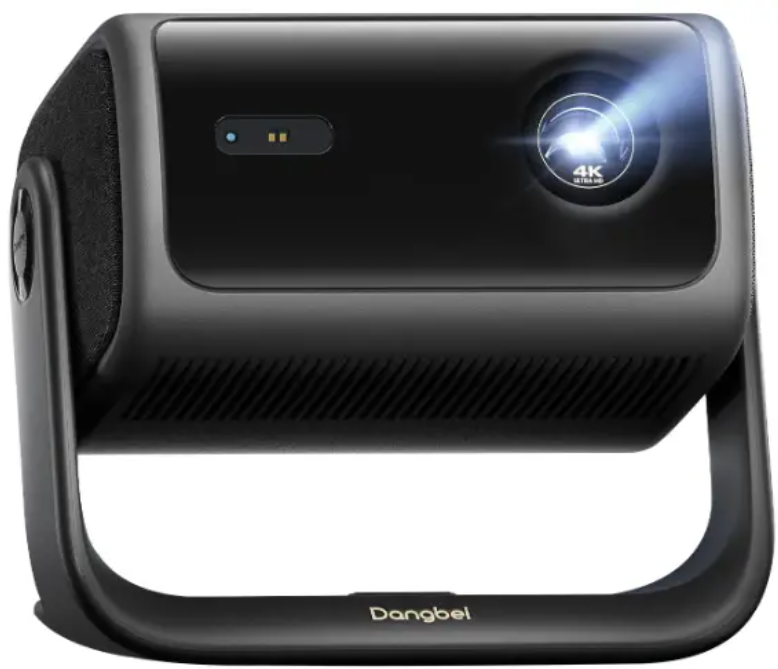
Introduction
The Dangbei MP1 Max Smart Projector represents a significant leap in home entertainment technology, merging cinematic-quality 4K visuals with intelligent smart features. Engineered with a hybrid tri-laser + LED light engine, it delivers stunning brightness of 3100 ISO lumens and vibrant color accuracy covering 110% of the BT.2020 spectrum. This advanced projector is powered by Google TV and comes with officially licensed Netflix, making streaming seamless and user-friendly.
Designed for home theater enthusiasts, gamers, and streaming aficionados, the MP1 Max offers a versatile projection size ranging from 40 to 300 inches, accommodating intimate movie nights or full-scale cinematic experiences. Its sleek, minimalist design and a unique 360° rotatable base with 135° tilt enable flexible placement in any room setup, from ceiling mounts to small apartments.
With features like ultra-low fan noise under 24 dB and Dolby audio with DTS: :X Support, the MP1 Max not only captivates with visuals but also immerses users in premium sound quality. Its competitive price of around $1,899 positions it as a premium yet accessible choice for those seeking a next-generation smart projector experience. Available through official Dangbei channels and select retailers, it is rapidly gaining acclaim for redefining home entertainment convenience and quality.
Specifications of the Dangbei MP1 Max Smart Projector
- Display Technology: DLP with 0.47” DMD chip
- Light Source: Hybrid Triple Laser + LED
- Brightness: 3100 ISO lumens
- Resolution: Native 4K UHD (3840 × 2160 pixels)
- Projection Size: 40" to 300" diagonal
- Throw Ratio: 1.2:1
- Aspect Ratios: 16:9 and 4:3 supported
- Color Gamut: 110% BT.2020 with ΔE < 1 for superb color accuracy
- HDR Support: HDR10+, HDR10, HLG
- Audio: Dual 12W speakers with Dolby Audio and DTS: :X
- Connectivity: Google TV integration, licensed Netflix, Bluetooth 5.2, dual HDMI inputs, USB port
- Smart Features: Auto Focus, Auto Keystone Correction, Screen Fit, Obstacle Avoidance, AI Brightness Adjustment
- Physical Dimensions: 296×246.7×230 mm; weight 5.6 kg
- Noise Level: Less than 24 dB in standard mode
- Power Consumption: 190W with 240W power adapter
Compared to similar projectors like the Dangbei Freedo (450 lumens, portable), the MP1 Max offers a significantly higher brightness and advanced features geared towards immersive home theater use, standing out in image quality and smart TV integration.
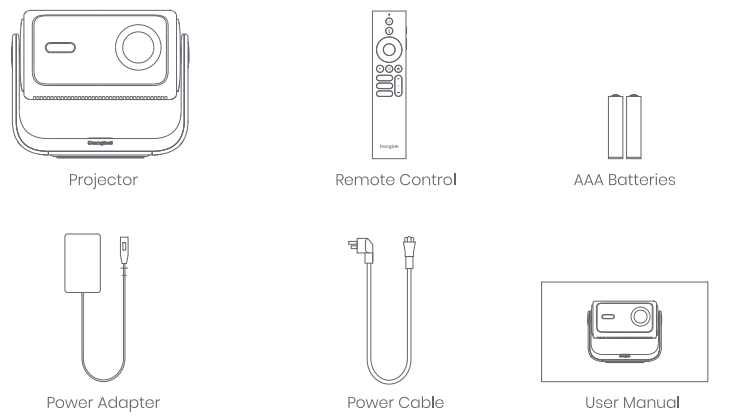
Packing List
Before using this product. Please check that all items are included in the box.
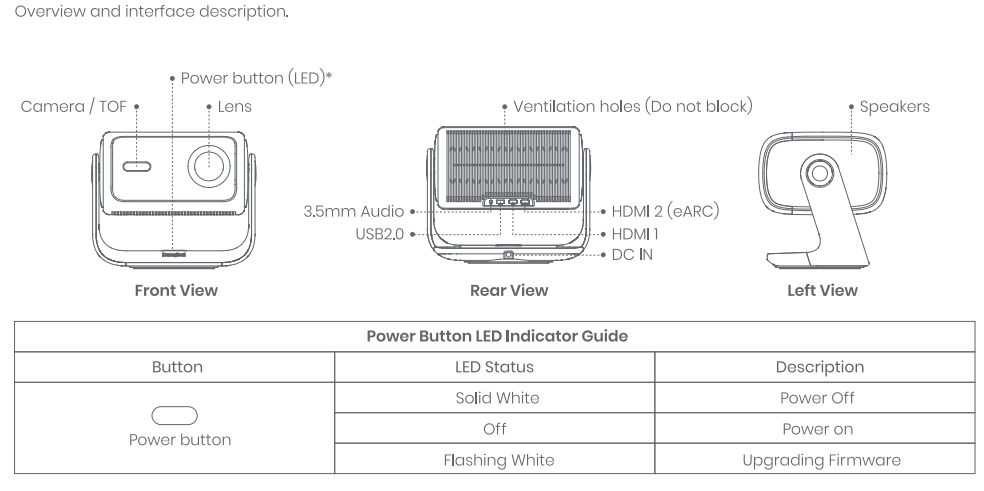
Projector Overview
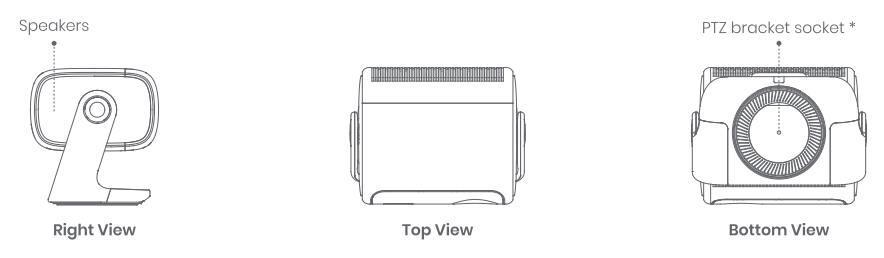
Number of screw holes:
- Screw hole specifications: l/4-inch imperial screw thread, depth 0.26 inches
- Please use with the dedicated ceiling mount bracket or floor stand. The brackets must be purchased separately.
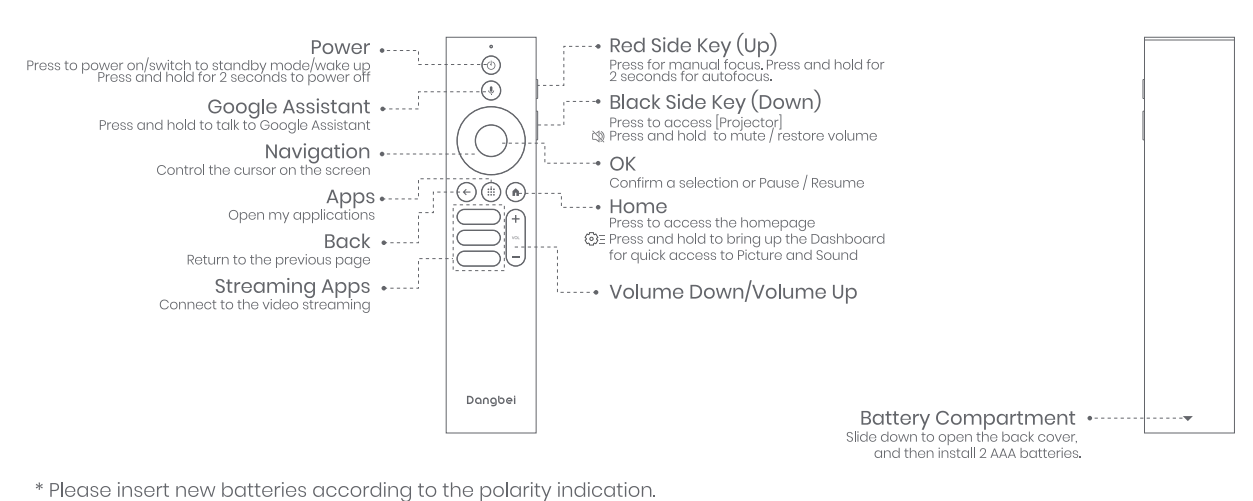
Remote Control Overview
- Open the battery compartment cover of the remote control.
- Install 2 AAA batteries .
- Put back the battery compartment cover.
Getting Started
Placement
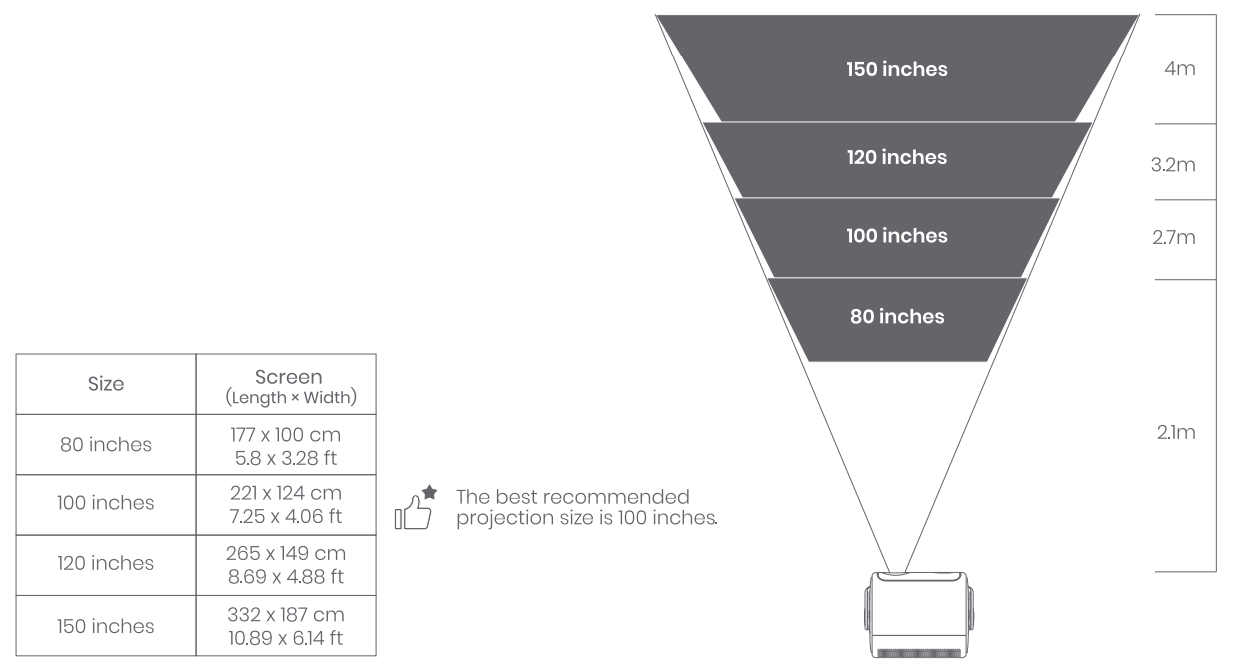
- Position the projector on a stable surface. Flat surface in front of the projection surface. A flat and white projection surface is recommended.
- Please follow the instructions below to determine the distance between the projector and the projection surface, and the corresponding projection size:
Power on
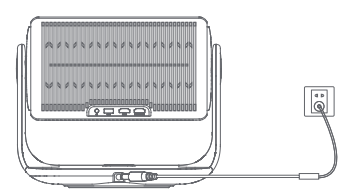
- Connect the projector to the power outlet
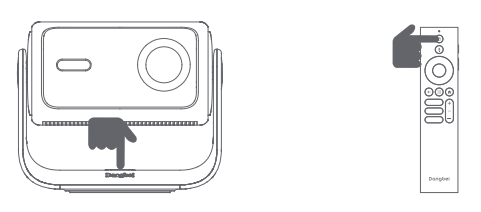
- Press the power button on the projector or remote control to turn on the projector.
Standby Mode/ Power off
- Press the power button on the projector or remote control to enter standby mode.
- Press and hold the power button on the projector or remote control for 2 seconds to turn off the projector.
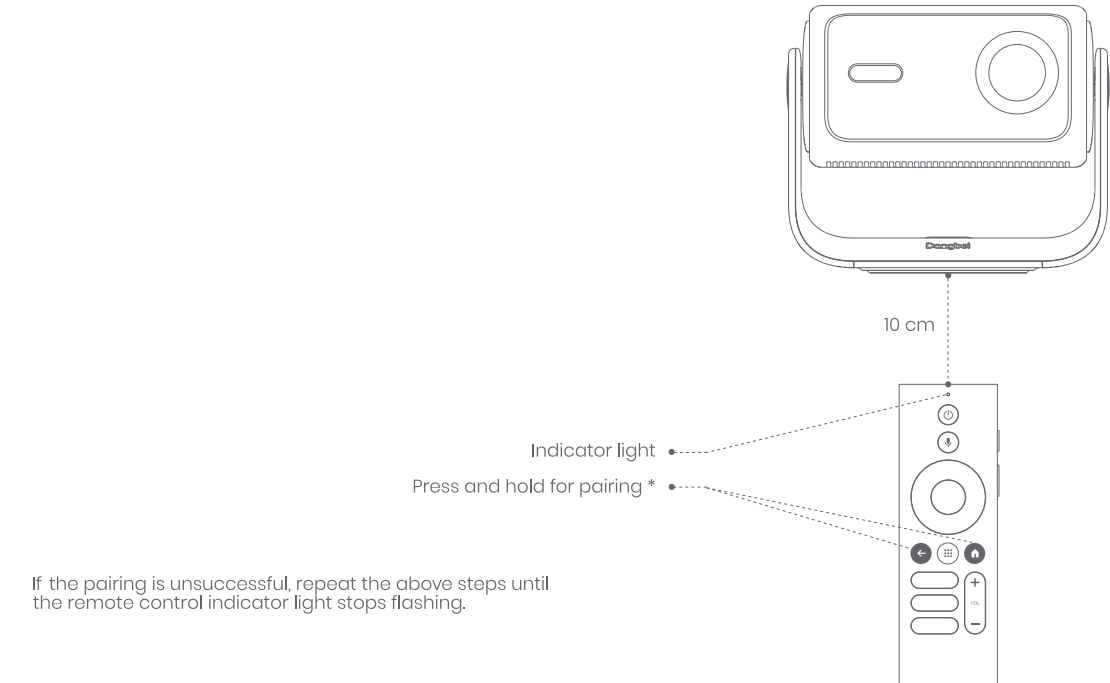
Remote Control Pairing
- Turn on the projector and wait for the Bluetooth pairing prompt on the screen.
- Bring the remote control within lO cm/ 0.33 ft of the projector.
- Simultaneously press and hold
 the keys.
 - Release the keys after the indicator light starts flashing.
- Wait until you hear two "beep· sounds. Indicating a successful pairing.
Troubleshooting the Dangbei MP1 Max Smart Projector
No audio output
- Check if you have pressed and held the black side key on the remote control, as this may mute the projector.
- Check if the projector interface "HDMI 2 (eARC)" or Bluetooth is connected to an external audio device.
No image output
- Press the power button located on the projector stand.
- The power button indicator light will turn off if the projector enters projection mode successfully.
- Ensure that the power adaptor has power output.
No network
- Enter settings, and check the network connection status in the network option.
- Ensure that the router is correctly configured.
Blurry Image
- Adjust the focus.
- The projector and screen/wall must be positioned at an effective distance.
- The projector lens is not clean.
Non-rectangular Image
- Place the projector perpendicular to the screen/wall if the keystone correction function is not used.
- Use the keystone correction function to adjust the display.
Automatic keystone correction failed.
- Ensure that the Camera/TOF on the front panel is not blocked or dirty.
- The best automatic keystone correction distance is 2.0-4.0m, horizontal $30°.
Autofocus failure
- Ensure that the Camera/TOF on the front panel is not blocked or dirty.
- The best autofocus distance is 2.0-4.0m, horizontal +20°.
Smart Eye Protection failed
- Ensure that the Camera/TOF on the front panel is not blocked or dirty
- The optimal sensing range is located around the center of the image. Being too close to the edges may result in the eye protection feature not triggering.
Intelligent Screen Fit failure
- Ensure that the projector is correctly positioned, so that the projected image extends beyond the edges of the screen.
- Ensure that the projection screen has a colored border/frame on all four sides, so that the projector can recognize the frame.
The Remote Control is unresponsive.
- Ensure that the remote control is successfully paired via Bluetooth. If the pairing is successful, the LED light will flash once when you press any button. When you press and hold any button, the LED light will remain solid.
- If the pairing is unsuccessful, the LED light will flash three times when you press any button. When you press and hold any button, the LED light will flash three times and then remain solid.d
- Check if the power indicator is still on without pressing any buttons. If it is, check the status of the remote control buttons to ensure they are not being pressed.
- Ensure that there are no interferences or obstructions between the projector anthe d remote control.
- Check the battery and installation polarity.
Connect the Bluetooth devices.
- Enter settings, open the Remotes & Accessories, to pair more Bluetooth devices.
Preventive measures include routine cleaning of air filters and firmware updates via Google TV settings. The MP1 Max comes with a 1-year warranty and responsive customer support accessible through official Dangbei websites and authorized resellers.
Pros & Cons of the Dangbei MP1 Max Smart Projector
- Pros:
- Exceptional 4K image quality with HDR10+ and wide color gamut (110% BT.2020)
- Strong brightness (3100 ISO lumens) suitable for various lighting conditions
- Google TV integration with licensed Netflix for seamless content access
- Flexible 360° rotation and 135° tilt for versatile placement
- Quiet operation under standard mode, suitable for bedrooms and study spaces
- Robust audio system with Dolby Audio and DT: S X enhances immersive viewing
- Cons:
- Price point (~$1,899) may be high for casual users or budget buyers
- Some menu responsiveness lag was reported shortly after startup
- Wireless 4K streaming could occasionally experience buffering due to network dependency
- Performance mode fan noise can be very loud, unsuitable for quiet environments
Overall, the Dangbei MP1 Max delivers excellent value for home theater enthusiasts seeking premium performance. Compared to alternatives, it excels in brightness, smart features, and build quality, but is less suited for portability or casual use, where lower-cost options may suffice.
Customer Reviews of the Dangbei MP1 Max Smart Projector
Users consistently praise the Dangbei MP1 Max Smart Projector for its crisp 4K image clarity and vibrant color reproduction, highlighting the projector’s ability to create a cinematic atmosphere at home. Many reviewers commend the smooth Google TV interface and the convenience of licensed streaming apps like Netflix.
Positive feedback often mentions the projector’s quiet operation in standard mode and the quality of built-in speakers, which deliver impressive audio without external devices. The flexible rotation and tilt system also receives high marks for easy room integration.
Common complaints include occasional lag in menu navigation and occasional buffering during wireless 4K streaming, which some users mitigate by using wired connections. A few users note the fan noise becomes quite loud in performance mode, preferring to keep it in standard settings for quiet viewing.
Overall, customers rate the MP1 Max around 4.5 out of 5 stars and recommend it for serious home theater setups and gamers looking for low-latency, high-quality projection. The projector’s blend of technology, usability, and design makes it a strong contender in the premium smart projector market.
Faqs
How do I set up the dangbei MP1 Max Smart Projector for the first time?
What should I do if the dangbei MP1 Max Smart Projector image is blurry or out of focus?
Can I connect external speakers to the dangbei MP1 Max Smart Projector?
Is the dangbei MP1 Max Smart Projector compatible with gaming consoles and streaming devices?
How do I troubleshoot Wi-Fi connectivity issues with the dangbei MP1 Max Smart Projector?
What are the best settings for watching movies on the dangbei MP1 Max Smart Projector?
How often should I clean and maintain the dangbei MP1 Max Smart Projector?
Can the dangbei MP1 Max Smart Projector be ceiling-mounted for a home theater setup?
More dangbei manuals
Leave a Comment