
Setup & Pairing: Dangbei N2 mini Smart Projector User Manual
Content
Dangbei N2 mini Smart Projector
Introduction
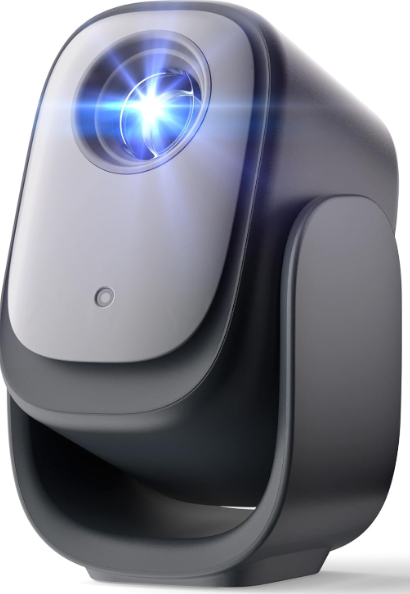
The Dangbei N2 mini Smart Projector is a compact, feature-rich home entertainment device designed to deliver a cinema-quality experience in any room. With native 1080p Full HD resolution, officially licensed Netflix support, and a suite of AI-powered setup tools, the N2 mini stands out as one of the most user-friendly and versatile portable projectors available today. Its ultra-portable design,, weighing just 3.74 pounds (1.72 kg),g) makes it ideal for small apartments, dorm rooms, travel, or even impromptu backyard movie nights.
Key benefits include automatic focus, keystone correction, screen alignment, and obstacle avoidance, ensuring a crisp, perfectly framed image every time, even when projecting onto uneven surfaces or walls. The built-in 6W speaker with Dolby Audio support delivers clear sound, while Wi-Fi, Bluetooth, HDMI, and USB connectivity options provide flexibility for streaming, gaming, or presentations. The projector runs a streamlined Smart Linux OS with access to nearly 300 apps, including Netflix, Prime Video, and YouTube, all accessible via dedicated buttons for instant streaming.
Target audiences include students, young professionals, families, and anyone seeking an affordable, portable big-screen solution. The Dangbei N2 mini Smart Projector is especially appealing for those with limited space or a need for easy setup and mobility. With an estimated price around $199, it offers exceptional value compared to larger, more expensive home theater projectors. Availability is widespread through online retailers and the official Dangbei website.
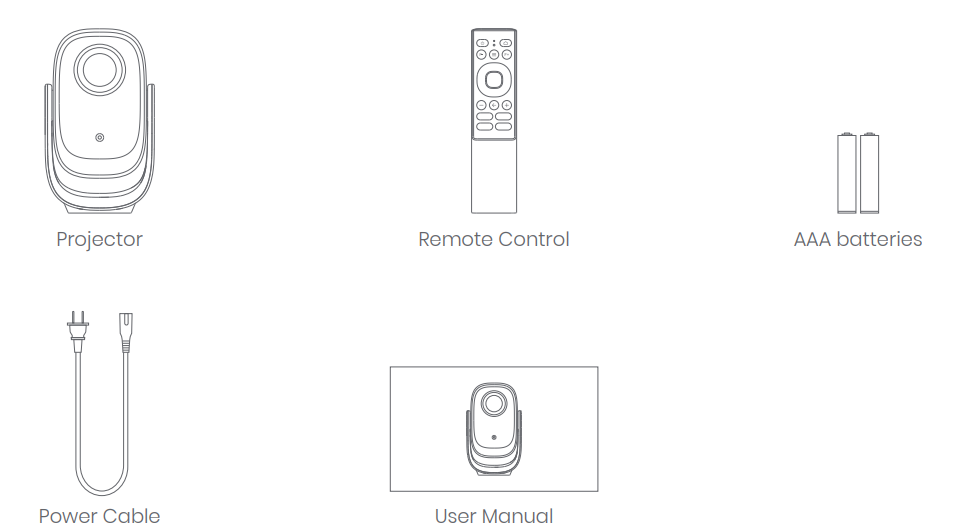
Packing List
Before using this product, please check that all items are included in the box.
Specifications
- Display: Native 1080p (1920 x 1080), 16:9 aspect ratio, TFT LCD panel
- Brightness: 200 ISO lumens
- Projection Size: 40–120 inches (recommended sweet spot: 100 inches)
- Throw Ratio: 1.25:1
- Optical Engine: EngineX Sealed Optical Engine
- Audio: Built-in 6W speaker, Dolby Audio support
- Connectivity: Wi-Fi, Bluetooth, HDMI, USB, 3.5mm audio jack
- Smart Features: Auto Focus, Auto Keystone Correction, Auto Screen Alignment, Obstacle Avoidance, 190° adjustable gimbal
- Operating System: Smart Linux OS with access to 300+ apps (Netflix, Prime Video, YouTube pre-installed)
- Portability: 5.51 x 5.51 x 9.45 inches, 3.74 lbs (1.72 kg)
- Power Consumption: 65W
The Dangbei N2 mini Smart Projector outperforms many budget projectors with its true 1080p resolution and advanced AI setup features. While it lacks the brightness of high-end models, its portability, ease of use, and smart app integration make it a strong choice for casual viewers and mobile users. Compared to similarly priced competitors, it offers better app support and more sophisticated image adjustment tools.
Important Precautions
- As with any bright source, do not stare into the direct beam, RG1 IEC 62471-5:2015
- Do not block or cover the heat dissipation holes of the device to avoid affecting the heat dissipation of internal parts and damaging the device.
- Keep away from humidity, exposure, high temperature, low pressure, and magnetic environments.
- Do not place the device in areas susceptible to excessive dust and dirt.
- Put the device on a flat and stable surface; do not put it in a place prone to vibration.
- Do not allow children to handle the device without supervision.
- No not place heavy or sharp objects on this device.
- Avoid extreme vibrations as they may damage the internal components.
- Please use the correct type of battery for the remote control.
- Only use attachments/accessories specified or provided by the manufacturer.
- Do not disassemble the device personally; repair the device only for staff authorized by the company.
- Place and use the device in an environment of 0°C-40°C.
- Do not use the earphones for a long time. Excessive sound from the earphones can damage your hearing.
- As with any bright source, do not stare into the direct beam.
- Protect the power cord from being walked on or pinched, particularly at plugs, convenience receptacles, and the point where they exit from this device.
- Unplug this device if there are lightning storms or when unused for a long period of time.
- Where the power plug or an appliance coupler is used as the disconnect device, the disconnect device shall remain readily operable.
- Before you make or change any connections, ensure that all devices are disconnected from the power outlet.
- Never touch the power cable with wet hands.
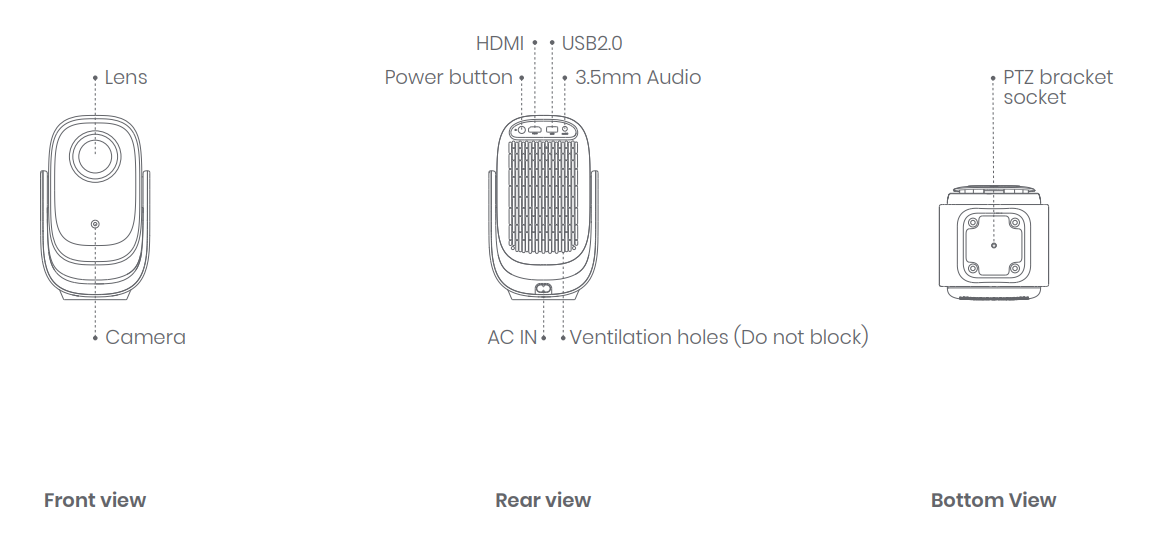
Projector Overview
Overview and interface description.
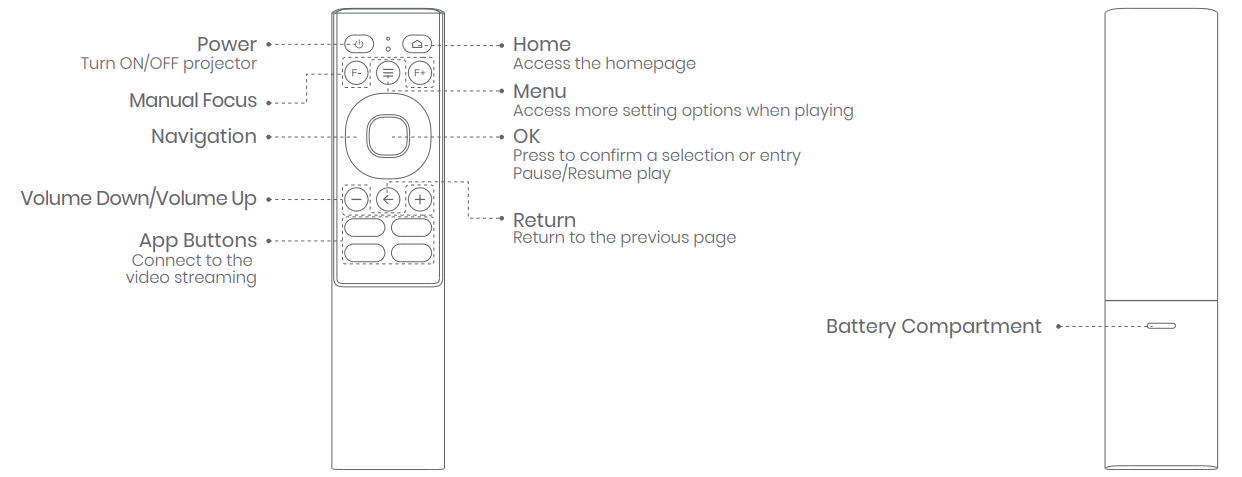
Remote Control Overview
- Open the battery compartment cover of the remote control.
- Install 2 AAA batteries.
- Put back the battery compartment cover.
Remote Control Pairing
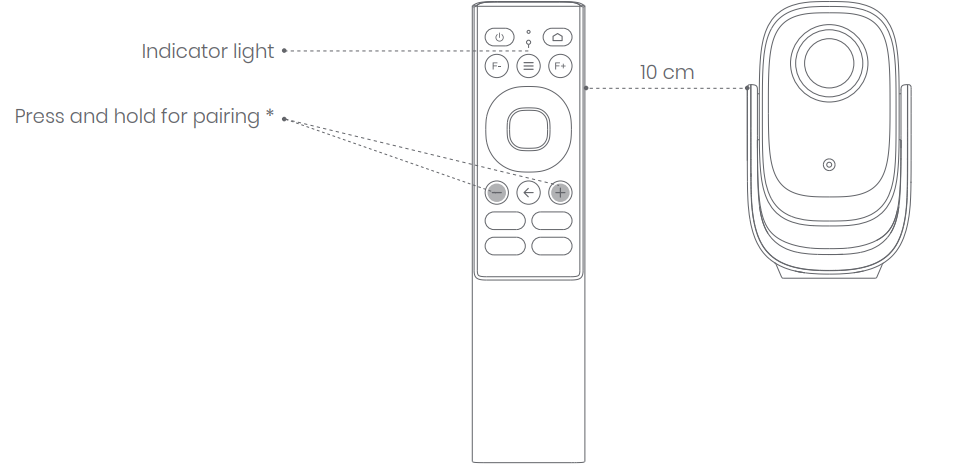
- Place the remote control within 10 cm of the projector.
- For first-time use, follow the on-screen projector instructions:
- Simultaneously press and hold the [Volume Down] and [Volume Up] buttons until the indicator light begins to flash.
(This means that the remote control is entering pairing mode.) - The connection is successful when the indicator light stops flashing.
- Simultaneously press and hold the [Volume Down] and [Volume Up] buttons until the indicator light begins to flash.
Network Settings
Go to [Settings] -- [Network].
Focus Settings
- Go to [Settings] -- [Focus].
- To use Manual focus, select [Manual focus], and use the up/down buttons on the navigation keys of the remote control to adjust the focus based on what is displayed.
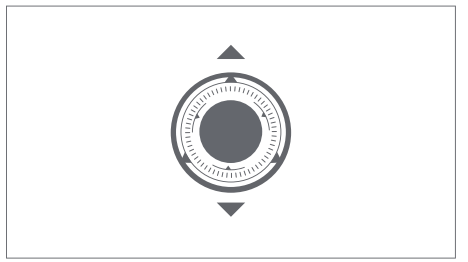
It supports quick focusing with the remote control. Press the [F-] or [F+] button on the remote control to a focus.
More Settings
- Picture Mode
Go to [Settings] -- [Picture Mode] to choose a picture mode from [Standard/Custom/Cinema/Sport/Vivid/Hi-Bright]. - Sound Mode
Go to [Settings] -- [Audio] -- [Sound Style] to choose a sound mode from [User/Standard/Vivid/Sport/Movie/Music/News]. - Projection Mode
Go to [Settings] -- [Projection] to choose the placement method of the projector. - Zoom
Go to [Settings] -- [Zoom] to decrease the image size from 100% to 50%. - Product Info
Go to [Settings] -- [About] to check the product information.
Troubleshooting
- No audio output
- Check if the volume is set to 0.
- Check if the projector interface "3.5mm Audio", "HDMI" , or Bluetooth is connected to an external audio device.
- No image output
- Press the power button on the back. The power button indicator light will turn off if the projector is powered on successfully.
- Ensure that the power cord is properly connected to the power outlet and the projector.
- No network
- Enter settings, and check the network connection status in the network option.
- Ensure that the router is correctly configured.
- Blurry Image
- Adjust the focus or keystone.
- The projector and screen/wall must be positioned at an effective distance.
- The projector lens is not clean.
- Non-rectangular Image
- Place the projector perpendicular to the screen/wall if the keystone correction function is not used.
- Use the keystone correction function to adjust the display
- Automatic keystone correction failed
- Ensure that the Camera on the front panel is not blocked or dirty.
- The best automatic keystone correction distance is 1.3-3.0 m, horizontal ±20°.
- Autofocus failure
- Ensure that the Camera on the front panel is not blocked or dirty.
- The best autofocus distance is 1.3-3.0 m, horizontal ±20°.
- The Remote Control is unresponsive.
- Ensure that the remote control is successfully paired via Bluetooth connection. If the pairing is successful, the indicator light will flash once when a button is pressed.
- If the pairing is unsuccessful, and the Remote Control is in IR communication, the indicator light will flash twice when a button is pressed.
- The projector's IR receiver is located at the back. Ensure that there are no interferences or obstructions between the projector and the remote control.
- Check the battery and installation polarity.
- Connect the Bluetooth devices
- Enter settings, open the Bluetooth option to check the Bluetooth device list, and connect the device.
- Others
- Please feel free to contact us at support@dangbei.com
Error Codes
Refer to the user manual for specific error codes. Most issues can be resolved by restarting the device or performing a factory reset.
Preventive Measures
- Keep the projector in a cool, dry place.
- Regularly clean the lens and vents.
- Use a surge protector to avoid power fluctuations.
Warranty and Support
The Dangbei N2 mini Smart Projector comes with a standard manufacturer’s warranty. For details, refer to the warranty card or the official Dangbei website. Extended protection plans may be available for purchase. For technical support, visit the Dangbei website for FAQs, contact forms, or email support as listed in your product documentation.
Pros & Cons
Advantages
- True 1080p Full HD Resolution: Delivers sharp, detailed images suitable for movies, gaming, and presentations.
- Official Netflix Support: Stream directly without external devices,, a rarity in budget projectors.
- AI-Powered Setup: Auto focus, keystone correction, and obstacle avoidance make setup effortless.
- Portable Design: Lightweight and compact, ideal for travel and small spaces.
- Smart App Integration: Access to 300+ apps, including major streaming platforms.
- Value for Money: Priced competitively at around $199, offering features usually found in more expensive models.
Limitations
- Moderate Brightness: At 200 lumens, best performance is in dim or dark rooms.
- No Voice Assistant Support: Not compatible with Amazon Alexa or Google Assistant.
- Basic Built-in Audio: The 6W speaker is adequate for casual use, but discerning users may want to connect external speakers.
- Limited Gaming Features: Lacks ultra-low latency modes found in premium projectors.
Compared to alternatives, the Dangbei N2 mini Smart Projector excels in smart features and portability but may not satisfy users seeking ultra-bright images or advanced smart home integration.
Customer Reviews
User feedback for the Dangbei N2 mini Smart Projector is overwhelmingly positive, especially regarding its ease of setup, vibrant colors, and portability. Many customers highlight the convenience of built-in Netflix and other streaming apps, as well as the projector’s ability to deliver a large, clear image even in small spaces. The AI-powered auto-focus and keystone correction are frequently praised for making the device accessible to non-technical users.
Common complaints include the need for a dark environment to achieve the best picture quality and the lack of voice assistant compatibility. Some users recommend pairing the projector with a soundbar for a more immersive audio experience. Star ratings typically range from 4 to 4.5 out of 5, with users emphasizing the projector’s value for money and reliability for casual viewing.
Purchase recommendations: The Dangbei N2 mini Smart Projector is ideal for students, renters, travelers, and anyone seeking an affordable, portable big-screen solution with smart features. It is especially recommended for those who prioritize streaming convenience and easy setup over maximum brightness or smart home integration.
Faqs
How do I set up the dangbei N2 mini Smart Projector for the first time?
What should I do if the dangbei N2 mini Smart Projector image is blurry or out of focus?
Can the dangbei N2 mini Smart Projector stream Netflix directly without external devices?
Is the dangbei N2 mini Smart Projector compatible with Bluetooth speakers or headphones?
How can I optimize the dangbei N2 mini Smart Projector’s image size and alignment for different rooms?
What are the power requirements and portability features of the dangbei N2 mini Smart Projector?
How do I maintain and clean the dangbei N2 mini Smart Projector to ensure longevity?
Why does the dangbei N2 mini Smart Projector not support Amazon Alexa or Google Assistant?
More dangbei manuals
Leave a Comment