
Dell Latitude E5470 Laptop User Manual
Content
Introduction to the Dell Latitude E5470 Laptop
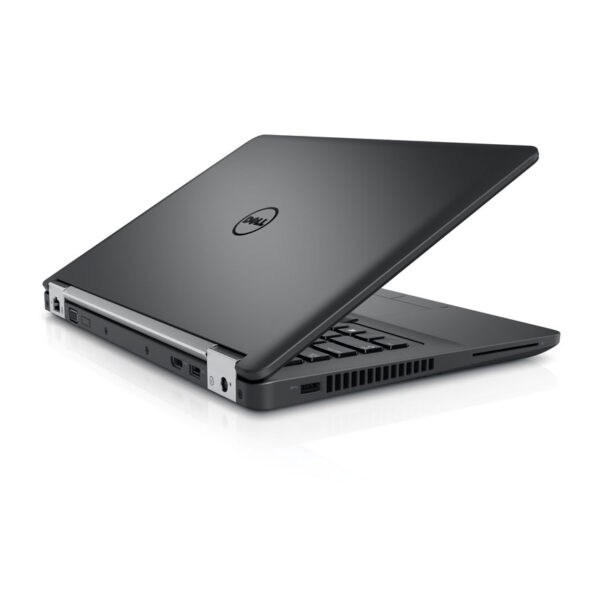
The Dell Latitude E5470 Laptop is a business-focused 14-inch notebook built for professionals who need dependable everyday performance, solid security features, and a practical design for office, remote, and on-the-go use. Positioned in Dell’s Latitude lineup, it is known for balancing portability with durability, making it a strong choice for students, IT teams, small businesses, and enterprise users who want a reliable work machine rather than a flashy consumer laptop.
Key selling points include a sturdy chassis, comfortable keyboard, generous port selection, and configurable hardware options such as Intel Core i5 or i7 processors, SSD storage, and up to 16GB of RAM. Many configurations also support Full HD displays, which improve readability for spreadsheets, documents, video calls, and multitasking. The Dell Latitude E5470 Laptop is especially well suited for office productivity, web browsing, accounting software, light content creation, and remote work setups.
As of 2026, this model is typically available as refurbished or renewed stock rather than as a new retail product. Estimated prices generally range from about $120 to $300, depending on processor, RAM, SSD size, and display resolution. Buyers looking for a low-cost business laptop with proven reliability often consider it a value-oriented option, particularly when compared with newer budget laptops that may offer less durability or fewer ports.
Specifications: Dell Latitude E5470 Laptop Technical Details
- Display: 14-inch panel, commonly available in 1366 x 768 or 1920 x 1080 resolution.
- Processor: 6th Gen Intel Core i5-6200U, i5-6300U, and higher-end i7 options in some configurations.
- Memory: DDR4 RAM, typically 8GB, with support up to 16GB in many models.
- Storage: 128GB to 256GB SSD is common, with some units offering larger configurations.
- Graphics: Integrated Intel HD Graphics 520 or 530, with select variants including AMD Radeon R7 M360.
- Connectivity: Wi-Fi 802.11ac, Bluetooth 4.1, Ethernet, HDMI, VGA, and multiple USB 3.0 ports.
- Build: Business-class chassis designed for daily travel and office use.
- Weight: Around 3.9 to 4.0 pounds, depending on configuration.
- Operating system: Commonly sold with Windows 10 Pro in refurbished market listings.
- Performance: Suitable for productivity workloads, browser-based tools, video conferencing, and multitasking.
Compared with similarly priced older business laptops, the Dell Latitude E5470 Laptop offers a stronger balance of build quality, upgradeability, and enterprise features than many consumer models. It competes closely with HP EliteBook and Lenovo ThinkPad systems from the same generation.
Detailed Description of the Dell Latitude E5470 Laptop
The Dell Latitude E5470 Laptop is designed around practical business computing. Its internal layout emphasizes easy maintenance, which helps IT departments and individual owners upgrade memory, replace storage, or service components without unnecessary complexity. The laptop typically uses a 14-inch form factor that is compact enough for travel while still providing a comfortable workspace for documents, dashboards, and web applications.
In real-world use, the E5470 works well for office productivity, remote learning, customer support, point-of-sale tasks, and everyday professional workloads. The Full HD display versions are especially useful for multitasking and long work sessions. The matte finish on many configurations helps reduce glare, while the sturdy body materials give the machine a dependable feel for regular commuting.
User experience is generally positive for typing comfort, port variety, and dependable thermal behavior during normal workloads. The laptop is not intended for heavy gaming or advanced video editing, but it remains capable for mainstream business tasks and light creative work. For users who want a durable workhorse rather than a thin consumer ultrabook, this model remains a practical choice.
Setup Guide for the Dell Latitude E5470 Laptop
- Unbox the laptop, charger, and any included accessories, then inspect the device for shipping damage.
- Connect the AC adapter and fully charge the battery before first use.
- Press the power button and follow the Windows setup prompts to choose language, region, keyboard layout, and network settings.
- Sign in with a Microsoft account or create a local account depending on your preference and organization policy.
- Install Dell support utilities, Windows updates, and the latest device drivers for chipset, graphics, wireless, and audio.
- Configure Wi-Fi, Bluetooth, external monitors, printer connections, and security options such as Windows Hello or password protection if supported.
- Run battery health checks and verify that storage, keyboard, touchpad, webcam, and audio are working correctly.
For safety, avoid using damaged cables, keep vents unobstructed, and place the laptop on a hard surface during charging. If the system fails to start, perform a power reset by disconnecting the charger and holding the power button for several seconds before trying again. If you are setting up a refurbished unit, check BIOS settings and confirm that storage is properly recognized.
Troubleshooting Common Dell Latitude E5470 Laptop Problems
- No power: Check the adapter, wall outlet, battery connection, and perform a hard reset.
- Black screen on startup: Test with an external monitor, reseat memory if possible, and reset BIOS settings.
- Slow performance: Upgrade to an SSD, increase RAM, remove startup apps, and run disk cleanup.
- Wi-Fi issues: Reinstall wireless drivers, toggle airplane mode, and confirm router compatibility.
- Overheating: Clean vents, use the laptop on a flat surface, and replace old thermal paste if needed.
- Battery drains quickly: Check battery health, reduce brightness, and replace a worn battery.
- Error codes: BIOS or POST beeps often indicate memory, storage, or power problems and usually require component checks.
Preventive care includes regular driver updates, careful battery charging habits, and periodic dust removal. If problems continue, warranty support or refurbished-seller coverage may still be available depending on the seller. For help, contact Dell Support through the official support website, phone support, or the service tag lookup tool.
Pros and Cons of the Dell Latitude E5470 Laptop
Pros
- Strong business-grade durability for daily professional use.
- Good keyboard and practical port selection for office workflows.
- Upgrade-friendly design with accessible RAM and storage in many units.
- Affordable in the refurbished market, offering strong value for money.
- Reliable performance for productivity apps, email, browsing, and video calls.
Cons
- Older 6th Gen Intel hardware is not ideal for demanding modern workloads.
- Battery life can vary widely on used or refurbished units.
- Base display options may look dated compared with newer IPS panels.
- Heavier than modern ultraportables.
- Not suitable for gaming or intensive creative production.
Compared with newer budget laptops, the Dell Latitude E5470 Laptop often offers better build quality and expansion options, but it sacrifices the latest processor efficiency and battery performance.
Customer Reviews of the Dell Latitude E5470 Laptop
Average user sentiment is generally positive, with many buyers rating it around 4 out of 5 stars for work reliability and value. Customers frequently praise the solid construction, comfortable typing experience, and excellent price-to-performance ratio in refurbished listings. One typical comment is: “A dependable business laptop that handles everyday tasks without drama.”
Common complaints include shorter battery life on older units, scratched cosmetic condition in renewed stock, and lower-resolution screens on some configurations. Another frequent note is: “Great for office work, but upgrade the SSD and RAM if you want smoother performance.”
For buyers who need a low-cost business notebook, this model is often recommended, especially when purchased from a seller that offers return coverage and a tested battery. It is best suited to users who prioritize reliability, ports, and easy maintenance over premium design or cutting-edge speed.
Faqs
How do I set up a Dell Latitude E5470 Laptop for the first time?
Why is my Dell Latitude E5470 Laptop running slowly, and how can I speed it up?
What should I do if the Dell Latitude E5470 Laptop will not turn on?
Which accessories are compatible with the Dell Latitude E5470 Laptop?
How can I improve battery life on a Dell Latitude E5470 Laptop?
What are the main features of the Dell Latitude E5470 Laptop for business users?
How do I fix Wi‑Fi or network problems on the Dell Latitude E5470 Laptop?
What maintenance should I do to keep a Dell Latitude E5470 Laptop in good condition?
More dell manuals
Leave a Comment