
Dell WB5023 Pro Webcam User Manual
Content
Dell WB5023 Pro Webcam Review and Product Manual
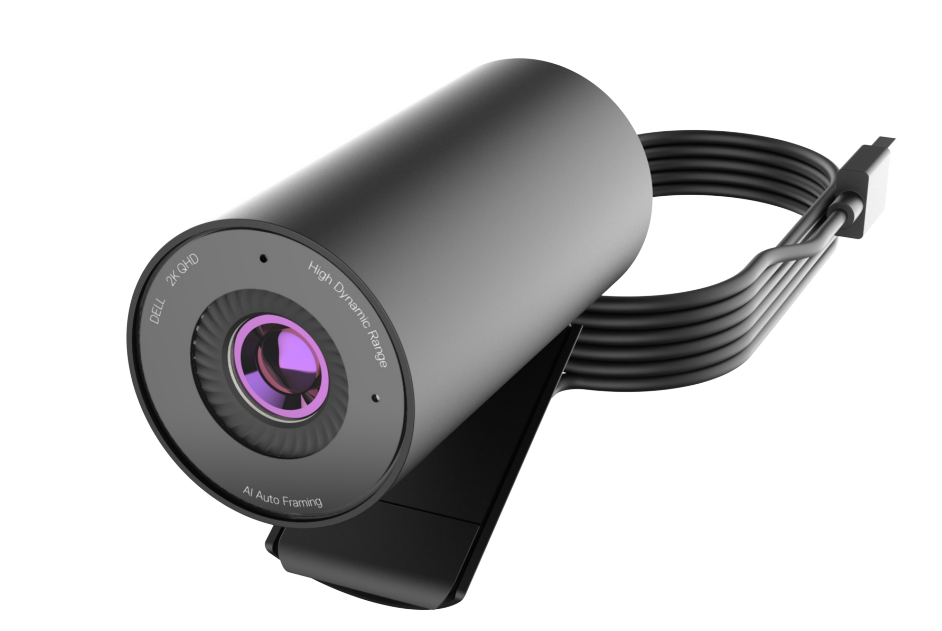
The Dell WB5023 Pro Webcam is a premium 2K QHD webcam built for professionals who need sharp video, reliable autofocus, and a clean desktop setup. With a maximum resolution of 2560 x 1440, support for 1080p at up to 60 fps, HDR, and a 78-degree field of view, this model is designed for video calls, online classes, livestreaming, and hybrid work. It also includes a built-in noise-reduction microphone, 4x digital zoom, and AI-powered framing features in supported software, making it a strong choice for users who want better image quality than standard 1080p webcams.
The Dell WB5023 Pro Webcam is especially appealing to remote workers, content creators, business teams, and educators who need dependable video quality across Zoom, Microsoft Teams, and other conferencing platforms. Its compact cylindrical design, integrated monitor clip, and tripod mount make it easy to position on a laptop, desktop display, or external stand. Dell also emphasizes easy plug-and-play setup through USB-A, which helps simplify installation for most modern systems.
In terms of pricing, the Dell WB5023 Pro Webcam typically falls in the mid-range premium category, with estimated street prices around $70 to $130 depending on region and retailer. It is widely available through major electronics stores, office suppliers, and Dell’s own channel, though stock levels may vary by market. For buyers comparing it with mainstream 1080p webcams, the added resolution, better sensor performance, and stronger video tuning make it a compelling upgrade.
Detailed Specifications: Dell WB5023 Pro Webcam Features and Performance
- Maximum resolution: 2K QHD 2560 x 1440 at 30 fps
- Full HD modes: 1920 x 1080 at up to 60 fps
- HD modes: 1280 x 720 at up to 60 fps
- Sensor: Sony STARVIS image sensor for improved low-light performance
- Field of view: 65 degrees or 78 degrees depending on mode and configuration
- Zoom: Up to 4x digital zoom
- Focus: Autofocus
- Image enhancement: HDR and auto white balance
- Microphone: Built-in microphone with noise reduction
- Connection: USB-A, USB 2.0 and above
- Mounting: Integrated monitor clip and tripod mount
- Dimensions: 44 mm x 92 mm
- Weight: 155 g
- Cable length: 1.5 m
- Compatibility: Windows 10, Windows 11, and macOS support in common use cases
Performance-wise, the Dell WB5023 Pro Webcam stands above basic 720p and 1080p webcams by delivering sharper detail and more flexible framing. Compared with similar office webcams, it competes strongly with premium 2K models from Logitech and other productivity brands, especially for users who value a balanced combination of video clarity, zoom, and ease of setup.
Pros and Cons of the Dell WB5023 Pro Webcam
Pros
- Sharp 2K QHD video: The higher resolution makes faces, text, and small details look noticeably clearer than standard Full HD webcams.
- Strong low-light handling: The Sony STARVIS sensor and HDR help improve image quality in dim home offices or conference rooms.
- Flexible framing: The 78-degree field of view and 4x digital zoom make it easier to adapt to solo calls or small group meetings.
- Professional design: The compact body and monitor clip fit neatly on laptops and external displays.
- Good value for business users: For buyers upgrading from a basic webcam, the feature set justifies the price more than many entry-level alternatives.
Cons
- USB-A only: Some modern laptops with USB-C ports may require an adapter.
- Not a true creator camera: While excellent for meetings, it is not built to replace dedicated cameras for advanced streaming production.
- Digital zoom limitations: 4x zoom is useful, but image quality drops as zoom increases.
- Mid-range pricing: It costs more than many budget webcams, so value depends on how much the buyer uses video calls.
Overall, the Dell WB5023 Pro Webcam offers strong value for professionals who want better-than-average video quality without moving into expensive creator-grade hardware. Against alternatives like standard 1080p webcams, it delivers a clearer image and more polished appearance. Against some competing premium models, it is competitive but may feel less versatile for users who need advanced software controls.
Customer Reviews and User Feedback for Dell WB5023 Pro Webcam
User feedback for the Dell WB5023 Pro Webcam is generally positive, with many buyers giving it around 4 out of 5 stars for image clarity, plug-and-play convenience, and solid build quality. A common praise is that the webcam produces crisp video right out of the box, especially in well-lit rooms. One typical customer-style comment is: “The picture is much sharper than my old 1080p webcam, and setup took less than five minutes.”
Frequent complaints usually focus on the price, the lack of USB-C, and the fact that digital zoom is useful only to a point. Some users also note that the microphone is acceptable for meetings but not exceptional for recording podcasts or professional voice work. Despite those issues, most reviews recommend the Dell WB5023 Pro Webcam for remote workers, office users, and anyone upgrading from a basic laptop camera.
If the goal is dependable video for work calls, online teaching, or everyday conferencing, this model is an easy recommendation. Buyers who want the best webcam for business meetings with 2K resolution and a professional look will likely find it a worthwhile purchase.
Faqs
How do I set up the dell WB5023 Pro Webcam for the first time on Windows or macOS?
Why is my dell WB5023 Pro Webcam not showing up in Zoom, Teams, or Google Meet?
What video quality settings should I use on the dell WB5023 Pro Webcam for meetings and streaming?
Does the dell WB5023 Pro Webcam work with laptops, desktops, and docking stations?
How can I fix blurry or low-light video on the dell WB5023 Pro Webcam?
What should I do if the dell WB5023 Pro Webcam audio and video are out of sync?
How do I get the best microphone performance from the dell WB5023 Pro Webcam?
How should I clean and maintain the dell WB5023 Pro Webcam to keep it working properly?
Tags
More dell manuals
Leave a Comment