
Setup: Eksa AirComfy Gaming Headset User Manual
Content
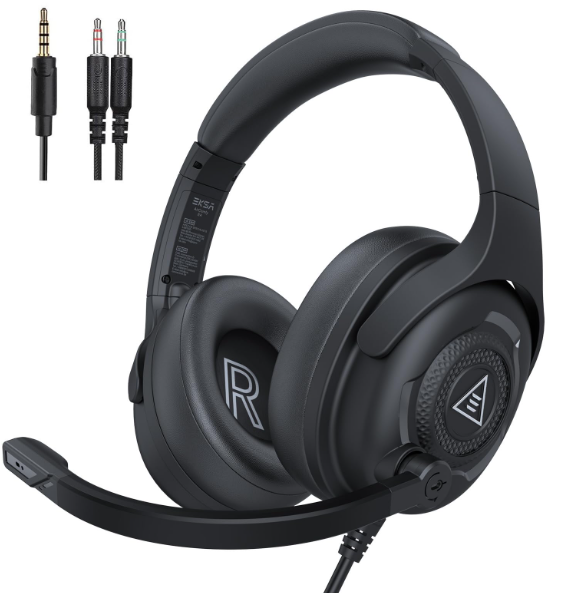
Eksa AirComfy Gaming Headset
Introduction
The Eksa AirComfy Gaming Headset is a premium choice designed specifically for gamers seeking comfort, immersive sound, and seamless communication during long gaming sessions. Engineered with advanced audio drivers and ergonomic features, this headset provides crystal-clear 3D surround sound and ultra-soft memory foam ear cushions that ensure all-day comfort. Its noise-isolating microphone and adjustable headband cater to competitive gamers and streamers who require precise voice communication and customization.
Ideal for PC, PS5, Xbox Series X, Nintendo Switch, and mobile devices, the eksa AirComfy Gaming Headset supports multiple platforms with plug-and-play connectivity. Key benefits include immersive 7.1 virtual surround sound, a flexible noise-canceling boom mic, and a lightweight design that minimizes fatigue. The headset also features RGB lighting to enhance your gaming setup's aesthetics.
With an estimated price range between $60 and $80, the Eksa AirComfy headset offers excellent value for both casual and professional gamers. It is widely available through online retailers and gaming stores, making it accessible for users wanting to upgrade their audio experience while maintaining affordability and quality.
Specifications of Eksa AirComfy Gaming Headset
- Connection Type: 3.5 mm Audio Cable (2 m / 6.56 ft)
- Driver Diameter: 50 mm
- Impedance: 32 Ω ± 15%
- Sensitivity: 103 ± 3 dB
- Frequency Response: 20 Hz – 20 kHz
- Weight: ≈263 g

- Size: 6.0 mm * 2.7 mm
- Sensitivity: -48 ± 4 dB
- Impedance: 2.2 KΩ
- Polar Pattern: Unidirectional
Compared to similar models like the HyperX Cloud Alpha and Corsair HS60, the eksa AirComfy stands out by offering a comparable surround sound experience at a lower price point, combined with superior comfort due to its memory foam cushioning and lightweight design.
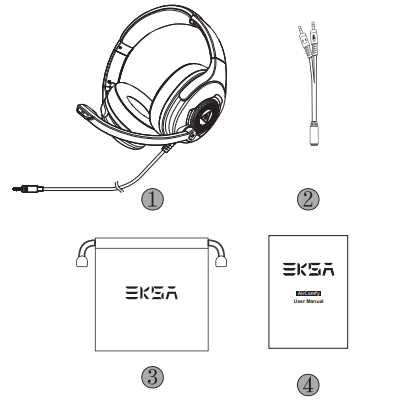
Package Contents
- EKSA AirComfy Gaming Headset
- Y Splitter Extension Cable
- Carry Pouch
- User Manual
Product Overview
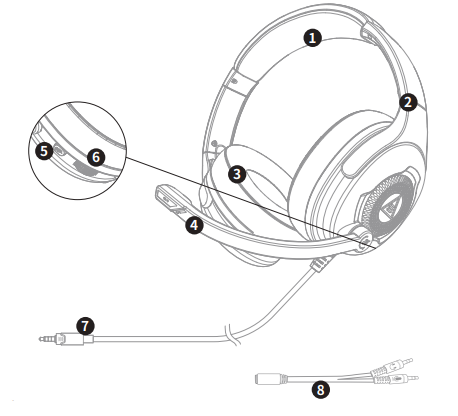
- Leather Head Beam
- Adjustable Headband
- Soft Memory Earmuffs
- Adjustable Microphone
- Mic Mute Button
- Volume Control Wheel
- 3.5 mm Audio Cable
- Y Splitter for Separate Mic and Headphone Ports
How to Use
PlayStation® 4:
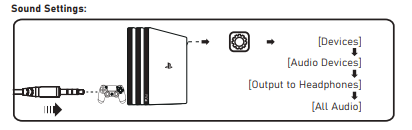
To get the best when using a PS®4, please directly connect your PS®4 controller with the 3.5 mm audio cable, and follow the steps below.
Sound Settings:
Xbox One® S/X:
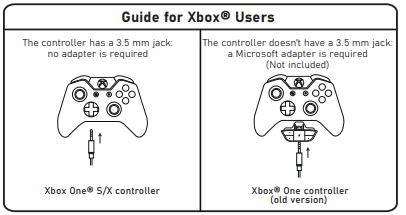
To work on the NEW version of the Xbox One® S/X controller, you can directly connect your headset to the controller via the 3.5 mm audio cable.
Note:
- The headset is not compatible with Xbox® 360.
- Old version Xbox® One needs a Microsoft adapter (Not included).
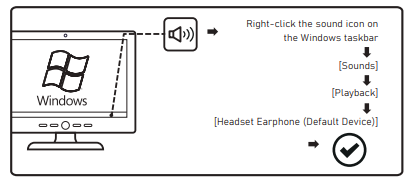
PC:
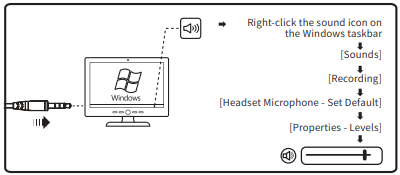
Microphone Settings:
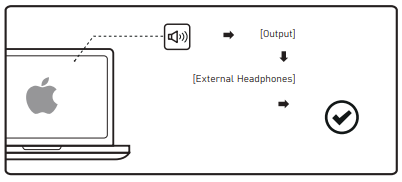
Mac:
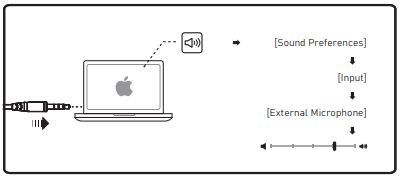
Microphone Settings:
Setup Guide for Eksa AirComfy Gaming Headset
Setting up the Eksa AirComfy Gaming Headset is straightforward and user-friendly:
- Connect the headset to your device using the included USB cable for PC or the 3.5mm jack for consoles and mobile devices.
- For PC users, the headset is plug-and-play; however, download the Eksa Audio software from the official website to enable 7.1 surround sound and customize audio settings.
- Adjust the padded headband and ear cushions for a snug, comfortable fit.
- Use the in-line volume wheel and microphone mute switch to control audio and voice input during gameplay.
- RGB lighting can be customized via the Eksa software or toggled using the headset button.
Troubleshooting tips: If the headset is not recognized, try reconnecting the USB cable or using a different port. Ensure drivers are up to date. For microphone issues, check mute status and positioning. Avoid exposure to moisture and extreme temperatures to maintain product longevity.
Safety warnings: Always start at low volume levels to protect hearing. Disconnect the headset during storms or when not in use for extended periods.
Troubleshooting Common Issues with the Eksa AirComfy Gaming Headset
- No audio output: Verify the headset is correctly connected; check device sound settings and volume levels.
- Microphone not working: Ensure the mic is not muted in hardware or software; check audio input settings.
- Distorted sound: Lower volume to avoid clipping; update audio drivers and software.
- Headset not detected: Reconnect cables, try different USB ports, or restart your device.
Preventive measures: Regularly clean ear cushions and the microphone, avoid dropping or bending cables, and store them in a dry place.
Eksa provides a 12-month warranty covering manufacturing defects. For support, users can contact Eksa customer service via their official website or authorized retailers.
Pros & Cons of eksa AirComfy Gaming Headset
Pros
- Exceptional comfort with memory foam ear cushions and an adjustable headband
- Immersive 7.1 virtual surround sound enhances the gaming experience
- Clear, noise-canceling microphone suitable for communication and streaming
- Wide compatibility across PC, consoles, and mobile devices
- Affordable price compared to competing gaming headsets with similar features
- Customizable RGB lighting adds visual appeal
Cons
- Wired connection may limit mobility compared to wireless alternatives
- Microphone boom could be more flexible for precise positioning
- Software customization is basic compared to high-end competitors
Overall, the Eksa AirComfy Gaming Headset offers strong value for money and stands out for comfort and sound quality, making it a great alternative to pricier options like the SteelSeries Arctis 3 or Razer Kraken X.
Customer Reviews of eksa AirComfy Gaming Headset
Users frequently praise the eksa AirComfy Gaming Headset for its comfortable fit during long gaming sessions and high-quality surround sound that enhances in-game awareness. Many highlight the clear microphone performance for team communication and streaming.
Typical star ratings average around 4.5 out of 5, with positive comments on durability and value for money. Some buyers mention minor issues such as the wired connection restricting movement or occasional software glitches, but these are generally resolved via updates or support.
Overall, customers recommend the Eksa AirComfy headset for gamers and content creators looking for a budget-friendly yet feature-rich audio solution that delivers immersive gaming sound and comfort.
Faqs
How do I set up the eksa AirComfy Gaming Headset for the first time?
What can I do if the microphone on my eksa AirComfy Gaming Headset is not working on my PC?
Is the eksa AirComfy Gaming Headset compatible with gaming consoles and mobile devices?
What are the key audio features of the eksa AirComfy Gaming Headset that enhance gaming performance?
How can I optimize the comfort of the eksa AirComfy Gaming Headset during long gaming sessions?
What maintenance steps should I follow to keep my eksa AirComfy Gaming Headset in good condition?
How do the audio controls on the eksa AirComfy Gaming Headset work?
Why is the lightweight design of the eksa AirComfy Gaming Headset important for gamers?
More eksa manuals
- Usage & Setup: Eksa E900DL Gaming Headset User Manual
- Setup: Eksa E900 Pro 2-IN-1 Gaming Headset User Manual
- Setup: Eksa Star Engine S Gaming Headset User Manual
- Setup & Usage: Eksa E1000 WT Wireless Gaming Headset User Manual
- Usage: Eksa StarEngine BT Headset User Manual
- Setup: Eksa E1000 Gaming Headset User Manual
Leave a Comment