
Setup: Eksa Star Engine S Gaming Headset User Manual
Content
Eksa Star Engine S Gaming Headset
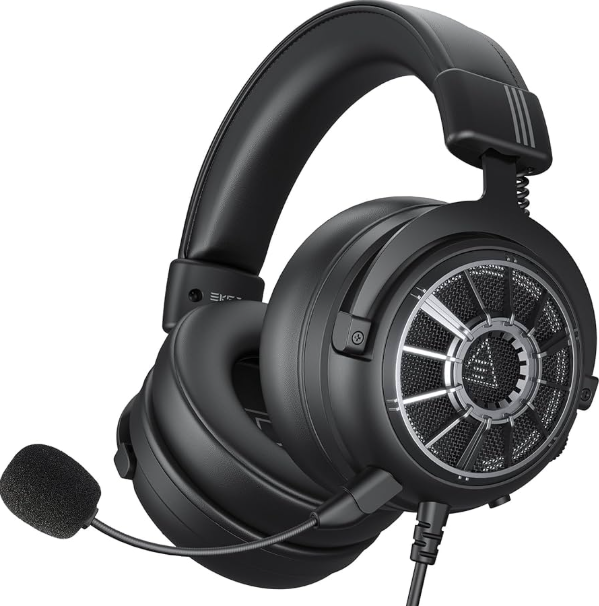
Introduction
The Eksa Star Engine S Gaming Headset is a high-performance audio accessory designed specifically for gamers seeking immersive sound and crystal-clear communication. Engineered with 50mm neodymium drivers and 7.1 virtual surround sound technology, this headset delivers accurate spatial audio, allowing players to pinpoint in-game movements and enhance the overall gameplay experience. Its noise-isolating microphone ensures clear voice transmission, reducing background noise for seamless team coordination.
Key benefits include ergonomic comfort with memory foam ear cushions, a durable adjustable headband, and versatile connectivity options supporting PC, PlayStation, Xbox, and Nintendo Switch. The headset's RGB lighting adds a stylish touch that complements any gaming setup. With an estimated price range of $50 to $70, the Eksa Star Engine S offers excellent value for both casual and competitive gamers alike and is widely available through online retailers and major electronics stores.
This headset is ideal for players who want immersive audio fidelity, comfortable long-term wear, and multi-platform compatibility, making it suitable for solo gaming sessions, online multiplayer battles, and live streaming.
Specifications of the eksa Star Engine S Gaming Headset

- Driver Diameter: 50 mm
- Impedance: 32 Ω
- Sensitivity: 100 ± 3 dB
- Frequency Response: 20 Hz – 20 kHz

- Sensitivity: -45 ± 3 dB
- Frequency Response: 100 Hz – 10 kHz
- Polar Pattern: Unidirectional
Compared to similar gaming headsets like the Corsair HS70 or JBL Quantum series, the EKSA Star Engine S competes strongly on price and delivers comparable sound quality and comfort, making it a competitive choice in the mid-range gaming headset market.
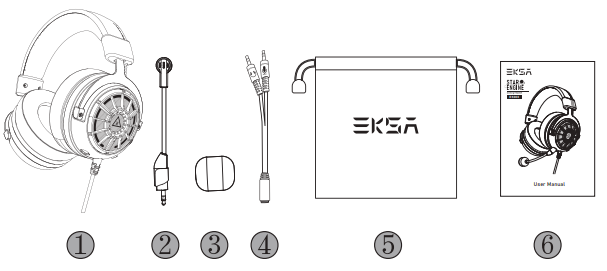
Package Contents
- EKSA Star Engine S Gaming Headset
- Detachable Microphone
- Microphone Foam Cover
- Y Splitter Extension Cable
- Carry Pouch
- User Manual
Product Overview
- Protein Leather Head Beam
- Adjustable Headband 9
- Soft Large Earmuffs
- Detachable Microphone
- Microphone Port
- Mic Mute Button
- Volume Control Wheel
- 3.5 mm Audio Cable
- Y Splitter for Separate Mic and Headphone Ports
How to Use
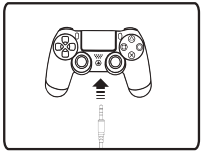
PlayStation® 5:
To get the best performance when using a PS®5, please directly connect your PS®5 controller with the 3.5 mm audio cable, and follow the steps below.
Sound Settings:
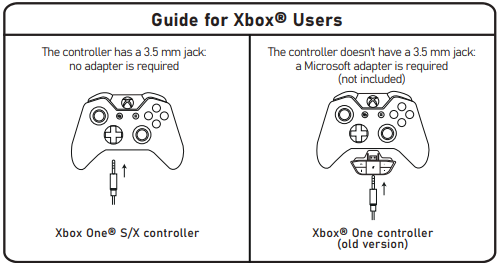
Xbox One® S/X:
To work on the NEW version of the Xbox One® S/X controller, you can directly connect your headset to the controller via the 3.5 mm audio cable.
Note:
- The headset is not compatible with Xbox® 360.
- The old version Xbox® One needs a Microsoft adapter (not included).
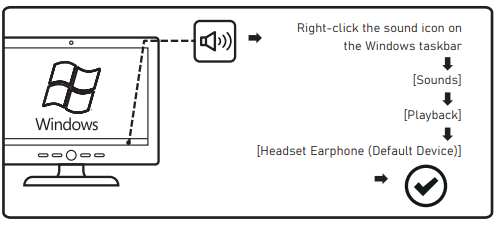
Windows:
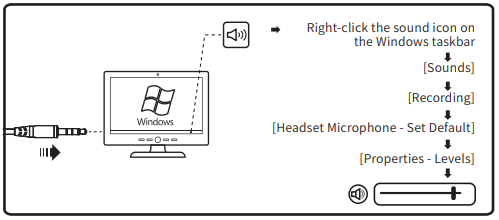
Microphone Settings:
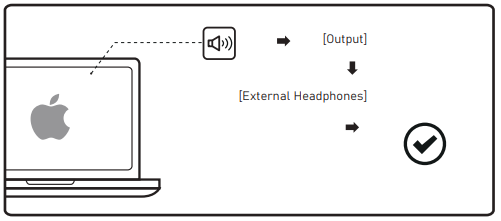
Mac:
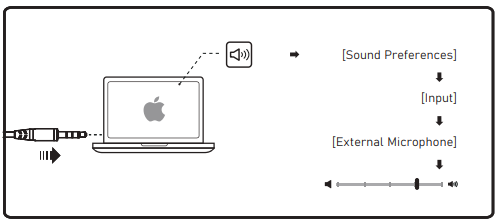
Microphone Settings:
Setup Guide for eksa Star Engine S Gaming Headset
Follow these simple steps to quickly set up your eksa Star Engine S Gaming Headset:
- Connect the headset: Plug the USB cable into your PC or the 3.5mm jack into your console/controller.
- Install drivers/software: For full 7.1 surround sound, download and install the eksa official software from the website.
- Configure audio settings: Open the software to adjust volume levels, surround sound modes, and RGB lighting effects.
- Microphone setup: Attach the noise-isolating boom mic securely and adjust the position for optimal voice pickup.
- Test audio: Play a game or audio file to verify sound and mic functionality. Adjust settings as needed.
Troubleshooting tips: If the headset is not recognized, try reconnecting or using a different USB port. Ensure drivers are up to date. Avoid high volume levels to protect hearing.
Safety precautions: Use the headset responsibly to avoid hearing fatigue. Keep the device dry and avoid exposing it to extreme temperatures.
Troubleshooting Eksa Star Engine S Gaming Headset
- No sound or mic not working: Check connections, update drivers, and verify the device is selected in system audio settings.
- Distorted sound: Lower volume levels, ensure cable integrity, and disable audio enhancements that may interfere.
- Microphone static or noise: Adjust mic position, confirm the noise-canceling feature is active, and reduce background noise.
- Headset not detected: Restart device and PC, try different USB ports or cables.
Preventive measures include regular cleaning of ear pads and mic, avoiding excessive twisting of cables, and storing the headset in a safe place. The eksa Star Engine S comes with a 12-month warranty covering manufacturing defects.
For support, contact eksa customer service via their official website or authorized retailers.
Pros & Cons of the eksa Star Engine S Gaming Headset
- Pros:
- Excellent 7.1 virtual surround sound enhances gaming immersion
- Comfortable memory foam ear cushions allow for long gaming sessions
- Multi-platform compatibility with USB and 3.5mm connections
- Customizable RGB lighting adds aesthetic appeal
- Affordable price point compared to premium gaming headsets
- Cons:
- Wired connection may limit mobility compared to wireless models
- Software required for advanced features can be buggy on some systems
- Microphone may pick up minor background noise in very loud environments
- Build quality is good but not as robust as higher-end brands
Customer Reviews of eksa Star Engine S Gaming Headset
Many users praise the eksa Star Engine S Gaming Headset for its outstanding sound clarity and comfortable fit, often highlighting the immersive 7.1 surround sound as a top feature. Common positive remarks include the stylish RGB lighting and versatile compatibility with various gaming platforms.
However, some customers note occasional issues with the headset software, citing minor bugs during setup. A few users also mention the wired design as a limiting factor compared to wireless competitors. Overall, the headset holds an average rating of 4 out of 5 stars on major retail sites.
Most reviewers recommend this headset for gamers seeking a budget-friendly, high-quality audio solution, particularly those who prioritize sound performance and comfort over wireless convenience.
Faqs
How do I set up the eksa Star Engine S Gaming Headset for the first time?
What should I do if my eksa Star Engine S Gaming Headset microphone is not working properly?
Can I use the eksa Star Engine S Gaming Headset with consoles like PS5 and Xbox Series X?
What are the key audio features of the eksa Star Engine S Gaming Headset that enhance gaming performance?
How can I optimize sound and microphone performance on the eksa Star Engine S Gaming Headset?
What troubleshooting steps should I take if the eksa Star Engine S Gaming Headset audio is distorted or low volume?
How do I maintain and clean my eksa Star Engine S Gaming Headset to ensure longevity?
Does the eksa Star Engine S Gaming Headset support voice assistant features and how can I use them?
More eksa manuals
- Setup & Usage: Eksa E1000 WT Wireless Gaming Headset User Manual
- Usage & Setup: Eksa E900DL Gaming Headset User Manual
- Usage: Eksa StarEngine BT Headset User Manual
- Setup: Eksa AirComfy Gaming Headset User Manual
- Setup: Eksa E1000 Gaming Headset User Manual
- Setup: Eksa E900 Pro 2-IN-1 Gaming Headset User Manual
Leave a Comment