
Setup & Usage: Eksa E1000 WT Wireless Gaming Headset User Manual
Content
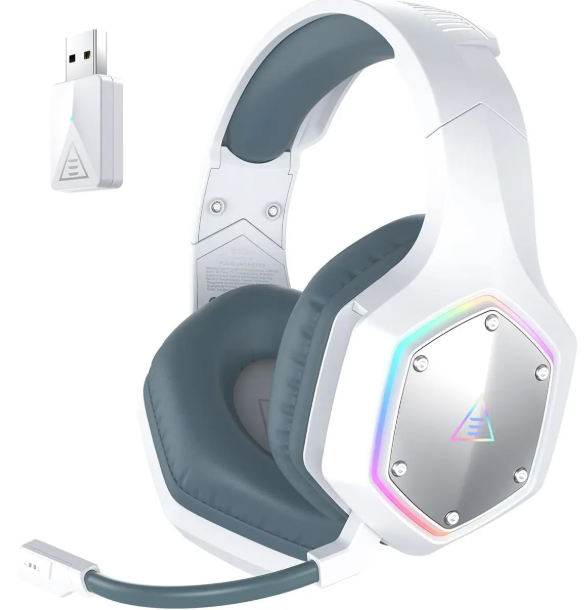
Eksa E1000 WT Wireless Gaming Headset
Introduction
The eksa E1000 WT Wireless Gaming Headset is engineered to elevate your gaming audio experience through cutting-edge technology and user-focused design. Utilizing a true 2.4 GHz gaming-grade wireless connection, it delivers ultra-low latency of less than 30 milliseconds, which ensures that game sounds and voice chat remain perfectly synchronized without the lag commonly experienced with Bluetooth headsets. This feature is critical for competitive gamers seeking real-time audio feedback during intense gameplay.
Equipped with powerful 50 mm drivers featuring synthetic fiber diaphragms and oxygen-free copper wiring, the headset provides rich, immersive sound with deep bass and crystal-clear highs. The inclusion of EKSA's proprietary 7.1 SoundBase virtual surround sound technology further enhances positional audio accuracy, allowing players to detect enemy footsteps and in-game cues with precision. Additionally, the headset integrates EKSA VoicePure ENC noise-cancellation technology that removes up to 96% of environmental noise, delivering clear voice communication in multiplayer scenarios.
Designed for extended gaming sessions, the E1000 WT boasts an impressive 36-hour battery life with fast Type-C charging that adds three hours of playtime in just 10 minutes. Its stylish RGB lighting complements any gaming setup, making it a visually appealing accessory. Compatibility spans multiple platforms including PC, PS4, PS5, Xbox, Nintendo Switch, and mobile devices, making it versatile for various gaming environments.
Targeted primarily at gamers who demand high-fidelity audio and seamless wireless performance, the eksa E1000 WT offers excellent value, typically priced in the mid-range category. It balances premium features and affordability, making it accessible for both casual and serious gamers worldwide.
Specifications of eksa E1000 WT Wireless Gaming Headset

- Size: 50 mm
- Unit impedance (Ω): 32 Ω
- Frequency Range: 20 Hz - 20 kHz
- Sensitivity (dB/mW) : 105 ± 3 dB

- Type: Lithium Battery
- Use Time: Up to 36 hours (light off)
- Rated Power: 5 V 1 A
- Charging Time: 2.5 H

- Type: Condenser Mic
- Polar Pattern: Omnidirectional
- Sensitivity: -42 ± 3 dB
- Impedance: 2.2 KΩ
Compared to similar wireless gaming headsets in its class, the eksa E1000 WT stands out with its true 2.4 GHz wireless technology providing lower latency than standard Bluetooth models and an extended battery life of up to 36 hours. Its surround sound customization and noise-canceling mic also offer competitive advantages for clear, immersive gaming communication.
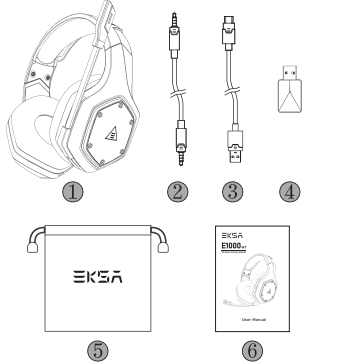
Package Contents
- EKSA E1000 WT Wireless Gaming Headset
- 3.5 mm Audio Cable
- Type C Charging Cable
- USB Dongle
- Carry Pouch
- User Manual
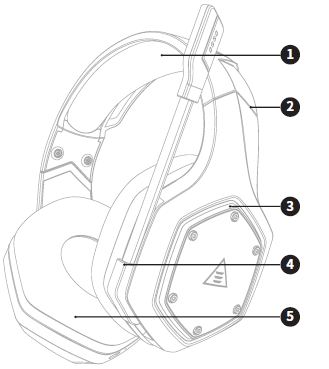
Product Overview
- Head Cushion
- Length Adjustment
- Colorful RGB Lights
- Rotable Microphone
- Ear Cushions
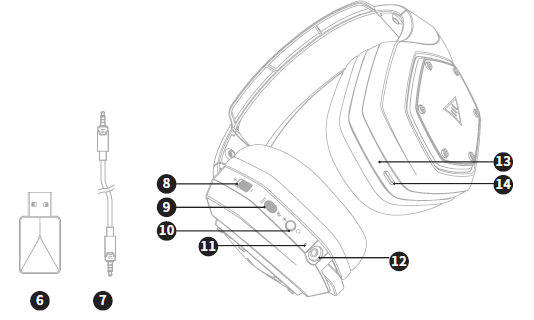
- USB 2.4G Dongle
- 3.5 mm to 3.5 mm Audio Cable
- Volume Adjuster
- Mic Mute Button / ENC Button
- Power On / Off Button / Multifunctional Button
- Status Indicator
- 3.5 mm Wired Mode Port
- Charging Indicator
- Type-C Charging Port
Main Features
EKSA VoicePure ENC
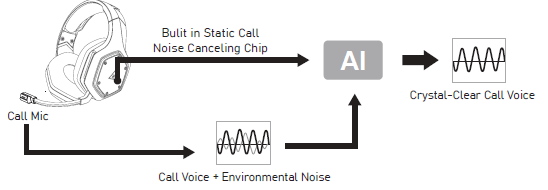
Perfect your game communication with EKSA VoicePure ENC. It isolates your voice from the noise around you with a noise-cancelling microphone, eliminating up to 96% of distracting background noise. You'll sound natural and clear in-game chats, giving you an extra competitive edge.
EKSA 7.1 SoundBase
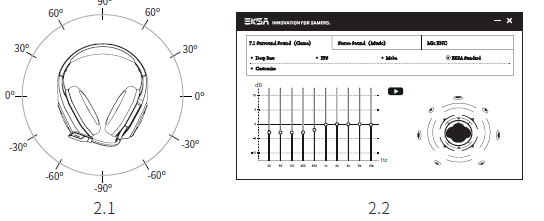
EKSA 7.1 SoundBase provides an unrivaled audio experience with punchy and immersive sound. Every sneaky footstep and every explosive gunshot is reproduced with accurate positioning and stunning clarity, creating a lifelike battlefield. The plug-and-play feature means no extra hassle to get a truly immersive gaming experience across platforms - including PS®4, PS®5, Switch™, and PC. To customize your preferred sound effects, simply download the driver from our official website(https://www.eksa.net/download).
Note: EKSA SoundBase Software suppots Windows® only.
Wide Compatibility
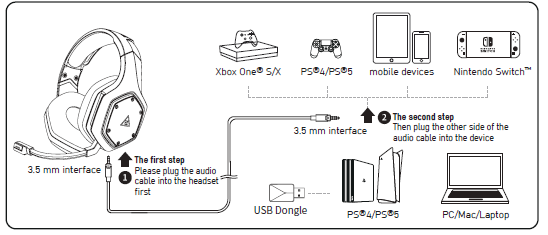
Equipped with 3.5 mm audio cable and USB Dongle, compatible with PS®5, PS®4, Xbox® One, Nintendo Switch™, PC, Laptop, Mac, mobile devices, etc.
One Key Sound Mode Switch
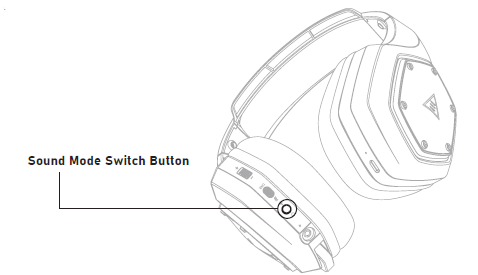
This button is on the ear shell, allowing you to switch from 7.1 surround sound to game mode or stereo to music mode. It is straightforward and convenient to operate.
Note: when switching the sound mode, you will hear a “surround sound on / off” voice prompt.
How to Use
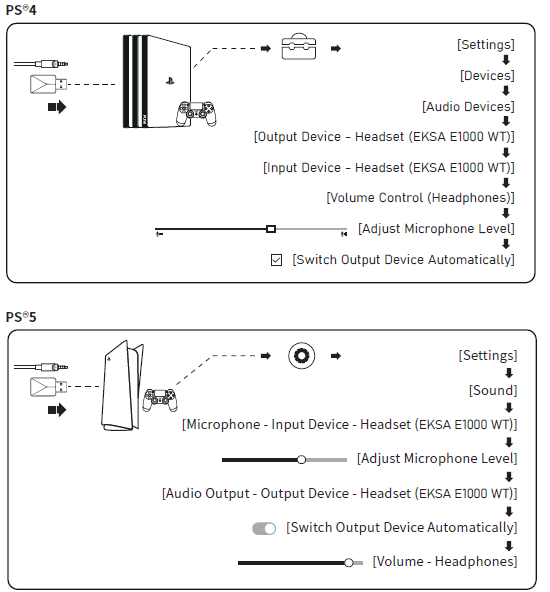
PlayStation® 4 / PlayStation® 5:
Connect the USB Dongle or the 3.5 mm audio cable to your PS®4/PS®5 . Then follow the steps below to check the audio settings to ensure your PS®4/PS®5 automatically switches to play audio and turns on the microphone.
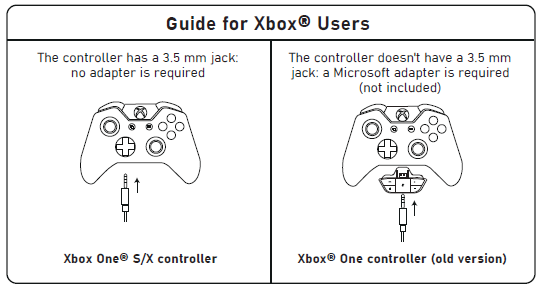
Xbox One® S/X:
To work on the NEW version of the Xbox One® S/X controller, you can directly connect your headset to the controller via the 3.5 mm audio cable.
Notes:
- The headset is not compatible with Xbox®360.
- Old version of Xbox® One needs a Microsoft adapter (not included).
Setup Guide for eksa E1000 WT Wireless Gaming Headset
- Charge the headset fully using the provided USB Type-C cable (approximately 2.5 hours).
- Plug the included 2.4 GHz USB wireless dongle into your PC or compatible console's USB port.
- Turn on the headset by pressing and holding the power button located on the left ear cup until the indicator light appears.
- The headset will automatically pair with the USB dongle. Confirm connection by checking the indicator light status.
- For 3.5 mm wired use, connect the included audio cable from the headset to your device’s headphone jack.
- Adjust volume and microphone settings via the built-in controls on the ear cup; use the EKSA SoundBase software to customize EQ and sound modes on PC.
Troubleshooting Tips: If the headset does not connect, ensure the dongle is securely plugged in and try re-pairing by turning the headset off and on. Check your device’s audio settings to select the headset as the default audio input/output device.
Safety Precautions: Avoid exposing the headset to moisture or extreme temperatures. Do not disassemble the headset or use unauthorized chargers. Prolonged high volume use may damage hearing; use volume moderation during extended sessions.
Troubleshooting Eksa E1000 WT Wireless Gaming Headset
- No Sound Output: Verify the headset is powered on and paired. Check device audio settings to confirm the headset is selected as the output device.
- Microphone Not Working: Confirm microphone mute is off. Test the mic with another device or application. Update device drivers if needed.
- Wireless Interference or Dropouts: Ensure no large metal objects or other wireless devices interfere with the 2.4 GHz signal. Keep the dongle within the recommended range (<10 meters).
- Battery Doesn’t Charge: Use the supplied Type-C charger. Inspect the USB cable and charging port for damage. If the issue persists, contact EKSA support.
- Error Codes: The headset uses LED indicators rather than error codes. A flashing red light indicates low battery; charge immediately.
Preventive Measures: Regularly clean the ear cushions, avoid overcharging, and store the headset in a cool, dry place to prolong lifespan.
Warranty & Support: EKSA typically offers a one-year warranty covering manufacturing defects. For assistance, users can visit EKSA’s official support website or contact customer service via email or phone provided in the product documentation[3][7].
Pros & Cons of the EKSA E1000 WT Wireless Gaming Headset
Pros
- Ultra-Low Latency Wireless: True 2.4 GHz connection provides less than 30 ms latency, outperforming Bluetooth for gaming.
- Long Battery Life: Up to 36 hours of playtime supports marathon gaming sessions without frequent charging.
- Rich Sound Quality: 50 mm drivers with EKSA 7.1 SoundBase deliver immersive surround sound and deep bass.
- Clear Communication: VoicePure ENC noise cancellation eliminates background noise for effective multiplayer chat.
- Comfort & Style: Adjustable headband, plush ear cushions, and RGB lighting enhance comfort and aesthetics.
- Wide Compatibility: Supports multiple platforms via wireless dongle or wired connection.
Cons
- Not Bluetooth: Lacks Bluetooth support, which may limit convenience for some users wanting multi-device switching.
- RGB Lighting Power Use: RGB lighting consumes battery faster; turning lights off extends battery life.
- Software Dependence: Custom sound modes require PC software installation, limiting full feature use on consoles.
- Microphone Position: Fixed omnidirectional mic may pick up some ambient noise despite ENC.
Overall, the eksa E1000 WT offers excellent value for gamers prioritizing low-latency wireless performance and immersive sound without breaking the bank, standing competitively against alternatives from brands like HyperX and Logitech in the mid-tier segment[1][4].
Customer Reviews of eksa E1000 WT Wireless Gaming Headset
Users commonly praise the eksa E1000 WT Wireless Gaming Headset for its outstanding wireless stability and sound clarity, especially highlighting the low latency that enhances gameplay responsiveness. Many appreciate the long battery life and comfortable fit, which support extended use without fatigue. The RGB lighting also receives positive remarks for adding style to gaming setups.
Common complaints include the absence of Bluetooth connectivity and occasional difficulty in configuring the surround sound modes on non-PC platforms. Some users have reported minor issues with microphone sensitivity in noisy environments, though the ENC feature generally improves voice clarity.
Overall star ratings average around 4 to 4.5 out of 5, with strong recommendations from gamers seeking a budget-friendly wireless headset with professional-level sound and communication features.
Faqs
How do I set up the eksa E1000 WT Wireless Gaming Headset for the first time?
Why is the eksa E1000 WT Wireless Gaming Headset audio cutting out or disconnecting during use?
What is EKSA VoicePure ENC and how does it improve microphone quality on the eksa E1000 WT Wireless Gaming Headset?
Is the eksa E1000 WT Wireless Gaming Headset compatible with PS5 and Nintendo Switch?
How can I optimize audio performance on my eksa E1000 WT Wireless Gaming Headset?
What should I do if the microphone on my eksa E1000 WT Wireless Gaming Headset is not picking up sound?
How long does the battery last on the eksa E1000 WT Wireless Gaming Headset, and how is charging handled?
What is the best way to maintain and clean the eksa E1000 WT Wireless Gaming Headset for durability?
More eksa manuals
Leave a Comment