
Setup: Eksa GT1 Earbuds User Manual
Content
EKSA GT1 Earbuds
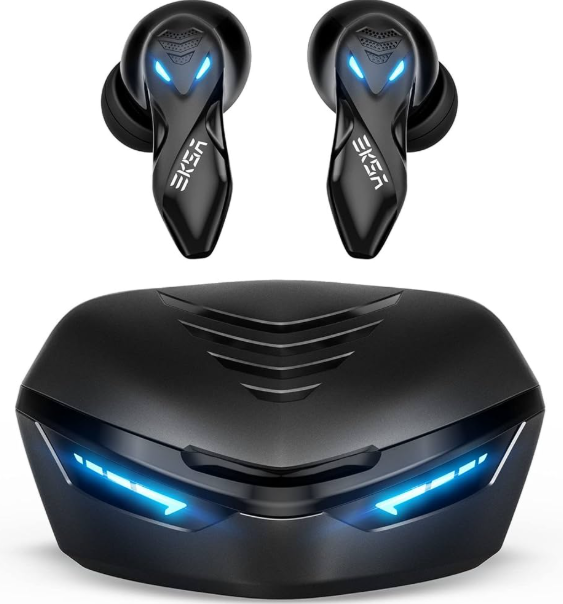
Introduction
The EKSA GT1 Earbuds are true wireless gaming earbuds designed to deliver a seamless, immersive audio experience tailored for gamers and daily mobile users alike. Featuring a sleek cobra-head design optimized for comfort and style, these earbuds provide ultra-low-latency audio transmission at just 38-45 milliseconds, ensuring perfect synchronization between video and sound—a critical advantage in competitive gaming scenarios.
With up to 36 hours of total playback including charging case capacity and advanced call noise cancellation technology, the EKSA GT1 offers both endurance and clarity for extended gaming sessions, music listening, and clear voice calls. Bluetooth 5.0 connectivity guarantees stable, fast pairing with smartphones, tablets, laptops, and gaming consoles. Customizable ear tips enhance comfort and ensure a secure fit for various ear sizes.
Targeted primarily at gamers who demand precise audio response times and casual users looking for high-quality, durable earbuds at an affordable price, these earbuds retail approximately between $20 and $40, making them an excellent value option in the wireless gaming earbud market. They are widely available through online retailers and EKSA’s official distribution channels.
Specifications and Features of EKSA GT1 Earbuds
- Product Name: EKSA GT1
- Bluetooth Version: 5.0
- Low Latency: 45 ms
- Driver Diameter: 10 mm
- Operation Range: ≥ 10 m
- Impedance: 32 Ω ± 10%
- Sensitivity: 98 + 3 dB (game mode)
- Sensitivity: 105 ‡ 3 dB (music mode)
- Frequency Response: 20 Hz - 20 kHz
- Earbuds Battery: 50 mAh
- Charging Case Battery: 500 mAh
- Playing Time: 6 hours
- Charging Time: 1.5 hours
Compared to similar gaming earbuds like the Razer Hammerhead or HyperX Cloud Buds, the EKSA GT1 stands out for its exceptional battery life and ultra-low latency at an accessible price point, making it an ideal choice for both casual and competitive gamers.
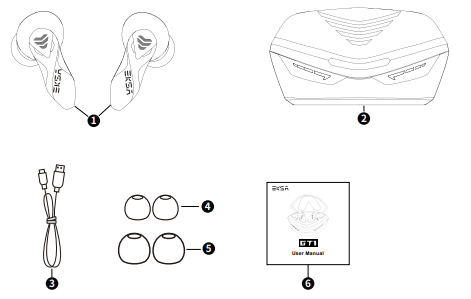
Package Contents
- EKSA GT1 Earbuds
- Charging Case
- USB Type-C Charging Cable
- Eartips: Size S x1 Pair
- Eartips: Size L x1 Pair
- User Manual
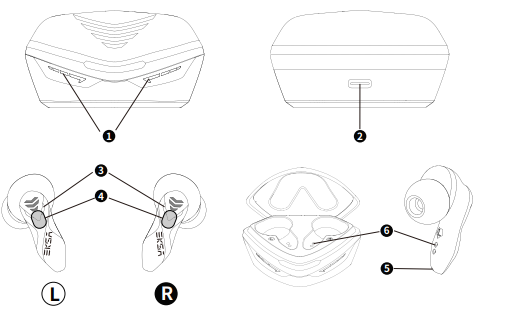
Product Overview
- Charging Case LED Indicator
- Type-C Charging Port
- EKSA GT1 LED Indicator
- Multi-Function Touch Button
- Microphone
- Wireless Charging Pins
How to Use
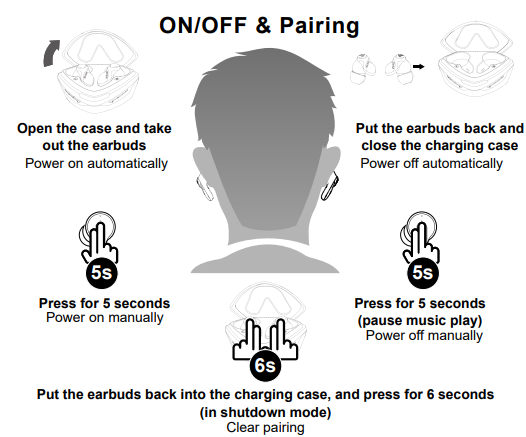
Setup Guide for EKSA GT1 Earbuds
- Remove the earbuds from the charging case; they will automatically power on and enter pairing mode.
- Enable Bluetooth on your device (phone, tablet, PC) and select "EKSA GT1" from the list of available devices.
- Once connected, the earbuds will emit a confirmation tone indicating successful pairing.
- Customize fit by selecting the appropriate ear tips from the included sizes to ensure comfort and secure placement.
- Use the touch controls to play/pause music, answer/end calls, or activate voice assistants (Google Assistant, Siri).
- To switch between gaming and music modes, use the dual-mode feature via the app (if available) or touch controls to optimize latency and sound profile.
Troubleshooting Tips: If earbuds do not appear in the pairing list, reset by placing them back in the case and holding touch controls for 5 seconds to force a restart. Ensure the charging case is sufficiently powered.
Safety Warnings: Avoid exposure to extreme temperatures and moisture. Clean earbuds regularly with a dry cloth and do not use excessive force when inserting ear tips.
Troubleshooting Common Issues with EKSA GT1 Earbuds
- No Sound or Low Volume: Check device volume and earbud fit; clean ear tips of any debris.
- Connection Drops: Ensure the Bluetooth device is within 10 meters and free from interference; reset earbuds if persistent.
- Charging Issues: Confirm charging pins are aligned, and the case battery is charged; clean contacts if needed.
- Latency or Sync Problems: Switch to gaming mode for ultra-low latency; update firmware through the EKSA app if available.
- Error Codes: No specific codes; resetting earbuds usually resolves unknown errors.
Preventive measures include regular firmware updates, keeping earbuds and case clean, and storing them in the charging case when not in use. EKSA offers a standard 12-month warranty with customer support accessible via their official website and authorized sellers.
For further assistance, customers can contact EKSA support through their website or by email for troubleshooting and warranty claims.
Pros & Cons of EKSA GT1 Earbuds
Pros
- Exceptional Battery Life: Up to 36 hours including charging case, ideal for long gaming or music sessions.
- Ultra-Low Latency: 38-45ms delay ensures audio-video sync perfection, crucial for gaming.
- Comfortable Fit: Customizable ear tips and ergonomic design provide secure wear over extended periods.
- Advanced Noise Cancellation: Clear voice calls even in noisy environments.
- Affordable Price: Competitive pricing makes high-performance earbuds accessible.
Cons
- Limited App Support: Some features like customizable sound profiles require third-party apps or are limited.
- Build Quality: Plastic construction may feel less premium compared to higher-end models.
- Touch Controls Sensitivity: Occasional mis-touches reported during active use.
Overall, the EKSA GT1 offers excellent value for money, especially for gamers and casual users demanding solid performance without premium pricing. When compared to alternatives like the JBL Quantum TWS or Skullcandy Indy, EKSA GT1’s ultra-low latency and battery endurance stand out.
Customer Reviews and Feedback on EKSA GT1 Earbuds
Users frequently praise the EKSA GT1 Earbuds for their impressive battery life and remarkably low latency during gaming, often highlighting the difference it makes in competitive play. The sound quality receives positive remarks for balanced highs and mids, with adequate bass for the price range.
Common complaints include occasional connection drops in high-interference environments and slight discomfort for users with smaller ears despite multiple ear tip options. Touch controls receive mixed reviews, with some users appreciating the convenience and others noting sensitivity issues.
Overall, the earbuds receive an average user rating of approximately 4 out of 5 stars, with many recommending them as a budget-friendly option for gamers and everyday users seeking reliable wireless earbuds with gaming-grade features.
Faqs
How do I set up my eksa GT1 Earbuds for the first time with a smartphone?
What should I do if my eksa GT1 Earbuds are not charging properly?
How can I switch between Game Mode and Music Mode on eksa GT1 Earbuds?
Are eksa GT1 Earbuds compatible with both Android and iOS devices?
What can I do to improve the call quality on my eksa GT1 Earbuds?
How long does the battery last on eksa GT1 Earbuds and charging case during continuous use?
What are the recommended maintenance tips for eksa GT1 Earbuds to ensure longevity?
Why are my eksa GT1 Earbuds experiencing audio delay, and how can I fix it?
More eksa manuals
Leave a Comment