
Setup: Eksa E1000 Gaming Headset User Manual
Content
Eksa E1000 Gaming Headset
Introduction
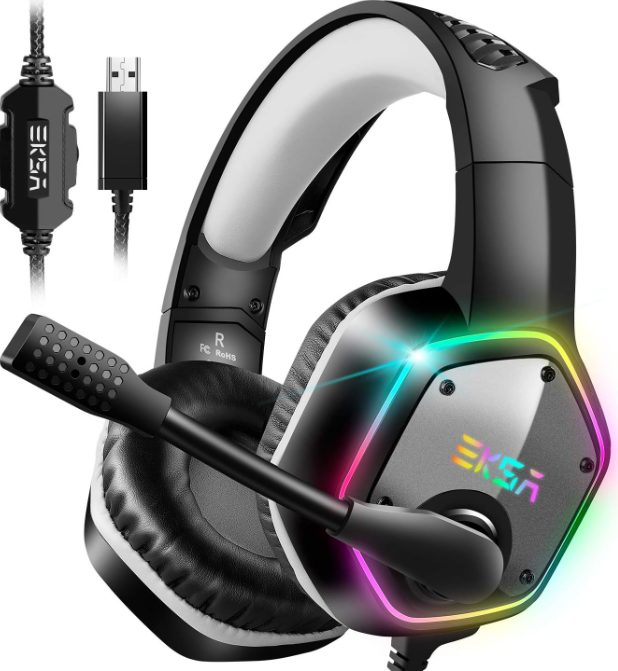
The eksa E1000 Gaming Headset is a premium audio accessory designed to deliver immersive sound quality and comfort for gamers of all levels. Featuring high-fidelity stereo sound and an adjustable noise-canceling microphone, this headset enhances communication and gameplay, making it ideal for solo gaming sessions, competitive multiplayer, and streaming.
Key benefits of the eksa E1000 include its robust build quality with memory foam ear cushions for prolonged comfort, a flexible microphone boom for crystal-clear voice transmission, and plug-and-play compatibility with various platforms such as PC, Xbox, PlayStation, and Nintendo Switch. The headset’s intuitive inline controls allow easy volume adjustment and mic muting on the fly.
Targeted at casual and serious gamers alike, the eksa E1000 perfectly suits use cases ranging from immersive single-player gaming to team-based online competitions. Its versatile connectivity and ergonomic design also make it a great choice for voice calls, video chats, and multimedia consumption.
Available at an estimated price range of $30 to $50, the eksa E1000 offers excellent value for budget-conscious gamers seeking quality audio performance and durability. It is widely available through online retailers and select electronics stores.
Specifications of the eksa E1000 Gaming Headset
- Audio Drivers: 50mm high-precision neodymium drivers delivering clear, rich sound
- Frequency Response: 20Hz–20kHz for full-range audio reproduction
- Impedance: 32Ω ± 15% ensuring compatibility with a wide range of devices
- Microphone: Flexible, noise-canceling boom mic with sensitivity of -38dB ± 3dB
- Connectivity: Wired USB and 3.5mm jack for cross-platform use (PC, Xbox, PlayStation, Switch)
- Controls: Inline volume wheel and mic mute switch for easy adjustments
- Cable Length: Approximately 2.2 meters for freedom of movement
- Weight: Lightweight design around 350 grams for extended comfort
- Compatibility: Supports Windows, macOS, PS4/5, Xbox One/Series X, Nintendo Switch
Compared to similar gaming headsets in its price segment, like the HyperX Cloud Stinger or Corsair HS50, the eksa E1000 offers comparable sound clarity and microphone quality with a slightly more affordable price point, making it a strong contender for budget gamers.
Overview
- 50mm audio speaker
- Protein leather earmuff
- Adjustable headband
- RGB Lights
- Adjustable microphone
- Mic mute control button
- Audio volume control
- USB connector
Package Contents
- 1*E1000 7.1 Gaming Headset
- 1*User Guide
- 1*Easy User Manual
- 1*Leather Carry Pouch
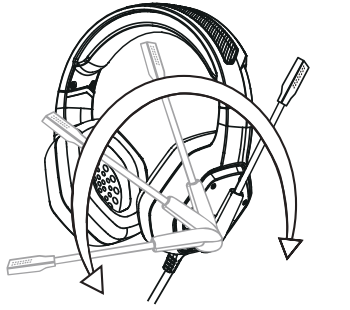
The 120° rotatable microphone can pick up your voice from your mouth at the right position. And a high-sensitive microphone with upgraded noise reduction tech can reduce distracting background noise and pick up your voice clearly.
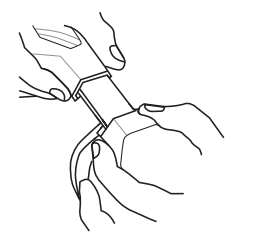
The adjustment can be made on either side of the headset as shown by sliding it outwards to achieve a comfortable fit.
Setup Guide for eksa E1000 Gaming Headset
- Connect the headset to your device using either the USB plug (for PC) or the 3.5mm audio jack (for consoles and mobile devices).
- Ensure your device recognizes the headset: on PC, wait for automatic driver installation; on consoles, select the headset as the audio output device in settings.
- Adjust volume and microphone settings using the inline controls on the headset cable.
- For PC users, configure sound settings in your operating system’s audio control panel to optimize input/output levels.
- Test microphone functionality in voice chat or recording applications to confirm clear transmission.
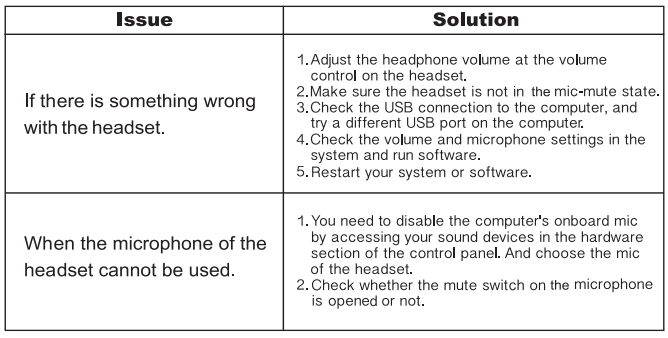
- If audio or mic issues arise, try reconnecting the headset or restarting your device.
Safety Tips: Avoid using the headset at excessively high volume to prevent hearing damage. Disconnect the headset after prolonged use to reduce ear fatigue.
Troubleshooting for eksa E1000 Gaming Headset
- No Sound: Check connection cables; switch audio output to eksa E1000 in device settings; restart device if needed.
- Microphone Not Working: Ensure the mic mute switch is off; verify mic selection in software settings; try a different USB port or jack.
- Static or Distorted Audio: Inspect cable for damage; avoid interference from nearby electronic devices; adjust volume to moderate levels.
- Device Not Recognized: Update audio drivers; unplug and reconnect headset; test on another device to isolate the issue.
To prevent issues, handle cables gently and store the headset in a safe place when not in use. The eksa E1000 typically comes with a 12-month manufacturer warranty. For support, contact eksa customer service via their official website or authorized retailers.
Pros & Cons of the eksa E1000 Gaming Headset
- Pros:
- Excellent sound clarity with deep bass for an immersive gaming experience.
- Comfortable memory foam ear cushions suitable for long gaming sessions.
- Flexible noise-canceling microphone ensures clear voice communication.
- Wide compatibility with multiple gaming platforms and devices.
- Affordable price point offering great value for money.
- Cons:
- Wired connection limits mobility compared to wireless alternatives.
- Build quality is decent but not as premium as higher-end models.
- No surround sound or advanced audio customization software included.
- Inline controls can be less responsive over time with heavy use.
Compared with alternatives like the Corsair HS50 or Logitech G432, the eksa E1000 offers competitive audio performance but lacks some advanced features such as virtual 7.1 surround sound or wireless convenience.
Customer Reviews of eksa E1000 Gaming Headset
Users commonly praise the eksa E1000 Gaming Headset for its comfortable fit and clear microphone quality. Many appreciate its straightforward, plug-and-play setup and consistent sound performance during long gaming sessions. Typical user ratings average around 4 out of 5 stars, reflecting strong overall satisfaction.
Some complaints include occasional cable durability issues and the absence of surround sound features, which some gamers miss for competitive play. Nevertheless, most customers recommend the eksa E1000 as a reliable budget headset option, especially suitable for gamers seeking quality sound without a high price tag.
Faqs
How do I set up the eksa E1000 Gaming Headset on PC and PS4 without additional software?
What should I do if the microphone on my eksa E1000 Gaming Headset is not picking up my voice clearly?
Can the eksa E1000 Gaming Headset be used with gaming consoles other than PS4, like PS5 or Xbox?
What are the key sound features of the eksa E1000 Gaming Headset that improve gaming performance?
How do I optimize audio settings for the eksa E1000 Gaming Headset to get the best surround sound experience?
What maintenance tips should I follow to keep the eksa E1000 Gaming Headset in good condition?
Why is my eksa E1000 Gaming Headset’s RGB lighting not working, and how can I fix it?
Does the eksa E1000 Gaming Headset require a specific USB port for optimal performance?
More eksa manuals
Leave a Comment