
Setup: Eksa E900 Gaming Headset User Manual
Content
Eksa E900 Gaming Headset
Introduction
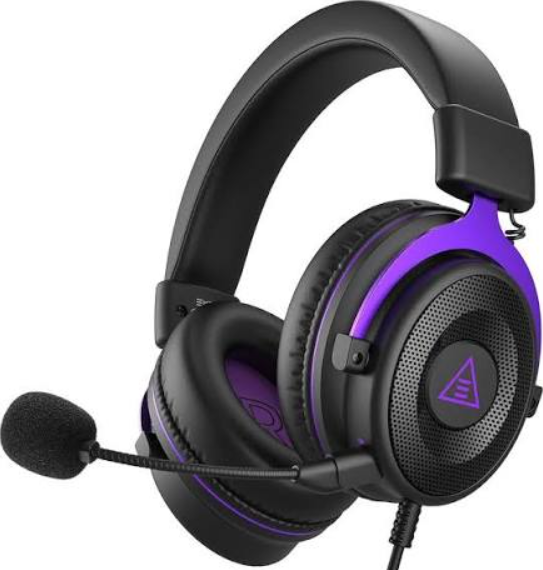
The eksa E900 Gaming Headset is a high-performance audio accessory designed for gamers seeking immersive sound and comfort during extended play sessions. Engineered with advanced 50mm drivers, it delivers crystal-clear audio with rich bass and detailed mids, creating a captivating gaming atmosphere. The headset features a noise-isolating design that minimizes external distractions, allowing players to focus fully on their gameplay.
Key benefits include a flexible noise-cancelling microphone for precise communication, durable build quality with adjustable headbands, and soft memory foam ear cushions for lasting comfort. The eksa E900 caters to competitive gamers, streamers, and casual players alike, supporting PC, PS4, Xbox One, and mobile platforms through a universal 3.5mm jack interface.
Available at an estimated price range of $40 to $60, the eksa E900 Gaming Headset offers exceptional value by combining premium features with affordability. Its broad compatibility and ergonomic design make it an ideal choice for those looking to enhance their gaming audio experience without breaking the bank.
Product Parameters
Headset:
- Interface Type: 3.5mm
- Driver Diameter: 050 mm
- Sensitivity: 118dB+3dB
- Speaker Impedance: 32 Q
- Frequency Range: 20Hz~20KHz
Microphone:
- Sensitivity: 42+3dB
- Size: ф6.0*2.7MM
- Microphone Impedance: 2.2KQ
- Supply Voltage: 3V
- Current Consumption: max 0.5mA
Package List
- 1x EKSA E900 Gaming Headset
- 1x Detachable Microphone
- 1x3.5mm Audio Cable
- 1x3.5mm Cable Splitter
- 1x Operating Instruction
- 1x Safety Instruction
- 1x Carry Pouch
Compared to similar mid-range gaming headsets like the HyperX Cloud Stinger and Corsair HS50, the eksa E900 provides competitive sound quality and comfort at a slightly lower price point, making it a strong contender in the budget gaming headset market.
At a Glance
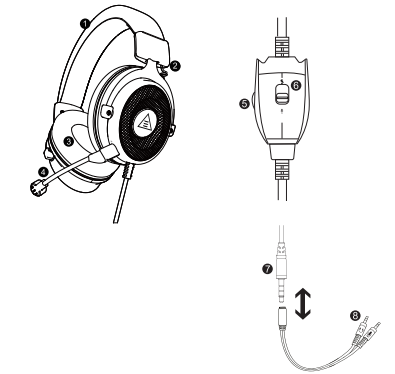
- Leatherette headband
- Adjustable steel arm headband
- Replaceable earmuffs
- Detachable microphone
- Volume up/down dial
- Microphone mute button
- 3.5mm audio cable
- PC splitter cable for separate mic and audio jacks
Usage
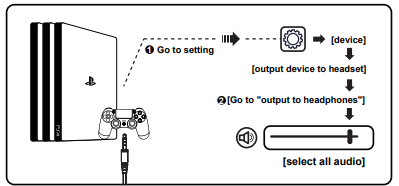
(PlayStation 4)
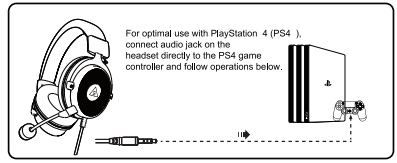
For 3.5mm Audio Cable:
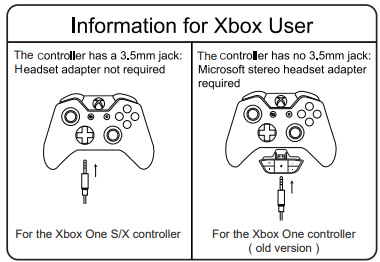
Usage (Xbox One S/X)
To work on the old version of the Xbox One controller, you need a Microsoft adapter (sold separately). To work on the new version of the Xbox One S/X controller, you can directly connect the E900 headset to the controller via 3.5mm jack.
Note: The headset isn't compatible with Xbox 360.
Usage (PC)
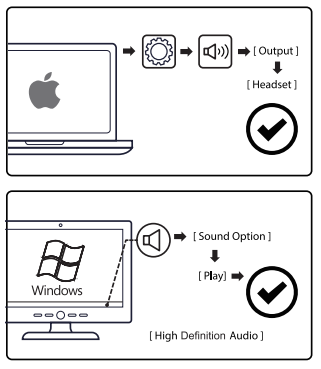
PC Sound Setting:
Setup Guide for eksa E900 Gaming Headset
- Connect the eksa E900 Gaming Headset to your device using the 3.5mm audio jack. For PC users, plug into the headphone and microphone ports or use a 3.5mm splitter if needed.
- Adjust the headset for comfort using the adjustable headband and position the microphone close to your mouth but not touching your lips.
- Use the inline volume and mute controls to set your preferred audio and microphone levels.
- For PC games, check your audio settings to select the eksa E900 as the default playback and recording device.
- If you experience microphone issues, ensure the mute switch is off and the cable is securely connected.
Safety tips: Avoid exposing the headset to extreme heat or moisture. Adjust volume gradually to protect hearing.
Troubleshooting Eksa E900 Gaming Headset
- No sound: Verify the audio jack is fully plugged in; check device sound settings and volume levels.
- Microphone not detected: Ensure the mute button is off and device settings recognize the headset mic as input.
- Static or crackling noise: Inspect the cable for damage; try reconnecting or testing on another device.
- Audio imbalance: Adjust the inline volume or device balance settings.
- Preventive measure: Store the headset safely and avoid pulling on cables to extend lifespan.
The eksa E900 comes with a one-year limited warranty. For further support, customers can contact eksa’s official customer service via their website or authorized retailers.
Pros & Cons of the eksa E900 Gaming Headset
- Pros:
- Excellent sound quality with deep bass and clear highs for immersive gaming.
- Comfortable memory foam ear cushions suitable for long gaming sessions.
- Flexible noise-canceling microphone enhances team communication.
- Wide compatibility across multiple gaming platforms.
- Affordable price point offers great value for budget-conscious gamers.
- Cons:
- Wired connection may limit mobility compared to wireless alternatives.
- Lack of software customization for equalizer settings.
- Build materials are mostly plastic, which may affect long-term durability.
Compared to wireless models like the Corsair HS70, the eksa E900 trades wireless convenience for lower latency and better price, appealing to gamers prioritizing sound quality and budget.
Customer Reviews of eksa E900 Gaming Headset
Users frequently praise the eksa E900 Gaming Headset for its crisp sound and comfortable fit, often highlighting its suitability for long gaming marathons. Many reviewers appreciate the noise-cancelling microphone, noting clearer in-game communication.
Common complaints include the wired design limiting movement and occasional durability concerns after months of use. The inline controls sometimes receive mixed feedback about responsiveness.
Overall, the headset averages around 4 out of 5 stars in popular e-commerce reviews, with numerous users recommending it as a reliable budget gaming headset that delivers excellent audio performance without a hefty price tag.
Faqs
How do I set up the eksa E900 Gaming Headset for the first time on PC and consoles?
What should I do if the microphone on the eksa E900 Gaming Headset is not picking up my voice clearly?
Can I use the eksa E900 Gaming Headset with mobile phones and tablets?
How does the eksa E900 Gaming Headset's noise-cancelling microphone improve gaming communication?
What are the key audio features of the eksa E900 Gaming Headset that enhance gameplay?
How can I maintain and clean my eksa E900 Gaming Headset for long-term use?
Does the eksa E900 Gaming Headset support virtual 7.1 surround sound, and how do I enable it?
What troubleshooting steps can I take if the eksa E900 Gaming Headset audio is too low or distorted?
More eksa manuals
Leave a Comment