
Setup & Usage: Eksa E400 Headband User Manual
Content
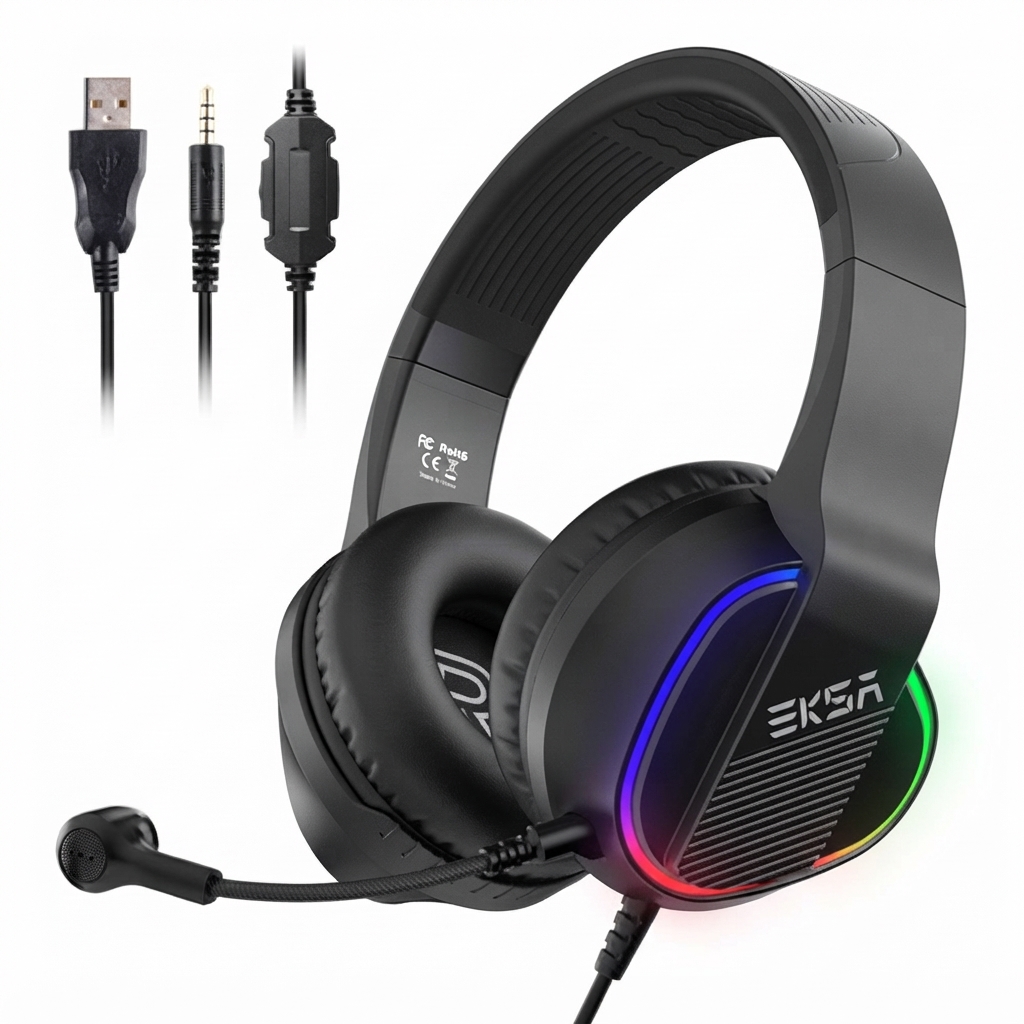
Eksa E400 Headband Gaming Headset
Introduction
The Eksa E400 Headband is a multi-platform wired gaming headset designed to deliver immersive 3D stereo surround sound with exceptional clarity and comfort. Equipped with powerful 40mm drivers and a detachable noise-cancelling microphone, this headset combines high-quality audio performance with a lightweight, ergonomic design that fits gamers and multimedia users alike. Its adjustable headband and soft memory foam ear cushions ensure long-lasting comfort during extended gaming sessions, making it ideal for PC, consoles like PS4 and Xbox One, laptops, and mobile devices.
Key benefits include immersive sound with rich bass and crisp highs, flexible multi-device compatibility, and a detachable 360-degree adjustable mic that enhances communication in multiplayer environments. The eksa E400 also features customizable RGB lighting to elevate the gaming aesthetic. Target audiences range from casual gamers and streamers to professionals seeking reliable, clear audio and voice communication.
Available globally, the eksa E400 usually retails within the affordable price range of approximately $30 to $50, offering excellent value for money. Its compatibility with various platforms and user-friendly design make it a versatile choice for gamers and multimedia enthusiasts looking for quality audio without breaking the bank.
Specifications
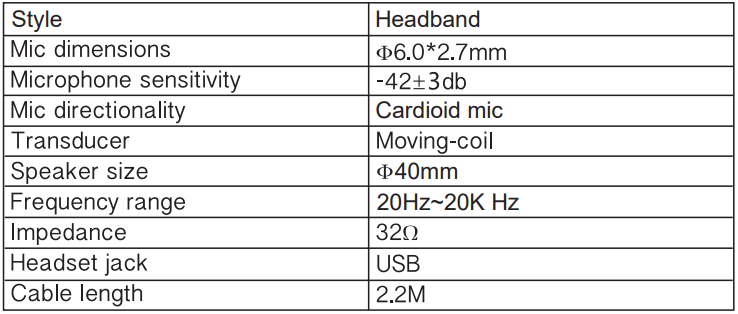
Compared to similar headsets in its price segment, the eksa E400 stands out with its combination of 3D stereo surround sound, detachable noise-cancelling microphone, and wide multi-platform compatibility, making it a highly flexible option for diverse gaming setups.
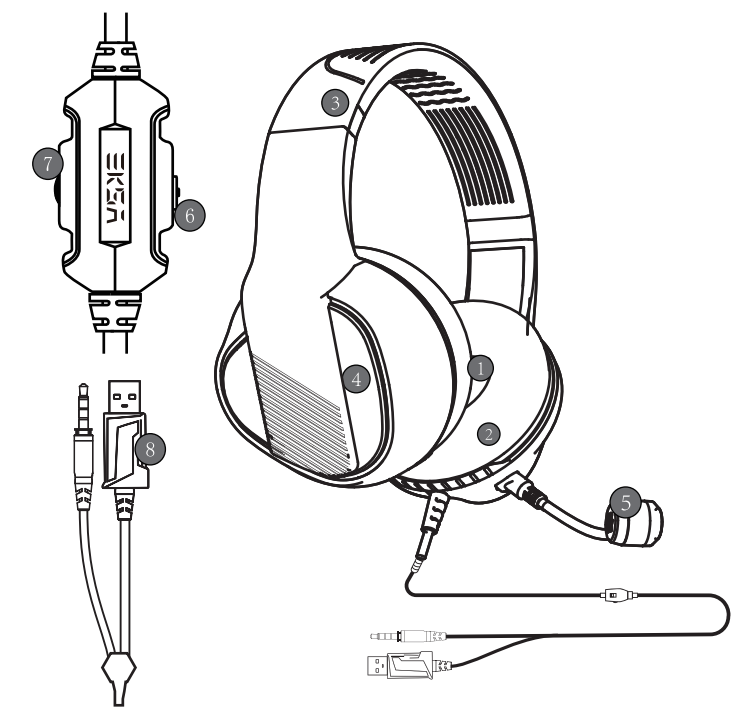
Overview
- 40mm audio speaker
- Protein leather earmuff
- Self-adjustable headband
- RGB light
- Adjustable microphone
- Mic mute control button
- Audio volume control
- USB&3.5mm connector
Package Contents
- 1x EKSA E400 headset
- 1x User Manual
- 1x Microphone
- 1x 35mm cable splitter
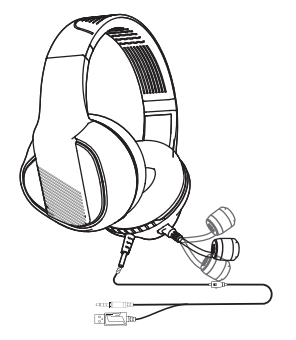
The microphone is 360° rotatable, allowing it to get your voice in the right position from your mouth. And a high-sensitive microphone with upgraded noise reduction tech reduces distracting background noise to collect your voice clearly.
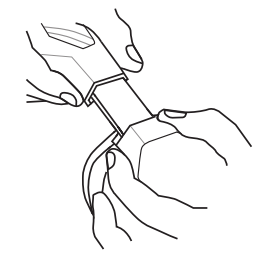
The adjustment can be made on either side of the headset as shown by sliding it outwards to achieve a comfortable fit.
Operating Your Gaming Headset
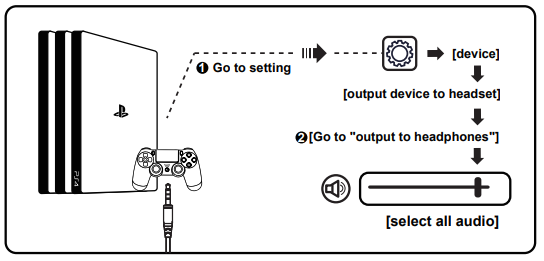
Usage (PlayStation®4)
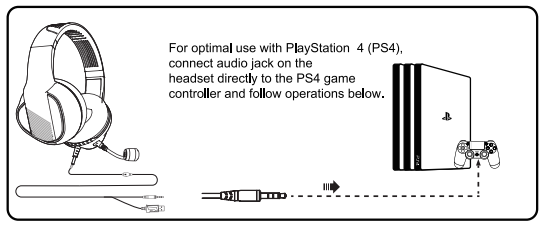
For 3.5mm Audio Cable:
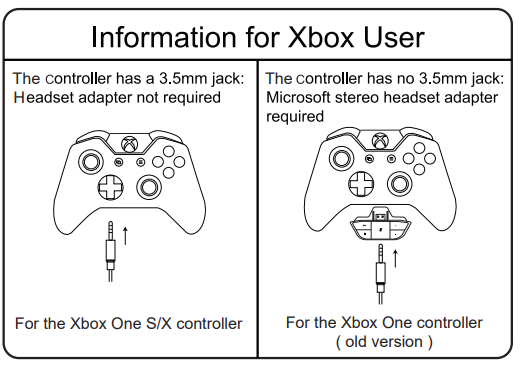
Usage (Xbox One S/X)|
To work on the old version of the Xbox One controller, you need a Microsoft adapter (sold separately). To work on the new version of the Xbox One S/X controller, you can directly connect the E400 headset to the controller via the 3.5mm jack.
Note: The headset isn't compatible with Xbox 360.
Usage (PC)
PC Sound Setting:
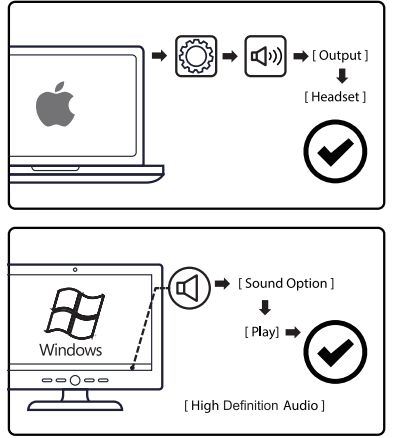
Setup Guide for eksa E400 Headband Gaming Headset
- Connect the headset: Plug the 3.5mm audio jack into your gaming device's headphone port. For Xbox One older controllers, use a separate adapter (not included).
- Adjust the headband: Use the self-adjusting headband to fit the headset comfortably over your head.
- Position the microphone: Attach and rotate the detachable noise-cancelling mic to your preferred angle (up to 360 degrees) for optimal voice pickup.
- Control audio: Use the inline volume wheel to adjust sound levels and mute the microphone during gameplay.
- Customize RGB lighting: If supported via USB connection, activate and configure RGB LED lights to your liking (note: USB interface is for lighting only).
Troubleshooting tips: If no sound is heard, check the connection and volume settings on both the headset and device. For microphone issues, ensure it is securely attached and not muted. If compatibility problems arise, verify adapter requirements for your console.
Safety warnings: Avoid listening at high volumes for extended periods to prevent hearing damage. Keep the headset dry and clean to maintain performance and durability.
Troubleshooting Eksa E400 Headband Issues
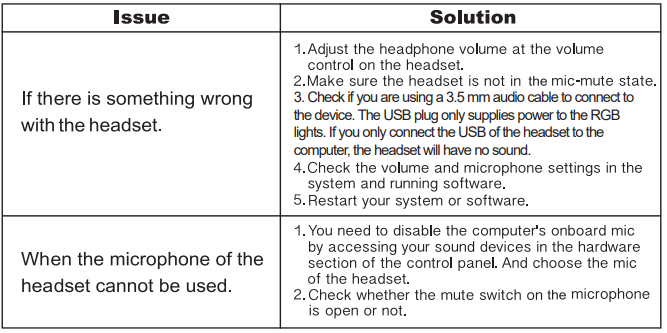
Pros & Cons of the eksa E400 Headband Gaming Headset
Pros
- High-quality 40mm drivers: Deliver immersive 3D stereo surround sound ideal for gaming and multimedia.
- Detachable noise-cancelling microphone: Enables clear communication and can be removed for casual listening.
- Multi-platform compatibility: Works with PC, PS4, Xbox One (adapter needed), mobile devices, and more.
- Comfortable design: Lightweight with memory foam ear cushions for extended wear without discomfort.
- Affordable pricing: Offers excellent value compared to other gaming headsets with similar features.
Cons
- Wired connection only: Limits mobility compared to wireless alternatives.
- RGB lighting requires USB power: USB port needed for LED effects, which is separate from the audio connection.
- Xbox One compatibility: May require an additional adapter for older controllers, adding to cost.
Customer Reviews and Feedback on eksa E400 Headband
Users consistently praise the eksa E400 Headband for its clear and immersive sound quality, especially highlighting the 3D stereo surround experience for gaming. The detachable noise-cancelling microphone receives positive remarks for enhancing team communication during multiplayer sessions. Comfort during long gaming hours is another frequently mentioned benefit due to the soft memory foam ear cushions and adjustable headband.
Common complaints include the wired design restricting movement and occasional need for an adapter to connect with certain Xbox controllers. Some users also note that the RGB lighting, while visually appealing, is limited to USB power and does not affect audio performance.
Overall, the eksa E400 headset garners an average rating of 4 to 4.5 stars, with many recommending it as a budget-friendly, versatile headset for gamers seeking quality sound without premium pricing. Buyers often suggest confirming device compatibility beforehand to avoid adapter inconveniences.
Faqs
How do I properly adjust the eksa E400 Headband for a comfortable fit?
What should I do if the eksa E400 Headband’s microphone is not picking up my voice clearly?
Can I use the eksa E400 Headband with consoles like PS4 or Xbox One without extra adapters?
What are the key features of the eksa E400 Headband that enhance gaming audio performance?
How do I maintain and clean the eksa E400 Headband to ensure durability?
Why is the RGB lighting on my eksa E400 Headband not working via USB connection?
How can I optimize the sound quality and microphone performance on the eksa E400 Headband?
What troubleshooting steps can I take if the eksa E400 Headband audio is distorted or too low?
Tags
More eksa manuals
- Usage & Setup: Eksa Air Joy Stereo Sound Gaming Headset User Manual
- Setup & Usage: Eksa Air Joy Pro Gaming Headset User Manual
- Usage & Setup: Eksa E3000 Gaming Headset User Manual
- Setup: Eksa E900 Gaming Headset User Manual
- Usage & Setup: Eksa E5 ANC Wireless Headphones User Manual
- Setup: Eksa GT1 Earbuds User Manual
Leave a Comment