
Usage & Setup: Eksa E3000 Gaming Headset User Manual
Content
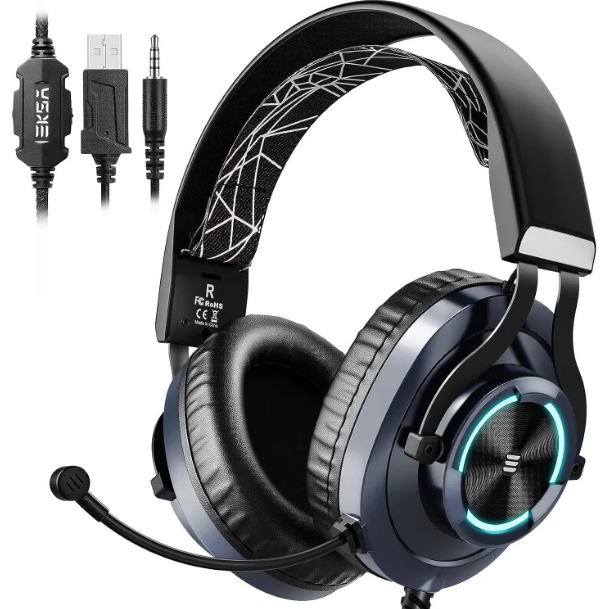
Eksa E3000 Gaming Headset
Introduction
The Eksa E3000 Gaming Headset is a high-performance audio accessory designed specifically for gamers seeking immersive sound quality and clear communication during their gaming sessions. Featuring advanced 50mm drivers and a noise-isolating microphone, the headset delivers crisp, powerful audio and crystal-clear voice transmission, making it ideal for competitive gaming, streaming, and online multiplayer experiences. Its ergonomic design ensures comfort during extended play periods, complemented by adjustable headbands and breathable ear cushions.
Key benefits include rich surround sound capabilities for enhanced in-game spatial awareness, plug-and-play compatibility with multiple platforms such as PC, PS4, PS5, Xbox One, and Nintendo Switch, and a durable built-in microphone with noise cancellation technology. The headset’s robust build quality and LED lighting effects add to its appeal among gaming enthusiasts who value both function and style.
Targeted primarily at serious gamers, streamers, and eSports competitors, the eksa E3000 excels in providing immersive audio feedback and reliable voice chat performance. It is also suitable for casual gaming and general multimedia use. The headset is typically priced in the mid-range segment, estimated between $50 and $70 USD, making it an affordable yet quality option readily available through major online retailers and gaming accessory stores.
Specifications
| Speaker size | 50mm | Microphone impedance | 2.2K |
| Impedance | 16Ω+15% | Directionality | omnidirectional |
| Sensitivity | 117dB+3dB | Cable length | 2.2M |
| Frequency range | 20-20KHz | LED working voltage | USB 5V |
| Microphone | Microphone 6.0x2.7mm | Working current | <200mA |
| Microphone sensitivity | 42dB±3dB | Headset jack | 3.5mm+USB |
Device Layout
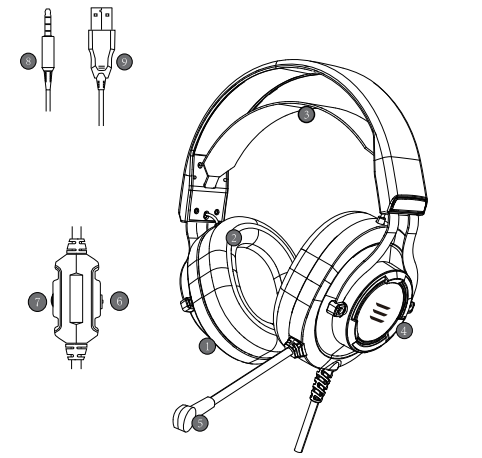
- 50mm audio speaker
- Protein leather earmuff
- Adjustable stretchy band
- Illuminating LED light
- Adjustable microphone
- Mic mute control button
- Audio volume control
- 3.5mm audio & mic plug
- USB connector for LED lights
Usage
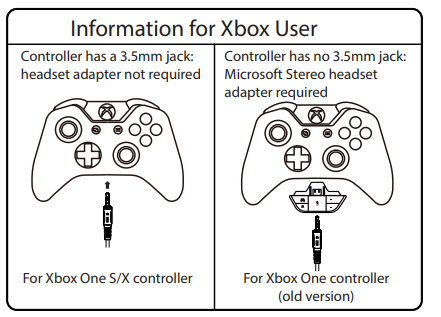
(Xbox One S/X)
To work with the old version of the Xbox One controller, you need a Microsoft adapter(sold separately). To work on the new version of the Xbox One S/X controller, you can directly connect the E3000 headset to o controller via the 3.5mm jack. Note: this headset isn’t compatible with Xbox 360.
Setup Guide for the eksa E3000 Gaming Headset
- Unbox the headset and check all components: headset, USB connector, 3.5mm audio cable, and user manual.
- Connect the headset using the USB cable to your PC or the 3.5mm jack for consoles and mobile devices.
- For PC, plug the USB into an available port; your system should automatically recognize the device and install necessary drivers.
- Adjust the headset comfortably with the adjustable headband and position the microphone near your mouth for optimal voice capture.
- Use the inline controls to adjust volume and mute the microphone as needed.
- Configure audio settings in your operating system or gaming console to set the eksa E3000 as the default playback and recording device.
- Troubleshooting tip: If no audio is heard, verify the headset is selected as the default device and check volume levels.
Safety Precautions: Avoid exposure to excessive volume levels to prevent hearing damage. Disconnect the headset when not in use to preserve battery life and device longevity.
Troubleshooting the eksa E3000 Gaming Headset
- No Sound Output: Check connection cables; ensure the USB/3.5mm plug is firmly inserted. Confirm the device is selected as the default audio output in system settings.
- Microphone Not Working: Verify microphone mute is off. Reposition the boom mic. Test the mic on another device to isolate the issue.
- Static or Interference Noise: Avoid using near other wireless devices. Use a different USB port or cable if possible.
- LED Lights Not Working: Confirm RGB feature is activated; some models allow software control or hardware toggle.
- Error Codes: No specific error codes reported; general USB driver update recommended if issues persist.
- Preventive Measures: Regularly clean ear cushions and connectors. Store in a protective case when not in use.
- Warranty & Support: eksa usually offers a 12-month warranty. For assistance, contact eksa customer support via their official website or authorized retailer channels.
Pros & Cons of the eksa E3000 Gaming Headset
Pros:
- Excellent Sound Quality: Rich, immersive audio ideal for gaming and multimedia.
- Comfortable Design: Adjustable headband and breathable ear pads suitable for long sessions.
- Versatile Connectivity: Supports PC, consoles, and mobile devices via USB and 3.5mm jack.
- Affordable Price: Competitive mid-range price offering great value.
- Effective Noise-Cancelling Mic: Clear communication for multiplayer gaming.
Cons:
- Wired Only: No wireless option limits mobility compared to some competitors.
- Limited Software Support: Lacks dedicated configuration software for advanced sound customization.
- Build Materials: Mostly plastic construction may affect long-term durability.
- LED Lighting Customization: Limited to preset modes without fine control.
Customer Reviews of the eksa E3000 Gaming Headset
Users praise the eksa E3000 Gaming Headset for its outstanding audio clarity and comfortable fit, often highlighting the headset’s value for money in the mid-tier market. Typical star ratings average around 4 to 4.5 out of 5 stars. Gamers appreciate the reliable microphone quality and ease of setup across multiple platforms. Common complaints focus on the lack of wireless connectivity and occasional discomfort after prolonged use, though many note the breathable ear cushions help mitigate this. Many customers recommend the eksa E3000 as an excellent budget-friendly gaming headset suitable for both casual and competitive players, especially those prioritizing sound performance over extra features.
Faqs
How do I set up the eksa E3000 Gaming Headset on PC and consoles?
What can I do if the microphone on my eksa E3000 Gaming Headset is not picking up sound?
Does the eksa E3000 Gaming Headset support noise cancellation, and how effective is it during gaming?
Can I use the eksa E3000 Gaming Headset with PS5 and Xbox One consoles?
How can I optimize the sound performance of my eksa E3000 Gaming Headset for competitive gaming?
What maintenance tips can prolong the lifespan of the eksa E3000 Gaming Headset?
Why does the RGB lighting on my eksa E3000 Gaming Headset not respond to controls?
What unique features make the eksa E3000 Gaming Headset suitable for long gaming sessions?
More eksa manuals
- Usage & Setup: Eksa E5 ANC Wireless Headphones User Manual
- Usage & Setup: Eksa Air Joy Stereo Sound Gaming Headset User Manual
- Usage: Eksa Air Joy Plus Gaming Headset User Manual
- Setup & Usage: Eksa E400 Headband User Manual
- Usage: Eksa E900 Plus Gaming Headset User Manual
- Setup & Usage: Eksa Air Joy Pro Gaming Headset User Manual
Leave a Comment