
Usage: Eksa Air Joy Plus Gaming Headset User Manual
Content
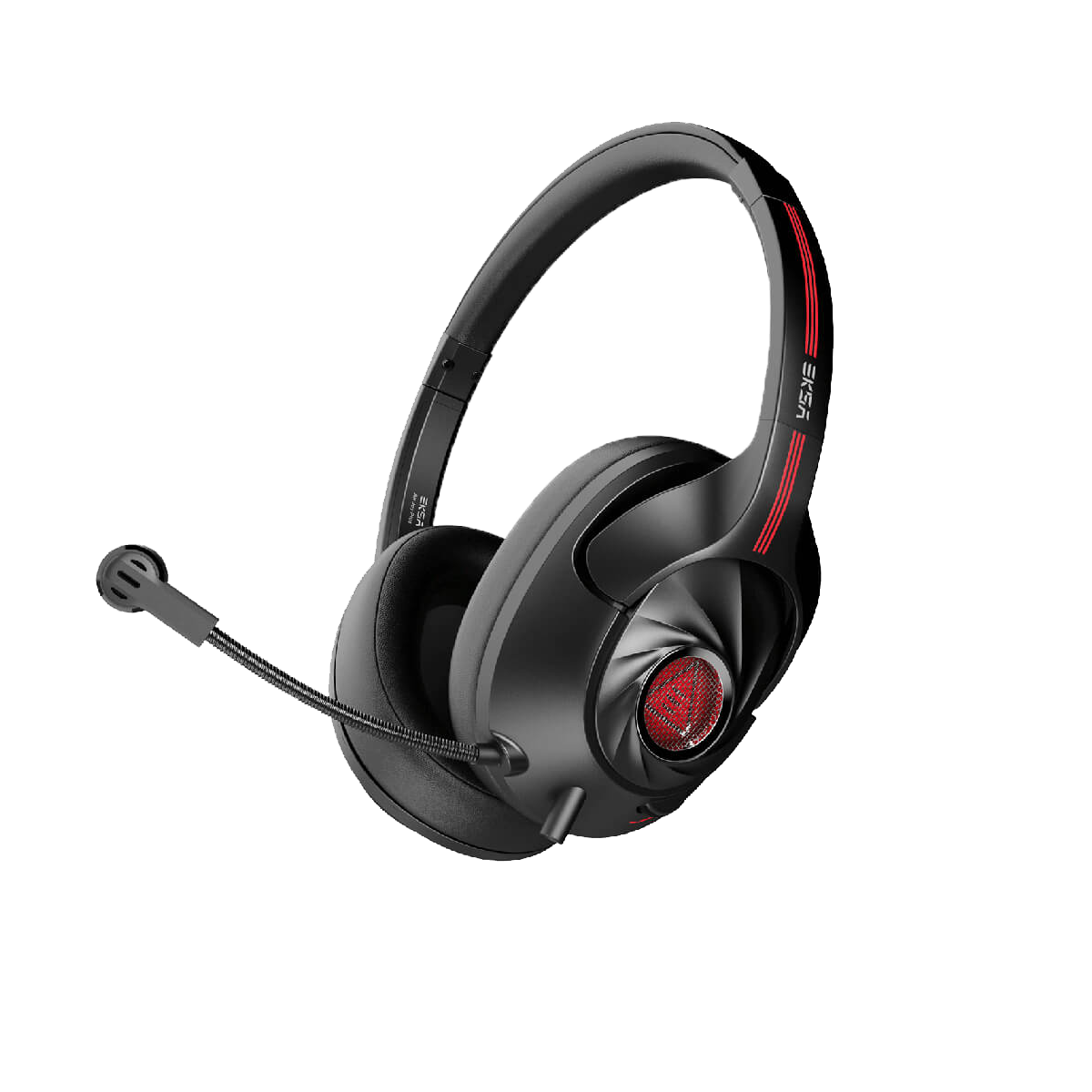
Eksa Air Joy Plus Gaming Headset
Introduction
The eksa Air Joy Plus Gaming Headset is a high-performance audio accessory designed to elevate your gaming experience with immersive sound and exceptional comfort. Engineered for gamers who demand clear communication, dynamic audio, and reliable connectivity, this headset offers a blend of advanced technology and user-friendly design. It features high-fidelity 50mm drivers that deliver crisp, balanced sound with deep bass, enhancing the intensity of gameplay, whether in fast-paced shooters, RPGs, or strategy games.
Its lightweight, ergonomic design with adjustable cushioned ear cups ensures long-lasting comfort during extended gaming sessions. The noise-isolating microphone with flexible positioning provides clear voice transmission for team coordination or streaming. Targeted at PC, PlayStation, Xbox, and Nintendo Switch gamers, the eksa Air Joy Plus is versatile for both casual and professional play.
With wireless Bluetooth connectivity and an included wired option, it supports seamless pairing across multiple devices. The headset comes with intuitive on-ear controls for volume and mic muting, allowing gamers to adjust settings without interrupting gameplay. Priced competitively within the mid-range gaming headset market, typically around $50 to $70, it offers excellent value for both beginner and serious gamers. Available through popular online retailers and specialty gaming stores, it is an accessible choice for enhancing your audio setup.
Parameter

- Driver Diameter: 40mm
- Impedance: 320+15%
- Sensitivity: 92+3dB
- Frequency Range: 20Hz-20KHz
- Weight: 204+10g

- Microphone Size: $6.0*2.7MM
- Microphone Sensitivity: -38+3dB
- Current: Maximum0.5mA
- Microphone Type: Unidirectional
- Type-C Cable Length: 2.0m/6.6ft
- USB Extension Cable Length: 0.8m/2.6ft
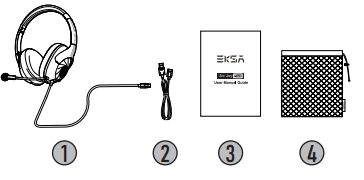
Package List
- EKSA Air Joy Plus Gaming Headset
- USB extension cable
- Operating Instruction
- Carry pouch
At a Glance
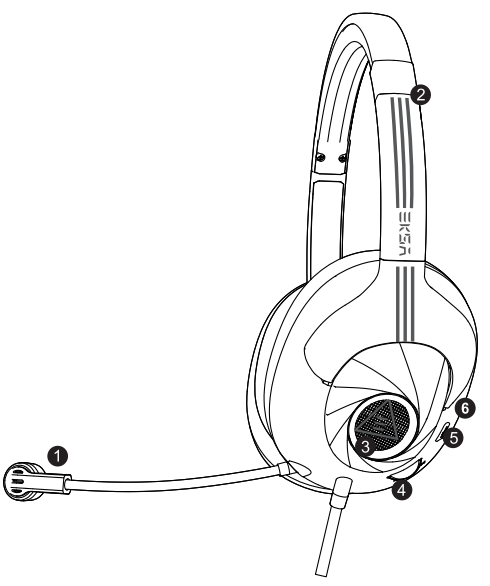
- Call microphone
- Adjustable headband
- LED Light
- Volume control
- Microphone mute button
- Noise-cancelling microphone
Features
Environmental Noise Cancellation
Environmental Noise Cancellation (ENC) employs a dual-mic noise-cancelling algorithm to achieve crystal-clear communications. Omnidirectional mic with embedded ENC chip collects sounds from all surroundings; unidirectional mic picks up only your voice.
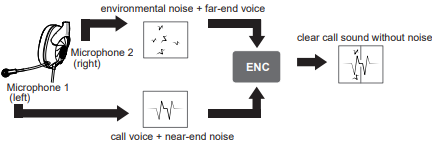
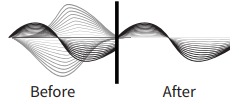
Through the dual-mic array, the position of the speaker's speech can be accurately calculated, to protect the voice of the target in the main direction and remove all kinds of interference in the environment. ENC can effectively suppress 90% of the negative environmental noise, can reduce the ambient noise up to 35dB, and make it easier for gamers to communicate freely.The beneficiary is the other side.
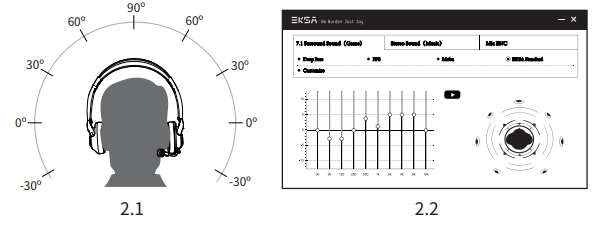
- For the convenience of players, this headset has a 7.1 surround sound function by default. Both Type-C and USB-connected devices can provide 7.1 surround sound.
- If you are a professional gamer and want to customize the sound effects, you can go to our official website (https://www.eksa.net/download) to download the driver. Freely configure the sound effects according to your habits. (Note: Our driver can only run on Windows systems)
Setup Guide for the eKSA Air Joy Plus Gaming Headset
- Charging: Use the included USB-C cable to fully charge the headset before first use (approx. 2 hours).
- Power On: Press and hold the power button until the LED indicator flashes, indicating the headset is on.
- Bluetooth Pairing: With the headset powered on, press and hold the Bluetooth button until the LED alternates colors, then select "eksa Air Joy Plus" from your device’s Bluetooth menu.
- Wired Connection: Connect the 3.5mm audio cable from the headset to your gaming device’s headphone port for instant audio without pairing.
- Adjust Fit: Customize the headband size and position the cushioned ear cups comfortably over your ears.
- Controls Usage: Use on-ear buttons to adjust volume, mute the microphone, and manage calls or media playback.
Troubleshooting Tips: If no sound is heard, verify the Bluetooth connection or check the 3.5mm cable connection. Ensure volume is not muted or set too low. If the microphone is not working, check mute status and reposition the boom mic closer to your mouth.
Safety Precautions: Avoid exposure to excessive moisture or extreme temperatures. Do not listen at high volumes for prolonged periods to prevent hearing damage.
Troubleshooting for the eksa Air Joy Plus Gaming Headset
- No Sound Output: Confirm the headset is fully charged and connected via Bluetooth or wired properly. Restart device and headset if necessary.
- Microphone Not Detected: Ensure the microphone is unmuted. Reconnect headset and check audio input settings on your device.
- Bluetooth Connection Issues: Clear Bluetooth cache on your device and re-pair. Keep headset within 10 meters of device without obstructions.
- Low Battery Warning: Charge headset immediately using the supplied USB-C cable to avoid sudden power loss.
- Audio Delay or Lag: Use wired connection for zero latency during competitive gaming.
Preventive measures include regular charging, keeping firmware updated if applicable, and storing the headset in a cool, dry place. The eksa Air Joy Plus comes with a standard 12-month warranty covering manufacturing defects. For further assistance, contact eksa customer support via their official website or authorized retailers.
Pros & Cons of the eksa Air Joy Plus Gaming Headset
- Pros:
- Excellent sound quality with clear highs and punchy bass suitable for immersive gaming
- Long wireless battery life up to 20 hours supports extended play sessions
- Comfortable ergonomic design with adjustable headband and soft ear cushions
- Dual connectivity (Bluetooth and wired) offers versatile device compatibility
- Affordable price providing strong value compared to similarly featured competitors
- Cons:
- Absence of advanced features like virtual surround sound or RGB lighting
- Microphone quality is good but may pick up some background noise in loud environments
- No dedicated software for sound customization or equalizer settings
- Bluetooth may experience occasional minor latency, impacting competitive gaming
Customer Reviews of the eksa Air Joy Plus Gaming Headset
Gamers widely praise the eksa Air Joy Plus Gaming Headset for its solid audio performance and comfort during long sessions. Many users highlight the headset’s clear microphone quality and stable Bluetooth connection as standout features. Common complaints include occasional latency in wireless mode and lack of customizable audio settings. Star ratings frequently hover around 4 out of 5, reflecting a positive overall experience.
One user noted, “Great headset for the price, very comfortable and the sound is crisp. Perfect for multiplayer games.” Another mentioned, “Mic is clear but picks up background noise sometimes, and I prefer wired for zero delay.” Most buyers recommend the headset for casual to mid-level gamers seeking reliable audio without breaking the bank.
Faqs
How do I set up the eksa Air Joy Plus Gaming Headset for the first time on PC and consoles?
What can I do if the microphone on my eksa Air Joy Plus Gaming Headset is not working properly?
Does the eksa Air Joy Plus Gaming Headset support 7.1 surround sound natively or via software?
Is the eksa Air Joy Plus Gaming Headset compatible with mobile devices and Nintendo Switch?
How can I optimize audio performance on the eksa Air Joy Plus Gaming Headset for FPS games?
What are the best practices for maintaining and cleaning the eksa Air Joy Plus Gaming Headset?
Why does the audio sometimes sound louder on the left side of the eksa Air Joy Plus Gaming Headset?
How does the noise-canceling microphone on the eksa Air Joy Plus Gaming Headset improve communication?
More eksa manuals
- Usage: Eksa E900 Plus Gaming Headset User Manual
- Usage & Setup: Eksa E5 ANC Wireless Headphones User Manual
- Usage & Setup: Eksa E800 Gaming Headset User Manual
- Usage & Setup: Eksa E3000 Gaming Headset User Manual
- Usage & Setup: Eksa E910 5.8GHz Wireless Gaming Headset User Manual
- Usage & Setup: Eksa Air Joy Stereo Sound Gaming Headset User Manual
Leave a Comment