
Usage: Eksa E900 Plus Gaming Headset User Manual
Content
Eksa E900 Plus Gaming Headset
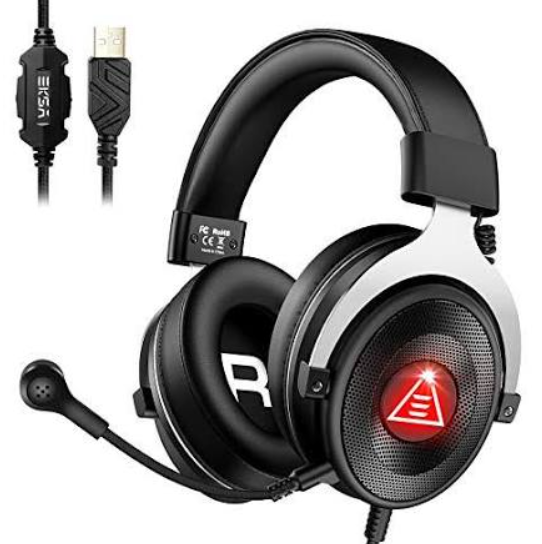
Introduction
The eksa E900 Plus Gaming Headset is designed to deliver an immersive audio experience tailored for gamers seeking comfort, crystal-clear sound, and advanced communication capabilities. Equipped with high-precision 50mm drivers and a noise-isolating microphone, the headset enhances in-game sound positioning and team chat clarity, making it ideal for competitive and casual gaming sessions alike.
This headset features adjustable RGB lighting, durable build quality with a reinforced headband, and memory foam ear cushions to ensure long-lasting comfort during extended play. Its plug-and-play compatibility with PCs, PlayStation, Xbox, and Nintendo Switch, via a 3.5mm jack, makes it versatile for multiple gaming platforms.
The eksa E900 Plus is targeted at gamers who prioritize both audio performance and comfort, including streamers and esports enthusiasts. It supports immersive surround sound simulation, enhancing the gaming atmosphere for FPS, RPG, and multiplayer online games.
Available at an estimated price range of $50 to $70, the eksa E900 Plus offers excellent value through a blend of performance, style, and comfort, readily found through major online retailers and select electronics stores.
Technical Specifications and Key Features
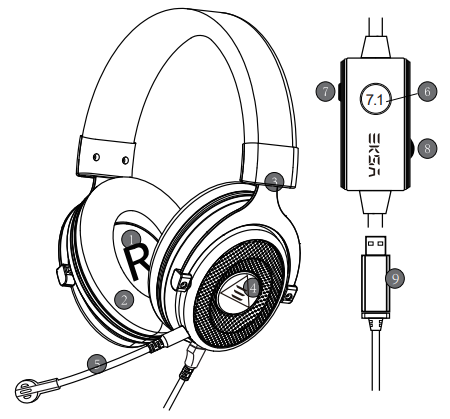
Overview
- 50mm audio speakers
- Protein leather memory foam earmuffs
- Self-adjustable headband
- Red LED light
- Detachable microphone
- 7.1 Surround sound button
- Mic mute control button
- Audio volume control wheel
- USB connector
Package Contents
- 1*EKSA E900 Plus Gaming Headset
- 1*User Guide
- 1*Detachable Mic
- 1*Leather Carry Pouch
Setup Guide for the EKSA E900 Plus Gaming Headset
- Connect the Headset: Plug the 3.5mm audio cable into your gaming device’s headphone port or controller jack.
- Adjust Fit: Extend the headband to fit comfortably over your head and position the memory foam ear cushions over your ears.
- Configure Audio Settings: On your device, set the audio output and input to the connected headset to enable sound and microphone functions.
- Control Volume and Mic: Use the inline volume wheel to adjust sound levels and the mute switch to toggle the microphone.
- Lighting Customization: Use the headset software or hardware button (if available) to configure RGB lighting effects.
Troubleshooting Tips: If no sound is heard, verify the connection and ensure device audio settings are correct. For microphone issues, check mute status and device permissions.
Safety Precautions: Avoid excessive volume levels to prevent hearing damage. Take breaks during long gaming sessions to reduce ear fatigue and ensure the headset fits securely but comfortably.
Troubleshooting Common Issues
- No Audio Output: Confirm the 3.5mm jack is fully inserted, and device volume is not muted. Restart the device if needed.
- Microphone Not Working: Check the microphone mute switch and device privacy settings. Test microphone on another device to isolate the problem.
- Distorted Sound: Inspect the cable for damage and avoid bending near connectors. Adjust equalizer settings on the gaming platform.
- RGB Lighting Not Responding: Ensure the power connection is secure. Reset the headset or update firmware via provided software.
Preventive measures include gently handling the cables and storing the headset in a safe place when not in use. The eksa E900 Plus typically comes with a 12-month manufacturer warranty covering defects and hardware failures.
For further support, contact eksa customer service through their official website or the retailer from which the headset was purchased.
Pros & Cons of the eksa E900 Plus Gaming Headset
- Pros:
- Excellent sound clarity with deep bass from 50mm drivers.
- Comfortable memory foam cushions support prolonged gaming sessions.
- Flexible noise-isolating microphone enables clear team communication.
- Customizable RGB lighting adds visual flair to gaming setups.
- Broad compatibility with PC and major consoles via a 3.5mm jack.
- Affordable price point offering strong value for money.
- Cons:
- Lacks wireless connectivity found in some competitors.
- RGB customization may require additional software or hardware not included.
- Inline controls are basic without advanced audio mixing features.
- Build quality, while durable, is mostly plastic rather than metal.
Compared to alternatives like the JBL Quantum 100 or Corsair HS70, the eksa E900 Plus is a strong choice for wired gamers who prioritize comfort and sound quality over wireless freedom, making it a budget-friendly option without significant compromises.
Customer Reviews and Feedback on the eksa E900 Plus Gaming Headset
Users consistently praise the eksa E900 Plus Gaming Headset for its comfortable fit and clear audio quality, highlighting the effective noise-isolating microphone as a key benefit during multiplayer communication. Average star ratings hover around 4 to 4.5 out of 5, with many recommending it for budget-conscious gamers seeking reliable performance.
Common complaints include the absence of wireless connectivity and occasional issues with RGB lighting setup, typically resolved via firmware updates or customer support. Several reviews mention the headset’s lightweight design reduces fatigue during extended use, while a few desire more advanced inline controls.
Overall, customers recommend the eksa E900 Plus for PC and console gamers who want a dependable wired headset with good sound and comfort, particularly at its competitive price point.
Faqs
How do I set up the eksa E900 Plus Gaming Headset for the first time on my PC?
What can I do if the microphone on my eksa E900 Plus Gaming Headset is not picking up my voice clearly?
Does the eksa E900 Plus Gaming Headset support 7.1 surround sound without extra software?
Is the eksa E900 Plus Gaming Headset compatible with gaming consoles like PS4, PS5, and Xbox?
How can I optimize audio performance on the eksa E900 Plus Gaming Headset for competitive gaming?
What maintenance steps should I follow to keep my eksa E900 Plus Gaming Headset in good condition?
Why is the red LED light on my eksa E900 Plus Gaming Headset not turning on?
Can I use the eksa E900 Plus Gaming Headset for both gaming and voice chat applications on my computer?
More eksa manuals
- Usage & Setup: Eksa E800 Gaming Headset User Manual
- Usage: Eksa Air Joy Plus Gaming Headset User Manual
- Usage & Setup: Eksa E910 5.8GHz Wireless Gaming Headset User Manual
- Usage & Setup: Eksa E5 ANC Wireless Headphones User Manual
- Setup & Usage: Eksa E5 BT 2.4 GHz Wireless Gaming Headset User Manual
- Usage & Setup: Eksa E3000 Gaming Headset User Manual
Leave a Comment