
Setup & Usage: Eksa E5 BT 2.4 GHz Wireless Gaming Headset User Manual
Content
Eksa E5 BT 2.4 GHz Wireless Gaming Headset
Introduction
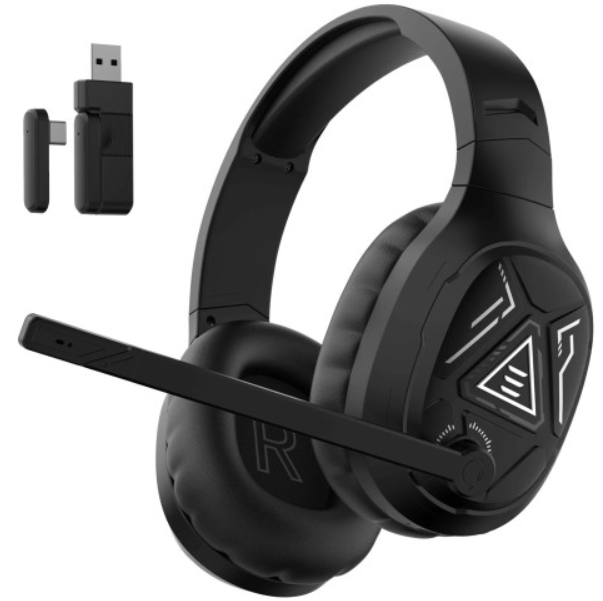
The Eksa E5 BT 2.4 GHz Wireless Gaming Headset offers a versatile and immersive audio experience tailored for gamers and multimedia enthusiasts. Equipped with a powerful 50mm driver and advanced wireless technology, this headset delivers clear, detailed 3D stereo sound that enhances gameplay, communication, and entertainment across multiple platforms.
Designed for comfort during extended sessions, the eksa E5 BT features ergonomic CloudSoft ear cushions and an adjustable headband, ensuring lasting wearability. Its standout feature is the 3-in-1 connectivity options—2.4 GHz wireless via USB dongle, Bluetooth 5.3, and wired 3.5mm mode—allowing seamless compatibility with PCs, PS4, PS5, Xbox, Nintendo Switch, Mac, and mobile devices.
With up to 52 hours of Bluetooth playback and 35 hours on 2.4 GHz wireless mode, the headset supports long gaming marathons without frequent recharging. Its competitive price range, typically around the budget to mid-tier segment, makes it an attractive choice for gamers seeking quality sound and flexibility without a premium cost. The eksa E5 BT is ideal for casual to serious gamers, streamers, and those who value multi-platform compatibility with solid audio performance.
Specifications of the eksa E5 BT 2.4 GHz Wireless Gaming Headset
- Speaker size: 50 mm
- Speaker impedance: 20 0
- Speaker frequency response: 20 HZ-20 kHz
- Speaker sensitivity: 113 dB
- Link distance: 15 m
- Microphone type: Condenser Mic
- Microphone pickup pattern: Omnidirectional
- Microphone sensitivity: -42 dB + 3dB
- Microphone impedance: 2.2 kl
- Bluetooth playback time: 52 h
- 2.4G playback time: 35 h
- Charging time: about 3 h
Compared to other budget gaming headsets, the eksa E5 BT stands out with its multi-mode connectivity and extended battery life, balancing performance and price effectively for gamers who need versatile use across devices.
Package Contents
- 1* EKSA E5 BT Wireless Headset
- 1* EKSA USB-A & Type C Adapter
- 1* Type-C Charging Cable
- 1* 3.5mm Audio Cable
- 1* Quick Start Guide Card
- 1* User Manual
Instructions for Use
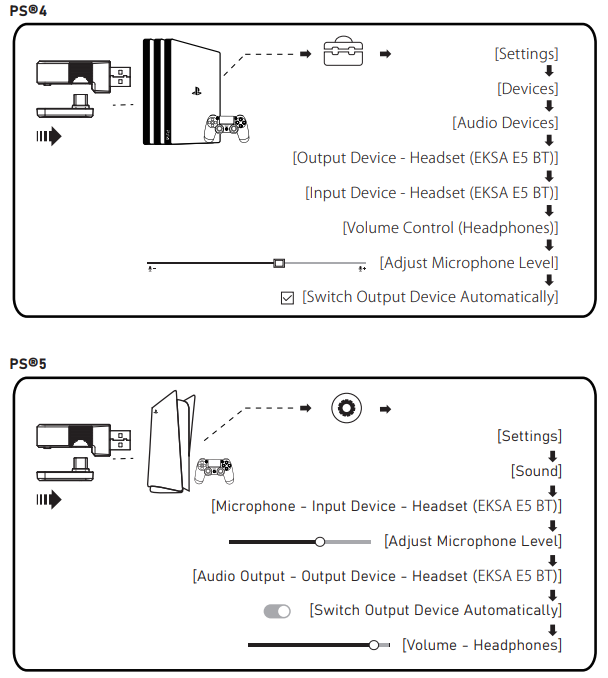
PS®4/PS®5: Simply connect your PS®4/PS®5 controller using the USB, Type-C, or 3.5mm audio cable. Then, follow the steps below to check the audio settings and ensure that your PS®4/PS®5 automatically switches audio for both playback and microphone.
Setup Guide for the EKSA E5 BT 2.4 GHz Wireless Gaming Headset
- Charging: Fully charge the headset via the included USB-C cable (about 3 hours) before first use.
- Power On: Press and hold the power button on the left earcup until the indicator light turns on.
- Connecting via 2.4 GHz Wireless: Plug the included USB dongle (choose a USB-A or USB-C adapter based on your device) into your PC or gaming console. Switch the headset connection mode to 2.4 GHz using the toggle switch on the left earcup.
- Connecting via Bluetooth: Switch the headset to Bluetooth mode. Enable Bluetooth on your device and search for “EKSA E5 BT.” Select it to pair. The headset supports Bluetooth 5.3 for stable connections.
- Wired Mode: Use a 3.5mm audio cable (not included) to connect directly for wired audio support.
- Controls: Use the intuitive volume wheel and microphone mute button on the left earcup for quick adjustments.
- Microphone Use: Flip down the boom mic to activate. Remember, flipping it up does not mute it—use the mute button for silence.
Troubleshooting Tips: If no audio or low volume occurs, ensure proper connection and volume settings on both headset and device. Check microphone mute status if voice communication fails.
Safety Precautions: Avoid exposure to water or extreme temperatures, do not overload the headset volume to protect hearing, and disconnect power when not in use for extended periods.
Troubleshooting for the eksa E5 BT 2.4 GHz Wireless Gaming Headset
- No Sound or Low Volume: Verify the headset is properly paired or connected. Check mute status on headset and device. Adjust volume levels accordingly.
- Microphone Not Working: Confirm mic is flipped down and not muted. Check device input settings and permissions.
- Connection Drops or Lag: Ensure no large obstacles or interference within a 15-meter range. Use 2.4 GHz mode for lower-latency gaming.
- Error Codes: No specific error codes, but power cycling the headset and reconnecting the device often resolves common issues.
- Preventive Measures: Keep firmware updated if available, charge regularly, and store in a dry, safe place.
Warranty & Support: The eksa E5 BT typically includes a limited manufacturer warranty. For assistance, contact eksa official support via their website or authorized retailers where purchased.
Pros & Cons of the eksa E5 BT 2.4 GHz Wireless Gaming Headset
Pros
- Multi-Platform Compatibility: Seamless connection to PC, consoles, and mobile devices via 2.4 GHz, Bluetooth, or wired modes.
- Long Battery Life: Up to 52 hours on Bluetooth, ideal for extended gaming or streaming sessions.
- Low-Latency Wireless: 2.4 GHz connection offers ultra-low latency (~20 ms), essential for competitive gaming.
- Comfortable Design: Ergonomic CloudSoft ear cushions provide comfort during prolonged use.
- Affordable Price: Offers solid performance at a budget-friendly price point compared to similar gaming headsets.
Cons
- Audio Quality: While clear and detailed for gaming, it lacks the depth and richness audiophiles might expect.
- Microphone Sensitivity: Adequate for gaming chat but may not satisfy users needing studio-grade vocal clarity.
- No Automatic Mic Mute: Flipping the mic up does not mute it; users must manually toggle mute.
- Build Materials: Mostly plastic construction which may feel less premium compared to higher-end headsets.
Customer Reviews of the eksa E5 BT 2.4 GHz Wireless Gaming Headset
Users praise the eksa E5 BT 2.4 GHz Wireless Gaming Headset for its versatile connectivity options and impressive battery life. Many gamers highlight its reliable low-latency wireless performance and comfort during long sessions. The 50mm drivers receive positive mentions for clear positional audio helpful in competitive gameplay.
Common complaints focus on the microphone’s average quality and the lack of automatic mute when flipping up the boom mic. Some users note the headset’s plastic feel but agree it aligns well with the affordable price.
Overall, customers rate the headset highly for value-for-money, recommending it for gamers seeking a flexible wireless headset without breaking the bank. Star ratings typically range between 4 and 4.5 out of 5, with repeat buyers appreciating the multi-device support and long battery endurance.
Faqs
How do I set up the eksa E5 BT 2.4 GHz Wireless Gaming Headset for the first time?
What should I do if the eksa E5 BT 2.4 GHz Wireless Gaming Headset has no audio or low volume?
Can the eksa E5 BT 2.4 GHz Wireless Gaming Headset be used with PS5, Xbox, and mobile devices?
How can I optimize the sound performance of the eksa E5 BT 2.4 GHz Wireless Gaming Headset for gaming?
What are the main features of the eksa E5 BT 2.4 GHz Wireless Gaming Headset that enhance comfort during long gaming sessions?
How long does the battery last on the eksa E5 BT 2.4 GHz Wireless Gaming Headset and how long does it take to charge?
How do I maintain and clean the eksa E5 BT 2.4 GHz Wireless Gaming Headset to ensure durability?
What should I do if the microphone on my eksa E5 BT 2.4 GHz Wireless Gaming Headset is not picking up sound clearly?
More eksa manuals
- Usage: Eksa Fenrir S Stereo Gaming Headset User Manual
- Usage & Setup: Eksa E910 5.8GHz Wireless Gaming Headset User Manual
- Setup: Eksa EM110 RGB Gaming Mouse User Manual
- Usage & Setup: Eksa E800 Gaming Headset User Manual
- How to Use: Eksa W1 RGB Headset Stand User Manual
- Usage: Eksa E900 Plus Gaming Headset User Manual
Leave a Comment