
Usage: Eksa Fenrir S Stereo Gaming Headset User Manual
Content
Eksa Fenrir S Stereo Gaming Headset
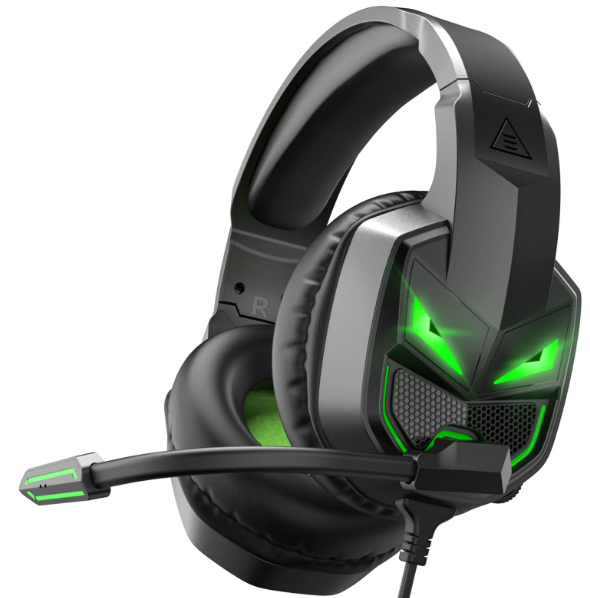
Introduction
The Eksa Fenrir S Stereo Gaming Headset is designed to deliver an immersive audio experience tailored for gamers seeking clear communication and rich sound quality. Equipped with powerful 50 mm drivers, it offers deep bass and crisp stereo surround sound, making it ideal for competitive gaming or casual play across platforms such as PC, Xbox Series X|S, Xbox One, PS4, and PS5. Its ergonomic design, including memory foam ear cushions and an adjustable headband, ensures comfort during extended gaming sessions. A key feature is the 120° rotatable noise-cancelling microphone that ensures clear voice transmission while minimizing background noise, enhancing team coordination and streaming quality.
Targeted at gamers who demand both performance and comfort, the eksa Fenrir S is suitable for multiplayer online games, streaming, and virtual meetings. It supports both USB and 3.5mm connectivity, offering versatile compatibility. Available globally through online retailers like Newegg and eBay, the headset is generally priced in the mid-range segment, roughly between $40 and $60 USD, making it a cost-effective choice for high-quality gaming audio.
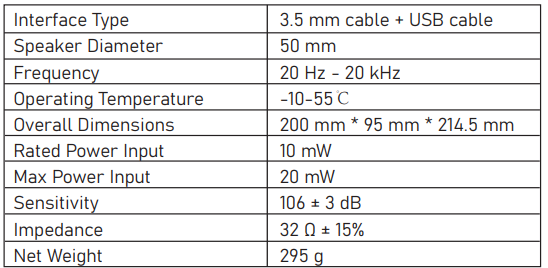
Specifications
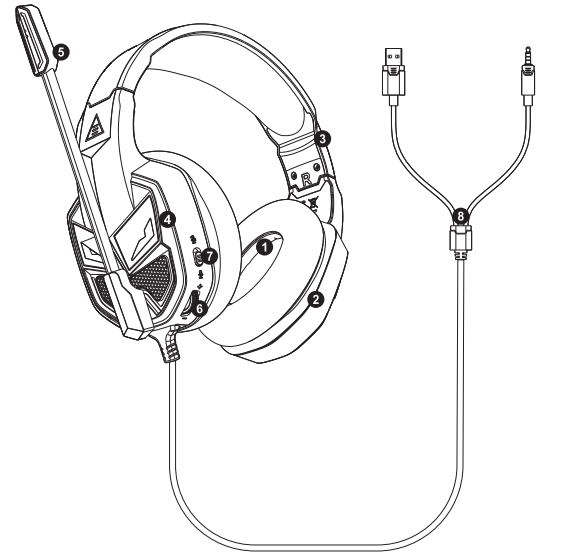
Product Overview
- 50 mm Audio Speaker
- PU Leather Earmuff
- Adjustable Headband
- LED Light
- Rotatable Microphone
- Volume Control Wheel
- Mic Mute Button
- 3.5mm Audio Cable + USB (only for LED lighting)
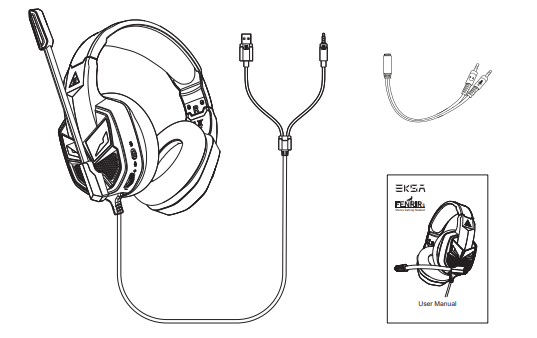
Packing List
- EKSA Fenrir S Gaming Headset
- Y Extension Cable
- User Manual
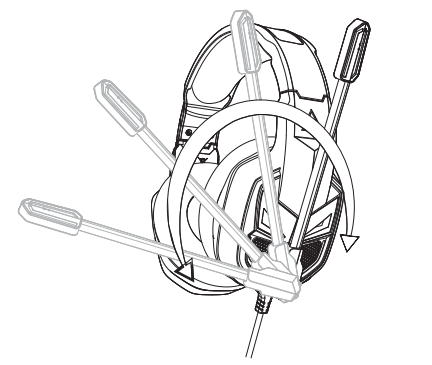
The microphone has a 120° flip-boom arm with which you can find the perfect angle to produce a clear audio. It is fitted with a noise reduction technology, thus eliminating the annoying background noises to collect your voice clearly.
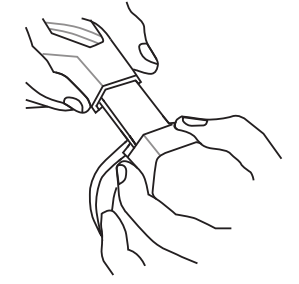
An adjustable headband allows you to enjoy a comfortable fit by adjusting it on either side of the headset.
Setup Guide for the eksa Fenrir S Stereo Gaming Headset
- Connect the headset to your device using the supplied USB cable or 3.5mm audio jack, depending on your platform.
- For PC users, ensure the headset is selected as the default audio playback and recording device via sound settings.
- Adjust the headband and position the ear cushions comfortably on your ears.
- Rotate the noise-cancelling microphone downward near your mouth for clear voice pick-up; rotate up to mute.
- Use the in-line volume control and mute switch on the headset cable or earcup to adjust sound levels and mute/unmute as needed.
Troubleshooting Tips: If no sound is heard, check connection ports and volume levels. Ensure drivers are updated for PC. For microphone issues, verify mute status and positioning. If echo or feedback occurs, lower volume or relocate the microphone slightly.
Safety Precautions: Avoid exposing the headset to extreme temperatures or moisture. Take periodic breaks during extended use to prevent ear fatigue or discomfort.
Troubleshooting Common Issues with eksa Fenrir S Stereo Gaming Headset
- No Sound Output: Verify secure USB or 3.5mm connection, check device audio settings, and test on another device.
- Microphone Not Working: Confirm the microphone is not muted, properly rotated down, and selected as the default input device.
- Audio Echo or Feedback: Reduce volume, reposition microphone away from speakers, or disable audio enhancements in OS settings.
- Device Not Recognized: Restart the device, try a different USB port, and update audio drivers if on PC.
Preventive measures include regular cable inspection for damage and keeping firmware or drivers updated if applicable. The eksa Fenrir S typically comes with a one-year limited warranty covering manufacturing defects. For support, users can contact eksa customer service via their official website or authorized retailers where the product was purchased.
Pros & Cons of the eksa Fenrir S Stereo Gaming Headset
- Pros:
- High-quality 50 mm drivers deliver clear, immersive stereo sound with strong bass response.
- Noise-cancelling microphone ensures clear communication, ideal for multiplayer gaming.
- Dual connectivity (USB + 3.5 mm) offers broad compatibility across various gaming platforms and devices.
- Ergonomic design with memory foam cushions supports comfortable long gaming sessions.
- Affordable price point provides excellent value compared to premium gaming headsets.
- Cons:
- Lacks customizable equalizer presets or advanced audio tuning features found in higher-end models.
- Microphone echo reported by some users, potentially requiring adjustments or environment tuning.
- No wireless connectivity option, restricted to wired use only.
- Does not include an adapter for older Xbox One models that require it.
Overall, the eksa Fenrir S balances performance and affordability well, making it a reliable choice for gamers who prioritize sound quality and comfort without a premium price tag.
Customer Reviews of the eksa Fenrir S Stereo Gaming Headset
Users generally praise the eksa Fenrir S for its sound clarity and comfortable fit during long gaming sessions. Many highlight the effective noise-cancelling microphone and versatile connectivity as major positives. Typical star ratings average around 4 out of 5 stars on retail platforms, reflecting overall satisfaction.
Common complaints focus on occasional microphone echo and lack of wireless functionality. Some users recommend adjusting microphone placement or volume settings to mitigate echo issues. Despite these minor drawbacks, most customers recommend the headset for PC and console gaming, citing excellent value for money and robust build quality.
Testimonials often emphasize improved game immersion and clear team communication, making the eksa Fenrir S a favored option among budget-conscious gamers seeking a dependable stereo gaming headset.
Faqs
How do I set up the eksa Fenrir S Stereo Gaming Headset for the first time on PC and Mac?
What should I do if the microphone on my eksa Fenrir S Stereo Gaming Headset is not working?
Can the eksa Fenrir S Stereo Gaming Headset be used with consoles like Xbox Series X or PS5?
How does the noise-cancelling microphone on the eksa Fenrir S Stereo Gaming Headset improve voice communication?
What are the key audio features of the eksa Fenrir S Stereo Gaming Headset that enhance gaming performance?
How can I adjust the eksa Fenrir S Stereo Gaming Headset for maximum comfort during long gaming sessions?
What maintenance tips can help prolong the life of my eksa Fenrir S Stereo Gaming Headset?
Why is the volume control wheel on the eksa Fenrir S Stereo Gaming Headset useful during gameplay?
More eksa manuals
- Setup: Eksa EM110 RGB Gaming Mouse User Manual
- Setup & Usage: Eksa E5 BT 2.4 GHz Wireless Gaming Headset User Manual
- How to Use: Eksa W1 RGB Headset Stand User Manual
- Usage & Setup: Eksa E910 5.8GHz Wireless Gaming Headset User Manual
- Setup: Eksa EM500 Superlight Gaming Mouse User Manual
- Usage & Setup: Eksa E800 Gaming Headset User Manual
Leave a Comment