
How to Use: Eksa W1 RGB Headset Stand User Manual
Content
Eksa W1 RGB Headset Stand
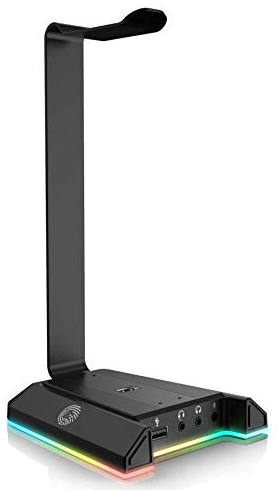
Introduction
The eksa W1 RGB Headset Stand is a stylish and practical accessory designed to enhance any gaming or desktop setup. This headset stand not only provides a dedicated, secure place to store your headset but also features customizable RGB lighting to add vibrant ambiance matching your gaming rig or workspace. Its sleek and modern design blends functionality with aesthetics, making it ideal for gamers, streamers, and tech enthusiasts looking to organize their gear while showcasing their personal style.
Key benefits include sturdy construction for reliable headset support, integrated USB 2.0 ports for convenient device connectivity, and a wide RGB spectrum allowing seamless synchronization with other RGB peripherals. The eksa W1 RGB Headset Stand targets users who demand both performance and style, catering to gamers and professionals who want to keep their desks tidy without sacrificing visual flair.
Typically priced in the range of $25 to $40, this headset stand is widely available through online retailers and electronics stores, offering solid value for a premium RGB accessory. With easy plug-and-play functionality and durable build quality, the eksa W1 RGB Headset Stand is a versatile choice for modern setups.
Specifications of the eksa W1 RGB Headset Stand
- Dimensions: Approx. 9.5" height x 4" width x 6" depth
- Material: High-grade ABS plastic with metal base for stability
- RGB Lighting: Full-spectrum customizable LED lights with multiple modes (static, breathing, cycling)
- USB Ports: Dual USB 2.0 ports for charging or data transfer
- Connectivity: USB 2.0 interface, plug-and-play support, compatible with Windows and macOS
- Weight Capacity: Supports headsets up to 1.5 lbs securely
- Power: Powered via the included USB cable, no external adapter necessary
- Additional Features: Cable management clip on the back, anti-slip rubber base
Compared to similar products like the Corsair ST100 or Rampage T14, the eksa W1 RGB offers competitive RGB customization and dual USB ports at a more affordable price point, making it an excellent choice for budget-conscious users who still want quality RGB effects.
Overview
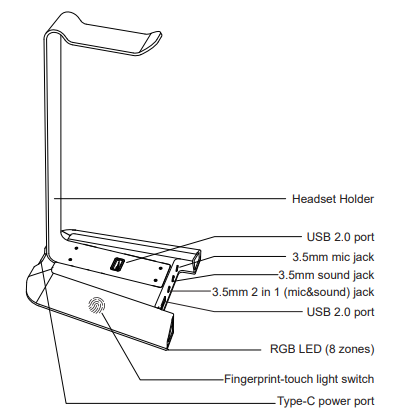
Package Contents
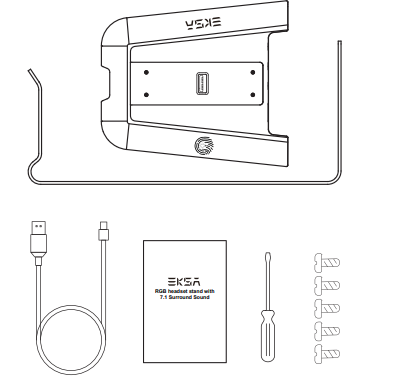
- 1 X EKSA RGB headset stand holder
- 1 X EKSA RGB headset stand base
- 1 x USB cable, 1.8m
- 1 x Screwdriver
- 5 x Screws (1*Screw for Spare Screw)
- 1 x User manual guide
How To Install
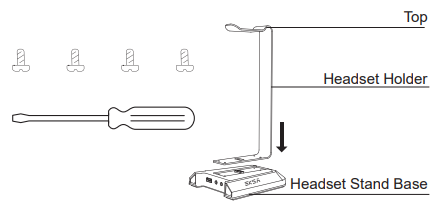
- Get 4 screws out to connect the holder and the base. (Remain 1"spare screw for replacement)
- Mount the 4 screws into the screw hole with a screwdriver
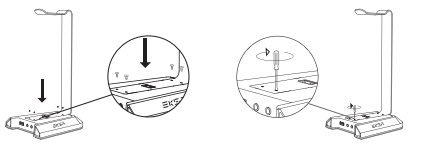
Setup Guide for eksa W1 RGB Headset Stand
- Unbox the eksa W1 RGB Headset Stand and connect the included USB cable to the rear USB port of the stand.
- Plug the other end into an available USB 2.0 port on your PC or laptop to power the RGB lights and enable USB passthrough ports.
- Place your headset onto the stand's holder securely.
- Use the dual USB ports on the stand to connect peripherals such as your mouse or charge devices.
- Customize the RGB lighting by pressing the lighting mode button located discreetly on the base to cycle through color modes and brightness settings.
- For any advanced lighting synchronization, use compatible RGB software supported by your PC.
Troubleshooting tips: If the RGB lights do not turn on, verify the USB cable connection and try plugging into a different USB port. Ensure your PC is powered on and the USB ports are active.
Safety precautions: Avoid exposure to liquids, keep the stand on a stable surface, and do not overload USB ports beyond their rated current to prevent damage.
Troubleshooting eksa W1 RGB Headset Stand Issues
- RGB lighting not working: Check USB connection, try restarting your PC, or test with another USB port.
- USB ports unresponsive: Ensure drivers are updated, disconnect and reconnect the USB cable, and verify USB hub functionality on your computer.
- Headset slipping off stand: Confirm headset weight is within supported range; use the anti-slip pad provided or adjust placement.
- Error codes: The eksa W1 RGB does not display error codes; issues are generally hardware connectivity related.
- Preventive measures: Regularly clean dust off ports and cables; avoid bending USB cables excessively.
The eksa W1 RGB Headset Stand comes with a one-year limited warranty covering manufacturing defects. For further assistance, contact eksa's customer support via their official website or authorized sellers.
Pros & Cons of the eksa W1 RGB Headset Stand
- Pros:
- Affordable RGB headset stand with vivid lighting effects
- Dual USB 2.0 ports add practical connectivity
- Sturdy build with anti-slip base ensures headset safety
- Easy plug-and-play setup without software installation
- Compact design fits well in most gaming and workstations
- Cons:
- USB 2.0 ports may be slower compared to USB 3.0 competitors
- Limited advanced RGB software integration for some users
- No dedicated cable management beyond a basic clip
- Supports only lighter headsets; heavy models may feel unstable
Overall, the eksa W1 RGB Headset Stand offers great value for users who want a stylish, functional stand with RGB flair without breaking the bank. Alternative stands like the Corsair ST100 provide more features but at a premium price, making the eksa W1 RGB an excellent budget-friendly option.
Customer Reviews of eksa W1 RGB Headset Stand
Users frequently praise the eksa W1 RGB Headset Stand for its vibrant RGB lighting and stable headset support, with many highlighting its positive impact on desk organization and aesthetic appeal. Common compliments include easy setup and the usefulness of the dual USB ports for connecting peripherals.
On the downside, some customers note that the USB 2.0 ports limit data transfer speeds and desire more advanced RGB customization options. A few users mention the stand’s limited weight capacity, advising caution with heavier headsets. Overall, the product averages a 4.3 out of 5 stars, with repeated purchase recommendations for casual gamers and desktop enthusiasts seeking an affordable, visually appealing headset stand.
Faqs
How do I set up the eksa W1 RGB Headset Stand for the first time?
What should I do if the 7.1 virtual surround sound on the eksa W1 RGB Headset Stand is not working?
Can the eksa W1 RGB Headset Stand charge other devices while in use?
Is the eksa W1 RGB Headset Stand compatible with all headphone types?
How do I customize the RGB lighting on the eksa W1 RGB Headset Stand?
What materials is the eksa W1 RGB Headset Stand made from, and how does this affect its durability?
How can I maintain and clean my eksa W1 RGB Headset Stand to ensure longevity?
What are the benefits of using the eksa W1 RGB Headset Stand for gaming performance?
Tags
More eksa manuals
- Setup: Eksa EM500 Superlight Gaming Mouse User Manual
- Setup: Eksa EM110 RGB Gaming Mouse User Manual
- Usage : Eksa EM600 RGB Gaming Mouse User Manual
- Usage: Eksa Fenrir S Stereo Gaming Headset User Manual
- Setup & Usage: Eksa E5 BT 2.4 GHz Wireless Gaming Headset User Manual
- Usage & Setup: Eksa E910 5.8GHz Wireless Gaming Headset User Manual
Leave a Comment