
Usage & Setup: Eksa E910 5.8GHz Wireless Gaming Headset User Manual
Content
Eksa E910 5.8GHz Wireless Gaming Headset
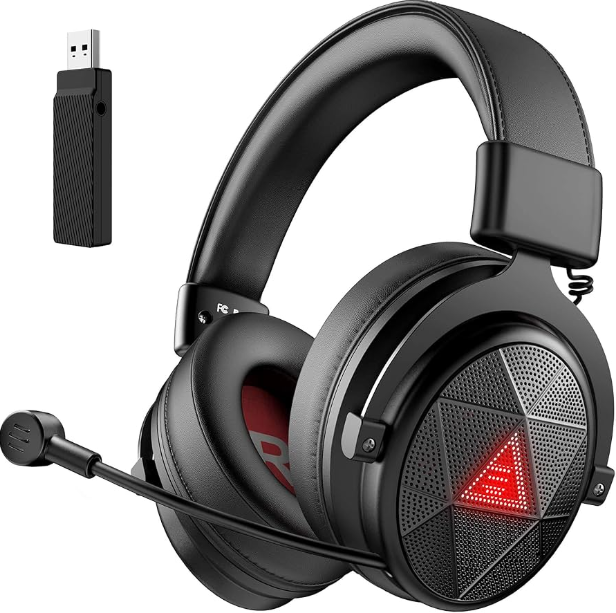
Introduction
The Eksa E910 5.8GHz Wireless Gaming Headset is designed to deliver an immersive, high-fidelity audio experience tailored specifically for gamers seeking freedom from wired constraints without compromising sound quality. Utilizing a 5.8GHz wireless connection, the headset avoids typical Bluetooth latency issues, ensuring low-latency, stable connectivity that is crucial for competitive gaming scenarios. Its ergonomic design caters to long gaming sessions, providing comfort alongside superior audio performance.
Key benefits of the eksa E910 include crystal-clear surround sound with powerful bass, a noise-isolating adjustable microphone for clear communication, and extensive compatibility with PCs, consoles such as PlayStation and Xbox, and mobile devices. This headset is ideal for both casual and professional gamers, streamers, and esports enthusiasts who demand precise sound cues and hassle-free wireless operation.
Priced in the mid-range segment, typically around $50–$70, the eksa E910 offers excellent value for gamers looking for premium features without a premium price. It is widely available online and in gaming accessory stores, making it accessible to a broad audience seeking to upgrade their gaming audio setup.
Overviews
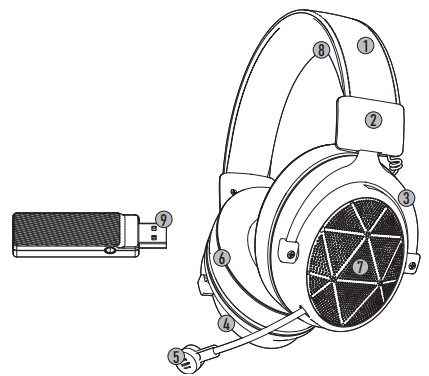
- Headband: PU Leather + Stainless Steel
- Head Clip: ABS
- Fork: Aluminum Alloy
- Shell: ABS
- Stretchable Mic: ABS
- Earmuffs: PU Leather Memory Foam
- LED Light: Red EKSA Logo
- Headband: Protein Leather Memory Foam
- 5.8GHz USB Dongle
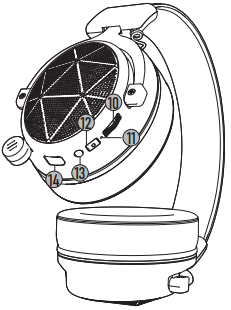
- Volume Control Wheel: Volume Up/Down
- LED Indicator
- Mic Mute Button
- Power Button: Headphones on/Headphones off
- Charging Port: Type-C
Specifications
Headphone Parameters:
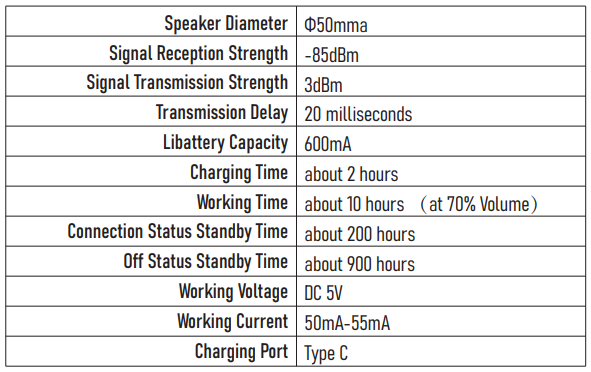
USB Dongle Parameters:
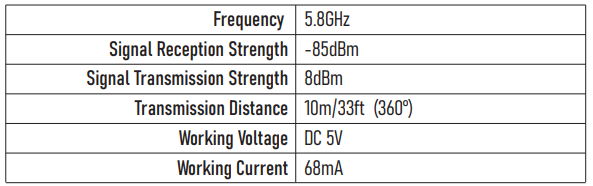
Speaker Parameters:
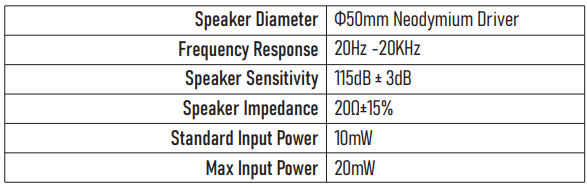
Microphone Parameters:

Package Includes
- 1* EKSA E910 Wireless Gaming Headset
- 1* 5.8G USB Dongle
- 1* Leather Carry Pouch
- 1* Type C Charging Cable
- 1* User Manual
How to Use
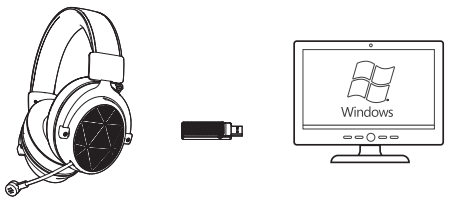
Usage on Windows 7/8/10 PC
Plug the 5.8G USB Dongle into any USB port that works normally on the PC, or connect it to a long USB cable. The headset will automatically pair when it is turned on. Then you can use it without installing any drivers.
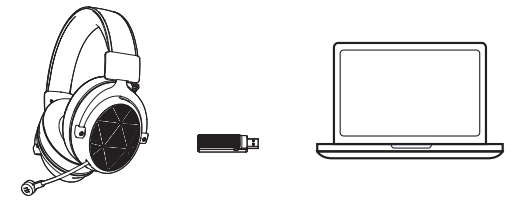
Usage on Laptop
Step 1:
- Insert the 5.8G USB Dongle into the USB port on the Laptop;
- Open your "Sound" settings from "Control Panel" and select "Hardware and Sound", then select "Sound". (You can also right-click your sound icon on the system tray and select Playback devices).
Step 2:
- In the Playback tab, select "USB Audio Devices" from the list and click "Set as Default Device".
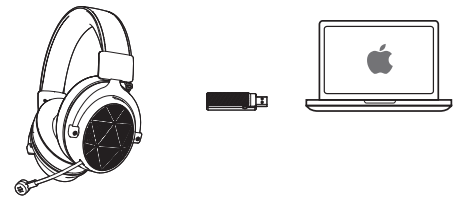
Usage on Mac/ Mac OS
- Step 1: Insert the 5.8G USB Dongle into the USB port on Mac;
- Step 2, In "System Preferences", click on the "Sound" icon;
- Step 3, Click on the Input tab and select the "USB Audio Device" for default sound input;
- Step 4, Click on the Output tab and select the "USB Audio Device" for default sound output;
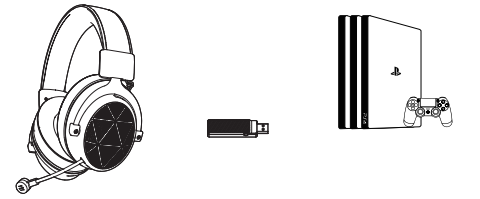
Usage on PS4/PS5
Insert the 5.8G USB Dongle directly into the PlayStation 4 Console and follow these steps:
- Step 1, Navigate to the Settings Menu and select it;
- Step 2, Highlight the "Devices" menu option and select it;
- Step 3, Scroll down to "Audio Devices" and select it;
- Step 4, Choose "Output to Headphones" and select "All Audio";
Setup Guide for eksa E910 5.8GHz Wireless Gaming Headset
Setting up your eksa E910 headset is straightforward and user-friendly. Follow these steps for optimal configuration:
- Charge the headset fully before first use using the included USB charging cable.
- Plug the wireless USB dongle into an available USB port on your PC, console, or compatible device.
- Power on the headset by pressing and holding the power button for 3 seconds until the LED indicator lights up.
- The headset will automatically pair with the dongle; a beep confirms a successful connection, and the LED will show a solid blue light.
- If pairing fails, press the power button five times rapidly to enter dongle pairing mode, then reconnect.
- Adjust volume and mute the microphone using the on-ear controls as needed.
Troubleshooting Tips: If you experience connectivity issues, ensure no other devices are operating on the 5.8GHz band nearby. Restart both the headset and the dongle. For audio glitches, verify sound settings on your device and update audio drivers if necessary.
Safety Precautions: Avoid exposing the headset to moisture or extreme temperatures. Disconnect and power off when not in use to preserve battery health.
Troubleshooting for Common Issues with eksa E910 5.8GHz Wireless Gaming Headset
- No Sound or Microphone Not Working: Check device audio settings to ensure the eksa E910 is selected as the default input/output device. Re-pair the headset if needed.
- Connectivity Drops or Interference: Keep the dongle and headset within 15 meters and free from obstructions. Avoid competing 5.8GHz wireless devices nearby.
- Battery Not Charging: Use the original USB cable and charger. Inspect for damage and try a different power source.
- Error Codes: The eksa E910 does not display specific error codes; troubleshooting relies on LED indicator patterns (e.g., flashing red for low battery).
Preventive tips include regular charging cycles and proper storage. The headset includes a 12-month warranty covering manufacturing defects. For support, contact eksa customer service via their official website or authorized retailers.
Pros and Cons of eksa E910 5.8GHz Wireless Gaming Headset
Pros
- Low-latency 5.8GHz wireless connection reduces input lag compared to Bluetooth alternatives.
- Comfortable design suitable for long gaming sessions
- Good audio clarity and microphone quality for clear communication
- Affordable price with features comparable to higher-end models
- Wide compatibility across multiple gaming platforms
Cons
- Battery life (around 10 hours) may require frequent charging for heavy users
- Wireless dongle required, which can be lost or damaged
- Limited advanced sound customization compared to premium brands
- Build quality is solid but uses mostly plastic components
Overall, the eksa E910 5.8GHz Wireless Gaming Headset offers excellent value for gamers prioritizing wireless freedom and sound quality without the high cost of premium models like SteelSeries or Astro.
Customer Reviews of eksa E910 5.8GHz Wireless Gaming Headset
Users commonly praise the eksa E910 for its reliable wireless connection and comfort during extended gaming sessions. Many highlight the clarity of the microphone and the ease of setup as key positives. The average star rating hovers around 4 out of 5, reflecting solid user satisfaction.
Frequent complaints include the relatively shorter battery life compared to some competitors and occasional minor audio dropouts in environments crowded with wireless signals. Several users recommend the headset for budget-conscious gamers who want a wireless option with good performance.
Testimonials often note the headset’s great value and compatibility with multiple devices, making it a versatile choice for cross-platform gaming.
Faqs
How do I set up the eksa E910 5.8GHz Wireless Gaming Headset for the first time?
What should I do if my eksa E910 5.8GHz Wireless Gaming Headset has no sound or connectivity issues?
Can I use the eksa E910 5.8GHz Wireless Gaming Headset with Xbox and PlayStation consoles?
What are the key audio features of the eksa E910 5.8GHz Wireless Gaming Headset for gaming?
How long does the battery last on the eksa E910 5.8GHz Wireless Gaming Headset, and how should I charge it?
Why is the eksa E910 5.8GHz Wireless Gaming Headset's microphone sometimes muffled or distorted?
How can I switch between stereo and 7.1 surround sound modes on the eksa E910 headset?
What maintenance tips will help prolong the lifespan of my eksa E910 5.8GHz Wireless Gaming Headset?
More eksa manuals
- Setup & Usage: Eksa E5 BT 2.4 GHz Wireless Gaming Headset User Manual
- Usage & Setup: Eksa E800 Gaming Headset User Manual
- Usage: Eksa Fenrir S Stereo Gaming Headset User Manual
- Usage: Eksa E900 Plus Gaming Headset User Manual
- Setup: Eksa EM110 RGB Gaming Mouse User Manual
- Usage: Eksa Air Joy Plus Gaming Headset User Manual
Leave a Comment