
Usage & Setup: Eksa E5 ANC Wireless Headphones User Manual
Content
EKSA E5 ANC Wireless Headphones
Introduction
The EKSA E5 ANC Wireless Headphones are designed to deliver immersive audio experiences with advanced active noise cancellation technology, making them an excellent choice for music lovers, gamers, remote workers, and frequent travelers. These over-ear headphones combine crystal-clear sound quality, a robust battery life, and ergonomic comfort for prolonged use. The active noise cancellation (ANC) feature reduces ambient noise by up to 25 dB, enabling users to enjoy undisturbed audio whether in noisy offices, public transport, or busy urban environments.
Key benefits include a powerful 40mm driver delivering rich bass and clear highs, Bluetooth 5.0 connectivity for stable wireless performance, and a substantial 920mAh battery that supports up to 40 hours of playback with ANC enabled. The headphones also support wired AUX connection for versatility when battery power is low. With adjustable ear cups and a foldable design, the EKSA E5 is built for comfort and portability.
Targeted at tech enthusiasts, gamers, music aficionados, and professionals seeking reliable noise-cancelling headphones, the EKSA E5 ANC fits a variety of use cases including streaming, gaming, conference calls, and travel. The headphones generally retail within an affordable mid-range price bracket, making them accessible to budget-conscious consumers while still offering premium features.
Specifications
Indicator Light
- Pairing: Red and blue light flash alternately
- Paired: Blue light flashes
- Playing: Slow flashes blue light
- Charging: Red light on
- Full Charge: Red light turns off
- Battery Low: Red light flashes with voice prompt
- ANC Working: Green Light turns on
Technical Specification
- Product Name: E5
- Bluetooth Version: V5.0
- Battery Capacity: 920mAh
- Input: 5V 470mA
- Bluetooth Chipset: QCC3003
- Noise Reduction Depth: -20~-25dB
- Speaker: $40 mm
- Charging Time: About 2.5 hours
- Using Time I: 40 hours (ANC+BT)
- Using Time 2: 60 hours (BT only)
- Using Time 3: 154 hours (ANC only)
- Bluetooth Profile: A2DP AVRCP HFP HS SPP DID PXP FM BAS
- Bluetooth Range: 10m/33ft
- Net Weight: 250g
- Impedance: 320
- Driver Diameter: 40mm
- Frequency Response: 20Hz-20kHz
Compared to similar wireless ANC headphones in its price range, the EKSA E5 offers one of the longest battery lives with active noise cancellation, along with fast USB-C charging and a robust Bluetooth 5.0 connection. Its ANC depth of up to 25dB effectively competes with other mid-tier ANC headphones.
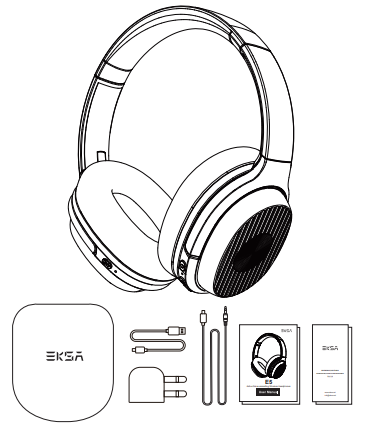
What’s in the box
How to use
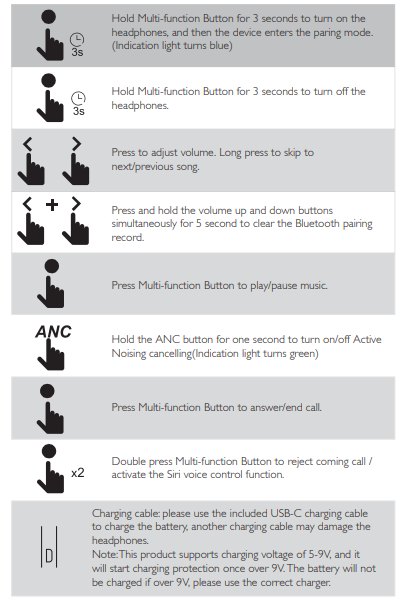
Functions
Easy Pairing
- Hold the power button for 3 seconds to turn on the headphones, and then the device enter paring mode.
- Keep the headphones and your Bluetooth device as close as possible during the pairing process.
- Turn on the Bluetooth function of your Bluetooth device. Search for the headphones' Bluetooth signal on your Bluetooth device, and select “E5” to pair it with your Bluetooth device. The Indicator Light slowly flashes blue when the headphones pair successfully.
- If you are asked for the Password/PIN code during the pairing procedure, enter “0000” (four zeros).
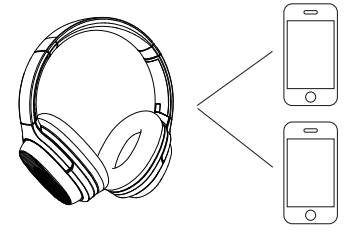
Pair to The Second Bluetooth Device
- Make sure the headphones have been connected to the first Bluetooth device successfully. And the headphones are not playing music.
- Turn off the first device’s Bluetooth.
- Turn on the second device’s Bluetooth, find the “E5” model name, and select it to pair with your device.
- Turn on the first device’s Bluetooth and select “E5”; pair it again.
Restore factory setting
Press and hold the volume up and down buttons simultaneously for 5 seconds to clear the Bluetooth pairing record.
NOTE: EKSA E5 only has one audio channel;, if you want to play music from another Bluetooth device, please pause the current device's music first.
ANC-Active Noise Cancelling : Turn on ANC: Hold the ANC button for one second, and the ANC Indicator light turns green.
Turn off ANC:
- Hold the ANC button for one second, and the ANC Indicator turns off.
- AUX Wired Connection: The headphones support AUX input for wired external audio source connection.
- Simply Power Off the headphones and plug in the audio cable.
(Note: Wired mode is not available when the headphones run out of battery)
NOTE: The buttons and microphone on EKSA E5 will not work when connected as wired headphones.
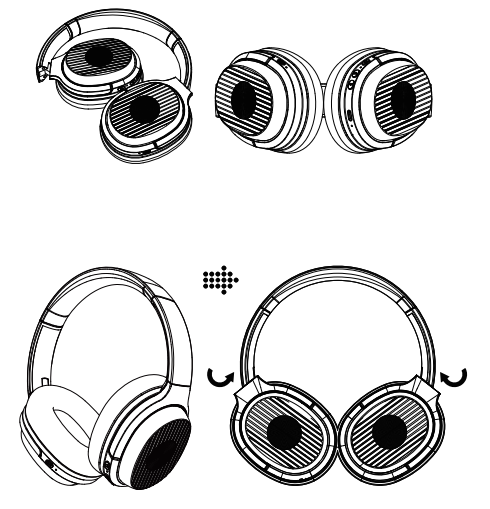
Collapsible Design
Setup Guide for EKSA E5 ANC Wireless Headphones
- Power On: Press and hold the power button until the LED flashes blue and red, indicating the headphones are in pairing mode.
- Pairing: On your Bluetooth device, select “EKSA E5” from the available devices list. The LED will flash blue when connected.
- Activating ANC: Hold the ANC button for one second to toggle noise cancellation on (green LED on) or off (LED off).
- Wired Mode: Power off the headphones before connecting a 3.5mm AUX cable to use in wired mode; note that the microphone and buttons are disabled in this mode.
- Charging: Connect the headphones to a USB-C charger (5V, 470mA recommended) for about 2.5 hours. Charging indicator shows red; turns off when fully charged.
Troubleshooting Tips: If pairing fails, reset the headphones by turning off and then on again. Ensure devices are within 10 meters for optimal Bluetooth connectivity. In wired mode, ensure the headphones are powered off before connecting the AUX cable.
Safety Precautions: Avoid exposing the headphones to excessive moisture or heat. Do not charge with a voltage exceeding 9V to prevent damage. Use only the supplied or equivalent USB-C cables for charging.
Troubleshooting Common Issues with EKSA E5 ANC Wireless Headphones
- No Sound or Low Volume: Check device volume and mute settings. Ensure the correct device is connected via Bluetooth or wired AUX. Reset connection if needed.
- ANC Not Working: Confirm ANC is toggled on via the ANC button. Battery levels must be sufficient to activate ANC.
- Bluetooth Connection Drops: Keep within 10 meters of the device without obstacles. Restart headphones and device if disconnection persists.
- Charging Issues: Use a compatible 5V USB-C charger. Avoid charging with voltage over 9V to prevent protection mode activation.
The EKSA E5 comes with a standard manufacturer warranty (typically 12 months), and customer support can be contacted via EKSA’s official website or authorized retailers for assistance and repairs.
Pros & Cons of EKSA E5 ANC Wireless Headphones
- Pros:
- Exceptional battery life with up to 40 hours of playback with ANC active
- Strong active noise cancellation up to 25 dB, reducing ambient noise effectively
- Comfortable ergonomic design with foldable, adjustable headband and soft ear cushions
- Fast USB-C charging, providing significant playback from a short charge
- Versatile connectivity: Bluetooth 5.0 wireless plus wired AUX option
- Competitive price point offering premium features at mid-range cost
- Cons:
- Wired mode disables microphone and control buttons, limiting usability
- Build quality largely plastic, which may affect durability perceptions
- Bluetooth range limited to about 10 meters, less than some premium models
- ANC effectiveness good but not on par with high-end noise-cancelling headphones
Customer Reviews and Feedback on EKSA E5 ANC Wireless Headphones
Many users praise the EKSA E5 ANC Wireless Headphones for their outstanding battery life and effective noise cancellation, especially at the price point. Comfort during long listening sessions and the foldable design are often highlighted as positive features. Reviewers also commend the fast USB-C charging and reliable Bluetooth 5.0 connectivity.
Common complaints include the non-functional microphone in wired mode and the somewhat plastic build quality. Some customers have noted minor Bluetooth connectivity glitches or a limited wireless range. Overall, the headphones maintain an average rating of around 4 out of 5 stars, with many recommending them as a cost-effective ANC wireless option for everyday use.
Faqs
How do I properly set up my eksa E5 ANC Wireless Headphones for the first time?
What can I do if my eksa E5 ANC Wireless Headphones won’t connect to Bluetooth devices?
Can I use the eksa E5 ANC Wireless Headphones in wired mode, and how does it affect features?
What devices are compatible with the eksa E5 ANC Wireless Headphones?
How can I maximize battery life and optimize performance on the eksa E5 ANC Wireless Headphones?
What should I do if the ANC feature on my eksa E5 ANC Wireless Headphones is not working properly?
How do I clean and maintain my eksa E5 ANC Wireless Headphones to ensure longevity?
What are the key features of the eksa E5 ANC Wireless Headphones that enhance user experience?
More eksa manuals
- Usage: Eksa Air Joy Plus Gaming Headset User Manual
- Usage & Setup: Eksa E3000 Gaming Headset User Manual
- Usage: Eksa E900 Plus Gaming Headset User Manual
- Usage & Setup: Eksa Air Joy Stereo Sound Gaming Headset User Manual
- Usage & Setup: Eksa E800 Gaming Headset User Manual
- Setup & Usage: Eksa E400 Headband User Manual
Leave a Comment