
Usage & Setup: Eksa Air Joy Stereo Sound Gaming Headset User Manual
Content
Eksa Air Joy Stereo Sound Gaming Headset
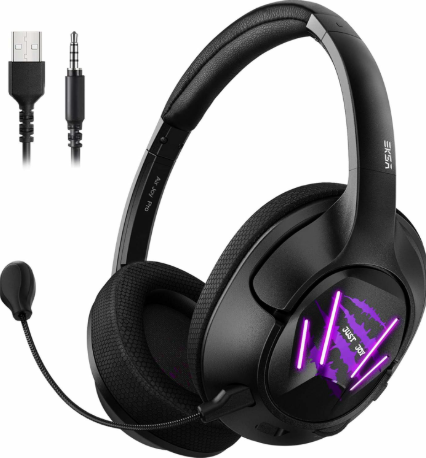
Introduction
The Eksa Air Joy Stereo Sound Gaming Headset is a versatile and affordable gaming accessory designed to deliver immersive audio experiences for gamers of all levels. Featuring high-quality stereo sound, this headset is tailored to enhance in-game audio clarity and communication, making it ideal for competitive multiplayer games, streaming, and casual gaming sessions. Its lightweight design and comfortable ear cushions ensure prolonged comfort during extended gameplay.
Key benefits include crystal-clear stereo sound, an adjustable noise-isolating microphone for precise communication, and universal compatibility across multiple platforms such as PC, Xbox, PlayStation, and mobile devices. The headset supports plug-and-play USB or 3.5mm jack connectivity, offering convenience without the need for complex software installations.
Targeted at gamers seeking reliable audio performance without breaking the bank, the eksa Air Joy provides excellent value for casual and professional players alike. Its sturdy build and ergonomic design make it suitable for long gaming marathons or daily use. The estimated price range for the eksa Air Joy Stereo Sound Gaming Headset currently falls between $30 and $50, making it competitive in the entry-level gaming headset market. It is widely available through online retailers and select electronics stores.
Product Parameters
- Headset interface type: 3.5mm cable (1.8m/5.9ft)
- Speaker diameter: 40mm
- Sensitivity: 96dB+3dB
- Speaker impedance: 320+15%
- Frequency range: 20Hz-20KHz
- Microphone pickup pattern: Cardioid
- Microphone sensitivity: -42+3dB
- Microphone frequency response: 100~5000Hz
- Microphone supply voltage: 1.5~3.3V
Package List:
- 1 x EKSA Air Joy Gaming Headset
- 1 x Operating Instruction
- 1 x 1-to-2 3.5mm Audio Jack Splitter Cable
At a Glance
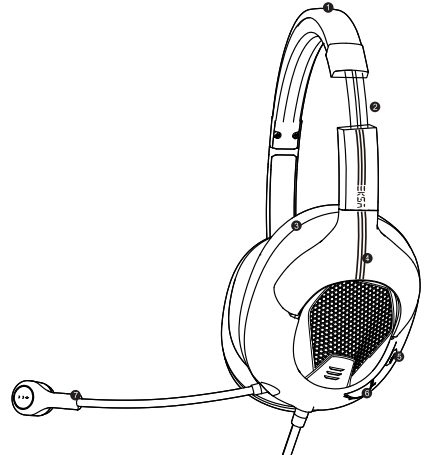
- PU leather headband
- Inside steel string
- Protein memory foam earmuffs
- ABS headset arm
- Microphone mute Button (Default mute on)
- Volume control slide
- Cardioid microphone
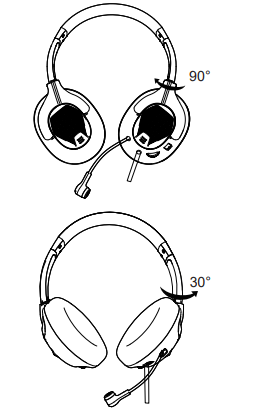
The bracket of the headset can be turned 90° inward and 30° outward. Excellent ergonomic design makes it suitable for all ages and head circumference sizes. Provides a maximum sense of comfort to the person wearing the headset, just like without wearing headphones. Even if you wear headphones for a long time, you won't feel uncomfortable.
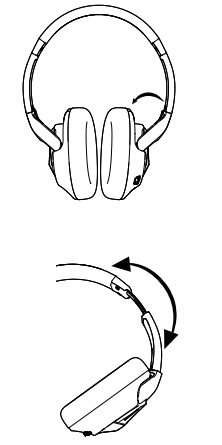
Can be adjusted on either side of the headset slider to the most suitable angle for you. (As shown below)
Setup Guide for eksa Air Joy Stereo Sound Gaming Headset
- Unbox the headset and inspect for any visible damage or missing components.
- Connect the headset to your gaming device using the USB port or 3.5mm audio jack depending on your device compatibility.
- Adjust the headband to fit comfortably on your head, ensuring the ear cushions fully cover your ears for optimal sound isolation.
- Position the microphone near your mouth for clear communication, and adjust the flexible boom arm as needed.
- Use the inline controls to set your preferred volume level and mute/unmute the microphone during gameplay.
- Configure audio settings on your device to select the eksa Air Joy as the default playback and recording device.
Troubleshooting tips: If audio is not heard, verify the connection is secure and the correct audio device is selected in your system settings. For microphone issues, ensure mute is off, and permissions are enabled for your gaming platform or application.
Safety precautions: Avoid using the headset at excessively high volumes to prevent hearing damage. Take breaks during extended use to reduce ear fatigue.
Troubleshooting Eksa Air Joy Stereo Sound Gaming Headset
- No sound output: Check if the headset is properly plugged in; try reconnecting or switching ports. Confirm the device is selected in the audio output settings.
- Microphone not detected: Ensure the mic mute switch is off, and the mic is connected. Update or reinstall audio drivers if needed.
- Distorted or low sound quality: Adjust volume levels and check cable integrity. Avoid bent or damaged cables.
- Intermittent audio cuts: Inspect for loose connections or try using a different device to isolate the issue.
- Preventive tips: Store the headset in a dry environment and avoid exposing it to extreme temperatures or moisture.
The eksa Air Joy typically comes with a standard one-year warranty covering manufacturing defects. For extended support, contact eksa customer service through their official website or authorized retailers.
Pros & Cons of eksa Air Joy Stereo Sound Gaming Headset
- Pros:
- Affordable price with solid stereo sound quality
- Comfortable lightweight design suitable for long gaming sessions
- Noise-isolating adjustable microphone enhances communication clarity
- Wide device compatibility via USB and 3.5mm jack
- Easy-to-use inline volume and mic controls
- Cons:
- Lacks advanced surround sound features found in higher-end models
- Plastic build may feel less durable compared to premium headsets
- No wireless connectivity option
- Basic audio customization since no dedicated software is provided
Overall, the eksa Air Joy offers excellent value for budget-conscious gamers looking for high-quality stereo sound and comfort. When compared to slightly pricier alternatives like the HyperX Cloud Stinger, it holds its ground in comfort and mic quality but falls short on surround sound and build-to-premium feel.
Customer Reviews of eksa Air Joy Stereo Sound Gaming Headset
Users frequently praise the eksa Air Joy Stereo Sound Gaming Headset for its clear audio and comfortable fit, highlighting the effective noise-isolating microphone as a standout feature for multiplayer communication. The headset often receives star ratings around 4 out of 5, reflecting satisfaction with its performance and price point.
Common complaints include occasional cable tangling due to a lack of a retractable or braided cable and the absence of surround sound effects, which some users desire for immersive gameplay. Despite these minor issues, many recommend it for casual and competitive gamers seeking a dependable, budget-friendly headset.
Testimonials often emphasize its plug-and-play convenience and solid build quality for the price, making it a popular choice on major e-commerce platforms.
Faqs
How do I set up the eksa Air Joy Stereo Sound Gaming Headset for the first time on PC and consoles?
What should I do if the microphone on my eksa Air Joy Stereo Sound Gaming Headset is not picking up sound?
Can I use the eksa Air Joy Stereo Sound Gaming Headset with PS5, Xbox Series X, and PC?
What are the main sound features of the eksa Air Joy Stereo Sound Gaming Headset that enhance gaming performance?
How can I optimize the audio settings for the eksa Air Joy Stereo Sound Gaming Headset to improve gaming immersion?
What are common problems with the eksa Air Joy Stereo Sound Gaming Headset and how can I fix them?
How do I maintain and clean the eksa Air Joy Stereo Sound Gaming Headset to ensure longevity?
Is the eksa Air Joy Stereo Sound Gaming Headset comfortable for long gaming sessions?
More eksa manuals
- Usage & Setup: Eksa E3000 Gaming Headset User Manual
- Setup & Usage: Eksa E400 Headband User Manual
- Usage & Setup: Eksa E5 ANC Wireless Headphones User Manual
- Setup & Usage: Eksa Air Joy Pro Gaming Headset User Manual
- Usage: Eksa Air Joy Plus Gaming Headset User Manual
- Setup: Eksa E900 Gaming Headset User Manual
Leave a Comment