
Usage & Setup: Eksa E900DL Gaming Headset User Manual
Content
Eksa E900DL Gaming Headset
Introduction
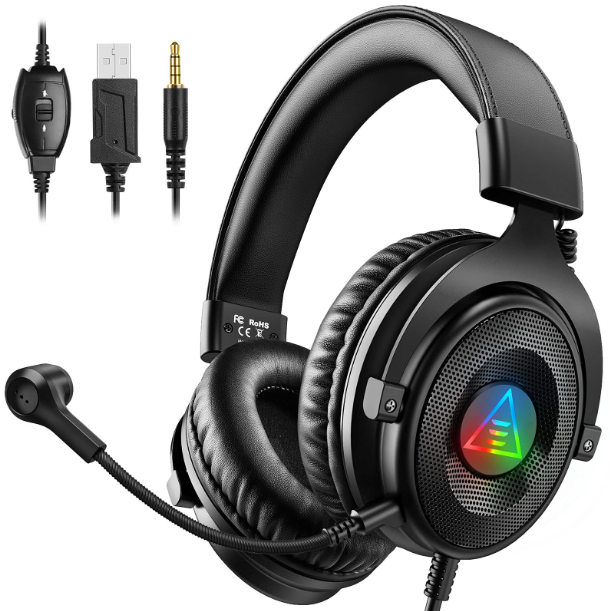
The Eksa E900DL Gaming Headset is a premium wired stereo headset designed specifically for gamers seeking immersive audio performance and comfort during extended play sessions. Featuring high-performance 50mm drivers, it delivers rich bass, clear trebles, and spatially layered sound, enhancing the gaming atmosphere with precise audio cues. Its unidirectional noise-cancelling microphone ensures clear communication by effectively reducing background noise, making it ideal for multiplayer gaming, streaming, and online chatting.
Built with a sturdy metal frame and adjustable headband, the headset combines durability with comfort, featuring thick memory foam ear cushions and breathable materials to dissipate heat. This makes it suitable for long gaming marathons on platforms such as PC, PS4, PS5, Xbox, Nintendo Switch, and mobile devices. With a 3.5mm audio jack, universal compatibility is guaranteed, while the detachable and rotatable microphone offers flexible usage for either gaming or casual music enjoyment.
Priced affordably within the budget-friendly range, approximately $40-$60 depending on the retailer, the eksa E900DL is widely available through online stores and gaming accessory outlets. Its combination of quality, comfort, and affordability makes it particularly attractive for casual and competitive gamers looking for value without sacrificing audio fidelity.
Product Parameters
Headset:
- Interface Type: 3.5mm & USB (power for light)
- Diver Diameter: 050 mm
- Sensitivity: 96dB+3dB
- Speaker Impedance: 32 Q
- Frequency Range: 20Hz~20KHz
Microphone:
- Sensitivity: -42+3dB
- Size: 46.0*2.7MM
- Microphone Impedance: 2.2KQ
- Supply Voltage: 3V
- Current Consumption: max 0.5mA
Package List
- 1x EKSA E900DL Gaming Headset
- 1x Detachable Microphone
- 1 x 3.5mm Audio Cable
- 1x Operating Instruction
- 1x Safety Instruction
- 1x Carry Pouch
At a Glance
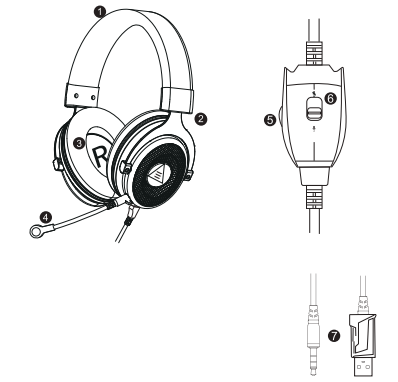
- Leatherette headband
- Adjustable steel arm headband
- Replaceable earmuffs
- Detachable microphone
- Volume up/down dial
- Microphone mute button
- 3.5mm audio cable & USB connector (power for light)
Usage
(PlayStation 4)
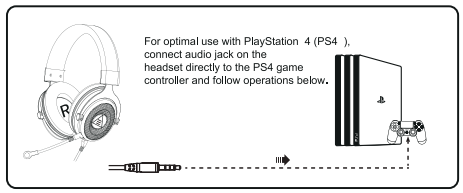
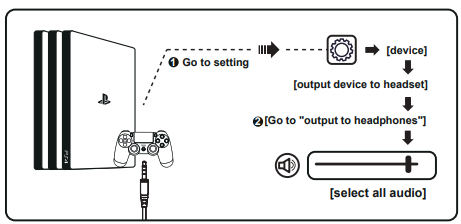
For 3.5mm Audio Cable:
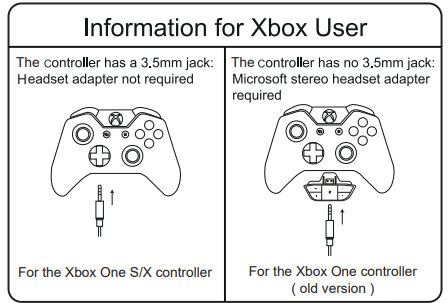
Usage (Xbox One S/X)
To work on the old version of the Xbox One controller, you need a Microsoft adapter (sold separately). To work on the new version of the Xbox One S/X controller, you can directly connect the E900DL headset to the controller via 3.5mm jack.
Note: The headset isn't compatible with Xbox 360.
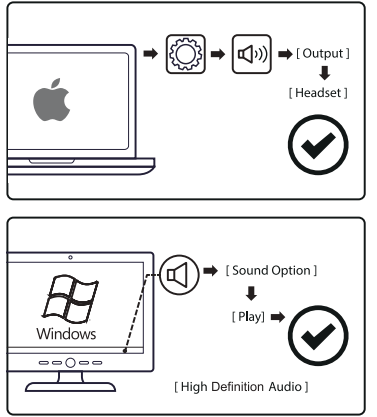
Usage (PC)
PC Sound Setting:
Setup Guide for Eksa E900DL Gaming Headset
- Connect the Headset: Plug the 3.5mm audio jack into your device’s headphone port. For PCs with separate mic and headphone jacks, use the included splitter adapter if available.
- Power the LED Lighting: Connect the USB cable to a USB power source to activate the headset’s LED lights (optional).
- Microphone Configuration: Attach the detachable unidirectional mic to the boom arm connector and adjust its position for optimal voice capture.
- Adjust Fit: Use the adjustable metal headband to fit the headset comfortably on your head, ensuring the ear cushions fully cover your ears.
- Volume and Mic Control: Use the inline volume wheel to adjust audio levels and the mute switch to toggle the microphone on or off during use.
- Troubleshooting Tips: If no sound is heard, ensure the headset is fully plugged in, and the device audio settings are correctly set. For mic issues, check the mute button and device input settings.
- Safety Precautions: Avoid excessive volume to protect hearing. Do not expose the headset to moisture or extreme temperatures to maintain durability.
Troubleshooting Common Issues with the Eksa E900DL Gaming Headset
- No Sound Output: Verify the 3.5mm jack is securely connected; check device audio output settings; try another device or port.
- Microphone Not Working: Ensure mic is attached properly; check mute switch status; verify input device is set to headset mic in system settings.
- Sound Distortion or Low Volume: Inspect cable for damage; adjust volume controls on headset and device; update audio drivers on PC.
- LED Lights Not Powering: Confirm USB power cable is connected to active USB port; LED functionality does not affect audio.
- Preventive Measures: Handle cables gently; store headset in carry pouch when not in use; keep away from liquids and extreme heat.
The Eksa E900DL comes with a manufacturer's warranty (typically 12-24 months) covering defects in materials and workmanship. For further support, users can access customer service via the official EKSA website or authorized retailers.
Pros & Cons of the Eksa E900DL Gaming Headset
Pros
- Powerful 50mm drivers deliver immersive, high-fidelity sound with strong bass and clear highs
- Detachable noise-cancelling microphone enhances voice clarity in team communication
- Comfortable design with an adjustable metal headband and memory foam ear cushions, suitable for long gaming sessions
- Wide compatibility via 3.5mm jack with PC, consoles, and mobile devices
- Attractive LED lighting and durable build quality for aesthetic appeal and longevity
- Inline volume and mic controls offer convenient on-the-fly adjustments
- Competitive price point offers excellent value for budget-conscious gamers
Cons
- A wired connection may limit mobility compared to wireless alternatives
- USB lighting requires a separate power source, adding cable clutter
- Some users report that the ear cushions may feel warm after extended use, despite breathable fabric
- Lacks advanced surround sound features found in higher-end gaming headsets
Customer Reviews and Feedback on the Eksa E900DL Gaming Headset
Users commonly praise the Eksa E900DL Gaming Headset for its excellent sound quality, especially noting the impactful bass and clear vocal reproduction during gaming and calls. Gamers appreciate the comfortable fit and sturdy metal frame, which reduces fatigue during long sessions. Many highlight the detachable noise-cancelling microphone as a valuable feature for clear team communication.
Some reviewers mention minor issues like the wired design restricting movement and occasional warmth in the ear cushions after long use. The LED lighting is noted as a stylish bonus but not essential. Overall, the headset receives high ratings of around 4 to 4.5 stars out of 5 on major retail platforms.
Users recommend the Eksa E900DL for gamers seeking affordable, high-quality wired headsets that balance comfort and sound performance, especially for PC and console gaming setups where wired reliability is preferred.
Faqs
How do I set up the eksa E900DL Gaming Headset for the first time?
What should I do if the microphone on my eksa E900DL Gaming Headset is not working properly?
Can the eksa E900DL Gaming Headset be used with consoles like PS5 and Xbox One?
What are the main audio features of the eksa E900DL Gaming Headset that enhance gaming performance?
How can I optimize sound quality on the eksa E900DL Gaming Headset during gameplay?
What maintenance tips help prolong the life of my eksa E900DL Gaming Headset?
Why is my eksa E900DL Gaming Headset producing static or distorted sound, and how can I fix it?
Does the eksa E900DL Gaming Headset support RGB lighting, and how do I control it?
More eksa manuals
- Setup: Eksa Star Engine S Gaming Headset User Manual
- Setup: Eksa AirComfy Gaming Headset User Manual
- Setup & Usage: Eksa E1000 WT Wireless Gaming Headset User Manual
- Setup: Eksa E900 Pro 2-IN-1 Gaming Headset User Manual
- Usage: Eksa StarEngine BT Headset User Manual
- Setup: Eksa E1000 Gaming Headset User Manual
Leave a Comment