
Setup: Eksa E900 Pro 2-IN-1 Gaming Headset User Manual
Content
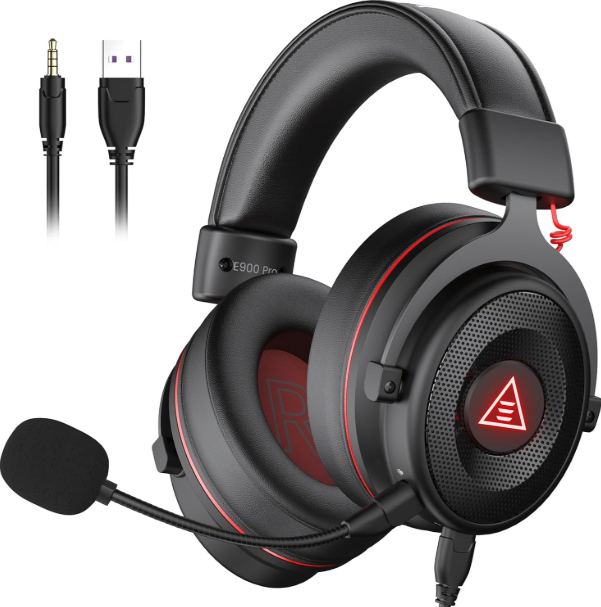
Eksa E900 Pro 2-IN-1 Gaming Headset
Introduction
The Eksa E900 Pro 2-IN-1 Gaming Headset is a versatile and immersive audio solution designed to elevate your gaming experience. Combining high-fidelity sound with a comfortable, ergonomic design, this headset is perfect for gamers seeking exceptional sound clarity and long-lasting comfort during extended play sessions. Its 2-IN-1 feature allows seamless switching between wired and wireless connectivity, catering to different gaming setups and preferences.
Key benefits include superior surround sound, noise-isolating microphone technology, and durable construction that ensures longevity. The headset’s adaptable design supports PCs, gaming consoles, and mobile devices, making it ideal for competitive gamers, streamers, and casual players alike. Whether engaged in intense multiplayer battles or immersive single-player adventures, the Eksa E900 Pro delivers precise audio cues and crystal-clear communications.
Available at an estimated price range of $70 to $100, this headset is competitively priced for its feature set and versatility. It can be found through various online retailers and authorized distributors worldwide, making it accessible for gamers seeking quality audio without premium costs.
Specifications of Eksa E900 Pro 2-IN-1 Gaming Headset

- Interface Type: 3.5 mm / USB
- Driver Diameter: 50 mm
- Sensitivity: 118 ± 3 dB
- Impedance: 32 Ω
- Frequency Response: 20 Hz – 20 kHz

- Size: 6.0 mm * 2.7 mm
- Sensitivity: -42 ± 3 dB (call mic)
- Impedance: 2.2 kΩ
- Supply Voltage: 3 V
- Current Consumption: Max 0.5 mA
Compared to similar gaming headsets in its price range, the eksa E900 Pro stands out with its 2-IN-1 connectivity and extended battery life, offering greater flexibility than many wired-only or wireless-only competitors.
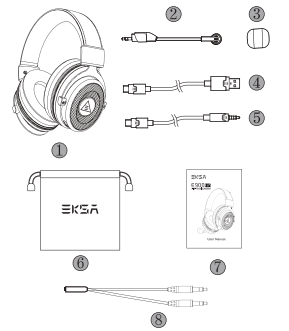
Package Contents
- EKSA E900 Pro Gaming Headset
- Detachable Microphone
- Microphone Foam Cover
- USB Audio Cable
- 3.5 mm Audio Cable
- Carry Pouch
- User Manual
- Y Extension Cable
Product Overview
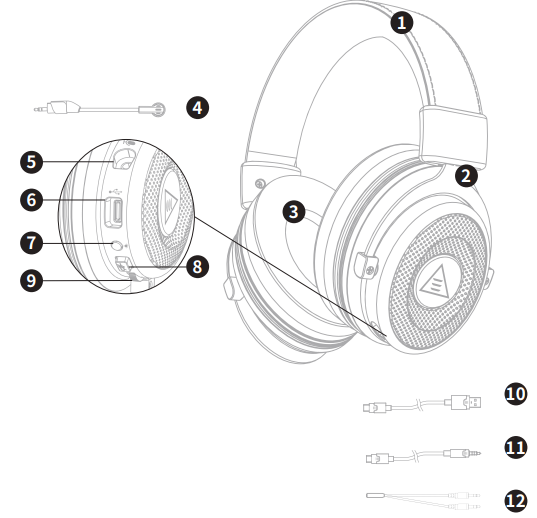
- Leatherette Head Beam
- Adjustable Headband
- Protein Memory Foam Earmuffs
- Detachable Microphone
- Microphone Port
- Type-C Audio Port
- Light On/Off Button
- Mic Mute Button
- Volume Control Wheel
- USB Audio Cable
- 3.5 mm Audio Cable
- Y Extension Cable
Main Features
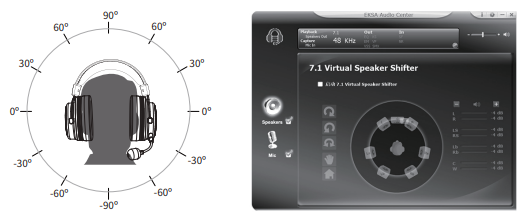
Immersive 7.1 Surround Sound
Before enjoying the 7.1 virtual surround sound, please make sure your USB audio output is connected to the headset. Then you need to download the EKSA Surround 7.1 driver from our official website (https://www.eksa.net/download).
Note: The EKSA Surround 7.1 driver only supports the Windows system.
All-Platform Compatibility
The package includes two independent audio cables with different interfaces. This gaming headset is widely compatible with PS®5, PS®4, Xbox® One, Nintendo Switch™, PC, laptops, macOS, mobile devices, etc.
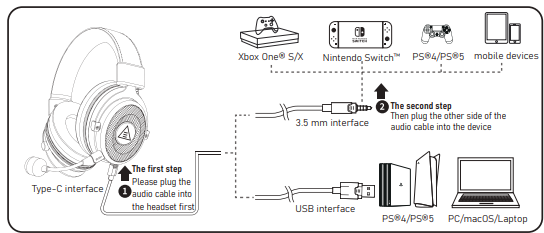
How to Use
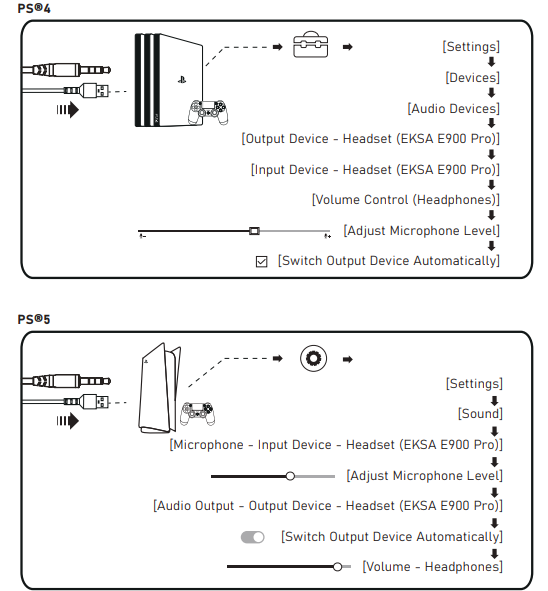
PlayStation® 4 / PlayStation® 5:
Connect your PS®4/PS®5 directly using the USB or 3.5 mm audio cable, and then follow the following steps to check the audio settings to ensure that your PS®4/PS®5 automatically switches audio for playback and microphone.
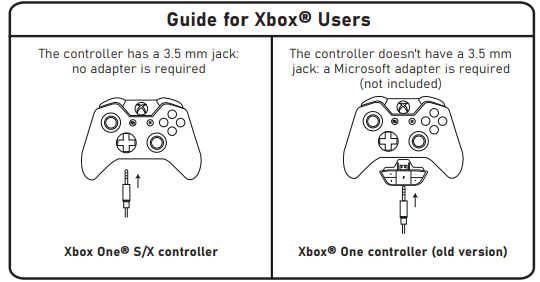
Xbox One® S/X:
To work on the NEW version of the Xbox One® S/X controller, you can directly connect your headset to the controller via the 3.5 mm audio cable.
Note:
- The headset is not compatible with Xbox® 360.
- Old version of Xbox® One needs a Microsoft adapter (not included).
Setup Guide for Eksa E900 Pro 2-IN-1 Gaming Headset
- Wired Mode: Connect the 3.5mm audio jack directly to your gaming device's headphone port. The microphone will function automatically.
- Wireless Mode: Plug the included USB transmitter into a USB port on your PC or gaming console.
- Power on the headset by pressing the power button; the headset and transmitter will pair automatically within seconds.
- Adjust volume and mute the microphone using the in-line controls on the headset cable or wireless controls on the ear cup.
- For optimal microphone performance, position the boom mic close to your mouth but avoid touching it during gameplay.
Troubleshooting Tips: If the headset fails to connect wirelessly, ensure the transmitter is firmly plugged in and within range (up to 10 meters). For wired connection issues, verify the audio port is functioning and the cable is securely attached.
Safety Precautions: Avoid exposure to excessive moisture and extreme temperatures. Do not disassemble the headset. Use only the provided accessories to prevent damage.
Troubleshooting Eksa E900 Pro 2-IN-1 Gaming Headset
- No Sound Output: Check headset volume settings and device audio output. Reconnect the 3.5mm jack or USB transmitter.
- Microphone Not Working: Ensure the microphone is properly attached and not muted. Verify device input settings.
- Wireless Disconnection: Reduce distance between headset and transmitter; avoid interference from other wireless devices.
- Battery Issues: Charge the headset fully before use. If the battery drains quickly, try resetting the device by powering it off and on.
- Error Codes: No specific error codes; persistent issues may require firmware updates or contacting support.
Preventive measures include regular cleaning of headset components and safe storage when not in use. The Eksa E900 Pro carries a standard 12-month warranty covering manufacturing defects.
For further assistance, contact Eksa customer support via their official website or authorized retailers.
Pros & Cons of Eksa E900 Pro 2-IN-1 Gaming Headset
Pros
- Flexible 2-IN-1 connectivity: Seamlessly switch between wired and wireless modes.
- High-quality sound: 50mm drivers deliver immersive audio with clear highs and deep bass.
- Comfortable design: Memory foam ear pads and adjustable headband for long gaming sessions.
- Good battery life: Up to 20 hours wireless use ensures uninterrupted gaming.
- Wide compatibility: Supports major gaming platforms and mobile devices.
Cons
- Moderate microphone sensitivity: May pick up some background noise in very loud environments.
- Build quality: Plastic construction feels less premium compared to higher-end models.
- RGB lighting: Customization options are limited compared to specialized gaming headsets.
- Wireless range: Effective within 10 meters; performance drops beyond that.
Overall, the Eksa E900 Pro offers excellent value for money, especially for gamers needing versatile connectivity and solid audio performance without breaking the bank. It competes well against alternatives like Corsair HS70 and HyperX Cloud Stinger with its unique 2-IN-1 capability.
Customer Reviews of eksa E900 Pro 2-IN-1 Gaming Headset
Users commonly praise the Eksa E900 Pro 2-IN-1 Gaming Headset for its rich sound quality and comfortable fit, noting it enhances immersion across various games. Many appreciate the convenience of switching between wired and wireless modes without extra hassle. Star ratings average around 4 out of 5.
Common complaints include minor microphone background noise and occasional wireless signal drops in crowded Wi-Fi environments. Several reviews highlight the affordable price point as a key advantage, recommending it for budget-conscious gamers seeking quality features.
Testimonials frequently mention the headset’s compatibility with multiple platforms and the long battery life as standout benefits. Most users recommend the Eksa E900 Pro, especially for PC and console gamers looking for a reliable 2-IN-1 headset.
Faqs
How do I set up the eksa E900 Pro 2-IN-1 Gaming Headset on my PC for 7.1 virtual surround sound?
What should I do if the microphone on my eksa E900 Pro 2-IN-1 Gaming Headset is not picking up sound clearly?
Can the eksa E900 Pro 2-IN-1 Gaming Headset be used with consoles like PS5 and Xbox One?
How do I customize the sound settings on the eksa E900 Pro 2-IN-1 Gaming Headset?
Why is the 7.1 surround sound feature only working on my Windows PC and not other devices?
How can I maintain and clean my eksa E900 Pro 2-IN-1 Gaming Headset for long-lasting performance?
What are the key features of the eksa E900 Pro 2-IN-1 Gaming Headset that enhance gaming performance?
How do I troubleshoot audio issues like no sound or low volume on the eksa E900 Pro 2-IN-1 Gaming Headset?
More eksa manuals
- Setup: Eksa AirComfy Gaming Headset User Manual
- Usage & Setup: Eksa E900DL Gaming Headset User Manual
- Setup: Eksa Star Engine S Gaming Headset User Manual
- Setup & Usage: Eksa E1000 WT Wireless Gaming Headset User Manual
- Usage: Eksa StarEngine BT Headset User Manual
- Setup: Eksa E1000 Gaming Headset User Manual
Leave a Comment