
How to Use: Fitbit Charge 2 Fitness Tracker User Manual
Content
Fitbit Charge 2 Fitness Tracker
Introduction
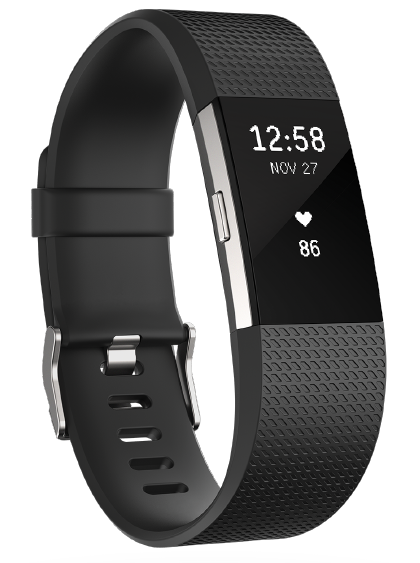
The Fitbit Charge 2 Fitness Tracker is a versatile and user-friendly wearable designed to help you achieve your health and fitness goals with precision and ease. As a standout in Fitbit’s lineup, the Charge 2 combines robust activity tracking with smart features, making it a top choice for fitness enthusiasts, busy professionals, and anyone looking to monitor their daily wellness.
This fitness band features a sleek, customizable design with a 1-inch monochrome OLED display, providing clear visibility of your stats at a glance. It tracks your steps, distance, calories burned, active minutes, floors climbed, and offers continuous heart rate monitoring—day and night. The device is compatible with both iPhone and Android, ensuring broad accessibility.
A unique selling point of the Fitbit Charge 2 is its SmartTrack technology, which automatically recognizes and records select exercises—such as running, walking, and cycling—without manual input. For workouts where you want more detailed metrics, you can use connected GPS to map your route and track your pace in real-time by pairing with your smartphone’s GPS. The device also supports multi-sport tracking, allowing you to customize your exercise menu for different activities.
Sleep tracking is another highlight, with the Charge 2 offering detailed insights into your sleep stages (light, deep, and REM), helping you understand and improve your sleep habits. Additional smart features include call, text, and calendar notifications, making it a practical companion for your everyday life.
The Fitbit Charge 2 is aimed at individuals seeking a balance between fitness tracking and smart functionality. Whether you’re an active professional, a fitness newbie, or someone striving for better sleep, this tracker adapts to your lifestyle. The device is splashproof and delivers up to 5 days of battery life on a single charge. While it is no longer sold new by Fitbit, it remains available through select retailers and the secondary market, typically in the $100–$150 range.
What you’ll find in the box
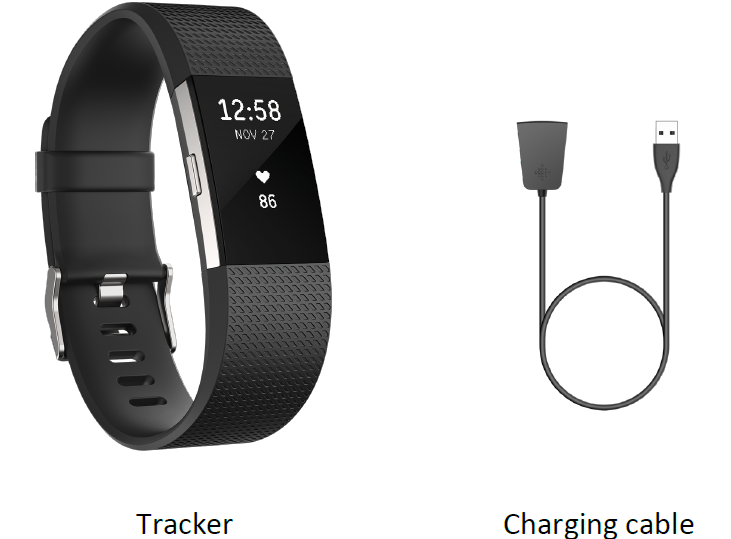
Your Fitbit Charge 2 box includes:
Fitbit Charge 2 General Information and Specifications
Sensors
Your Charge 2 contains the following sensors:
- A MEMS 3-axis accelerometer, which tracks your motion patterns
- An altimeter, which tracks altitude changes
- An optical heart rate tracker
Materials
The wristband that comes with Charge 2 is made of a flexible, durable elastomer material similar to that used in many sports watches. It does not contain latex. Accessory wristbands are available in genuine leather.
The buckle and frame on Charge 2 are made of surgical-grade stainless steel. While all stainless steel contains traces of nickel and can cause an allergic reaction in someone with nickel sensitivity, the amount of nickel in all Fitbit products meets the European Union's stringent Nickel Directive.
Wireless technology
Charge 2 contains a Bluetooth 4.0 radio transceiver.
Haptic feedback
Charge 2 contains a vibration motor, for alarms, goals, notifications, and reminders.
Battery
Charge 2 contains a rechargeable lithium-polymer battery.
Memory
Charge 2 stores most minute-by-minute stats and exercise data for seven days. It stores SmartTrack data for three days and summary totals for 30 days. Heart rate data is stored at one-second intervals during exercise tracking and at five-second intervals at all other times.
Refer to the following table for information on how long Charge 2 stores your stats and data in between the times you sync your tracker. Stored data consists of steps, distance, calories burned, floors, active minutes, heart rate, exercise, sleep, and stationary vs. active hours.
Note that Charge 2 can store a maximum of 10 hours of exercise data. This means that if you exercise for more than 10 hours and don’t sync your tracker, your exercise history will not include everything. We recommend syncing your tracker at least once a day.
| Type of data | Days stored |
|---|---|
| Minute-by-minute stats | 7 |
| Sleep data | 7 |
| Sleep stages | 5 |
| SmartTrack data | 7 |
| Summary totals | 30 |
Display
The Charge 2 has an OLED tap display.
Size
Wristband sizes are shown below. Note that accessory wristbands sold separately may vary slightly in size.
- Small wristband: Fits a wrist between 5.5 and 6.7 inches in circumference
- Large wristband: Fits a wrist between 6.7 and 8.1 inches in circumference
- Extra large wristband: Fits a wrist between 8.1 and 9.3 inches in circumference
Environmental conditions
- Operating Temperature: 14° to 113° F (-10° to 45° C)
- Non-operating Temperature: -4° to 140° F (-20° to 60° C)
- Water Resistant: Splash proof. Do not shower with the device or submerge it in water.
- Maximum Operating Altitude: 30,000 feet (10,000 m)
Set up Fitbit Charge 2
Your fully charged Charge 2 has a battery life of up to five days. Battery life and charge cycles vary with use and other factors; actual results will vary.
Charge your tracker
To charge your tracker:
- Plug the charging cable into the USB port on your computer or a UL-certified USB wall charger.
Clip the other end of the charging cable to the port on the back of the tracker. The pins on the charging cable must lock securely with the port.
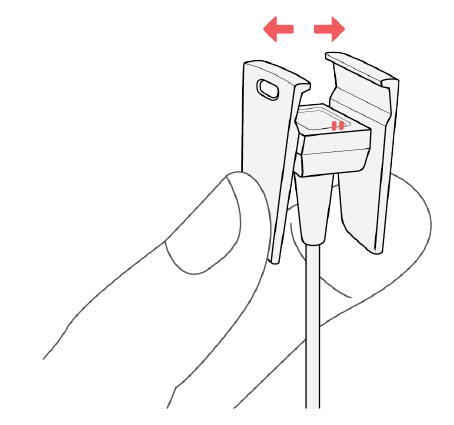
Make sure the button on your tracker is aligned with the button opening on the charging cable. You’ll know the connection is secure when the tracker vibrates and you see a battery icon on your tracker’s display. The battery icon disappears after three seconds.
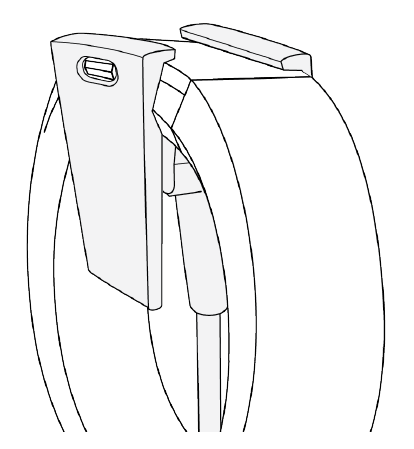
Charging fully takes about one to two hours. While the tracker charges, you can tap it to check the battery level. A fully charged tracker shows a solid battery icon.
Set up with your phone
Set up Inspire HR with the Fitbit app for iPhones and iPads or Android phones. The Fitbit app is compatible with most popular phones. See fitbit.com/devices to check if your phone is compatible.

To get started:
- Download the Fitbit app:
- Apple App Store for iPhones
- Google Play Store for Android phones
- Install the app, and open it.
- If you already have a Fitbit account, log in to your >account tap the Today tab
 >your profile picture Set Up a Device.
 - If you don't have a Fitbit account, tap Join Fitbit to be guided through a series of questions to create a Fitbit account.
- If you already have a Fitbit account, log in to your >account tap the Today tab
- Continue to follow the on-screen instructions to connect Inspire HR to your account.
When you're done with setup, read through the guide to learn more about your new tracker and then explore the Fitbit app.
For more information, see the related help article.
See your data in the Fitbit app
Open the Fitbit app on your phone to view your activity and sleep data; log food and water; participate in challenges; and more.
Troubleshoot Fitbit Charge 2
If your tracker is not working properly, review our troubleshooting guidance below.
Visit help.fitbit.com more information.
Heart-rate signal missing
Charge 2 continuously tracks your heart rate while you’re exercising and throughout the day. Occasionally the heart rate tracker may have difficulty finding a good signal. When this happens you’ll see dashed lines where your current heart rate usually appears
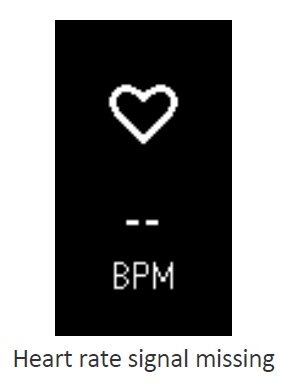
If you’re not getting a heart rate signal, first make sure you’re wearing your tracker correctly, either moving it higher or lower on your wrist or tightening or loosening the band. After holding your arm still and straight for a short wait, you should see your heart rate again. If the heart rate signal is still missing, check your Heart Rate setting on your Fitbit dashboard and make sure it’s set to On or Auto.
Unexpected behavior
If you experience one of the following problems, it may be fixed by restarting your tracker:
- Not syncing despite successful setup
- Not responding to button presses or taps despite being charged
- Not tracking your steps or other data
Note: Restarting your tracker reboots the device but does not delete any data.
To restart your tracker:
- Plug the charging cable into the USB port on your computer or a UL-certified USB wall charger.
Clip the other end of the charging cable to the port on the back of the tracker. The pins on the charging cable must lock securely with the port.
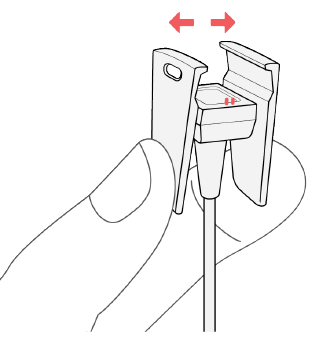
Make sure the button on your tracker is aligned with the button opening on the charging cable. You’ll know the connection is secure when the tracker vibrates and you see a battery icon on your tracker’s display. Your Charge 2 will begin charging.
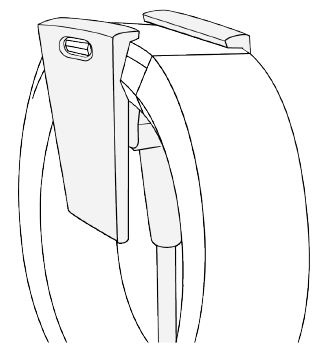
- Press and hold the button on your tracker for four seconds. When you see the Fitbit logo and the tracker vibrates, this means the tracker has restarted.
After your tracker restarts you can unplug it from the charging cable and put it back on. For additional troubleshooting or to contact Customer Support, see help.fitbit.com.
Return policy and warranty
Warranty information and the fitbit.com return policy can be found at http://www.fitbit.com/returns.
Pros & Cons
Advantages of the Fitbit Charge 2 Fitness Tracker
- Comprehensive Fitness Tracking: Accurately monitors steps, distance, calories, active minutes, floors climbed, and heart rate—both during the day and while sleeping.
- SmartTrack & Connected GPS: Automatically detects workouts and offers connected GPS via your smartphone for real-time pace and distance, a big step up from the original Charge.
- Sleep Insights: Delivers detailed sleep stage tracking, helping users understand and improve their sleep quality.
- Multi-Sport Support: Tracks a variety of exercises, including running, biking, hiking, weight training, and more, with customizable exercise menus.
- Smart Notifications: Provides call, text, and calendar alerts, adding convenience for daily use.
- Long Battery Life: Lasts up to 5 days on a single charge, reducing the need for frequent recharging.
- Comfortable Design: Lightweight and comfortable for all-day wear, even during intense workouts.
- Value for Money: Offers a robust feature set at a competitive price point, especially on the used market.
Limitations to Consider
- No Built-In GPS: Requires a smartphone for GPS tracking, which may be inconvenient for runners who prefer to leave their phone behind.
- Optical HR Accuracy: While generally reliable, optical heart rate sensors can be less accurate during high-intensity or arm-based workouts, such as dance or boxing.
- Display: Monochrome OLED is functional but less vibrant than full-color displays found on newer models.
- Limited Smart Features: Lacks advanced smartwatch functions like music storage, voice assistant, or third-party app support.
- Availability: Discontinued by Fitbit, so new units may be harder to find; most available stock is refurbished or used.
Compared to alternatives like Garmin Vivofit or newer Fitbit models, the Charge 2 stands out for its ease of use, comprehensive tracking, and comfort, though it may lack some advanced features found in premium smartwatches.
Customer Reviews and Testimonials
Users of the Fitbit Charge 2 Fitness Tracker consistently praise its accurate activity monitoring, comfortable fit, and intuitive app integration. Many highlight the device’s ability to automatically track workouts and provide detailed sleep analysis as major benefits. The long battery life and customizable exercise menus are also frequently mentioned positives.
On the downside, some users note that the heart rate sensor can occasionally miss peaks during very active or dance-based workouts, a common limitation of optical sensors. A few have mentioned that the lack of built-in GPS is a drawback for outdoor runners. Despite these minor issues, the device earns an average rating of 4 to 4.5 stars out of 5 on major retail platforms, reflecting strong overall satisfaction.
Testimonials often recommend the Fitbit Charge 2 for users seeking reliable, everyday fitness tracking without the complexity or cost of a full smartwatch. If you prioritize comfort, comprehensive health metrics, and smart notifications, the Charge 2 remains a solid choice—especially if found at a discounted price. However, those needing advanced sports features or built-in GPS may want to consider newer models.
Frequently mentioned issues include band durability over time and occasional syncing problems with the app. These are generally minor and do not detract significantly from the overall user experience.
Faqs
How do I set up my fitbit Charge 2 Fitness Tracker for the first time?
What should I do if my fitbit Charge 2 Fitness Tracker is not syncing with my phone?
What are the main fitness and health features of the fitbit Charge 2 Fitness Tracker?
Is the fitbit Charge 2 Fitness Tracker compatible with both Android and iOS devices?
How can I maximize the battery life and performance of my fitbit Charge 2 Fitness Tracker?
How do I clean and maintain my fitbit Charge 2 Fitness Tracker to ensure longevity?
Can I customize workout tracking and heart rate zones on the fitbit Charge 2 Fitness Tracker?
What should I do if my fitbit Charge 2 Fitness Tracker screen is unresponsive or frozen?
More fitbit manuals
- Setup & Usage: Fitbit Surge Fitness Super Watch User Manual
- How to Use: Fitbit Charge HR Activity Wristband User Manual
- How to Use: Fitbit Versa Wrist Watch User Manual
- How to Use: Fitbit Charge Wireless Activity Wristband User Manual
- How to Use: Fitbit Versa 2 Wrist Watch User Manual
- How to Use: Fitbit Inspire Fitness Tracker User Manual
Leave a Comment