
How to Use: Fitbit Inspire Fitness Tracker User Manual
Content
Fitbit Inspire Fitness Tracker
Introduction
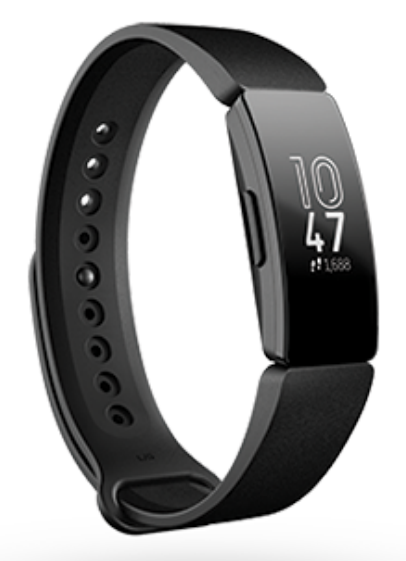
The Fitbit Inspire Fitness Tracker is a versatile, user-friendly activity tracker designed to support users in achieving their health and fitness goals. With a sleek, minimalist design and a lightweight build, it offers continuous 24/7 heart rate monitoring, sleep tracking, and blood oxygen (SpO2) monitoring, making it suitable for everyday wear and comprehensive wellness management. Its connected GPS feature, which uses your smartphone’s GPS, accurately records outdoor activities such as running, cycling, and walking while maintaining an extended battery life of up to 10 days on a single charge.
Ideal for fitness enthusiasts, beginners, and health-conscious individuals, the Fitbit Inspire caters to those seeking a reliable, affordable tracker without the complexity and price tag of high-end GPS watches. It provides personalized insights like the Daily Readiness Score and Active Zone Minutes to help optimize workout intensity and recovery, supporting better fitness outcomes. The device is water-resistant up to 50 meters, allowing wearers to track swimming and other water-based activities safely.
Available in elegant colors such as Midnight Zen, Lilac Bliss, and Morning Glow, the Fitbit Inspire combines style with function. Priced competitively in the range of approximately $70 to $100,, depending on the model and retailer, it offers excellent value and wide availability through official retailers and online marketplaces. Its intuitive touch screen and interchangeable bands enhance usability and personalization, making the Fitbit Inspire Fitness Tracker a compelling choice for anyone focused on holistic health tracking and active lifestyle management.
Get started
What's in the box
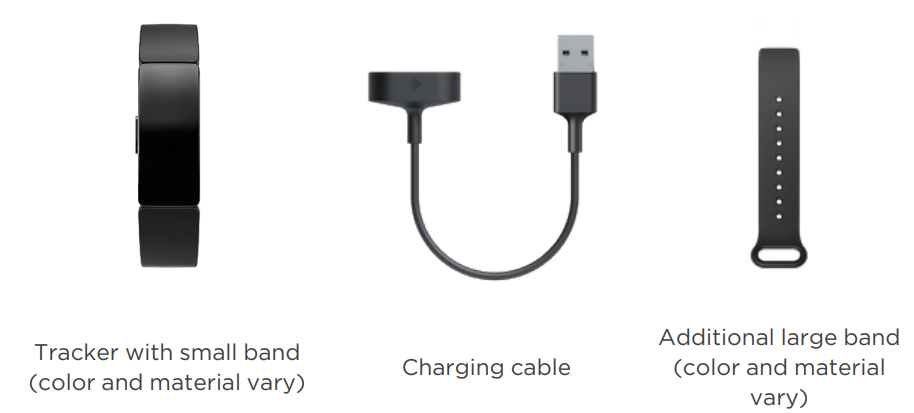
The detachable bands on Inspire come in a variety of colors and materials, sold separately.
Charge your tracker
A fully-charged Inspire has a battery life of 5 days. Battery life and charge cycles vary with use and other factors; actual results will vary.
To charge Inspire:
- Plug the charging cable into the USB port on your computer, a UL-certified USB wall charger, or another low-energy charging device.
- Hold the other end of the charging cable near the port on the back of the tracker until it attaches magnetically. Make sure the pins on the charging cable align with the port on the back of your tracker.
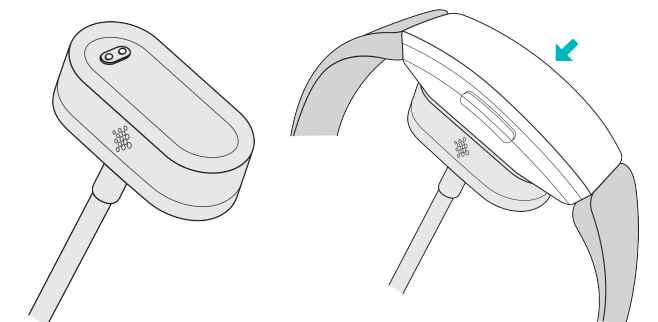
Charging fully takes about 1-2 hours. While the tracker charges, you can press the buttons to check the battery level. A fully-charged tracker shows a solid battery icon with a smile.
Set up with your phone..
Set up Inspire with the Fitbit app for iPhones and iPads or Android phones. The Fitbit app is compatible with most popular phones. See Fitbit devices to check if your phone is compatible.
To get started:
- Download the Fitbit app:
Apple App Store for iPhones
Google Play Store for Android phones - Install the app, and open it.
- Tap Sign in with Google, and follow the on-screen instructions to set up your device.
When you're done with setup, read through the guide to learn more about your new tracker and then explore the Fitbit app.
- For more information, see the related help article.
- See your data in the Fitbit app
- Open the Fitbit app on your phone to see your activity and sleep data, choose a workout or mindfulness session, and more.
Wear Inspire
Choose to wear Inspire around your wrist or in the clip accessory (sold separately). If you need to remove the band or attach a different band, see the instructions in "Change the band" on page 12.
When you wear Inspire in the band, make sure your tracker is set to On Wrist .
When you wear Inspire in the accessory clip, make sure it’s set to On Clip . For more information, see "Navigate Inspire" on page 14.
Wear Inspire on your wrist.
Wear Inspire a finger's width above your wrist bone. Attach the bands, and then securely fasten your tracker on your wrist. For more information, see "Change the band" on page 12.
Secure the band
- If you previously wore Inspire in a clip, change your device setting to On Wrist. For more information, see "Navigate Inspire" on page 14.
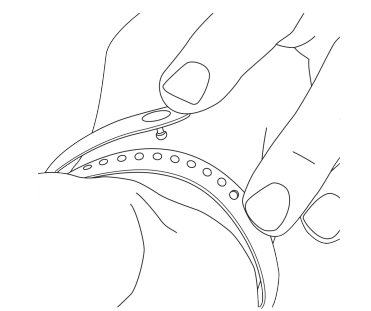
- Place Inspire around your wrist.
- Slide the end of the band with the peg through the loop.
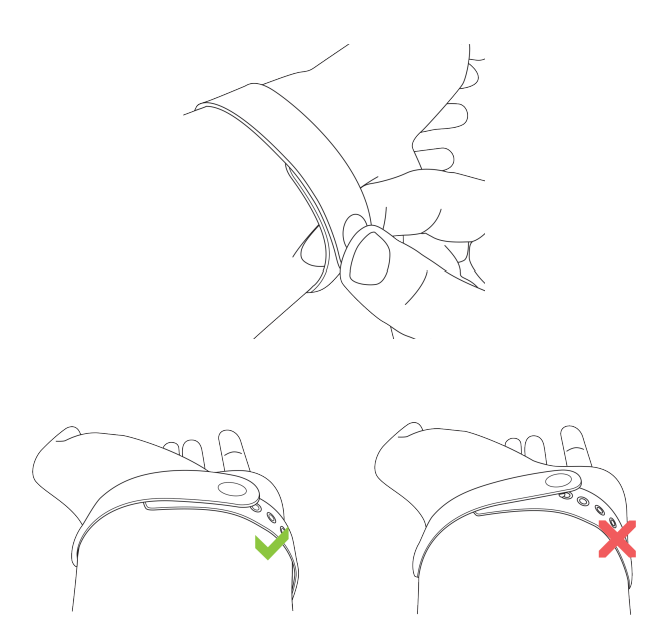
- Align both ends of the band so they directly overlap, and choose the hole that best fits your wrist.
- Squeeze the peg and band between your thumb and forefinger until you feel the band snap into place. Don't wear your tracker too tightly.
Handedness
For greater accuracy, you must specify whether you wear Inspire on your dominant or non-dominant hand. Your dominant hand is the one you use for writing and eating. To start, the Wrist setting is set to non-dominant. If you wear Inspire on your dominant hand, change the Wrist setting in the Fitbit app:
From the Today tab in the Fitbit app, tap the icon  in the top left> Inspire tile >Wrist >Dominant
Wear Inspire in a clip..
Wear Inspire clipped to your clothing. Remove the bands, and place your tracker in the clip. For more information, see "Change the band" on page 12.
To put Inspire in the clip:
- If you previously wore Inspire on your wrist, change your device setting to On Clip
 . For more information, see "Navigate Inspire" on page 14. Note: Make sure Inspire is set to On Wrist
 when you wear your tracker in the band.
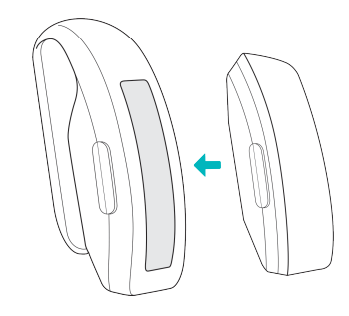
 - Hold the tracker with the screen facing you and the button on the left.
- Hold the clip accessory with the opening facing you and the button insert on the left.
- Place the top of the tracker into the clip opening and move the bottom of the tracker into place. Inspire is secure when all edges of the clip lie flat against the tracker.
Clip Placement
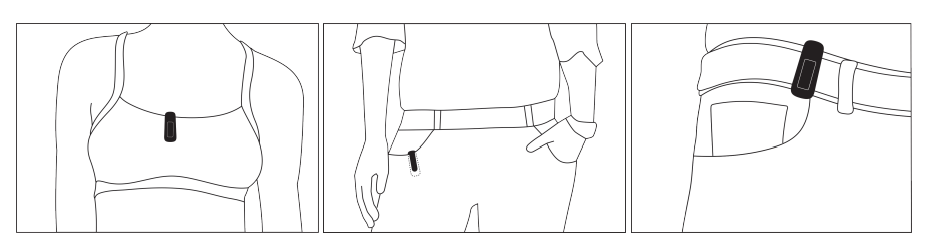
- Wear Inspire on or close to your body with the screen facing outward. Secure the clip tightly to a shirt pocket, bra, pants pocket, belt, or waistband. Try out a few different locations to see what's most comfortable and secure for you.
- If you experience skin irritation when wearing Inspire on your bra or waistband, clip it to an external piece of clothing instead, such as your belt or pocket.
Wear and care tips
- Clean your band and wrist regularly with a soap-free cleanser.
- If your tracker gets wet, remove it and dry it completely after your activity.
- Take your tracker off from time to time.
Change the band
Inspire comes with a small band attached and an additional large, bottom band in the box. Both the top and bottom bands can be swapped with accessory bands, sold separately on Fitbit. For band measurements, see "Band size" on page 31.
Fitbit Inspire and Fitbit Inspire HR bands are compatible with both trackers.
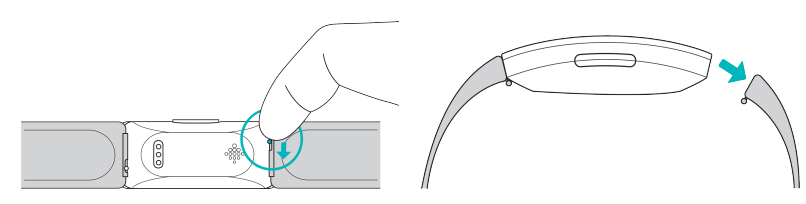
Remove a band
- Turn over Inspire and find the quick-release lever.
- While pressing the quick-release lever inward, gently pull the band away from the tracker to release it.
- Repeat on the other side.
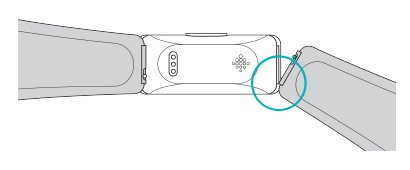
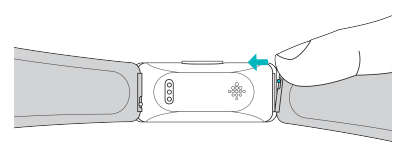
Attach a band
- To attach a band, hold the band and slide the pin (the side opposite the quick-release lever) into the notch on the tracker.
- While pressing the quick-release lever inward, slide the other end of the band into place.
- When both ends of the pin are inserted, release the quick-release lever.
Troubleshooting
If Inspire isn't working properly, see our troubleshooting steps below.
Unresponsive device
If you experience any of the following issues, restart your tracker:
- Won't sync
- Won't respond to taps, swipes, or button presses
- Won't track steps or other data
- Won't show notifications
General Info and Specifications
- Sensors and Components
Fitbit Inspire contains a MEMS 3-axis accelerometer, which tracks motion patterns. - Materials
The housing on Inspire is plastic. The Inspire classic band is made of a flexible, durable elastomer material similar to that used in many sports watches, and the peg is made of anodized aluminum. While anodized aluminum can contain traces of nickel, which can cause an allergic reaction in someone with nickel sensitivity, the amount of nickel in all Fitbit products meets the European Union's stringent Nickel Directive. - Wireless technology
Inspire contains a Bluetooth 4.0 radio transceiver. - Haptic feedback
Inspire contains a vibration motor for alarms, goals, notifications, and reminders. - Battery
Inspire contains a rechargeable lithium-polymer battery. - Memory
Inspire stores your data, including daily stats, sleep information, and exercise history, for 7 days. See your historical data in the Fitbit app. - Display
Inspire has an OLED display. - Band size
Band sizes are shown below. Note that accessory bands sold separately may vary slightly.- Small band
Fits a wrist between 5.5 - 7.1 inches (140 mm - 180 mm) in circumference - Large band
Fits a wrist between 7.1 - 8.7 inches (180 mm - 220 mm) in circumference
- Small band
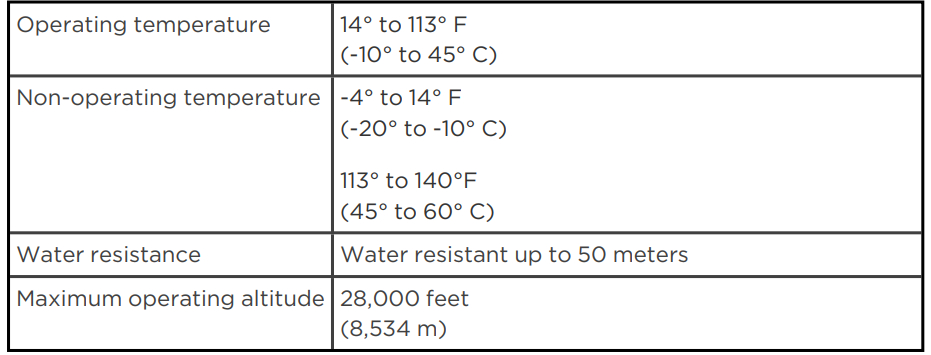
Environmental conditions
Return policy and warranty
Find warranty information and the Fitbit. Return policy on our website.
Pros & Cons of the Fitbit Inspire Fitness Tracker
- Pros
- Long Battery Life: Offers up to 10 days of use per charge, reducing frequent recharging.
- Comprehensive Health Monitoring: Includes 24/7 heart rate, SpO2 blood oxygen tracking, sleep analysis, and skin temperature variation for wellness insights.
- Connected GPS: Leverages your smartphone’s GPS for accurate tracking of outdoor activities, providing pace and distance data.
- Water Resistant: Rated 5 ATM, safe for swimming and showering, ideal for versatile workout conditions.
- Lightweight and Comfortable: Slim design and soft silicone bands enable all-day, all-night wear.
- Affordability: Competitively priced with features often found in higher-end trackers, offering good value for money.
- Cons
- No Built-in GPS: Dependent on phone GPS for outdoor trackingwithoutua t a phone, cycling distance and certain metrics may be inaccurate.
- Basic Sport Modes: Limited to about six selectable exercise types on the device itself, though more can be managed via the app.
- Occasional Heart Rate Sensor Hiccups: Minor inaccuracies during rapid heart rate changes or high-impact activities are reported by some users.
- Water Resistance Not Permanent: Water resistance may degrade over time due to wear or damage, requiring cautious use in water sports.
Customer Reviews and Feedback on Fitbit Inspire Fitness Tracker
The Fitbit Inspire Fitness Tracker has garnered positive feedback for its ease of use, comfortable fit, and accurate health metrics. Users commonly praise its long battery life and intuitive interface, highlighting the usefulness of continuous heart rate monitoring and sleep tracking to improve lifestyle habits. The Daily Readiness Score and Active Zone Minutes features receive favorable mentions for motivating consistent exercise and balanced recovery.
Several reviewers note that the connected GPS performs well when paired with a smartphone, offering reliable distance and pace data for runs and walks. However, some customers mention occasional delays in syncing and minor inaccuracies in heart rate readings during intense workouts. Additionally, a few users have expressed frustration over the limited sport modes directly accessible on the device, preferring more versatility without needing to use the app constantly.
Overall, the Fitbit Inspire receives an average rating of around 4 to 4.5 stars out of 5, with many recommending it as a cost-effective fitness tracker for beginners and casual users seeking a balanced mix of health tracking and smartwatch features.
Faqs
How do I set up my fitbit Inspire Fitness Tracker for the first time?
What should I do if the side buttons on my fitbit Inspire Fitness Tracker are unresponsive?
Can I use my fitbit Inspire Fitness Tracker with both Android and iOS devices?
How often should I clean and maintain my fitbit Inspire Fitness Tracker?
What are the key features that make fitbit Inspire Fitness Tracker different from other fitness trackers?
Why is my fitbit Inspire Fitness Tracker not syncing with my smartphone?
How do I fix charging issues with my fitbit Inspire Fitness Tracker?
Can I use the heart rate feature on my fitbit Inspire Fitness Tracker during exercise?
More fitbit manuals
- How to Use: Fitbit Charge Wireless Activity Wristband User Manual
- How to Pair: Fitbit Flyer Headphones Instruction Guide
- How to Use: Fitbit Charge HR Activity Wristband User Manual
- Setup: Fitbit Flex 2 Wristband User Guide
- How to Use: Fitbit Charge 2 Fitness Tracker User Manual
- How to Use: Fitbit Flex Wireless Activity + Sleep Wristband User Manual
Leave a Comment