
Setup: Fitbit Flex 2 Wristband User Guide
Content
Fitbit Flex 2 Wristband
Introduction
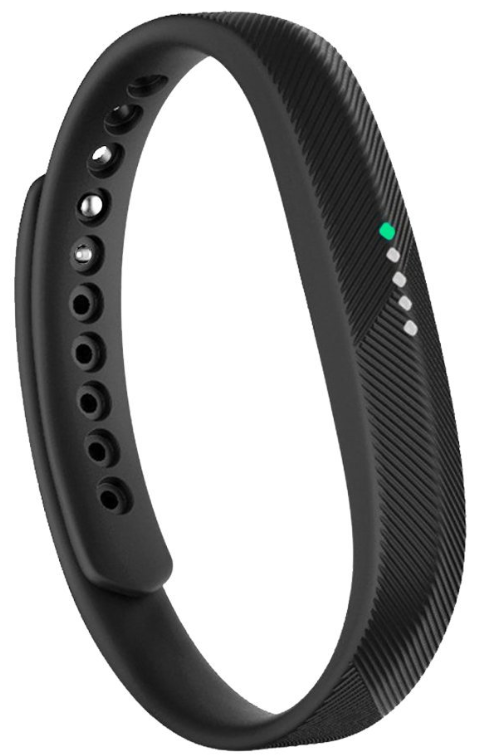
The Fitbit Flex 2 Wristband is a sleek, ultra-thin fitness tracker designed to seamlessly blend into an active lifestyle. Ideal for individuals seeking a subtle, stylish way to monitor their health and activity, this wristband offers all-day activity tracking, automatic sleep monitoring, and swimproof durability. Its slim design allows the small tracker module to be removed and placed in interchangeable bands, bangles, or pendants, making it versatile for both casual wear and formal occasions.
Equipped with a MEMS 3-axis accelerometer and vibration motor, the Flex 2 tracks steps, distance, calories burned, and active minutes throughout the day. It also features a discreet LED progress display that uses color-coded lights to show your step count and notifications from calls or texts. The device automatically recognizes exercises like running and swimming, syncing detailed summaries to the Fitbit app for comprehensive insights.
With an estimated price range of around $70 to $100, the Fitbit Flex 2 is competitively positioned for users who want basic fitness tracking without the bulk or complexity of more advanced smartwatches. It appeals especially to casual fitness enthusiasts, swimmers (thanks to its 50-meter water resistance), and those prioritizing style and comfort in daily wear.
Available through major retailers and online platforms, this device supports Bluetooth 4.0 connectivity for easy syncing with smartphones or computers. Its battery lasts up to 5 days on a single charge, providing reliable tracking without frequent interruptions.
Get started
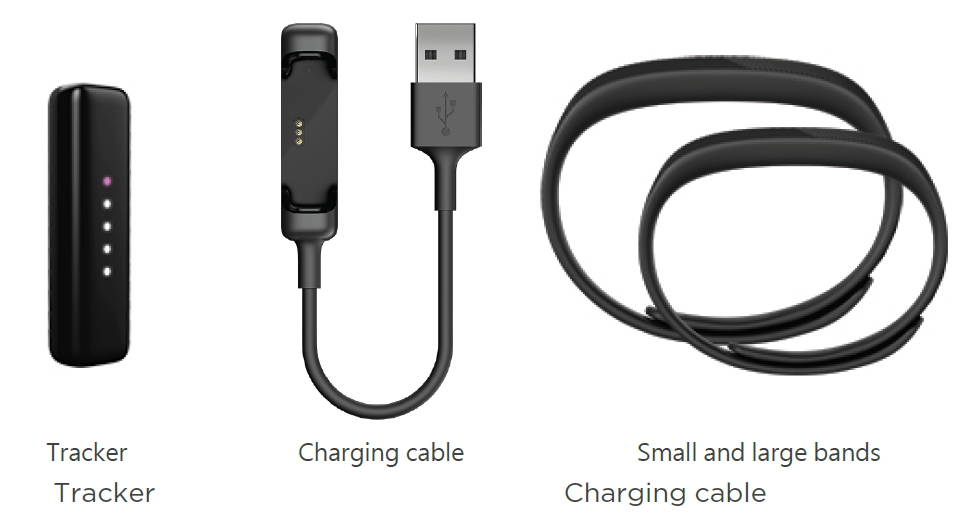
What's in the box
Charge your tracker
A fully-charged Flex 2 has a battery life of up to 5 days. Battery life and charge cycles vary with use and other factors; actual results will vary.
To charge Flex 2:
- Plug the charging cable into the USB port on your computer, or a UL-certified USB wall charger, or another low-energy charging device.
- Press the tracker into the compartment on the charging cable The pins on the charging cable must align with the corresponding pins on the back of the tracker and lock securely in place. You’ll know the connection is secure when the tracker vibrates and you see the indicator lights blinking, indicating your progress towards a total charge.
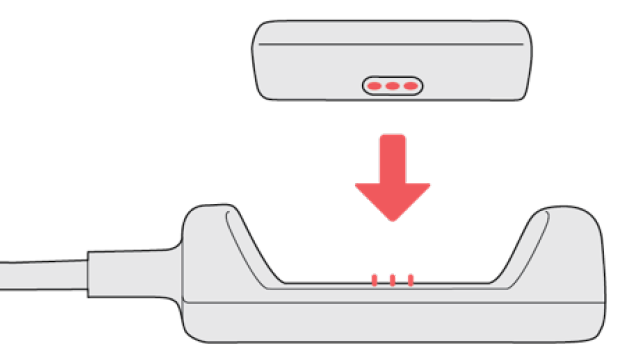
Charging fully takes about 2 to 3 hours. While the tracker charges, each white light that turns on represents 25% of the maximum charge. When Flex 2 has charged completely, you’ll see a green light and then all 5 lights will shine for a few seconds before turning off. If you don’t see any lights flashing, you can double-tap your tracker to check the charging progress. You’ll know your tracker is fully charged when you see 1 green and 4 white indicator lights.
Set up with your phone
Set up Flex 2 with the Fitbit app for iPhones and iPads or Android phones. The Fitbit app is compatible with most popular phones and tablets.
Activity Tracking
Flex 2 continuously tracks a variety of stats whenever you wear it. Data automatically syncs when in range of the Fitbit app throughout the day.
See your stats
Whenever you wear it, Flex 2 tracks your daily stats, including:
- Steps taken
- Distance covered
- Calories burned
- Active minutes
Find your complete history and other information detected by your tracker, such as sleep data, in the Fitbit app.
Track a daily activity goal
Flex 2 tracks your progress toward a daily activity goal of your choice. When you reach your goal, your tracker vibrates and shows a celebration.
Choose a goal
Set a goal to help you get started on your health and fitness journey. To begin, your goal is 10,000 steps per day. Choose to increase or decrease the number of steps, or to change your goal to distance, calories burned, or active minutes.
Track your hourly activity
- Flex 2 helps you stay active throughout the day by keeping track of when you're stationary and reminding you to move.
- Reminders nudge you to walk at least 250 steps each hour. You feel a vibration and see a reminder on your screen at 10 minutes before the hour if you haven't walked 250 steps.
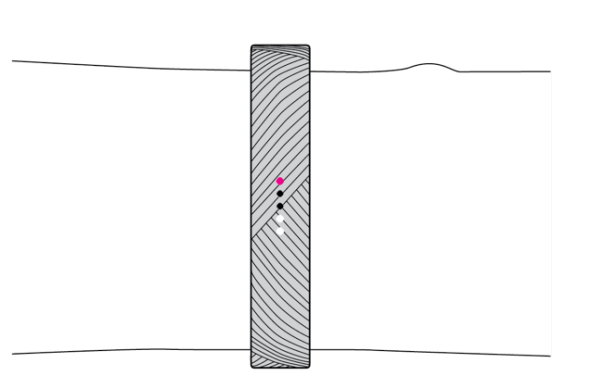
When you meet the 250-step goal after receiving the reminder, you feel a second vibration and see a celebration.
- Turn on reminders to move in the Fitbit app.
Track your sleep
- Wear Flex 2 to bed to automatically track your time asleep and movement during the night to help you understand your sleep patterns. To see your sleep stats, sync your tracker when you wake up and check the app.
Set a sleep goal
- To start, you have a sleep goal of 8 hours of sleep per night. Customize this goal to meet your needs.
Set a bedtime reminder
- The Fitbit app can recommend consistent bedtimes and wake times to help you improve the consistency of your sleep cycle. Turn on bedtime reminders to be reminded nightly when it's time to start getting ready for bed.
Learn about your sleep habits
- Flex 2 tracks several sleep metrics including when you go to bed, how long you're asleep, and how long you spend awake or restless. Track your sleep with Flex 2 and check the Fitbit app to see your sleep patterns.
Track your exercise automatically
- Flex 2 automatically recognizes and records many high-movement activities which are at least 15 minutes long. Sync your device to see basic stats about your activity in your exercise history.
Share your activity
After you complete a workout, sync your tracker with the Fitbit app to share your stats with friends and family.
Troubleshooting
If you experience any of the following issues, restart your tracker:
- Won't sync
- Won't track steps or other data
- Won't respond to taps
To restart your tracker:
- Plug the charging cable into the USB port on your computer or a UL- certified USB wall charger.
- Remove the tracker from the wristband and press the tracker into the compartment on the charging cable. The pins on the charging cable must align with the corresponding pins on the back of the tracker and lock securely in place. You’ll know the connection is secure when the tracker vibrates and you see the indicator lights blinking, indicating your progress towards a total charge. Your Flex 2 will begin charging.
- Find the button on the charging cable and press it three times within five seconds. The button is under the tracker compartment.
The tracker vibrates each time you press the button. After the third button press, wait for about five seconds for all the lights to flash at once, this means the tracker has restarted. Note that the light flash happens quickly and you may not notice it. Your tracker resumes charging after a restart and you will see the normal blinking of the indicator lights indicating your progress towards a total charge.
After your tracker restarts you can unplug it from the charging cable and put it back on.
General Info and Specifications
Sensors
Fitbit Flex 2 contains the following sensors and motors:
- A MEMS 3-axis accelerometer, which tracks motion patterns
- A vibration motor
Materials
The wristband that comes with Flex 2 is made of a flexible, durable elastomer material similar to that used in many sports watches. It does not contain latex.
- The clasp that comes with Flex 2 is made of surgical-grade stainless steel. While all stainless steel contains traces of nickel and can cause an allergic reaction in someone with nickel sensitivity, the amount of nickel in all Fitbit products meets the European Union's stringent Nickel
Directive.
- Fitbit accessory bangles, bands and, pendants sold separately are available in durable elastomer and stainless steel.
Wireless technology
- Flex 2 contains a Bluetooth 4.0 radio transceiver.
Battery
- Flex 2 contains a rechargeable lithium-polymer battery.
Memory
- Flex 2 stores your daily stats for 7 days. Sync your tracker with the Fitbit app to access your historical data.
Display
- Flex 2 has an LED tap display.
Band size
- Band sizes are shown below. Note that accessory wristbands sold separately may vary slightly.
- Small band
Fits a wrist between 5.5 - 6.7 inches (140 mm - 170 mm) in circumference - Large band
Fits a wrist between 6.7 - 8.1 inches (170 mm - 206 mm) in circumference
- Small band
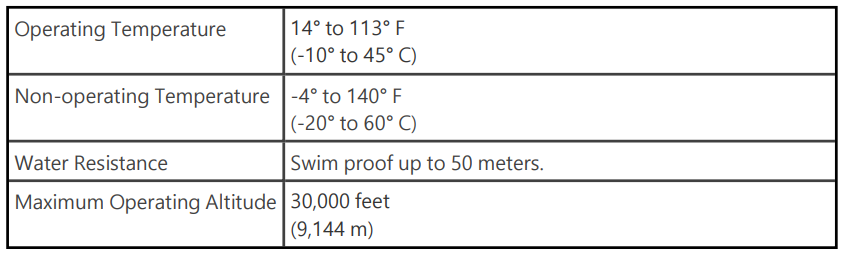
Environmental conditions
Pros & Cons of the Fitbit Flex 2 Wristband
Pros
- Slim and Stylish Design: The ultra-thin tracker fits comfortably and can be worn in multiple styles including wristbands, bangles, and pendants for versatile fashion options.
- Swimproof Capability: Fully water-resistant up to 50 meters, making it suitable for swimming, showering, and wet weather conditions without worry.
- Automatic Activity & Sleep Tracking: Tracks steps, distance, calories, and sleep patterns automatically with SmartTrack technology, minimizing user effort.
- Long Battery Life: Up to 5 days of use per charge, supporting all-day and night monitoring with minimal downtime.
- Discreet LED Notifications: Vibrations and color-coded LED lights alert you to calls, texts, and reminders to move, maintaining connectivity without a full display screen.
Cons
- No Heart Rate Monitor or GPS: Lacks advanced sensors which limits accuracy for serious athletes or those needing detailed workout data.
- Basic Display: LED lights only indicate step progress and notifications but do not provide detailed stats on the device itself, requiring the Fitbit app for full data.
- Battery Life Variation: While advertised for up to 5 days, some users report needing to charge every 3 days with regular syncing, which could be inconvenient.
- Sleep Tracking Accuracy: Some users find sleep data inconsistent or incomplete compared to other devices, with limited feedback on sleep quality.
- Value for Money: While affordable, competitors like the Fitbit Inspire or Charge series offer more features at slightly higher prices, appealing to users needing heart rate or GPS.
Customer Reviews & Feedback on Fitbit Flex 2 Wristband
Users consistently praise the Fitbit Flex 2 Wristband for its comfort, sleek design, and swimproof build. Many commend its ability to track daily steps and recognize swimming exercises automatically, making it useful for active lifestyles. The versatility of interchangeable bands and discreet LED notifications is frequently highlighted as a positive feature.
However, some customers mention drawbacks such as the lack of a heart rate sensor and GPS, which limits its use for serious fitness tracking. Battery life is another commonly noted issue, with some users needing to recharge the device every few days instead of the advertised 5-day span. Sleep tracking inconsistencies and the minimal LED display, which requires syncing to a smartphone or computer for detailed stats, are also recurring complaints.
Overall, the Fitbit Flex 2 receives an average rating of approximately 4 out of 5 stars. Many recommend it for casual fitness tracking and those prioritizing style and swim-friendly features, but advise serious athletes to consider alternatives with more comprehensive sensors and displays.
Faqs
How do I set up my Fitbit Flex 2 Wristband for the first time?
What should I do if my Fitbit Flex 2 Wristband is not syncing with my phone?
How do I insert or remove the Fitbit Flex 2 tracker from its wristband correctly?
Can I use the Fitbit Flex 2 Wristband with both iOS and Android devices?
What are the main features of the Fitbit Flex 2 Wristband that help track fitness progress?
How can I prevent skin irritation when wearing the Fitbit Flex 2 Wristband daily?
What troubleshooting steps can fix a Fitbit Flex 2 Wristband that does not charge?
How do I switch between the small and large wristbands for the Fitbit Flex 2 Wristband?
Tags
More fitbit manuals
- How to Pair: Fitbit Flyer Headphones Instruction Guide
- How to Use: Fitbit Flex Wireless Activity + Sleep Wristband User Manual
- How to Use: Fitbit Inspire Fitness Tracker User Manual
- How to Use: Fitbit Charge 5 Fitness Tracker User Manual
- How to Use: Fitbit Charge Wireless Activity Wristband User Manual
- Setup: Fitbit Charge 4 Fitness Tracker Instruction Manual
Leave a Comment