
Setup: Heatstorm Cabinet Smart Heater HS-1500-KP User Manual
Content
Heatstorm Cabinet Smart Heater HS-1500-KP Product Manual: Complete Guide and Review
Introduction to Heatstorm Cabinet Smart Heater HS-1500-KP
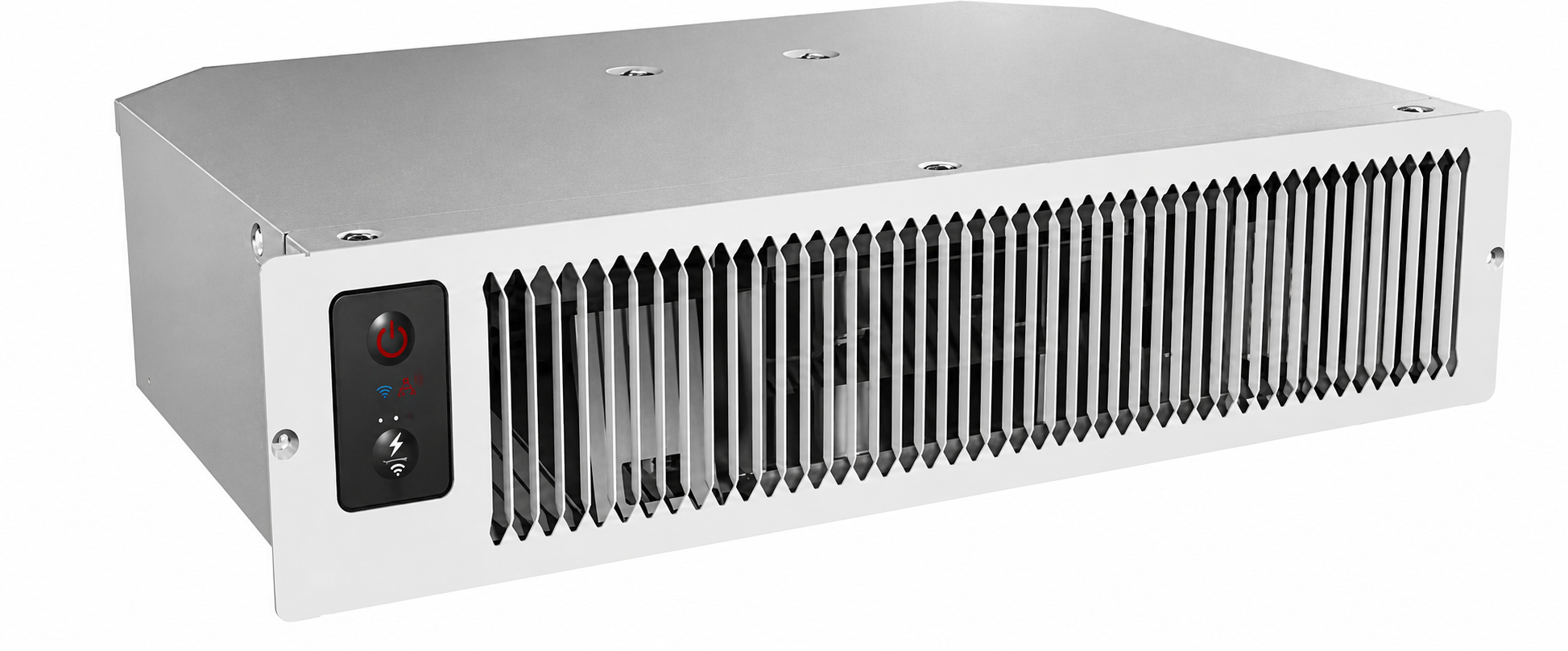
The Heatstorm Cabinet Smart Heater HS-1500-KP, also known as the Kick Space Heater, is a compact, powerful infrared electric heater designed for discreet under-cabinet or kick-space installation. Ideal for kitchens, bathrooms, offices, and small living areas, this Wi-Fi-enabled smart heater delivers efficient warmth up to 750 sq. ft. with its 5,200 BTU output. Its slim profile (19.37” L x 12.17” W x 3.66” H) fits seamlessly in tight spaces where traditional heaters can't go, making it perfect for homeowners, renters, and RV owners seeking supplemental heating without sacrificing floor space.
Key benefits include dual power modes (1,500W high or 750W low) for energy savings, no-heat-loss infrared quartz technology, and smart app control via the Smart Life app for remote temperature adjustments, scheduling, and fan speed settings (low, auto, high). Safety features like overheat protection, tip-over shutoff, and ETL certification ensure reliable performance. Users love its quiet operation (44-47 decibels) and fast heat response, heating rooms quickly even in cold conditions down to 40°F. Priced around $229.99 with free shipping from retailers like FactoryPure and Home Depot, it's widely available online with a 1-year factory warranty (extendable to 5 years). This Heatstorm Cabinet Smart Heater HS-1500-KP stands out as a smart, space-saving solution for modern homes needing targeted, efficient heating.
Technical Specifications and Key Features of Heatstorm Cabinet Smart Heater HS-1500-KP
The Heatstorm Cabinet Smart Heater HS-1500-KP boasts impressive specs for a kick-space heater, outperforming many portable models in efficiency and smart controls.
- Power Output: 1,500W (high) or 750W (low), 5,200 BTU heating capacity, covers up to 750 sq. ft.
- Dimensions & Weight: 19.37” L x 12.17” W x 3.66” H, 10.8 lbs – ideal for under-cabinet mounting.
- Voltage & Cord: 120V, 6 ft standard cord.
- Heating Technology: Infrared quartz bulbs for 100% heat transfer, no loss; auto-select power mode.
- Smart Features: Wi-Fi connectivity, Smart Life app control (temperature, fan speed: low/auto/high, display brightness, scheduling), remote included.
- Safety & Noise: Overheat protection, tip-over shutoff, safe-touch grill, ETL certified; quiet 44-47 dB fan operation.
- Additional: 1-year warranty, wall-mount design for kick spaces.
Compared to similar products like Heat Storm's Phoenix series (150-750 sq. ft., $149.99), the HS-1500-KP excels in cabinet-specific fit and app responsiveness, with faster heat-up times and lower noise.
BATTERY WARNING
- The remote contains a lithium button/coin cell battery. If a new or used lithium button/coin cell battery is swallowed or enters the body, it can cause severe internal burns and can lead to death in as little as 2 hours. If you think batteries have been swallowed or placed inside any part of the body, seek immediate medical attention. Call a local poison control center for treatment information.
- Even used batteries may cause severe injury or death.
- Remove and immediately recycle or dispose of used batteries according to local regulations and keep them away from children. Do NOT dispose of batteries in household trash or incinerate.
- Battery type: Li-Mn CR2025 3.0V. Do not mix old and new batteries, different brands, or types of batteries, such as alkaline, carbon-zinc, or rechargeable batteries.
- Non-rechargeable batteries are not to be recharged.
- Do not force discharge, recharge, disassemble, heat above 140°F, or incinerate batteries. Doing so may result in injury.
- Ensure the batteries are installed correctly according to polarity (+ and -).
- Remove and immediately recycle or dispose of batteries from equipment not used for an extended period of time according to local regulations.
- Always completely secure the battery compartment. If the battery compartment does not close securely, stop using the product, remove the batteries, and keep them away from children.
Installation Instructions
Installation should be carried out by a certified electrician or a person possessing the required expertise. Ensure that the heater is installed correctly before activating the power.
HEATER LOCATION
When choosing a location for your new heater, ensure that the general instructions are followed. Your heater must be properly installed before operation. Do not prop the heater up against objects or use the heater with the grill placed vertically. For best effect, install the heater out of direct sunlight.
- Basement or Garage Use
- The heater can be utilized in a finished basement with drywall and carpet. For other scenarios, consider Heat Storm Outdoor Infrared Heaters. Visit heatstorm.com for details.
- Vaulted or Cathedral Ceilings
- The heater can be used with vaulted or cathedral ceilings. However, initial room heating may take longer. Once the desired temperature is reached, the heater will cycle accordingly.
- Poorly Insulated Areas
- Note that rooms with poor insulation may not retain heat efficiently, potentially leading to longer or more frequent operation.
- Cold Climate Installation Note
- Placing the unit under a window or on a poorly insulated wall may result in the heater reading a colder ambient temperature than the actual room temperature.
- Heating Multiple Rooms
- Effectiveness depends on floor plan openness and room sizes. Experiment to find the most suitable configuration. DO NOT USE in the Following Areas:
- Outdoors – use Heat Storm Outdoor Infrared Heaters.
- Locations with gasoline, paint, or flammable liquids.
- Wet or moist locations.
- Closets.
POWER CONNECTION GUIDELINES
This heater is wired for an outlet, or the cord can be cut to hardwire the heater. Heat Storm Infrared Heaters are considered to be an appliance. Each heater and appliance should be on its own circuit. Plug the heater directly into a wall outlet; do not use extension cords, surge protectors, or relocatable power taps. This heater is designed for standard 120-volt outlets and should only be connected to a proper 3-prong polarized outlet. Ensure the cord is not under carpeting, covered with rugs, runners, or similar coverings. Avoid routing it under furniture or appliances and position it away from high-traffic areas to prevent tripping hazards.
TOOLS NEEDED FOR INSTALLATION
- Drywall saw
- Utility knife
- Wire cutter and stripper for hardwiring
- Phillips screwdriver
Missing parts? Email us at cs@heatstorm.com.
STEP 1: INSERT MOUNTING BRACKET
Create a Hole
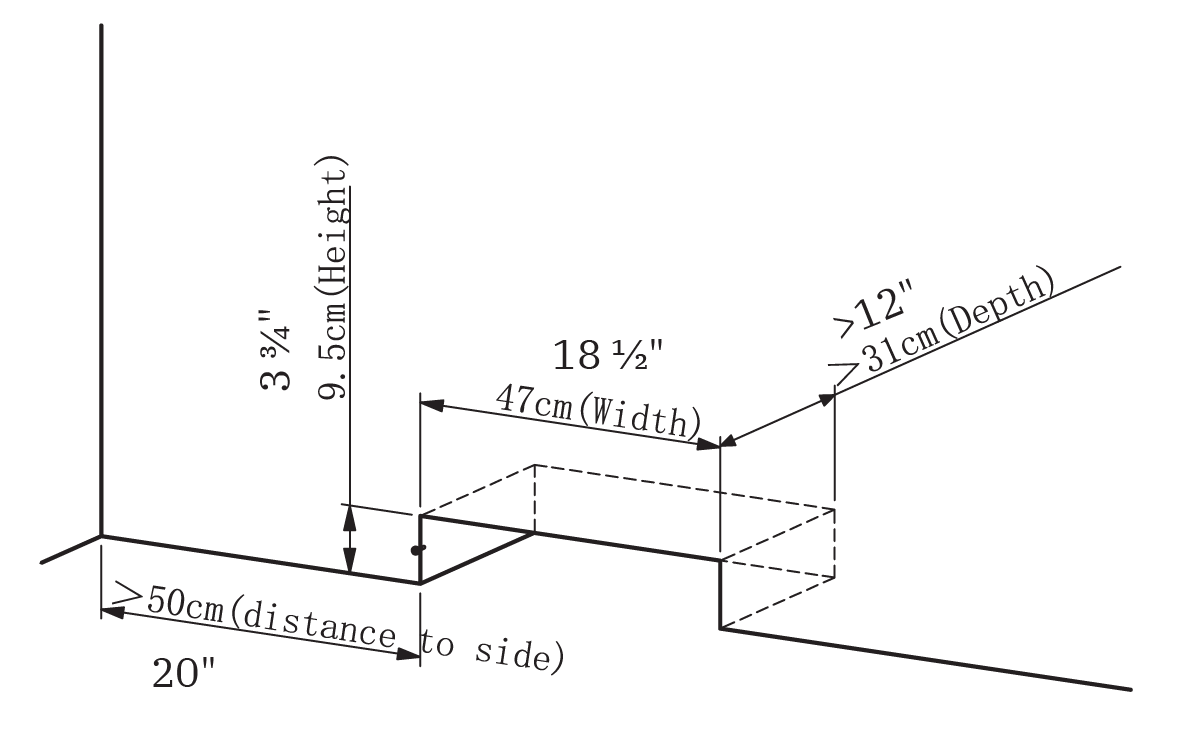
Cut a rectangular hole in wood or gypsum board with the following dimensions: 3 3/4" high, 18 1/2" wide, and at least 12" deep. Ensure there is at least 20" of space between the hole and any nearby cabinets or walls, and install a built-in electrical socket inside the hole for easy connection.
Remove Front Screws
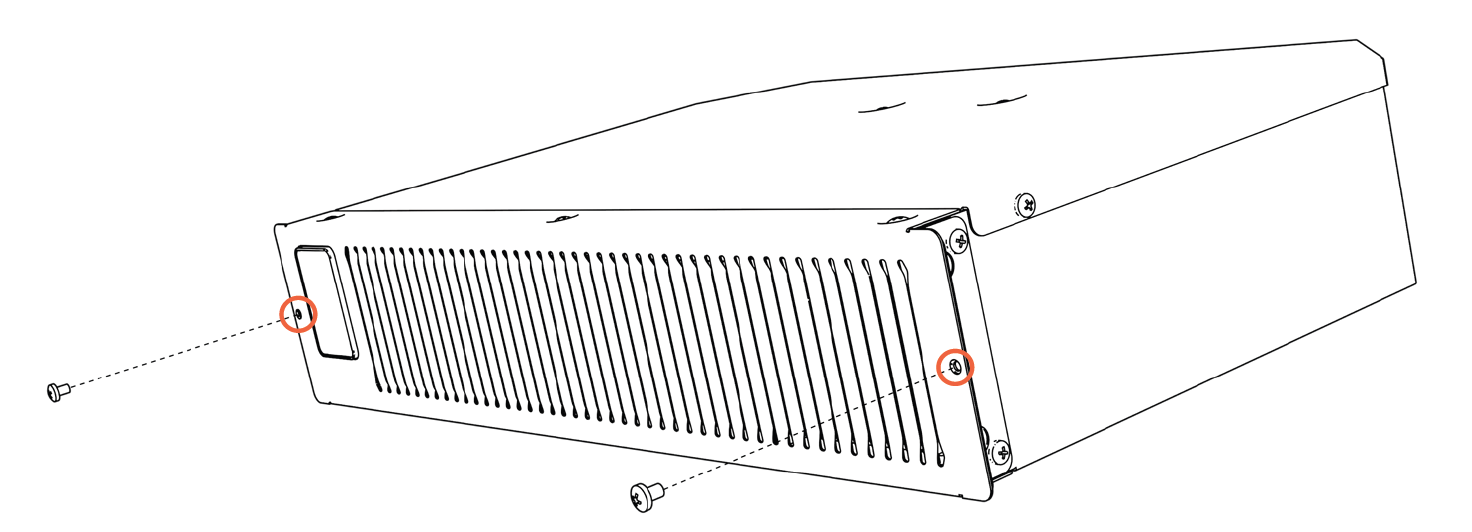
Remove the two M4x7 screws located on the front cover, as shown in the image.
STEP 2: HARDWIRE HEATER (OPTIONAL)
Remove Heater Top
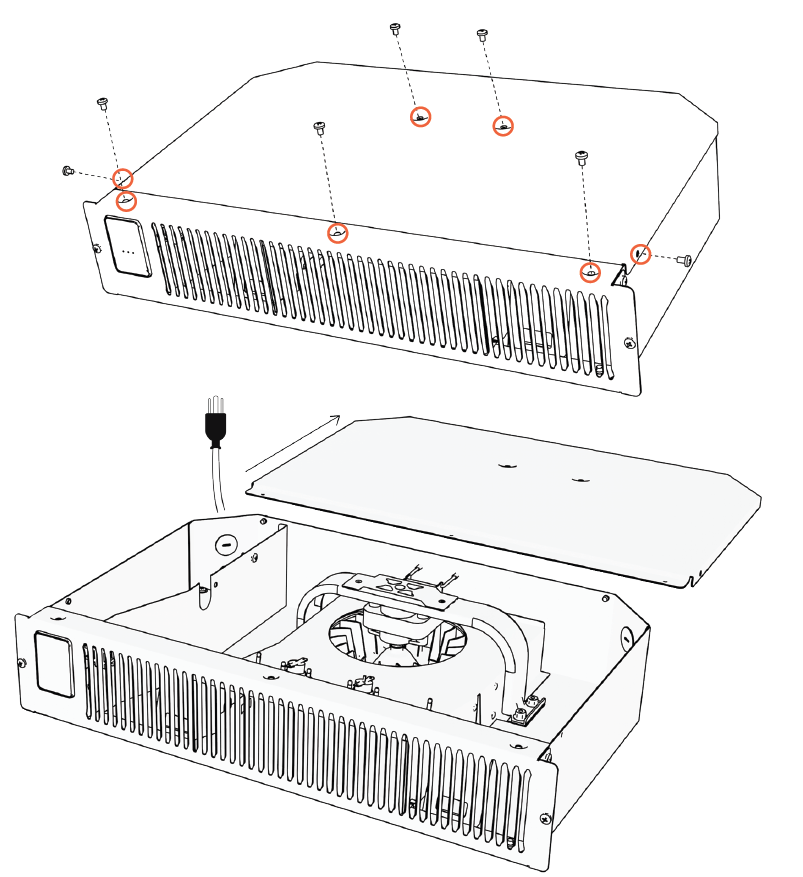
Remove all screws on the top and side of the heater as shown in the picture. Then, slide the top cover backward to remove it.
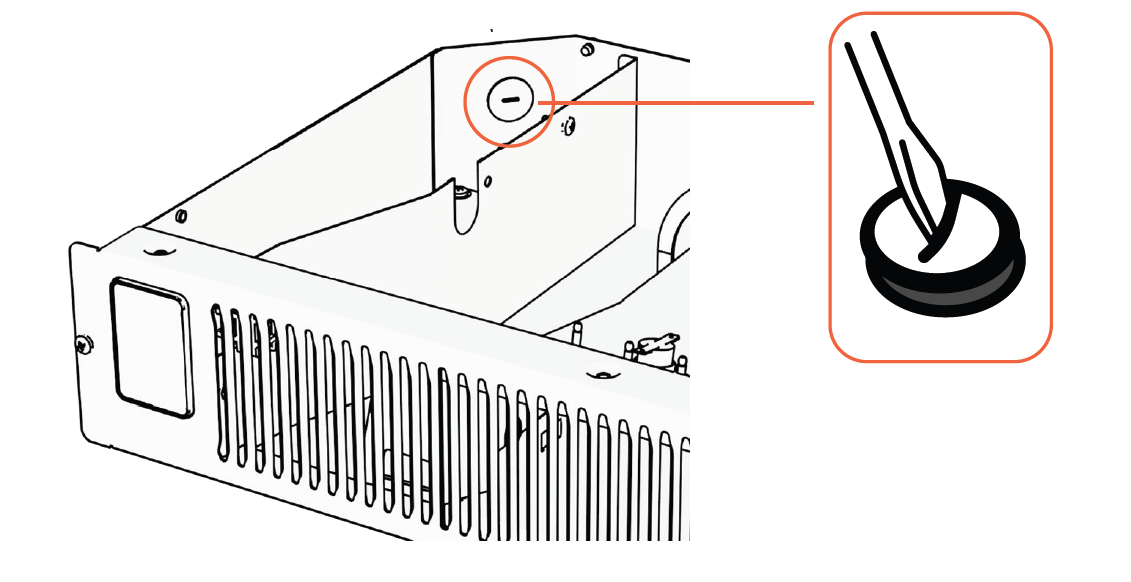
Remove Hole Cover
Use a screwdriver to remove the hole cover. Once removed, feed your wire into the box, ensuring that the wires are stripped and ready for connection.
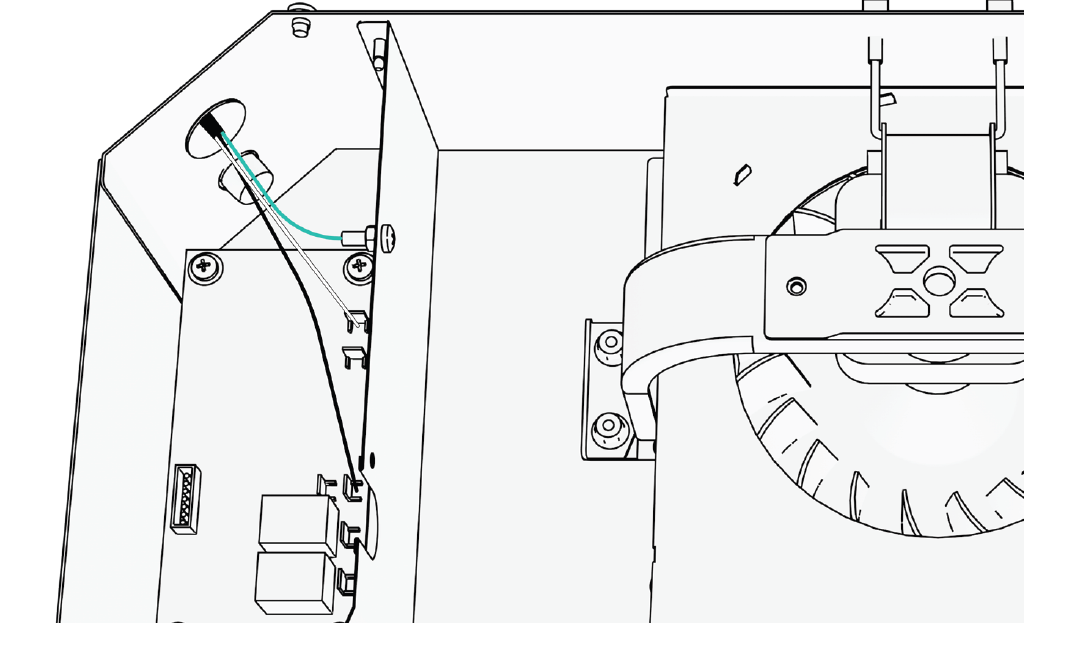
Connect Wires
Disconnect the current power cord and connect the 120V AC power supply according to the original wiring method used for the power cord.
STEP 3: INSTALL HEATER
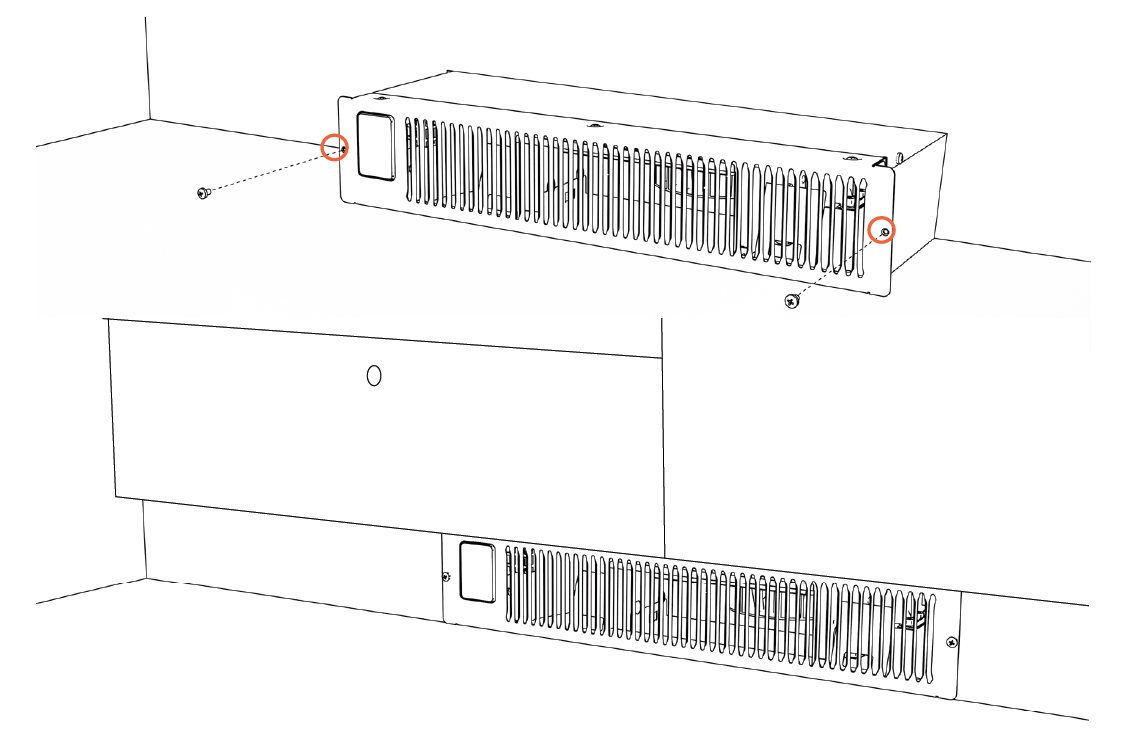
Install the Heating Base
Slide the heater into the rectangular hole and secure it in place using the two ST4.0x25mm screws from the kit.
OPERATIONS & CONTROLS
- Power ON/OFF
- Press the power icon to alternate between on (red) and off (white).
- Child Lock
- Press and hold the power icon for 3 seconds to engage/disengage child lock. When the child lock is on, a red lock icon will appear and no changes can be made to the settings until the child lock is turned off.
- Factory Reset
- Power off the heater and allow time for the elements to cool. Unplug and plug in the heater. Within 3 minutes of plugging in the heater, press and hold the power icon for 10 seconds to reset the heater to factory settings.
- Changing Working Mode
- Press the lightning/Wi-Fi button to toggle between low, auto, and high working modes.
Low Mode | Green
Heater runs at 50% power, effectively halving the wattage.
Auto Mode | White
Heater runs at full power until it's within 2 degrees of the set temperature. It then shifts to 50% power to achieve and maintain the desired temperature. This ensures more frequent, energy-efficient operation while effectively maintaining the set temperature.
High Mode | Red
Heater runs at 100% power.
NOTE: The fan will turn on and off to circulate air. The heater is trying to determine if the ambient temperature in the room has changed. After the heater function or power is turned off, the blower will continue for several minutes to cool internal components.
Wi-Fi Discovery Mode
Press and hold the lightning/Wi-Fi symbol for 5 seconds to enable the Wi-Fi discovery mode (will blink blue). Refer to page 14 for guidance on connecting to Wi-Fi. The blinking blue light will turn to a solid blue once Wi-Fi is connected.
Pair External Thermostat
Press and hold both the power and mode buttons on the heater for 5 seconds. The light will begin blinking red, indicating it's in discovery mode. Next, press and hold the button on the back of the external thermostat for 5 seconds until you hear a beep. Once paired, the thermostat indicator light will glow red, confirming a successful connection.
Selecting Celsius or Fahrenheit
Navigate to the Me section in the app. Tap the settings icon in the top right corner. Select Temperature Unit to change the temperature unit.
REMOTE CONTROL
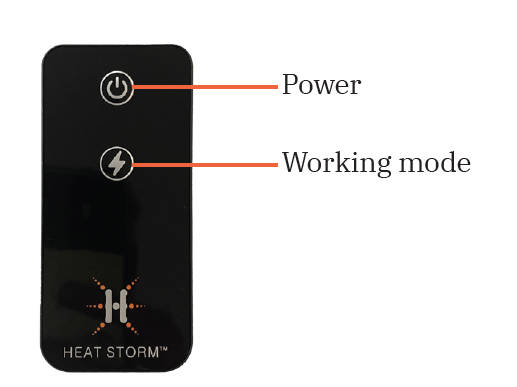
The remote will function the same as the buttons on your unit. If you have any questions on how a function works, please refer to the previous control descriptions.
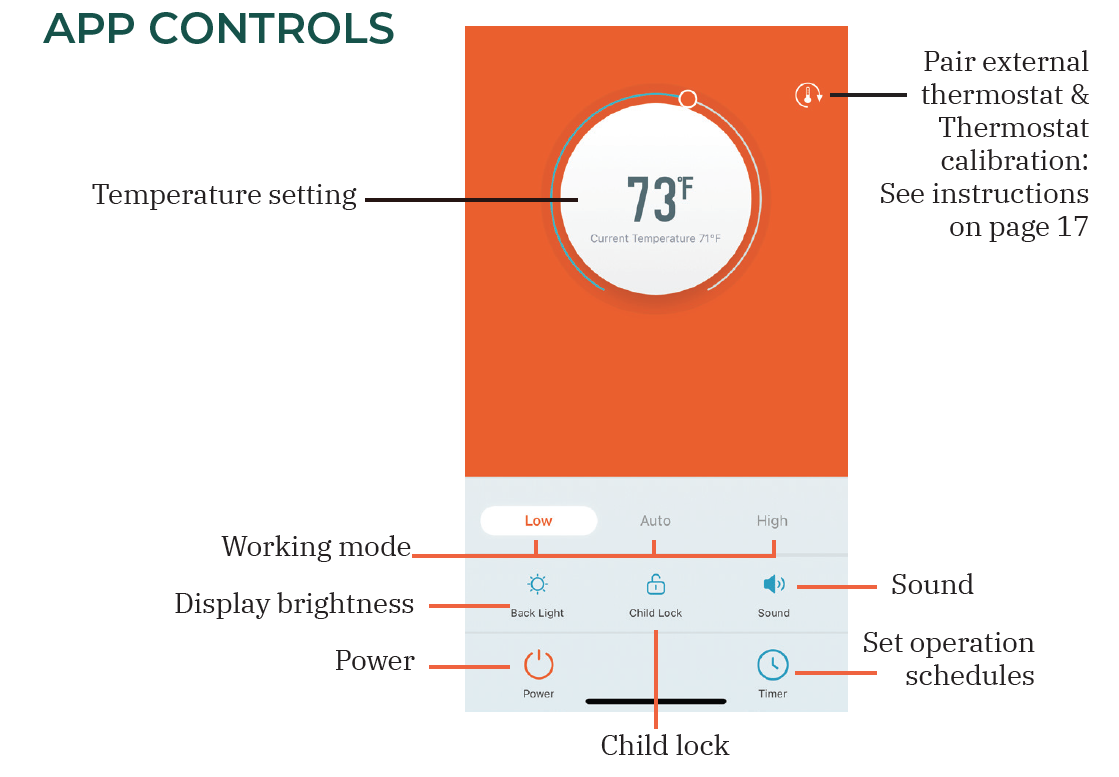
APP CONTROLS
Wi-Fi Setup
SMART LIFE APP
Manage your Heat Storm Smart Heater conveniently anytime and anywhere you desire. With just a tap of your finger, you can adjust temperatures, create schedules, set a child lock, and ensure warmth according to your preferences.
Prepare Your Phone
Enable Wi-Fi and Bluetooth on your phone. Connect your phone to a 2.4 GHz Wi-Fi network. Your phone needs to be connected to the same Wi-Fi network that you want to connect your heater to.
- NOTE: For some dual-band routers, you may need to manually create a network dedicated to 2.4 GHz.
Download the Smart Life App
Download the app by scanning the QR code or searching for Smart Life in the App Store or on Google Play. Once the app is downloaded, sign up and agree to the User Agreement and Privacy Policy. Register with your email, set your password, and create a new home in the Smart Life app.
CONNECT YOUR HEATER TO WI-FI
The Smart Life app offers multiple methods for Wi-Fi setup. If one method fails, don't worry—simply move on to the next one. It's essential to note that the app might undergo updates over time. As a result, the app prompts you encounter may differ slightly from the manual. For the most accurate and up-to-date guidance, follow the prompts within the app.
EASY CONNECT
Ensure your phone's Wi-Fi, Bluetooth, and location functions are all activated.
Add Device
When the machine is on, press and hold the Wi-Fi/sun button on the control panel for 5 seconds until the Wi-Fi indicator light begins flashing slowly. Add the appliance in the app:
i. If a pop-up is displayed, tap "Go to add". If you don't get a pop-up, tap the plus icon in the top right corner. Select "Add device."
ii. Choose "Small home appliance," then find "Heater (BLE)."
Choose Wi-Fi
Enter your case-sensitive Wi-Fi network name and password, then tap "Confirm." Press "Next" if prompted to reset the heater.
Configuration Process
Wait for the connection to be completed. Please be patient, as this may take a few minutes. The app will notify you that the device was successfully added. Select "Done" to enter the control interface.
MANUAL CONNECT
Add Device
i. When the machine is on, press and hold the Wi-Fi/sun button on the control panel for 5 seconds until the Wi-Fi indicator light begins flashing.
ii. In the app, tap the plus icon in the top right corner.
iii. Select "Add device." Choose "Small home appliance."
iv. Tap "Heater (Wi-Fi)."
Choose Wi-Fi
Enter your case-sensitive Wi-Fi network name and password, then tap "Confirm." Press "Next" if it asks you to reset your heater.
Configuration Mode
Confirm the Wi-Fi indicator light on the control panel is flashing quickly and select "Blinking quickly" within the app. Then click on "Finish network configuration."
Configuration Process
Wait for the connection to be completed. Please be patient, as this may take a few minutes. The app will notify you that the device was successfully added. Select "Done" to enter the control interface.
Troubleshooting Guide
RECALIBRATING YOUR HEATER
If your heater is not working like normal, try resetting it. Heaters are like other electronics; sometimes they need a reboot (refer to the factory reset on page 11). If an issue persists, contact customer service at 435-752-6611.
FAN
Not Blowing Air
When powering the heater ON, it does not blow any air at first. The initial 15 seconds allow the infrared elements to heat up, ensuring that when the fan turns on, warm air is circulated into the room.
Not Blowing Warm Air
Ensure the air inlet is not blocked. The ambient temperature (displayed) is higher than the thermostat setting. Something is blocking the airflow. Move the object out of the way of the heater. This is common if the heater is in a closet or under a desk.
Continuing to Blow Air When Heater Is Turned Off
This is the cool-down phase. The heater will run for several minutes (up to 12) to cool the internal components. This increases the lifespan of the infrared elements. If the heater did not finish the cooling procedure when it was unplugged, the fan will blow immediately when the heater is powered back on. Heater Fails to Reach the Set Temperature and Continues to Run. Possible reasons for temperature discrepancies:
- Ensure clean filters.
- Address drafty or poorly insulated rooms.
- Keep doors closed for efficient heating.
- Place the heater on an interior wall, away from windows.
- If issues persist, consider the heater's size suitability for the room. Optimal for spaces between 150–750 sq. ft., with primary heating around 150 sq. ft.
Square footage recommendations may vary based on home insulation. Placing the heater near objects can impede air circulation in the room, resulting in uneven temperatures within the same space. Unplug the unit from the wall outlet for 2 hours. Reconnect the unit after this period. If the issue persists, contact customer service at 435-752-6611.
Fan Runs for Under a Minute and Then Turns Off
The fan is turning on to attempt to create airflow within your room. The heater is trying to determine if the ambient temperature in the room has changed.
THERMOSTAT CALIBRATION
Ambient Temperature Reading of the Heater Different from the Reading on My Central Heating Thermostat. Thermostat readings may fluctuate depending on the surroundings. You can manually calibrate the thermostat on the heater to align with your central HVAC system. You may need to attempt calibration multiple times to align your heater thermostat with your HVAC system.
- In the Smart Life app, tap on your heater to enter the temperature adjustment screen. Press the icon to enter the temperature calibration page.
- Adjust the Heat Storm's thermostat with the slider to reach the same temperature as your central HVAC.
NOTE: Generally, Heat Storm heater thermostats are more precise than home central thermostats. Adjusting your Heat Storm heater to align with your central system may result in reduced efficiency.
Pros and Cons of Heatstorm Cabinet Smart Heater HS-1500-KP
Pros
- Space-saving design fits perfectly under cabinets, freeing floor space unlike bulky freestanding heaters.
- Smart Wi-Fi app offers precise control, quick temperature adjustments (reacts instantly), and energy-efficient auto mode.
- Powerful 5,200 BTU output heats 750 sq. ft. efficiently with infrared tech, outperforming 1,000W competitors.
- Quiet at 44-47 dB, safe for bedrooms or TV rooms; excellent value at $229.99 with a 1-year warranty.
- Easy Wi-Fi setup and remote control enhance convenience for smart homes.
Cons
- Fixed cord length (6 ft) may require an extension in some installs.
- App pairing can be tricky initially, as noted in user feedback (press the correct button sequence).
- Higher upfront cost than basic 1,500W heaters without smart features.
- Fan runs post-shutdown to cool elements, slightly extending runtime.
Overall, the pros dominate for targeted heating needs, offering superior value over alternatives like non-smart kick heaters.
Customer Reviews and Feedback for Heatstorm Cabinet Smart Heater HS-1500-KP
Customers rate the Heatstorm Cabinet Smart Heater HS-1500-KP highly, averaging 4.5+ stars across sites like Home Depot and Heat Storm reviews. Praises include easy Wi-Fi setup, fast heating ("heats well in Fall/Winter"), and quiet operation: "44-47 dB, perfect with TV on." One user said, "App works great for scheduling; reacts instantly to changes." Common complaints involve initial app pairing ("Press Wi-Fi correctly after video guide") and late-season purchases limiting testing.
Testimonials highlight reliability: "Very easy setup, heats efficiently." Most recommend it for kitchens and small spaces, addressing cold floors effectively. Frequently mentioned issues like fan cooldown are seen as safety pluses. Buy if you need smart, compact heating – strong purchase recommendation for 2025 winter use.
Faqs
How do I set up the Heatstorm Cabinet Smart Heater HS-1500-KP WiFi connection for app control?
What should I do if the Heatstorm Cabinet Smart Heater HS-1500-KP won't turn on or heat?
How do I use the app features on Heatstorm Cabinet Smart Heater HS-1500-KP for better temperature control?
Is the Heatstorm Cabinet Smart Heater HS-1500-KP compatible with smart home systems like Alexa?
How can I optimize performance of Heatstorm Cabinet Smart Heater HS-1500-KP for kick space heating?
How often should I clean and maintain the Heatstorm Cabinet Smart Heater HS-1500-KP?
What power settings are available on Heatstorm Cabinet Smart Heater HS-1500-KP and when to use them?
Why is the fan noisy on my Heatstorm Cabinet Smart Heater HS-1500-KP and how to fix it?
More heatstorm manuals
- Setup: Heatstorm In-wall Smart Heater HS-3000-WALL-R User Manual
- Setup: Heatstorm Infrared Heater HS-1500-ILODT User Manual
- Setup: Heatstorm In-wall Smart Heater HS-1500-WALL-R User Manual
- Setup: Heatstorm Mojave Portable Heater HS-1500-IMO User Manual
- Setup: Heatstorm Quartz Infrared Element Heater HS-1500-SED-WI User Manual
- How to Use: Heatstorm Garage Heater HS-6000-GC User Manual
Leave a Comment