
Setup: Heatstorm In-wall Smart Heater HS-1500-WALL-R User Manual
Content
Heat Storm 1500-Watt In-Wall Smart Heater HS-1500-WALL-R: Complete Product Manual & Review
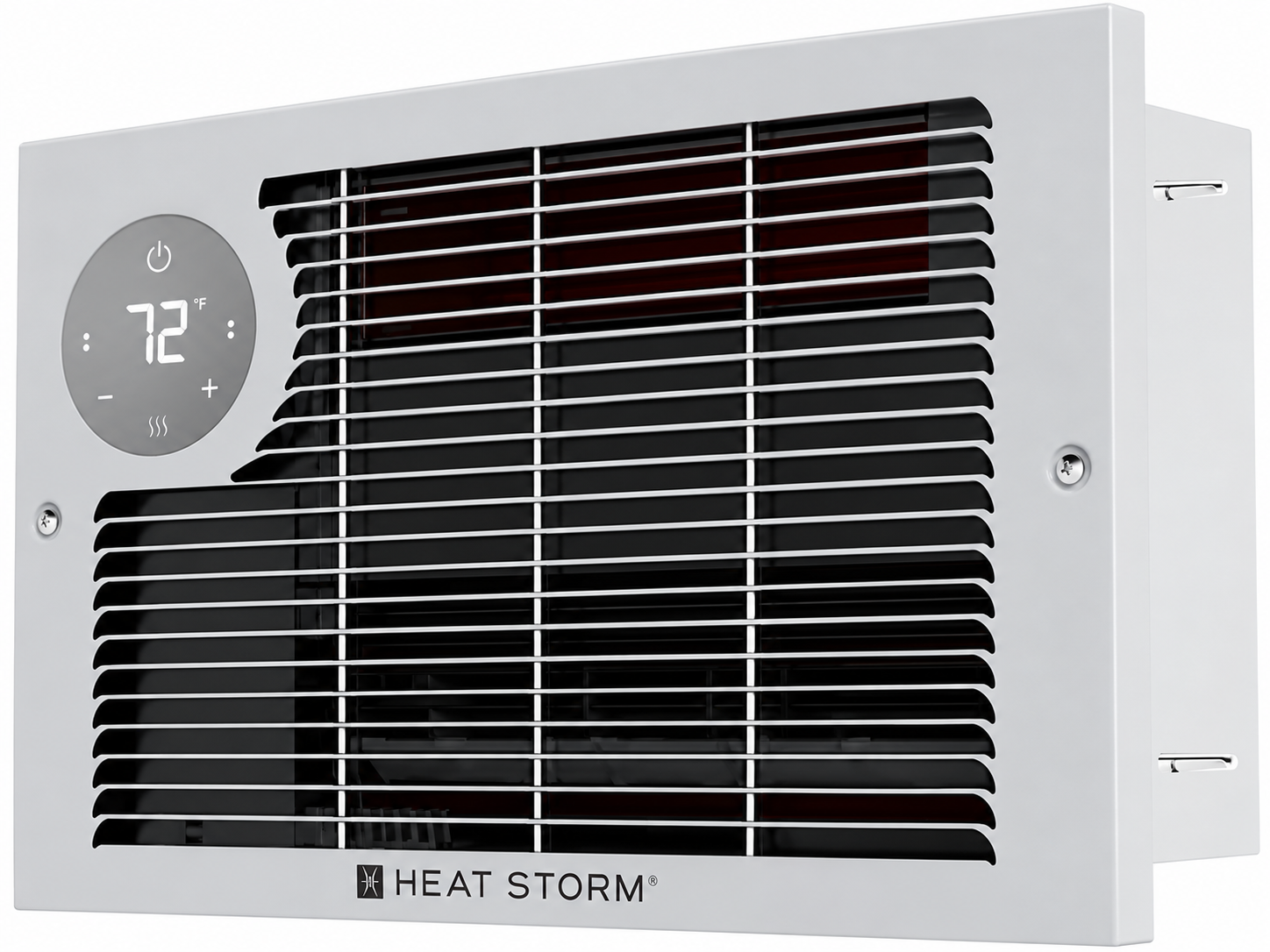
Introduction to the Heat Storm In-Wall Smart Heater
The Heat Storm In-Wall Smart Heater HS-1500-WALL-R represents a modern solution for homeowners seeking efficient, space-saving heating technology. This Wi-Fi-enabled electric heater combines cutting-edge smart home integration with practical heating performance, making it an ideal choice for supplemental and primary heating applications. The heater delivers 5200 BTU of warmth with selectable power settings of 750W or 1500W, allowing users to customize their heating output based on specific room requirements and energy consumption preferences.
Designed for seamless wall integration, the Heat Storm In-Wall Smart Heater HS-1500-WALL-R eliminates the need for bulky floor-standing units, preserving valuable living space while maintaining aesthetic appeal. The device features a built-in digital thermostat, LED touchscreen display with adjustable brightness, and comprehensive smart home connectivity through Wi-Fi and mobile app control. Users can establish custom heating schedules, monitor temperature in real-time, and adjust settings from anywhere using their smartphone, resulting in significant energy savings and enhanced convenience.
This product targets homeowners, apartment dwellers, office managers, and anyone seeking reliable supplemental heating for rooms up to 150 square feet as primary heat, or up to 500 square feet as secondary heating with proper insulation. The Heat Storm In-Wall Smart Heater HS-1500-WALL-R typically retails between $200-$350, with competitive pricing available through major retailers including Home Depot, Northern Tool, and Zoro. The heater is currently in stock at multiple online retailers and offers free shipping on many platforms.
Technical Specifications of the Heat Storm HS-1500-WALL-R
Power and Performance Metrics:
- Power Rating: 750-1500 watts (dual selectable settings)
- BTU Output: 5200 BTU per hour
- Voltage: 120V standard household outlet
- Amperage: 6.25-12.5 amps AC
- Heating Coverage: Up to 150 sq ft (primary heat), up to 500 sq ft (secondary heat with R24 insulation)
Physical Specifications:
- Width: 15 inches
- Depth: 4 inches
- Mounting Type: In-wall installation only
- Color: White finish
- Material Construction: Durable plastic housing with internal heating elements
- Operating Noise Level: 42-47 decibels (ultra-quiet operation)
Smart Features and Controls:
- Wi-Fi enabled with mobile app control
- Bluetooth one-touch setup for hassle-free connectivity
- LED touchscreen display with adjustable brightness
- Digital thermostat with automatic temperature maintenance
- Custom heating schedule programming
- Remote control included
- Child lock safety feature
- Safe-to-touch protective grill
Advantages of the Heat Storm In-Wall Smart Heater HS-1500-WALL-R
Key Strengths:
- Smart Home Integration: Wi-Fi connectivity and mobile app control allow complete remote management from anywhere, enabling users to adjust temperatures and create heating schedules that reduce energy consumption and utility costs.
- Space-Saving Design: Wall-mounted installation eliminates floor clutter and preserves valuable room space, making it perfect for apartments, offices, and rooms with limited floor area.
- Energy Efficiency: Dual power settings (750W and 1500W) let users select appropriate heat output, reducing unnecessary energy consumption during milder weather conditions.
- Quiet Operation: Operating at only 42-47 decibels ensures minimal noise disruption, making it suitable for bedrooms, offices, and quiet living spaces.
- Safety Features: Child lock protection, safe-to-touch grill, and automatic thermostat control provide peace of mind for families with children and pets.
- Fast Installation: In-wall mounting with included template and hardware enables quick professional or DIY installation without complex wiring requirements.
Disadvantages and Limitations
Areas for Consideration:
- Limited Heating Capacity: Maximum coverage of 500 square feet as secondary heat means it works best for supplemental heating rather than whole-home climate control in larger residences.
- Installation Requirements: Wall-mounted design requires cutting into walls and may not be suitable for renters or temporary living situations without landlord approval.
- Wi-Fi Dependency: Smart features require stable internet connectivity; users without reliable Wi-Fi cannot access remote app functionality.
- Electricity Costs: Electric heating generally costs more than gas heating, making long-term operation expenses higher for primary heating applications.
- Limited Adjustability: Only two power settings (750W and 1500W) provide less granular control compared to some competitor models with multiple heat levels.
Installation Instructions
Installation should be carried out by a certified electrician or a person possessing the required expertise. Ensure that the heater is installed correctly before activating the power.
HEATER LOCATION
When choosing a location for your new heater, ensure that the general instructions are followed. Your heater must be properly installed prior to operation. Do not prop the heater up against objects or use the heater with the grill placed vertically. For best effect, install the heater out of direct sunlight.
Basement or Garage Use
The heater can be utilized in a finished basement with drywall and carpet. For other scenarios, consider Heat Storm Outdoor Infrared Heaters. Visit heatstorm.com for details.
Vaulted or Cathedral Ceilings
The heater can be used with vaulted or cathedral ceilings. However, initial room heating may take longer. Once the desired temperature is reached, the heater will cycle accordingly.
Poorly Insulated Areas
Note that rooms with poor insulation may not retain heat efficiently, potentially leading to longer or more frequent operation.
Cold Climate Installation Note
Placing the unit under a window or on a poorly insulated wall may result in the heater reading a colder ambient temperature than the actual room temperature.
Heating Multiple Rooms
Effectiveness depends on floor plan openness and room sizes. Experiment to find the most suitable configuration.
DO NOT USE in the Following Areas:
- Outdoors – Use Heat Storm Outdoor Infrared Heaters.
- Locations with gasoline, paint, or flammable liquids.
- Wet or moist locations.
- Closets.
POWER CONNECTION GUIDELINES
This heater is wired for an outlet, or the cord can be cut to hardwire the heater.
Heat Storm Infrared Heaters are considered appliances. Each heater and appliance should be on its own circuit.
Plug the heater directly into a wall outlet; do not use extension cords, surge protectors, or relocatable power taps. This heater is designed for standard 120-volt outlets and should only be connected to a properly grounded 3-prong outlet.
Ensure the cord is not under carpeting or covered with rugs, runners, or similar coverings. Avoid routing it under furniture or appliances, and position it away from high-traffic areas to prevent tripping hazards.
TOOLS NEEDED FOR INSTALLATION
- Drywall saw
- Utility knife
- Wire cutter and stripper for hardwiring
- Phillips screwdriver
STEP 1: INSERT MOUNTING BRACKET
Select a Suitable Wall
Ensure there is at least a 4½-inch clearance between the heater and nearby walls, ceiling, and floor. Additionally, place the heater in a location where the cord can reach an outlet for power if it is not being hardwired.
Mark a 13⅝" × 8⅞" Hole Between Two Studs
Once you have measured, cut out the drywall.
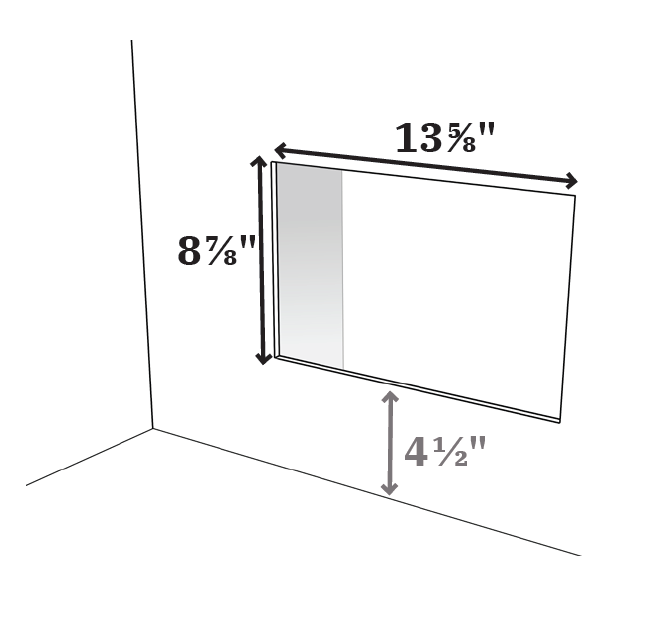
Note: The mounting plate can be installed during new construction, and the heater can be added after all finishing work is complete.
Secure the Mounting Bracket
Insert the mounting bracket into the rectangular hole and screw it into the wood studs.
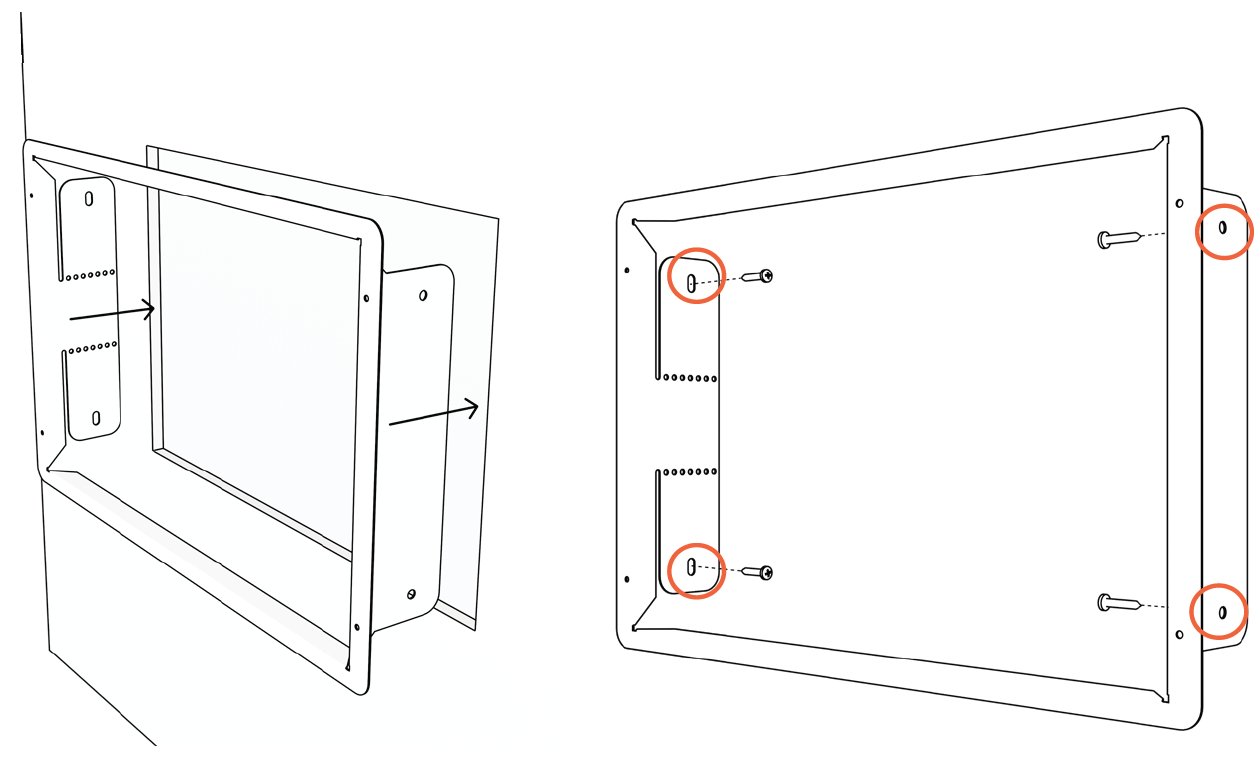
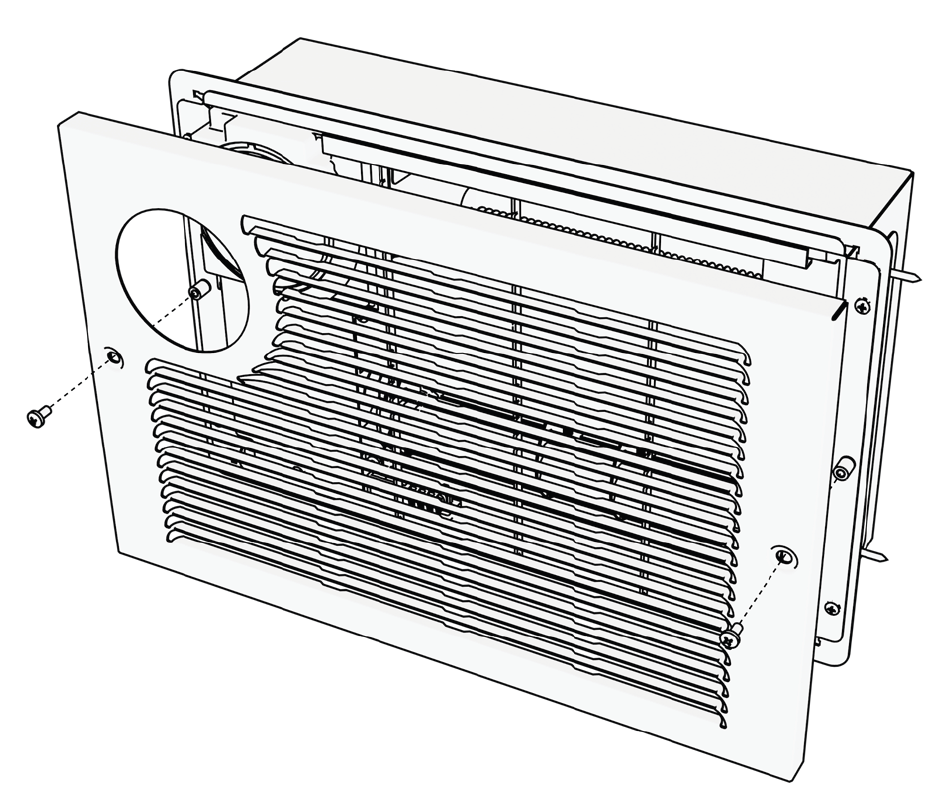
Remove the Heater Grill
Remove the front grill from the heating base to prepare for installation.
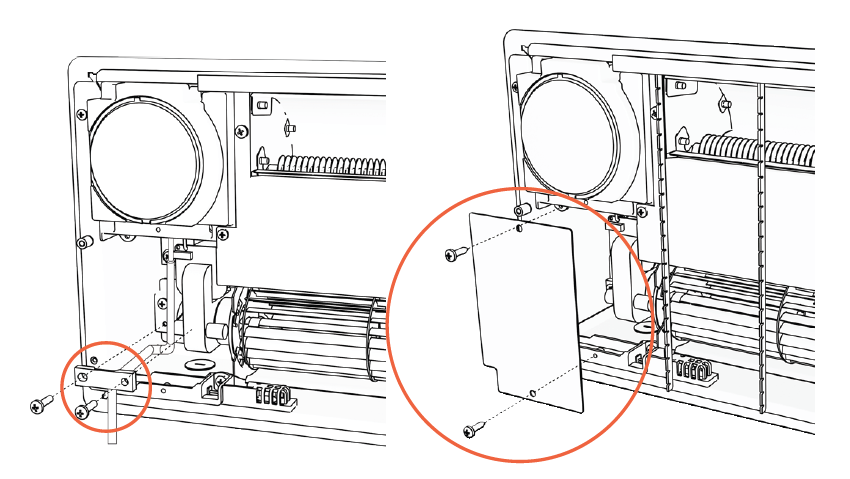
STEP 2: HARDWIRE HEATER (OPTIONAL)
Remove the Power Box Cover and Crimp Block
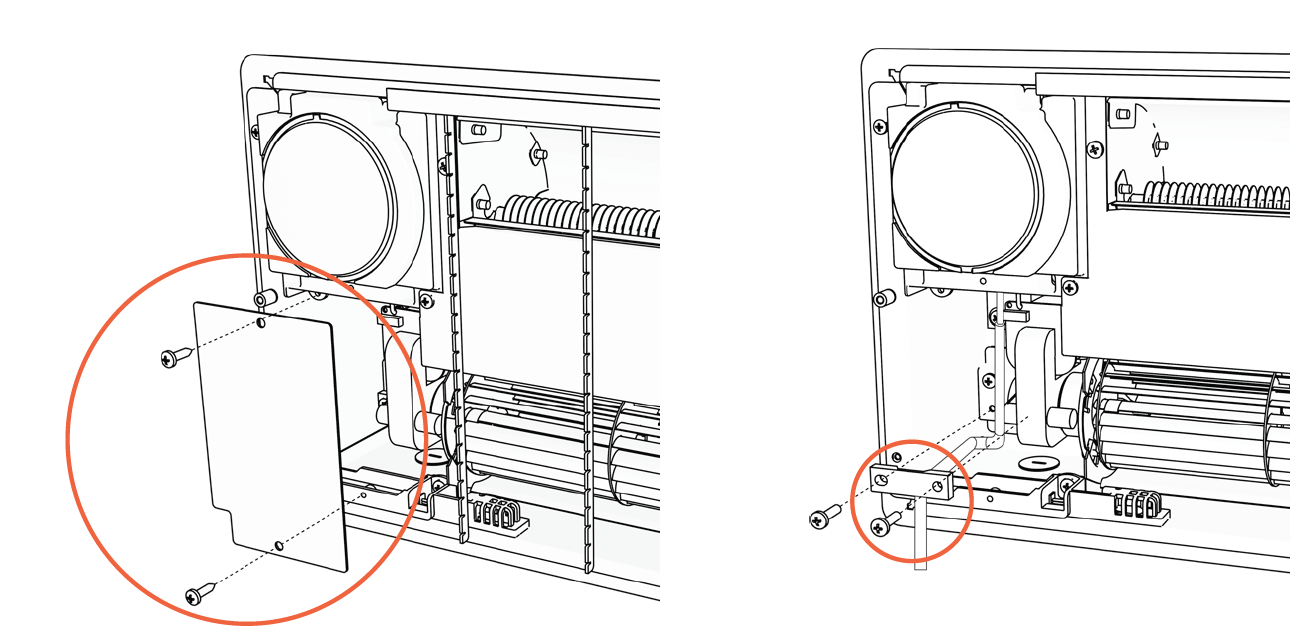
Cut the Power Cord
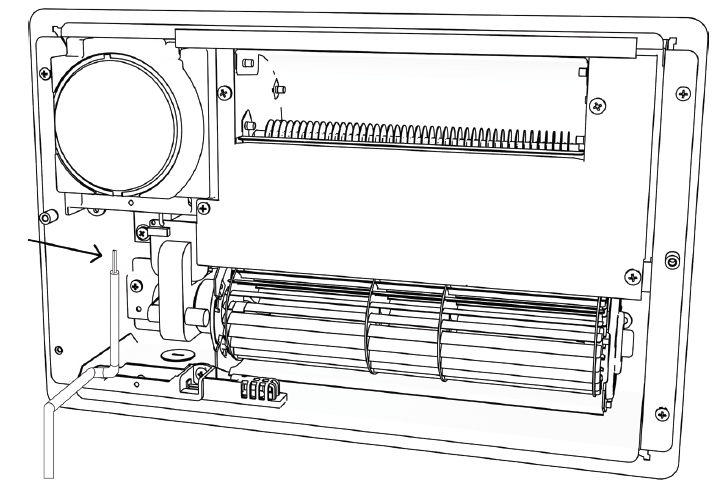
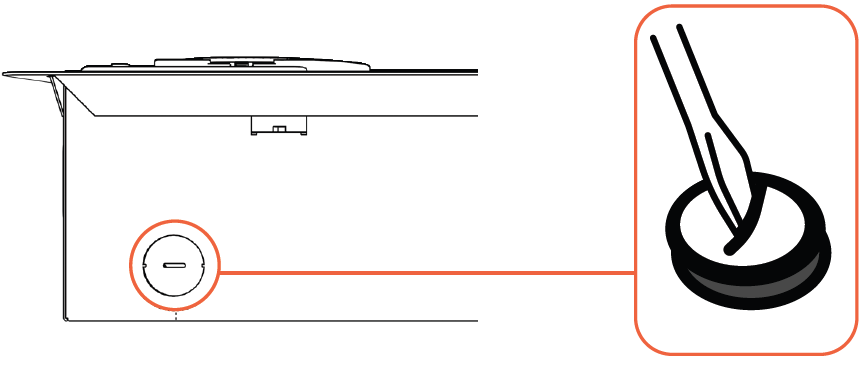
Remove the Hole Cover
Once removed, feed your wire into the box and ensure the wires are stripped and ready to connect.
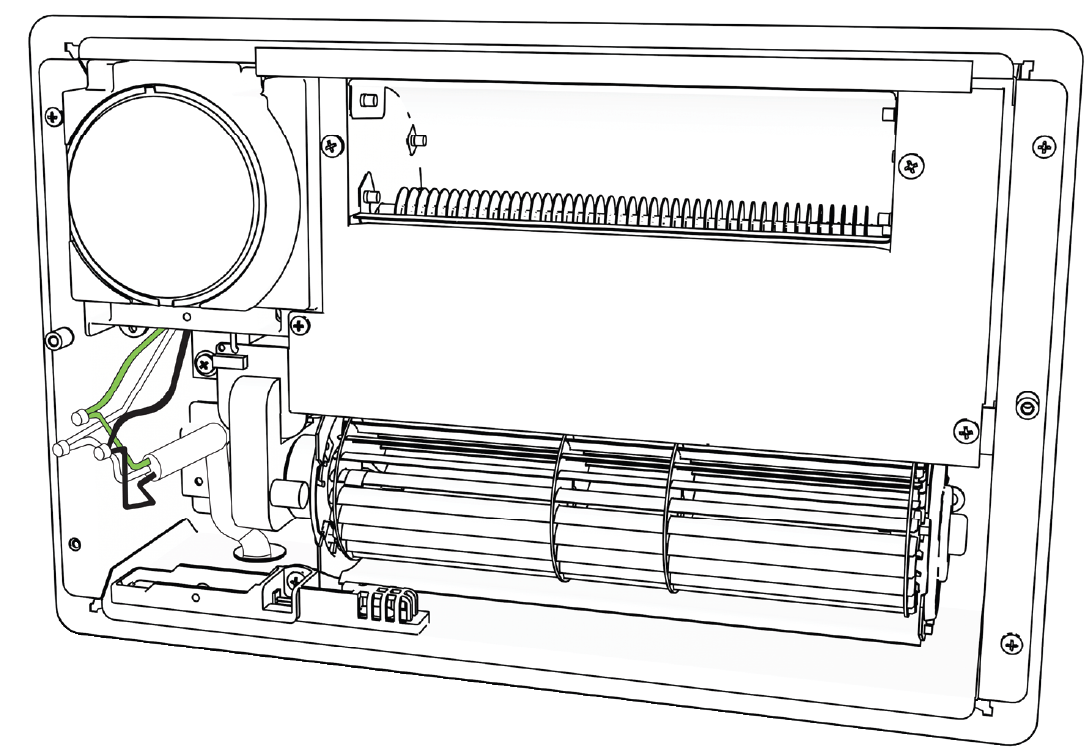
Connect the Wires
Connect the white wire to the white wire, the green (or bare) wire to the green wire, and the black wire to the black wire.
Replace the Power Box Cover and Crimp Block
STEP 3: INSTALL HEATER
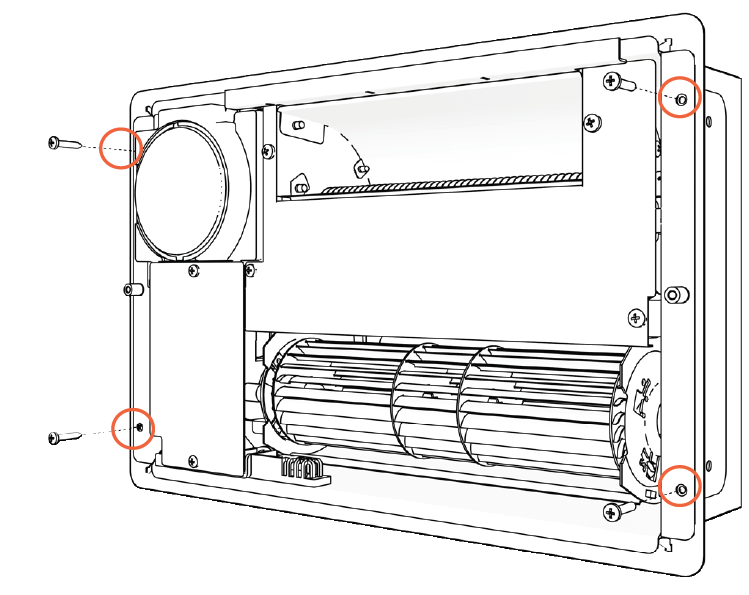
Install the Heating Base
Slide the heating base into the mounting bracket. Screw it into place as shown.
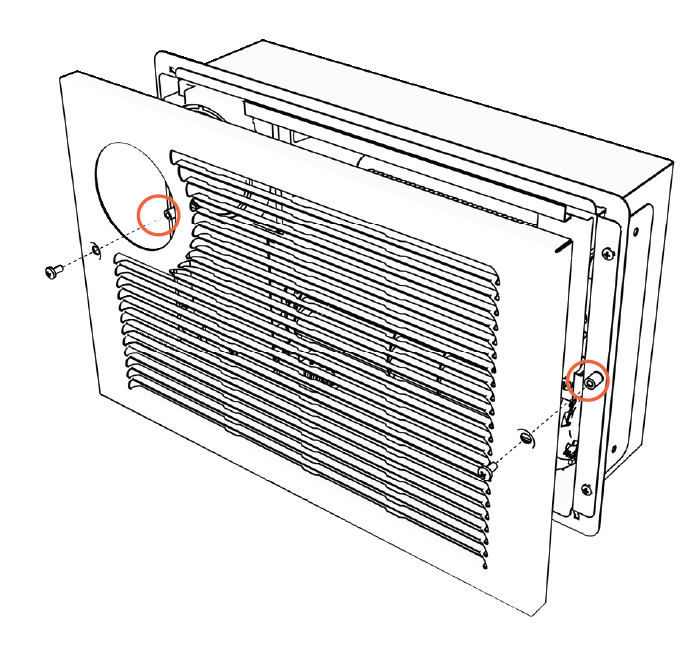
Attach the Front Grill
Screw the grill to the heating base using two screws.
Operations & Controls
Power ON/OFF
Press the power icon to alternate between ON (red) and OFF (white).
Factory Reset
Power off the heater and allow time for the heating elements to cool. Unplug the heater and plug it back in. Within 3 minutes of plugging in the heater, press and hold the power icon for 10 seconds to reset the heater to factory settings.
Timer
When the heater is off, you can set both the delay-on and delay-off times. Tap the timer icon to enable edit mode. The display will flash. Use the plus (+) and minus (-) icons to change the "ON" time in hourly increments. Tap the timer icon again to set the "delay OFF" timer. Follow the same instructions above to increase or decrease the time. Wait 5 seconds for the timer setting to activate.
Setting the Temperature
The default temperature for the heater is 70°F or 21°C. Pressing the plus (+) or minus (-) icons enters temperature setting mode, where the thermostat can be adjusted in increments of 1°F or 1°C. The display exits this mode after 5 seconds of inactivity, showing the current ambient temperature.
NOTE: After the heater function or power is turned off, the blower will continue operating for several minutes to cool the internal components.
Selecting Celsius & Fahrenheit
Press the plus (+) and minus (-) icons simultaneously to switch between Celsius and Fahrenheit.
NOTE: Switching between °C and °F can only be performed using the control panel on the heater. This function is not available using the remote control.
Change Working Mode
Press the fan button to toggle between Low, Auto, and High working modes.
Low Mode | Green*
The heater operates at 50% power, effectively halving the wattage. This is beneficial when the circuit breaker tends to trip easily or when heating a small space.
Auto Mode (Eco Mode) | White
The heater runs at full power until the room temperature is within 2 degrees of the set temperature. It then switches to 50% power to achieve and maintain the desired temperature. This allows more frequent, energy-efficient operation while maintaining the set temperature.
High Mode | Red*
The heater runs at 100% power until the desired temperature is reached.
NOTE: The fan will turn on and off to circulate air. The heater uses this process to determine whether the ambient room temperature has changed.
Low and High modes will reach the set temperature, followed by a 2-degree cooling period before reheating.
Fan Only/Heat Mode
Press and hold the fan button for 3 seconds to toggle between Fan Only mode (blue fan icon) and Heat mode (red icon).
Sound
Press the lock/volume symbol to alternate between sound ON and OFF.
Child Lock
Press and hold the lock/volume icon for 3 seconds to engage or disengage the child lock. When the child lock is activated, a red lock icon will appear, and no changes can be made to the settings until the child lock is turned off.
Display Brightness
Tap the Wi-Fi/sun symbol to change the display brightness.
Wi-Fi Discovery Mode
Press and hold the Wi-Fi/sun symbol for 5 seconds to enable Wi-Fi discovery mode. The indicator will blink blue. Refer to page 16 for guidance on connecting to Wi-Fi. The blinking blue light will turn solid blue once the Wi-Fi connection is established.
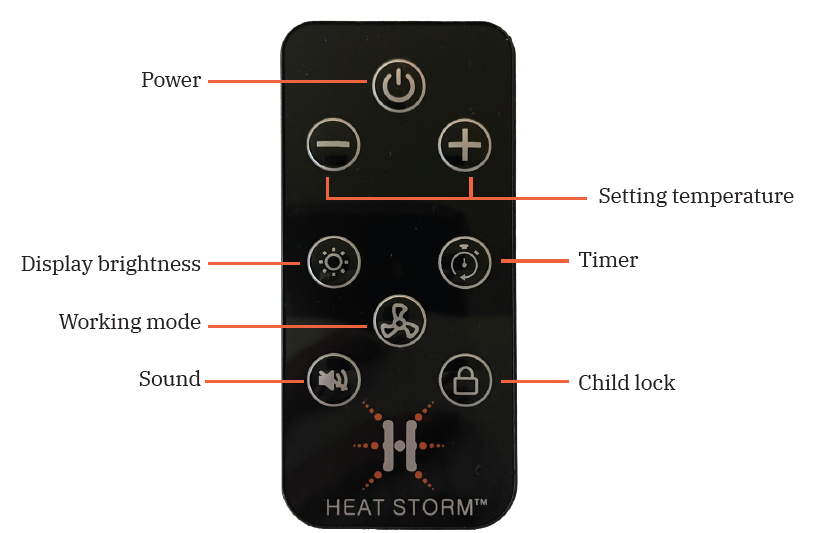
REMOTE CONTROL
The remote control functions the same way as the buttons on the heater. If you have any questions about how a function works, refer to the previous control descriptions.
Customer Reviews and User Feedback
Users consistently praise the Heat Storm In-Wall Smart Heater HS-1500-WALL-R for its convenient smart home integration and reliable heating performance. Common positive feedback highlights include fast installation, quiet operation, and effective temperature control through the mobile app. Customers particularly appreciate the ability to schedule heating patterns, resulting in measurable energy bill reductions. The touchscreen interface receives praise for intuitive operation and adjustable brightness settings beneficial for light-sensitive users.
Some users report minor issues with Wi-Fi connectivity during initial setup, though most resolve this through the Bluetooth pairing feature. A few customers mention that heating effectiveness depends significantly on room insulation quality, with poorly insulated spaces experiencing slower temperature rises. Overall, the Heat Storm In-Wall Smart Heater HS-1500-WALL-R maintains strong customer satisfaction ratings, with users recommending it primarily for supplemental heating in well-insulated spaces and secondary bedrooms.
Installation and Setup Guide for the Heat Storm HS-1500-WALL-R
Pre-Installation Preparation:
- Verify the wall location has an accessible 120V electrical outlet nearby
- Confirm wall structure can accommodate in-wall installation (stud placement considerations)
- Ensure adequate insulation behind wall for optimal heat distribution
- Review included installation template for precise measurements
Installation Steps:
- Cut rectangular opening in wall according to template specifications
- Position heater unit in wall opening and secure with provided mounting hardware
- Connect power cord to nearby 120V outlet
- Install faceplate and trim to match wall finish
- Power on unit and proceed to Wi-Fi setup via touchscreen menu
Operating the Heat Storm In-Wall Smart Heater HS-1500-WALL-R
- Basic Operation: Press the power button on the touchscreen display to activate the heater. Use the positive/negative buttons to adjust desired temperature settings. Select between Low (750W) and High/Auto (1500W) modes using the fan speed controls. The digital thermostat automatically maintains your selected temperature by cycling the heating element on and off as needed.
- Smart App Features: Download the Smart Life mobile app and pair your Heat Storm In-Wall Smart Heater HS-1500-WALL-R using the one-touch Bluetooth connection. Create custom heating schedules by specifying desired temperatures for different times of day. Enable away mode to prevent unnecessary heating when rooms are unoccupied. Monitor real-time temperature readings and adjust settings remotely from your smartphone.
- Remote Control Operation: The included remote control provides convenient adjustment without accessing the wall unit directly. Use remote buttons to modify temperature settings, switch power modes, and access basic thermostat functions from any location within range.
Maintenance and Care Instructions
Regular maintenance ensures optimal performance and extends the lifespan of your Heat Storm In-Wall Smart Heater HS-1500-WALL-R. Gently vacuum the protective grill monthly to remove dust accumulation that can reduce heating efficiency. Check Wi-Fi connectivity regularly and restart the unit if connection issues occur. Verify that touchscreen sensitivity remains responsive; if unresponsive, perform a soft reset by powering off and on. Avoid blocking air intake and outlet areas to maintain proper airflow and heat distribution.
Comparison with Similar In-Wall Heating Solutions
The Heat Storm In-Wall Smart Heater HS-1500-WALL-R competes favorably against other wall-mounted electric heaters in its price range. Unlike basic models lacking smart features, this unit offers Wi-Fi control and mobile app integration at a competitive price point. Compared to infrared heater alternatives like the Heat Storm Tradesman 1500 Outdoor model, the HS-1500-WALL-R provides interior-specific design with touchscreen controls and thermostat functionality. The selectable 750W/1500W power output offers more flexibility than fixed-output competitors, allowing users to optimize energy consumption based on heating needs and seasonal variations.
Troubleshooting Common Issues with the HS-1500-WALL-R
- Wi-Fi Connection Problems: If the heater fails to connect to Wi-Fi, restart both the unit and your router. Verify your home Wi-Fi network name and password are correct. Move your smartphone closer to the heater during app setup to ensure strong Bluetooth signal for pairing.
- Inadequate Heating: Confirm the selected temperature setting is higher than current room temperature. Check that the fan speed is set to High or Auto mode for maximum output. Verify room insulation quality and seal any air leaks around windows and doors. Ensure the heater's air intake and outlet areas are not obstructed by furniture or curtains.
- Touchscreen Unresponsiveness: Clean the touchscreen gently with a soft, dry cloth to remove dust or moisture. If unresponsiveness persists, power off the unit for 30 seconds and power on again to reset the system. Contact manufacturer support if problems continue.
Warranty and Customer Support
The Heat Storm In-Wall Smart Heater HS-1500-WALL-R typically includes manufacturer warranty coverage for defects and malfunctions. Most retailers offer 30-day return policies and satisfaction guarantees. Contact Heat Storm customer service through their official website for technical support, warranty claims, and replacement part ordering. Many retailers including Home Depot provide extended warranty options for additional protection and peace of mind.
Final Recommendations for the Heat Storm HS-1500-WALL-R
The Heat Storm In-Wall Smart Heater HS-1500-WALL-R represents an excellent choice for homeowners seeking modern, efficient supplemental heating with smart home integration. This unit excels in apartments, offices, bedrooms, and living spaces where traditional heating is insufficient or where space constraints prevent floor-standing heater installation. The combination of Wi-Fi control, energy-saving features, and quiet operation justifies the investment for users prioritizing convenience and efficiency. For permanent installations in well-insulated spaces with reliable internet connectivity, the Heat Storm In-Wall Smart Heater HS-1500-WALL-R delivers outstanding value and performance.
```
More heatstorm manuals
- Setup: Heatstorm Quartz Infrared Element Heater HS-1500-SED-WI User Manual
- Setup: Heatstorm In-wall Smart Heater HS-3000-WALL-R User Manual
- Setup: Heatstorm Infrared Wall Heater WA HS-1000-WA User Manual
- Setup: Heatstorm Cabinet Smart Heater HS-1500-KP User Manual
- Setup & Usage: Heatstorm Infrared Heater HS-1000-WX User Manual
- Setup: Heatstorm Infrared Heater HS-1500-ILODT User Manual
Leave a Comment