
Setup: Heatstorm Quartz Infrared Element Heater HS-1500-SED-WI User Manual
Content
Heatstorm Quartz Infrared Element Heater HS-1500-SED-WI: Complete Product Manual
Introduction to Heatstorm Quartz Infrared Element Heater HS-1500-SED-WI
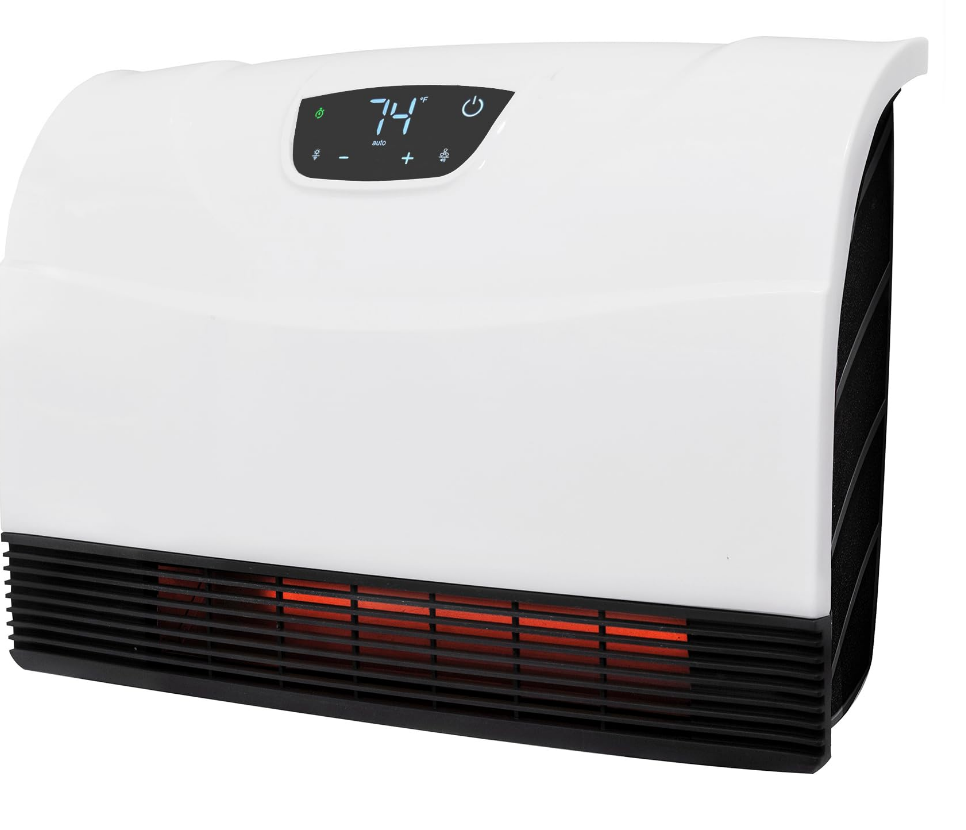
The Heatstorm Quartz Infrared Element Heater HS-1500-SED-WI, also known as the Sedona Infrared Heater, delivers efficient, targeted warmth through advanced quartz infrared technology. This WiFi-enabled wall-mounted heater combines 1500 watts of power with smart features like app control via the Smart Life App, allowing remote operation and custom schedules for energy savings. Ideal for bathrooms, bedrooms, offices, or small rooms up to 150 sq ft as primary heat or 750 sq ft as supplemental, it heats quickly without drying the air, thanks to infrared quartz elements that retain humidity.
Key benefits include three power modes (high, full, eco), a built-in thermostat for automatic temperature maintenance, and a safe-to-touch grill perfect for homes with children or pets. The fan-only mode circulates air in summer, while the wall-mount design saves floor space and plugs into standard 120V outlets without tripping breakers. Target audiences range from homeowners seeking zone heating to reduce utility bills to renters needing portable, efficient solutions. Unique selling points: hassle-free WiFi setup via Bluetooth, quiet operation at 42-47 decibels, and 5200 BTU output for reliable performance.
The estimated price range is $100-$150, available at retailers like Home Depot, Zoro, and Heatstorm's website with free shipping options. This Heatstorm Quartz Infrared Element Heater HS-1500-SED-WI excels in energy-efficient infrared heating, making it a smart choice for cost-effective comfort in modern homes.
Technical Specifications and Key Features of Heatstorm Quartz Infrared Element Heater HS-1500-SED-WI
The Heatstorm Quartz Infrared Element Heater HS-1500-SED-WI offers robust specs for versatile use. Detailed below are its technical details, performance metrics, and comparisons.
- Model: HS-1500-SED-WI (UPC: 810109082636)
- Wattage: 750-1500W (adjustable); Amps: 6.25-12.5A; Voltage: 120V
- Heating Capacity: 5200 BTU; Primary: up to 150 sq ft; Secondary: up to 750 sq ft
- Dimensions: 19” L x 4.75” W x 13.25” H; Weight: 7.72 lbs (some sources note 61 lbs with packaging)
- Cord Length: 6 ft (73 inches); Sound Level: 42-47 dB
- Key Features: WiFi-enabled (Smart Life App control), built-in thermostat, remote control (batteries included), three modes (high/full/eco), fan-only mode, wall-mount hardware, overheat protection
- Safety: Cool-touch grill, ETL listed, no tip-over switch but stable wall design
- Performance Benchmarks: Heats rooms quickly without circuit overload; more efficient than convection heaters due to infrared tech with no heat loss.
Compared to similar 1500W infrared heaters like Heat Storm's cabinet models, the HS-1500-SED-WI stands out with WiFi and slimmer wall-mount profile, offering better space savings over portable units.
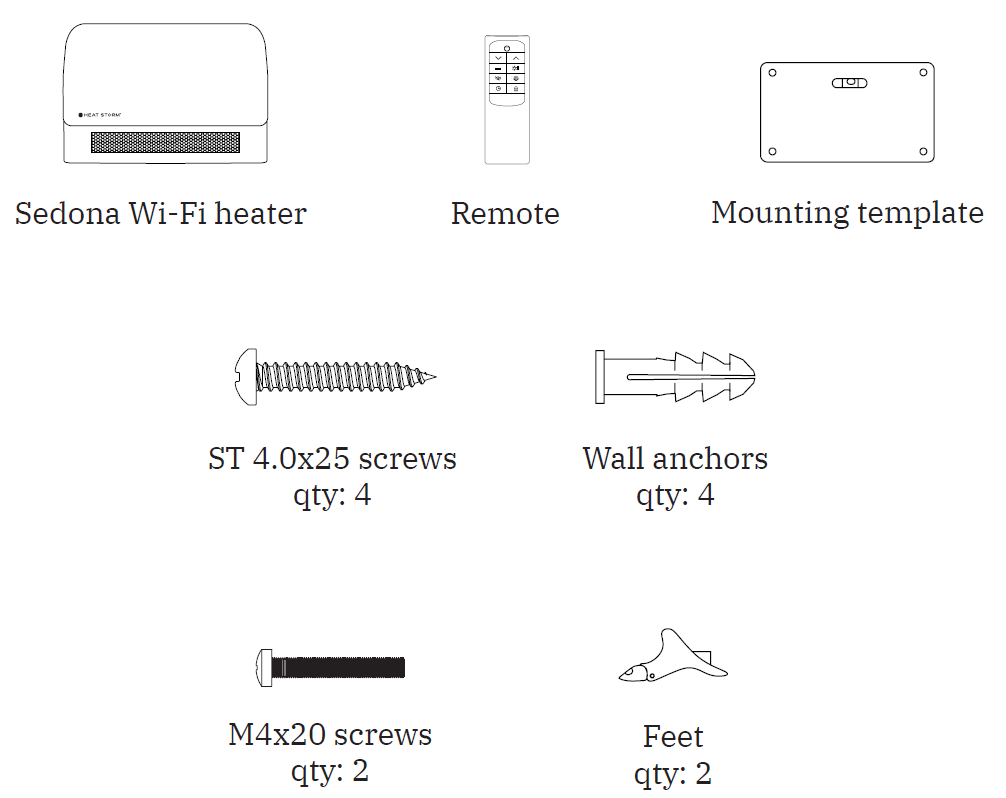
WHAT'S IN THE BOX
Installation Instructions
HEATER LOCATION
Ensure proper installation before use. Choose a location following the general instructions and avoid direct sunlight. It is not recommended to move the heater while it is operating. Turn off the heater, wait for the fan to stop completely, and then relocate it.
Basement or Garage Use
The heater can be used in a finished basement with drywall and carpet. For other applications, consider Heat Storm Outdoor Infrared Heaters. Visit heatstorm.com for additional information.
Vaulted or Cathedral Ceilings
The heater can be used in rooms with vaulted or cathedral ceilings. However, initial room heating may take longer. Once the desired temperature is reached, the heater will cycle accordingly.
Poorly Insulated Areas
Rooms with poor insulation may not retain heat efficiently, potentially resulting in longer or more frequent heater operation.
Cold Climate Installation Note
Placing the heater under a window or on a poorly insulated wall may cause it to detect an ambient temperature lower than the actual room temperature.
Heating Multiple Rooms
Heating effectiveness depends on the openness of the floor plan and the sizes of the rooms. Experiment with different heater locations to determine the most suitable configuration.
NOTE: The heater is designed for supplemental heating in spaces ranging from 150 to 750 square feet. DO NOT USE in the Following Areas:
- Outdoors. Use Heat Storm Outdoor Infrared Heaters for outdoor applications.
- Locations containing gasoline, paint, or flammable liquids.
- Closets.
MULTIPLE APPLIANCES
Heat Storm Infrared Heaters are classified as electrical appliances. Each heater and other major appliance should operate on its own electrical circuit. If deciding between one or two heaters, the manufacturer recommends using a second heater for more efficient operation, potentially longer heating element life, reduced power consumption in suitable conditions, and faster room warming.
POWER CONNECTION GUIDELINES
Plug the heater directly into a wall outlet. Do not use extension cords, surge protectors, or relocatable power taps. This heater is designed for standard 120-volt outlets and should only be connected to a properly installed, 2-prong polarized outlet. Ensure the power cord is not placed under carpeting or covered with rugs, runners, or similar materials. Do not route the cord under furniture or appliances. Position it away from high-traffic areas to prevent tripping hazards.
Required Tools:
- 3/16-inch drill bit.
- Phillips screwdriver.
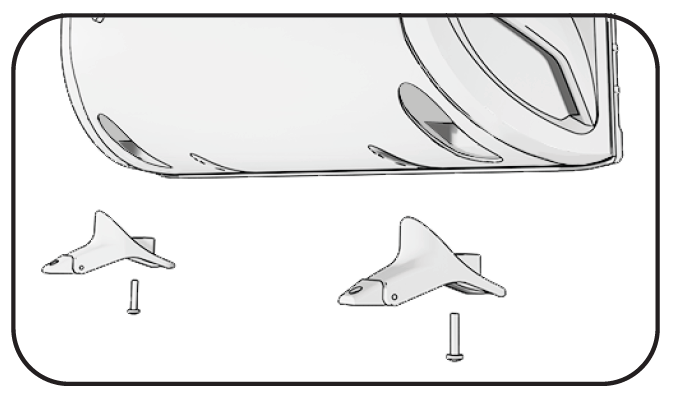
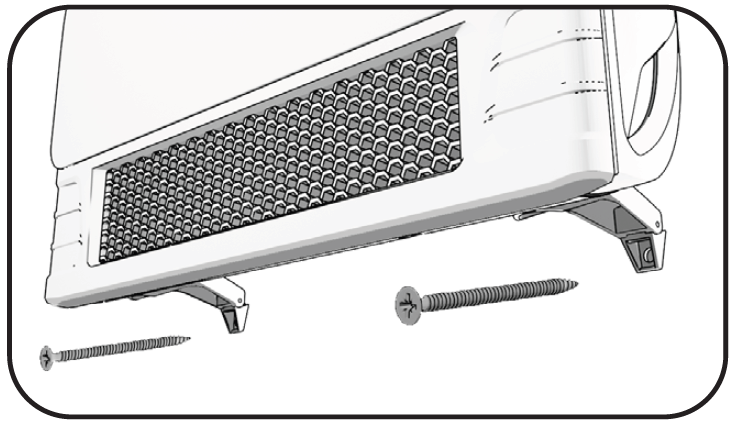
STEP 1: FEET INSTALLATION (REQUIRED)
Attach the two feet to the bottom of the heater using the supplied M4 × 20 screws. Ensure both feet are securely fastened before use. Once the feet are installed, the heater can be used as a freestanding unit or prepared for optional wall installation.
STEP 2: WALL INSTALLATION (OPTIONAL)
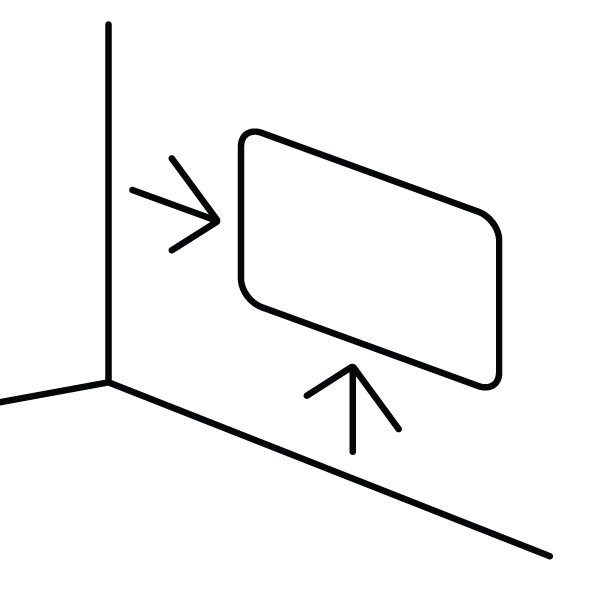
- Select the Installation Location: Choose a suitable wall for mounting the heater. Maintain a minimum clearance of 4½ inches between the heater and nearby walls, the ceiling, and the floor. Ensure the power cord can reach a suitable electrical outlet.
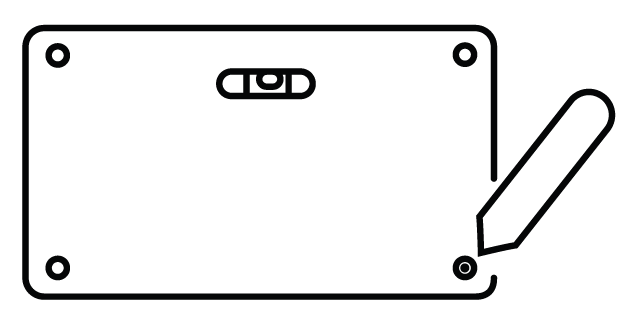
- Mark the Drilling Points: Position the supplied drilling guide against the wall and use a pencil to mark the designated mounting holes.
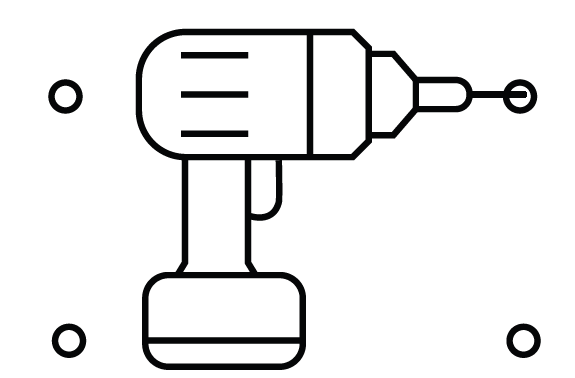
- Drill the Mounting Holes: Use a 3/16-inch drill bit to drill holes at the marked locations. Insert the supplied drywall anchors into the holes where appropriate for the wall construction.
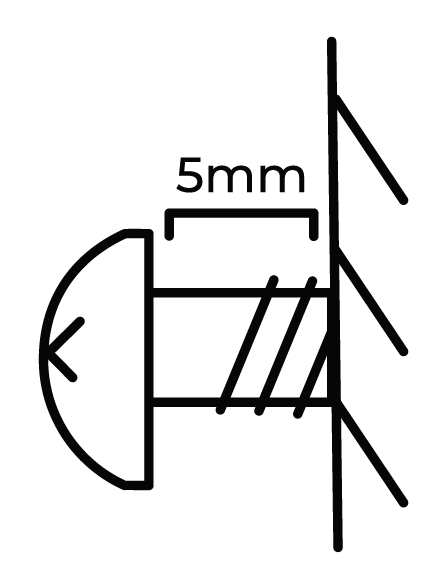
- Install the Upper Screws: Insert the top two mounting screws into the anchors, leaving a 5 mm gap between each screw head and the wall.
- Hang the Heater: Carefully position the heater onto the two upper screws, ensuring it is properly seated and supported.
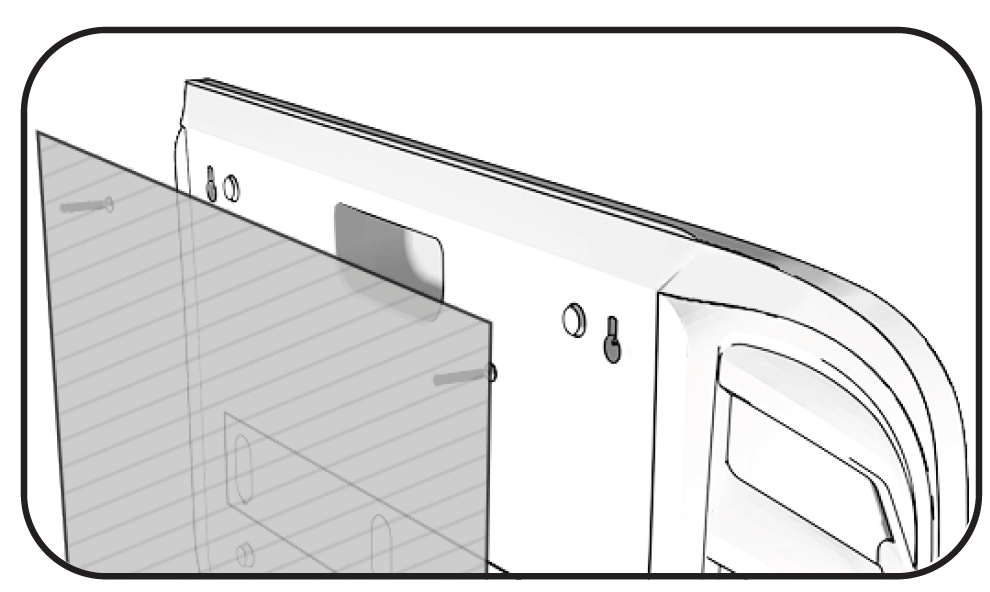
- Secure the Lower Mounting Points: Insert and tighten the remaining two screws through the bottom mounting holes to secure the heater to the wall.
Operations & Controls
Turn Heater On/Off
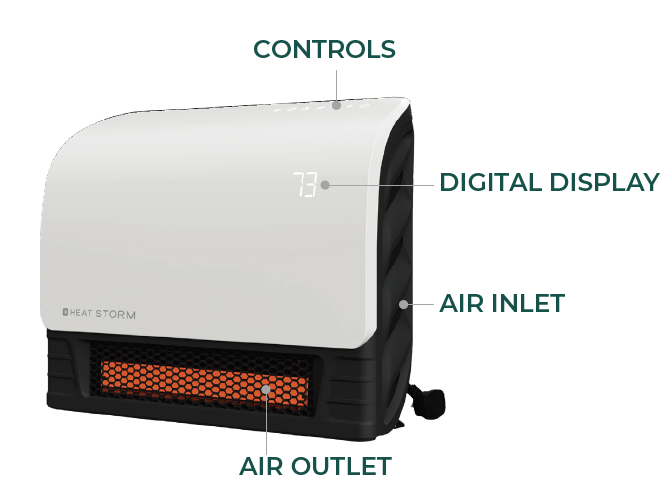
Press the power icon to switch the heater between the ON and OFF states.
Factory Reset
Turn off the heater and allow the heating elements to cool. Unplug the heater from the electrical outlet, then reconnect it. Within one minute of reconnecting the power, press and hold the ON/OFF icon for 10 seconds to restore the factory settings.
Timer
Set the heater's operating duration by tapping the timer icon. Use the plus (+) and minus (−) icons to adjust the timer in one-hour increments. The selected duration will appear on the front display. Once the programmed operating time has elapsed, the heater will automatically turn off.
Setting the Temperature
The heater's default temperature is 70°F (21°C). Press the plus (+) or minus (−) icon to enter temperature adjustment mode. The thermostat setting can be increased or decreased in increments of 1°F or 1°C. After five seconds of inactivity, the display automatically exits temperature adjustment mode and returns to showing the current ambient temperature.
NOTE: After the heating function or power is turned off, the blower will continue operating for several minutes to cool the internal components.
Selecting Celsius & Fahrenheit
Press the plus (+) and minus (−) icons simultaneously to switch the temperature display between Celsius (°C) and Fahrenheit (°F).
Child Lock
Press and hold the lock icon for three seconds to activate or deactivate the child lock. When the child lock is enabled, a red indicator light illuminates, and the control settings cannot be changed until the lock is deactivated.
NOTE: The child lock can only be activated or deactivated using the heater's control panel. This function is not available through the remote control.
Change Working Mode (Low/Med/High)
Press the fan button to cycle through the available operating modes. The indicator light above the button identifies the selected mode.
- Low Mode (Green Light): The heater operates at 50% power, reducing the wattage by half. This mode is suitable for heating smaller spaces or reducing electrical demand where circuit breakers are prone to tripping.
- Auto (Eco) Mode (White Light): The heater operates at full power until the ambient temperature is within 2 degrees of the selected temperature. It then reduces operation to 50% power to reach and maintain the desired temperature while limiting unnecessary energy consumption.
- High Mode (Red Light): The heater operates at 100% power until the selected temperature is reached.
NOTE: The fan may turn on and off periodically to circulate air and help the heater detect changes in the surrounding room temperature.
NOTE: In Low and High modes, the heater stops heating when the set temperature is reached. Heating resumes after the ambient temperature decreases by approximately 2 degrees.
Fan Only/Heat Mode
Press and hold the fan icon to switch between Fan Only and Heat modes. The indicator light above the icon illuminates blue when Fan Only mode is selected and red when Heat mode is active.
Display Light Control
Tap the sun/Wi-Fi symbol to turn off the display lights.
Wi-Fi Discovery Mode
Press and hold the sun/Wi-Fi symbol for five seconds to activate Wi-Fi discovery mode. The indicator light will blink blue while the heater is searching for a connection. Refer to page 12 of the original manual for Wi-Fi connection instructions. Once the connection is established, the blinking blue indicator will change to a solid blue light.
Sound
Tap the volume/thermometer icon to turn the heater's control sounds on or off.
Pair External Thermometer
Press and hold the volume/thermometer icon for five seconds to activate pairing mode for the Heat Storm External Thermometer. The indicator light will blink red to show that the heater is in discovery mode. Next, press and hold the button on the back of the external thermometer for five seconds until a beep is heard. Once pairing is successful, the volume/thermometer indicator light will remain solid red.
REMOTE CONTROL
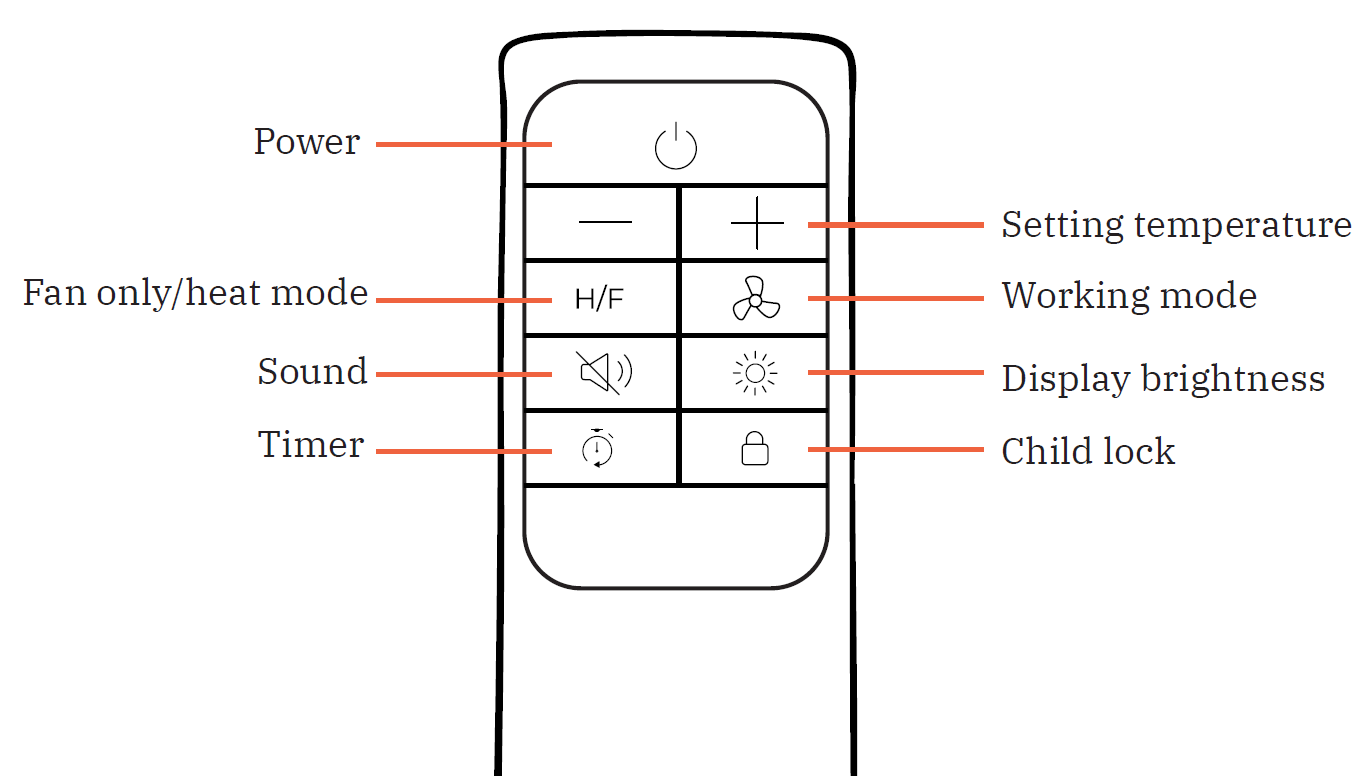
The remote control provides access to the same supported operating functions as the buttons on the heater, except for functions specifically restricted to the heater's control panel. For instructions on individual functions, refer to the corresponding control descriptions above.
Pros and Cons of Heatstorm Quartz Infrared Element Heater HS-1500-SED-WI
Pros
- WiFi smart control enables remote scheduling, saving energy—users report 20-30% lower bills with eco mode.
- Quiet at 42-47 dB and safe grill design ideal for families; heats evenly without drying air.
- Versatile: Wall-mount saves space, fan mode for year-round use; outperforms basic heaters in small rooms.
- Excellent value at $100-$150—energy-efficient infrared tech provides high BTU output per watt vs. ceramic alternatives.
Cons
- Fixed wall-mount limits portability compared to freestanding models like Heat Storm HS-1500-ILOD.
- Weight discrepancies in specs (7.72-61 lbs) may confuse; installation requires basic tools.
- No oscillation or timer in base model; some users note app connectivity issues initially.
- Best for supplemental use—may struggle in very large, uninsulated spaces vs. 3000W+ garage heaters.
Overall, it offers strong value for targeted heating, surpassing budget plug-ins in smart features and efficiency.
Customer Reviews and Feedback on Heatstorm Quartz Infrared Element Heater HS-1500-SED-WI
Customers praise the Heatstorm Quartz Infrared Element Heater HS-1500-SED-WI for quick, moist heat and WiFi convenience, averaging 4.5/5 stars across retailers. "Perfect for my 120 sq ft office—app control is a game-changer, no more cold mornings!" says one Home Depot reviewer.[8] Common praises: Easy wall install, energy savings, and pet-safe design. Frequent recommendations for bedrooms and bathrooms where it "warms instantly without noise.".
Complaints include occasional WiFi setup glitches (resolved via Bluetooth pairing) and limited range in drafts. "Great heater but wish it oscillated," notes a user, though most affirm its value: "Heats my bathroom perfectly for half the cost of central heat.". Addresses issues like overheat shutoff enhance safety trust. Highly recommended for smart, efficient infrared heating.
Faqs
How do I set up the heatstorm Quartz Infrared Element Heater HS-1500-SED-WI for the first time including wall mounting?
How do I connect the heatstorm Quartz Infrared Element Heater HS-1500-SED-WI to WiFi for app control?
What should I do if the heatstorm Quartz Infrared Element Heater HS-1500-SED-WI won't turn on?
How do I adjust temperature settings on the heatstorm Quartz Infrared Element Heater HS-1500-SED-WI?
Is the heatstorm Quartz Infrared Element Heater HS-1500-SED-WI compatible with smart home systems or external thermostats?
How can I optimize performance of the heatstorm Quartz Infrared Element Heater HS-1500-SED-WI for efficient heating?
What maintenance is required for the heatstorm Quartz Infrared Element Heater HS-1500-SED-WI?
What safety precautions should I follow when using the heatstorm Quartz Infrared Element Heater HS-1500-SED-WI?
More heatstorm manuals
- Setup: Heatstorm Infrared Wall Heater WA HS-1000-WA User Manual
- Setup: Heatstorm In-wall Smart Heater HS-1500-WALL-R User Manual
- Setup & Usage: Heatstorm Infrared Heater HS-1000-WX User Manual
- Setup: Heatstorm In-wall Smart Heater HS-3000-WALL-R User Manual
- Setup: Heatstorm Infrared Heater HS-1000-WX-WI User Manual
- Setup: Heatstorm Cabinet Smart Heater HS-1500-KP User Manual
Leave a Comment