
Setup & Usage: Heatstorm Infrared Heater HS-1000-WX User Manual
Content
Heatstorm Infrared Heater HS-1000-WX Product Manual: Complete Guide and Review
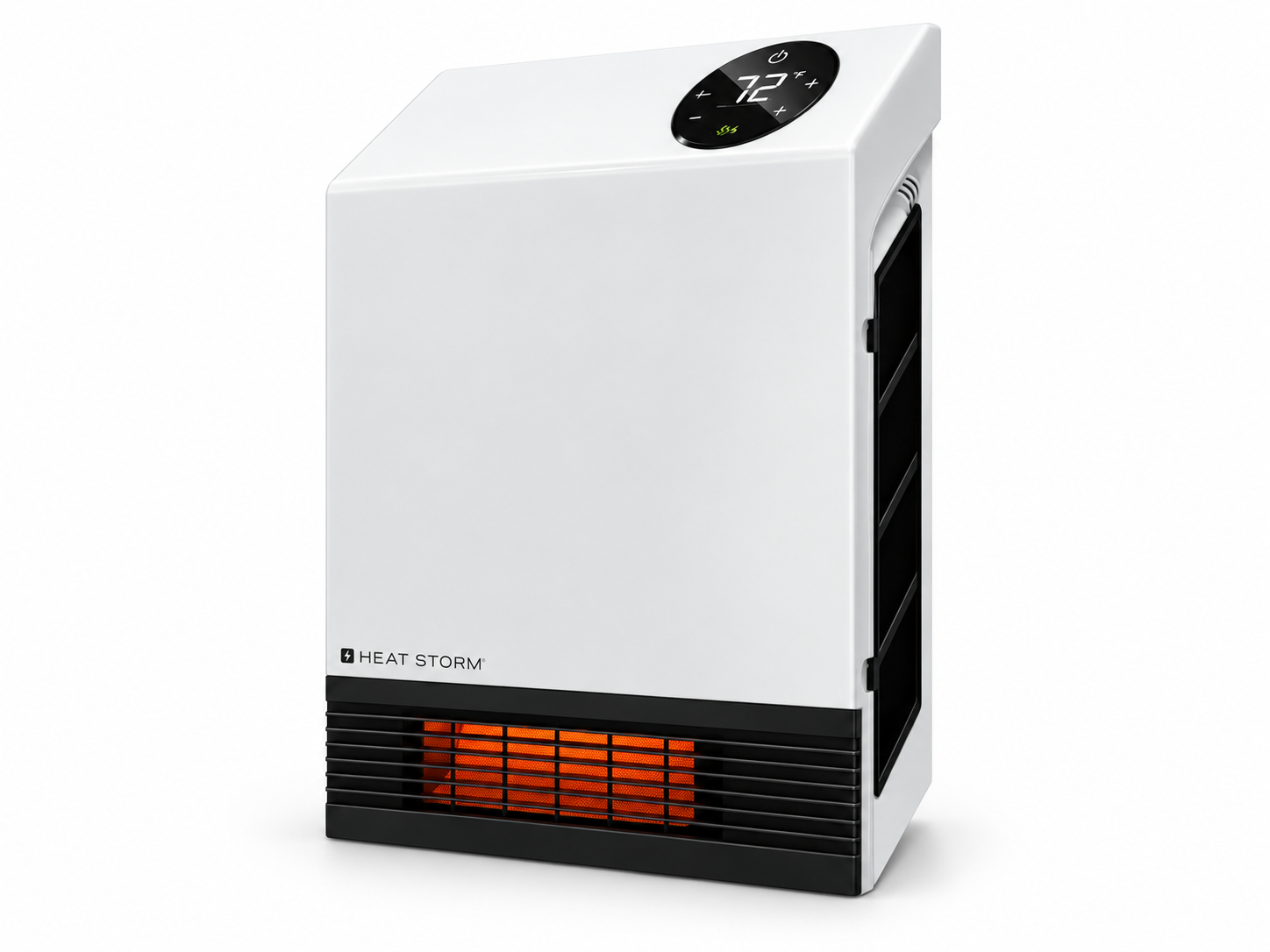
Introduction to Heatstorm Infrared Heater HS-1000-WX
The Heatstorm Infrared Heater HS-1000-WX is a premium wall-mounted space heater designed for efficient, energy-saving warmth in homes and offices. This Wi-Fi-enabled infrared heater delivers 3,400 BTU of heat output using 1,000/500-watt dual power modes, making it ideal for supplemental heating up to 500 sq. ft. or primary heating in spaces up to 100 sq. ft. Its patented Heat Exchanger with HMS technology ensures maximum heat from infrared quartz bulbs without loss, warming objects directly rather than just the air for faster, more effective results.
Key benefits include smart WiFi control via smartphone app or voice assistants, a built-in thermostat with large LED display, and remote control for effortless operation. The space-saving design uses less than 2 sq. ft. of wall space, plugs into a standard 110V outlet, and features safe-to-touch surfaces, tip-over protection, and overheat shut-off. Perfect for bedrooms, living rooms, home offices, or nurseries, this Heatstorm Infrared Heater HS-1000-WX suits families, remote workers, and anyone seeking quiet, reliable zone heating without drafts or noise.
Additional perks like energy-saving modes and silent forced-air operation enhance comfort year-round. Estimated price ranges from $150-$250, available at major retailers like Northern Tool, Lowe's, and Home Depot. Whether combating chilly winters or maintaining cozy temps, this infrared wall heater offers smart, convenient heating solutions for modern lifestyles.
Installation Instructions
HEATER LOCATION
When selecting a location for your new heater, ensure that all general installation instructions are followed. The heater must be installed on a wall. Do not lean the heater against objects or operate it with the grille positioned vertically. For optimal heating performance, install the heater away from direct sunlight.
Basement or Garage Use
The heater can be used in a finished basement with drywall and carpeting. For other environments, consider using Heat Storm Outdoor Infrared Heaters. Visit heatstorm.com for additional information.
Vaulted or Cathedral Ceilings
The heater can be used in rooms with vaulted or cathedral ceilings. However, initial heating may take longer due to the increased room volume. Once the desired temperature is reached, the heater will cycle automatically to maintain the selected temperature.
Poorly Insulated Areas
Rooms with inadequate insulation may not retain heat efficiently. As a result, the heater may operate for longer periods or cycle more frequently to maintain the desired temperature.
Cold Climate Installation Note
Installing the heater beneath a window or on a poorly insulated wall may cause its thermostat to detect a lower ambient temperature than the actual room temperature.
Heating Multiple Rooms
The heater's effectiveness in warming multiple rooms depends on the openness of the floor plan and the size of each room. Experiment with suitable installation locations to determine the most effective heating arrangement.
NOTE: The heater is designed for supplemental heating in spaces ranging from 100 to 500 square feet. DO NOT USE in the Following Areas:
- Outdoors – Use Heat Storm Outdoor Infrared Heaters instead.
- Locations containing gasoline, paint, or flammable liquids.
- Wet or moist locations.
- Closets.
POWER CONNECTION GUIDELINES
Heat Storm Infrared Heaters are classified as electrical appliances. Each heater and other major appliance should operate on its own electrical circuit. Plug the heater directly into a wall outlet. Do not use extension cords, surge protectors, or relocatable power taps. The heater is designed for standard 120-volt electrical outlets and must be connected to a properly installed 2-prong polarized outlet. Ensure that the power cord is not placed beneath carpeting or covered with rugs, runners, or similar materials. Do not route the cord underneath furniture or appliances. Position the cord away from high-traffic areas to reduce the risk of tripping.
TOOLS NEEDED FOR INSTALLATION
- 3/16-inch drill bit.
- Phillips screwdriver.
WALL INSTALLATION (REQUIRED)
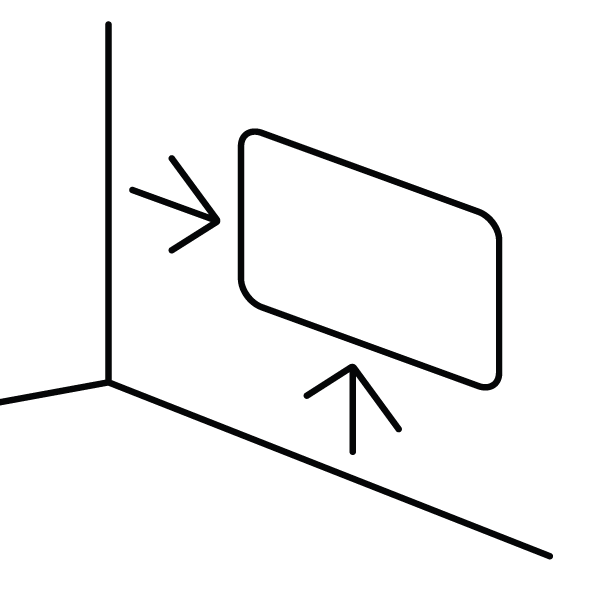
- Select a suitable wall for installing the heater. Maintain a minimum clearance of 4½ inches between the heater and nearby walls, the ceiling, and the floor. Ensure the selected location allows the power cord to reach a suitable electrical outlet.
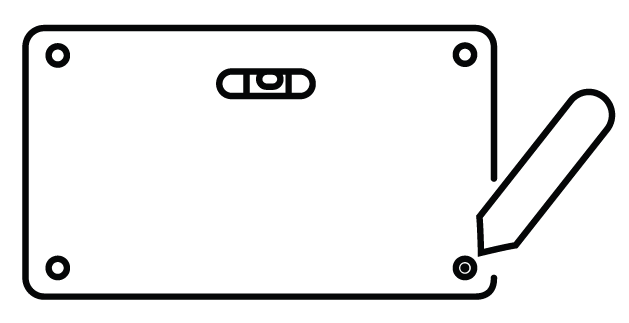
- Use the supplied drilling guide and a pencil to mark the mounting-hole positions on the wall.
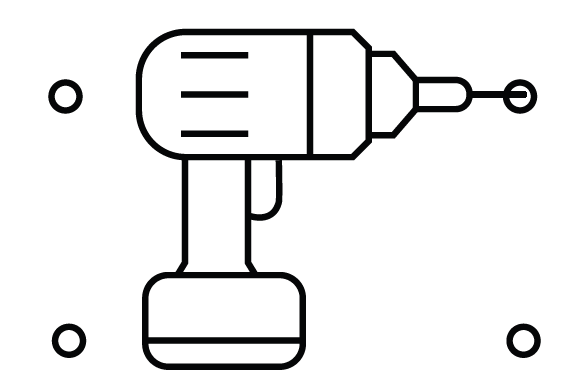
- Drill holes at the marked positions using a 3/16-inch drill bit. Insert the supplied drywall anchors into the holes, ensuring they are properly seated. Use mounting hardware appropriate for the wall construction.
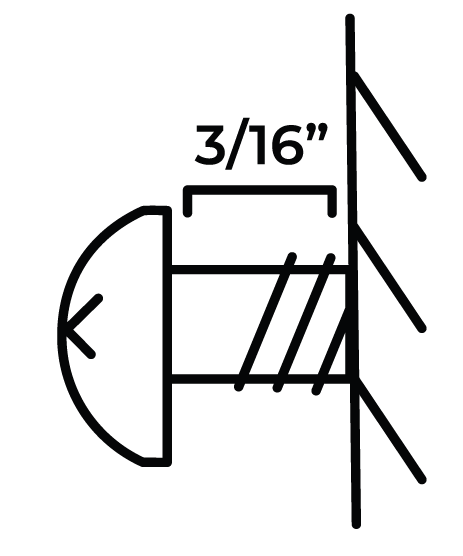
- Insert the top two mounting screws into the prepared holes, leaving a 3/16-inch gap between the screw heads and the wall.
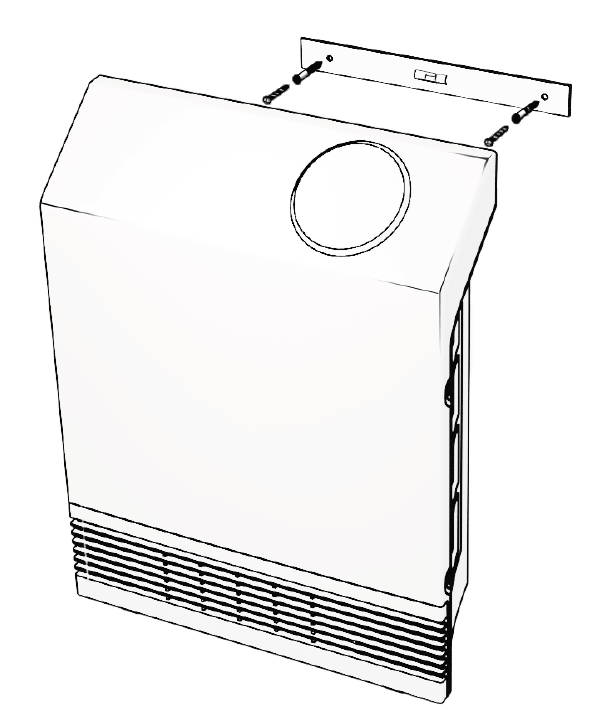
- Carefully hang the heater onto the top two mounting screws, ensuring that the mounting points are correctly engaged and the heater is securely supported.
Operations & Controls
POWER ON/OFF
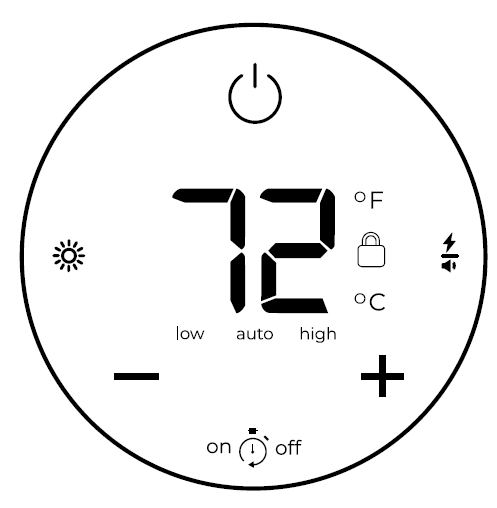
Press the power icon to switch the heater between the ON and OFF states.
TIMER
When the heater is turned off, both the delayed start and delayed shutoff timers can be programmed. Tap the timer icon to enter timer adjustment mode. The display will begin flashing. Use the plus (+) and minus (−) icons to adjust the delayed start time in one-hour increments.
Tap the timer icon again to access the delayed shutoff timer. Use the plus (+) and minus (−) icons to increase or decrease the time. Wait 5 seconds without pressing any buttons to activate the selected timer settings.
NOTE: When the heater is operating, only the delayed shutoff timer can be configured.
TEMPERATURE
The heater's default temperature setting is 70°F (21°C). Press the plus (+) or minus (−) icon to enter temperature adjustment mode. The thermostat setting can be increased or decreased in increments of 1°F or 1°C. After 5 seconds of inactivity, the display automatically exits temperature adjustment mode and returns to showing the current ambient temperature.
NOTE: After the heating function or power is turned off, the blower will continue operating for several minutes to cool the internal components.
Selecting Celsius & Fahrenheit
Press the plus (+) and minus (−) icons simultaneously to switch the temperature display between Celsius (°C) and Fahrenheit (°F).
CHANGE WORKING MODE
Press the lightning bolt/volume button to cycle through the three operating modes: Low, Auto (Eco), and High.
- Low Mode: The heater operates at 50% of its rated power, effectively reducing its wattage by half. This mode is suitable for heating smaller spaces or reducing electrical demand where circuit breakers are prone to tripping. Repeated breaker trips should be investigated rather than relying on Low Mode as a permanent solution.
- Auto Mode (Eco Mode): The heater initially operates at full power until the measured room temperature is within 2 degrees of the selected temperature. It then switches to 50% power to reach and maintain the desired temperature. This operating mode is designed to provide more consistent temperature control while reducing power consumption when full heating output is unnecessary.
- High Mode: The heater operates at 100% of its rated power until the selected temperature is reached.
NOTE: The fan may turn on and off periodically to circulate air and determine whether the ambient room temperature has changed.
NOTE: In Low and High modes, the heater reaches the selected temperature and allows the room temperature to decrease by approximately 2 degrees before restarting the heating cycle.
CHILD LOCK
Press and hold the power icon for 5 seconds to activate or deactivate the child lock function. When activated, a red lock icon appears on the display, and the control settings cannot be changed until the child lock is disabled.
NOTE: The child lock function can only be activated or deactivated through the heater's control panel. It cannot be operated using the remote control.
DISPLAY BRIGHTNESS
Tap the sun symbol on the control panel to adjust the display brightness.
SOUND
Tap the power/volume symbol to enable or disable the control panel sounds.
FACTORY RESET
Turn off the heater and allow sufficient time for the heating elements to cool. Unplug the heater from the electrical outlet, then reconnect it. Within 3 minutes of reconnecting the power, press and hold the timer icon for 10 seconds to restore the factory settings.
THERMOSTAT CALIBRATION
Thermostat readings may vary depending on the heater's installation location and surrounding environmental conditions. The heater allows manual thermostat calibration to align its temperature reading more closely with a central HVAC system. Multiple calibration attempts may be required to obtain the desired temperature alignment.
- Press and hold the ON/OFF icon on the heater's control panel for 10 seconds to enter thermostat calibration mode. The heater will beep, and the temperature numbers on the display will begin flashing.
- While the temperature numbers are flashing, press the plus (+) or minus (−) icon to adjust the thermostat calibration setting.
- If no buttons are pressed for 5 seconds, the heater automatically exits thermostat calibration mode.
MAINTAINANCE
WASHABLE LIFETIME FILTER SYSTEM
Heat Storm Infrared Heaters are equipped with a washable lifetime filter system designed for routine maintenance. It is recommended to clean the filters at least once a month or more frequently when necessary. Before cleaning the filters, turn off the heater, unplug it from the electrical outlet, and allow it to cool completely. The filters can be cleaned using a vacuum cleaner or warm tap water by following the instructions below.
Vacuum Method
Gently move the vacuum cleaner attachment over the filter cover to remove accumulated dust and debris. Do not remove the filter cover or filter when using this cleaning method.
Water Method
- Locate the Filters: Identify the two filters on the heater, with one positioned on each side of the unit.
- Remove the Filters: Press both retaining tabs to release the filter cover. Carefully remove the filter, noting the direction of airflow through the filter so that it can be reinstalled correctly.
- Wash the Filters: Hold the filter under warm running tap water, directing the water opposite to the normal airflow direction. Continue rinsing until the water runs clear. The filter may release accumulated residue during cleaning, so avoid allowing the water to drip onto carpets or other stain-sensitive surfaces. If necessary, soak the filter in water mixed with a small amount of mild dish soap. Rinse thoroughly with clean water afterward to remove all soap residue.
- Dry the Filters: Gently shake the filter over a sink to remove excess water. Allow the filter to air-dry completely before reinstalling it.
- DO NOT force or accelerate the drying process using heaters, hair dryers, or other artificial drying methods.
- ENSURE that the filter is completely dry before placing it back into the heater.
- Reinstall the Filters: Once the filter is completely dry, reinstall it in its original position, maintaining the correct airflow orientation. Reattach the filter cover securely before operating the heater.
Troubleshooting Guide
Recalibrating Your Heater
If your heater is not operating normally, try resetting it. Like other electronic devices, heaters may occasionally require a reboot. Refer to the factory reset instructions on page 11. If the problem persists, contact customer service at 435-752-6611.
Fan
Not Blowing Air
When the heater is first powered ON, the fan does not immediately begin blowing air. The initial 15-second delay allows the infrared heating elements to warm up, ensuring that warm air is circulated into the room when the fan starts operating.
- Not Blowing Warm Air
- Ensure that the air inlet is not blocked and the air filter is clean. If the filter is dirty, clean it.
- Check whether the displayed ambient temperature is higher than the thermostat setting. If so, the heater may not produce warm air until the room temperature drops below the selected setting.
- Check for objects blocking the airflow. Remove any obstructions near the heater. Restricted airflow is common when the heater is placed in a closet or under a desk.
Continuing to Blow Air When the Heater Is Turned Off
This is part of the normal cooldown process. The fan may continue running for several minutes, up to 12 minutes, to cool the internal components. This process helps extend the lifespan of the infrared heating elements. If the heater is unplugged before completing its cooldown cycle, the fan may begin operating immediately when power is restored.
Heater Fails to Reach the Set Temperature and Continues to Run
Possible reasons for temperature discrepancies include:
- Dirty Air Filters: Ensure that the air filters are clean and free from dust or debris that could restrict airflow.
- Poor Room Insulation: Check for drafts or inadequate insulation that may prevent the room from retaining heat efficiently.
- Open Doors: Keep doors closed while the heater is operating to minimize heat loss and improve heating efficiency.
- Improper Heater Placement: Position the heater on an interior wall, away from windows and other areas exposed to cold drafts.
- Unsuitable Room Size: If the problem persists, verify that the heater is appropriate for the room size. The heater is designed for supplemental heating in spaces ranging from 150 to 750 square feet, with primary heating coverage of approximately 150 square feet.*
Pros and Cons of Heatstorm Infrared Heater HS-1000-WX
Pros
- WiFi Smart Control: Adjust temperature, timers, and schedules remotely via app—ideal for busy households.
- Compact and Safe Design: Wall-mount saves floor space (13"W x 17"H x 4"D, 6.1 lbs); cool-touch grill and safety shut-offs prevent accidents.
- Efficient Infrared Heating: Heats up to 500 sq. ft. supplementally with 3,400 BTU; dual 1,000/500W modes save energy.
- Quiet Operation: Silent forced air suits bedrooms or offices without disturbance.
- Easy Maintenance: Washable filters every 6 months; replace bulbs after 20,000 hours.
Cons
- Limited Primary Coverage: Best for 100-350 sq. ft. primarily; larger rooms need multiples, unlike 30,000+ BTU alternatives.
- Short Cord: 3-6 ft. length may require nearby outlet placement.
- No Oscillation or Timer: Lacks some features of freestanding heaters, though the app compensates.
Overall, the Heatstorm Infrared Heater HS-1000-WX provides excellent value at its price, outperforming basic plug-ins in smart features and efficiency while competing well with brands like Dr. Infrared for wall-mounted infrared heaters.
Customer Reviews and Feedback for Heatstorm Infrared Heater HS-1000-WX
Users praise the Heatstorm Infrared Heater HS-1000-WX for its quick, even heating and app convenience, often rating it 4.5+ stars. "Instant warmth in my 400 sq. ft. office—WiFi control is a game-changer!" notes one reviewer, highlighting silent operation and energy savings. Common praises include safe design for homes with kids/pets and easy wall installation.
Complaints focus on the short cord and occasional WiFi glitches, with some wishing for broader primary coverage: “Great for small rooms, but pair with another for larger spaces.”B Consumer Reports scores it well for room and spot heating performance. Most recommend it for supplemental use, emphasizing reliability and 1-year warranty value.
More heatstorm manuals
- Setup: Heatstorm Infrared Heater HS-1000-WX-WI User Manual
- Setup: Heatstorm Infrared Wall Heater WA HS-1000-WA User Manual
- How to Use: Heatstorm Heater HS-6000-OTRBK User Manual
- Setup: Heatstorm Quartz Infrared Element Heater HS-1500-SED-WI User Manual
- Usage: Heatstorm Tradesman Infrared Heater HS-1500-TT User Manual
- Setup: Heatstorm In-wall Smart Heater HS-1500-WALL-R User Manual
Leave a Comment