
How to Use: Heatstorm Heater HS-6000-OTRBK User Manual
Content
Heatstorm Heater HS-6000-OTRBK Product Manual: Complete Guide to Wi-Fi Infrared Heating
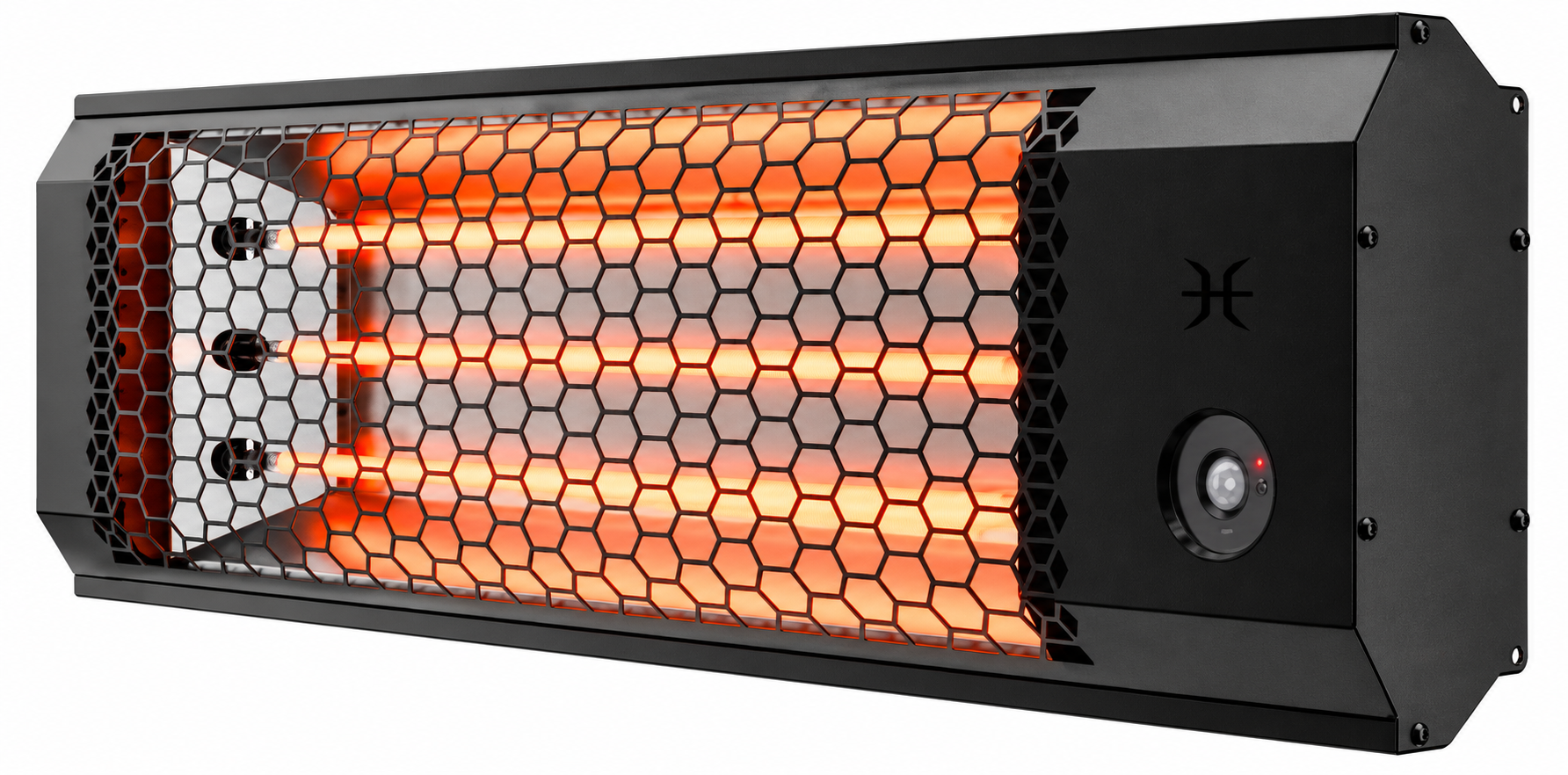
Introduction to Heatstorm Heater HS-6000-OTRBK
The Heatstorm Heater HS-6000-OTRBK is a powerful 6000-watt infrared space heater designed for outdoor and indoor use, delivering instant, silent heat to garages, patios, decks, workshops, and workspaces. This Wi-Fi-enabled, weatherproof electric heater features adjustable wattage settings of 2000, 4000, or 6000 watts, providing up to 20,000 BTUs to warm up to 200 square feet as primary heat or 1000 square feet as supplemental heating. Its radiant infrared technology heats people and objects directly, remaining effective even in windy conditions, unlike traditional convection heaters.
Key benefits include total remote control via smartphone app for custom schedules, motion sensor activation for energy efficiency, and a durable carbon fiber bulb that's weather-resistant and long-lasting. Completely silent at 0 decibels, it includes a remote control, mounting hardware for wall or ceiling installation, and tilt adjustments for optimal direction. Operating on 240V with 25 amps, professional electrician installation is recommended due to hardwiring requirements.
Ideal for homeowners, contractors, and businesses needing reliable patio heater or garage heater solutions, the Heatstorm HS-6000-OTRBK excels in cold seasons, ensuring comfort without noise or drafts. Available at retailers like Home Depot and Northern Tool, prices typically range from $300 to $500, offering excellent value for high-output infrared heating.
Specifications
- Wattage: 1900 / 3800 / 5700 W
- Dimensions (L × W × H): 36.84 × 4.13 × 11.02 inches
- Amperage: 23.75 A
- Weight: 11.7 lbs
- Heating Capacity: 20,000 BTU
- Noise Level: 0 dB
- Voltage: 240 V
- Power Cord Length: N/A (Hardwired)
- Airflow: 0 CFM
- Heat Settings: 3 Levels
- Heat Direction: Directional Heating
- Heating Technology: Carbon Fiber Infrared
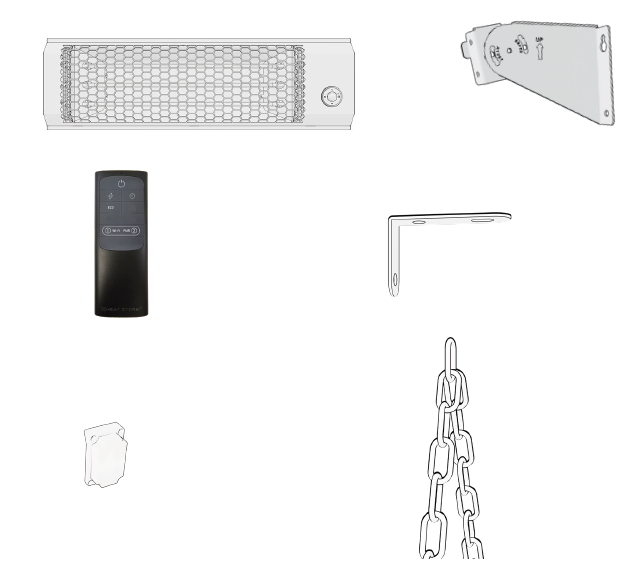
Included parts
- Heater
- Ceiling Mounts
- Remote
- Electrical box cover
- Chains
- Wall bracket
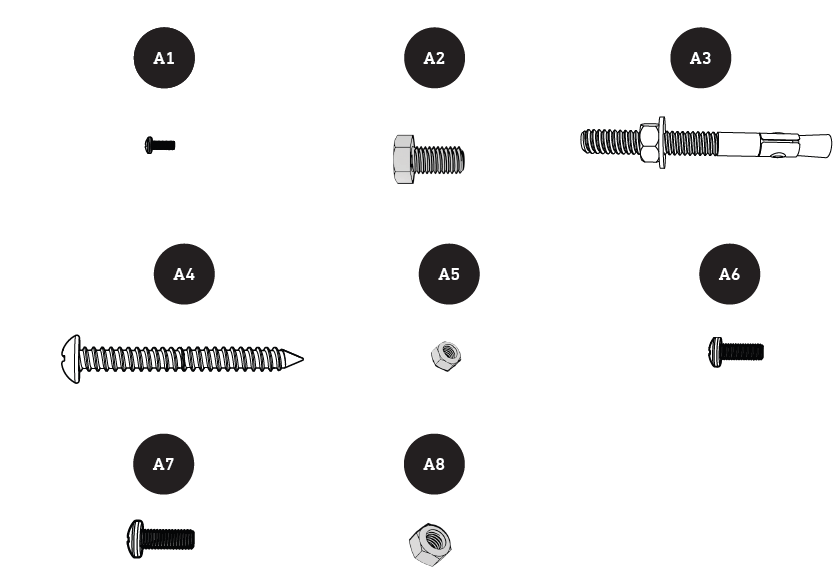
Included hardware
- ST3.5x14 screw
- M6X12 Hex Head Phillips
- Concrete sleeve anchor
- M6x60 self-tapping Phillips
- M5 nyloc nut
- M5x14 Truss Head Screw
- M6x12 Truss head screw
- M6 nyloc nut
Installation Instructions
- Ensure that the heater is properly installed before use.
- The heater should always be installed horizontally and should only use the mounting brackets provided.
Heater Location (Wall & Ceiling Mount)
When choosing a location for your new heater, ensure that the general installation instructions are followed.
- Your heater must be installed using the provided mounting hardware.
- The heater should not face the ceiling or flammable substances.
- Ensure that there is no possibility of flammable material coming into contact with the heater or being placed near it.
- This heater is weather-resistant and can be used indoors or outdoors. If using it outdoors, ensure that the electrical connection is properly protected against water.
Do Not Use in the Following Areas:
- Locations containing gasoline, paint, or flammable liquids.
- Wet or moist locations.
- Closets.
- Areas directly near a bathtub, shower, or swimming pool.
Power Connection Guidelines
Heat Storm heaters are classified as electrical appliances. Each heater and appliance should have its own dedicated electrical circuit. This heater is designed for a 240-volt power supply and must be hardwired to a properly grounded electrical circuit. Do not use extension cords, surge protectors, or relocatable power taps. Do not connect this heater to a timer device that automatically turns it on while unattended, such as an Alexa- or Google-controlled smart plug. Ensure that the electrical cord is not concealed beneath carpeting, rugs, runners, or similar coverings. Avoid routing the cord beneath furniture or appliances. Position it away from high-traffic areas to prevent tripping hazards. Regularly inspect the heater's electrical cord and connections. Loose electrical connections can cause overheating or create a fire hazard. The cable must be securely attached to the wall or ceiling using appropriate cable clips.
TOOLS NEEDED FOR INSTALLATION
- 3/16” drill bit
- Philips screwdriver
- Standard screwdriver
- Hammer
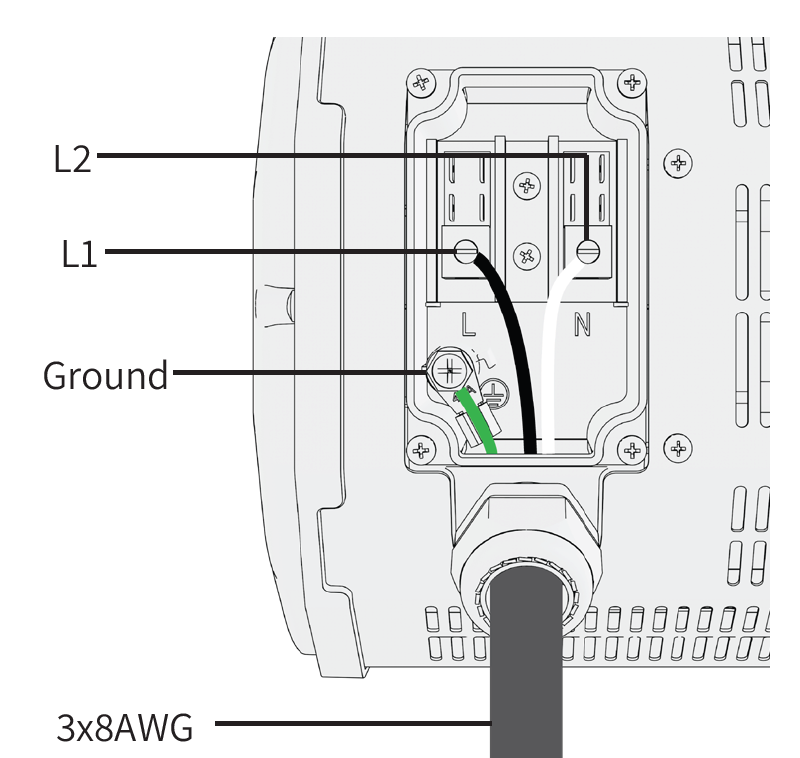
Wire the Heater
Carefully follow the provided wiring diagram to connect the heater to a 240V power source. Installation by a licensed electrician is recommended to ensure safety and compliance with applicable local electrical codes.
Attach the Electrical Box Cover
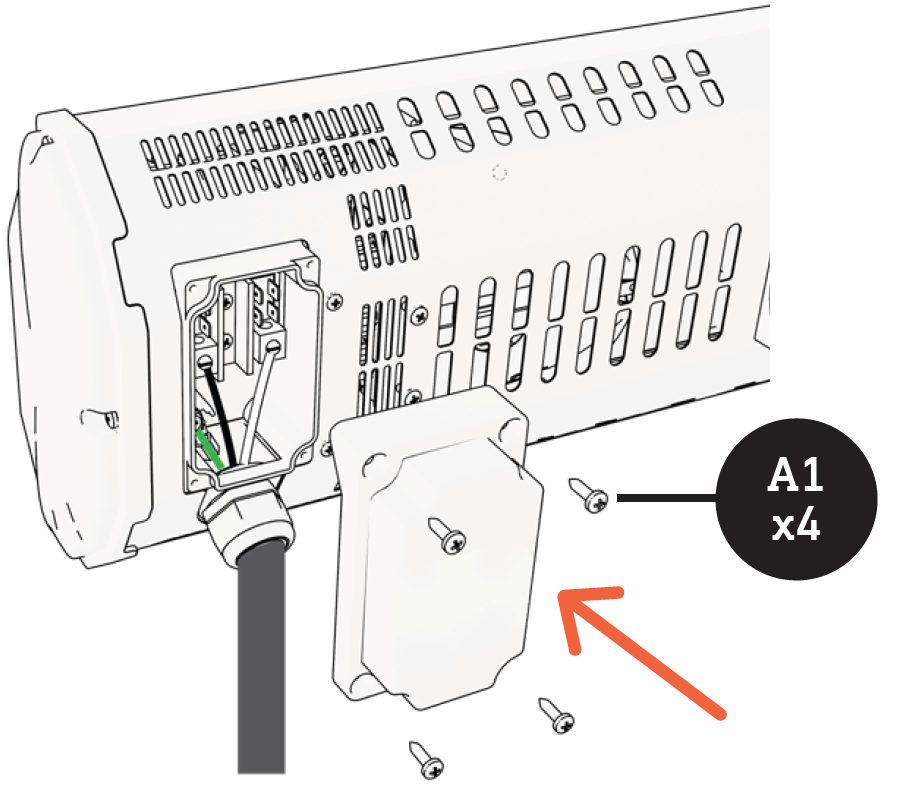
Place the electrical box cover back onto the heater. Align the cover with the mounting holes and secure it using the four provided screws (A1 × 4).
Determine the Mounting Method
Select the appropriate installation method:
- Wall mounting
- Ceiling mounting
Wall Installation
- Mark and Drill Holes
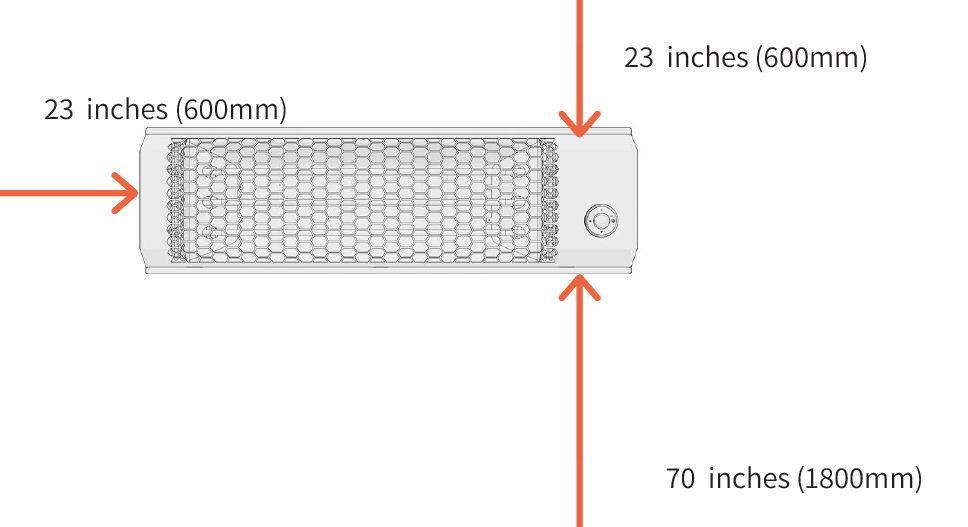
Use the provided template to mark the mounting-hole positions. Drill suitable holes into wall studs or masonry, depending on the installation surface. The heater must be installed at least 70 inches (approximately 1.8 m) above the ground. Maintain a clearance of at least 23 inches (approximately 0.6 m) from nearby walls and the ceiling.
Attach the Brackets to the Heater
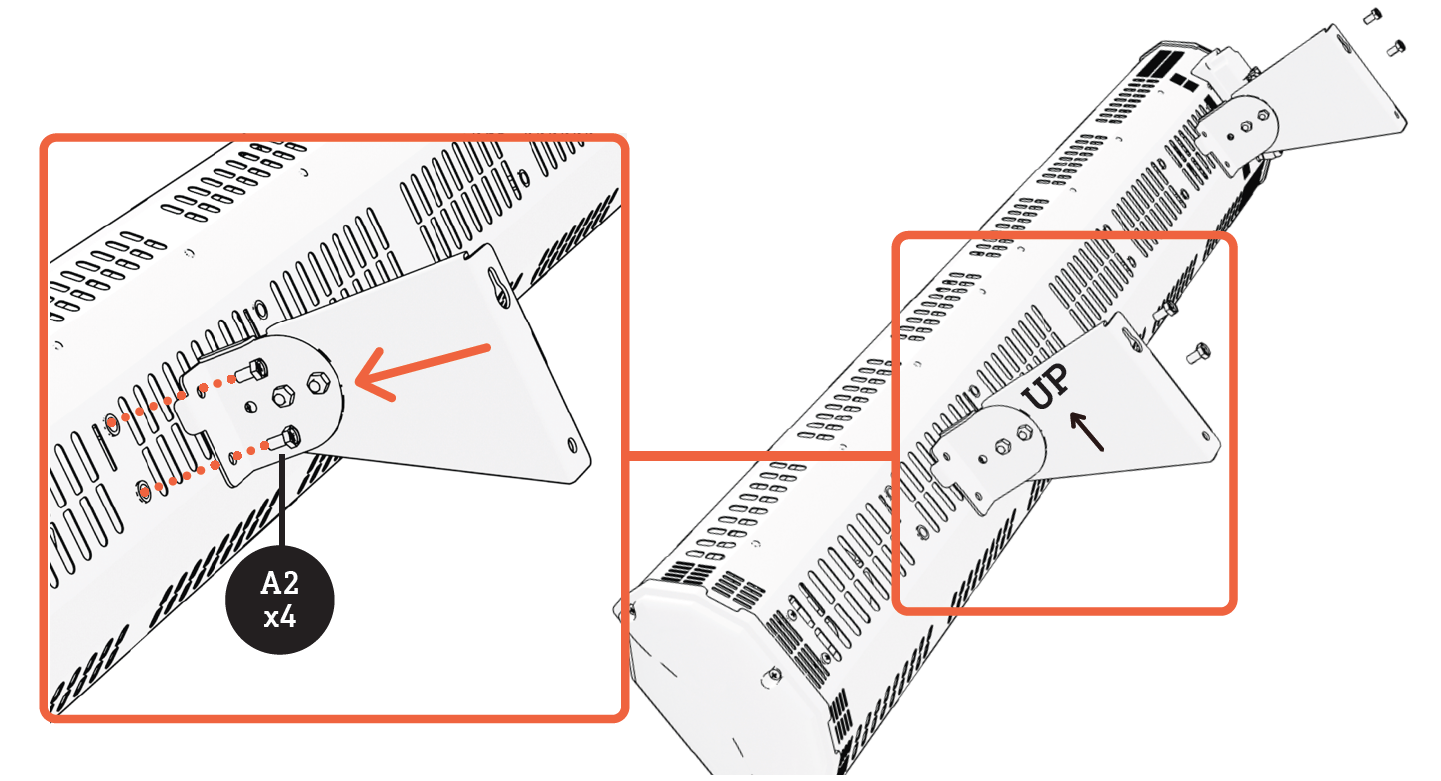
Use only the provided mounting brackets. Align each bracket foot with the screw holes nearest to the ends of the heater. Ensure that each bracket is positioned correctly, with the engraved "UP" marking facing upward. The brackets are designed to fit in only one direction. Secure the brackets firmly in place.
- Determine Your Wall Type
- Once the mounting brackets have been attached to the heater, select the appropriate installation method based on the wall material:
- Concrete wall installation
- Drywall or wood stud installation
Concrete Wall Installation
Install the Hardware
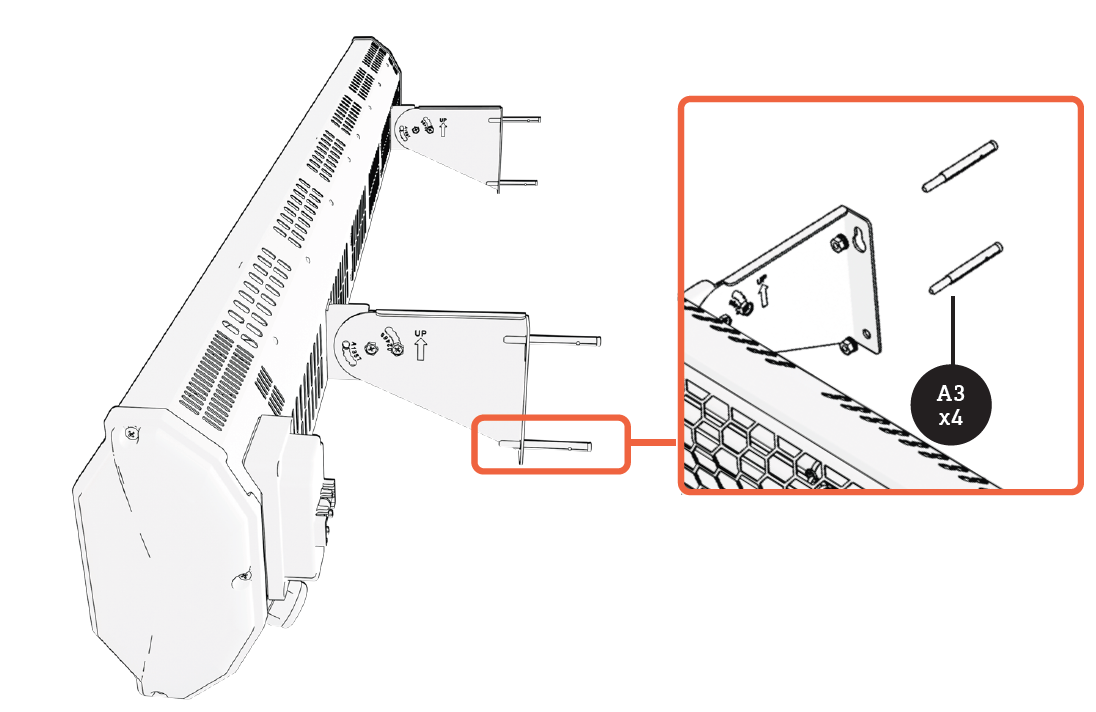
Remove the nuts and washers from each concrete anchor. Insert all four concrete anchors into the predrilled wall holes. Light hammering may be necessary to position the anchors correctly.
Mount the Heater
Align both mounting brackets with the installed concrete anchors and carefully slide the heater into position. Reinstall the washers and nuts to secure the heater firmly to the wall.
Drywall/Stud Installation
Install the Top Hardware
If mounting into drywall, insert all four drywall anchors into the predrilled wall holes. Install the top two screws, leaving a gap of approximately 3/16 inch between the screw heads and the wall to accommodate the mounting brackets.
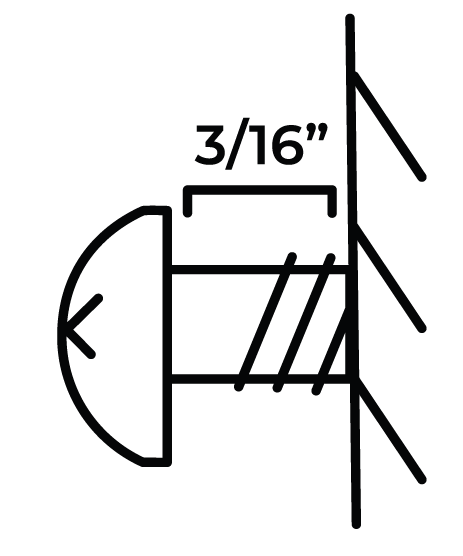
Mount the Heater
Align the upper keyholes of both mounting brackets with the installed top screws. Carefully slide the brackets into position until the heater is supported.
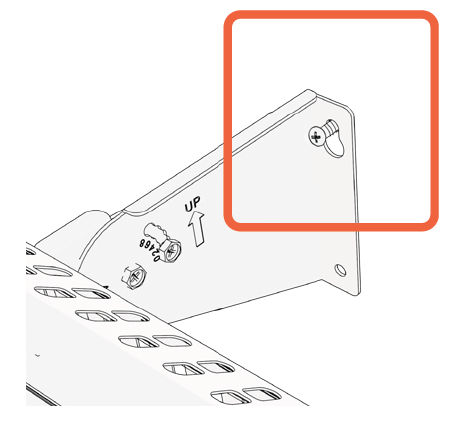
Install the Bottom Hardware
Insert the remaining screws through the bottom mounting holes of the brackets. Tighten all mounting screws securely to ensure that the heater is firmly attached to the wall.
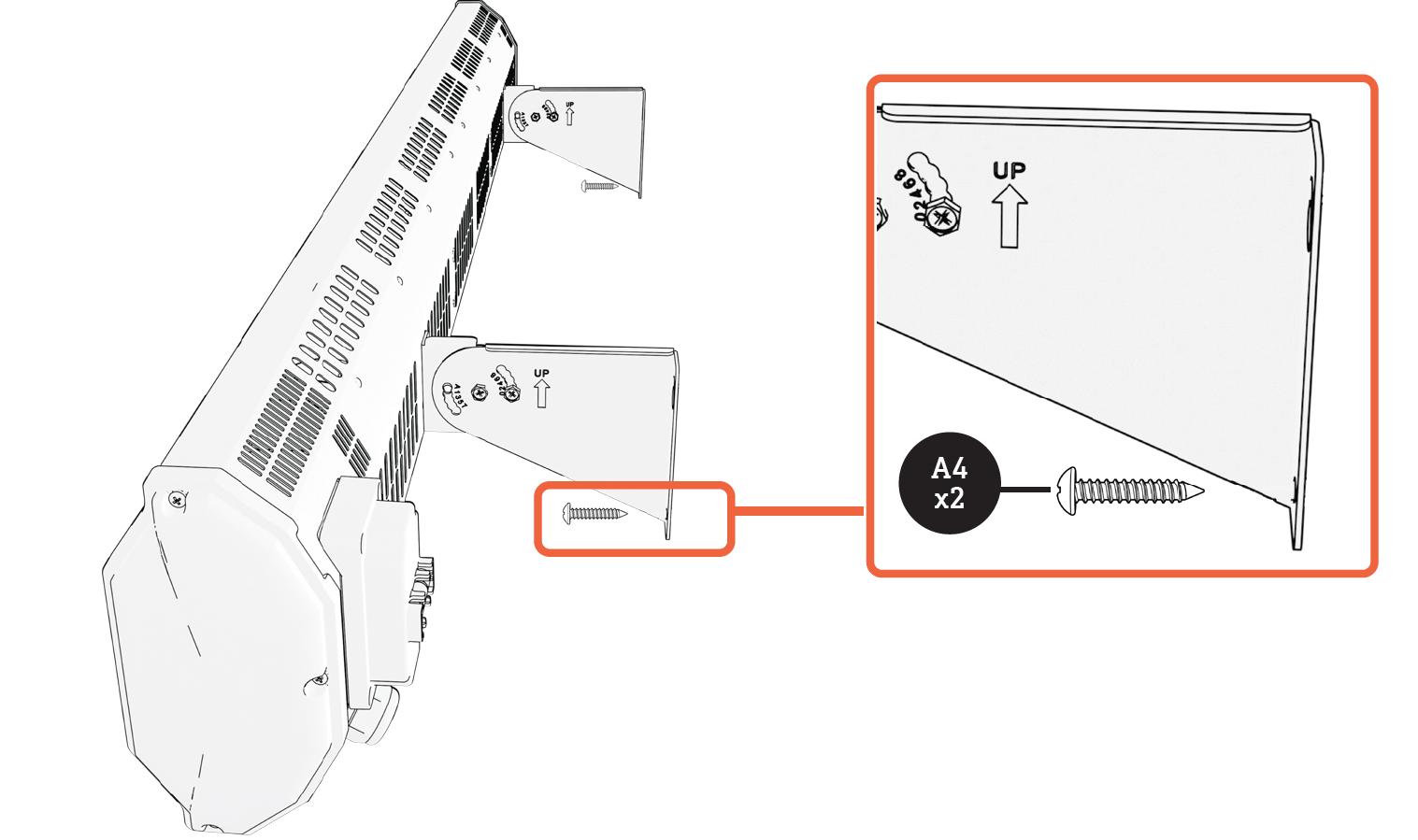
Ceiling Chain Installation
Do not install the heater closer than 23.6 inches (0.6 m) to the ceiling surface or lower than 70.9 inches (1.8 m) above the ground.
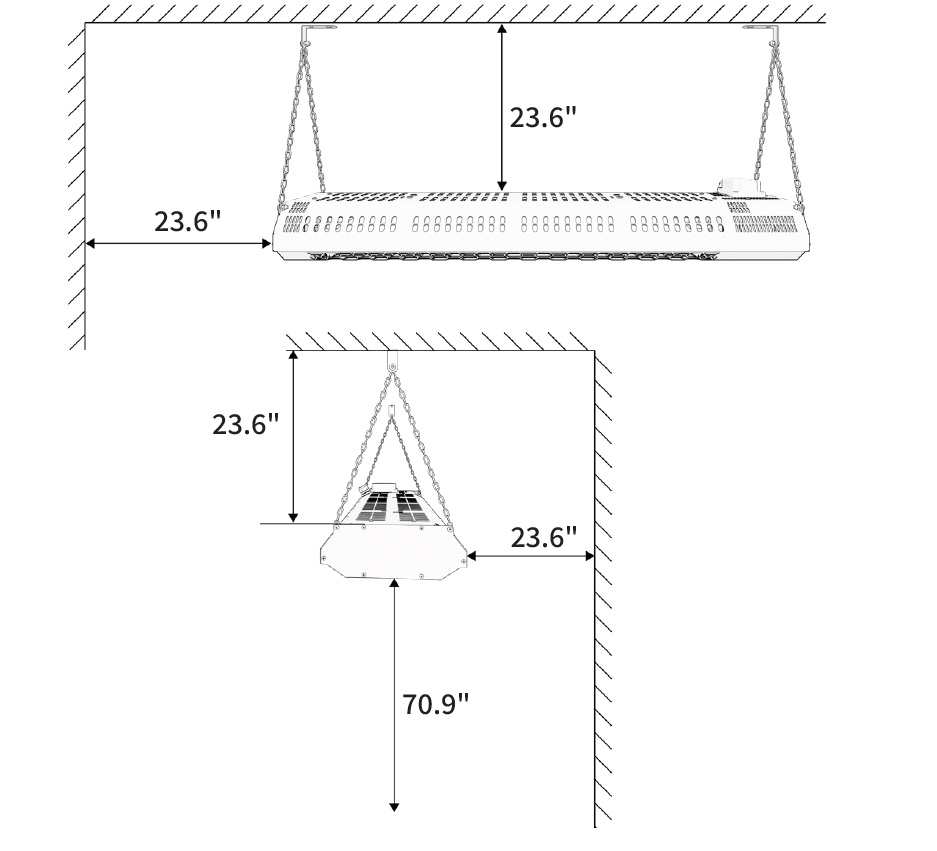
- Mount the Ceiling Brackets to a Stud
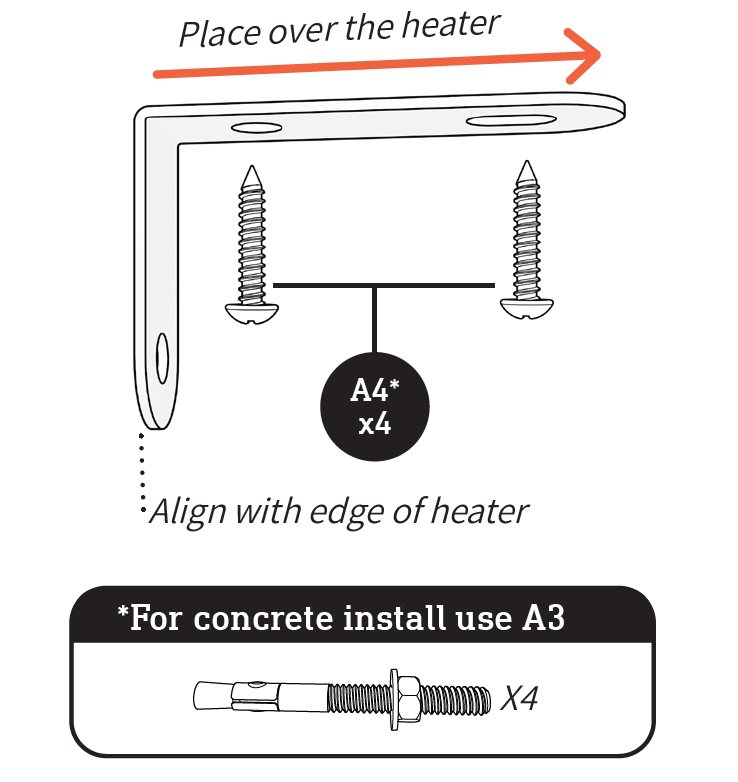
- Use a stud finder to locate suitable ceiling studs capable of supporting the heater's weight. Mark the bracket positions to ensure proper alignment. Position the brackets as shown in the installation diagram, ensuring that they extend over the heater rather than away from it.
- Secure each bracket using the appropriate mounting hardware:
- Stud Installation: Use A4 self-tapping screws.
- Concrete Installation: Use A3 concrete anchors.
Attach Chains to the Heater
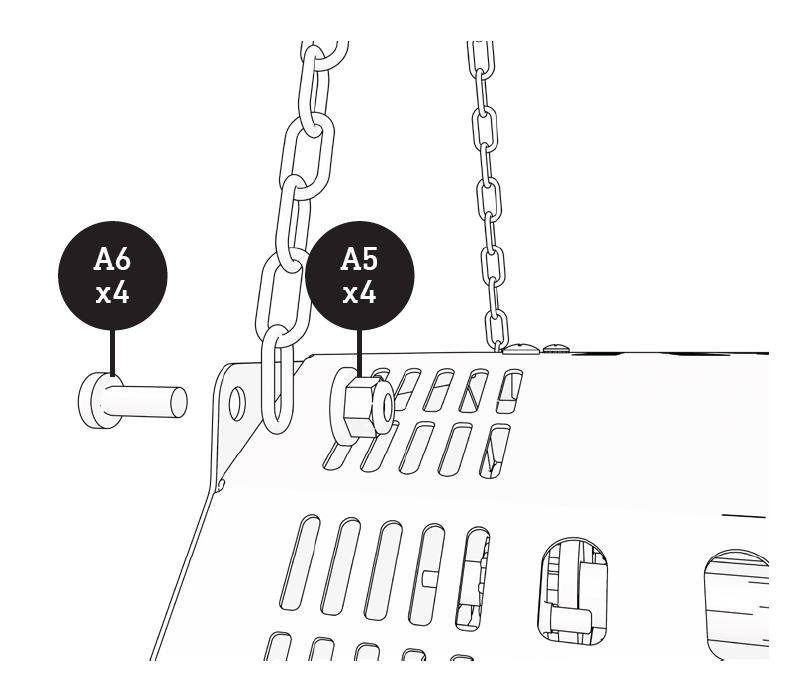
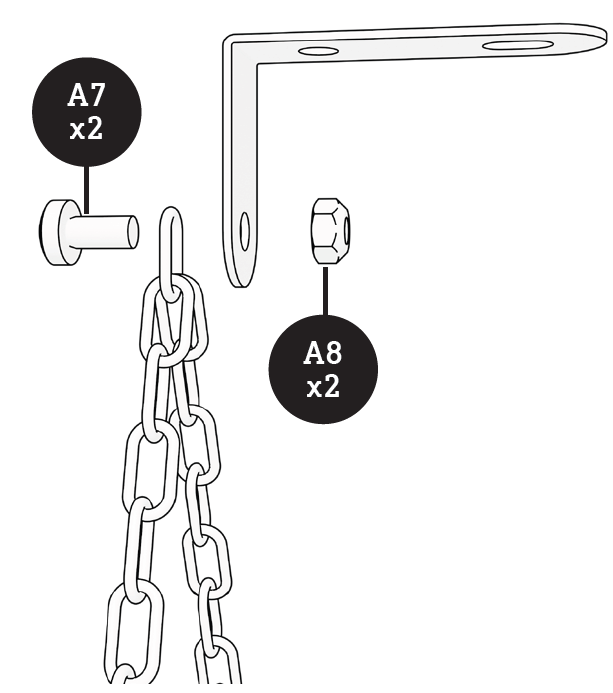
Attach the two chains to the heater by securing one chain to each short side. Align a chain link with the mounting hole, insert the screw through both the chain and heater bracket, and secure it with the nut. Repeat the process on the opposite side. Ensure that both chains are equal in length so the heater hangs horizontally.
Hang the Heater
Using two people, carefully lift and hang the heater by securely fastening each chain to the ceiling brackets. Ensure that both chains are properly attached and equal in length so the heater remains level.
Operations & Controls
Power Level
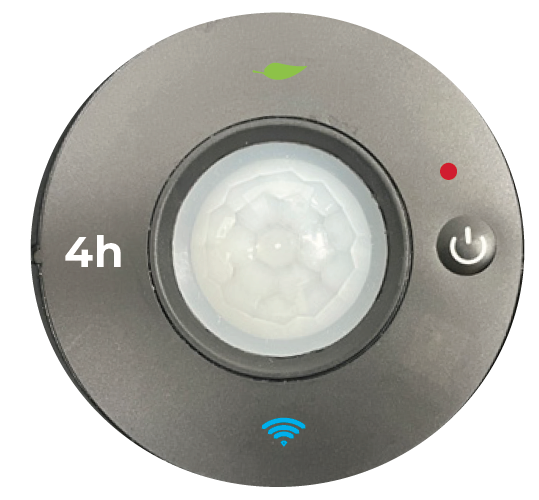
Press the power button to cycle through the available power settings: Level 1, Level 2, Level 3, and Off.
- Level 1: Activates one heating element.
- Level 2: Activates two heating elements.
- Level 3: Activates three heating elements.
- Off: Turns off the heater, indicated by a red light.
Eco Mode
While the heater is operating, press and hold the power button for approximately 2 seconds to enable or disable ECO mode. When ECO mode is activated, a green leaf icon appears on the display. The heater automatically turns off if no person is detected within 10 feet for 5 minutes. Heating automatically resumes when a person is detected within the specified range.
Timer
It is recommended to configure and manage the heater's timer settings through the compatible mobile application.
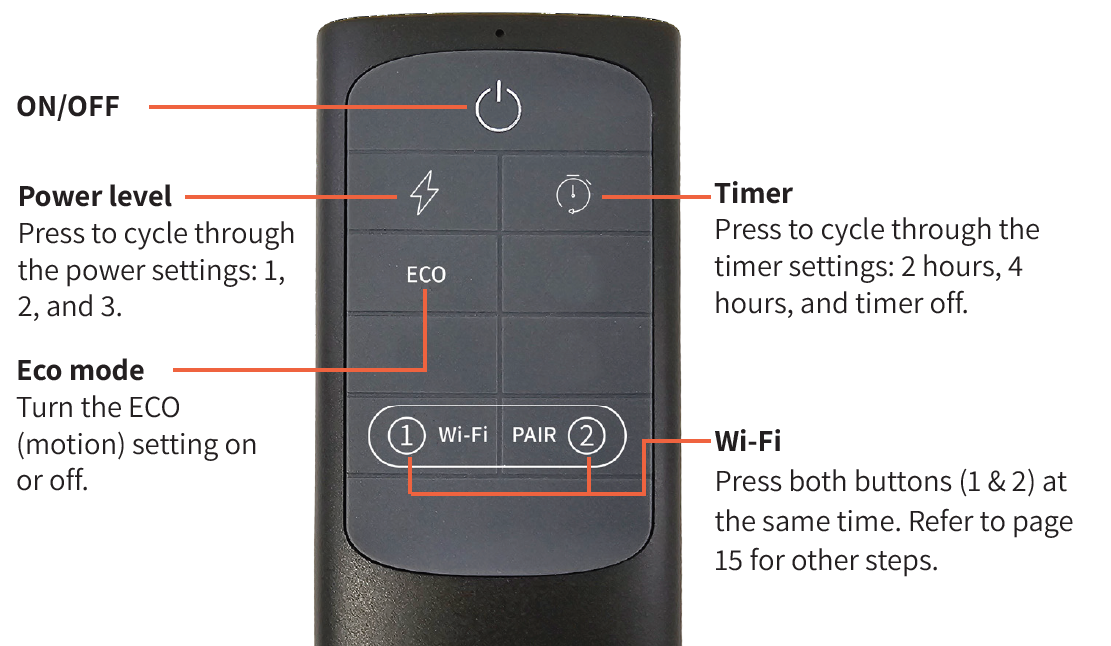
Remote Control
The remote control provides the same functions as the buttons located on the heater. For detailed instructions regarding each function, refer to the operating control descriptions provided above.
Pros and Cons of Heatstorm Heater HS-6000-OTRBK
Pros
- Instant, Silent Heat: Delivers 6000W infrared warmth immediately at 0 dB, perfect for quiet spaces like workshops; users report rapid temperature rises from 52°F to 180°F near the unit.
- Smart Wi-Fi and Motion Sensor: App-controlled schedules, remote access, and auto-activation save energy; external thermostat probe allows precise placement.
- Weatherproof Durability: IP-rated for patios and garages, with robust carbon fiber elements outlasting quartz alternatives.
- Versatile Installation: Wall/ceiling mount with tilt; heats large areas efficiently as primary or secondary source.
- Value for Money: At $300-$500, outperforms basic 1500W heaters; superior to Dr. Infrared for Wi-Fi features and coverage.
Cons
- Requires 240V hardwiring and an electrician, adding $100-$200 install costs; not plug-and-play like 120V models.
- Large size (57” L x 8” W x 11” H, 14.5 lbs) limits small-space use; ceiling mount often needed.
- Motion sensor may trigger falsely in active areas, though adjustable via app.
- High power draw (25A) demands a dedicated circuit, unlike lower-wattage competitors.
Customer Reviews: Heatstorm Heater HS-6000-OTRBK Feedback
Customers rave about the Heatstorm Heater HS-6000-OTRBK, averaging 4.5/5 stars across Home Depot and retailer sites for its powerful, wind-resistant heat in garages and patios. "Instant heat transformed my cold workshop—Wi-Fi app is a game-changer for scheduling," says one verified buyer (5/5 stars). Praises highlight silent operation, easy tilt-mounting, and motion sensor efficiency, with many recommending it over traditional propane heaters for safety and cleanliness.
Common complaints include installation complexity, with some noting electrician needs, though most agree it's worth it. "Great coverage for 200 sq ft, but ensure a 30A breaker," advises a 4-star review. Frequently mentioned issues like initial app setup are resolved quickly via updates. Overall, 85% recommend for outdoor infrared garage heaters, praising durability and value.
More heatstorm manuals
- Usage: Heatstorm Tradesman Infrared Heater HS-1500-TT User Manual
- Setup: Heatstorm Infrared Heater HS-1000-WX-WI User Manual
- Setup: Heatstorm Tradesman Outdoor Heater HS-1500-TRC User Manual
- Setup & Usage: Heatstorm Infrared Heater HS-1000-WX User Manual
- Setup: Heatstorm Carbon Fiber Infrared Heater HS-1500-OTR-MWI User Manual
- Setup: Heatstorm Infrared Wall Heater WA HS-1000-WA User Manual
Leave a Comment