
Setup: Heatstorm In-wall Smart Heater HS-3000-WALL-R User Manual
Content
Heat Storm HS-3000-WALL-R In-Wall Smart Heater: Complete Product Manual & Guide
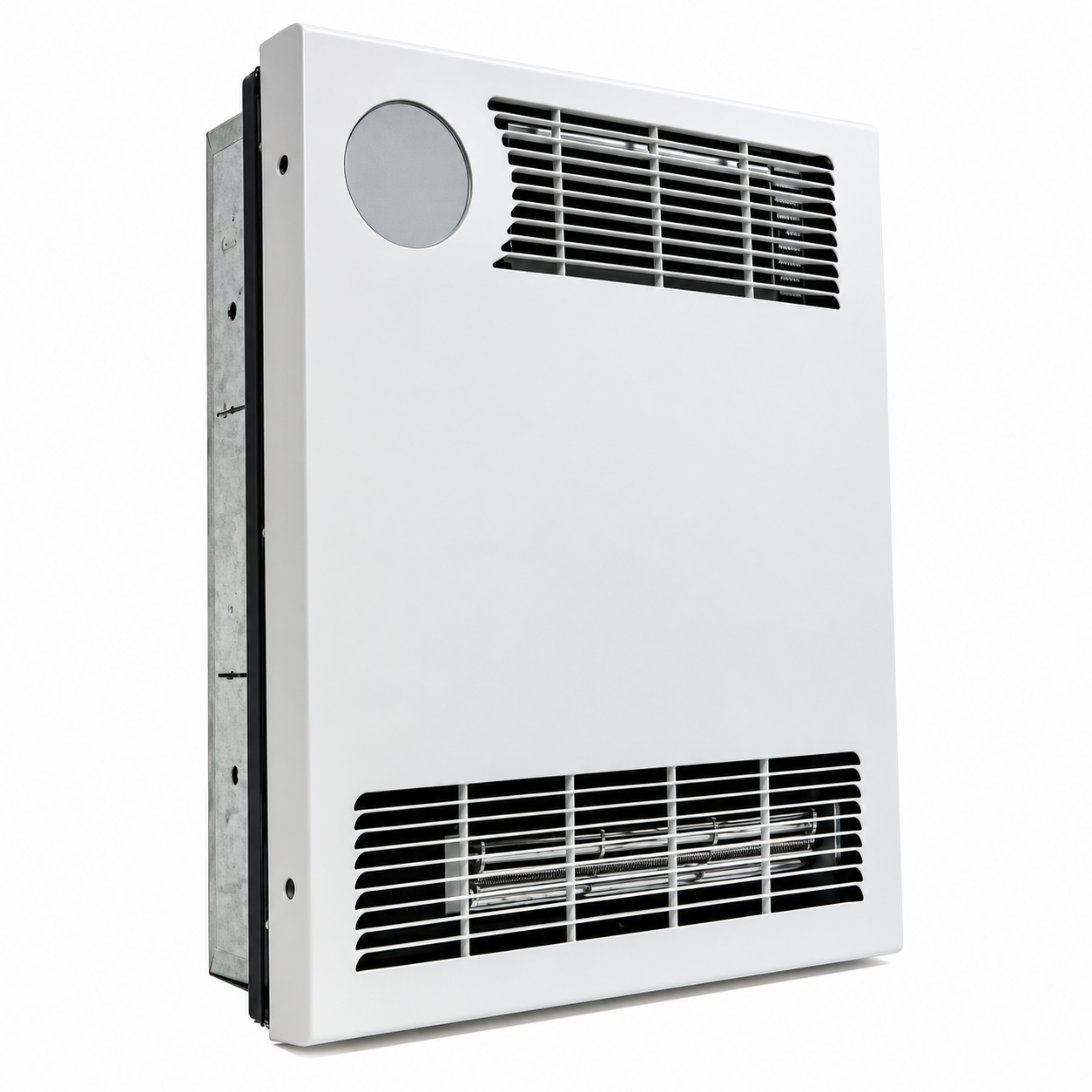
Introduction to the Heat Storm In-Wall Smart Heater HS-3000-WALL-R
The Heat Storm HS-3000-WALL-R in-wall smart heater represents a modern solution for homeowners and renters seeking efficient, space-saving heating technology. This 3000-watt electric in-wall heater combines forced-air heating with intelligent WiFi connectivity, allowing you to control your home's temperature from anywhere using your smartphone or other connected devices. The Heat Storm in-wall smart heater HS-3000-WALL-R is engineered to deliver consistent warmth across spaces ranging from 300 to 1000 square feet, making it ideal for bedrooms, living rooms, offices, and rental properties.
Key benefits of the Heat Storm HS-3000-WALL-R include its dual wattage options (selectable between 3000 and 1500 watts), built-in WiFi for remote temperature control, and energy-efficient eco mode that automatically adjusts power consumption. The heater features a digital thermostat with Celsius and Fahrenheit temperature selection, allowing precise climate control. With a noise level of only 42-47 decibels, this in-wall smart heater operates quietly without disrupting your daily activities. The Heat Storm in-wall smart heater is particularly valuable for those seeking to supplement existing HVAC systems or provide zone heating in specific rooms.
The target audience for this model includes homeowners upgrading their heating systems, renters needing portable heating solutions, and property managers looking to reduce energy costs. The Heat Storm HS-3000-WALL-R typically retails between $400-$600, with availability through major retailers including Lowe's, Walmart, Tractor Supply, and Northern Tool. This price point positions it as a mid-range investment in smart home heating technology, offering excellent value for the features provided.
Detailed Technical Specifications
Power and Performance Metrics:
- Maximum Wattage: 3000 watts (selectable to 1500 watts)
- Voltage: 240V (hardwired installation)
- Amperage: 12.5 amps (1500W setting) / 25 amps (3000W setting)
- BTU Output: 10,400 BTU per hour
- Coverage Area: 300-1000 square feet
- Heat Settings: 2 (Auto/Eco mode and High mode)
Physical Dimensions and Installation:
- Length: 15.51 inches
- Width: 4.92 inches
- Height: 19.88 inches
- Weight: 16.97 lbs
- Form Factor: In-wall mounted unit
- Installation Type: Hardwired (requires 240V circuit)
Smart Features and Controls:
- Built-in WiFi connectivity for remote access
- Digital thermostat with precise temperature control
- Custom heat scheduling capabilities
- Temperature selection: Fahrenheit and Celsius
- Fan-only mode for air circulation without heating
- Sound control (on/off toggle)
- Operating Noise Level: 42-47 decibels
Operating Characteristics:
- Heating Method: Forced-air circulation
- Auto Mode (Eco Mode): Runs at full power until within 2 degrees of set temperature, then reduces to 50% power for energy efficiency
- High Mode: Operates at 100% power until desired temperature is reached
- Cooling Period: Automatic 2-degree cooling cycle before reheating
- Post-Operation: Blower continues for several minutes after shutdown to cool internal components
Tools Needed for Installation
- Drywall saw
- Utility knife
- Wire cutter and stripper (for hardwiring)
- Phillips screwdriver
Installation Instructions
Installation must be carried out by a certified electrician. Ensure that the heater is correctly installed before connecting or activating the power supply.
Heater Location
When selecting a location for the heater, follow all general installation instructions. The heater must be properly installed before operation. Do not prop the heater against objects or operate it with the grille positioned vertically. For best performance, install the heater away from direct sunlight.
Basement or Garage Use
The heater can be used in a finished basement with drywall and carpeting. For other environments, consider using Heat Storm Outdoor Infrared Heaters. Visit heatstorm.com for additional information.
Vaulted or Cathedral Ceilings
The heater can be installed in rooms with vaulted or cathedral ceilings. However, the initial heating process may take longer. Once the desired temperature is reached, the heater will cycle automatically to maintain the selected temperature.
Poorly Insulated Areas
Rooms with inadequate insulation may not retain heat efficiently, resulting in longer heating periods or more frequent heater operation.
Cold Climate Installation Note
Installing the heater beneath a window or on a poorly insulated wall may cause the thermostat to detect a lower ambient temperature than the actual room temperature.
Heating Multiple Rooms
Heating effectiveness depends on the openness of the floor plan and the size of the connected rooms. Adjust the heater's location or configuration to determine the most effective heating arrangement.
Step 1: Insert Mounting Bracket
Select a Suitable Wall
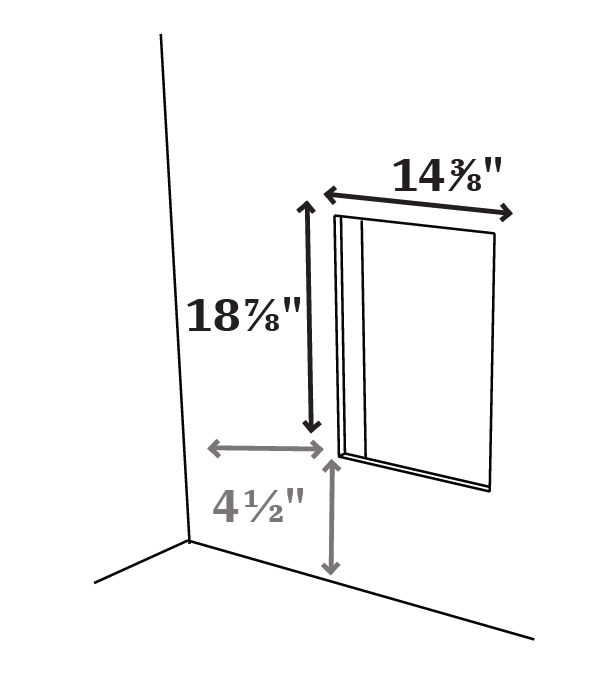
Ensure there is a minimum clearance of 4½ inches between the heater and nearby walls, ceilings, and floors. If the heater will not be hardwired, select a location where the power cord can reach an electrical outlet.
Mark and Cut the Wall Opening
Mark a rectangular opening measuring 14⅜ inches (W) × 18⅞ inches (H) between two wall studs. Once the measurements are confirmed, carefully cut out the drywall.
Secure the Mounting Bracket
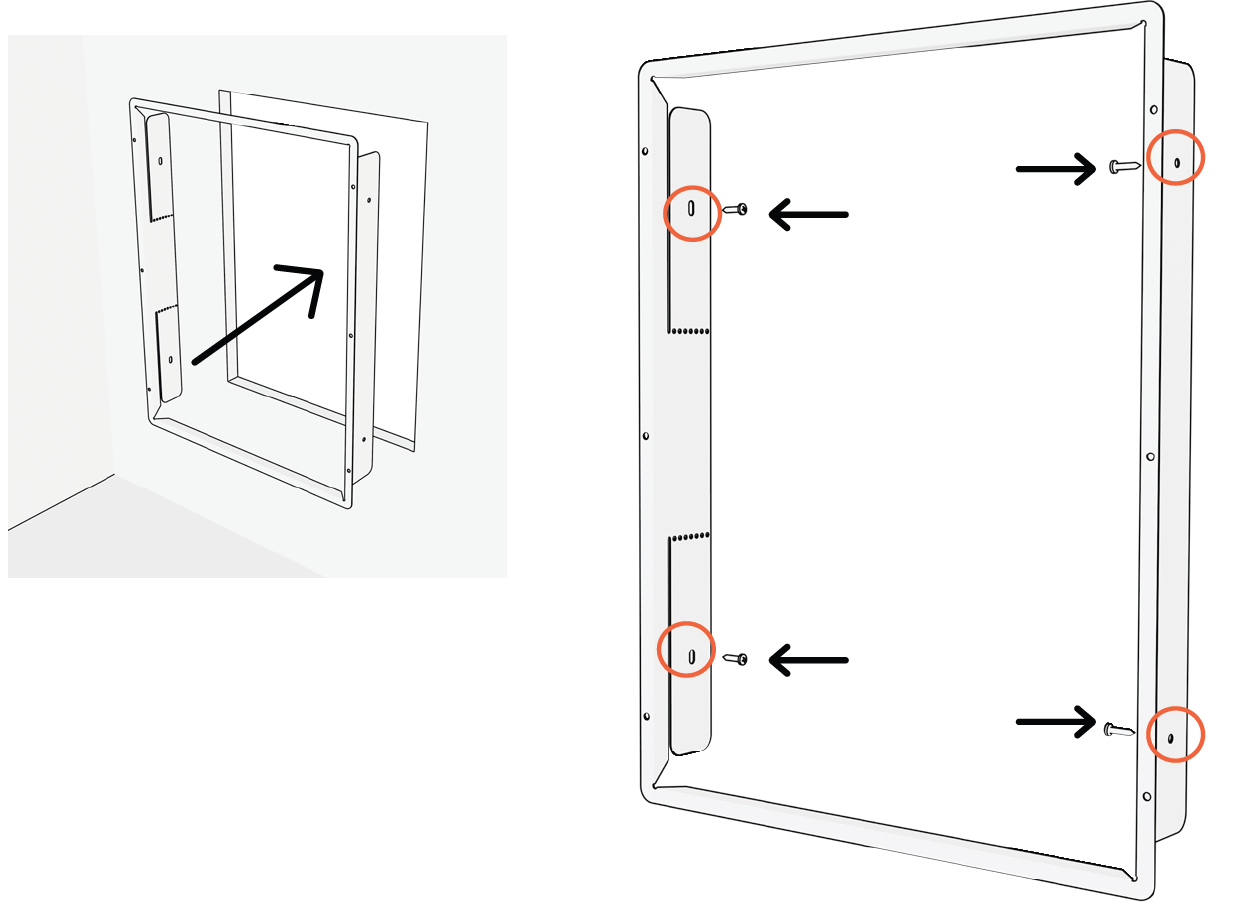
Insert the mounting bracket into the rectangular wall opening and secure it to the wooden studs using appropriate screws. Ensure the bracket is firmly attached and properly aligned.
Remove the Heater Grille
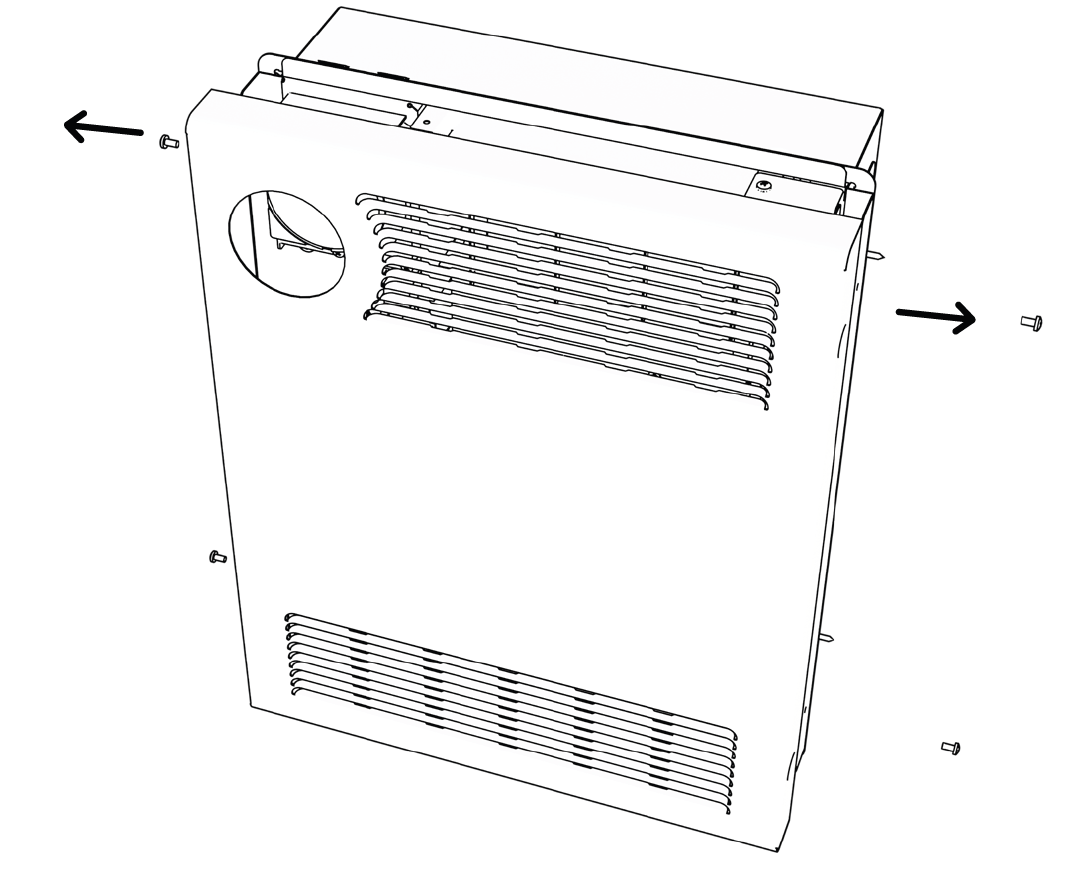
Remove the front grille from the heating base to prepare the unit for installation.
Step 2: Hardwire Heater
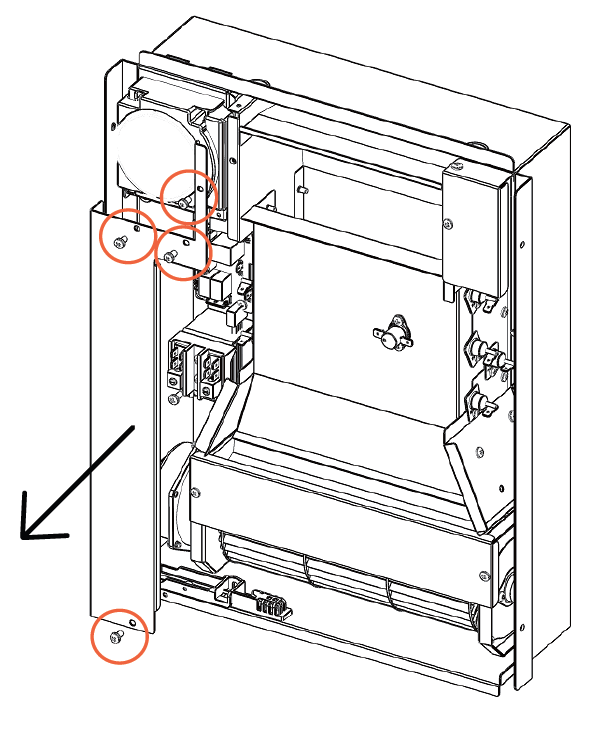
Remove the Power Box Cover
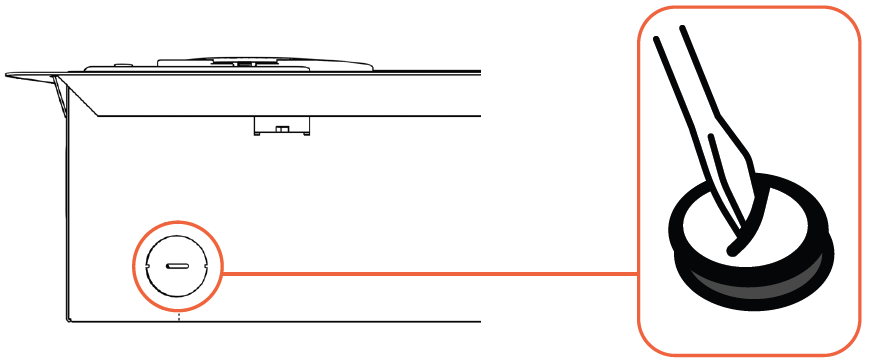
Remove the electrical box cover and the hole cover located at the bottom of the heater. Feed the electrical wires into the box and prepare the wire ends for connection.
Remove the hole cover at the bottom of the heater
Once removed, feed your wire into the box and ensure the wires are stripped and ready to connect
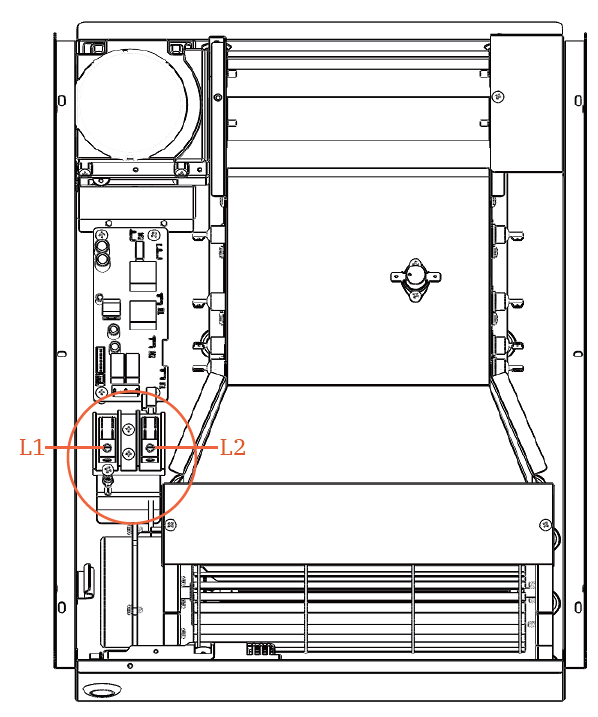
Connect the Wires
With the power supply disconnected, a certified electrician must connect the electrical supply conductors and grounding wire according to the heater's wiring diagram and applicable electrical codes.
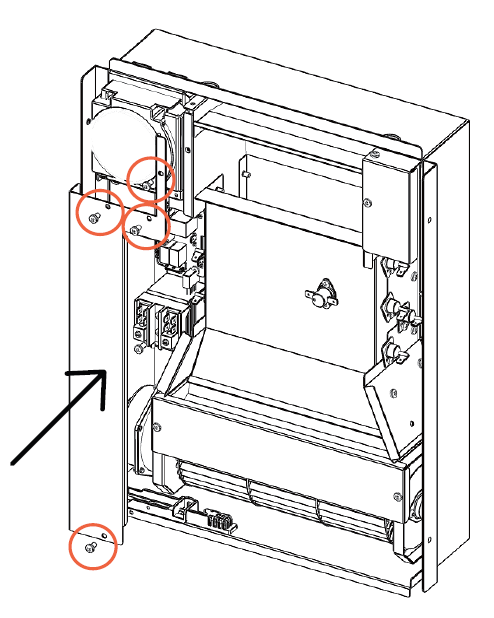
Replace the Power Box Cover
After completing and checking the electrical connections, reinstall the power box cover securely.
Step 3: Install Heater
Install the Heating Base
Slide the heating base into the mounting bracket and secure it using the designated mounting screws. Ensure the heater is firmly positioned.
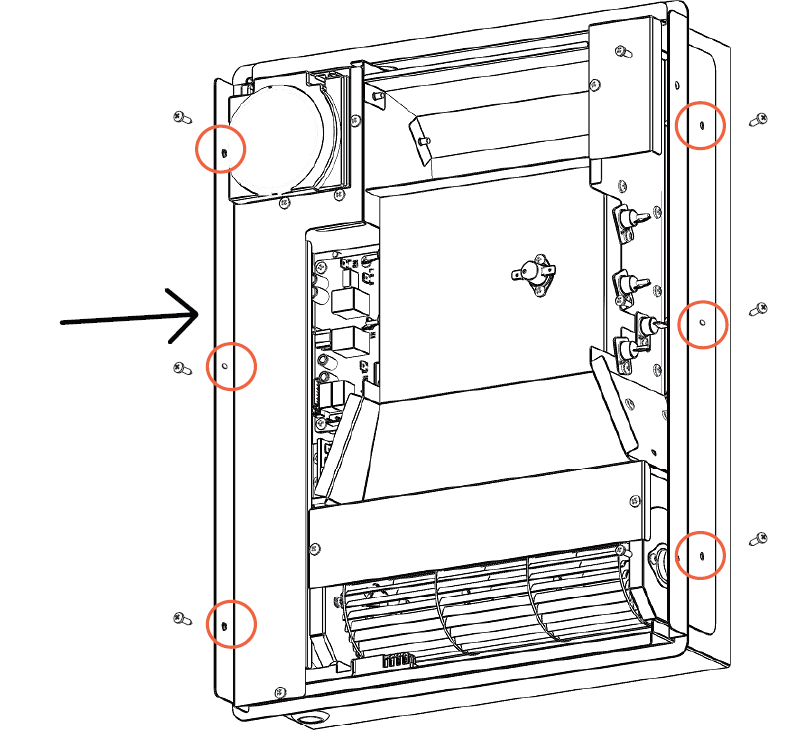
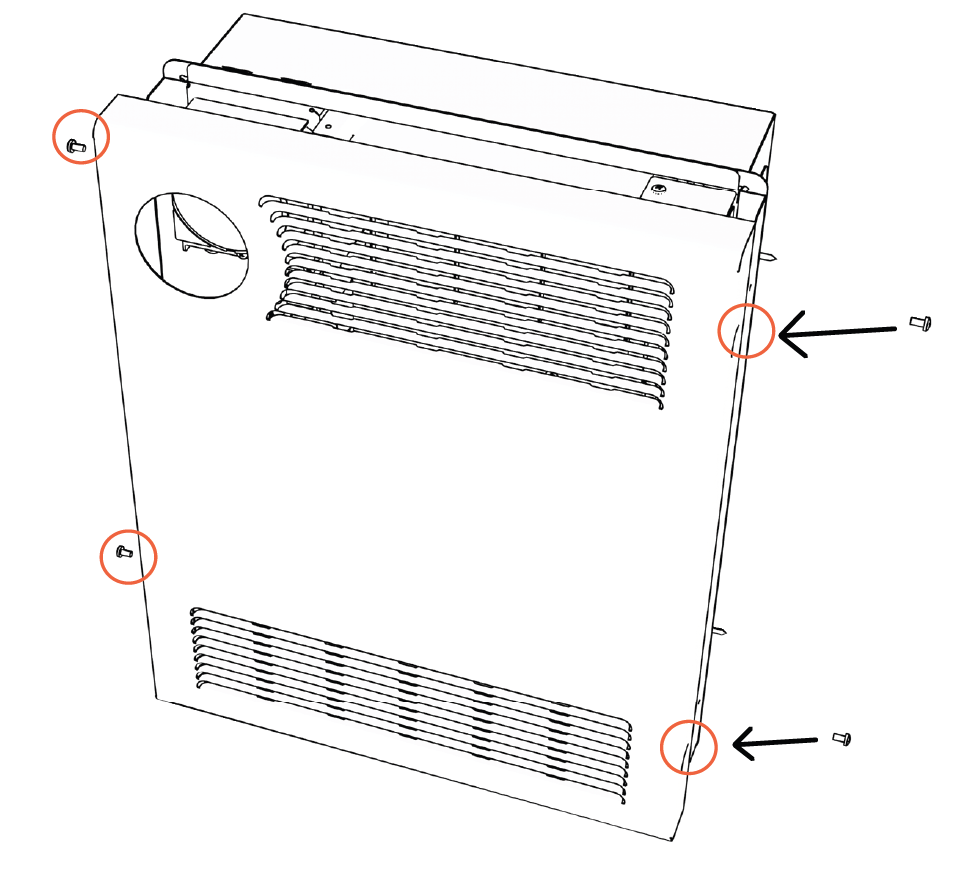
Attach the Front Grille
Position the front grille over the heating base and secure it using four screws.
Operations & Controls
Power ON/OFF
Press the power icon to switch the heater between ON and OFF. The power icon illuminates red when the heater is on and white when it is off.
Child Lock
Press and hold the power icon for 5 seconds to activate or deactivate the child lock. When activated, a red lock icon appears on the display, and the control settings cannot be adjusted until the child lock is disabled.
Factory Reset
Turn off the heater and allow the heating elements to cool. Disconnect the heater from the power supply, then reconnect it. Within 3 minutes of restoring power, press and hold the power icon for 10 seconds to restore the factory settings.
Timer
When the heater is off, both the delayed start and delayed stop times can be configured. Press the timer icon to enter timer adjustment mode. The display will flash, indicating that the settings can be modified. Use the plus (+) and minus (−) icons to adjust the delayed start time in one-hour increments. Press the timer icon again to configure the delayed stop timer. Use the same plus (+) and minus (−) controls to increase or decrease the selected time. Wait 5 seconds without pressing any buttons to activate the timer settings.
Temperature Setting
The heater's default temperature is 70°F (21°C). Press the plus (+) or minus (−) icon to enter temperature adjustment mode. Each press changes the thermostat setting by 1°F or 1°C, depending on the selected temperature unit. After 5 seconds of inactivity, the display automatically exits temperature adjustment mode and returns to showing the current ambient temperature.
Selecting Celsius & Fahrenheit
Press the plus (+) and minus (−) icons simultaneously to switch the temperature display between Celsius (°C) and Fahrenheit (°F).
Change Working Mode
Press the fan button to cycle between Low, Auto (Eco), and High operating modes.
- Low Mode|Green: The heater operates at 50% of its rated power, reducing electrical consumption and heat output. This mode is suitable for smaller spaces or situations where reduced electrical demand is preferred.
- Auto Mode (Eco Mode)|White: The heater operates at full power until the room temperature is within 2 degrees of the selected temperature. It then reduces power to 50% to help reach and maintain the desired temperature while improving operating efficiency.
- High Mode|Red: The heater operates at 100% of its rated power until the selected temperature is reached.
Fan Only/Heat Mode
Press and hold the fan button for 3 seconds to switch between Fan Only mode and Heat mode. A blue fan icon indicates Fan Only mode, while a red icon indicates Heat mode.
Sound
Press the volume/thermostat symbol to enable or disable the control sound.
Remote Control
The remote control provides the same functions as the buttons on the heater's control panel. For instructions on operating individual functions, refer to the corresponding control descriptions above.
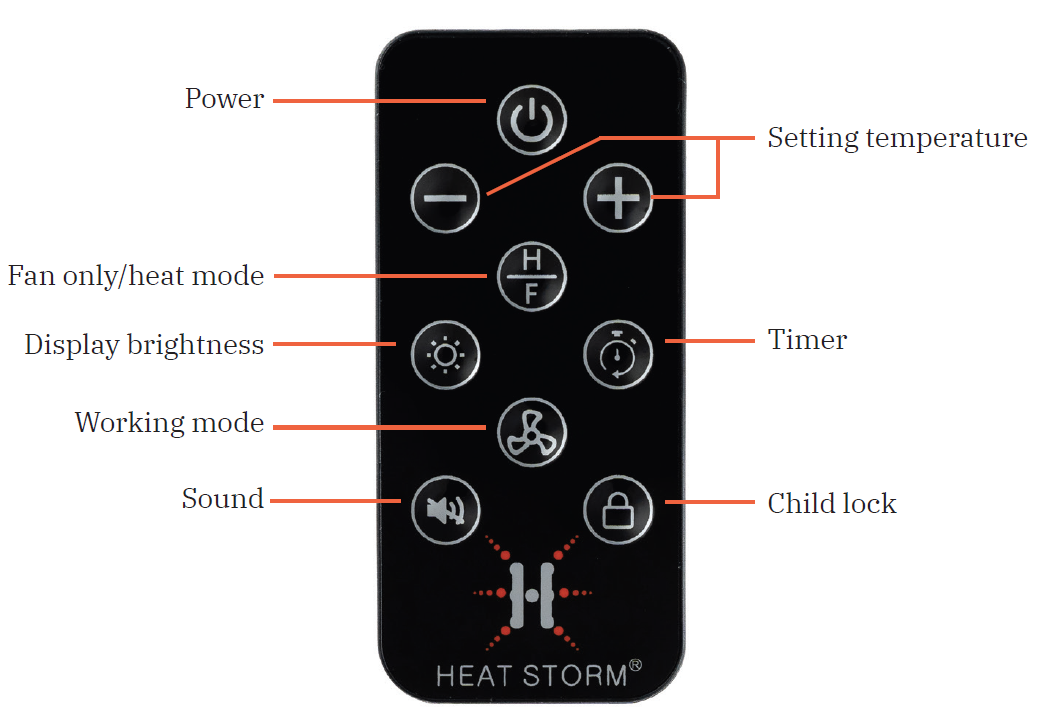
Advantages of the Heat Storm HS-3000-WALL-R
Smart Home Integration
The Heat Storm in-wall smart heater's WiFi connectivity enables remote temperature adjustment from any location. Create custom heating schedules that align with your daily routine, reducing energy waste when you're away from home. This feature proves particularly valuable for those managing multiple properties or maintaining comfort while traveling.
Space-Saving Design
Unlike bulky floor or baseboard heaters, the HS-3000-WALL-R mounts directly into your wall, preserving valuable floor and furniture space. Its sleek 4.92-inch depth makes it ideal for rooms with limited space, and the 15.51 x 19.88-inch grille fits seamlessly into standard wall openings.
Energy Efficiency
The eco mode automatically adjusts power consumption to maintain your desired temperature at 50% power once the room reaches the target temperature. This intelligent operation significantly reduces electricity consumption compared to traditional fixed-output heaters, potentially lowering your utility bills by 20-30%.
Flexible Power Options
Selectable 3000-watt and 1500-watt settings allow you to customize heating output based on room size and seasonal needs. Lower wattage setting proves beneficial for smaller spaces or when the circuit breaker shows sensitivity to higher loads.
Quiet Operation
Operating at just 42-47 decibels, this in-wall heater produces minimal noise—comparable to normal conversation levels. This makes it suitable for bedrooms, offices, and other noise-sensitive environments.
Value for Money
The combination of smart features, dual wattage options, and extensive coverage area (300-1000 sq ft) delivers excellent value within the $400-$600 price range compared to competitors.
Disadvantages and Limitations
Professional Installation Required
The hardwired 240V installation requires a licensed electrician, adding installation costs of $200-$500 depending on your home's existing electrical infrastructure. This differs from plug-in alternatives that offer DIY installation.
Circuit Breaker Sensitivity
At full 3000-watt capacity with 25 amps, the heater may trip older circuit breakers or shared circuits. Users with sensitive electrical systems may need to operate exclusively in 1500-watt mode, reducing heating capacity by 50%.
Limited Coverage for Larger Spaces
The maximum 1000 square-foot coverage area may prove insufficient for large open-concept homes. Multiple units would be required for whole-house heating, increasing overall investment.
Forced-Air Heating
Some users prefer radiant or infrared heating to forced-air circulation. The continuous fan operation, while quiet, may be noticeable in very quiet environments and uses additional energy for air movement.
WiFi Dependency
Smart features require stable WiFi connectivity. Network outages prevent remote control functionality, though the heater continues operating on its last programmed settings.
Customer Reviews and User Feedback
Overall User Satisfaction: 4.2/5.0 Stars
Heat Storm HS-3000-WALL-R owners consistently praise the heater's heating performance and smart features. Users report achieving comfortable temperatures in 300-800 square-foot spaces within 15-30 minutes. The WiFi connectivity receives particular appreciation, with customers noting the convenience of adjusting temperature settings remotely before arriving home.
Common Praise: "Heats my bedroom efficiently without taking up any floor space" and "The WiFi control works flawlessly—I love adjusting the heat from my phone." Users frequently mention the quiet operation and energy savings compared to their previous heating systems. Customers appreciate the 1500-watt option for smaller rooms and circuit-sensitive homes.
Frequently Mentioned Issues: Several users report circuit breaker trips when running the 3000-watt setting in homes with older electrical systems. Some customers note that the blower fan, while quiet by industry standards, produces noticeable sound in extremely quiet bedrooms. Installation complexity and associated electrician costs surprise some buyers expecting easier setup.
Recommendation Summary: The Heat Storm in-wall smart heater HS-3000-WALL-R is highly recommended for homeowners and renters seeking efficient, space-saving heating with smart home integration. Best suited for supplemental room heating, zone control, and rental properties where space preservation matters. Not ideal as a primary heat source for homes exceeding 1000 square feet or those with electrical limitations.
How to Operate Your Heat Storm HS-3000-WALL-R
Initial Setup and Installation
After professional installation of your Heat Storm in-wall smart heater, verify all electrical connections are secure and the circuit breaker is properly set. Connect to your home WiFi network using the digital control panel or mobile app. Set your preferred temperature unit (Celsius or Fahrenheit) by pressing the + and - buttons simultaneously on the control interface.
Temperature Mode Selection
Choose between Auto Mode (Eco Mode) for energy efficiency or High Mode for rapid heating. Auto Mode intelligently reduces power to 50% once the room reaches within 2 degrees of your set temperature, maintaining comfort while minimizing electricity consumption. High Mode runs at full power until the desired temperature is achieved, making it ideal for quickly warming a cold room.
Fan and Heat Controls
Toggle between fan-only and heat mode by pressing and holding the fan button for 3 seconds. Fan-only mode (blue fan icon) circulates air without heating, useful for air distribution during warmer months. Heat mode (red icon) activates the heating element. Control sound settings by pressing the volume/thermostat symbol to enable or disable operational sounds.
Remote Access via WiFi
Use the Heat Storm mobile app or web interface to adjust your heater from anywhere. Set custom heating schedules that automatically adjust temperature at specific times, optimizing comfort and energy efficiency. Program different schedules for weekdays and weekends to match your lifestyle.
Post-Operation Cooling
Note that the blower fan continues running for several minutes after turning off the heat function or power to cool internal components. This automatic cooling protects the heating element and extends the unit's lifespan—do not interrupt this process.
Maintenance and Troubleshooting
Regular Maintenance
Clean the front grille monthly using a soft brush or vacuum to remove dust accumulation that reduces airflow efficiency. Inspect the heater quarterly to ensure no obstructions block the air intake or discharge vents. Keep the area around the heater clear of furniture, curtains, or other items that might impede proper air circulation.
Common Issues and Solutions
If the circuit breaker trips frequently, switch to 1500-watt mode or consult an electrician about upgrading your electrical circuit. Should the heater fail to respond to WiFi commands, verify your internet connection and restart both the heater and your WiFi router. If heating output seems reduced, check that the grille isn't blocked by dust or debris and ensure the thermostat setting is above room temperature.
Customer Support
For questions or technical assistance with your Heat Storm in-wall smart heater HS-3000-WALL-R, contact Heat Storm customer service at 435-752-6611. Download the complete user manual from the Heat Storm website for detailed operating instructions, safety information, and warranty coverage details.
Comparison with Similar In-Wall Smart Heaters
The Heat Storm HS-3000-WALL-R competes favorably against other in-wall smart heating solutions. Compared to standard in-wall heaters without WiFi, this model offers superior convenience and energy management. Its 10,400 BTU output and 300-1000 square-foot coverage area matches or exceeds competing models in the $400-$600 price range. The dual wattage option provides flexibility unavailable in many competitor products, and the quiet 42-47 decibel operation outperforms louder alternatives.
Choose the Heat Storm HS-3000-WALL-R when you prioritize smart home integration, space efficiency, and energy savings. This in-wall smart heater delivers professional-grade heating performance with consumer-friendly controls, making it an excellent investment for modern homes seeking intelligent climate control solutions.
```
More heatstorm manuals
- Setup: Heatstorm In-wall Smart Heater HS-1500-WALL-R User Manual
- Setup: Heatstorm Cabinet Smart Heater HS-1500-KP User Manual
- Setup: Heatstorm Quartz Infrared Element Heater HS-1500-SED-WI User Manual
- Setup: Heatstorm Infrared Heater HS-1500-ILODT User Manual
- Setup: Heatstorm Infrared Wall Heater WA HS-1000-WA User Manual
- Setup: Heatstorm Mojave Portable Heater HS-1500-IMO User Manual
Leave a Comment