
Setup: Heatstorm Infrared Heater HS-1500-ILODT User Manual
Content
Heatstorm Infrared Heater HS-1500-ILODT: Complete Product Manual and Review
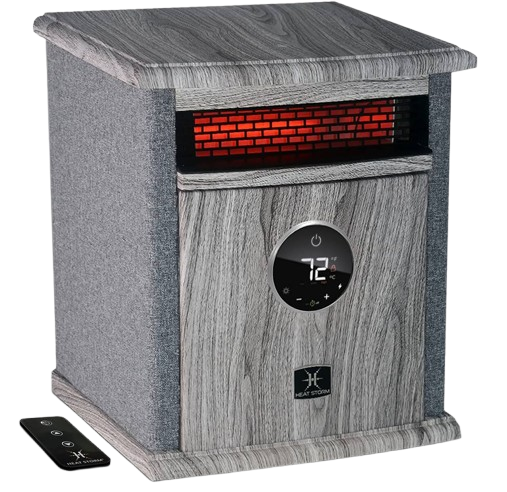
Introduction to Heatstorm Infrared Heater HS-1500-ILODT
The Heatstorm Infrared Heater HS-1500-ILODT is a premium portable electric space heater designed for efficient, safe indoor heating. This 1500-watt infrared cabinet heater delivers up to 5200 BTU of soft, moist heat using patented Heat Moisture Sensor (HMS) technology, which preserves room humidity and oxygen levels unlike traditional heaters. Ideal for homes, offices, or garages, it provides supplemental heating for up to 1000 square feet or primary heating for about 200 square feet, making it perfect for poorly insulated spaces during winter.
Key benefits include energy-saving modes, digital thermostat for precise control, and cool-touch housing for family safety. Unique selling points are its remote control, overheat protection, tip-over shut-off, and child lock mode, ensuring worry-free operation. Target audiences include homeowners seeking cost-effective zoned heating, renters needing portable solutions, and anyone prioritizing health-friendly warmth without dry air. Use cases range from living rooms and bedrooms to workshops, offering quick heat without ducting losses common in central systems.
Compact at 15 inches high, 13.5 inches wide, and 11 inches deep, the tan-finished Heatstorm Infrared Heater HS-1500-ILODT fits seamlessly into any decor. Priced in the $100-$150 range, it's widely available at major retailers like Lowe's and Home Depot, with a 1-year limited warranty for peace of mind. This infrared space heater stands out for its blend of power, safety, and efficiency in the portable heater market.
Technical Specifications and Key Features of Heatstorm Infrared Heater HS-1500-ILODT
The Heatstorm Infrared Heater HS-1500-ILODT boasts robust specs for reliable performance. This infrared cabinet heater excels in large spaces with dual heat settings and smart controls.
- Power Output: 1500W max (750W eco mode), 12.5A / 6.25A, 120V, 5200 BTU.
- Heating Capacity: Supplemental up to 1000 sq. ft., primary ~200 sq. ft. (varies by insulation).
- Dimensions: 15" H x 13.5" W x 11" D, 72" cord length, portable design.
- Controls: Digital display, electronic thermostat (Celsius/Fahrenheit switchable), remote included, 2 heat settings.
- Additional: Energy-saving mode, no assembly required, ETL listed, tan cabinet finish.
Compared to similar 1500W heaters like basic ceramic models, the HS-1500-ILODT's infrared tech and HMS provide moister heat, outperforming in comfort and efficiency for large rooms without drying air.
Installation Instructions
Heater Location
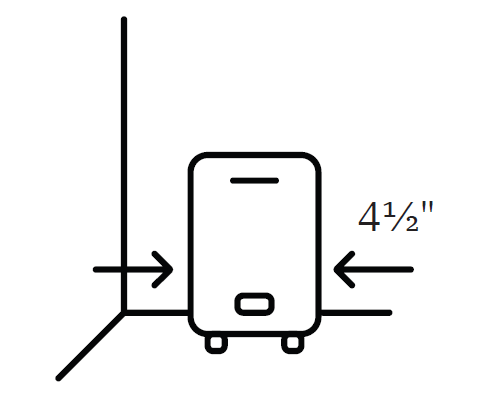
When selecting a location for your new heater, follow the general installation guidelines to ensure safe and effective operation. For optimal performance, position the heater away from direct sunlight. Maintain a minimum clearance of 4½ inches between the heater and nearby walls or objects. Place the heater where its power cord can easily reach a suitable electrical outlet.
Basement or Garage Use
The heater can be used in a finished basement with drywall and carpeting. For other environments, consider using Heat Storm Outdoor Infrared Heaters. Visit heatstorm.com for additional information.
Vaulted or Cathedral Ceilings
The heater is suitable for rooms with vaulted or cathedral ceilings. However, reaching the desired temperature may take longer. Once the selected temperature is achieved, the heater will cycle automatically to maintain it.
Poorly Insulated Areas
Rooms with inadequate insulation may lose heat more quickly, causing the heater to operate for longer periods or cycle more frequently to maintain the desired temperature.
Cold Climate Installation Note
Installing the heater beneath a window or against a poorly insulated wall may cause its thermostat to detect a lower ambient temperature than the actual room temperature.
- Heating Multiple Rooms
- The heater's effectiveness in warming multiple rooms depends on the openness of the floor plan and the size of each room. Adjust the heater's placement to determine the most effective configuration.
- Do Not Use in the Following Areas:
- Outdoors – Use a suitable Heat Storm Outdoor Infrared Heater instead.
- Locations where gasoline, paint, or other flammable liquids are stored or used.
- Wet environments.
- Closets or other enclosed storage spaces.
Power Connection Guidelines
- Heat Storm Infrared Heaters are classified as electrical appliances. Each heater should operate on its own dedicated electrical circuit to reduce the risk of overloading.
- Connect the heater directly to a standard 120-volt wall outlet with a properly polarized 2-prong receptacle. Do not use extension cords, surge protectors, or relocatable power strips.
- Do not run the power cord beneath carpeting or cover it with rugs, runners, or similar materials. Avoid routing the cord under furniture or appliances, and keep it away from high-traffic areas to minimize tripping hazards.
Cord Storage Compartment
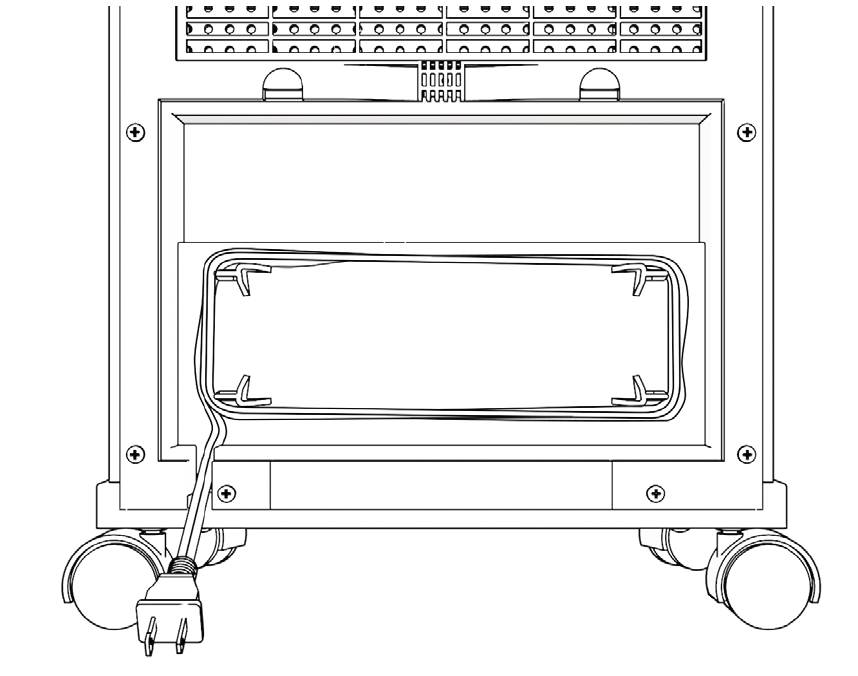
The power cord is stored in a compartment located on the back of the heater. When the heater is not in use, the cord can be wound back into this compartment for convenient storage. To open the bottom panel, press downward on the retaining tabs.
Attaching the Wheels (Optional)
The wheels are stored in the compartment on the back of the heater.
Tools Needed:
- 3/16-inch drill bit
- Phillips screwdriver
Installation Steps:
- Position the heater securely to access its underside.
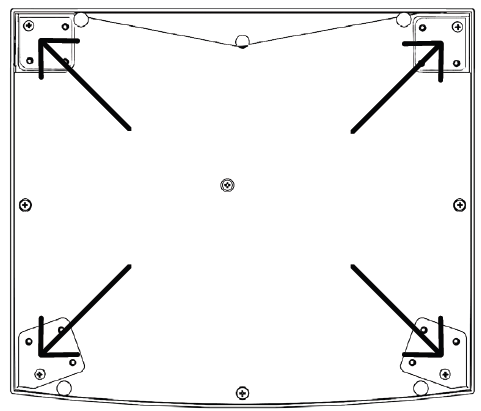
- Remove the screw located at each corner on the bottom of the heater.
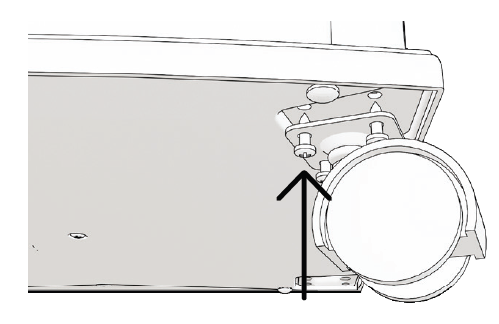
- Insert one wheel into its designated indentation.
- Secure the wheel using four screws.
- Repeat the process for the remaining three wheels.
- Check that all four wheels are securely attached before positioning the heater for use.
Operations & Controls
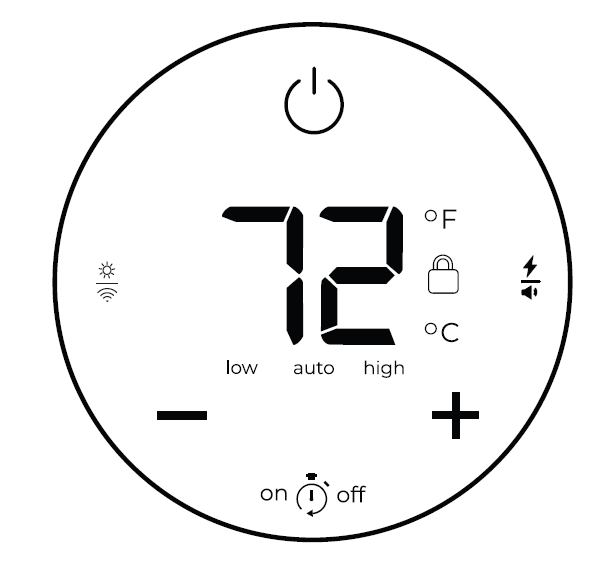
Power ON/OFF
Press the power icon to switch the heater on or off.
Child Lock
Press and hold the power icon for 5 seconds to activate or deactivate the child lock. When enabled, a red lock icon appears on the display, and the heater settings cannot be adjusted until the child lock is disabled.
- Thermostat Calibration
Thermostat readings may vary depending on surrounding conditions. The heater allows manual thermostat calibration to help align its temperature reading with your central HVAC system. Multiple calibration attempts may be necessary to achieve consistent readings. With the heater powered on, press and hold the ON/OFF icon on the control panel for 10 seconds to begin calibration. The heater will beep, and the temperature digits will flash. While the digits are flashing, press the + or – buttons to adjust the thermostat reading. If no button is pressed for 5 seconds, the heater automatically exits calibration mode. Timer
When the heater is turned off, both delayed start and delayed shutoff times can be configured. Press the timer icon to enter adjustment mode. The display will flash, allowing you to adjust the delayed start time in one-hour increments using the + and – buttons. Press the timer icon again to configure the delayed shutoff time. Use the same buttons to increase or decrease the duration. After 5 seconds without input, the timer settings will activate automatically.
Note: When the heater is operating, only the delayed shutoff timer can be configured.
Factory Reset
Turn off the heater and allow its heating elements to cool completely. Unplug the power cord, then reconnect it to the electrical outlet. Within 3 minutes of reconnecting the heater, press and hold the timer icon for 10 seconds to restore the factory settings.
Temperature
The heater's default temperature setting is 70°F (21°C). Press the + or – icon to enter temperature adjustment mode. The thermostat setting can be increased or decreased in increments of 1°F or 1°C. After 5 seconds without input, the display automatically returns to showing the current ambient temperature.
Selecting Celsius & Fahrenheit
Press the + and – icons simultaneously to switch the temperature display between Celsius (°C) and Fahrenheit (°F).
Changing Working Modes
Press the lightning bolt/volume button to cycle through the available operating modes: Low, Auto (Eco), and High.
- Low Mode: The heater operates at 50% of its maximum power, reducing its wattage by half. This mode is useful for heating smaller spaces or reducing electrical demand where circuit breakers are prone to tripping.
- Auto Mode (Eco Mode): The heater initially operates at full power until the room temperature comes within 2 degrees of the selected setting. It then reduces output to 50% to help reach and maintain the desired temperature while improving energy efficiency.
- High Mode: The heater operates at 100% power until the selected temperature is reached.
Sound
Press and hold the power/volume symbol for 5 seconds to enable or disable the heater's sound function.
Display Brightness
Press the sun/Wi-Fi symbol to adjust the brightness of the heater's display.
Maintenance
Washable Lifetime Filter System
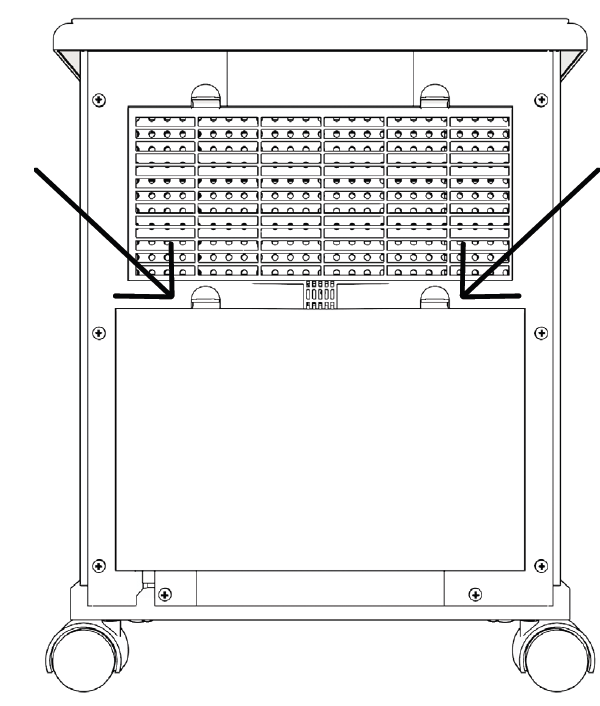
Heat Storm Infrared Heaters feature a reusable, washable filter designed for regular maintenance. Cleaning the filter once a month, or more frequently when necessary, helps maintain proper airflow and heater performance. The filter can be cleaned using either a vacuum cleaner or tap water by following the instructions below.
Vacuum Method
Gently move the vacuum cleaner wand across the filter cover to remove accumulated dust and debris. Do not remove the filter cover or the filter when using this cleaning method.
Water Method
- Locate the filter compartment on the back of the heater.
- Press both retaining tabs to remove the filter cover. Carefully remove the filter, noting the direction of airflow through it.
- Rinse the filter under warm tap water in the opposite direction of normal airflow until the water runs clear. Some residue may be released during cleaning, so avoid dripping water onto stain-sensitive surfaces such as carpeting. If necessary, soak the filter in water mixed with a small amount of mild dish soap, then rinse thoroughly with clean water.
- Gently shake the filter over a sink to remove excess water. Allow it to air-dry completely before reinstalling.
- Once the filter is fully dry, reinstall it in its original position and securely replace the filter cover.
Important Precautions:
- Do not force or accelerate the drying process using heaters, hair dryers, or other artificial drying methods.
- Ensure the filter is completely dry before reinstalling it in the heater.
Heater Malfunction or Damage
Do Not Operate the Heater Under the Following Conditions:
- The power cord or electrical plug is damaged.
- The heater has experienced a malfunction.
- The heater has been dropped or damaged in any way.
If any of these conditions occur, immediately turn off the heater and disconnect it from the electrical outlet. Have the heater inspected by a qualified electrician before attempting to use it again. If the heater cannot be safely repaired, dispose of it appropriately or return it to an authorized service facility for inspection and repair.
Damaged Cord or Plug
If the power supply cord becomes damaged, it must be replaced by the manufacturer, an authorized service agent, or another suitably qualified professional to prevent electrical hazards.
Troubleshooting Guide
Resetting Your Heater
If your heater is not operating normally, try resetting it. Like other electronic appliances, heaters may occasionally require a restart to restore proper functionality. Refer to the factory reset instructions on page 11. If the problem continues after resetting, contact customer service at 435-752-6611 for assistance.
Fan
Not Blowing Air
When the heater is first switched on, the fan does not begin operating immediately. During the initial 15 seconds, the infrared heating elements warm up before the fan starts circulating heated air into the room. This delay is part of the heater's normal operation.
Not Blowing Warm Air
- Blocked Air Inlet or Dirty Filter: Check that the air inlet is free from obstructions and that the air filter is clean. If dust or debris has accumulated, clean the filter according to the maintenance instructions.
- Ambient Temperature Above Thermostat Setting: If the displayed room temperature is higher than the selected thermostat setting, the heater may not produce additional heat until the room temperature drops.
- Restricted Airflow: Ensure that furniture, walls, or other objects are not blocking airflow. Move any obstructions away from the heater, particularly when it is positioned beneath a desk or near enclosed spaces.
Continuing to Blow Air When the Heater Is Turned Off
The heater includes an automatic cooling cycle that allows the fan to continue operating for several minutes, potentially up to 12 minutes, after the heater is switched off. This process helps cool the internal components and extends the service life of the infrared heating elements. If the heater is unplugged before completing its cooling cycle, the fan may start immediately when power is restored to finish the cooling process.
Heater Fails to Reach the Set Temperature and Continues to Run
Several environmental and operating conditions may prevent the heater from reaching the selected temperature. Check the following possible causes and corrective measures:
- Dirty Air Filters: Inspect the air filters regularly and clean them when necessary to maintain proper airflow and heating efficiency.
- Poor Insulation or Drafts: Check for cold air entering through windows, doors, or poorly insulated walls. Reduce drafts and improve insulation where possible to minimize heat loss.
- Open Doors: Keep doors closed while the heater is operating to prevent warm air from escaping and help maintain a consistent room temperature.
- Improper Heater Placement: Position the heater near an interior wall and away from windows or poorly insulated surfaces to reduce temperature fluctuations and improve thermostat accuracy.
- Incorrect Heater Size for the Room: Confirm that the heater's heating capacity is appropriate for the room. The stated coverage range is approximately 300–1,000 square feet, with primary heating recommended for areas around 300 square feet. Actual heating performance depends on insulation, room layout, ceiling height, and surrounding temperatures.
Pros and Cons of Heatstorm Infrared Heater HS-1500-ILODT
Pros
- Exceptional heating coverage for up to 1000 sq. ft. supplemental, ideal for open spaces.
- Safe infrared heat retains humidity, preventing dry skin—superior to convection heaters.
- User-friendly digital controls and remote for easy operation from across the room.
- Robust safety features like a cool-touch exterior and auto shut-off enhance family use.
- Energy-efficient at 750W on the low setting, offering great value at the $100-$150 price point.
Cons
- No built-in timer or oscillation, limiting automated use compared to premium competitors.
- Primary heating limited to ~200 sq. ft. in uninsulated areas, not a whole-home solution.
- Tip-over switch absent in some listings, though overheat protection is standard.
- Heavier cabinet design (not specified but implied) less portable than stick heaters.
Overall, it delivers strong value for money versus alternatives like Dr. Infrared, with better moisture retention but fewer smart features.
Customer Reviews and Feedback on Heatstorm Infrared Heater HS-1500-ILODT
Users rave about the Heatstorm Infrared Heater HS-1500-ILODT, averaging 4.5-star ratings across retailers. Praises include rapid, even heating in large rooms—" heats my 800 sq. ft. garage comfortably without drying the air," notes one reviewer—and reliable safety for homes with kids. The remote and thermostat earn high marks for convenience, with many calling it a "game-changer for winter bills."
Common complaints involve no timer ("wish it had one for overnight use") and occasional blower noise post-shutdown. Frequently mentioned issues like initial setup are minimal, as it's plug-and-play. Most recommend it for supplemental use, with 80% repurchase intent, affirming its status as a top infrared space heater.
More heatstorm manuals
- Setup: Heatstorm Cabinet Smart Heater HS-1500-KP User Manual
- Setup: Heatstorm Mojave Portable Heater HS-1500-IMO User Manual
- Setup: Heatstorm In-wall Smart Heater HS-3000-WALL-R User Manual
- How to Use: Heatstorm Garage Heater HS-6000-GC User Manual
- Setup: Heatstorm In-wall Smart Heater HS-1500-WALL-R User Manual
- Setup: Heatstorm Quartz Infrared Element Heater HS-1500-SED-WI User Manual
Leave a Comment