
How to Use: Heatstorm Garage Heater HS-6000-GC User Manual
Content
Heat Storm 6000-Watt Garage Heater HS-6000-GC: Complete Product Manual & Guide
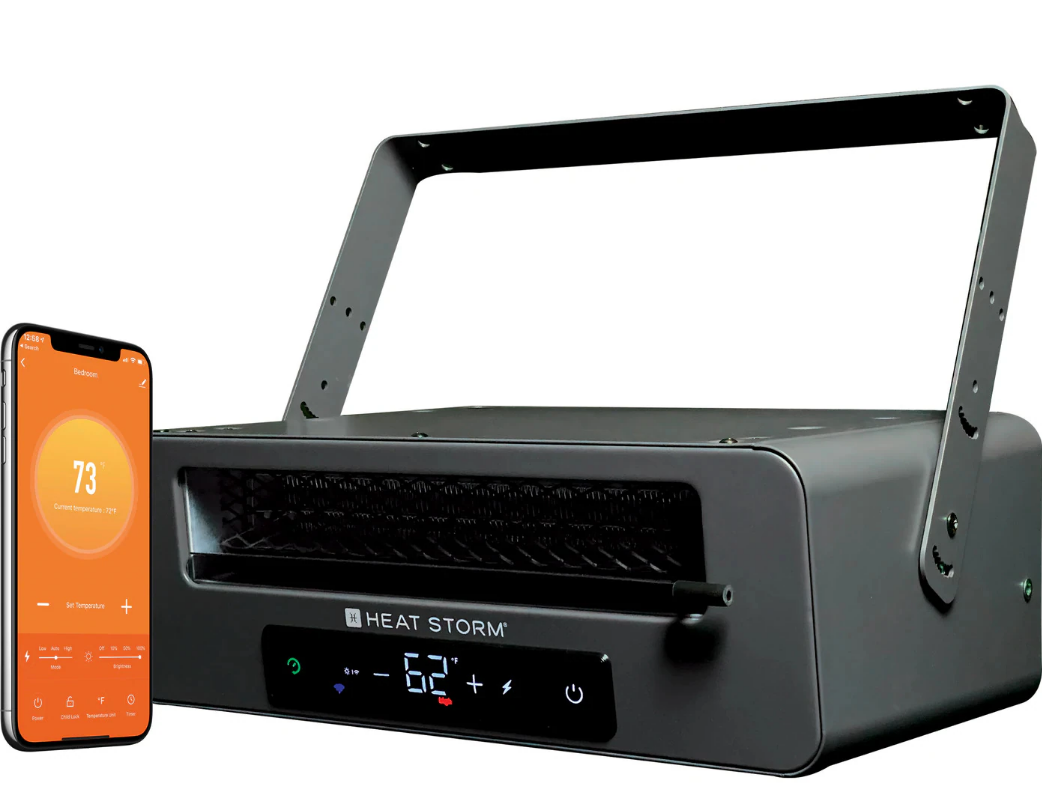
Introduction to the Heat Storm Garage Heater HS-6000-GC
The Heat Storm 6000-Watt Garage Heater HS-6000-GC is a premium wall- or ceiling-mounted heating solution designed for garages, workshops, basements, and commercial spaces. This powerful infrared garage heater delivers instant warmth with adjustable heat output ranging from 3,000 to 6,000 watts, producing up to 20,400 BTU of comfortable heating. Whether you're running a home workshop, maintaining a garage workspace, or heating a warehouse environment, the Heat Storm HS-6000-GC provides efficient climate control for spaces up to 1,000 square feet as primary heat or up to 1,800 square feet as supplementary heating.
What sets the Heat Storm 6000-watt garage heater apart is its combination of intelligent technology and rugged construction. The unit features Wi-Fi-enabled smart controls through the Smart Life app, allowing you to adjust temperature settings, create heating schedules, and monitor energy usage from your smartphone. An included external thermostat ensures even heat distribution throughout your space, while the quiet operation at 45-49 decibels maintains a comfortable working environment. The heater operates on 240V hardwired power, drawing 25 amps at full capacity, making it suitable for permanent installation in demanding environments.
The Heat Storm garage heater is ideal for homeowners, contractors, workshop owners, and facility managers seeking reliable, long-term heating solutions. Priced competitively between $339.99 and $399.99, this infrared garage heater offers exceptional value for those investing in quality climate control. The unit is available through major retailers including Home Depot, Lowe's, Tractor Supply, and various online suppliers. Installation requires a certified electrician due to its hardwired 240V connection, ensuring safe and compliant setup in your facility.
Key Features and Specifications of the HS-6000-GC
Understanding the technical specifications of the Heat Storm 6000-watt garage heater helps you determine if it meets your heating needs:
- Power Output: 3,000-6,000 watts with adjustable settings
- Heat Output: 10,000-20,000 BTU
- Coverage Area: Up to 1,000 sq ft (primary heat) or 1,800 sq ft (secondary heat)
- Electrical Requirements: 240V hardwired, 25 amps at maximum load
- Noise Level: 45-49 decibels for quiet operation
- Dimensions: 12.75" L x 17.5" W x 7" H
- Weight: 17 lbs
- Mounting Options: Wall or ceiling installation with 360-degree swivel mount
- Smart Controls: Wi-Fi enabled with smartphone app integration
- Included Accessories: Mounting hardware, external thermostat, remote control with batteries
Installation Instructions
HEATER LOCATION
Choose a suitable location to mount the heater, following the general installation instructions. Avoid placing the heater in direct sunlight. Moving the heater while it is operating is not recommended. Before relocating the heater, turn it off and wait until the fan has stopped completely. DO NOT USE in the following areas:
- Areas with gasoline, paint, or flammable liquids/vapors.
- Near a bathtub, shower, or swimming pool.
- Outdoors. Use Heat Storm Outdoor Infrared Heaters for outdoor applications.
Vaulted or Cathedral Ceilings
The heater can be used in rooms with vaulted or cathedral ceilings. However, initial room heating may take longer. Once the desired temperature is reached, the heater will cycle accordingly.
Poorly Insulated Areas
Rooms with poor insulation may not retain heat efficiently, potentially resulting in longer or more frequent heater operation.
Cold Climate Installation Note
Placing the unit under a window or on a poorly insulated wall may cause the heater to detect a lower ambient temperature than the actual room temperature. Consider connecting the Heat Storm External Thermostat for a more accurate room temperature reading.
TOOLS NEEDED FOR INSTALLATION
- 3/16-inch drill bit.
- Phillips screwdriver.
STEP 1: MOUNT THE HEATER
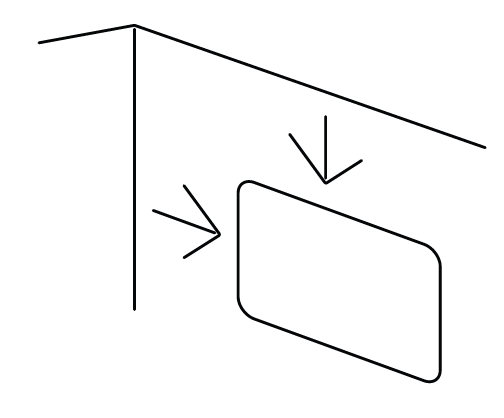
- Select a suitable location on the wall or ceiling for the heater, at least 5 feet 10 inches above the ground. Ensure there is a minimum clearance of 4 inches between the heater and nearby walls and the ceiling.
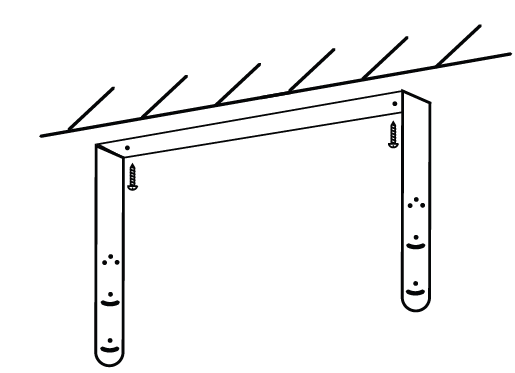
- Use a stud finder to locate a stud. Secure the provided mounting bracket to the stud using the supplied screws.
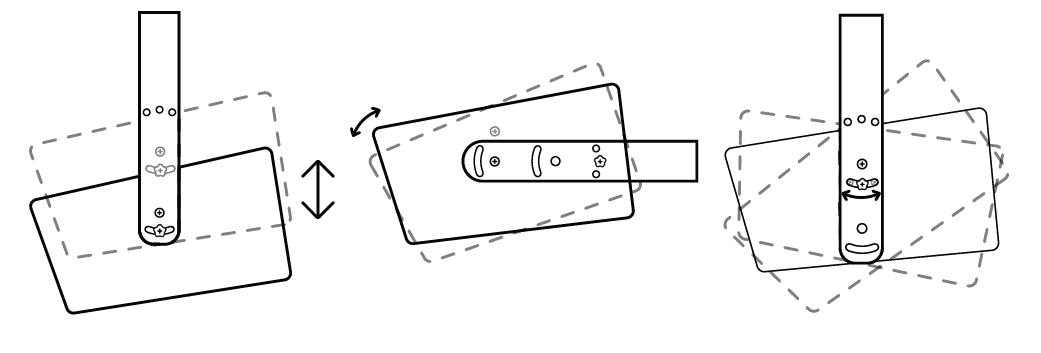
Attach the heater to the mounting bracket using the screws. Several mounting configurations are possible depending on the positioning of the screws.
STEP 2: CONNECT POWER
Heat Storm Infrared Heaters are classified as electrical appliances. Each heater should be connected to its own dedicated electrical circuit. The power supply must be properly grounded. Ensure the power cord is not placed under carpeting or covered with rugs, runners, or similar materials. Avoid routing the cord beneath furniture or appliances. Position the cord away from high-traffic areas to prevent tripping hazards. Remove the four screws securing the connector cover. Use a maximum 30A fuse for branch circuit protection and copper wiring only. Insert the cable containing 8-gauge internal wires into the wiring compartment through the top opening. Connect Line 1 (L1), Line 2 (L2), and the ground wire to their designated terminals. Secure the wires using the clip inside the compartment. Important: Electrical wiring and circuit connections must be performed by a qualified electrician in accordance with applicable electrical codes and the heater's electrical ratings.
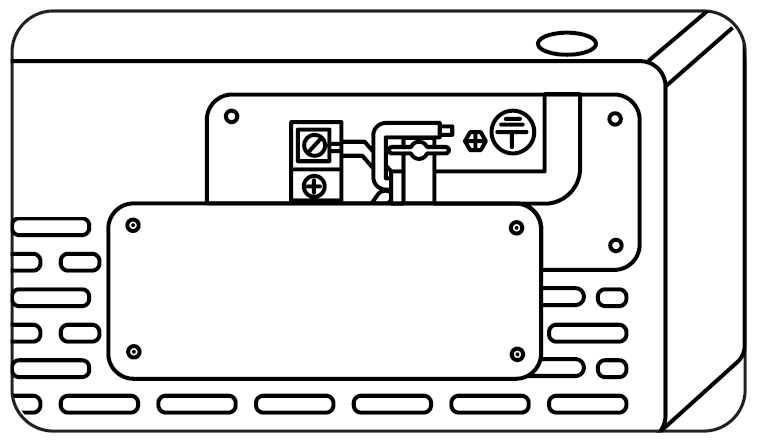
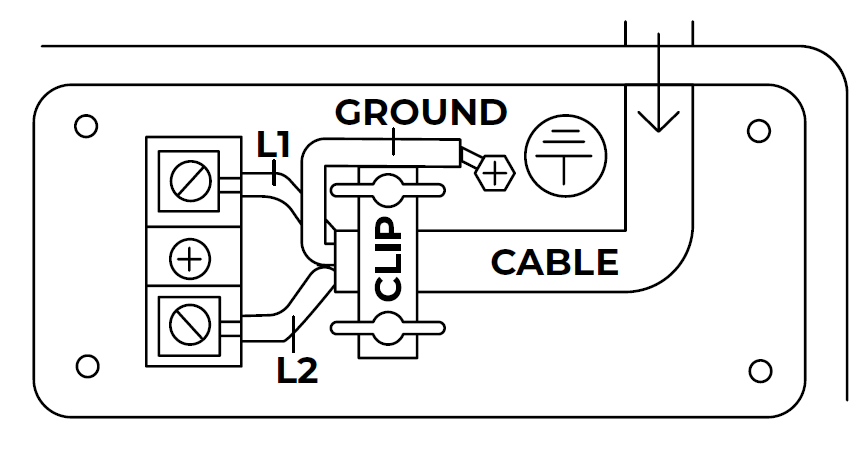
WIRING DIAGRAM
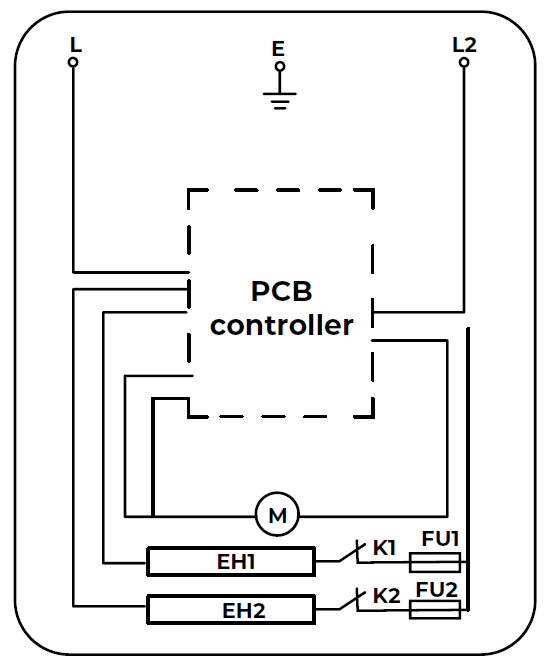
The wiring diagram illustrates the heater's electrical connections, including Line 1 (L1), Line 2 (L2), and ground connections. Refer to the manufacturer's wiring diagram when installing, inspecting, or servicing the heater. Electrical repairs, including fuse replacement and wiring modifications, should be performed only by qualified personnel.
OPERATIONS & CONTROLS

Turn Heater ON/OFF
Press the power icon to switch the heater between ON and OFF.
- Red power icon: Heater is ON.
- White power icon: Heater is OFF.
Timer
Set the heater's operating time by tapping the timer icon. Use the plus (+) and minus (-) icons to adjust the time in one-hour increments. The selected time will appear on the front display, and the timer icon will illuminate green once the timer is set. The heater will automatically turn off when the selected operating time has elapsed.
Setting the Temperature
The heater's default temperature setting is 70°F (21°C). Press the plus (+) or minus (-) icon to enter temperature-setting mode. Adjust the thermostat in increments of 1°F or 1°C. After 5 seconds of inactivity, the display will automatically exit temperature-setting mode and show the current ambient temperature.
Note: After the heating function is turned off, the blower will continue operating for several minutes to cool the internal components.
Selecting Celsius & Fahrenheit
Press and hold the plus (+) and minus (-) icons simultaneously for 3 seconds to switch between Celsius (°C) and Fahrenheit (°F).
Change Working Mode (Low/Medium/High)
Press the fan button to cycle between Low, Auto (Eco), and High operating modes. The indicator light above the button will illuminate to show the selected mode.
- Low Mode (Green Icon): The heater operates at 50% power, reducing its wattage by half. This mode is suitable for heating smaller spaces or reducing electrical demand.
- Auto (Eco) Mode (White Icon): The heater operates at full power until the room temperature is within 2 degrees of the selected temperature. It then switches to 50% power to reach and maintain the desired temperature. This mode adjusts power output automatically to help maintain consistent heating.
- High Mode (Red Icon): The heater operates at 100% power until the selected temperature is reached.
Fan Only/Heat Mode
Press and hold the fan button for 3 seconds to switch between Fan Only and Heat modes.
- Fan Only Mode: A blue fan icon indicates that the heater is operating without heat.
- Heat Mode: A red icon indicates that the heating function is enabled.
Pair External Thermometer
Press and hold the thermometer icon for 5 seconds to begin pairing the Heat Storm External Thermometer. An audible beep will indicate that pairing mode has been activated. Next, press and hold the button on the back of the external thermometer for 5 seconds until another beep is heard. The thermometer will illuminate red to indicate that it has been successfully paired with the heater.
Wi-Fi Discovery Mode
Press and hold the Wi-Fi icon for 5 seconds to enable Wi-Fi discovery mode. Refer to page 10 of the original user manual for detailed instructions on connecting the heater to a Wi-Fi network.
THERMOSTAT CALIBRATION
Thermostat readings may vary depending on the heater's surroundings and installation location. The thermostat can be manually calibrated to align its displayed temperature with your central HVAC system. You may need to repeat the calibration process several times to achieve the desired temperature alignment.
- Open the Smart Life app and select your heater to access the temperature adjustment screen. Tap the temperature settings icon to open the temperature calibration page.
- Adjust the Heat Storm thermostat using the slider until its displayed temperature matches the reading on your central HVAC thermostat.
Note: Heat Storm Infrared Heater thermostats may provide more localized temperature readings than central HVAC thermostats. Adjusting the heater's thermostat to match the central HVAC system may reduce heating efficiency.
FACTORY RESET
Turn off the heater and allow sufficient time for the heating elements and internal components to cool completely. Disconnect the heater from the power supply and then reconnect it. Within 3 minutes of reconnecting power, press and hold the timer icon for 10 seconds to restore the heater to its factory settings.
Installation and Setup Guide for Your Garage Heater
Proper installation of the Heat Storm HS-6000-GC is crucial for optimal performance and safety. Since this garage heater requires a hardwired 240V connection, professional electrician installation is strongly recommended. The unit requires a dedicated 30-amp breaker and proper wiring to handle the maximum 25-amp draw at full power.
- Installation Steps: First, hire a certified electrician to install the 240V hardwired connection with appropriate circuit breaker protection. The electrician will ensure all electrical codes and safety standards are met. Once electrical installation is complete, mount the heater using the included bracket on either your ceiling or wall, depending on your space layout. Position the external thermostat in a central location away from direct heat exposure to ensure accurate temperature readings. Install batteries in the remote control and download the Smart Life app on your smartphone to enable Wi-Fi connectivity and remote control features.
- Smart App Configuration: After powering on the Heat Storm 6000-watt garage heater, access the Smart Life app to connect the unit to your home Wi-Fi network. Create heating schedules that match your usage patterns, such as pre-heating your garage before morning work sessions or maintaining minimal heat overnight. The app allows you to set different temperature targets for various times of day, maximizing energy efficiency while ensuring comfort.
WI-FI SETUP
SMART LIFE APP
Manage your Heat Storm Smart Heater conveniently from anywhere using the Smart Life app. With just a tap on your smartphone, you can adjust temperature settings, create heating schedules, activate the child lock, and control the heater according to your preferences.
Prepare Your Phone
Enable Wi-Fi and Bluetooth on your smartphone. Connect your phone to a 2.4 GHz Wi-Fi network. Your smartphone must be connected to the same Wi-Fi network that you intend to use for the heater.
Download the Smart Life App
- Download the Smart Life app by scanning the provided QR code or searching for "Smart Life" in the Apple App Store or Google Play Store.
- Once the app is installed, open it and sign up for an account. Read and accept the User Agreement and Privacy Policy.
- Register using your email address, create a password, and set up a new home within the Smart Life app.
CONNECT YOUR HEATER TO WI-FI
The Smart Life app provides multiple methods for connecting your heater to Wi-Fi. If one connection method fails, try another available method.
Note: The Smart Life app may receive updates that change its interface and setup instructions. Therefore, the options and prompts displayed in the app may differ slightly from those described in this manual. Follow the on-screen instructions for the most accurate setup guidance.
BLUETOOTH CONNECT
Ensure that your smartphone's Wi-Fi, Bluetooth, and location services are enabled before beginning the connection process.
1. Choose Wi-Fi
- Enter your Wi-Fi network name and password, ensuring that all characters are entered correctly, including uppercase and lowercase letters.
- Tap "Confirm" to proceed. If the app prompts you to reset the heater, tap "Next" and follow the displayed instructions.
2. Add Device
With the heater powered on, press and hold the Wi-Fi/Sun button on the control panel for 5 seconds until the Wi-Fi indicator light begins flashing slowly. Add the heater to the Smart Life app using the following steps:
- If a device detection pop-up appears, tap "Go to Add." If no pop-up appears, tap the plus (+) icon in the upper-right corner and select "Add Device."
- Select "Small Home Appliance" and locate "Heater (BLE)" from the available device categories.
3. Configuration Process
- Allow the app to complete the connection process. This may take a few minutes.
- Once the heater is successfully connected, the app will display a confirmation message indicating that the device has been added.
- Tap "Done" to open the heater's control interface.
EZ MODE – MANUAL CONNECT
Add Device
- With the heater powered on, press and hold the Wi-Fi/Sun button on the control panel for 5 seconds until the Wi-Fi indicator light begins flashing.
- Open the Smart Life app and tap the plus (+) icon in the upper-right corner.
- Select "Add Device" and choose "Small Home Appliance."
- Tap "Heater (Wi-Fi)" from the list of available appliances.
Choose Wi-Fi
- Enter your Wi-Fi network name and password, ensuring that the information is correct and case-sensitive.
- Tap "Confirm" to continue. If the app asks you to reset the heater, tap "Next" and follow the instructions provided.
Configuration Process
- Allow the Smart Life app to establish a connection with the heater. The process may take a few minutes.
- Once the connection is established, the app will display a notification confirming that the heater has been successfully added.
- Tap "Done" to access the heater's control interface.
Configuration Mode
- Confirm that the Wi-Fi indicator light on the heater's control panel is flashing quickly.
- Select "Blinking Quickly" within the Smart Life app.
- Tap "Finish Network Configuration" to complete the setup process.
MAINTENANCE AND CLEANING
To maintain proper heater performance, clean the air inlet approximately every six months. If excessive dust or dirt accumulates, use a soft cloth or brush to gently remove the buildup. Before cleaning, turn off the heater, disconnect it from the power supply, and allow it to cool completely. Clean the heater carefully to prevent damage to its components. Do not allow water or cleaning liquids to enter the heater.
HEATER MALFUNCTION OR DAMAGE
DO NOT operate the heater under the following conditions:
- The heater has a damaged power cord or plug.
- The heater has malfunctioned or is not operating correctly.
- The heater has been dropped or damaged in any manner.
If any of these conditions occur, turn off the heater immediately. Disconnect the power cord or switch off the electrical circuit at the breaker. Have the heater inspected by a qualified electrician or authorized service facility before using it again.
Damaged Cord or Plug
If the power supply cord is damaged, it must be replaced by the manufacturer, an authorized service agent, or a similarly qualified professional to prevent electrical hazards. Do not attempt to repair or replace a damaged power cord yourself.
Troubleshooting Common Issues with the Heat Storm HS-6000-GC
While the Heat Storm garage heater is engineered for reliability, you may encounter occasional issues. Here are solutions to common problems:
- Heater Not Turning On: Verify that the 240V power supply is connected and the circuit breaker hasn't tripped. Check the remote control batteries and ensure the Smart Life app shows the heater as powered. If the unit still doesn't respond, have your electrician inspect the hardwired connection for loose wiring or circuit issues.
- Insufficient Heat Output: Confirm that the thermostat setting is higher than the current room temperature. Verify the heater is operating in high power mode (6,000 watts) rather than low power mode (3,000 watts). Check that the external thermostat probe is positioned correctly and not exposed to direct heat or drafts that could provide inaccurate readings. Ensure your space's insulation is adequate for the heater's capacity—poorly insulated areas will struggle to maintain warmth.
- Wi-Fi Connectivity Problems: Reset the heater's Wi-Fi connection by holding the app connection button for 5 seconds. Ensure your router is within range and functioning properly. Delete and reinstall the Smart Life app if connectivity issues persist. Verify your smartphone has the latest app version installed.
- Fan Noise or Operational Issues: The Heat Storm 6000-watt garage heater operates at 45-49 decibels, which is normal. If you notice excessive noise, ensure the mounting bracket is secure and the unit isn't vibrating against the wall or ceiling. Check that air intake vents on the back of the unit aren't obstructed by dust or debris.
- Temperature Display Concerns: The internal thermometer displays the current temperature, which may differ from your desired setting. Use the external thermostat for more accurate space temperature monitoring. The app allows fine adjustment in 1-degree increments for precise temperature control.
Warranty and Support: The Heat Storm HS-6000-GC includes a 1-year manufacturer's warranty covering defects and malfunctions. Contact Heat Storm customer support for warranty claims or technical assistance. Most retailers also offer 90-day return windows for dissatisfied customers.
Advantages of the Heat Storm 6000-Watt Garage Heater
- Powerful and Efficient Heating: The Heat Storm HS-6000-GC delivers up to 20,400 BTU of infrared heat, efficiently warming spaces up to 1,000 square feet. The dual-setting power output (3,000 or 6,000 watts) allows you to match heating intensity to your current needs, reducing energy consumption during milder conditions.
- Smart Technology Integration: Wi-Fi-enabled controls through the Smart Life app provide unprecedented convenience. Schedule heating sessions, adjust temperatures remotely, and monitor energy usage from anywhere. This feature proves invaluable for those who forget to turn off the heater or want to pre-warm their space before arrival.
- Quiet Operation: Operating at just 45-49 decibels, the Heat Storm garage heater won't disrupt your work or surrounding environment. This makes it suitable for workshops where concentration is important or residential garages where noise is a concern.
- Flexible Installation Options: The 360-degree swivel mount and adjustable louvers allow installation on walls or ceilings with directional airflow control. This flexibility accommodates various garage layouts and maximizes heat distribution efficiency.
- Durable Construction: Heavy-duty steel housing ensures long-term reliability in demanding garage and workshop environments. The robust design withstands temperature fluctuations and regular use in commercial or industrial settings.
- Competitive Pricing: At $339.99 to $399.99, the Heat Storm 6000-watt garage heater offers exceptional value compared to alternative heating solutions. The combination of smart features, powerful output, and durability justifies the investment.
Limitations and Considerations
- Professional Installation Required: The hardwired 240V connection requires hiring a certified electrician, adding to initial installation costs. This differs from plug-in heaters and may require circuit breaker upgrades in older homes.
- Permanent Installation: Once hardwired, the Heat Storm HS-6000-GC isn't portable. You cannot easily relocate it to different spaces, making careful placement planning essential before installation.
- App Control Granularity: Some users find the app's temperature adjustment in 1-degree increments excessive for typical use. Most people don't notice differences between 65 and 66 degrees, though the precision option remains available.
- Space Limitations: While the heater handles up to 1,000 square feet effectively, poorly insulated spaces or extremely cold climates may require supplemental heating even at maximum output.
- Electrical Demands: The 25-amp draw at full capacity requires dedicated circuit breaker capacity. Older homes may need electrical panel upgrades to accommodate this heater safely.
Customer Reviews and User Feedback
Users consistently praise the Heat Storm 6000-watt garage heater for its rapid heating capabilities and smart technology integration. Real-world testing demonstrates the unit reaches impressive temperatures—users report surface temperatures exceeding 180 degrees Fahrenheit at the heat output point, confirming powerful performance. The external thermostat feature receives positive feedback for enabling even heat distribution across workshop spaces.
Common customer praise includes the heater's quiet operation, which allows uninterrupted work in workshops and garages. The Wi-Fi-enabled controls and Smart Life app integration rank among the most appreciated features, with users appreciating the ability to set schedules and control the heater remotely. The flexible mounting options and compact design (only 17 lbs) make installation straightforward for electricians.
Some users note that the app's interface requires extensive tapping for temperature adjustments, preferring larger increment buttons. A few customers mention that in uninsulated or poorly insulated spaces, the heater struggles to maintain comfortable temperatures during extreme cold, though this reflects space limitations rather than heater defects.
The Heat Storm HS-6000-GC is recommended for homeowners and professionals seeking reliable, smart-enabled garage heating. It represents excellent value for those willing to invest in professional installation and provides years of dependable service in properly sized spaces.
Comparison with Alternative Garage Heating Solutions
The Heat Storm 6000-watt garage heater competes favorably against portable space heaters, propane garage heaters, and alternative electric solutions. Unlike portable heaters, the HS-6000-GC provides permanent, high-capacity heating without occupying valuable floor space. Compared to propane heaters, it eliminates fuel costs and ventilation concerns. The smart controls and energy-saving features surpass basic electric heaters lacking automation capabilities. For users prioritizing modern technology, safety, and long-term reliability, the Heat Storm HS-6000-GC represents the superior choice.
Maintenance and Care Tips
Keep your Heat Storm garage heater operating at peak efficiency through regular maintenance. Periodically vacuum dust and debris from the air intake vents on the heater's back panel to ensure unrestricted airflow. Check that the external thermostat probe remains clean and positioned away from direct heat sources or drafts. Inspect the mounting bracket annually to confirm it remains secure and the heater hasn't shifted. During off-season storage, ensure the unit is powered down and protected from moisture and extreme temperature fluctuations.
Conclusion and Recommendations
The Heat Storm 6000-Watt Garage Heater HS-6000-GC stands as an excellent choice for anyone seeking professional-grade garage heating with modern smart controls. Its powerful infrared output, quiet operation, and intelligent app integration make it ideal for workshops, garages, and commercial spaces. While professional installation and electrical considerations require upfront planning, the long-term reliability and energy efficiency justify the investment. For homeowners and professionals committed to quality climate control solutions, the Heat Storm HS-6000-GC delivers exceptional performance and value.
```
Faqs
How do I install the Heatstorm Garage Heater HS-6000-GC for the first time including wiring?
What should I do if the Heatstorm Garage Heater HS-6000-GC won't connect to WiFi?
How do I use the external thermostat with Heatstorm Garage Heater HS-6000-GC?
What are the power requirements and compatibility for Heatstorm Garage Heater HS-6000-GC?
How can I optimize performance of Heatstorm Garage Heater HS-6000-GC in a cold garage?
What maintenance is required for Heatstorm Garage Heater HS-6000-GC?
Why is my Heatstorm Garage Heater HS-6000-GC not producing enough heat?
Can I mount Heatstorm Garage Heater HS-6000-GC on the ceiling and how?
More heatstorm manuals
- Setup: Heatstorm Mojave Portable Heater HS-1500-IMO User Manual
- Setup: Heatstorm Infrared Heater HS-1500-ILODT User Manual
- Setup: Heatstorm Cabinet Smart Heater HS-1500-KP User Manual
- Setup: Heatstorm In-wall Smart Heater HS-3000-WALL-R User Manual
- Setup: Heatstorm In-wall Smart Heater HS-1500-WALL-R User Manual
- Setup: Heatstorm Quartz Infrared Element Heater HS-1500-SED-WI User Manual
Leave a Comment