
Setup: Hive Active Heating Wired Thermostat User Manual
Content
Hive Active Heating Wired Thermostat
Introduction
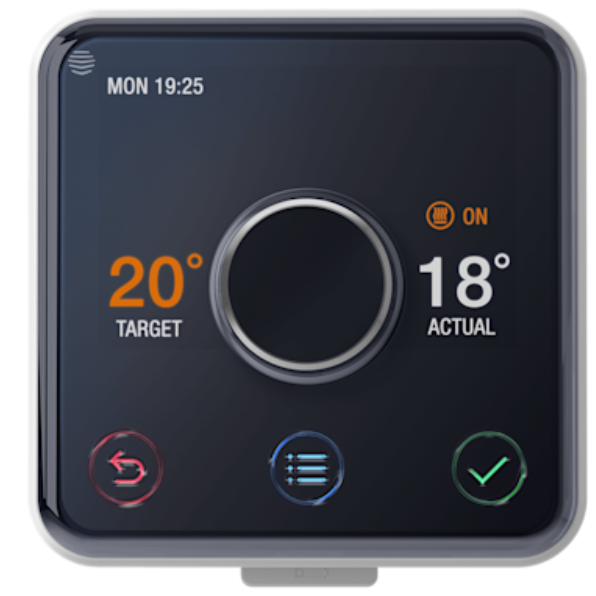
The Hive Active Heating Wired Thermostat is a cutting-edge smart thermostat designed to give homeowners precise and convenient control over their central heating systems. Created by British Gas, this thermostat offers seamless integration with a wide range of boilers,, including gas, LPG, oil, and some electric systems, making it a versatile choice for modern homes. Its wired design ensures reliable power and connectivity, providing consistent performance without the need for frequent battery changes.
Key benefits include multi-zone heating control, allowing management of up to three different heating zones independently, and advanced scheduling features that let users set daily heating and hot water times tailored to their lifestyle. The thermostat also features automatic frost protection to prevent frozen pipes during winter, geolocation-based heating alerts to conserve energy when leaving the home, and a holiday mode for maintaining ideal temperatures while away. The integration with popular voice assistants like Amazon Alexa, Google Assistant, and Apple HomeKit enables hands-free control, enhancing user convenience.
This product is ideal for tech-savvy homeowners seeking energy efficiency, comfort, and smart home integration. It is commonly used in both new installations and upgrades of existing heating systems. The Hive Active Heating Wired Thermostat typically retails in the price range of £120-£180 and is widely available through British Gas, major home improvement retailers, and online marketplaces.
Specifications of Hive Active Heating Wired Thermostat
- Dimensions: Thermostat – 100mm x 104mm x 48mm; Receiver – 106mm x 98mm x 44mm
- Weight: Thermostat approx. 212g; Receiver approx. 159g
- Power Supply: Thermostat powered by 4 x AA batteries (included); Receiver powered via 230V mains
- Compatibility: Supports most gas, LPG, and oil boilers with existing thermostat/programmer; compatible with electric boilers with room thermostat/programmer
- Connectivity: Requires broadband internet with a minimum of 1.5 Mbps; hub connects to router via Ethernet
- Features: Multi-zone control (up to 3 zones), daily heating and hot water schedules, heating boost for up to 6 hours, automatic frost protection, geolocation alerts, holiday mode, and "Ready By" pre-heating feature
- Integration: Works with Amazon Alexa, Google Assistant, Apple HomeKit, Siri, and IFTTT for voice and smart home control
Compared to similar smart thermostats such as Nest or Ecobee, Hive Active Heating Wired Thermostat offers robust multi-zone support and strong boiler compatibility, particularly for UK heating systems. Its wired power supply can provide more stable operation than battery-only thermostats.
Welcome to Hive Active Heating
Hive Active Heating is a clever way to control your heating. This guide tells you everything you need to know about your thermostat.
To control your thermostat remotely, you need to link it to your Hive hub and Hive account. Just download the Hive app or visit hivehome.com/register to get set up.
Download the Hive app:

Getting started
How to change the temperature:
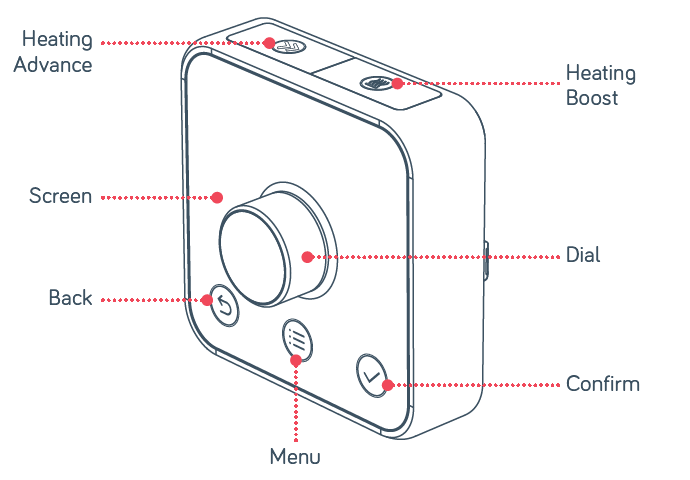
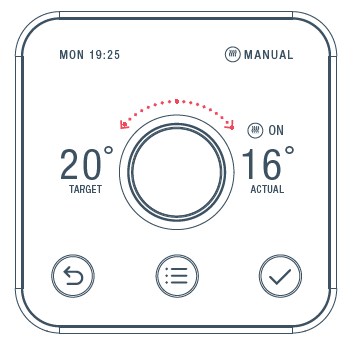
- Turn the dial clockwise to increase the target temperature
- Your heating will come on if the target temperature is above the actual temperature (you’ll see
 when the heating is on)
 - Turn the dial anti-clockwise to lower the target temperature
- When flashes, boiler protection mode has temporarily engaged to stop your boiler from being switched on and off too many times within 1 minute
Heating
How to change mode:
Your thermostat has 3 different heating modes: Schedule, Manual,, and Off
- Push the dial to wake up the thermostat
- Once the screen turns on, press the Menu
 button and select Heat
 - Here you’ll see the different modes: Schedule, Manual, and Off
- Select one by turning and pushing the dial
Schedule turns your heating on and off when you want it to,, and can be more energy efficient
Thmanualll makes sure your home maintains a constant temperature. Leave your heating in Frost Protection mode - so your heating will only come on if your home drops below 7°C. You’ll see on the screen to remind you that Frost Protection is enabled.
Setting up a heating schedule:
Your thermostat will walk you through setting up your heating schedule step by step.
To do this:
- Wake up your thermostat by pushing the dial,, and then press the Menu button
- Turn the dial to select Heat and push the dial to confirm
- Select Schedule and push the dial to confirm
- Scroll to Start Over and push the dial to confirm
- Follow the on-screen instructions to create your new schedule
How to view your heating schedule:
- Push the dial to wake up the thermostat
- Once the screen turns on,, press the Menu button
- Turn the dial to select Heat, then push the dial
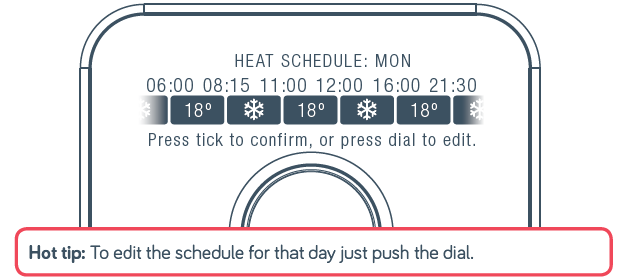
- Choose Schedule, then select View/Edit Current
- Turn the dial left or right to browse through the days and to select a day
- You’ll now see the schedule for the day you selected
Setup Guide for Hive Active Heating Wired Thermostat
- Install the Receiver: Mount the receiver near your boiler and connect it to the boiler and the 230V mains power supply following the provided wiring schematic.
- Mount the Thermostat: Attach the thermostat to a wall in a commonly used room away from drafts or heat sources.
- Connect the Hub: Plug the Hive hub into your broadband router via Ethernet cable and power it up.
- Pair Devices: Use the Hive mobile app (available on iOS and Android) to pair the thermostat, receiver, and hub. The app will guide you through connecting the devices and registering your account.
- Configure Settings: Set your heating and hot water schedules, activate frost protection, and customize zones if multiple thermostats are installed.
Troubleshooting Tips: If pairing fails, ensure the hub is properly connected to the internet and that batteries in the thermostat are fresh. Consult the user manual for reset procedures if devices don’t respond. Avoid installing the thermostat near external heat sources or drafts.
Safety Precautions: Always isolate power to the boiler before wiring the receiver. If unsure about electrical work, consult a qualified professional. Do not expose the thermostat or receiver to water or excessive moisture.
Troubleshooting Hive Active Heating Wired Thermostat
- No Heating Response: Check if the thermostat shows the heating-on symbol and verify receiver power. Replace thermostat batteries if low.
- Connectivity Issues: Ensure the hub is connected to the router with a stable internet connection. Restart the hub and router if necessary.
- Error Codes: Refer to the user manual for specific error codes displayed on the thermostat. Common fixes include rebooting devices or re-pairing components.
- Heating Not Following Schedule: Confirm schedules set in the Hive app and ensure the correct zone is selected.
- Preventive Maintenance: Regularly check device firmware updates via the app and replace batteries annually to ensure optimal function.
Warranty & Support: The Hive Active Heating Wired Thermostat includes a 1-year manufacturer’s warranty. For technical support, contact British Gas customer service or use the Hive online help portal.
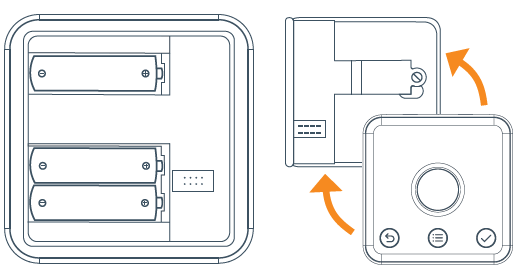
How to change the batteries:
A red battery symbol means your batteries need to be replaced with three new AA batteries.
- Pull your thermostat away from the wall to detach it from its backplate, then turn it over to access the batteries.
- Simply pop the old batteries out and put the new ones in
- Push your thermostat back onto its backplate until it clicks securely into place.
Thermostat unplugged
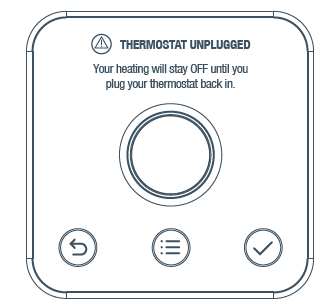
- If a “thermostat unplugged” message shows, it means that your thermostat has been unplugged from its backplate.
- When your thermostat is unplugged,, it cannot control your boiler. Your heating will immediately switch off and will stay off until your thermostat is plugged back in.
- Keep your thermostat plugged in to control your heating with Hive.
For more information, visit hivehome.com/support or get in touch with the Hive team at help@hivehome.com
Pros & Cons of Hive Active Heating Wired Thermostat
Pros
- Robust compatibility with a wide range of UK boilers,, including gas, oil, LPG, and electric models.
- Multi-zone heating control supports up to three separate zones for tailored comfort.
- Advanced features like frost protection, geolocation alerts, holiday mode, and heating boost enhance convenience and energy savings.
- Integration with major voice assistants enables hands-free operation. A reliable wired power supply ensures stable performance without frequent battery changes.
Cons
- Requires professional installation for wiring the receiver to the boiler, which may add to the overall cost.
- Dependent on a stable broadband internet connection for full smart features.
- The app interface can be complex for first-time users without a smart home experience.
- Price point is higher than some simpler programmable thermostats without smart features.
Customer Reviews of Hive Active Heating Wired Thermostat
Users consistently praise the Hive Active Heating Wired Thermostat for its ease of remote control via the Hive app and reliable multi-zone heating management. Many appreciate how the frost protection feature prevents costly pipe damage in winter. Voice assistant compatibility is highlighted as a major convenience, allowing users to adjust temperatures effortlessly.
Some common complaints involve initial installation complexity requiring professional help and occasional connectivity glitches if the home internet is unstable. A few users mention the app can be unintuitive at first, but improves with use. Overall, the product maintains a strong 4 out of 5 stars rating on major retail platforms.
Many recommend the thermostat for homeowners seeking reliable smart heating control with energy-saving benefits, especially those with multiple heating zones or larger properties.
Faqs
How do I set up the hive Active Heating Wired Thermostat for the first time?
What should I do if my hive Active Heating Wired Thermostat is not connecting to the receiver?
Can I use the hive Active Heating Wired Thermostat with a separate hot water cylinder?
How do I create a heating schedule on the hive Active Heating Wired Thermostat?
What are the key features that make the hive Active Heating Wired Thermostat different?
How often should I maintain my hive Active Heating Wired Thermostat?
Why is my hive Active Heating Wired Thermostat not turning on the heating?
Is the hive Active Heating Wired Thermostat compatible with older heating systems?
Tags
More hive manuals
Leave a Comment