
Setup: Hive Active Heating Thermostat User Manual
Content
Hive Active Heating Thermostat
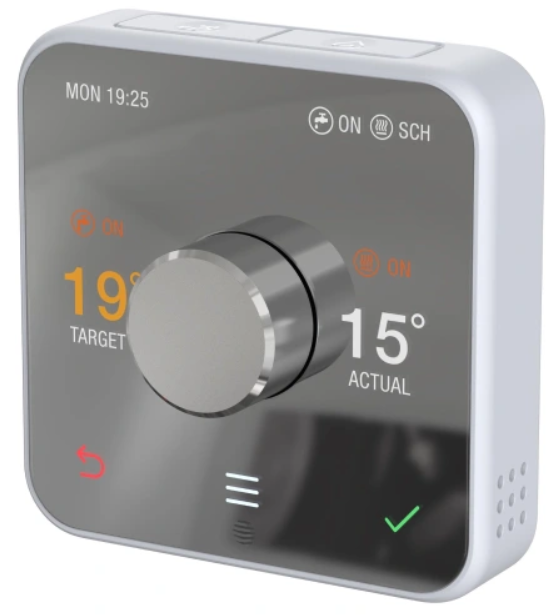
Introduction to Hive Active Heating Thermostat
The Hive Active Heating Thermostat represents a significant advancement in smart home heating control, offering homeowners a sophisticated yet user-friendly solution for managing their central heating systems remotely. This intelligent thermostat combines modern design with practical functionality, allowing you to optimize your home's comfort while reducing energy consumption and lowering heating bills.
The Hive Active Heating Thermostat is engineered to work seamlessly with most gas, LPG, oil, and electric boilers, making it a versatile choice for diverse heating setups. Whether you're looking to save money on energy costs or simply want greater convenience in managing your home's temperature, this smart thermostat delivers comprehensive control through both the physical device and the intuitive Hive mobile app.
Key benefits include the ability to manage your heating from anywhere using smartphone control, customizable daily heating schedules tailored to your lifestyle, and automatic frost protection that prevents pipe damage during cold months. The Hive Active Heating Thermostat can save homeowners up to £202 annually on energy bills while reducing carbon emissions by approximately 488.2 kg CO2e per year. With voice control compatibility across Amazon Alexa, Google Assistant, and Apple HomeKit, this thermostat integrates seamlessly into modern smart homes. Priced competitively in the mid-range smart thermostat market, the Hive Active Heating Thermostat is ideal for homeowners seeking reliable, feature-rich heating control without excessive complexity.
Technical Specifications & Features
Physical Dimensions and Design:
- Thermostat dimensions: 9.59 x 9.59 x 4.62 cm (height x width x depth)
- Compact, wall-mounted design with optional freestanding capability
- Central physical dial for intuitive temperature adjustment
- Touch screen control interface for easy menu navigation
- Available in dark grey with 12 color frame options for interior customization
Power and Battery Specifications:
- Powered by two AA batteries for wireless operation
- Extended battery life with low power consumption (less than 1kW per month)
- Battery status indicators on the display screen
Boiler Compatibility:
- Compatible with most gas boilers
- Works with LPG (liquefied petroleum gas) boilers
- Oil boiler compatibility when an existing thermostat or programmer is present
- Electric boiler support with standard room thermostat and/or programmer
- Domestic hot water tank control (on/off only)
Smart Features and Capabilities:
- Daily customizable heating schedules for personalized comfort
- Ready By pre-heating feature that learns heating duration and activates automatically
- Holiday mode maintains optimal temperature while you're away
- Automatic frost protection activates heating at 7°C minimum
- Geolocation features adjust heating based on your location proximity
- Boost function allows temporary temperature increase with adjustable duration
- Remote control via the Hive app from anywhere with an internet connection
Voice Control and Smart Home Integration:
- Amazon Alexa compatibility for voice-activated control
- Google Assistant integration for seamless voice commands
- Apple HomeKit support for iOS ecosystem users
- Works with IFTTT for advanced automation scenarios
- Includes Hive Hub for enhanced smart home connectivity
Overview
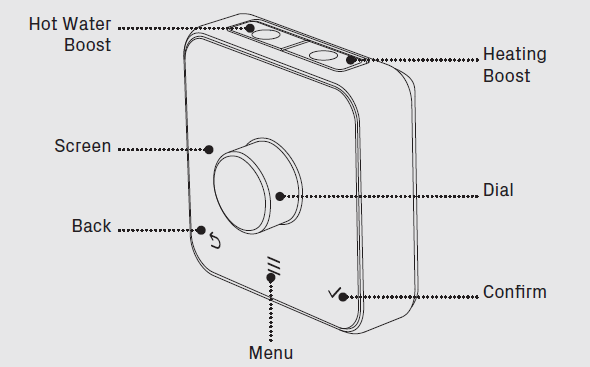
Getting started
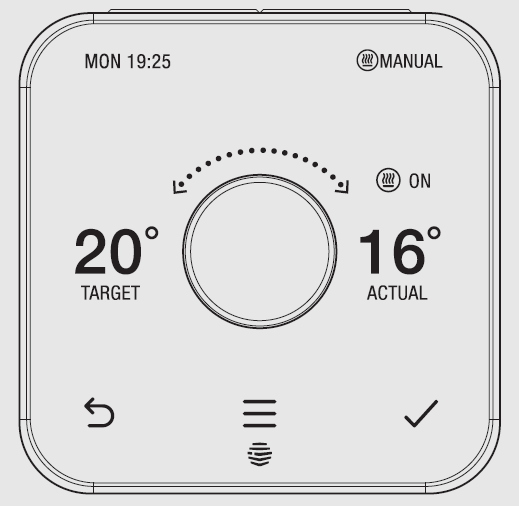
How to change the temperature:
- Turn the dial clockwise to increase the target temperature
- Your heating will come on if the target temperature is above the actual temperature (you’ll see
 when the heating is on)
 - Turn the dial anti-clockwise to lower the target temperature
Setup and Installation Guide
- Pre-Installation Preparation:
Before installing your Hive Active Heating Thermostat, ensure you have the following items: the thermostat unit, receiver module, two AA batteries, wall-mounting hardware, and the installation manual. Turn off the power to your existing heating system at the circuit breaker for safety. Take a photograph of your current thermostat wiring before removal, as this will assist with the proper installation of the Hive receiver module. - Step-by-Step Installation Process:
Begin by removing your existing thermostat and carefully noting the wire positions. Install the Hive receiver module in the same location, connecting the wires according to the color-coding provided in the manual. The receiver requires a 230V mains power connection. Once the receiver is securely installed, insert two AA batteries into the thermostat unit. Mount the thermostat backplate on your preferred wall location using the provided screws, ensuring it's level and away from direct sunlight, heat sources, or cold drafts. - Initial Configuration and Pairing:
Push the dial on the thermostat to activate the screen. Navigate through the initial setup menu by pressing the Menu button. Select your heating system type and boiler model from the available options. Download the Hive app on your smartphone and create an account if you don't already have one. Use the app to add your thermostat by scanning the QR code on the device or entering the setup code. Pair your thermostat with your home WiFi network through the app. Test the connection by adjusting the temperature remotely to confirm successful setup. - Troubleshooting Initial Setup Issues:
If your thermostat doesn't respond to app commands, verify that the receiver has stable mains power and check that both devices are connected to the same WiFi network. If the screen remains blank after battery insertion, try replacing the batteries with fresh ones. For persistent connectivity issues, perform a factory reset by holding the back button for 10 seconds and reconfigure the device.
Other features
More things you can do with your thermostat
- Select Holiday mode and set the dates you’ll be away by going to Menu, then Holiday.
- Set a Child Lock so little hands can’t change the temperature. Find it under Menu, then Settings.s
- Increase the temperature of your Frost Protection setting. By default, this is set so your home won’t drop below 7 °C and will activate whatever mode your heating is in. Find it under Menu , then Settings.
Hive Multizone
- Multizone lets you control existing plumbed heating zones in your home. Each zone needs its own Hive Thermostat and receiver.
- If you are a Hive Multizone customer, to change the zone name of each thermostat, log in to the Hive app, and Tap manage>Devices> tap on your thermostat>rename device.
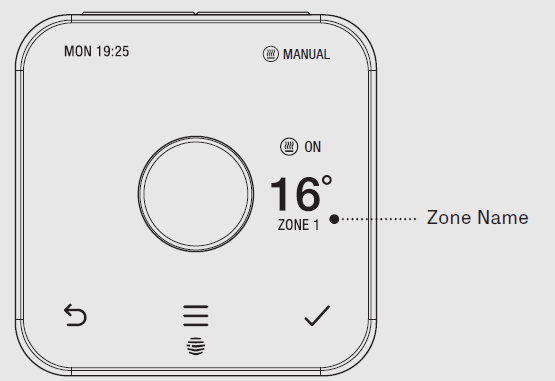
No signal
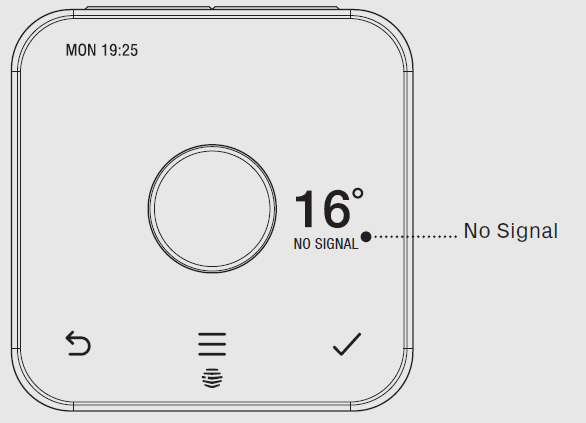
If this message shows on your thermostat, it means your thermostat and receiver aren’t communicating.
For more information, visit hivehome.com/support. Alternatively, you can find more advice in the Hive app.
Hot tip: Even without a signal, you can still manually switch your heating and hot water on and off by pressing the buttons on the Hive receiver (usually beside your boiler) when its ‘Status’ light is red.
Troubleshooting
If you need to identify which of your Hive thermostats belongs to which receiver, follow these steps:
- Turn the heating off in every zone using the app or thermostats
- When you look at the receivers, the ‘central heating’ light should be switched off on each receiver
- Turn the heating on in one zone only by using the app or thermostat. The ‘central heating’ light on one receiver will turn green, showing that this thermostat is paired to this receiver.
- Repeat these steps to identify which receivers your other thermostats are paired with.
For more information on Hive Multizone, please visit hivehome.com/support
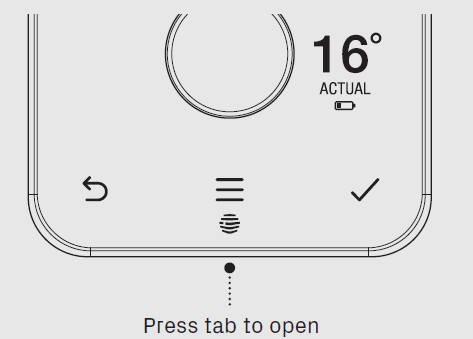
 A red battery symbol means your batteries need to be replaced with four new AA batteries.
How to change the batteries:
- Press the tab on the base of your thermostat
- Lift your thermostat off the hooks that hold it against the wall (and turn it over to access the batteries)
- Simply pop the batteries out and put the new ones in.
- Re-hook the top of your thermostat and then press the bottom until it clicks to secure it to the wall.
Common Problems and Troubleshooting Solutions
- Heating Not Responding:
If your heating fails to activate when requested, first verify the thermostat is in Schedule or Manual mode rather than Off mode. Check that the target temperature is set above the current room temperature. Ensure the receiver module has continuous mains power and that no circuit breaker has been tripped. If the issue persists, restart both the thermostat and receiver by removing power for 30 seconds, then reconnecting. - App Connectivity Problems:
When the Hive app fails to communicate with your thermostat, confirm your home WiFi network is functioning properly by testing other connected devices. Verify that both your smartphone and the Hive Hub are connected to the same WiFi network and not on separate guest networks. Log out of the app completely, close it, and log back in. If connectivity remains problematic, check for available app updates in your device's app store. - Battery-Related Issues:
A flashing battery icon indicates low battery levels; replace the AA batteries immediately to prevent loss of thermostat control. Use high-quality alkaline batteries for optimal performance and longevity. If the thermostat becomes unresponsive after battery replacement, ensure batteries are inserted correctly with proper polarity alignment. - Frost Protection Activation:
Frost protection automatically engages when your home temperature drops below 7°C, overriding the Off mode setting. This is intentional and prevents pipe freezing during extreme cold. To disable frost protection temporarily during maintenance, switch to Manual or Schedule mode. - Warranty and Support:
The Hive Active Heating Thermostat includes a 1-year manufacturer's warranty covering defects in materials and workmanship. For technical support, access the comprehensive help section within the Hive app or contact Hive customer service through their official website. Keep your purchase receipt and product serial number readily available for warranty claims.
Advantages and Disadvantages
Key Advantages of Hive Active Heating Thermostat:
- Energy Savings: Can reduce annual heating bills by up to £202 with intelligent scheduling and geolocation features
- User-Friendly Design: Intuitive central dial interface combined with comprehensive app control appeals to both tech-savvy users and those preferring simplicity
- Wide Boiler Compatibility: Works with gas, LPG, oil, and electric boilers, making it suitable for most UK heating systems
- Remote Control: Manage heating from anywhere via smartphone app, ideal for busy lifestyles and unexpected schedule changes
- Smart Home Integration: Seamless compatibility with Alexa, Google Assistant, and Apple HomeKit for voice control and automation
- Aesthetic Appeal: Modern, attractive design with customizable color frames that complement contemporary interiors
- Low Power Consumption: Uses less than 1kW monthly, minimizing environmental impact
Potential Disadvantages to Consider:
- Battery Dependency: Requires regular AA battery replacement, which can be inconvenient compared to mains-powered alternatives
- Limited Zone Control: Supports only 3 heating zones, whereas some competitors offer up to 20 zones for extensive multi-room control
- No Motion Sensing: Unlike some premium thermostats, it lacks occupancy detection to automatically adjust heating based on room usage
- Installation Costs: Professional installation typically costs around £70, adding to the initial investment
- Shorter Warranty: A 1-year warranty is less comprehensive than some competitors offering 2-3 years coverage
- App Dependency: Full feature access requires a smartphone app; some users prefer purely physical controls
Customer Reviews and User Feedback
Users consistently praise the Hive Active Heating Thermostat for its straightforward operation and reliable performance. The central dial design receives particular appreciation for being intuitive and requiring a minimal learning curve. Customers frequently mention satisfaction with energy bill reductions after implementing customized heating schedules, with many reporting savings aligning with manufacturer claims.
The Ready By pre-heating feature garners positive feedback, with users appreciating how the thermostat learns their home's heating duration and automatically activates heating to achieve target temperatures at scheduled times. Voice control integration with popular smart home platforms is highly valued by those invested in broader smart home ecosystems.
Common complaints center on battery replacement frequency, with some users finding the need to replace AA batteries more often than expected. A minority of users report occasional WiFi connectivity inconsistencies, though most issues resolve after app updates or router adjustments. The lack of motion sensing compared to premium alternatives is noted by users seeking fully automated temperature management.
Overall, the Hive Active Heating Thermostat receives strong ratings for delivering reliable smart heating control at a competitive price point. Users recommend it particularly for homeowners seeking an excellent balance between functionality, design, and affordability without requiring advanced multi-zone capabilities.
Faqs
How do I set up my hive Active Heating Thermostat for the first time?
What should I do if my hive Active Heating Thermostat is not responding or controlling the heating properly?
Can I control multiple heating zones with the hive Active Heating Thermostat?
Is the hive Active Heating Thermostat compatible with all boilers and heating systems?
How can I optimize the performance and energy savings of my hive Active Heating Thermostat?
How do I set or change a heating schedule on my hive Active Heating Thermostat?
What maintenance is required to keep my hive Active Heating Thermostat working reliably?
Can I control my hive Active Heating Thermostat remotely using voice assistants or a smartphone app?
More hive manuals
Leave a Comment