
Setup: Hive Hub Smart Home System User Manual
Content
Hive Hub Smart Home System
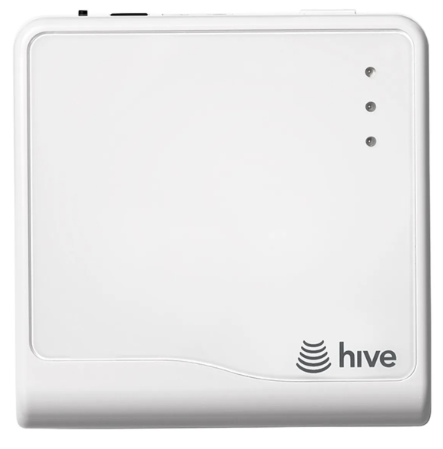
Introduction
The Hive Hub Smart Home System is a powerful, user-friendly solution for transforming your home into a fully connected, automated environment. Designed for homeowners seeking convenience, security, and energy efficiency, this smart hub centralises control of lighting, heating, security, and more—all from a single app. Whether you're a tech enthusiast or a beginner, the Hive Hub Smart Home System offers plug-and-play simplicity, making it ideal for families, renters, and busy professionals.
Key benefits include remote device management, customizable automation, and seamless integration with popular voice assistants like Amazon Alexa and Google Assistant. The system supports a wide range of Hive devices, including smart lights, thermostats, plugs, sensors, and cameras, and even works with Philips Hue bulbs for expanded compatibility. With its modular design, you can easily expand your setup as your needs grow.
The Hive Hub Smart Home System is available for purchase online and in select retail stores, with starter packs typically priced between $180 and $220. It’s perfect for anyone looking to enhance home automation, improve energy management, or boost security with minimal effort.
Specifications of the Hive Hub Smart Home System
- Dimensions: 96.1mm (W) x 96.6mm (H) x 27.3mm (D)
- Weight: 114g
- Connectivity: Ethernet, Zigbee, Wi-Fi, Bluetooth 4.0, Z-Wave
- Power Supply: UK 3-pin plug
- Processor: Dual-core 1GHz CPU
- Memory: 1GB RAM, 4GB Flash storage
- Backup: 3G for internet failover
- Supported Devices: Hive lights, thermostats, plugs, sensors, cameras, Philips Hue bulbs
- System Requirements: Broadband router with spare Ethernet port, 1.5Mbps+ internet, iOS/Android device
- Compatibility: Works with Amazon Alexa, Google Assistant, IFTTT
The Hive Hub Smart Home System outperforms many competitors with its robust wireless protocols, expandable ecosystem, and reliable remote management. Unlike basic hubs, it supports advanced automation, multi-room audio, and emergency two-way voice communication.
Welcome to Hive
Let’s get started setting up your account. Just download the Hive app or visit hivehome.com/register to enter your details. Once your account has been confirmed, you can log in through the Hive app and start pairing your devices.*
Download the Hive app:

Remember: For your Hive devices to work correctly, your Hub must be kept plugged in and switched on.
Your Hive Hub
Your Hub is the heart of your Hive system. It lets your devices talk to each other and allows you to control them from your smartphone, tablet or laptop anytime, anywhere.
Getting started:
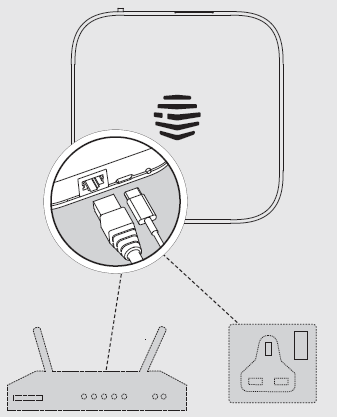
- Connect your Hub
- Connect your Hub to a mains power socket using the power cable in the box.
- For the Hub to work at its best, you should avoid placing it on the floor or in an enclosed area such as a cupboard. A table or shelf are betteroption, if possible.
- Activate your Hub
Log in to the Hive app, select install Hub and follow the steps to connect by WiFi or by Ethernet cable. - That’s it!
You can now pair your other Hive devices by tapping ‘Add’ then ‘Install new device’ in the app.
If you already have an account with us, don’t worry about this step.
Hive Hub User Guide
Usage
Your Hive Hub is designed for UK household wiring, and for indoor use only.
Maintenance
Disconnect your Hive Hub before cleaning and keep it away from water and other liquids at all times. The Hub does not contain any serviceable parts, so do not attempt to open it.
Can we help?
You can view our handy how-to-use videos along with hints and tips at hivehome.com/support
I,,f for any reason you need to return your Hive Hub, simply return your box and its contents to the retailer. Any return is subject to the retailer’s refund policy, so please don’t forget to check the retailer’s refund policy too.
© 2025 Centrica Hive Limited (trading as Hive).
Registered in England (No. 5782908) SL4 5GD, UK.
Bord Gáis Energy. Registered in Ireland (No. 463078) D02 HH27, Ireland.
All rights, reserved.
Simplified UK/EU Declaration of Conformity: Centrica Hive Limited declares that the radio equipment type HUB600 complies with UK SI 2017 No. 1206 and EU Directive 2014/53/EU. Full declaration text available at: hivehome.com/compliance
Max. radiated power: < 20 dBm. Frequency: 2400-2483.5 MHz
To avoid environmental and health problems due to hazardous substances in electrical and electronic goods, appliances marked with a crossed-out wheeled bin should not be placed into your household rubbish bin. Instead, when they are unable to be reused, they should be recycled. Your local authority will be able to advise you on the location of the nearest recycling centre that is authorised to accept this type of waste. Please recycle responsibly.
Setup Guide for the Hive Hub Smart Home System
Setting up the Hive Hub Smart Home System is quick and easy:
- Plug the Hive Hub into your broadband router using the included Ethernet cable.
- Download the Hive app on your iOS or Android device.
- Open the app and follow the on-screen instructions to pair the hub.
- Install devices one at a time—activate bulbs, sensors, and plugs as prompted.
- Configure automation and scenes in the app for ppersonalisedcontrol.
For troubleshooting, ensure your router has a spare, Ethernet port and your internet speed meets requirements. Always update the Hive app for the latest features. Safety tip: Do not use damaged cables or power supplies.
Troubleshooting the Hive Hub Smart Home System
Common issues and solutions:
- Hub not connecting: Check Ethernet and power connections; restart router.
- Device not pairing: Ensure device is within range; reset device if needed.
- App not responding: Update app; restart device.
- Error codes: Refer to the Hive support site for code-specific fixes.
Prevent issues by keeping firmware updated and devices charged. The Hive Hub Smart Home System comes with a standard warranty and US-based phone/email support. For help, visit the Hive support website or contact customer service directly.
Pros & Cons of the Hive Hub Smart Home System
Pros
- Easy setup and intuitive app interface
- Supports multiple wireless protocols and voice assistants
- Expandable with a wide range of Hive and Philips Hue devices
- Reliable remote management and automation
- Strong customer support and warranty
Cons
- Requires a broadband connection and a router with spare Ethernet port
- Some advanced features may require a subscription
- Not all third-party devices are compatible
The Hive Hub Smart Home System offers excellent value for money, especially for those building a comprehensive smart home ecosystem.
Customer Reviews of the Hive Hub Smart Home System
Users consistently rate the Hive Hub Smart Home System highly, with an average of 4.5 stars. Common praises include its simple setup, reliable performance, and seamless integration with voice assistants. Many customers appreciate the ability to automate routines and control devices remotely. Some users mention occasional connectivity issues with older routers, but most find the support team helpful. The Hive Hub Smart Home System is recommended for anyone seeking a reliable, expandable smart home solution.
Faqs
How do I set up the hive Hub Smart Home System for the first time?
What should I do if my hive Hub Smart Home System is not connecting to devices?
Can I use the hive Hub Smart Home System with Amazon Alexa or Google Assistant?
What devices are compatible with the hive Hub Smart Home System?
How do I create automation scenes with the hive Hub Smart Home System?
Why does my hive Hub Smart Home System lose connection frequently?
How often should I update or maintain the hive Hub Smart Home System?
Can I control the hive Hub Smart Home System remotely?
Tags
More hive manuals
Leave a Comment