
Setup: Hive Motion Sensor Home Security Device User Manual
Content
Hive Motion Sensor Home Security Device
Introduction
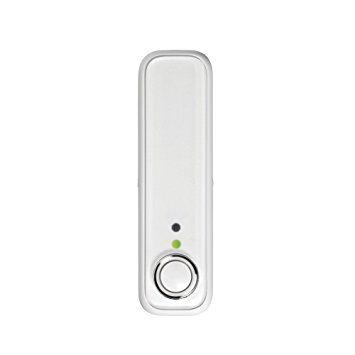
TheHivee Motion Sensor Home Security Device is a compact, intelligent indoor motion detector designed to enhance home security and automation. It continuously monitors motion within a 5-meter range and alerts homeowners instantly through the Hive app, allowing real-time monitoring from anywhere. This device integrates seamlessly with other Hive smart home products, enabling automated responses such as turning on lights or activating cameras when motion is detected.
Key benefits include reliable motion detection with customizable notification schedules, ensuring alerts only when you’re away, and long battery life powered by a single CR123A lithium battery. Its unobtrusive design fits discreetly in any room, making it suitable for homeowners seeking an easy-to-install security upgrade or smart home enthusiasts aiming to create a connected environment.
Ideal for apartments, family homes, or offices, the sensor supports iOS and Android devices with the Hive app and requires a Hive Hub for operation if not already owned. The estimated price range typically falls between $40 and $60, and it is widely available via major smart home retailers and online platforms.
Specifications of theHivee Motion Sensor Home Security Device
- Dimensions: 84mm height × 22mm width × 24mm depth
- Weight: 62 grams
- Power Source: 1 × CR123A lithium battery (included)
- Connectivity: Wireless via Hive Hub (2.4 GHz frequency band, <10 dBm max radiated power)
- Detection Range: Up to 5 meters with a 94° vertical field of view
- Compatibility: Hive app for iOS (iOS 9+) and Android (4.4+)
- System Requirements: Internet connection (minimum 1.5 Mbps recommended)
- Installation: Indoor use only, wall mount or tabletop placement
- Features: Real-time alerts, scheduling options, pet-friendly mode to reduce false alarms
- Performance: Fast motion detection with low false positives when avoiding direct sunlight or window views
Compared to similar products like the Nest or Ring motion sensors, theHivee sensor stands out with its tight integration into the broader Hive smart ecosystem and customizable alert schedules, giving it an edge in home automation flexibility.
Getting started
- Add your sensor
You can do this using your Hive app or the online dashboard.
Using the Hive app:- Open the Hive app on your smartphone or tablet. You may be asked to log in.
- Tap the Menu button and then
Install devices, then follow the on-screen instructions.
Using the online dashboard:- L og in to your Hive account at hivehome.com
- Under Settings, select Install devices, then follow the on-screen instructions.
When prompted, pull the tab from the sensor case to start the pairing process. The LED light on the front will begin to flash amber while it searches for your hub.
Once your sensor appears on the screen, you can name it and press Save to complete setup.
- Choose a location
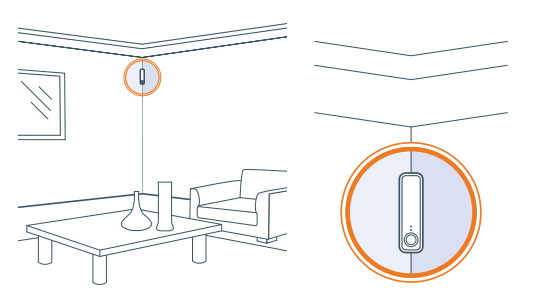
Find a place that has a good view of the area you want to monitor, as long as it’s near enough to your Hive Hub or signal booster to stay connected.- Aim for around 2-3m from the floor, as any higher may leave blind spots below.
- Alternatively, you can rest the sensor on its side on a table or shelf; you may not need to fix it to the surface.
- Your sensor can detect motion up to 5m away and has a 94° field of view when vertical.
- Fix it in place (optional)
If you’d like to check the signal before fixing your sensor in place, you can do this in the app or online dashboard under Manage devices.
When fixing the sensor in place, ensure there is enough space above to slide open the case for future battery replacement.
Using the adhesive strips:- Peel strips from the backing paper and stick to either the back or the angled sides of the sensor d, depending on where you’re attaching it.
- Wipe the area on the surface where the adhesive strips will be attached and make sure it’s dry.
- Remove the backing from the adhesive strips so that you can firmly place the sensor on the surface.
The following might trigger a false motion alert:
- Directsunlight hitting your sensor.
- Having a window in view (movement outside a window).
- Having a heat source in view (such as a hot air blower, a draughty window, or an air conditioning outlet).
- Lots of posts coming through the letterbox in view.
Remember: Pets can trigger your motion sensor. If you don’t want this to happen,, try placing the sensor where pets won’t be seen.
Remember: Removing the provided adhesive strips from wallpaper or paint can leave marks on the wall.
Usage
Your Hive Motion Sensor is designed for indoor use only.
Battery
When your Hive Motion Sensor battery needs replacing, we recommend replacing it with 1 new CR123A lithium battery. Caution: Keep battery away from children. If swallowed, consult a physician at once. The battery can explode or leak if heated, disassembled, shorted, recharged, exposed to fire or high temperature, or inserted incorrectly. Keep in original package until ready to use. Do not carry batteries loose in your pockets or purse.
Maintenance
Remove the battery from your Hive Motion Sensor before cleaning and keep it away from water and other liquids at all times.
Setup Guide for theHivee Motion Sensor Home Security Device
- Download and install the latest Hive app on your iOS or Android device.
- Ensure you have a Hive Hub set up; if not, install the hub following its manual.
- Within the app, navigate to Settings > Install devices and select Add Motion Sensor.
- Pull the tab from the sensor to activate it; the LED will flash amber,r indicating pairing mode.
- Wait for the sensor to appear in the app, then assign a name and location for easy identification.
- Mount the sensor approximately 2-3 meters above the floor on a wall or place it on a shelf for optimal coverage.
- Configure notification schedules to receive alerts only when you are away or during specified times.
- Optionally, link the sensor with other Hive devices to trigger automatic actions, like turning on lights or cameras.
Troubleshooting tips: Keep the sensor away from direct sunlight and windows to prevent false alerts. Ensure your Hive Hub is within range to maintain a stable connection.
Safety Precautions: Use indoors only and avoid exposure to moisture or extreme temperatures. Replace batteries promptly to maintain consistent performance.
Troubleshooting Guide forHivee Motion Sensor Home Security Device
- Problem: Sensor not pairing
Solution: Check Hive Hub connectivity, pull the battery tab fully, and restart the app. Ensure you are within range. - Problem: False motion alerts
Solution: Adjust sensor placement to avoid direct sunlight and window views. Enable pet-friendly mode if pets trigger alerts. - Problem: No notifications received
Solution: Verify notification permissions on your smartphone and internet connectivity. Re-sync the sensor from the app if needed. - Error Codes: The device typically shows LED signals; persistent amber flashing indicates connection issues. Restart the device or reinstall.
- Preventive Measures: Regularly check battery health, keep firmware updated via the Hive app, and maintain hub proximity.
TheHivee Motion Sensor offers a 1-year limited warranty. For extended support, contact Hive customer service through their official website or app.
Pros & Cons of theHivee Motion Sensor Home Security Device
Pros
- Easy integration with the Hive smart home ecosystem allows advanced automation setups.
- Compact and lightweight design blends seamlessly indoors without being obtrusive.
- Customizable alert schedules reduce unnecessary notifications, enhancing user convenience.
- Pet-friendly option minimizes false alarms caused by small pets.
- Long battery life withan included CR123A lithium battery reduces maintenance frequency.
Cons
- Indoor use only; not suitable for outdoor security monitoring.
- Requires Hive Hub, which adds tothe initial setup cost if not already owned.
- Limited detection range (5 meters) compared to some competitors.
- Connectivity depends on stable Wi-Fi and hub placement, which may be a challenge in larger homes. Hiverall, the hive Motion Sensor offers excellent value for money within the Hive ecosystem, especially for users who want smart automation combined with reliable security monitoring.
Customer Reviews of theHivee Motion Sensor Home Security Device
Users consistently praise theHivee Motion Sensor Home Security Device for its reliable motion detection and seamless app integration. Many highlight the convenience of receiving instant alerts and the ease of setting up customized schedules. The pet-friendly feature is frequently mentioned as a major plus for pet owners.
Common complaints include occasional false alarms due to placement near windows orsunlight and the necessity of owning a Hive Hub for operation. Star ratings predominantly range from 4 to 4.5 out of 5, reflecting high overall satisfaction.
Customers recommend this sensor for anyone looking to enhance indoor security and automate smart home functions efficiently. Frequent users appreciate the battery longevity and the ability to link with Hive cameras and lights for comprehensive protection.
Faqs
How do I set up the hive Motion Sensor Home Security Device for the first time?
What should I do if my hive Motion Sensor Home Security Device is not connecting to the Hive Hub?
Can I integrate the hive Motion Sensor Home Security Device with other Hive smart devices?
How do I optimize the placement of my hive Motion Sensor Home Security Device for best performance?
What are common problems with the hive Motion Sensor Home Security Device and their solutions?
How often should I perform maintenance on my hive Motion Sensor Home Security Device?
Is the hive Motion Sensor Home Security Device compatible with voice assistants like Alexa or Google Assistant?
Can pets trigger false alerts on the hive Motion Sensor Home Security Device, and how can I prevent this?
Tags
More hive manuals
Leave a Comment