
Usage: Hive Hub Central Control User Manual
Content
Hive Hub Central Control
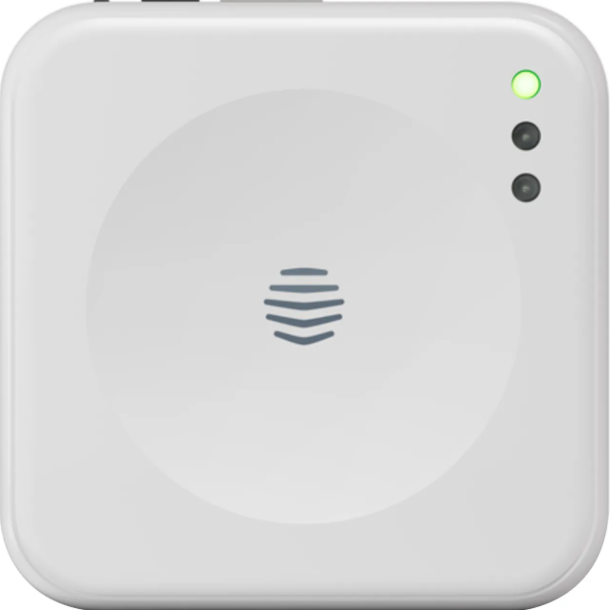
Introduction
The Hive Hub Central Control is the intelligent heart of your smart home, designed to seamlessly connect and manage all your Hive devices from a single, user-friendly interface. Whether you're looking to control your heating, lighting, or security, this advanced hub brings convenience, energy efficiency, and peace of mind to your household. With remote access via the Hive app, you can adjust settings from anywhere, ensuring your home is always comfortable and secure.
Key benefits include smart scheduling, geolocation alerts, and compatibility with voice assistants like Alexa, Google Assistant, and Apple HomeKit. The Hive Hub Central Control is ideal for homeowners seeking a reliable, easy-to-use solution for managing their smart home ecosystem. It’s perfect for families, tech enthusiasts, and anyone looking to reduce energy bills while enhancing home automation.
Available for purchase online and in select retail stores, the Hive Hub Central Control typically retails between £60 and £90, depending on the retailer and included accessories. It’s widely available across the UK and compatible with most broadband routers, making it a versatile choice for modern smart homes.
Specifications: Hive Hub Central Control
- Product Type: Central controller for smart home devices
- Connectivity: Wi-Fi (802.11n 2.4GHz), Zigbee, Bluetooth 4.0/LE
- Dimensions: 9.61 cm x 2.73 cm x 9.66 cm
- Weight: 1.6 kg
- Power Supply: USB adapter (100-240V input, 5.2VDC output)
- Compatibility: Works with Hive thermostats, smart plugs, lights, sensors, and more
- Features: Centralised device management, automation scenes, push/email notifications, 7-day event log, audio clip history
- Security: Dedicated network for Hive devices, mute microphone option
- Performance: Enhanced Zigbee range, over-the-air (OTA) upgrades
Compared to similar hubs, the Hive Hub Central Control stands out with its robust security, wide device compatibility, and advanced monitoring features like smoke/CO alarm detection and glass break alerts.
Setup Guide: Hive Hub Central Control
Setting up the Hive Hub Central Control is straightforward. Plug the hub into your broadband router using the provided USB cable and adapter. Download the Hive app on your smartphone or tablet, then follow the on-screen instructions to connect the hub to your Wi-Fi network. Pair your Hive devices by following the app’s pairing prompts. For optimal performance, place the hub in a central location within your home.
Configuration options include setting up automation scenes, scheduling device actions, and customising notifications. If you encounter connectivity issues, ensure your router supports 2.4GHz Wi-Fi and that the hub is within range. Always update the hub’s firmware via the app for the latest features and security patches. Avoid placing the hub near metal objects or thick walls to maintain strong signal strength.
Safety Warning: Do not expose the hub to water or extreme temperatures. Keep it out of reach of children and pets.
Download the Hive app:

- If you already have an account with us, don't worry about this step.
Your Hive Hub
- Your hub is the heart of your Hive system. It lets your devices talk
- to each other and allows you to control them from your smartphone, tablet or laptop anytime, anywhere.
Getting started
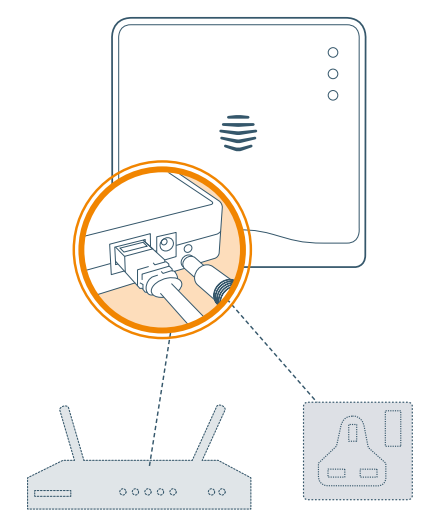
- Connect your hub
- Connect your hub to your broadband router using the
Ethernet cable in the box.
- Connect your hub to a mains power socket using the power cable in the box.
- For the hub to work at its best, you should avoid placing it on the floor or in an enclosed area such as a cupboard.
- A table or shelf are better option, if possible.
Activate your hub
- Log in to the Hive app, select Hub or log in at hivehome.com and enter the hub ID when prompted. This is the ABC-123 formatted number on the underside of the hub.
That's it!
- You can now pair your other Hive devices by tapping
- Install devices in the app or online dashboard.
Remember: For your Hive devices to work correctly , your hub must be kept plugged in and switched on.
Usage
- Your Hive Hub is designed for UK household wiring, and for indoor use only.
Maintenance
- Disconnect your Hive Hub before cleaning and keep it away from water and other liquids at all times. The hub does not contain any serviceable parts,s so do not attempt to open it.
Troubleshooting: Hive Hub Central Control
Common issues include connectivity problems, device pairing failures, and notification delays. If the hub won’t connect to Wi-Fi, restart your router and hub, then retry the setup. For device pairing issues, ensure the device is within range and powered on. If notifications are delayed, check your app settings and internet connection.
Preventive measures include regular firmware updates and keeping the hub in a well-ventilated area. If problems persist, consult the Hive support website or contact customer service. The Hive Hub Central Control comes with a 1-yearmanufacturer'sr warranty covering defects and malfunctions.
Support Contact: Hive Customer Support – 0333 202 9650 or support@hivehome.com
Pros & Cons: Hive Hub Central Control
ProCentralised control for all Hive devices
- Advanced security and monitoring features
- Easy setup and user-friendly app
- Compatible with major voice assistants
- Regular firmware updates for improved performance
Cons
- Limited to Hive ecosystem devices
- Requires a stable Wi-Fi connection
- Higher price point compared to basic hubs
The Hive Hub Central Control offers excellent value for money, especially for those invested in the Hive ecosystem. It outperforms basic hubs with its advanced features and robust security.
Customer Reviews: Hive Hub Central Control
Customers consistently rate the Hive Hub Central Control highly, with an average of 4.5 stars. Users praise its ease of setup, reliable performance, and comprehensive device management. Common praises include the app’s intuitive interface and the hub’s ability to integrate seamlessly with other Hive products. Some users mention occasional connectivity issues, but these are typically resolved with simple troubleshooting steps.
Testimonial: “The Hive Hub Central Control has transformed my smart home experience. It’s easy to use and keeps everything running smoothly.” – Sarah, 5 stars.
Overall, the Hive Hub Central Control is a top choice for anyone looking to enhance their smart home setup with reliable, feature-rich central control.
Faqs
How do I set up the hive Hub Central Control for the first time?
What should I do if my hive Hub Central Control stops responding or loses connection?
Can the hive Hub Central Control integrate with voice assistants like Alexa and Google Assistant?
What smart devices are compatible with hive Hub Central Control?
How can I optimize the performance and wireless range of the hive Hub Central Control?
Does the hive Hub Central Control support automation and scheduling for smart home devices?
How do I maintain and care for my hive Hub Central Control to ensure longevity?
What are the internet and power requirements for installing the hive Hub Central Control?
Tags
More hive manuals
Leave a Comment