
Setup: Hive Signal Booster User Manual
Content
Hive Signal Booster
Introduction
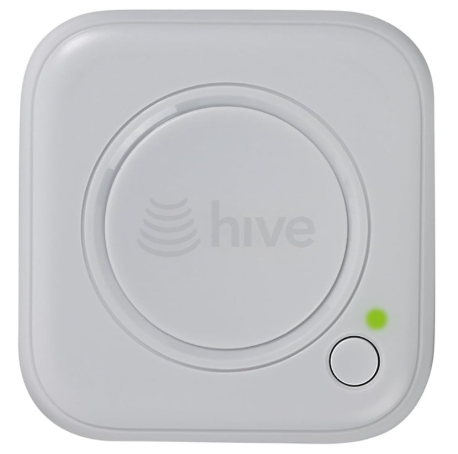
The Hive Signal Booster is a smart, compact device designed to enhance the connectivity of your Hive smart home ecosystem by extending the wireless range between your Hive Hub and Hive devices. Perfectly suited for larger homes, multi-story houses, or areas with thick walls such as basements and lofts, this signal booster ensures uninterrupted communication between your Hive Active Heating™ devices, facilitating seamless control and automation. Its key benefit lies in eliminating connectivity blind spots, thereby improving your home's heating and automation reliability.
Targeted at homeowners who use Hive smart heating and automation systems, this device is ideal for those facing signal range issues or wireless interference inside their property. Its compatibility with most Hive devices (excluding Wi-Fi-enabled ones like Hive View Outdoor or Leak Sensor) makes it versatile for expanding your smart home setup.
Available primarily in the UK and Ireland, the Hive Signal Booster plugs into any Type G power socket, making installation effortless. It typically retails in the £10 to £25 price range, providing great value for improving your Hive network coverage without extensive infrastructure changes.
Specifications of Hive Signal Booster
- Connectivity: ZigBee HA 1.2 protocol for optimized Hive device communication
- Power Supply: Plugs into a Type G mains socket (UK/IRE) with low power consumption
- Frequency Range: 2405 - 2480 MHz operating band
- Max Radiated Power: Less than 10 dBm to ensure safe, reliable signal amplification
- Compatibility: Works with all Hive products except Wi-Fi-based devices like Hive View Outdoor and Leak Sensor
- Smart Features: Supports Alexa integration, IFTTT connectivity, and mobile app control via the Hive app
- Size & Color: Compact white design blends seamlessly indoors
- Performance: Extends effective wireless range between Hive Hub and devices up to several rooms, overcoming thick walls and interference
Compared to similar ZigBee signal boosters on the market, Hive’s booster is specifically optimized for Hive systems, ensuring superior compatibility and ease of integration without additional setup complexity.
Getting started
- Choose a location
Your Hive Signal Booster should be plugged into a mains power socket about halfway between your Hive Hub and the device that has low signal strength or anisn’ttonnect. Plug your Hive Signal Booster in and switch the power socket on
The light on the front will begin to flash amber whilst the Hive Signal Booster searches for your hub.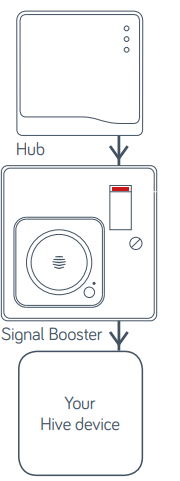
- Add your Hive Signal Booster
You can do this using your Hive app or the online dashboard.
Using the Hive app:- Open the Hive app on your smartphone or tablet, and you may be asked to log-in.
- Tap the Menu button and then Install device. Your hub will then start looking for your Hive Signal Booster.
Using the online dashboard:
Log in to your account at hivehome.com
- Under Settings,s select Install devices. Your hub will then start looking for your Hive Signal Booster.
Once your Hive Signal Booster appears on the screen, you can name it and press Save to complete setup. - That’s it!
The LED light on your Hive Signal Booster will now be green, en and your Hive devices will automatically talk to your hub.
Remember: Once your Hive Signal Booster is installed, please leave the power to it switched on, including the extension cable if you’re using one.
Usage
Your Hive Signal Booster is designed for UK household wiring, and for indoor use only. Under normal use conditions, this product should be kept at least 20cm away from the body of the user.
Maintenance
Disconnect your Hive Signal Booster before cleaning and keep it away from water and other liquids at all times. The Hive Signal Booster does not contain anyserviceable partst,s so do not attempt to open it.
Setup Guide for Hive Signal Booster
- Choose an Optimal Location: Plug the signal booster into a mains socket roughly halfway between your Hive Hub and the Hive device experiencing low connectivity. Ensure the socket remains powered continuously.
- Power On: Connect the device and switch the socket on. The signal booster’s LED will flash amber, signaling it is searching for the Hive Hub.
- Pair Using Hive App: Open your Hive app on an iOS or Android device, navigate to ‘Install Devices’, then select ‘Add another device’. Follow the on-screen instructions to detect and name your signal booster.
- Confirm Connection: Once paired, the LED indicator will turn green, confirming successful setup and that your Hive devices are communicating through the booster.
- Configuration Options: No advanced manual configuration is is needed, as the system , the system automatically integrates with the Hive system; however, device naming and location tagging can be performed via the app.
Troubleshooting Tips: If the LED does not turn green, ensure the socket is powered, the booster is within range of the Hive Hub, and your app is updated. Restart the app or booster if necessary.
Safety Precautions: Use indoors only; keep at least 20cm away from other electronics and water sources. Do not operate in damp or outdoor environments.
Troubleshooting the Hive Signal Booster
- Common Issue: LED remains flashing amber – indicates no connection to the Hub. Solution: Verify power supply, move the booster closer to the hub, and retry pairing.
- Devices not connecting: Hive devices still show a low signal or disconnection. Solution: Check device compatibility; only ZigBee devices are supported. Consider adding additional boosters for large properties.
- Error Codes: No specific error codes; connectivity issues are indicated by LED status and app notifications.
- Preventive Measures: Position the booster away from large metal objects, microwaves, and strong Wi-Fi routers to reduce interference.
- Warranty & Support: Backed by Hive’s standard product warranty and customer support. Contact Hive support via their website or app for personalized assistance.
Pros & Cons of the Hive Signal Booster
- Pros:
- Easy plug-and-play installation with no technical expertise required
- Extends ZigBee wireless range effectively in typical UK homes
- Compatible with a wide range of Hive smart heating and automation devices
- Works seamlessly with Hive app, Alexa, and IFTTT for smart home integration
- Affordable price point offers good value for improving connectivity
- Cons:
- Only supports ZigBee devices, excluding Wi-Fi-enabled Hive devices like Hive View Outdoor.
- Requiresa mains power socket to be always on, limiting placement flexibility.
- Range improvement depends on home layout; very large or metal-rich properties may need multiple boosters.
Customer Reviews of Hive Signal Booster
Users generally praise theHivee Signal Booster for significantly improving device connectivity in larger homes and hard-to-reach areas such as basements and lofts. Many highlight the simple setup process and reliable performance as major positives, awarding it 4 to 5 stars on average.
Common complaints include a limited range in very large properties requiring multiple boosters and occasional difficulties with initial pairing, which are typically resolved by repositioning the device or restarting the app. Overall, customers recommend the booster for anyone experiencing Hive device signal issues, noting it as an affordable and effective solution to strengthen their smart home network.
Tags
More hive manuals
Leave a Comment