
Setup: Hive EO Mini Pro 3 EV Charger User Manual
Content
hive EO Mini Pro 3 EV Charger
Introduction
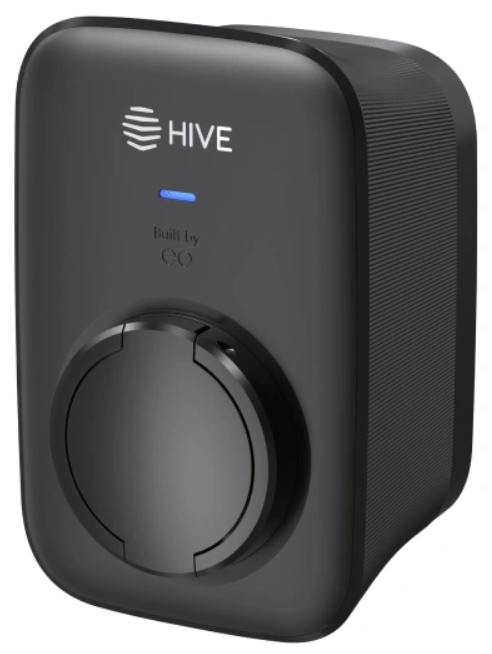
The hive EO Mini Pro 3 EV Charger is a compact, smart, and reliable solution for electric vehicle owners seeking a seamless home charging experience. Designed for both indoor and outdoor installation, this wall-mounted EVSE (Electric Vehicle Supply Equipment) offers advanced features such as WiFi connectivity, remote monitoring, and flexible charging scheduling. With its sleek design and robust build, the hive EO Mini Pro 3 is ideal for homeowners, renters, and small businesses looking to future-proof their charging setup.
Key benefits include real-time energy monitoring, compatibility with most EVs, and integration with popular smart home systems. The charger supports up to 7.4kW (32A) charging, making it suitable for rapid overnight charging. Its compact size and easy installation process make it a top choice for those with limited space or seeking a hassle-free setup. The hive EO Mini Pro 3 is available in the UK and Europe, with an estimated price range of £500–£700, depending on installation and accessories.
hive EO Mini Pro 3 EV Charger Specifications
- Charging Power: Up to 7.4kW (32A, 230V)
- Connector Type: Type 2 (Mennekes)
- Connectivity: WiFi, Bluetooth, and optional 4G
- Smart Features: Remote start/stop, scheduling, energy monitoring
- Dimensions: 220 x 120 x 60 mm
- Weight: 1.8 kg
- IP Rating: IP54 (dust and splash resistant)
- Operating Temperature: -20°C to +50°C
- Compatibility: All EVs with Type 2 inlet
- Warranty: 3 years
The hive EO Mini Pro 3 outperforms similar models like the EO Mini Pro 2 and rival chargers in terms of connectivity, energy efficiency, and user-friendly interface. Its compact design and high power output make it a standout choice for modern EV owners.
Tethered charger
Important
- Your EO Mini Pro 3 should only be installed by a qualified electrician with the relevant training.
- Go to hivehome.com/guides/ev-charging for detailed installation instructions.
Getting started
Installing your charger:
Your EO Mini Pro 3 EV charger should only be professionally installed by a fully qualified and accredited installer.
Download the Hive app:
Use Hive’s award-winning app to make the most of your EO Mini Pro 3. Make use of smart charge features that let you optimise your charger:
- Download the Hive app to your phone or tablet
- Apple App Store
- Google Pla
- Log in, or click ‘Create account’ if you don’t already have one
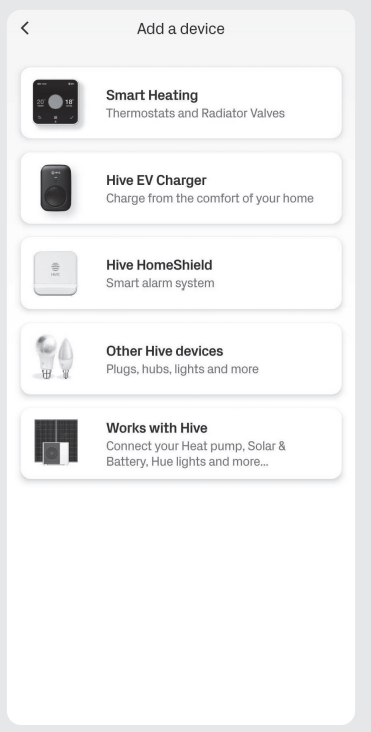
- On the Home screen, tap ‘Add’ then follow the instructions to add your EV charger
Onboarding your charger
- You can easily set up your EO Mini Pro 3 in the Hive app. Just follow the prompts onscreen and before you know it, you’ll be a few taps away from charging your car at home.
To get started, you’ll need:
- Your Charger ID – found on the device label or in your quick-start guide
- Your Charger PIN – this will be in an email from Hive sent after your device is installed
Important
If you haven’t got your Charger PIN yet, visit hivehome.com/contact-us or call us on 0333 202 1054.
Getting to know your charger
- Sleek and understated, the EO Mini Pro 3 is one of the most compact chargers on the market. And it’s kitted out with the latest smart functionality to make charging simple.
Randomised delay
- In compliance with The Electric Vehicles (Smart Charge Points) Regulations 2021, there will be a random delay of up to 10 minutes before a scheduled charge will start. Charging sessions initiated outside of schedules will not be subject to this randomised delay.
Using the charger without the app
- Your EO Mini Pro 3 charger is configured to use GSM mobile signal to connect to the Hive app. However, if you live in an area with poor GSM mobile signal, your engineer can set up the charger to operate in ‘plug and charge’ mode. That way you can charge your EV without having to use the Hive app.
Accessing the charger portal locally
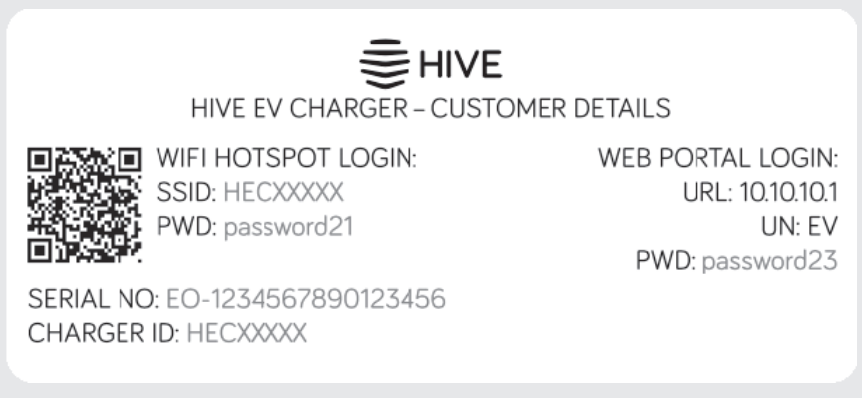
- If your engineer has configured your charger to work in ‘plug and charge’ mode (also referred to as ‘dumb’ mode), or if Hive’s support team need you to access your charger locally, you can find the local access details on the customer details label (attached to the Quick Start guide in the box your charger came in).
- Note: Only to be used if charger is being used in ‘dumb’ mode.
Charger settings
- Configure your charger, your way
Your EO Mini Pro 3 works best with the Hive app. You can set it up how you want on the ‘Settings’ menu, accessible through the cog icon in the top right of the charger control screen. - Charger
See your charger details, update your charger’s name and enable/disable secure charging. - Schedule
Check or update your EO Mini Pro 3’s schedule settings. You can configure how and when your charger works. - Tariff
Link your charging schedule to your energy tariff. If you’ve got a dedicated EV tariff, you can enjoy cheaper overnight charging. - My vehicle
View or update your EV details. This helps accurately calculate the range added on each charge. - Notifications
Configure what notifications you want to receive from your EO Mini Pro 3.
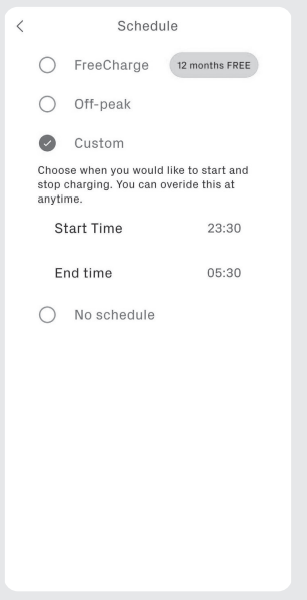
Schedules
Optimise your charging to meet your needs
- A range of schedule configuration options are available on your EO Mini Pro 3, all easy to set up and change.
Eco
- Link your charging schedule to your energy tariff. If you’ve got a dedicated EV tariff, you can enjoy even cheaper overnight charging.
Custom
- Set your own charging schedule – perfect if you want direct control over when you want your charge sessions to happen.
No schedule
- Simply plug in and charge. With no defined schedule, you can charge as and when needed.
My vehicle
- View or update your EV details. This helps accurately calculate the range added on each charge.
Note: If you have enabled secure charging via your charger on the ‘Settings’ page, you’ll receive a notification that you need to approve when plugging in your vehicle so you can start your charge session.
LED lights
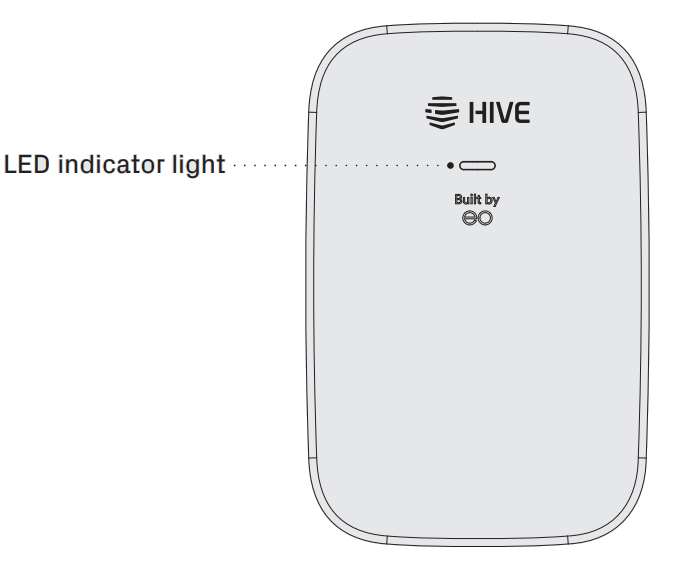
The EO Mini Pro 3 has an LED light on the front of the device which will indicate a range of device states.
During device switch on:
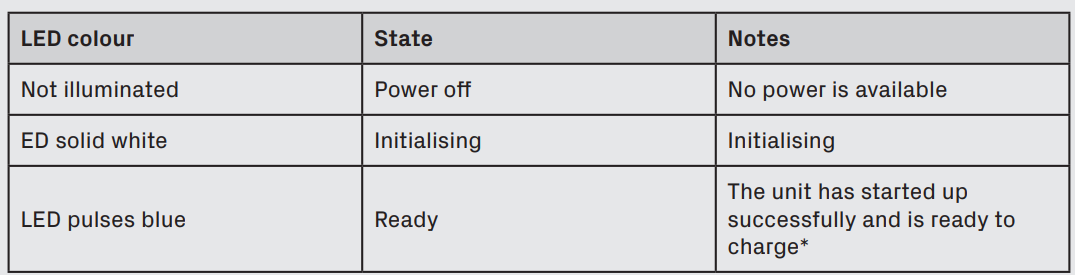
*Once the LED pulses blue, it may take up to a further 10 minutes for your charger to connect to the Hive platform, allowing you to control your charger from the Hive app.
During normal operation:
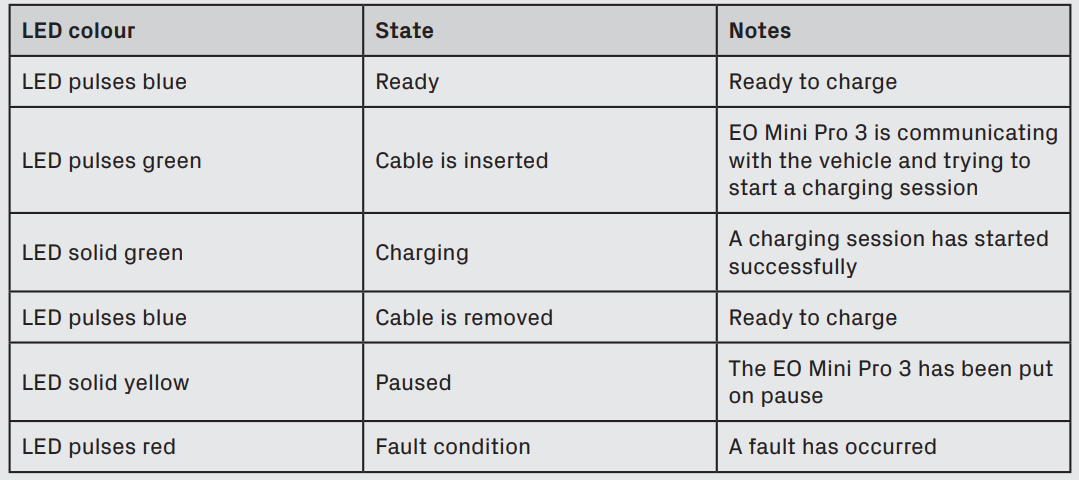
Troubleshooting the hive EO Mini Pro 3 EV Charger
- No Power: Check circuit breaker and wiring connections.
- WiFi Issues: Restart router and charger; ensure correct credentials.
- Charging Not Starting: Verify EV compatibility and connector seating.
- Error Codes: Refer to the manual for specific code meanings.
- Preventive Measures: Regularly inspect cables and connectors for wear.
The hive EO Mini Pro 3 comes with a 3-year warranty. For support, contact hive customer service or visit their official website. Common issues are usually resolved with simple checks or firmware updates.
Pros and Cons of the hive EO Mini Pro 3 EV Charger
- Pros: Compact design, smart features, easy installation, reliable performance, excellent customer support.
- Cons: Higher price than basic models, requires stable WiFi for full functionality.
The hive EO Mini Pro 3 offers excellent value for money, especially for those seeking advanced features and seamless integration with smart home systems. It compares favorably with alternatives like the EO Mini Pro 2 and other leading EV chargers.
Customer Reviews for the hive EO Mini Pro 3 EV Charger
Users praise the hive EO Mini Pro 3 for its reliability, ease of use, and smart features. Common complaints include occasional WiFi connectivity issues and the need for professional installation. Most customers rate it 4.5/5 stars, highlighting its compact size and efficient charging. Purchase recommendations are strong for those seeking a premium, feature-rich EV charger. Frequently mentioned issues are easily resolved with customer support.
Faqs
How do I set up the hive EO Mini Pro 3 EV Charger for the first time?
What should I do if the hive EO Mini Pro 3 EV Charger is not charging my vehicle?
Can I use the hive EO Mini Pro 3 EV Charger with solar panels or a home energy management system?
How do I update the firmware on my hive EO Mini Pro 3 EV Charger?
Is the hive EO Mini Pro 3 EV Charger suitable for outdoor installation?
How can I optimize charging speed with the hive EO Mini Pro 3 EV Charger?
What maintenance does the hive EO Mini Pro 3 EV Charger require?
Can I share access to my hive EO Mini Pro 3 EV Charger with family or guests?
More hive manuals
Leave a Comment