
Setup: Hive Hub 360 User Manual
Content
Hive Hub 360
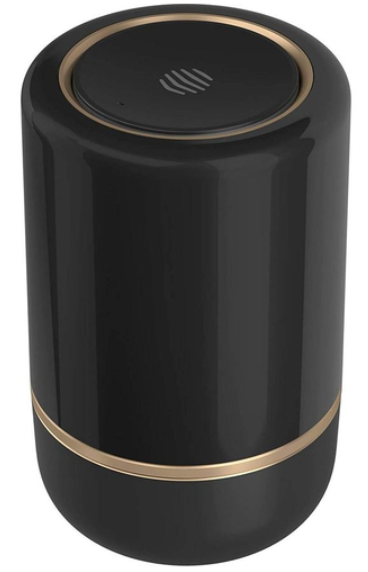
Introduction
The Hive Hub 360 represents the next generation in smart home hubs, designed for seamless connectivity and enhanced security. As a central device, it connects all your Hive smart home products—such as thermostats, sensors, and plugs—into one intuitive system. Unlike previous models, the Hub 360 features advanced 360° audio detection capabilities, enabling it to recognize important sounds like smoke alarms, carbon monoxide detectors, glass breaking, and even pet noises, then send instant notifications to your smartphone.
Its stylish and compact design makes it suitable for prominent placement in any home environment, blending functionality with aesthetics. Targeted at smart home enthusiasts and those seeking an integrated home monitoring and automation system, the Hub 360 is ideal for homeowners wanting peace of mind and enhanced control over their home environment. Whether you want to manage heating, lighting, or security remotely, this hub offers a reliable, user-friendly solution.
With connectivity maintained even during internet outages thanks to internal memory and a dedicated secure Zigbee network, the Hive Hub 360 ensures your smart system remains operational without interruption. Available in elegant two-tone variants such as white with champagne gold or black with brushed copper, its price typically ranges around £80-£100, available through Hive’s official website and major online retailers.
Technical Specifications and Features of the Hive Hub 360
- Connectivity: Wi-Fi (2.4GHz, 802.11n), Bluetooth 4.0, Zigbee enhanced range network
- Audio Detection: 360° microphone array detects smoke alarms, CO alarms, glass break, and dog barking
- Dimensions: Diameter 81.5 mm; compact design for versatile placement
- Power Supply: USB-powered with included adapter and cable
- Compatibility: Works with Hive app on iOS (9.3.5+) and Android (4.4.2+)
- Internal Memory: Stores 7-day event log and audio clips to maintain routines during internet outages
- Color Options: White & champagne gold, Black & brushed copper
- Performance: Improved range compared to the original Hive Hub; supports more devices with a stronger signal
Compared to earlier Hive hubs, the Hub 360 offers significant upgrades like built-in audio monitoring and better Zigbee network performance, allowing smart devices to maintain communication even when broadband is down. Its audio detection feature is unique among home hubs, positioning it as both a connectivity center and a basic security alert system.
Download the Hive app

If you already have an account with us, don’t worry about this step.
Your Hive Hub 360
Hive Hub 360 is our most advanced hub yet. It connects your Hive devices and detects important sounds around your home (including a smoke or carbon monoxide alarm, glass in windows or doors breaking,,g or a dog barking) and sends you a notification to your smartphone.
Setting up your Hive Hub 360:
- Connect your Hive Hub 360
- For your Hive Hub 360 to work at its best, you should avoid placing it on the floor or in an enclosed area such as a cupboard. A table or shelf in a central location in your home is the best place.
- Connect your Hive Hub 360 to a mains power socket using the power cable in the box.
- Activate your Hive Hub 360
Log in to the Hive app and from the Install devices screen select Hub 360, then follow the on-screen instructions. - That’s it!
You can now pair your other Hive devices by tapping Install devices in the app or online dashboard.
Base view of Hive Hub 360
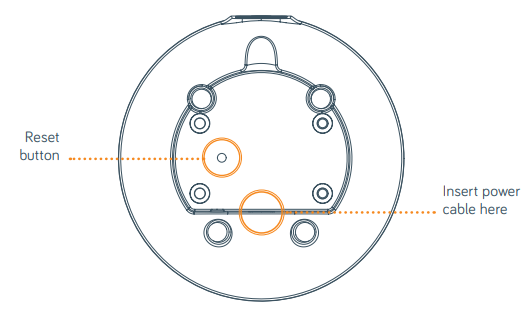
Setup Guide for Hive Hub 360: Quick and Easy Installation
Setting up the Hive Hub 360 is designed to be straightforward and largely wireless:
- Unbox the hub, power supply, and USB cable.
- Plug the hub into a power outlet in a central location within your home for optimal audio and device coverage.
- Download the Hive app on your smartphone or tablet (iOS or Android).
- Follow the in-app instructions to add the Hive Hub 360 to your existing system or create a new one.
- Allow 10 to 15 minutes for the hub to connect and pair with other Hive smart devices over Zigbee.
- Configure audio detection alerts by selecting which sounds (smoke alarms, glass breaking, barking) you want to monitor.
- Set custom Hive Actions and routines, such as scheduled lighting or heating controls.
Troubleshooting tips: If the hub fails to connect, reboot your router and the hub, ensure you’re on a 2.4GHz Wi-Fi network, and check for app updates. Keep the hub away from metal objects or thick walls to avoid interference.
Safety Precautions: Use only the supplied power adapter. Avoid placing the hub near water sources or extreme heat. Do not attempt to open the device.
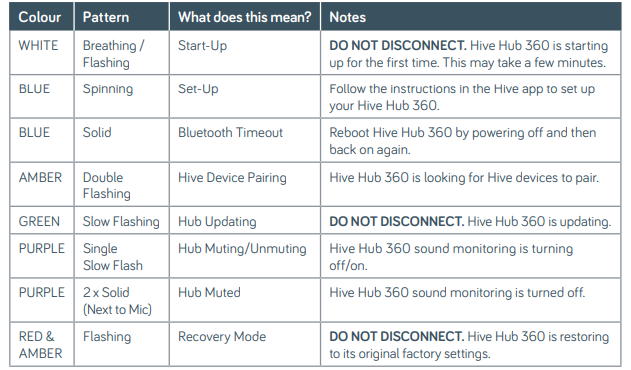
Hive Hub 3 Base view of 60 lights and what they mean:
Remember
For your Hive devices to work correctly,, your Hive Hub 360 must be kept plugged in and
switched on. Must only be used with the power supply and cable provided.
Usage
Your Hive Hub 360 is designed for UK and Ireland household wiring, and for indoor use only. Power supply – Input: 100~240VAC 50/60Hz. Output: 5.0VDC 2.5A. The distance between the user and the device should be no less than 25cm.
Maintenance
Disconnect your Hive Hub 360 before cleaning and keep it away from water and other liquids at all times. The Hive Hub 360 does not contain any serviceable parts, so do not attempt to open it.
Troubleshooting Guide for Hive Hub 360
If the light on the top of your Hive Hub 360 is solid blue, please do the following:
- Power off the device and switch the power back on again.
- Wait until the top of the hub displays a spinning blue light.
- Head to the Hive app – you’re ready to pair the Hive Hub 360 with your mobile device to complete setup.
Note: The USB port on the rear of your Hive Hub 360 is for future upgrades. Please don’t use it to charge devices,s as this may damage your Hive Hub 360.
- Problem: Hub not connecting to Wi-Fi.
Solution: Verify the router is 2.4GHz enabled, restart both the router and the hub, and check the Wi-Fi password. - Problem: Audio alerts not received.
Solution: Confirm audio detection is enabled in the app, adjust microphone sensitivity, and ensure hub placement is central and unobstructed. - Problem: Hive devices are not responding when the internet is down.
Solution: Hub 360’s internal memory supports offline routines; if routines fail, reboot the hub to refresh device links. - Error Codes: Refer to the Hive app for specific error messages; common fixes include reconnecting devices or updating firmware.
- Preventive Measures: Regularly update the Hive app and hub firmware, maintain a stable Wi-Fi network, and monitor hub notifications.
Support & Warranty: Hive Hub 360 includes a standard 2-year warranty. For further assistance, contact Hive customer support via phone or live chat available on their official website.
Pros & Cons of the Hive Hub 360: Balanced Insights
Pros:
- Enhanced Connectivity: Stronger Zigbee network range supports more devices reliably, even outdoors.
- Audio Detection: Unique 360° listening capability for smoke alarms, glass breakage, and barking alerts.
- Offline Functionality: Internal memory ensures routines and automations continue during internet outages.
- Elegant Design: Stylish color options encourage visible placement, improving sensor effectiveness.
- Easy Setup: Wireless installation with intuitive app guidance.
Cons:
- Price Premium: Slightly more expensive than the standard Hive Hub, which may deter budget-conscious buyers.
- Limited Audio Triggers: Currently supports only a few sounds; customization options are limited.
- Internet Dependency: Notifications require internet; limited remote access if broadband is down.
- Reboot Requirement: Occasional connectivity drops may require a manual reboot.
Overall, the Hive Hub 360 offers substantial improvements over alternatives in device management and security features, making it a valuable upgrade for Hive users seeking a smarter and safer home system.
Customer Reviews and Feedback on Hive Hub 360
Users consistently praise the Hive Hub 360 for its robust smart device connectivity and unique audio detection features. Many appreciate its sleek design and ease of installation. Common compliments include receiving timely alerts for smoke alarms and glass breaking, which users find reassuring.
However, some reviews mention occasional Wi-Fi disconnections requiring reboots, and the limited number of sound types detected. Star ratings typically average around 4 out of 5. Customers recommend the Hub 360 for anyone with multiple Hive devices who desires enhanced home monitoring and automation reliability.
Typical recommendations suggest pairing the hub with Hive cameras and sensors for comprehensive home security. Users looking for a central hub with advanced audio monitoring and offline operation find the Hive Hub 360 a worthwhile investment.
Faqs
How do I set up hive Hub 360 for the first time with my Wi-Fi network?
What can I do if my hive Hub 360 is not detecting smoke or carbon monoxide alarms correctly?
What are the key sound detection features of hive Hub 360 and how do they enhance home security?
Can hive Hub 360 work with my existing Hive smart devices and what connectivity does it use?
How does hive Hub 360 perform during internet outages and what happens to my smart home devices?
What maintenance does the hive Hub 360 require to keep it working optimally?
Why does hive Hub 360 require a 2.4GHz Wi-Fi network and is it compatible with 5GHz routers?
How can I optimize hive Hub 360’s placement in my home for better performance?
Tags
More hive manuals
Leave a Comment