
Usage : Hive Sync Energy Wall Charger 2 User Manual
Content
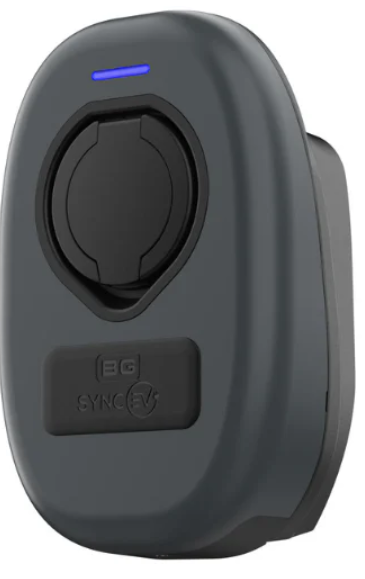
hive Sync Energy Wall Charger 2
Introduction
The Hive Sync Energy Wall Charger 2 is a next-generation electric vehicle (EV) charging solution designed for residential and domestic use. Combining smart technology with robust build quality, it offers fast, safe, and reliable charging, making greener, more cost-effective driving accessible to EV owners. With a power output of 7.4kW, this charger can fully recharge an average EV battery in under 8 hours, ideal for overnight home charging.
Key benefits include dual connectivity via Wi-Fi and 4G networks, ensuring seamless operation even in areas with poor signal, advanced safety features like PEN fault detection and DC leakage protection, and a durable, weather-resistant design. Its compatibility with the Hive app allows users to remotely monitor and control charging sessions, including smart features such as solar energy integration and tariff-based charging.
Targeted at eco-conscious homeowners with electric vehicles, the Sync Energy Wall Charger 2 suits those seeking a reliable, easy-to-install charger that supports smart energy management. Typical use cases include everyday home charging and solar-powered EV charging. The charger is generally priced in the mid-range market, approximately starting from £700 to £900, depending on installation and configuration options. It is widely available through Hive and authorized resellers, often qualifying for government incentives such as the UK’s OZEV grant.
Specifications of Hive Sync Energy Wall Charger 2
- Charging Power: 7.4 kW (32A, single-phase), capable of full charge under 8 hours
- Connectivity: Wi-Fi, 4G, and LAN (Ethernet) for flexible network access
- Cable Options: Available as socketed (Type 2 socket with auto-lock) or tethered (fixed 7.5m Type 2 cable)
- Safety Features: Built-in open PEN fault detection, integrated 30mA Type A RCD + 6mA DC leakage protection
- Load Management: Supports load balancing and power curtailment for optimized energy use
- Dimensions: Socket model – 297mm (H) x 223mm (W) x 121mm (D); Weight approx. 4–5 kg
- Durability: Weatherproof IP55-rated, UV-stabilized polycarbonate housing
- Certifications: CE and UKCA certified, OZEV grant approved
- Warranty: 3-year warranty covering charger and installation
- Additional Features: Compatible with Hive app, supports solar charging, OCPP 1.6 compliance for smart grid integration
Compared to similar 7.4kW home chargers, the Sync Energy Wall Charger 2 stands out with its robust connectivity options (4G + Wi-Fi), enhanced safety protections, and seamless integration with renewable energy sources and smart home systems.
Getting started
Installing your charger:
Your Sync Energy Wall Charger 2 EV charger should only be professionally installed by a fully qualified and accredited installer.
Download the Hive app:
Use Hive’s award-winning app to make the most of your Sync Energy Wall Charger 2. Make use of smart charge features that let you optimise your charger:
- Download the Hive app to your phone or tablet
- Apple App Store
- Google Play
- Log in, or click ‘Create account’ if you don’t already have one
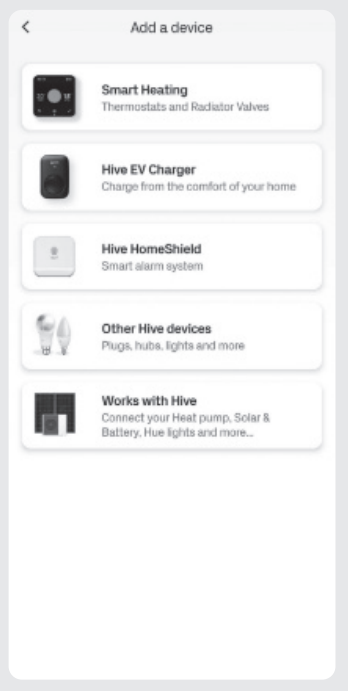
- On the Home screen, tap ‘Add’ then follow the instructions to add your EV charger2 Onboarding your charger
- You can easily set up your Sync Energy Wall Charger 2 in the Hive app. Just follow the prompts onscreen, and before you know it, you’ll be a few taps away from charging your car at home.
- To get started, you’ll need:
- Your Charger ID – found on the device label or in your quick-start guide
- Your Charger PIN – this will be in an email from Hive sent after your device is installed
Getting to know your charger
- Robust and built to last, the Sync makes all the features of Hive charging even more affordable.
- So, greener, cheaper driving could be closer than you think.
- Randomised delay
- In compliance with The Electric Vehicles (Smart Charge Points) Regulations 2021, there will be a random delay of up to 10 minutes before a scheduled charge will start. Charging sessions initiated outside of schedules will not be subject to this randomised delay.
- Using the charger without the app
- Your Sync Energy Wall Charger 2 can be configured to connect to the Hive app via Wi-Fi. Alternatively, it is configured to use its internal SIM mobile signal should Wi-Fi not be available.
- However, if you live in an area with a poor mobile signal and cannot connect the charger to your home Wi-Fi network, your engineer can set up the charger to operate in ‘plug and charge’ mode. That way, you can charge your EV without having to use the Hive app.
- Please note: While the charger can operate offline in ‘plug and charge’ mode, we strongly recommend connecting it to either Wi-Fi or a mobile signal whenever possible. This ensures the charger receives important firmware and security updates, helping maintain optimal performance and safety.
Charger settings
Configure your charger, your way.
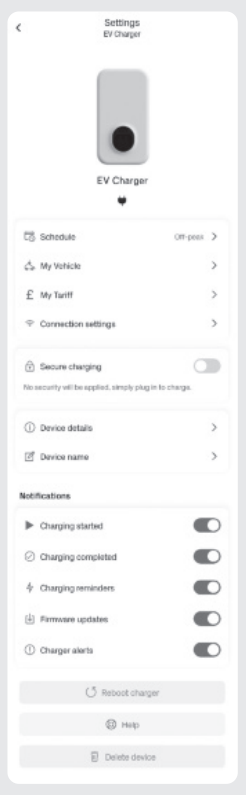
- Your Sync Energy Wall Charger 2 works best with the Hive app. You can set it up how you want on the ‘Settings’ menu, accessible through the cog icon in the top right of the charger control screen.
Charger
- See your charger details, update your charger’s name,e and enable/disable secure charging.
Schedule
- Check or update your Sync Energy Wall Charger 2’s schedule settings. You can configure how and when your charger works.
Tariff
- Link your charging schedule to your energy tariff. If you’ve got a dedicated EV tariff, you can enjoy cheaper overnight charging.
My vehicle
- View or update your EV details. This helps accurately calculate the range added on each charge.
Notifications
- Configure what notifications you want to receive from your Sync Energy Wall Charger 2
Schedules
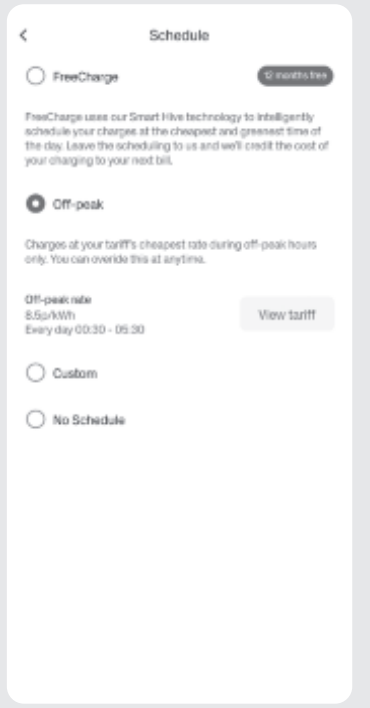
- Optimise your charging to meet your needs.
- A range of schedule configuration options is available on your Sync Energy Wall Charger 2, all easy to set up and change.
Eco
- Link your charging schedule to your energy tariff. If you’ve got a dedicated EV tariff, you can enjoy even cheaper overnight charging.
Custom
- Set your own charging schedule – perfect if you want direct control over when you want your charge sessions to happen.
- No schedule
- Simply plug in and charge. With no defined schedule, you can charge as and when needed.
My vehicle
- View or update your EV details. This helps accurately calculate the range added on each charge.
- Note: If you have enabled secure charging via your charger on the ‘Settings’ page, you’ll receive a notification that you need to approve when plugging in your vehicle so you can start your charge session.
LED lights
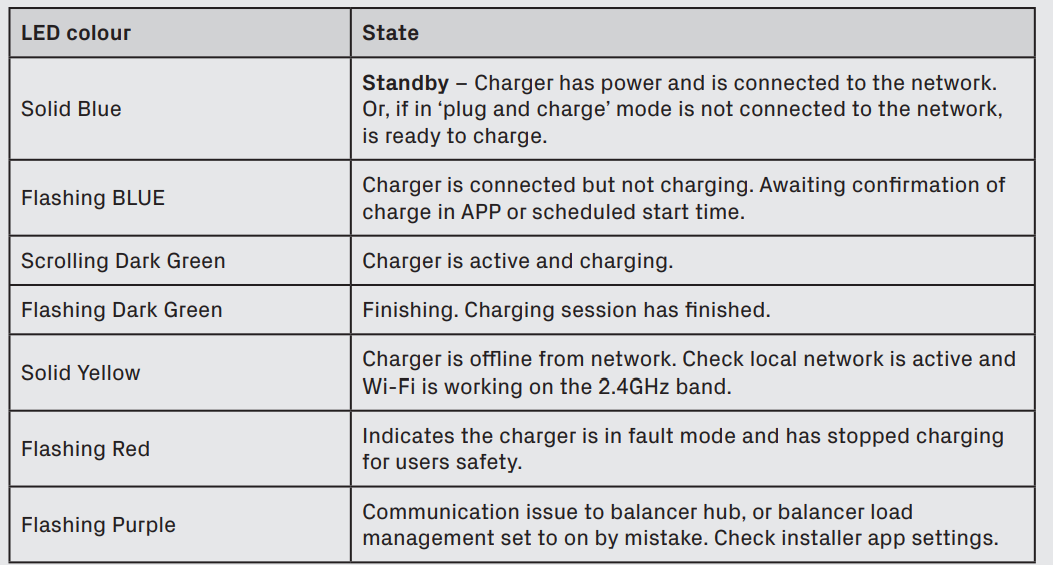
The Sync Energy Wall Charger 2 has an LED light on the front of the device, which will indicate a range of device states.
Potential causes:
- Internal RCD has tripped
- Vehicle fault
- Under or over the suitable charging voltage
- Remove the connection to the vehicle and reset the power to the EV charger.
Troubleshooting Hive Sync Energy Wall Charger 2
- Common Issues:
- Charger not connecting to Wi-Fi/4G – Reset network settings and ensure signal strength is adequate.
- Charging stops unexpectedly – Check for error codes in the Hive app, possibly due to fault protection triggers.
- LED indicator shows fault – Confirm PEN fault detection and RCD status; ensure no ground faults exist in home wiring.
- Error Codes & Fixes: Refer to the user manual for specific error codes; many resolve with a power cycle or network reconnection.
- Preventive Measures: Regularly inspect cables and connectors for wear; keep firmware updated via app; maintain clear access to charger for ventilation.
- Warranty & Support: The charger comes with a 3-year warranty (registration required). For technical support, contact Hive customer service or your certified installer.
- Contact Information: Hive support can be reached via their official website or the customer helpline provided at installation.
Pros & Cons of Hive Sync Energy Wall Charger 2
- Pros:
- Robust 7.4kW charging power suitable for most home EV needs.
- Dual connectivity (Wi-Fi and 4G) ensures reliable remote access.
- Advanced safety features, including PEN fault detection and DC leakage protection.
- Compatible with solar energy and smart tariff integration for cost savings.
- Compact, weather-resistant design with customizable color fascia.
- 3-year warranty with professional installation included.
- Cons:
- Charging speed limited to 7.4kW, slower than some higher-power competitors (e.g., 22kW models).
- Price point may be higher than basic chargers without smart features.
- Requires professional installation, potentially adding the to the overall cost.
- Limited cable length on tethered models (7.5m) may not suit all parking arrangements.
- Overall, the Hive Sync Energy Wall Charger 2 offers excellent value for users prioritizing smart features and safety over ultra-fast charging, standing out against alternatives for residential EV owners.
Customer Reviews for Hive Sync Energy Wall Charger 2
Users commonly praise theHivee Sync Energy Wall Charger 2 for its reliable connectivity and ease of use through the Hive app. Many highlight the robust build quality and the peace of mind provided by enhanced safety features. The ability to integrate solar charging and smart tariff management is often mentioned as a valuable cost-saving benefit.
Some customers report occasional connectivity glitches in areas with weak Wi-Fi but appreciate the fallback 4G option. Complaints mostly focus on the installation costs and limited charging speed compared to commercial-grade chargers. Overall, the product averages a solid 4 out of 5 stars in user ratings, with frequent recommendations for home EV owners seeking a dependable and feature-rich charger.
Faqs
How do I set up the hive Sync Energy Wall Charger 2 for the first time?
What should I do if the hive Sync Energy Wall Charger 2 is not connecting to Wi-Fi or the app?
Can I use the hive Sync Energy Wall Charger 2 with solar panels and smart tariffs?
Is the hive Sync Energy Wall Charger 2 compatible with all electric vehicles?
How does the load management feature work on the hive Sync Energy Wall Charger 2?
What safety features does the hive Sync Energy Wall Charger 2 include?
How often should I maintain the hive Sync Energy Wall Charger 2?
Can I schedule charging sessions remotely using the hive Sync Energy Wall Charger 2?
Tags
More hive manuals
Leave a Comment