
Setup & Pairing: Hive View Smart Indoor Camera User Manual
Content
Hive View Smart Indoor Camera
Introduction
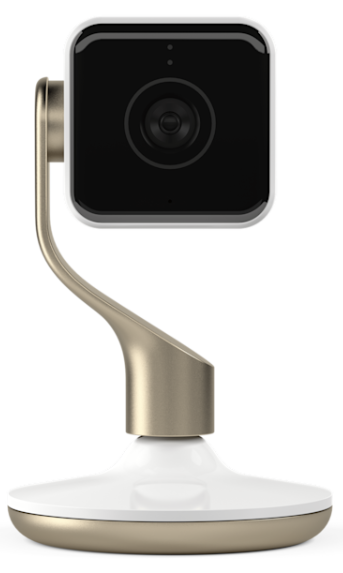
The Hive View Smart Indoor Camera is a sophisticated home security solution designed to keep your living space safe and connected. Featuring full 1080p HD video streaming, this smart camera delivers crisp and clear visuals both day and night. Its wide 130° lens ensures a broad viewing angle, while the 8x digital zoom allows you to focus on important details remotely. The camera supports two-way audio, enabling users to communicate directly with family members, pets, or visitors through a smartphone or tablet, making it ideal for busy homeowners, pet owners, and families seeking peace of mind.
Equipped with advanced motion, person, and sound detection, the camera instantly records and sends notifications to your mobile devices and even your Apple Watch. Its sleek design and wireless setup make it easy to position anywhere indoors. Targeted at tech-savvy users and security-conscious individuals, the Hive View Smart Indoor Camera suits a variety of use cases, from monitoring children and elderly relatives to deterring intruders. Available through select retailers and online platforms, the camera typically ranges between $100 and $150, offering premium features at an accessible price point.
Specifications
- Video Quality: Full HD 1080p live streaming with crisp, clear visuals
- Lens and Field of View: Wide-angle 130° lens with up to 8x digital zoom
- Night Vision: Infrared automatic night vision up to 16 feet
- Two-Way Audio: Built-in microphone and speaker for real-time communication
- Detection Features: Motion, person, and sound detection with customizable alerts
- Notification System: Instant push notifications to smartphones, tablets, and Apple Watch
- Video Storage: Cloud-based recording with 24-hour free history, optional subscription for extended storage
- Design: Compact wireless design with a stable base and an adjustable camera head
- Connectivity: Wi-Fi enabled, easy setup via Hive app with Bluetooth support
- Performance Benchmark: Reliable low-latency feed with minimal motion strobing and clear audio capture
Compared to similar indoor cameras like Nest Cam and Arlo Q, the Hive View offers competitive features such as person detection and comprehensive app notifications, with the added benefit of seamless integration with other Hive smart home devices.
Install your Hive View
Start by downloading the Hive app:

- If you are new to Hive, log into your Hive app, tap Camera, and follow the on-screen instructions to install.
- If you already have other Hive products, log in to the app, tap Menu, then Install Device, es and follow the on-screen instructions.
Tips for installing the camera:
- Your Hive View uses Bluetooth® to connect to your smartphone or tablet during installation and will need to maintain this connection throughout.
- Keep your smartphone or tablet within 1- 2 metres (3-6 feet) of the camera during installation.
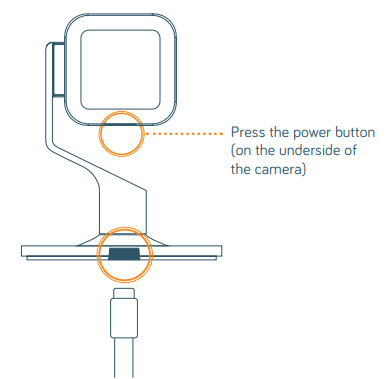
- If the camera doesn’t turn on once plugged in, turn it on by holding the power button for 2-3 seconds. The light ring on the camera will glow white to let you know it’s powering on.
Choose a location
- Now you need to find a place that has a good view of the area you want to monitor. Make sure it’s near enough to a power socket and your broadband router to stay connected to Wi-Fi®.
- You can attach your camera to a metal surface using the magnet in the bottom of the base or mount it to another surface using the screws and base plate provided. Or you can place the camera on a table or shelf.
- Your camera can detect activity up to 7m (23 ft) away and has a 130° wide-angle field of view.
- Please be sensible and thoughtful in terms of where you place cameras, and respect your neighbours’ privacy.
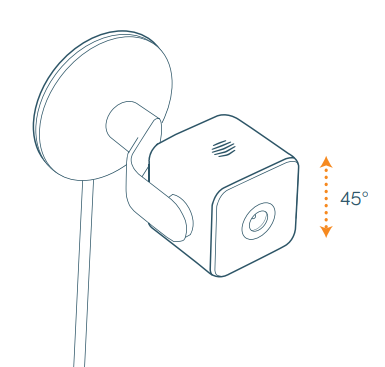
- For optimum performance, do not choose a position that requires the camera to be tilted off centre by more than 45° up or down.
Fix it in place (only if mounting)
- Check the live stream and Wi-Fi signal in the app before fixing it in place. The Wi-Fi signal can be found under Settings. This is to ensure you have the desired field of view and Wi-Fi signal strength.
- If the live stream appears upside down, you can rotate the camera’s view 180° in the app under Settings.
When mounting the camera:
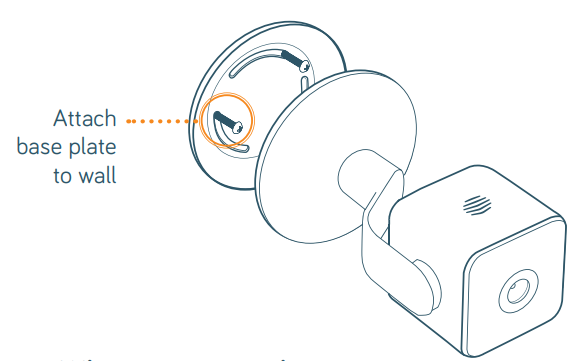
- Take the base plate from the box and use it to mark out where the screws will need to go on the surface where you are mounting it.
- Drill holes where you have marked and insert the wall plugs (anchors) from the box into the holes.
- Take the screws from the box and screw in the base plate, taking note of which way the recess for the power cable is facing.
- Attach the camera to the base plate. The magnet at the bottom of the base will secure it in place.
Troubleshooting Common Issues with Hive View Smart Indoor Camera
- Camera Not Connecting to Wi-Fi: Ensure Bluetooth is enabled during setup, verify Wi-Fi password, and restart the router and camera. Reinstall the Hive app if needed.
- No Live Feed or Black Screen: Check power supply and USB connection. Confirm the camera is within Wi-Fi range and reset the camera if the issue persists.
- Delayed or Missing Notifications: Verify notification settings in the Hive app and device permissions. Disable battery saver modes that may limit background activity.
- Audio Not Working: Check microphone and speaker permissions on your device. Test two-way audio in the app and ensure firmware is up to date.
- Error Codes: Most errors are resolved through app-guided resets; persistent errors may require contacting Hive support.
- Preventive Measures: Keep firmware and app updated, maintain a strong Wi-Fi signal, and charge the camera regularly if using battery power.
The Hive View Smart Indoor Camera includes a limited warranty covering manufacturing defects. For additional support, users can contact Hive customer service via their official website or app support channels.
Pros & Cons of the Hive View Smart Indoor Camera
- Pros:
- High-quality 1080p HD video with clear day/night visuals
- Wide 130° viewing angle and 8x digital zoom for detailed monitoring
- Effective motion, person, and sound detection with instant alerts
- Two-way audio enhances interaction with family and pets remotely
- Easy setup using the intuitive Hive app with Bluetooth and Wi-Fi
- Cloud storage option extends video history beyond the free 24-hour window
- Cons:
- Limited free video storage (24 hours only) without a subscription
- Some users report frequent notifications, which may require manual adjustment
- No local storage option; entirely dependent on cloud backup
- Not 4K resolution, which some competitors now offer
Overall, the Hive View Smart Indoor Camera offers strong value for money, particularly for users invested in the Hive ecosystem. Its feature set competes well with alternatives like Nest and Arlo, but falls slightly short in local storage and ultra-high video resolution.
Customer Reviews and Feedback on Hive View Smart Indoor Camera
Users of the Hive View Smart Indoor Camera typically rate the product positively, with many praising its reliable 1080p video quality and ease of use through the Hive app. Common highlights include the effective person detection and the convenience of two-way audio for interacting with pets and family members remotely. The wide-angle lens and night vision capabilities receive consistent commendations for home monitoring.
On the downside, some users express frustration over the notification frequency, which can be excessive unless manually tuned in the app. The limited free storage period of 24 hours is another frequently mentioned issue, encouraging some buyers to subscribe to the cloud service for longer video retention. Star ratings generally range from 4 to 4.5 out of 5 stars, with recommendations often noting the camera as a solid choice for indoor smart home security that balances performance and affordability.
Faqs
How do I set up my Hive View Smart Indoor Camera for the first time?
What should I do if my Hive View Smart Indoor Camera is not connecting to the app?
How do I mount my Hive View Smart Indoor Camera for optimal indoor placement?
Can I use the Hive View Smart Indoor Camera with smart home assistants like Amazon Alexa?
How does the Hive View Smart Indoor Camera notify me of activity?
What should I do if my Hive View Smart Indoor Camera stops working unexpectedly?
How can I optimize the battery life and performance of my Hive View Smart Indoor Camera?
Is the Hive View Smart Indoor Camera suitable for use as a security system or baby monitor?
Tags
More hive manuals
Leave a Comment