
Setup: Honeywell Home Prestige® Touch Screen Thermostat User Manual
Content
Honeywell Home Prestige® Touch Screen Thermostat: Complete Product Manual and Guide
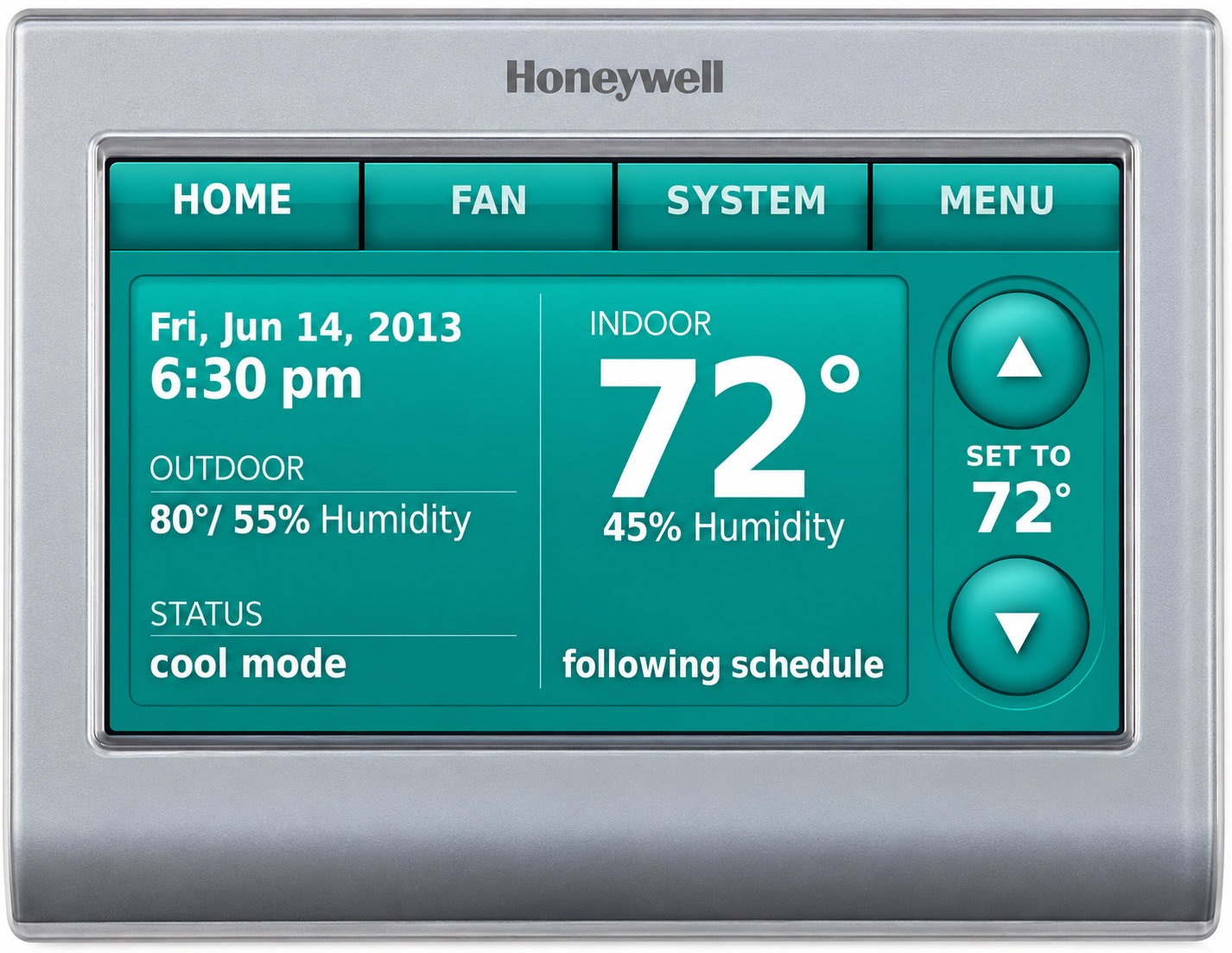
Introduction to Honeywell Home Prestige® Touch Screen Thermostat
The Honeywell Home Prestige® Touch Screen Thermostat revolutionizes home climate control with its high-definition color touchscreen and advanced RedLINK® technology. This ENERGY STAR® certified smart thermostat offers effortless 7-day programming for temperature, humidification, dehumidification, and ventilation, ensuring whole-home comfort. Its intuitive interface asks simple questions to auto-program itself, eliminating complex setups. Key benefits include adaptive intelligent recovery that learns your system's response time for precise comfort, remote control via app, and compatibility with complex HVAC systems like heat pumps and dual-fuel setups.
Ideal for homeowners, light commercial users, and tech-savvy families seeking energy-efficient solutions, the honeywell home Prestige® Touch Screen Thermostat suits modern homes with multi-zone needs or variable-speed fans. Unique selling points are its 2-wire installation simplicity, wireless expansion up to 32 zones, and robust features like discharge air temperature staging. Available exclusively through professional HVAC partners like Chaves HVAC or Resideo Pros, it ensures expert installation. Estimated price range is $250-$400 for basic kits (e.g., THX9421R5021WW), with premium bundles like YTHX9421R5127WW including Internet Gateway around $400-$500. Perfect for optimizing HVAC performance, reducing energy bills, and enhancing indoor air quality (IAQ), this thermostat delivers premium control for everyday luxury.
Honeywell Home Prestige® Touch Screen Thermostat Specifications and Features
The Honeywell Home Prestige® Touch Screen Thermostat boasts cutting-edge specs for superior performance in residential and light commercial applications. Here's a detailed breakdown:
- Display and Controls: High-definition full-color touchscreen; intuitive interface for scheduling, humidity viewing, and installer contacts
- Programming: 7-day programmable with Smart Schedule; adaptive intelligent recovery learns system timing
- Stages and Compatibility: Up to 4 Heat/2 Cool (heat pumps), 3 Heat/2 Cool conventional; supports dual-fuel, variable-speed fans, and up to 32 zones with add-ons
- Power and Installation: 2-wire with Equipment Interface Module (EIM); 18-30V, battery or hardwired; dimensions 4.63" x 4.94" x 1.13" (thermostat)
- Sensors and Connectivity: Includes return/discharge air sensors, outdoor sensor compatibility; RedLINK® wireless for remote app control; USB for setup transfer
- Performance Metrics: Operating range 32°F-120°F; ENERGY STAR® certified for energy savings; 5-year warranty
- Additional Capabilities: Ventilation control, 3 assignable outputs, fan cycling/continuous modes
Compared to competitors like basic Nest or Ecobee models, it excels in IAQ management and pro-grade staging without needing full rewiring, offering better value for advanced systems.
Setup Guide
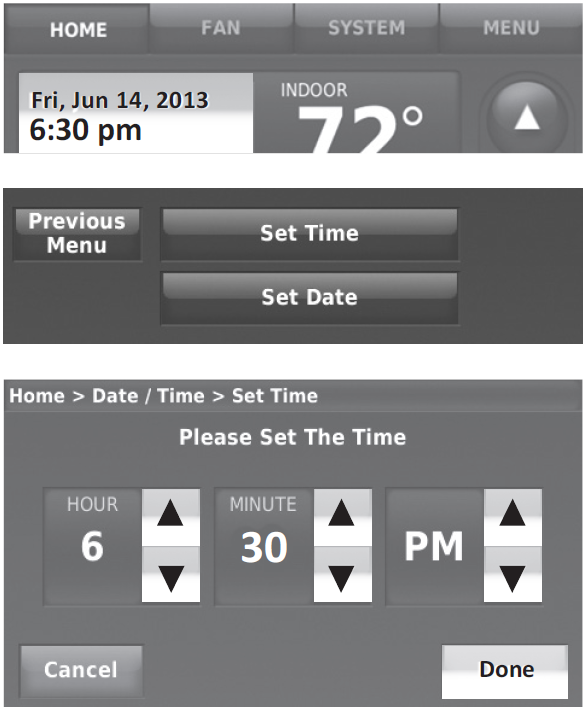
Setting the Time/Date
- Touch the current time. The screen displays Set Time/Set Date.
- Touch Set Time or Set Date.
- Touch ▲ or ▼ until the correct time or date is displayed.
- Touch Done to save or Cancel to ignore changes.
Setting the Fan
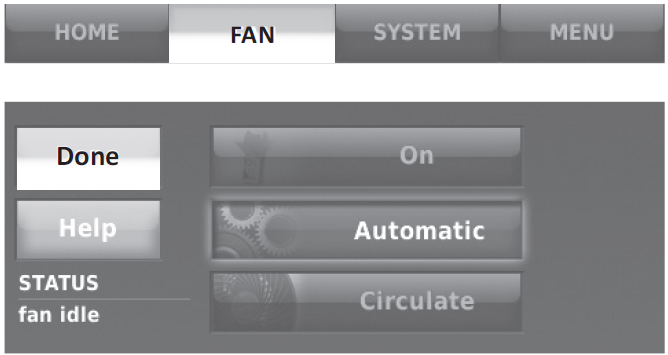
- Touch FAN to display fan settings.
- Touch On, Automatic, Circulate, or Follow Schedule.
- Touch Done to save and exit.
- On: Fan is always on.
- Automatic: Fan runs only when the heating or cooling system is on.
- Circulate: Fan runs randomly about 35% of the time (residential use only).
- Follow Schedule: Fan is controlled by the programmed schedule.
Setting System Mode
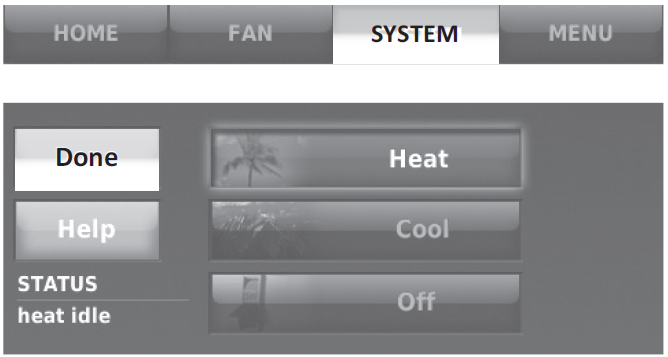
- Touch SYSTEM to display system settings.
- Touch the desired option:
- Heat: Thermostat controls only the heating system.
- Cool: Thermostat controls only the cooling system.
- Off: Heating and cooling systems are off.
- Automatic: Thermostat selects heating or cooling as needed, depending on the indoor temperature.
- Emergency Heat (heat pumps with auxiliary heat): Controls auxiliary or emergency heat. The compressor is locked out.
- Touch Done to save and exit.
Preset energy-saving schedules
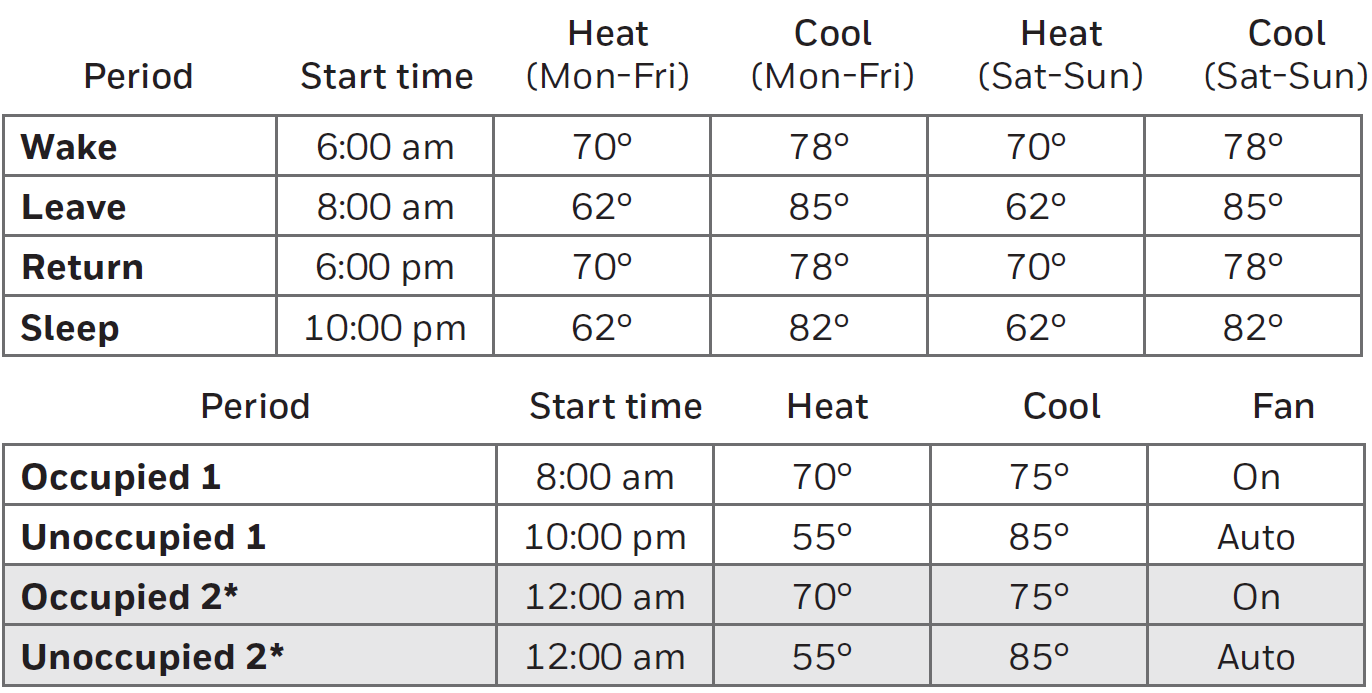
Adjusting Program Schedules
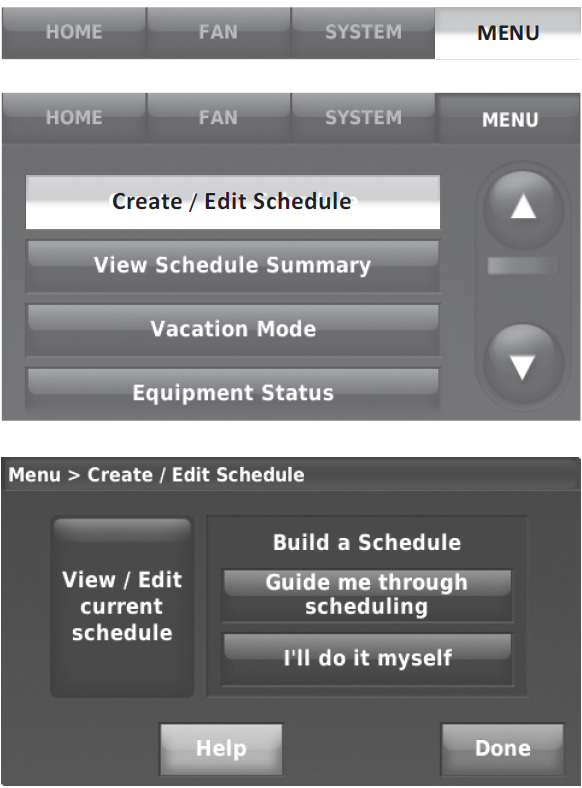
- Touch MENU.
- Select Create/Edit Schedule.
- Touch Guide Me to create a schedule by answering simple questions.
- Touch I'll do it myself to manually create a program schedule.
- Touch View/Edit to view the full schedule and make a quick adjustment.
- Select the days to schedule, then touch Next.
- Touch Wake to set your Wake time for the selected day(s).
- Touch ▲ or ▼ to set Heat and Cool temperatures for the Wake period, then touch Done.
- Touch other time periods (Leave, Return, Sleep) to set the time and temperatures for each.
- Touch Done to save and exit.
Viewing Equipment Status
- Touch MENU.
- Select Equipment Status.
- Touch ▲ or ▼ to view the status of all the equipment your thermostat is controlling.
Depending on how your thermostat was installed, the Equipment Status screen can report data about the following systems:
- Heating and cooling
- Fan
- Humidification
- Dehumidification
- Ventilation
- Maintenance reminders
- Thermostat information
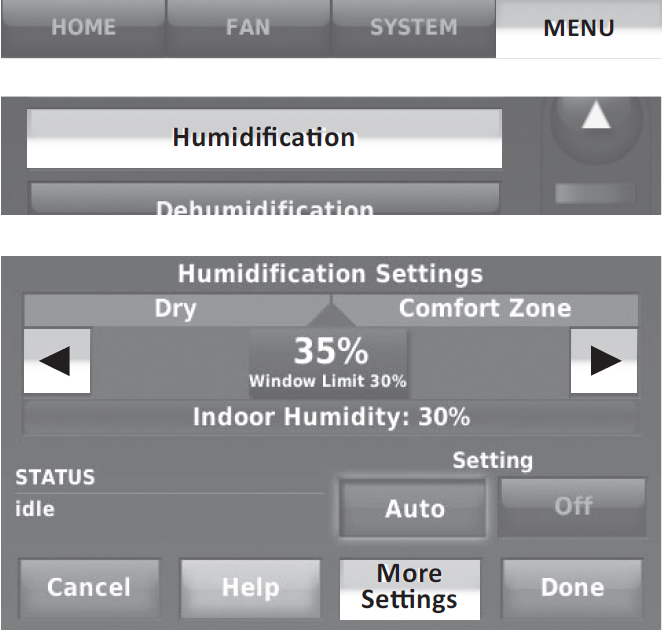
Adjusting Humidification Settings
- Touch MENU and select Humidification.
- Select Auto.
- Move the slider bar to select the humidity level.
- Touch More Settings if frost or condensation appears on the windows. Use a lower number to prevent frost or condensation. Use a higher number if indoor air is too dry.
Window Protection limits the amount of humidity to prevent frost or condensation on windows.
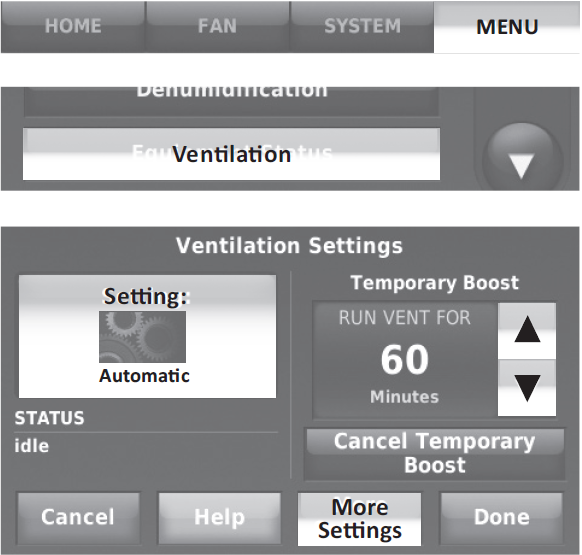
Adjusting Ventilation Settings
- Touch MENU and select Ventilation.
- Touch Setting, then select:
- Auto: Ventilation runs as programmed by the installer.
- Off: Ventilation remains off unless turned on using the timer.
- On: Ventilation is always on.
- Touch ▲ or ▼ to run ventilation temporarily. To turn it off, set it to zero.
- Touch More Settings to set maintenance reminders and lockouts. Select Yes to prevent ventilation from running during the Sleep or Unoccupied (commercial) program periods or when outdoor conditions exceed values set by the installer.
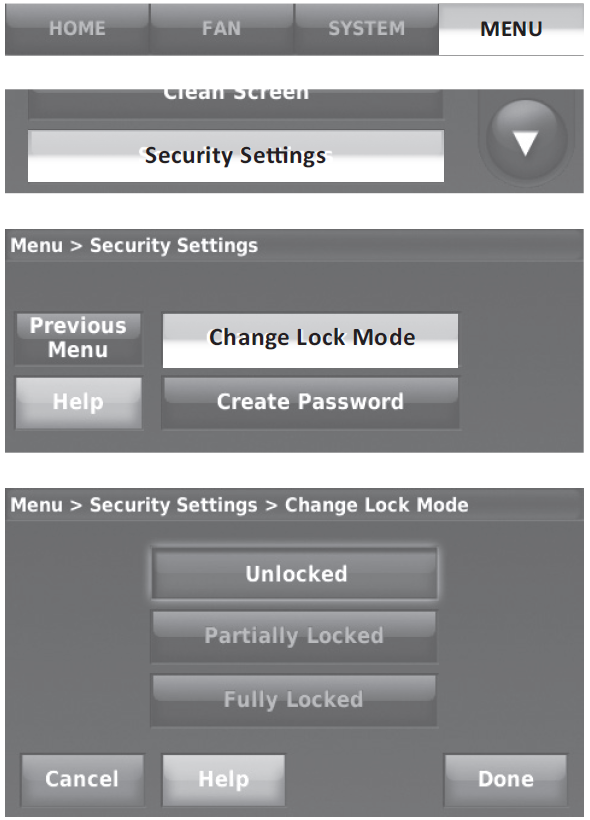
Adjusting Security Settings
You can adjust security options to prevent unauthorized changes to system settings.
- Touch MENU and select Security Settings.
- Select Change Lock Mode.
- Select an option and follow the prompts:
- Unlocked: Full access allowed.
- Partially Locked: Only temperature can be changed.
- Fully Locked: No access allowed.
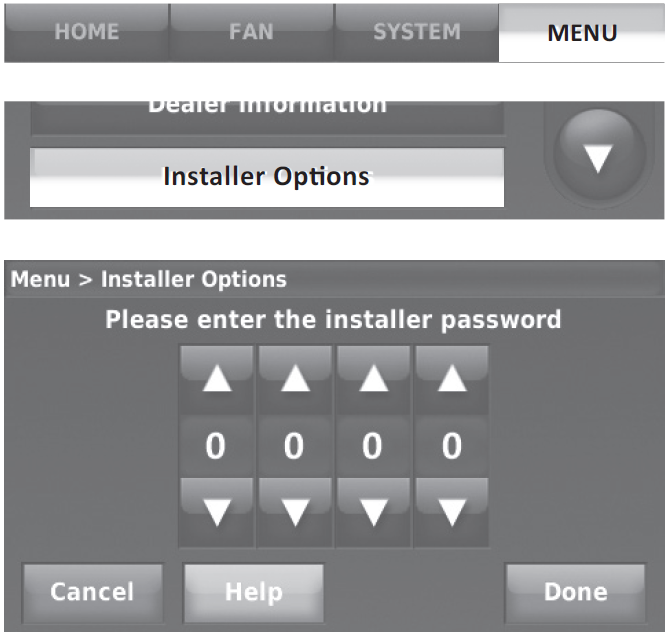
Installer Options
Installer Options require a password and should only be changed by a qualified technician. To prevent unintended changes or damage to your equipment, do not change these options yourself.
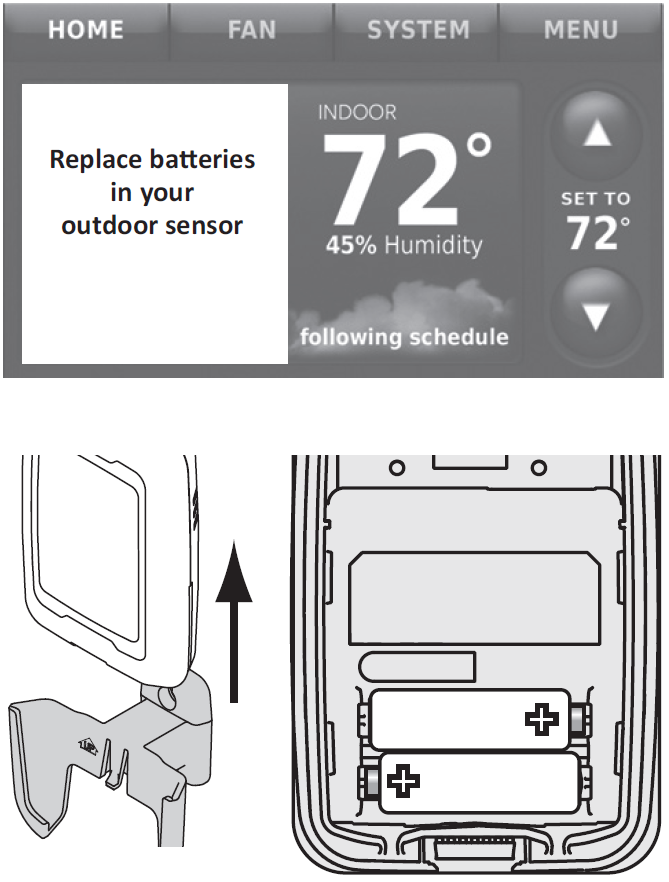
Replacing Outdoor Sensor Batteries
Replace batteries in your outdoor sensor when a warning appears on the thermostat screen, about 60 days before the batteries are depleted. To replace the batteries:
- Remove the sensor from the bracket.
- Detach the cover.
- Insert two fresh AA lithium batteries.
- Replace the cover and set the sensor back into the bracket.
Troubleshooting
If you have difficulty with your thermostat, try these suggestions. Most problems can be corrected quickly and easily.
Screen Is Blank
- Check the circuit breaker and reset if necessary.
- Make sure the power switch at the heating and cooling system is on.
- Make sure the furnace door is closed securely.
Screen Is Difficult to Read
- Change screen brightness using the Preferences menu.
- At 2 a.m. each day, Prestige thermostats change screen colors for an hour to prevent burn-in. Touch the screen at any time to restore the preset screen colors.
Heating or Cooling System Does Not Respond
- Touch SYSTEM to set the system to Heat. Make sure the temperature is set higher than the inside temperature.
- Touch SYSTEM to set the system to Cool. Make sure the temperature is set lower than the inside temperature.
- Check the circuit breaker and reset if necessary.
- Make sure the power switch at the heating and cooling system is on.
- Make sure the furnace door is closed securely.
- If "Waiting For Equipment" is displayed, the compressor protection timer is on. Wait 5 minutes for the system to restart safely without damaging the compressor.
Pros and Cons of Honeywell Home Prestige® Touch Screen Thermostat
Pros
- Exceptional ease of use with auto-programming and vibrant touchscreen, ideal for non-tech users
- Advanced IAQ control (humidity, ventilation) outperforms standard smart thermostats like Honeywell's RTH9585WF
- RedLINK® enables reliable wireless zoning and remote access, saving up to 20% on energy via adaptive recovery
- Professional-grade durability with 5-year warranty and robust terminals; great value at $250-$500
- ENERGY STAR® efficiency and multi-stage support for precise comfort in large homes
Cons
- Requires professional installation through HVAC pros, adding $100-$200 to costs
- 2-wire setup needs EIM, not DIY-friendly like plug-and-play Wi-Fi alternatives
- Higher upfront price than basic models (e.g., vs. $150 Honeywell Wi-Fi thermostats)
- App-dependent for full remote features; occasional connectivity glitches reported in complex setups
- Limited direct retail availability, relying on pros for purchase and support
Overall, it offers superior value for complex HVAC needs compared to consumer-grade options.
Customer Reviews and Feedback on Honeywell Home Prestige® Touch Screen Thermostat
Users rave about the honeywell home Prestige® Touch Screen Thermostat, averaging 4.7/5 stars across HVAC retailer sites. Praises include "crystal-clear touchscreen and effortless programming—saved us 15% on bills!" from a Chaves HVAC reviewer, and "perfect IAQ control for allergy sufferers" on eComfort. Common pros: reliable RedLINK® remote access and adaptive scheduling. Testimonials highlight pro installation value: "Worth every penny for even heating in our 4,000 sq ft home."
Complaints focus on setup: "Needed HVAC pro; not for DIY" (4/5 stars), and rare Wi-Fi glitches. Frequently mentioned issues like initial EIM wiring are resolved via installer support. 90% recommend for smart home upgrades, especially over basic models. Addressed fixes include firmware updates for stability.
Faqs
How do I set up the Honeywell Home Prestige® Touch Screen Thermostat for the first time including EIM connection?
How do I create a heating and cooling schedule on Honeywell Home Prestige® Touch Screen Thermostat?
What should I do if Honeywell Home Prestige® Touch Screen Thermostat won't connect to the EIM?
How do I troubleshoot Honeywell Home Prestige® Touch Screen Thermostat not responding to touch?
Can Honeywell Home Prestige® Touch Screen Thermostat work with existing HVAC systems and what wiring is needed?
How do I adjust humidity settings on Honeywell Home Prestige® Touch Screen Thermostat for optimal comfort?
How do I optimize energy savings with Honeywell Home Prestige® Touch Screen Thermostat features?
What maintenance is required for Honeywell Home Prestige® Touch Screen Thermostat long-term reliability?
More honeywell home manuals
- Setup: Honeywell Home Smart Thermostat 9000 Color Touchscreen TH9320WF User Manual
- Setup: Honeywell Home RTH9580 Smart Colour Touchscreen Programmable Thermostat User Manual
- Setup: Honeywell Home Round™ Smart Thermostat TH8732WFH5004 User Manual
- Setup: Honeywell Home X1N Non-Programmable Thermostat RTH11B/RTHC11B User Manual
- Setup: Honeywell Home ElitePRO S1100 Smart Thermostat User Manual
- Setup: Honeywell Home RTH6500WF Smart Series Programmable Thermostat User Manual
Leave a Comment