
Setup: Honeywell Home RTH6500WF Smart Series Programmable Thermostat User Manual
Content
Honeywell Home RTH6500WF Smart Series Programmable Thermostat: Complete Product Manual & Guide
Introduction to the Honeywell Home RTH6500WF Smart Thermostat
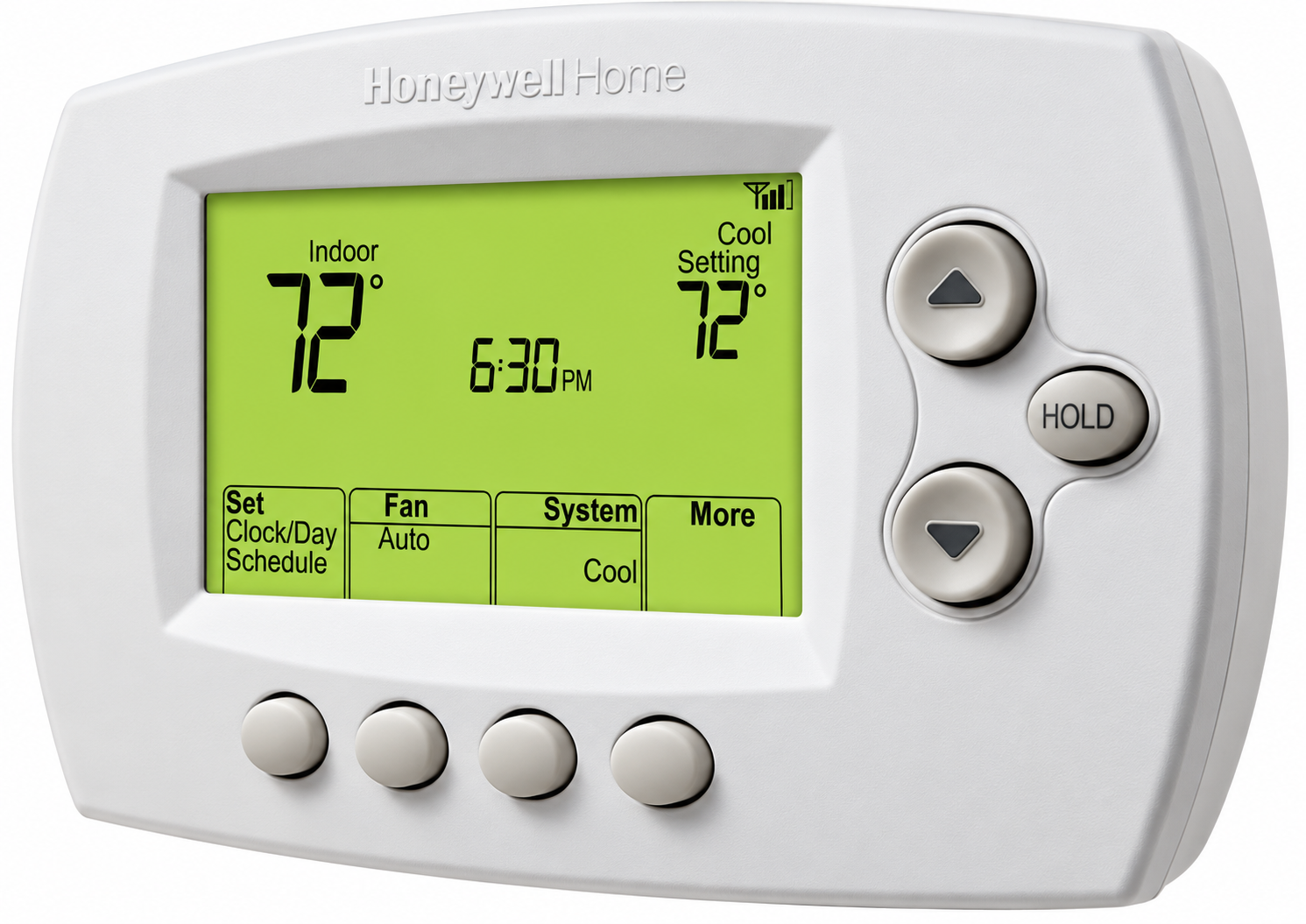
The Honeywell Home RTH6500WF Smart Series Programmable Thermostat represents a significant advancement in home climate control technology, combining intuitive programming with intelligent automation to optimize your home's heating and cooling efficiency. This WiFi-enabled thermostat allows homeowners to monitor and control their HVAC systems remotely while enjoying substantial energy savings through intelligent temperature management.
The RTH6500WF Smart Series Programmable Thermostat is designed for homeowners seeking a balance between affordability and advanced functionality. Whether you're managing a single-family residence, a multi-zone heating system, or a heat pump installation, this smart thermostat adapts to your specific climate control needs. The device features Smart Response Technology, which learns your heating and cooling patterns to automatically adjust system startup times, ensuring your home reaches the desired temperature exactly when you need it.
Key benefits include remote access through internet connectivity, automatic temperature scheduling for four daily periods, compatibility with major voice assistants including Alexa and Google Assistant, and compressor protection to extend your HVAC system's lifespan. The thermostat typically retails between $100-$150, making it an accessible option for homeowners looking to upgrade from manual or basic programmable models. Available through major retailers including Home Depot and the Honeywell Store, the RTH6500WF offers excellent value for those prioritizing energy efficiency and smart home integration without premium pricing.
In the box
- Thermostat
- Wallplate (attached to thermostat)
- Screws and anchors
- Quick Start Guide
- Thermostat ID Card
- Wire labels
- User Guide
- Quick Reference Card
Technical Specifications and Features
The Honeywell Home RTH6500WF Smart Series Programmable Thermostat delivers comprehensive technical capabilities designed for modern HVAC systems:
- Programming Capacity: 7-day scheduling with four customizable time periods (Wake, Leave, Return, Sleep)
- Temperature Control: Fahrenheit and Celsius display options with precise digital readout
- Smart Response Technology: Learns system response time to reach setpoint temperatures and begins heating/cooling early for optimal comfort
- Connectivity: WiFi-enabled with email alerts, automatic firmware upgrades, and remote access via smartphone or web portal
- System Compatibility: Supports multiple HVAC configurations including heat only, cool only, heat pump with auxiliary heating, and multi-stage heating/cooling systems
- Auto Changeover: Automatic switching between heating and cooling modes with mandatory 1.5°F differential for system stability
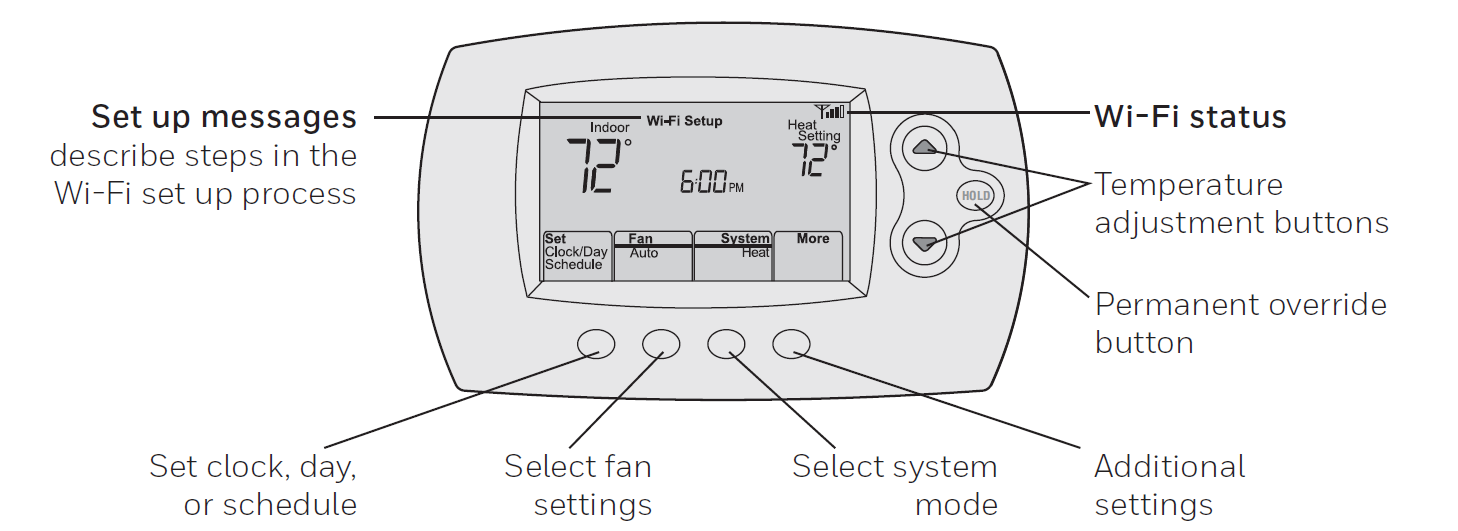
- Display Features: Digital backlit display showing current temperature, setpoint, and system status
- Default Energy-Saving Settings: Pre-configured temperature schedules (Heat: 70°F wake/return, 62°F leave/sleep; Cool: 78°F wake/return, 85°F leave, 82°F sleep)
- Voice Assistant Integration: Compatible with Alexa, Google Assistant, and Microsoft Cortana
- Protective Features: Compressor protection and heat/cool auto changeover to prevent system damage
Setting up your thermostat
Setting up your programmable thermostat is easy. It is preprogrammed and ready to go as soon as it is installed and registered.
- Install your thermostat.
- Connect your home Wi-Fi network.
- Register online for remote access.
Installing your thermostat
You might need the following tools to install this thermostat:
- No. 2 Phillips screwdriver
- Small pocket screwdriver
- Pencil
- Level (optional)
- Drill and bits (3/16" for drywall, 7/32" for plaster) (optional)
- Hammer (optional)
- Electrical tape (optional)
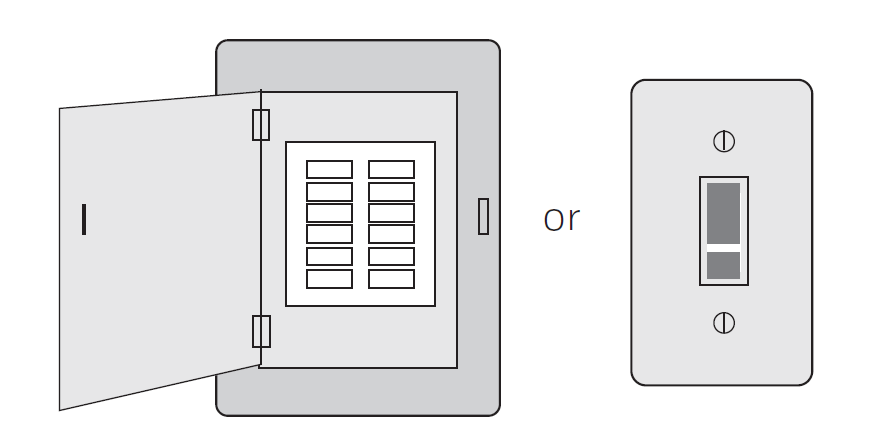
Switch OFF power to your heating/cooling system.
Remove the old thermostat faceplate and leave the wires connected.
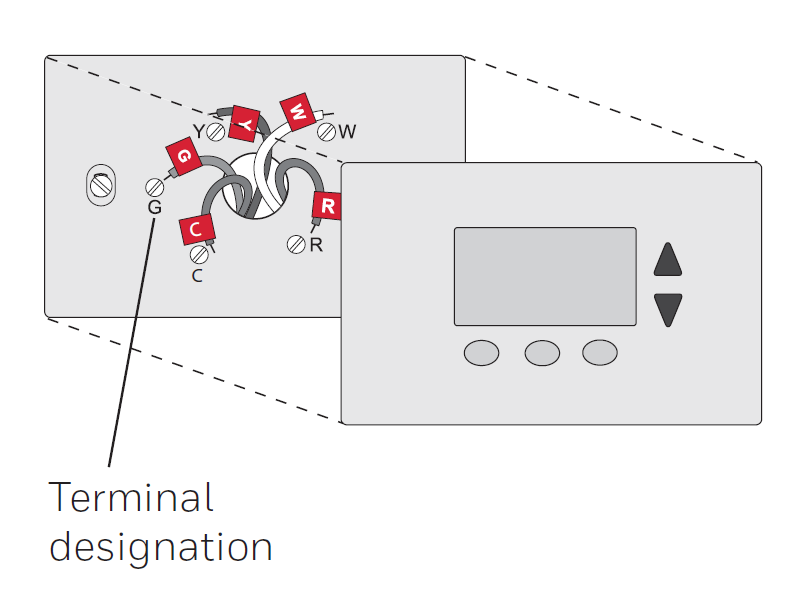
Label wires.
Do not label by wire color. Use the supplied sticky tags to label each wire as you disconnect it. Label wires according to the old thermostat terminal designations, not by wire color.
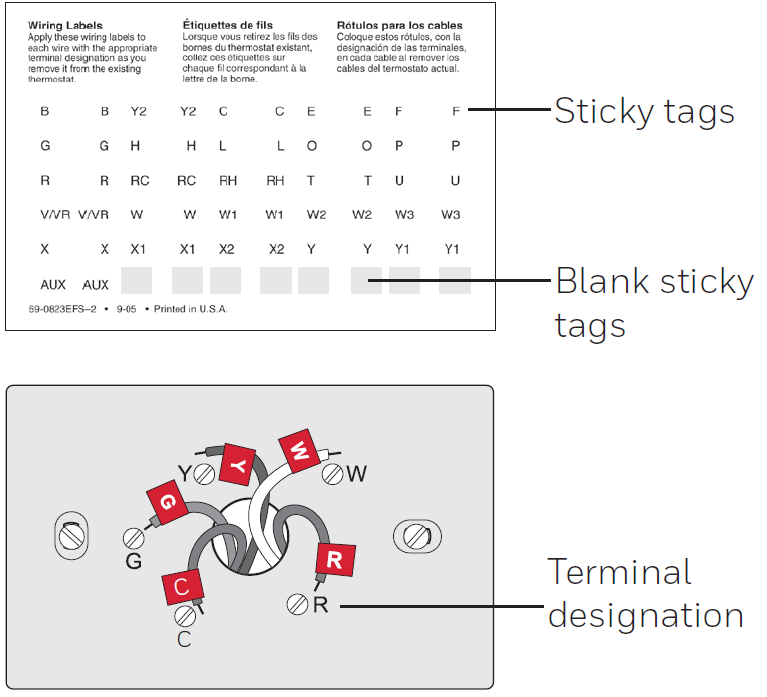
Remove wallplate.
Remove the old wallplate from the wall after all wires have been labeled and disconnected.
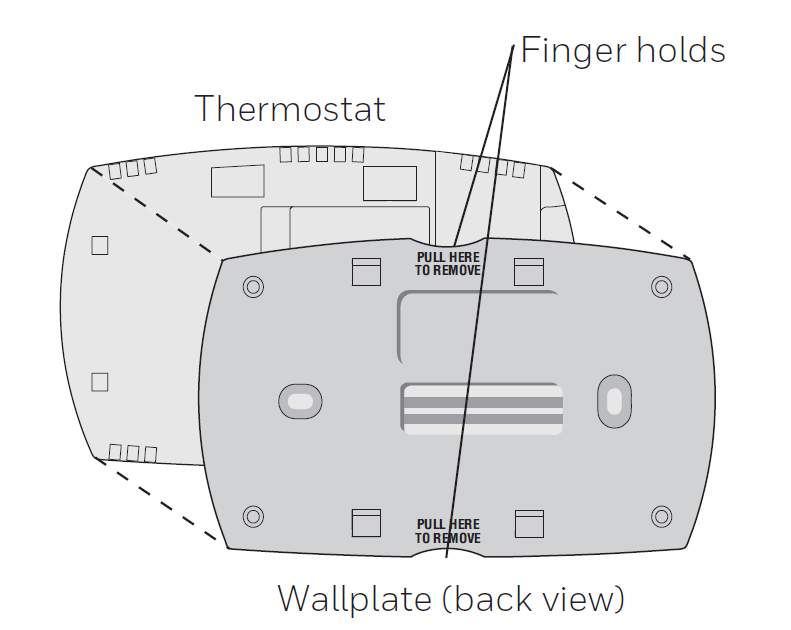
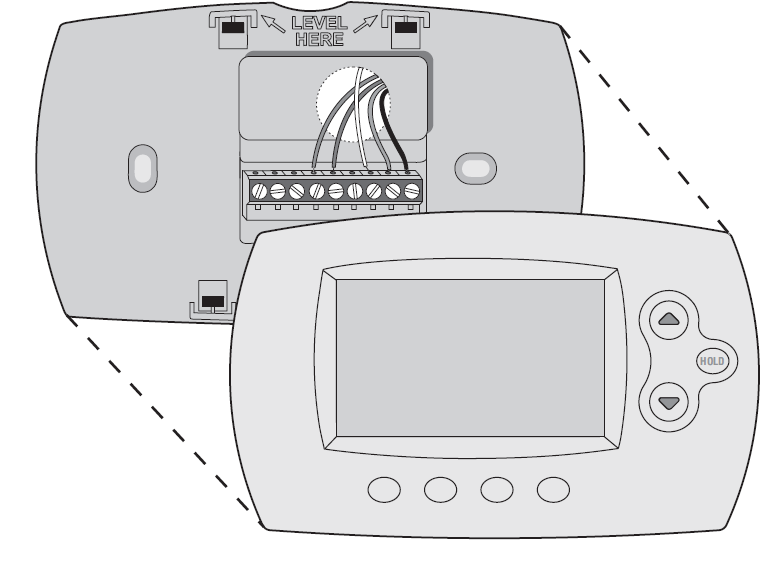
Separate the thermostat and its wallplate.
On your new thermostat, grasp the finger holds on the top and bottom of the wallplate with one hand and the thermostat (front) with the other hand. Pull the pieces apart.
Mount the wallplate for the thermostat.
Mount your new wallplate using the screws and anchors included with the thermostat.
If necessary:
- Drill 3/16-in holes for drywall.
- Drill 7/32-in holes for plaster.
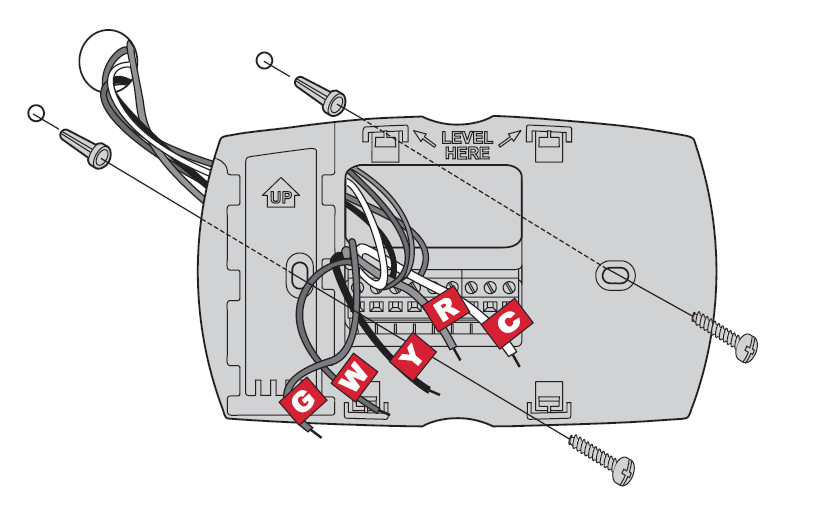
Wiring (conventional system)
Wire the thermostat to your conventional system:
- Starting with the C wire, match the sticky tag on the wire to the terminal labels. You must have a C wire.
- Loosen the screw, insert the wire on the inside edge of the terminal, then tighten the screw.
- Verify the wire is firmly secured by gently pulling on the wire.
- Repeat steps a–c for all other wires.
- Push any excess wire back into the wall opening after all wires are installed.
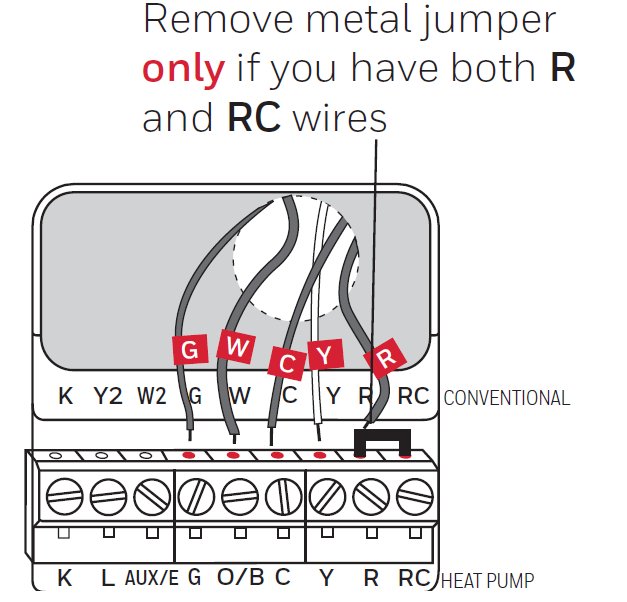
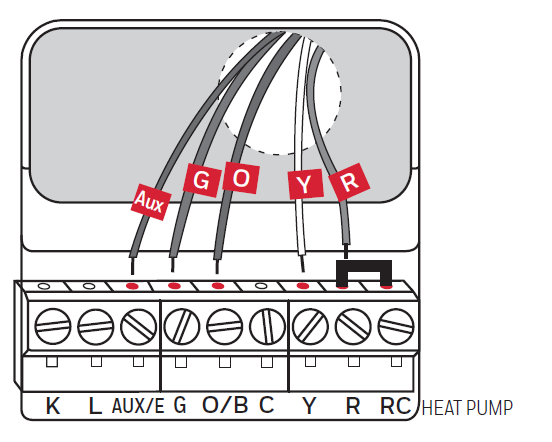
Wiring (heat pump system only)
Wire the thermostat to your heat pump:
- Starting with the C wire, match the sticky tag on the wire to the terminal labels.
You must have a C wire.
- Loosen the screw, insert the wire on the inside edge of the terminal, then tighten the screw.
- Verify the wire is firmly secured by gently pulling on the wire.
- Repeat steps a–c for all other wires.
- Push any excess wire back into the wall opening after all wires are installed.
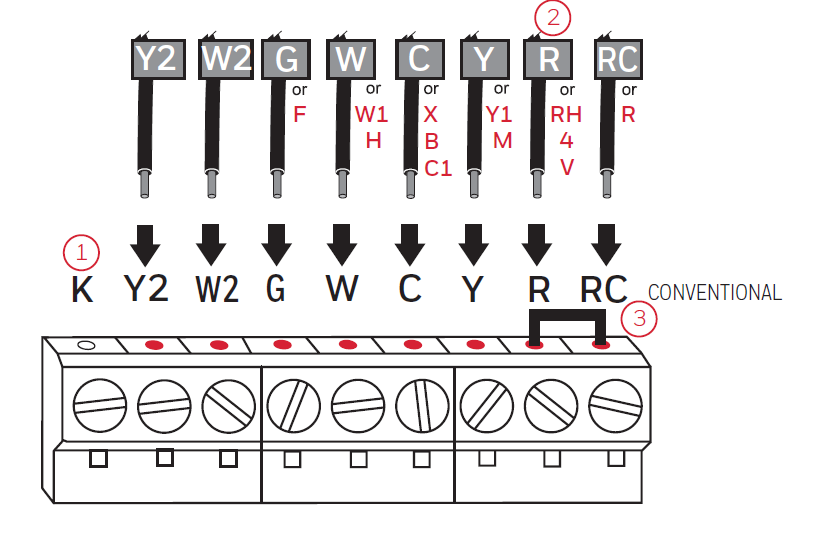
Alternate wiring (conventional system)
Use this if your wire labels do not match the terminal labels.
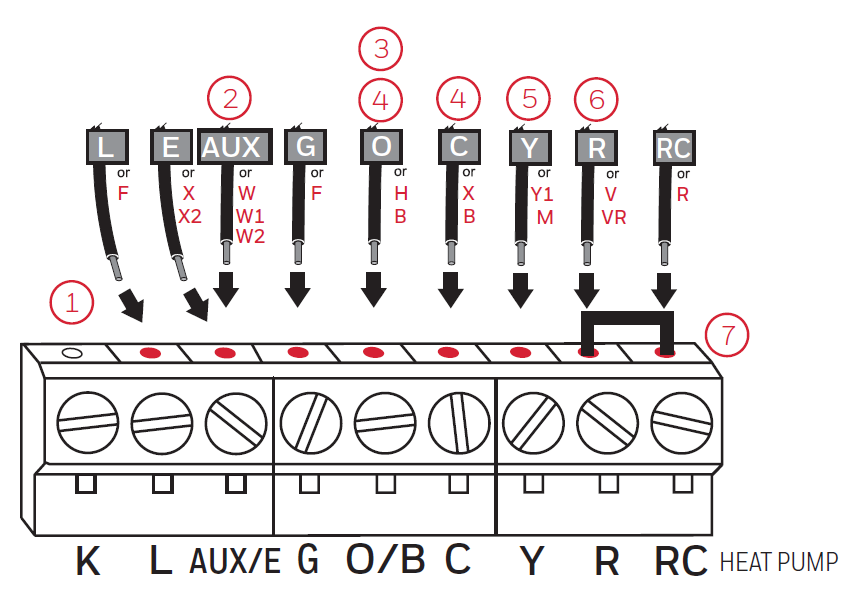
Alternate wiring (heat pump system only)
Use this if your wire labels do not match the terminal labels.
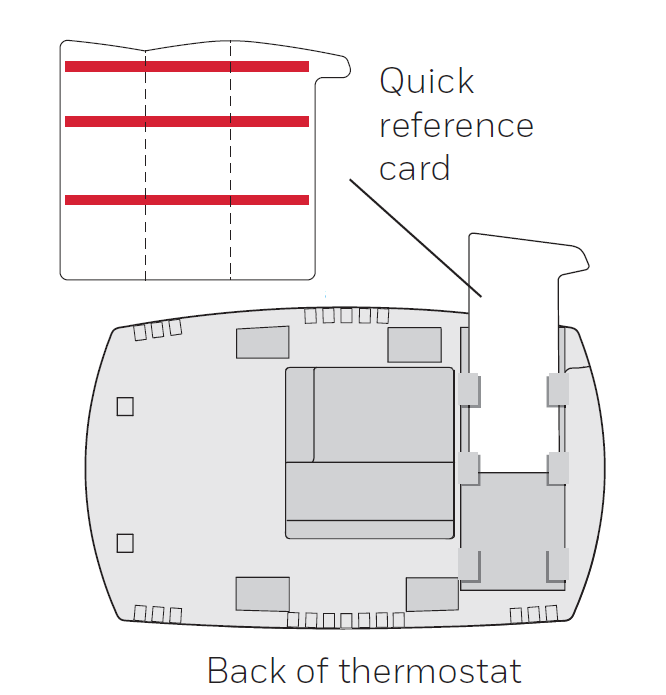
Insert quick reference card.
Fold the quick reference card along the score lines, and slide it into the slot on the back of the thermostat.
Attach thermostat to wallplate.
Align the thermostat to the wallplate and then snap it into place.
Switch heating/cooling system ON.
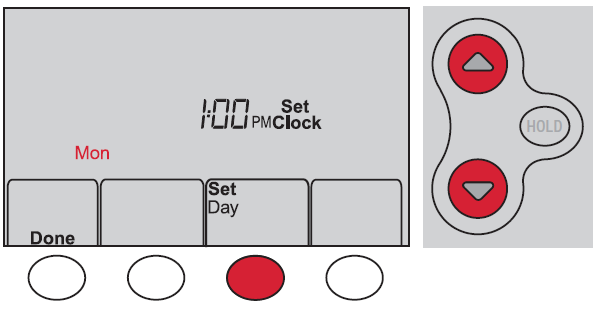
Set the clock to the current day and time
- Press ▲ or ▼ to set the clock.
- Press Set Day.
- Press ▲ or ▼ to select the day of the week.
- Press Done to save.
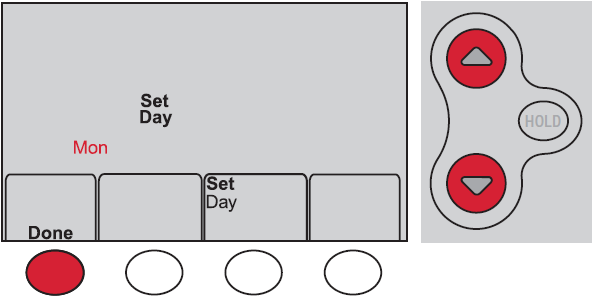
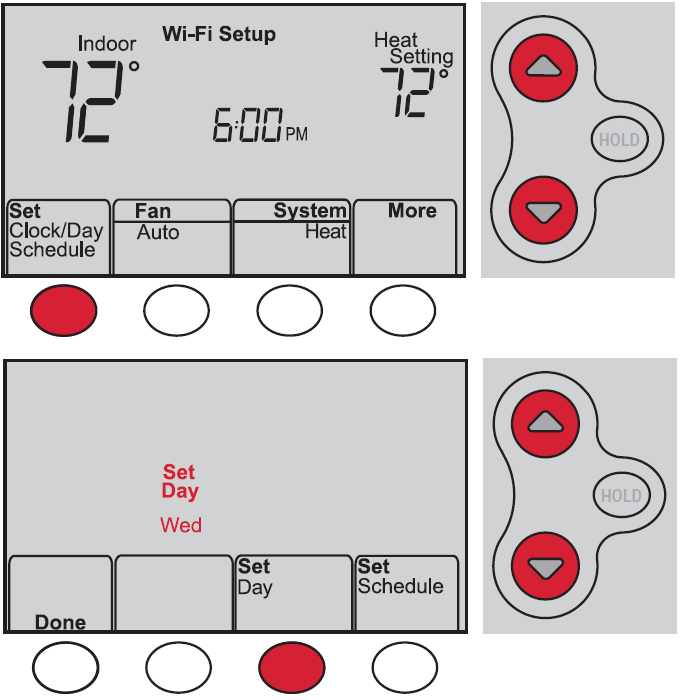
Setting the time and day
- Press Set Clock/Day/Schedule, then press ▲ or ▼ to set the clock.
- Press Set Day, then press ▲ or ▼ to select the day of the week.
- Press Done to save.
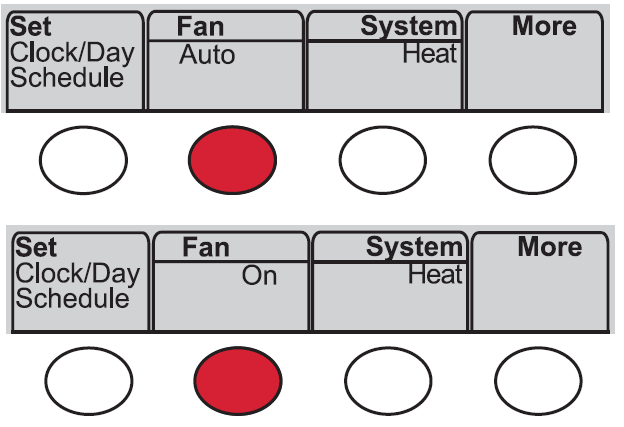
Setting the fan
Press Fan to select On or Auto (toggle to re-select).
- Auto: Fan runs only when the heating or cooling system is on. Auto is the most commonly used setting.
- On: Fan is always on.
Selecting system mode
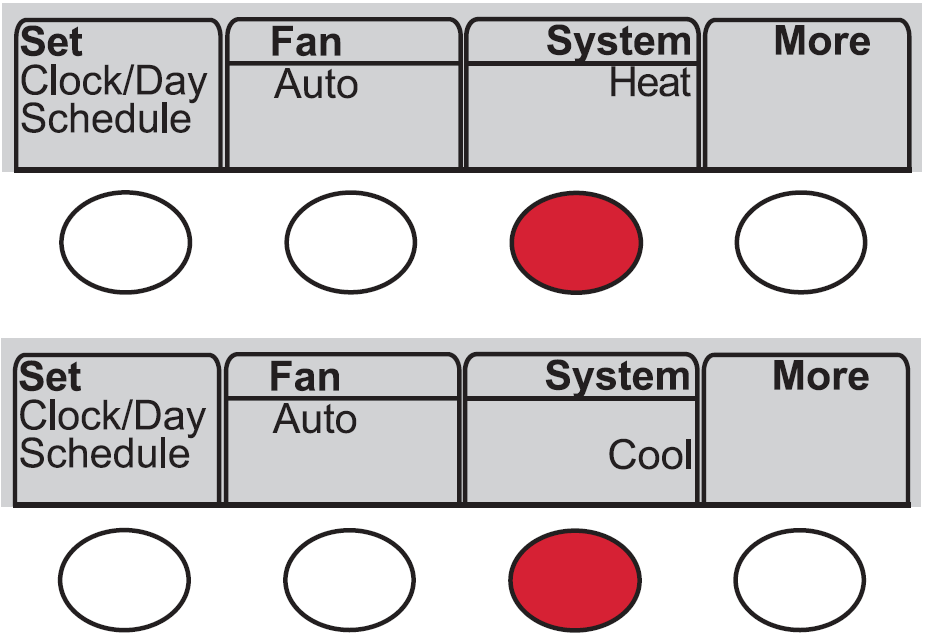
Press System to select:
- Heat: Controls only the heating system.
- Cool: Controls only the cooling system.
- Off: Heating/cooling systems are off.
- Auto: Selects heating or cooling depending on the indoor temperature.
- Em Heat (heat pumps with aux. heat): Controls auxiliary/emergency heat. Compressor is off.
Adjusting program schedules
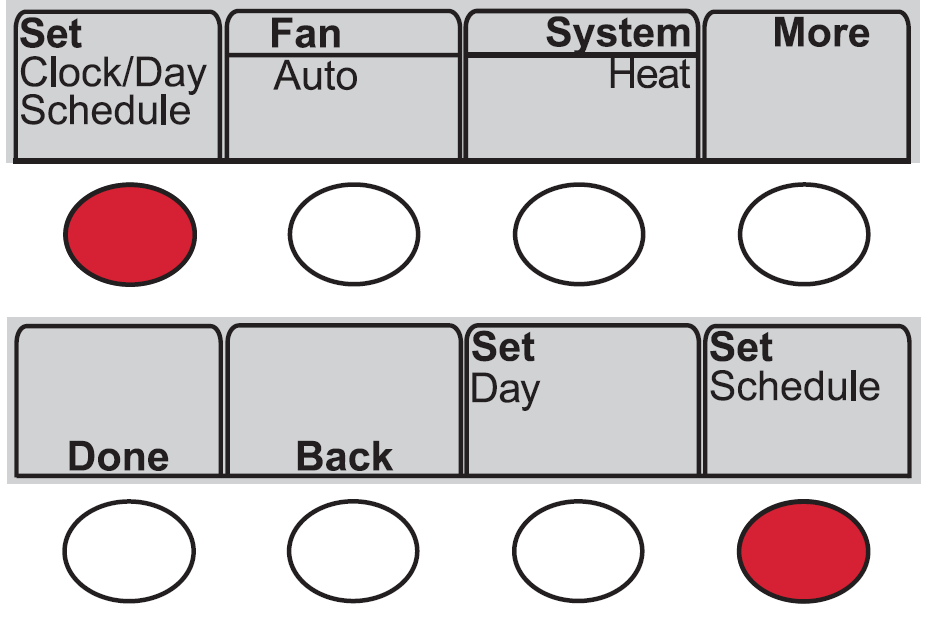
- Press Set Clock/Day/Schedule, then Set Schedule.
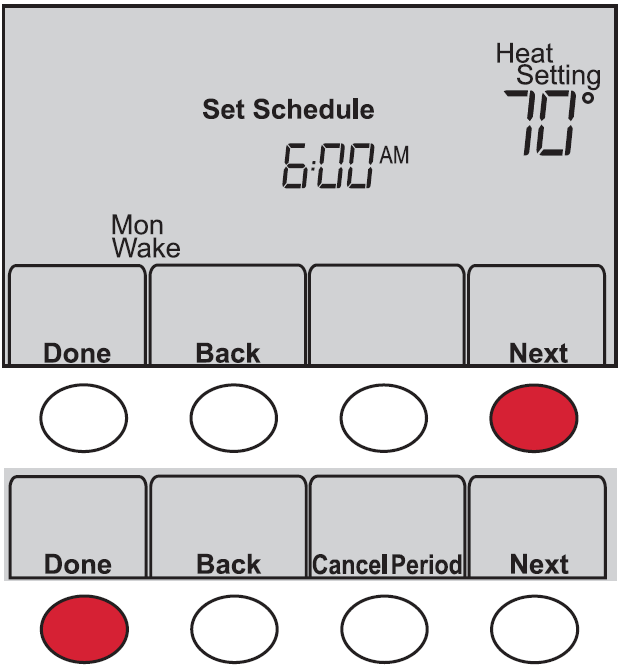
- Press ▲ or ▼ to set your Monday (Mon) Wake time, then press Next.
- Press ▲ or ▼ to set the temperature for this period, then press Next.
- Set the time and temperature for the next time period (Leave). Repeat Steps 2 and 3 for each time period.
- Press Next to set time periods for the next day. Repeat Steps 2 through 4 for each day.
- Press Done to save and exit.
Smart Response Technology
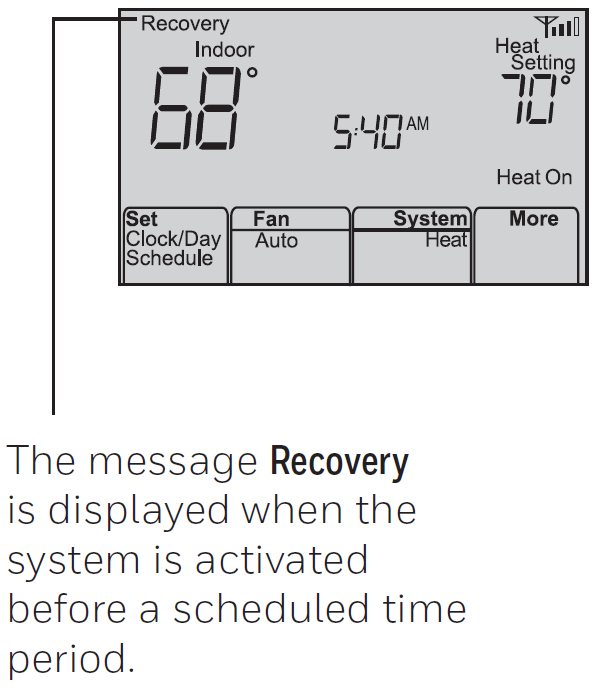
This feature allows the thermostat to “learn” how long the heating/cooling system takes to reach programmed temperature settings, so the temperature is reached at the time you set. For example: Set the Wake time to 6:00 am and the temperature to 70°. The heat will come on before 6:00 am, so the temperature is 70° by 6:00 am.
Compressor protection
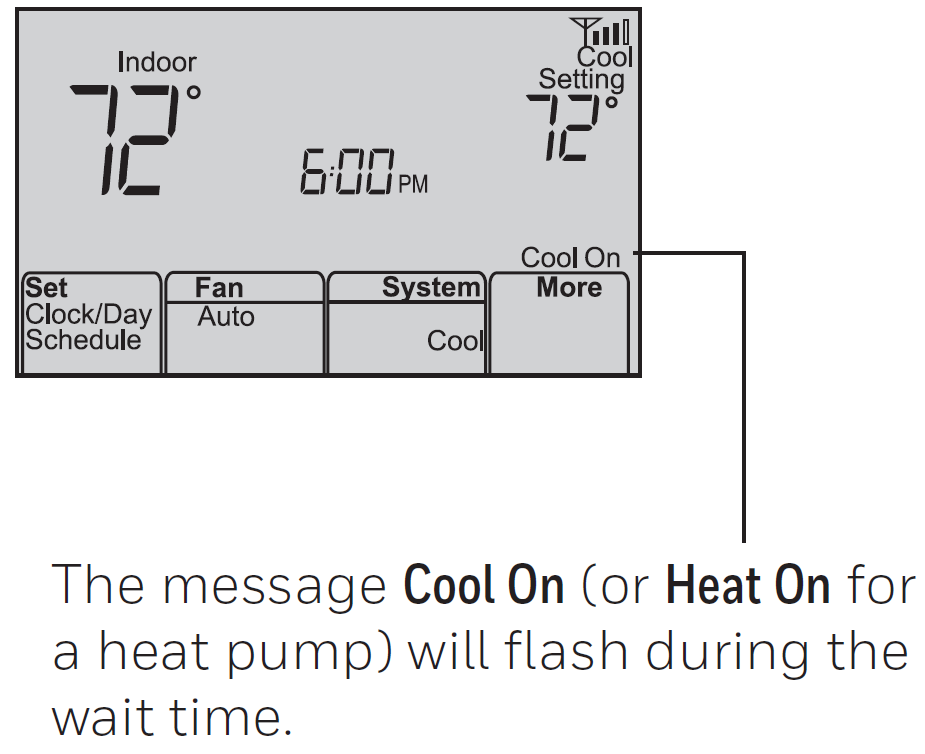
This feature forces the compressor to wait a few minutes before restarting, to prevent equipment damage.
Auto changeover
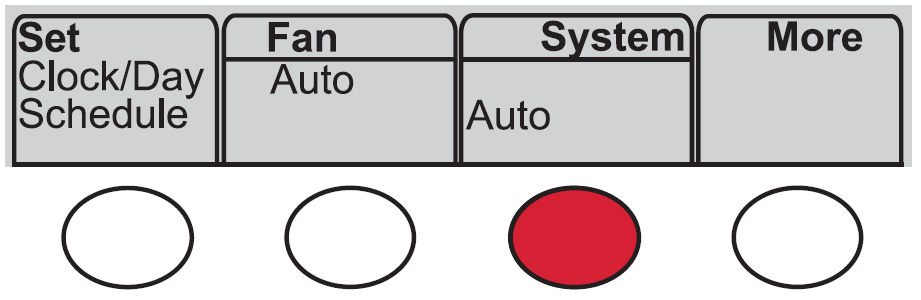
This feature is used in climates where both air conditioning and heating are used on the same day. When the system is set to Auto, the thermostat automatically selects heating or cooling depending on the indoor temperature. Heat and cool settings must be at least 3 degrees apart. The thermostat will automatically adjust settings to maintain this 3-degree separation.
Setting functions and options
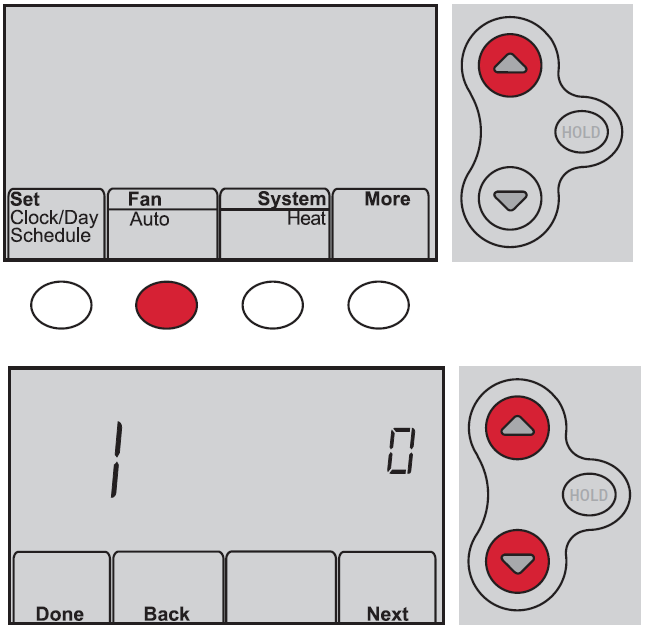
You can change options for several system functions. Available functions depend on the type of system you have. This thermostat is pre-set for a single-stage heating/cooling system. Setting function 1 for a heat pump will adjust the default settings.
- Press Fan and ▲ simultaneously and hold for approximately 3 seconds. The screen will change to display two numbers, and the button designations will be Done, Back, blank, and Next.
- Press Next until you see the function number—the larger number on the left—you want to set.
- Change options for any function by pressing ▲ or ▼ until the correct option (smaller number on the right) is displayed.
- Repeat Steps 2 and 3 until you have set all functions that you wish to change.
- When you have made all changes, press Done to save and exit.
Advantages of the RTH6500WF Smart Thermostat
- Energy Efficiency Benefits: The default energy-saving program settings can reduce heating and cooling expenses when used as directed. The Smart Response Technology ensures your system operates only as long as necessary, eliminating wasted runtime. By learning your home's thermal characteristics, the thermostat prevents overshooting temperature setpoints.
- Remote Access and Control: WiFi connectivity enables you to adjust your home's temperature from anywhere using a smartphone, tablet, or computer. Receive email alerts for system issues and enjoy automatic firmware updates that enhance functionality without manual intervention.
- Flexible Programming: The 7-day scheduling system accommodates different weekday and weekend routines. Four customizable time periods per day provide granular control over temperature settings, adapting to your lifestyle patterns whether you work traditional hours or maintain non-standard schedules.
- System Compatibility: Unlike single-function thermostats, the RTH6500WF accommodates diverse HVAC configurations, from simple single-stage systems to complex multi-stage heat pumps with auxiliary heating, making it suitable for nearly any residential climate control setup.
- Affordability: Priced between $100-$150, the RTH6500WF offers smart home features at a fraction of premium thermostat costs, with minimal installation complexity for homeowners comfortable with basic electrical connections.
Troubleshooting
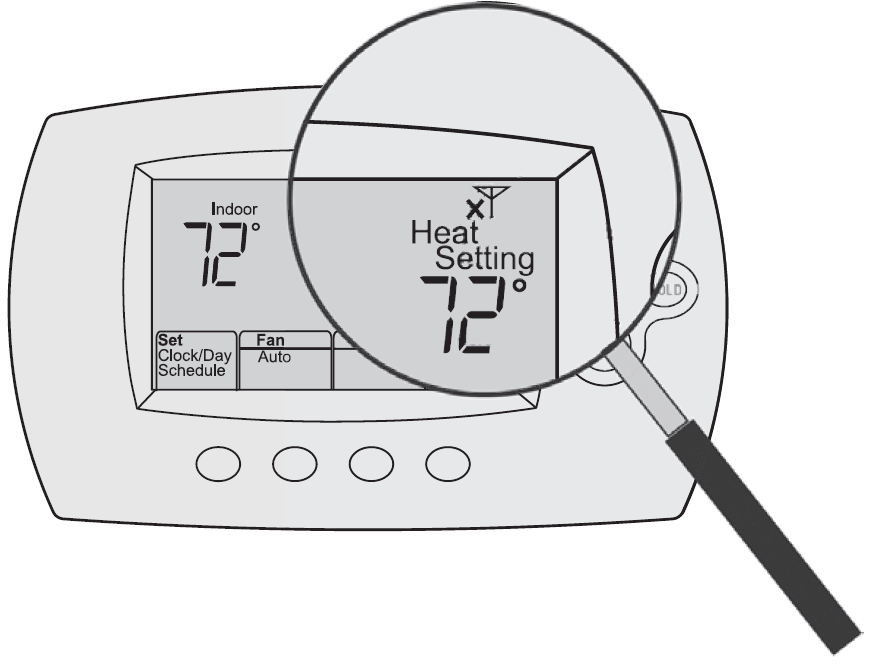
Lost Signal
If the no-Wi-Fi indicator displays in place of the Wi-Fi strength indicator in the upper right-hand corner of the home screen:
- Check another device to be sure Wi-Fi is working in your home; if not, call your Internet Service Provider.
- Move the router.
- Restart the thermostat: remove it from the wallplate, wait 10 seconds, and snap it back onto the wallplate. Return to Step 1 of Connecting to your Wi-Fi network.
Limitations and Considerations
- Minimum Temperature Differential: The thermostat maintains a mandatory 1.5°F differential between heat and cool settings in Auto mode. This safety feature prevents rapid switching but means you cannot set heating and cooling to identical temperatures, requiring slight temperature flexibility.
- WiFi Dependency: While the thermostat functions independently without internet connection, remote access and cloud features require active WiFi connectivity. In areas with unreliable internet, you'll rely on manual onsite adjustments.
- Learning Curve: Programming the RTH6500WF involves navigating system settings and configuration options that may challenge users unfamiliar with digital thermostats. The manual provides detailed instructions, but initial setup requires attention to detail.
- Display Size: The digital display, while functional, is smaller than some competing models, potentially making temperature readings less visible from across rooms.
Customer Reviews and User Feedback
Users consistently praise the Honeywell Home RTH6500WF Smart Series Programmable Thermostat for its reliability and energy-saving performance. Homeowners report noticeable reductions in monthly heating and cooling bills after installation, with many attributing savings to the Smart Response Technology's ability to eliminate unnecessary system runtime. The WiFi connectivity receives particular appreciation for enabling remote temperature adjustments during travel or extended absences.
Common user praise highlights include intuitive smartphone app access, reliable automatic mode switching, and straightforward installation for users with basic electrical knowledge. Voice assistant integration works seamlessly, allowing hands-free temperature adjustments through Alexa or Google Home ecosystems. Users with multi-stage heating systems appreciate the thermostat's ability to manage complex configurations without requiring professional programming.
Occasional criticisms focus on the initial setup complexity for advanced features, with some users finding the manual navigation slightly confusing. A small percentage of users report WiFi connectivity issues in homes with weak signals, though relocating the thermostat closer to the router typically resolves these problems. Overall, customer satisfaction remains high, with users valuing the balance of affordability, functionality, and genuine energy savings delivered by the RTH6500WF Smart Series Programmable Thermostat.
Installation and Setup Guidelines
Before installation, verify your HVAC system compatibility using the system setting options (0-8) that accommodate various heating and cooling configurations. Turn off power at your breaker before beginning any electrical work. The RTH6500WF requires a C-wire (common wire) for WiFi functionality, though some installations may require a power adapter if your existing system lacks this connection.
After physical installation, connect to WiFi during the initial power-up sequence. The thermostat automatically detects your local time zone based on your registered zip code. Configure your preferred temperature scale (Fahrenheit or Celsius) and customize the four daily schedule periods to match your lifestyle. Test the Smart Response Technology by observing how early the system begins heating or cooling before your programmed setpoint times.
Conclusion and Recommendations
The Honeywell Home RTH6500WF Smart Series Programmable Thermostat delivers excellent value for homeowners prioritizing energy efficiency and smart home integration. Its combination of affordable pricing, proven reliability, and genuine energy-saving features makes it an ideal choice for upgrading from manual or basic programmable thermostats. The Smart Response Technology genuinely learns your home's characteristics, while WiFi connectivity enables convenient remote management.
This thermostat suits homeowners in moderate to cold climates who benefit from complex heating and cooling scheduling, those with multi-stage HVAC systems requiring flexible programming, and budget-conscious buyers seeking smart features without premium pricing. If you prioritize simplicity over advanced features or live in mild climates requiring minimal seasonal adjustments, more basic models may suffice. For most homeowners, however, the RTH6500WF represents a practical investment in comfort, convenience, and measurable utility bill reduction.
```
Faqs
How do I install the Honeywell Home RTH6500WF Smart Series Programmable Thermostat for the first time?
What should I do if WiFi Setup doesn't appear on my Honeywell Home RTH6500WF Smart Series Programmable Thermostat?
How do I connect Honeywell Home RTH6500WF Smart Series Programmable Thermostat to my home WiFi network?
Does the Honeywell Home RTH6500WF Smart Series Programmable Thermostat require a C wire, and what if I don't have one?
How do I program the schedule on Honeywell Home RTH6500WF Smart Series Programmable Thermostat after setup?
How do I troubleshoot if Honeywell Home RTH6500WF Smart Series Programmable Thermostat won't turn on heating or cooling?
What systems are compatible with Honeywell Home RTH6500WF Smart Series Programmable Thermostat?
How do I configure advanced settings on Honeywell Home RTH6500WF Smart Series Programmable Thermostat for optimal performance?
More honeywell home manuals
- Setup: Honeywell Home X1N Non-Programmable Thermostat RTH11B/RTHC11B User Manual
- Setup: Honeywell Home T10 Pro Smart Programmable Thermostat with RedLINK THX321WFS2001W User Manual
- Setup: Honeywell Home RTH9580 Smart Colour Touchscreen Programmable Thermostat User Manual
- Setup: Honeywell Home Programmable Thermostat RTH2300/RTH221 Series User Manual
- Setup: Honeywell Home Prestige® Touch Screen Thermostat User Manual
- Setup: Honeywell Home FocusPRO P200 Series Programmable Thermostats User Manual
Leave a Comment