
Setup: Honeywell Home Programmable Thermostat RTH2300/RTH221 Series User Manual
Content
Honeywell Home Programmable Thermostat RTH2300/RTH221 Series: Complete Product Manual
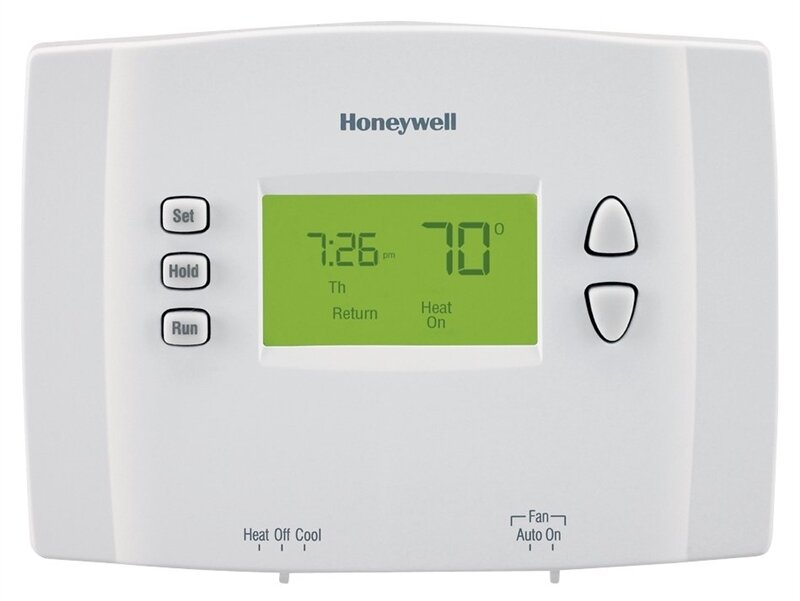
Introduction to Honeywell Home Programmable Thermostat RTH2300/RTH221 Series
The Honeywell Home Programmable Thermostat RTH2300/RTH221 Series is a reliable, user-friendly solution for smart home temperature control, offering precise 5-2 day programming for weekdays and weekends. This versatile thermostat allows you to set four customizable periods per day—Wake, Leave, Return, and Sleep—ensuring optimal comfort while saving energy during away times. With its backlit digital display, intuitive push-button controls, and built-in compressor protection, it delivers effortless HVAC management for gas, oil, or electric systems, including heat pumps without auxiliary heat.
Key benefits include energy savings through preset schedules (e.g., cooler settings during Leave and Sleep periods), temporary or permanent overrides via the Hold feature, and precise ±1°F temperature control. Ideal for homeowners, renters, and small offices seeking an affordable upgrade from manual thermostats, it's perfect for busy households with differing weekday/weekend routines. Easy DIY installation takes minutes, compatible with 20-30 VAC systems.
Priced in the $25-$40 range, the Honeywell Home Programmable Thermostat RTH2300/RTH221 Series is widely available at retailers like Home Depot, with models such as RTH2300B1012/E1 and RTH2300B1038/E1. Whether optimizing for summer cooling (50°F-99°F range) or winter heating, this thermostat provides consistent performance and peace of mind with features like low battery warnings and compressor safeguards.
Technical Specifications and Key Features of Honeywell Home RTH2300/RTH221 Series Thermostat
The Honeywell Home Programmable Thermostat RTH2300/RTH221 Series boasts robust specs for reliable operation:
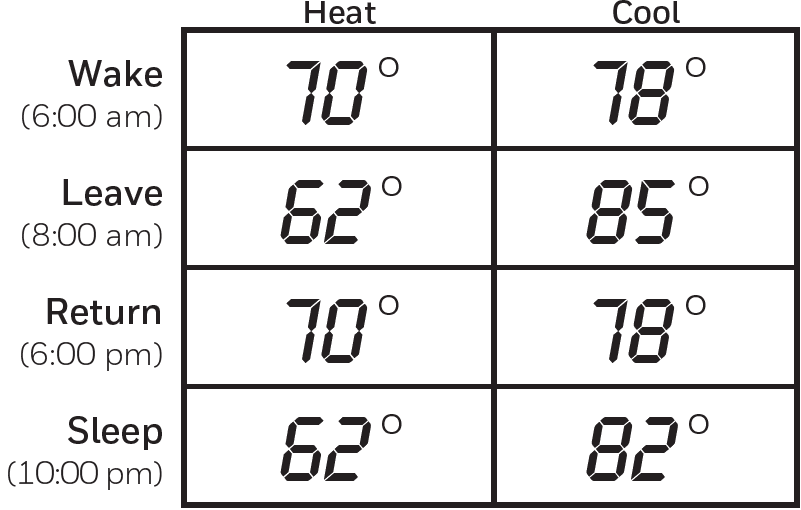
- Programming: 5-2 day schedule (separate weekday/weekend); 4 periods/day (Wake 6:00 AM, Leave 8:00 AM, Return 6:00 PM, Sleep 10:00 PM); presets adjustable for heat (e.g., 70°F Wake) and cool (e.g., 78°F Wake).
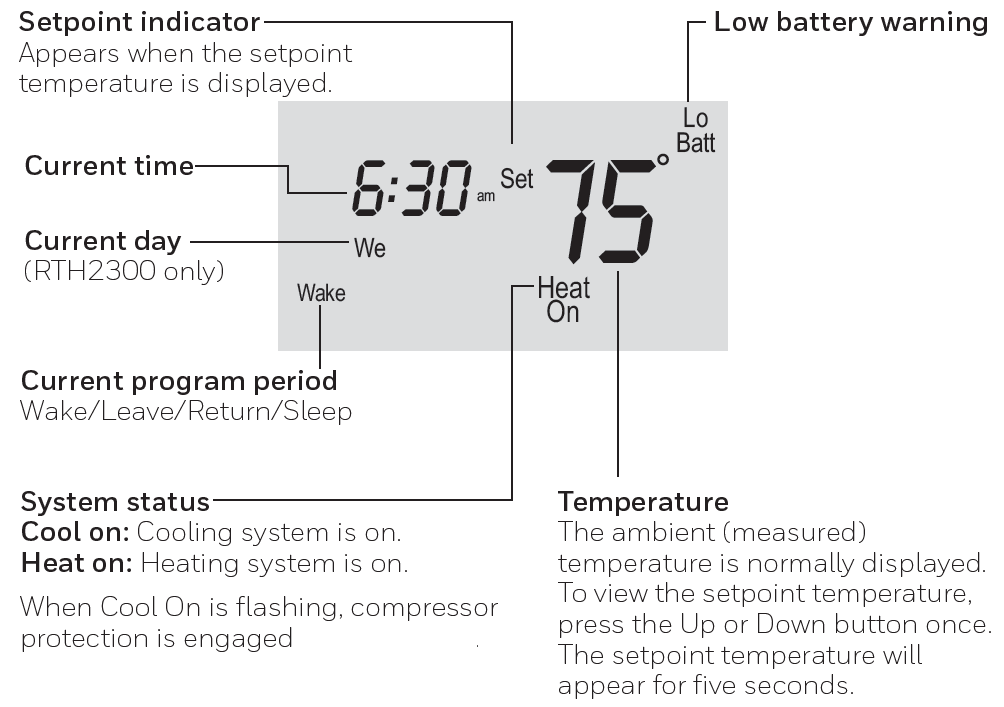
- Display & Controls: Backlit LCD with current time/day, program period, setpoint indicator; buttons for Set (time/schedule), Hold (override), Run (resume); Up/Down arrows for ±1°F precision.
- System Compatibility: Heat/cool systems, heat pumps (no auxiliary); gas/oil/electric; fan auto/on; 20-30 VAC, 1.0A per terminal (R, W, Rc).
- Temperature Range: Heat 50°F-99°F (10°C-37°C); Cool same; Fahrenheit/Celsius selectable.
- Features: Compressor protection (5-min delay, flashing "Cool On"); temporary/permanent override; low battery warning; advanced programming (e.g., function 5 for furnace/heat pump).
- Performance: Built-in safeguards prevent HVAC damage; easy install in under 30 minutes.
Compared to basic models like Honeywell's non-programmable options, the RTH2300/RTH221 excels in customization, outperforming cheaper no-brand thermostats in durability and precision.
Usage Instrustions
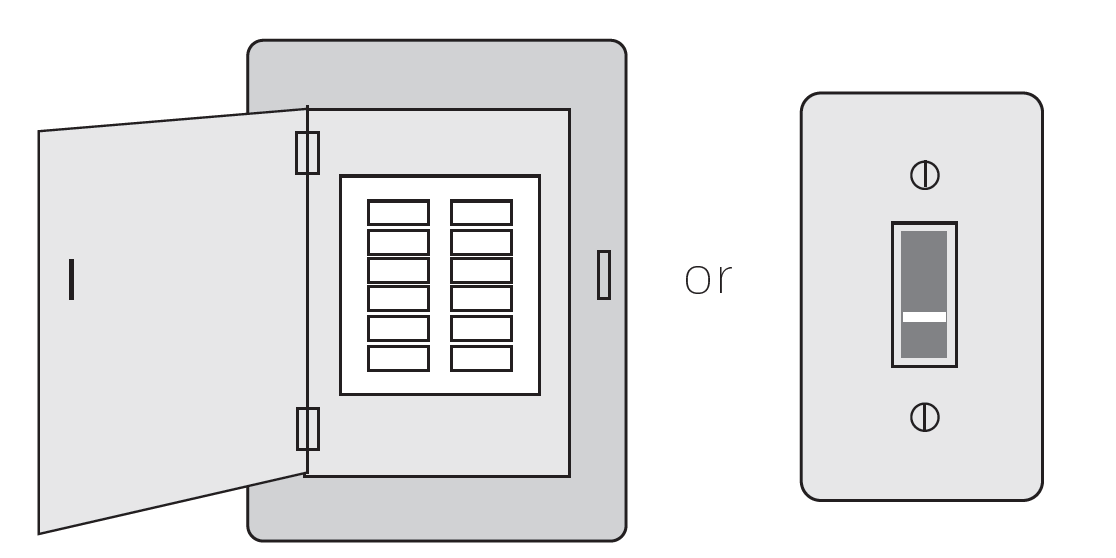
- Turn Off Power to Heating/Cooling System
- Circuit breaker M31535 box
- Heating/cooling system power switch
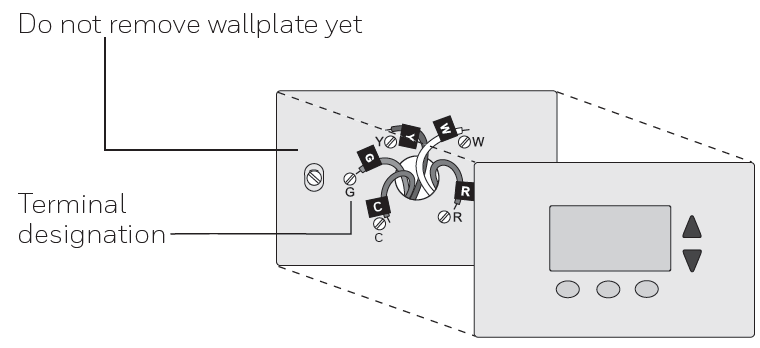
Remove Old Thermostat
Remove old thermostat but leave wallplate with wires attached.
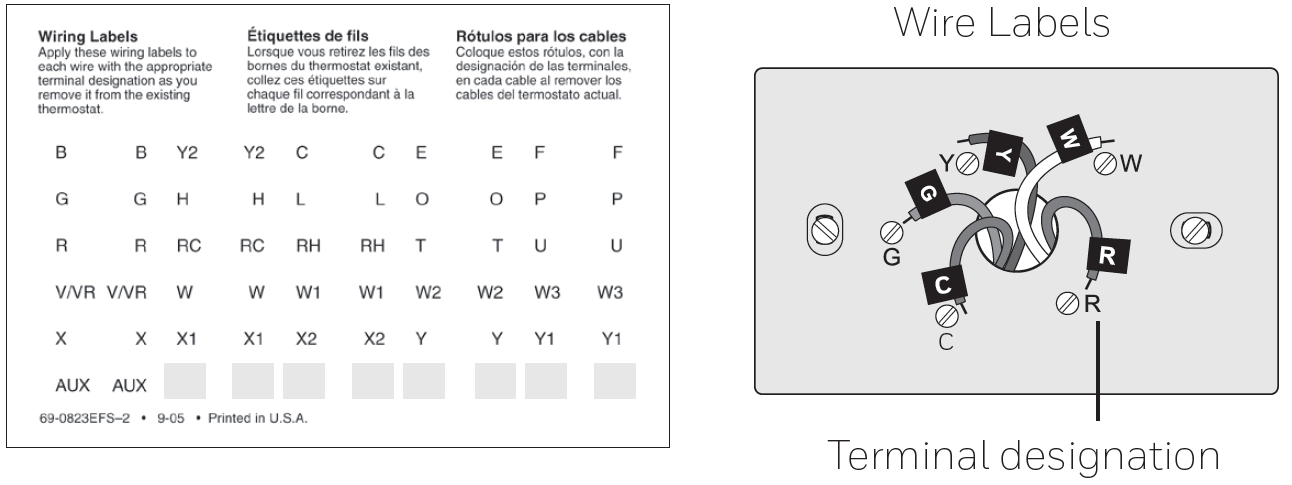
Label Wires with Tags
Label the wires using the supplied wire labels as you disconnect them.
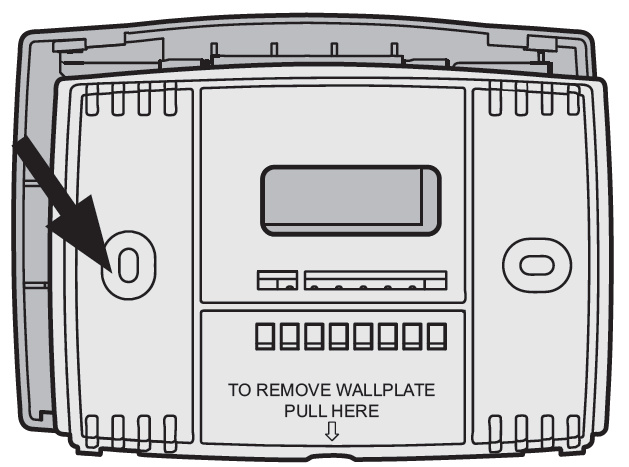
- Separate Wallplate from New Thermostat
Remove wallplate from the new thermostat and mount onto wall
- Mount Wallplate
Mount the new wallplate using the included screws and anchors- Drill 3/16-in. holes for drywall
- Drill 3/32-in. holes for plaster
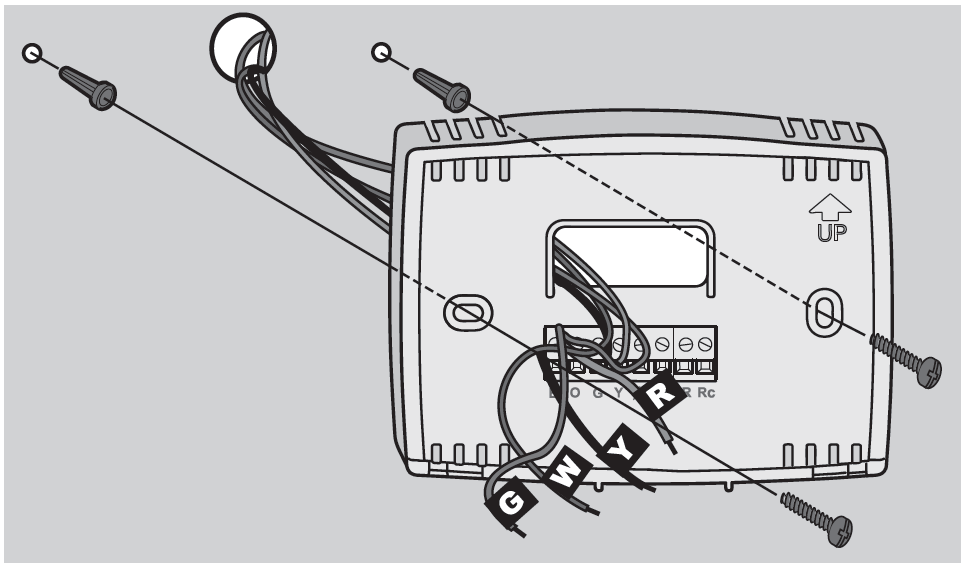
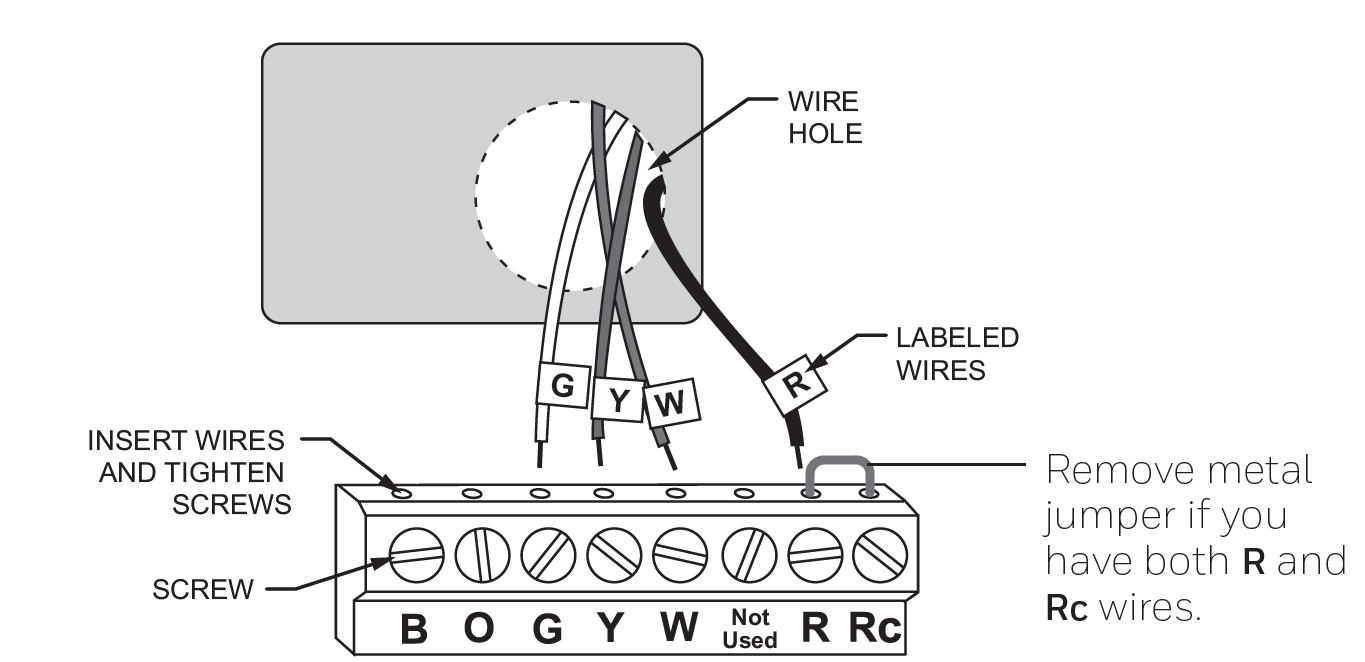
Connect Wires
Simply match wire labels
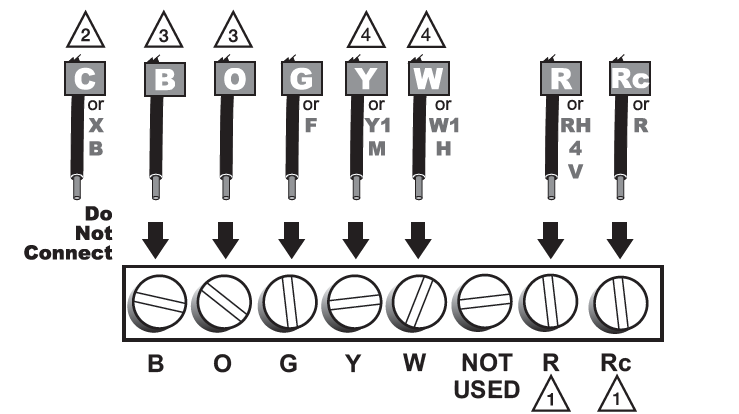
- Alternate Wiring
- If wires will be connected to both R and Rc terminals, remove metal jumper.
- Do not use C or X. Wrap bare end of wire with electrical tape.
- If you have a heat pump without auxiliary/backup heat connect O or B, not both. If you do not have a heat pump, do not connect B. Wrap bare end of wire with electrical tape.
- Place a jumper (piece of wire) between Y and W if you are using a heat pump without auxiliary/backup heat.
Install Batteries
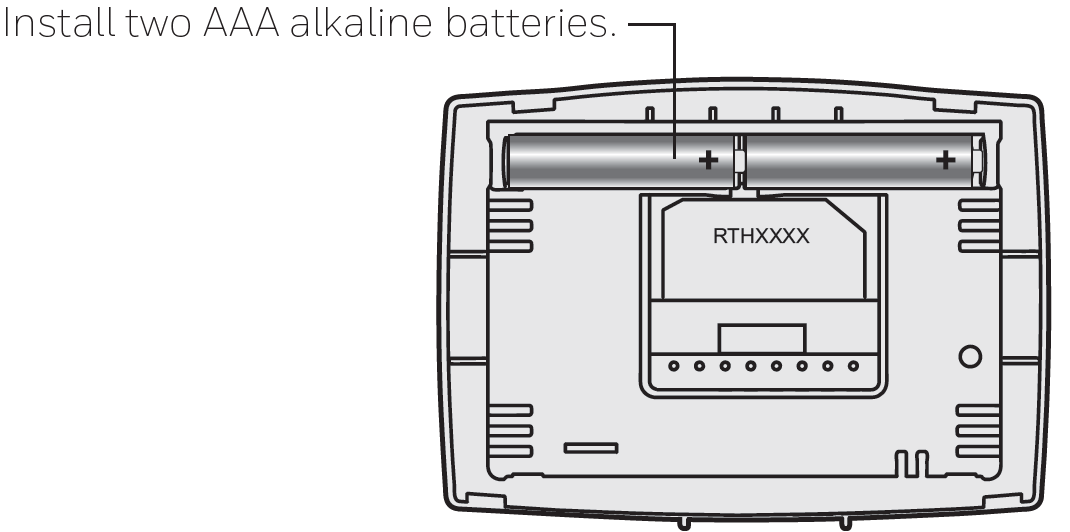
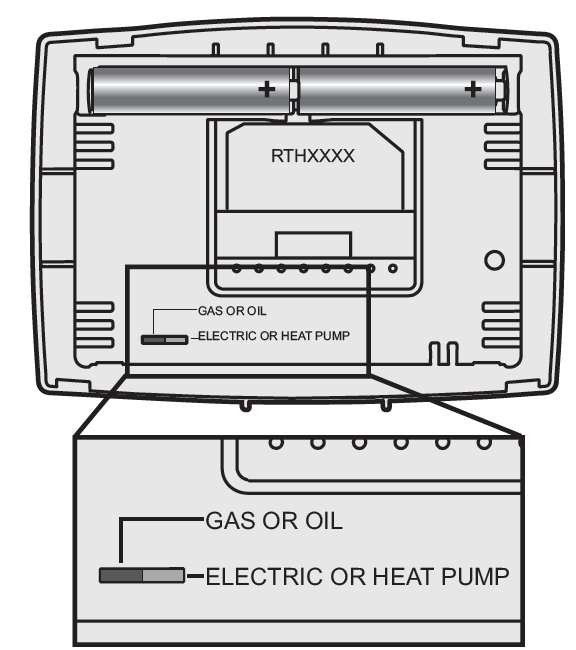
- Set fan operation switch
Move the switch to the proper setting:- Gas or Oil: For gas or oil heating systems, leave the fan operation switch in this factory-set position (for systems that control the fan in a call for heat).
- Electric or Heat Pump: Change the switch to this setting for heat pump or electric heat systems. (This setting is for systems that allow the thermostat to control the fan in a call for heat, if a fan wire is connected to the G terminal.)
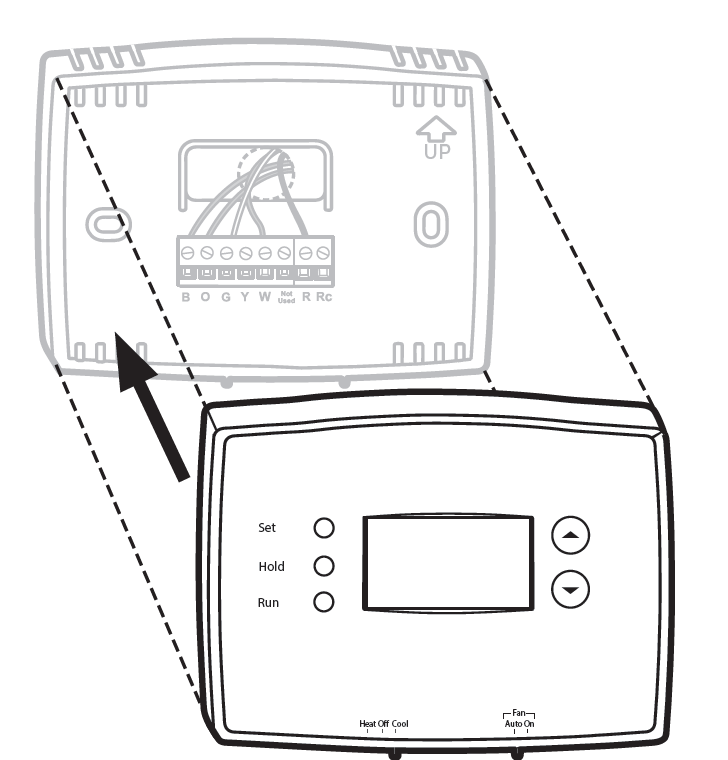
Install Thermostat onto Wallplate
Install thermostat onto the wallplate on the wall
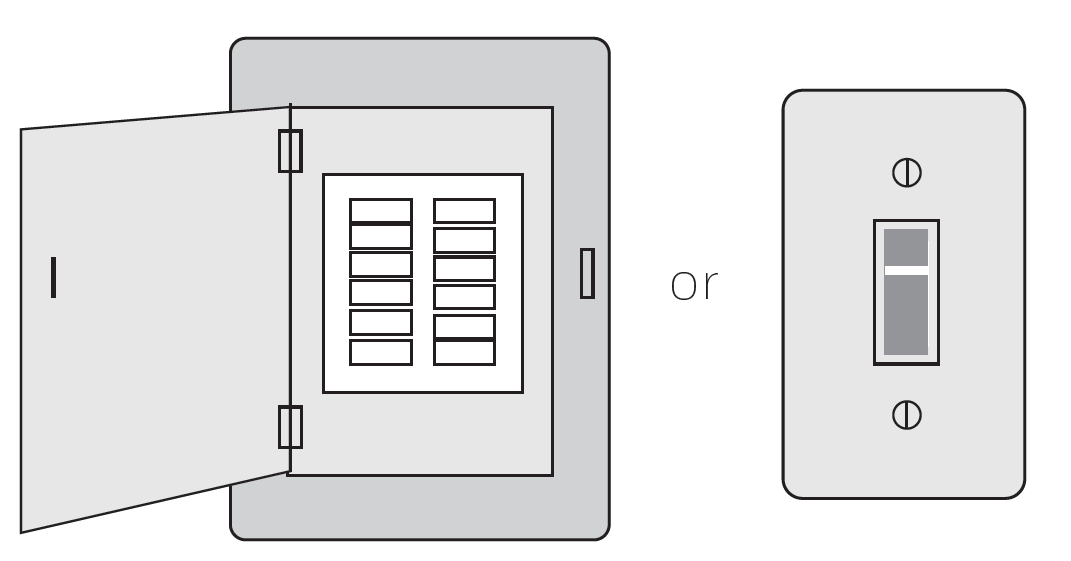
- Turn Power Back On
Turn the power back on to the heating/cooling system
Advanced Installation
Enter System Setup To enter system setup, press and hold both the s and t buttons until the display changes.
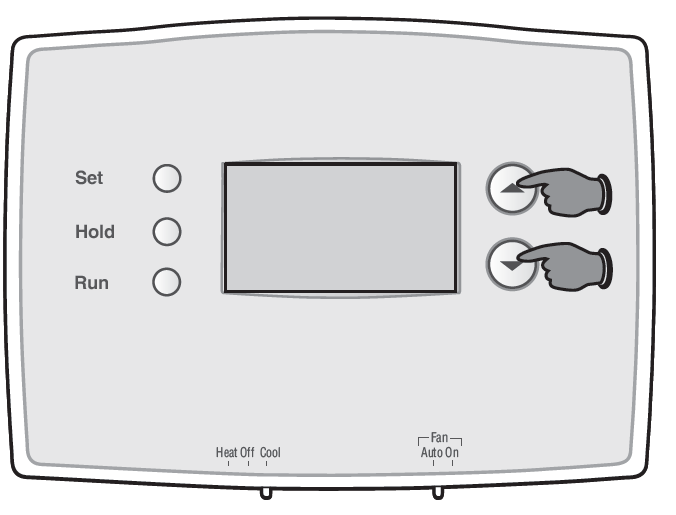
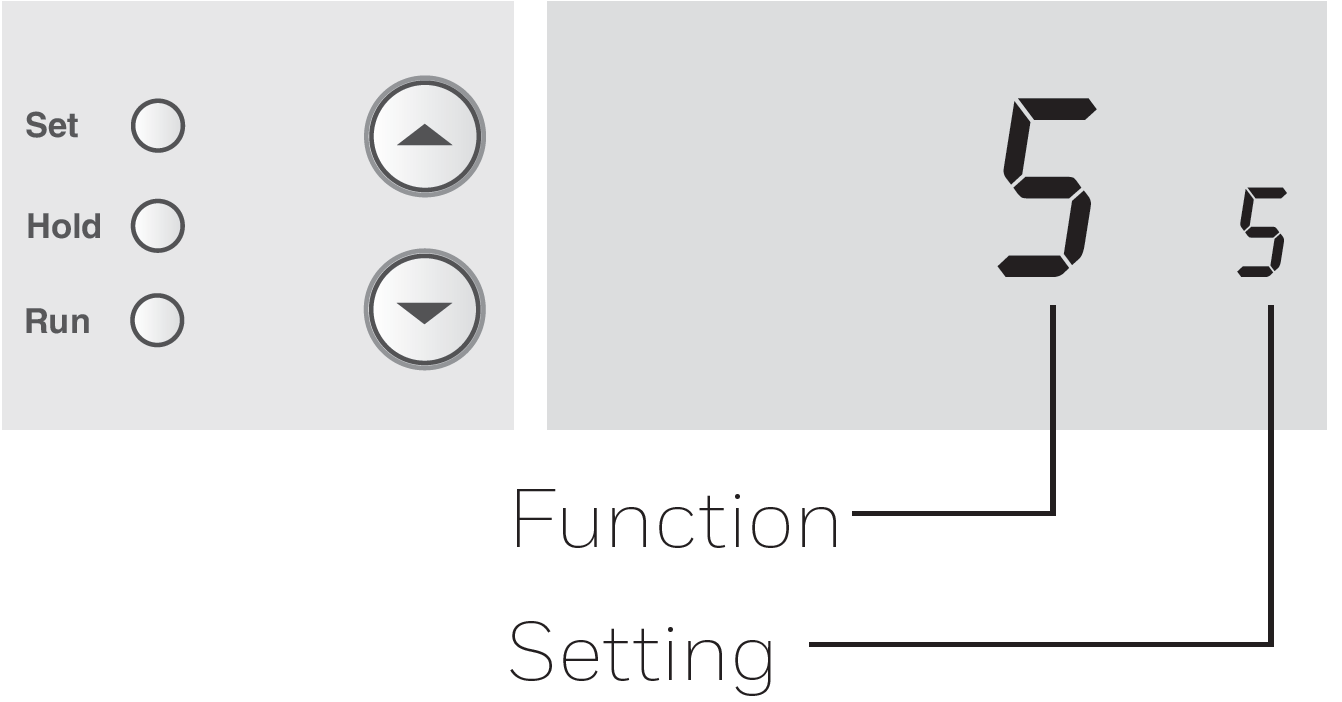
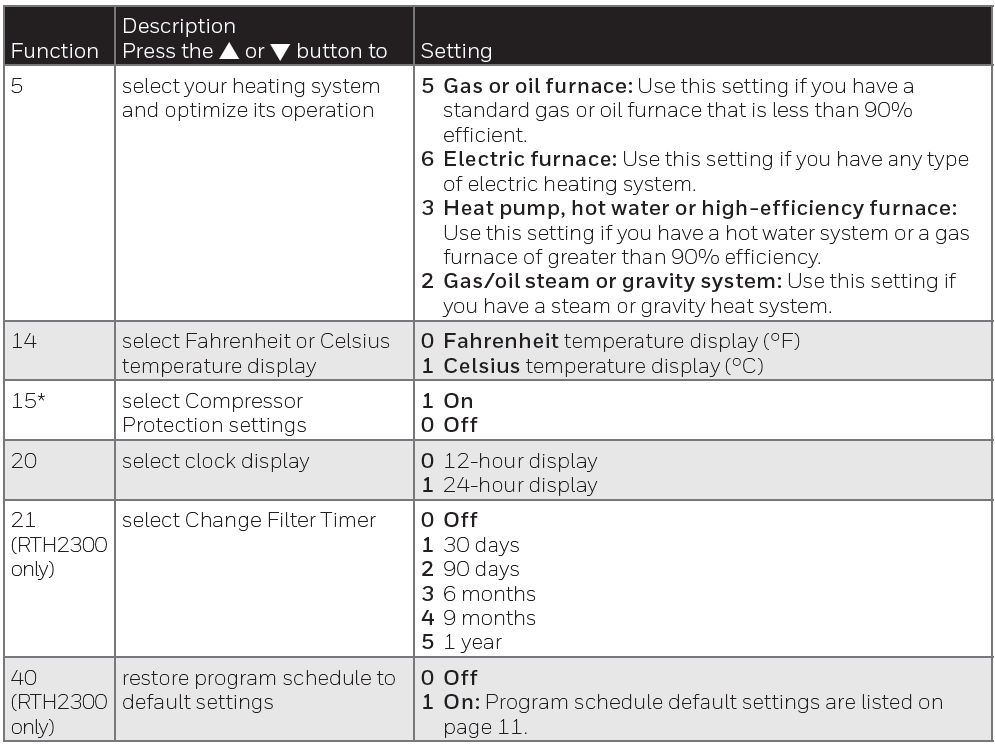
Changing Settings
- Press the s or t button to change the setting.
- Press the s and t buttons simultaneously for one second to advance to the next function.
- Press the RUN button to exit and save settings.
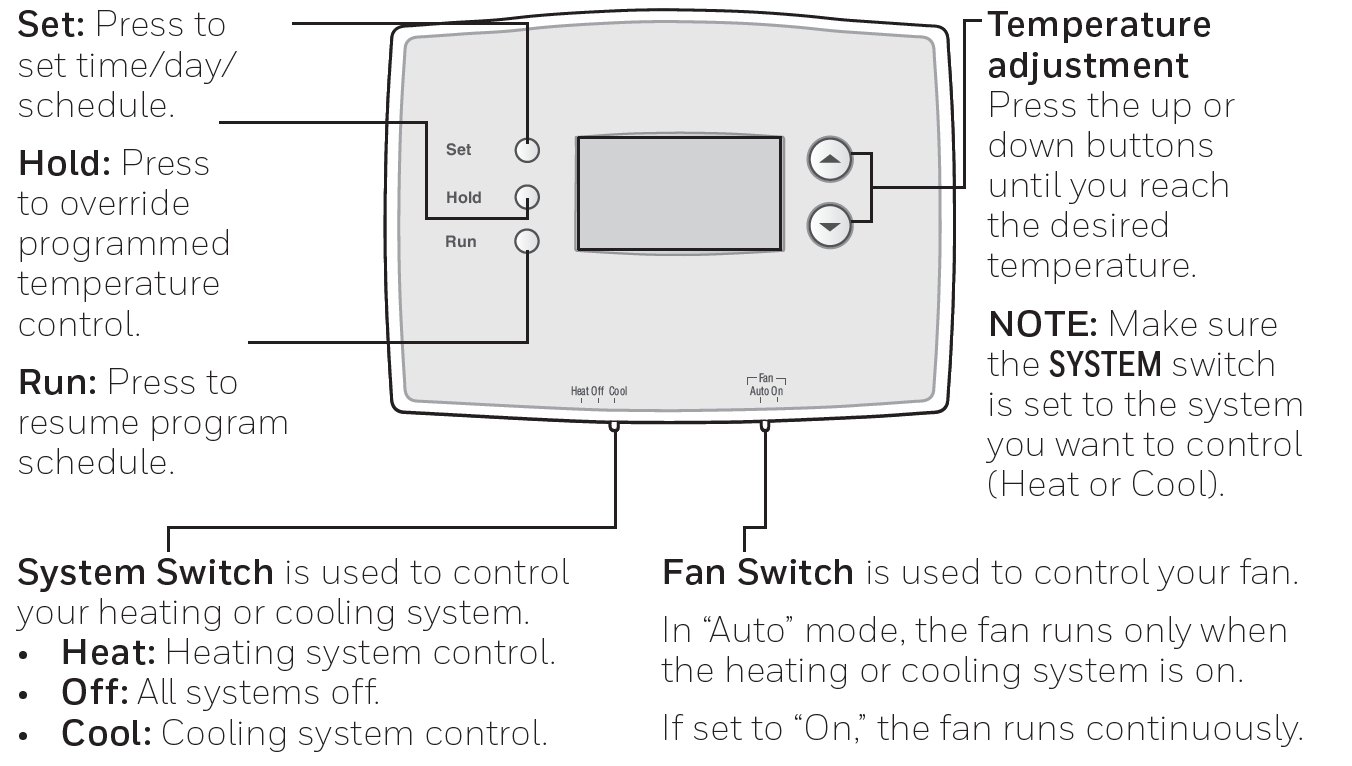
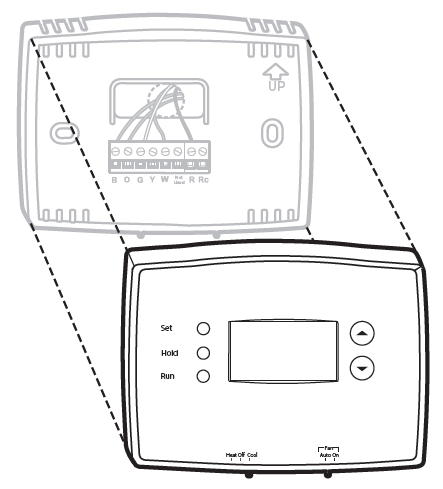
Thermostat controls
Display screen
Set the time and day
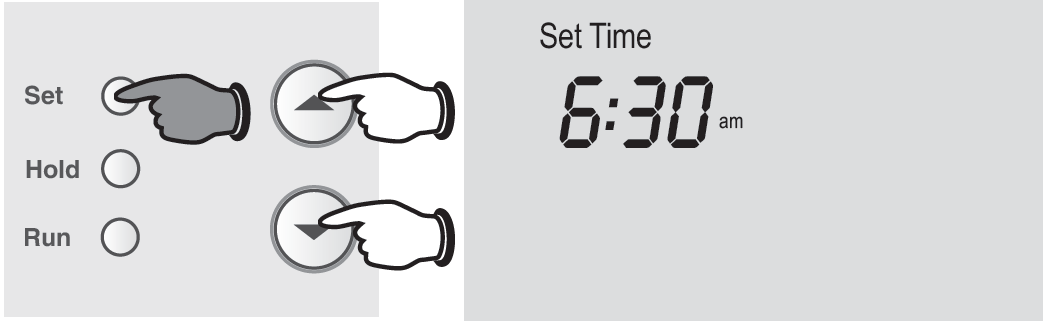
- Press the SET button, then press s or t to set the clock time.
- Press the SET button, then press s or t to select the day of the week. (RTH2300 only)\
- Press RUN to save & exit.
Program Schedule
You can program four time periods each day. The RTH2300 can be programmed with different schedules for weekdays and weekends. We recommend the pre-set settings, since they can reduce your heating/cooling expenses.
- Wake - Set to the time you awaken and the temperature you want during the morning, until you leave for the day.
- Leave - Set to the time you leave home and the temperature you want while you are away (usually an energy-saving level).
- Return - Set to the time you return home and the temperature you want during the evening, until bedtime.
- Sleep - Set to the time you go to bed and the temperature you want overnight (usually an energy-saving level).
To adjust program schedules (RTH2300)
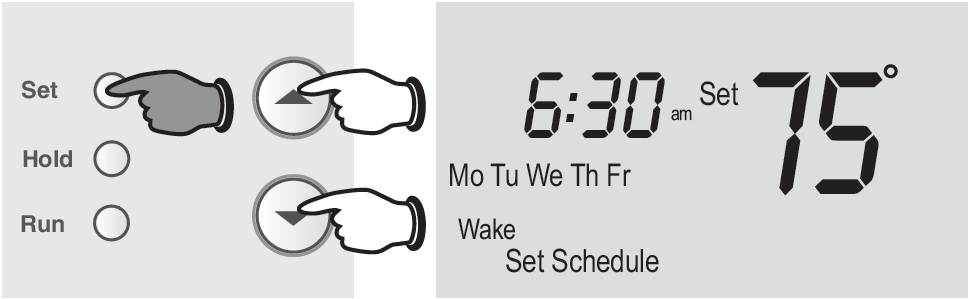
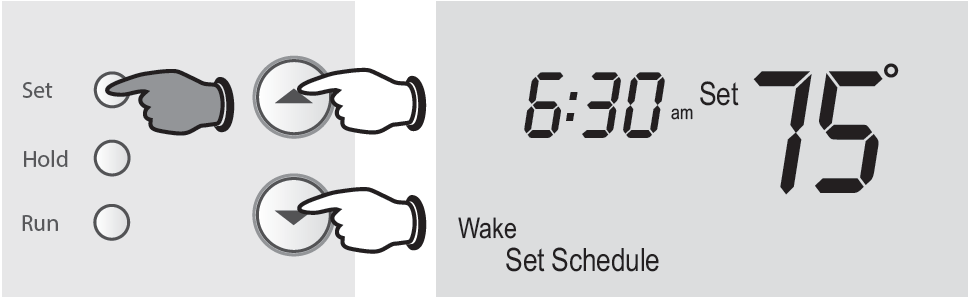
- Press SET until Set Schedule is displayed.
- Press s or t to set your weekday Wake time (Mo-Fr), then press SET.
- Press s or t to set the temperature for this time period, then press SET.
- Set time and temperature for the next time period (Leave). Repeat steps 2 and 3 for each weekday time period.
- Press SET to set weekend time periods (Sa & Su), then press RUN to save & exit.
To adjust program schedules (RTH221)
- Press s or t to immediately adjust the temperature. This will temporarily override the temperature setting for the current time period.
- “Temporary” will appear on the display and the current program period will flash.
- The new temperature will be maintained only until the next programmed time period begins (see page 11).
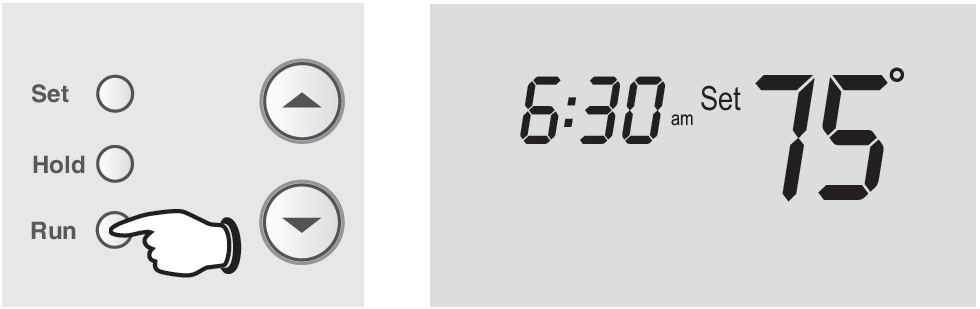
- To cancel the temporary setting at any time, press RUN.
Program schedule override (permanent)
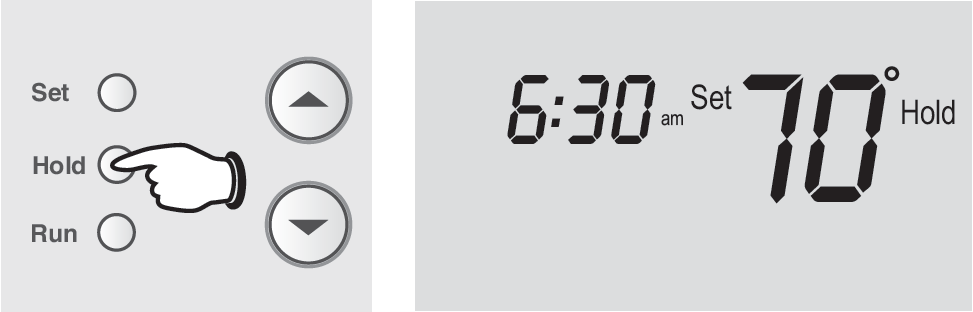
- Press HOLD to permanently adjust the temperature. This will override the temperature settings for all time periods.
- The “Hold” feature turns off the program schedule and allows you to adjust the thermostat manually, as needed.
- Whatever temperature you set will be maintained 24 hours a day, until you manually change it, or press RUN to cancel “Hold” and resume the program schedule.
Built-in compressor protection
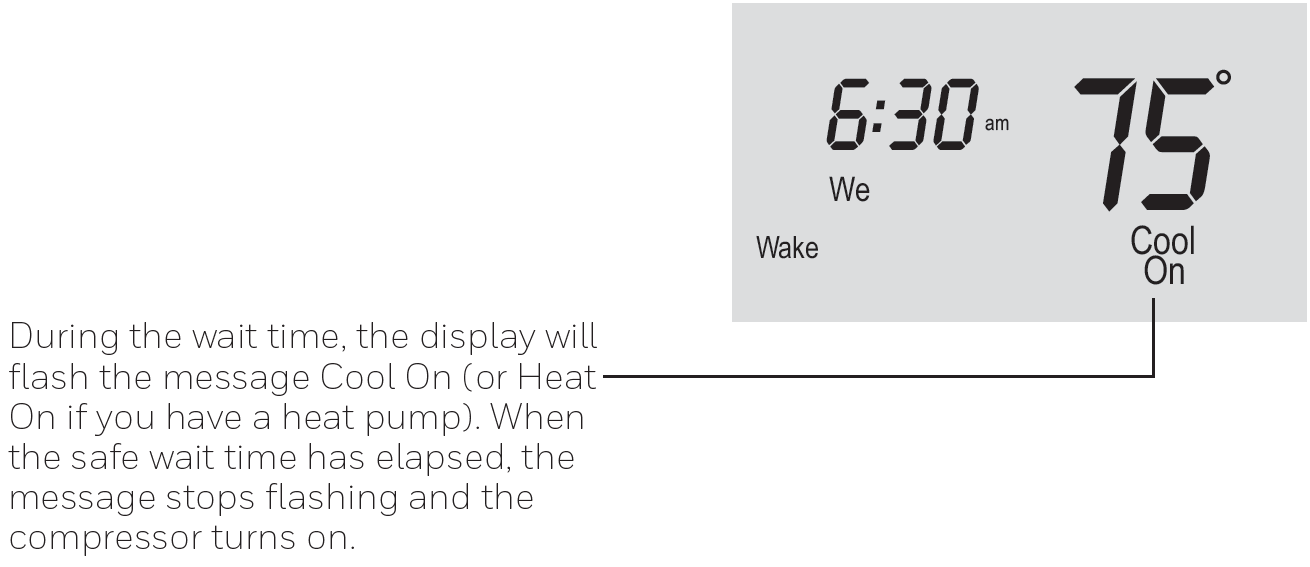
This feature helps prevent damage to the compressor in your air conditioning or heat pump system. Damage can occur if the compressor is restarted too soon after shutdown. This feature forces the compressor to wait 5 minutes before restarting.
Change filter (RTH2300 only)
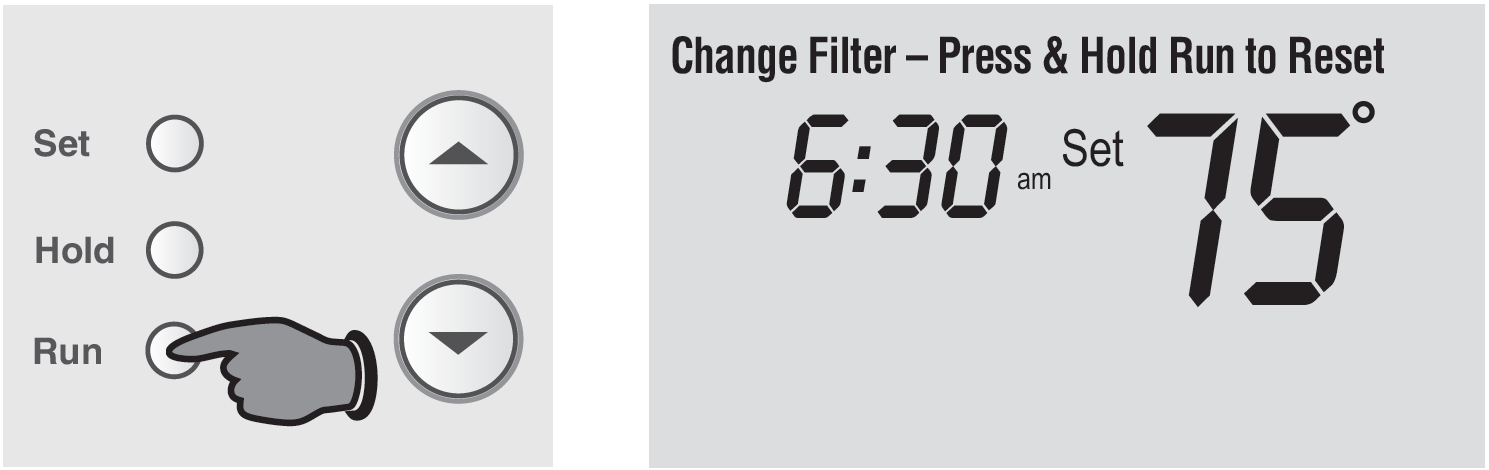
If the filter reminder is turned on during installation, the words Change Filter will flash on the screen when the filter needs to be replaced. After you replace the air filter, press and hold the RUN button for 3 seconds to reset the alert.
Battery replacement
- Install two fresh AAA batteries when Lo Batt flashes on the screen. Lo Batt appears for 60 days before the batteries are depleted.
- Replace batteries once a year, or when you will be away for more than a month.
- Most settings are stored in nonvolatile (permanent) memory. Only the clock and the day must be set after you replace the batteries.
Troubleshooting
Display Is Blank:
- Make sure fresh AAA alkaline batteries are installed correctly.
Heating or Cooling System Does Not Respond:
- Set the system switch to Heat and adjust the temperature above the current indoor temperature.
- Set the system switch to Cool and adjust the temperature below the current indoor temperature.
- Wait 5 minutes for the system to respond.
Temperature Settings Do Not Change:
- Make sure the temperature settings are within the acceptable ranges:
- Heating: 40°F to 90°F (4.5°C to 32°C).
- Cooling: 50°F to 99°F (10°C to 37°C).
“Cool On” or “Heat On” Is Flashing:
- The compressor protection feature is activated.
- Wait 5 minutes for the system to restart safely without damaging the compressor.
“Heat On” Is Not Displayed:
- Set the system switch to Heat.
- Adjust the temperature setting above the current room temperature.
“Cool On” Is Not Displayed:
- Set the system switch to Cool.
- Adjust the temperature setting below the current room temperature.
Pros and Cons of Honeywell Home Programmable Thermostat RTH2300/RTH221 Series
Pros
- Energy Efficiency: Custom schedules reduce bills by 10-20% via automatic setbacks (e.g., 62°F Leave period).
- User-Friendly: Intuitive interface with backlight; quick overrides and presets make it ideal for all ages.
- Reliable Protection: Compressor safeguard extends HVAC life; precise control prevents short-cycling.
- Affordable Value: At $25-$40, offers premium features vs. pricier Wi-Fi models like Ecobee, with better simplicity for non-smart homes.
- Easy Setup: DIY-friendly, no pro needed; versatile for most systems.
Cons
- No Wi-Fi/Smart Features: Lacks app control or voice integration, unlike Honeywell's T-series; best for basic needs.
- Limited Weekend Flexibility: RTH221 may lack full day distinction; some users cancel periods manually.
- Basic Display: No touchscreen; buttons feel dated compared to modern LCDs.
- Battery Dependency: Requires AA batteries; low warning can surprise if overlooked.
Overall, excellent value for budget-conscious users seeking programmable thermostat reliability over smart gimmicks.
Customer Reviews and Feedback on Honeywell Home RTH2300/RTH221 Series
Users rate the Honeywell Home Programmable Thermostat RTH2300/RTH221 Series highly, averaging 4.4/5 stars on Home Depot from thousands of reviews. Praises include "easy install and accurate temperature control—saves on energy bills!" and “backlit screen perfect for nighttime adjustments.” Many highlight preset schedules: “Weekday/weekend programming matches my life perfectly.”
Common complaints: occasional "Hold mode sticks" (resolved by pressing Run) and “no Wi-Fi for remote access.” Testimonials note reliability: “Replaced old thermostat; compressor protection saved my AC.” Recommended for DIYers avoiding complex smart setups. Addresses issues like flashing "Cool On" via 5-minute wait for protection.
Faqs
How do I wire the Honeywell Home Programmable Thermostat RTH2300/RTH221 Series during installation?
How do I set up the programming schedule on Honeywell Home Programmable Thermostat RTH2300/RTH221 Series for weekdays and weekends?
What should I do if the Honeywell Home Programmable Thermostat RTH2300/RTH221 Series display is blank or not responding?
How do I configure the system settings on Honeywell Home Programmable Thermostat RTH2300/RTH221 Series for heat pump or electric heat?
Is the Honeywell Home Programmable Thermostat RTH2300/RTH221 Series compatible with heat pump systems, and what wiring is needed?
Why is my Honeywell Home Programmable Thermostat RTH2300/RTH221 Series not turning on heating or cooling?
How do I temporarily override the schedule on Honeywell Home Programmable Thermostat RTH2300/RTH221 Series?
What maintenance is required for Honeywell Home Programmable Thermostat RTH2300/RTH221 Series to ensure optimal performance?
More honeywell home manuals
- Setup: Honeywell Home T10 Pro Smart Programmable Thermostat with RedLINK THX321WFS2001W User Manual
- Setup: Honeywell Home FocusPRO P200 Series Programmable Thermostats User Manual
- Setup: Honeywell Home RTH6500WF Smart Series Programmable Thermostat User Manual
- Setup: Honeywell Home Color Touchscreen Programmable Thermostat RTH9585WF User Manual
- Setup: Honeywell Home X1N Non-Programmable Thermostat RTH11B/RTHC11B User Manual
- How to Use: Honeywell Home T9 Smart Thermostat with Smart Room Sensor User Manual
Leave a Comment