
Setup: Honeywell Home Color Touchscreen Programmable Thermostat RTH9585WF User Manual
Content
Honeywell Home Color Touchscreen Programmable Thermostat RTH9585WF: Complete Product Manual
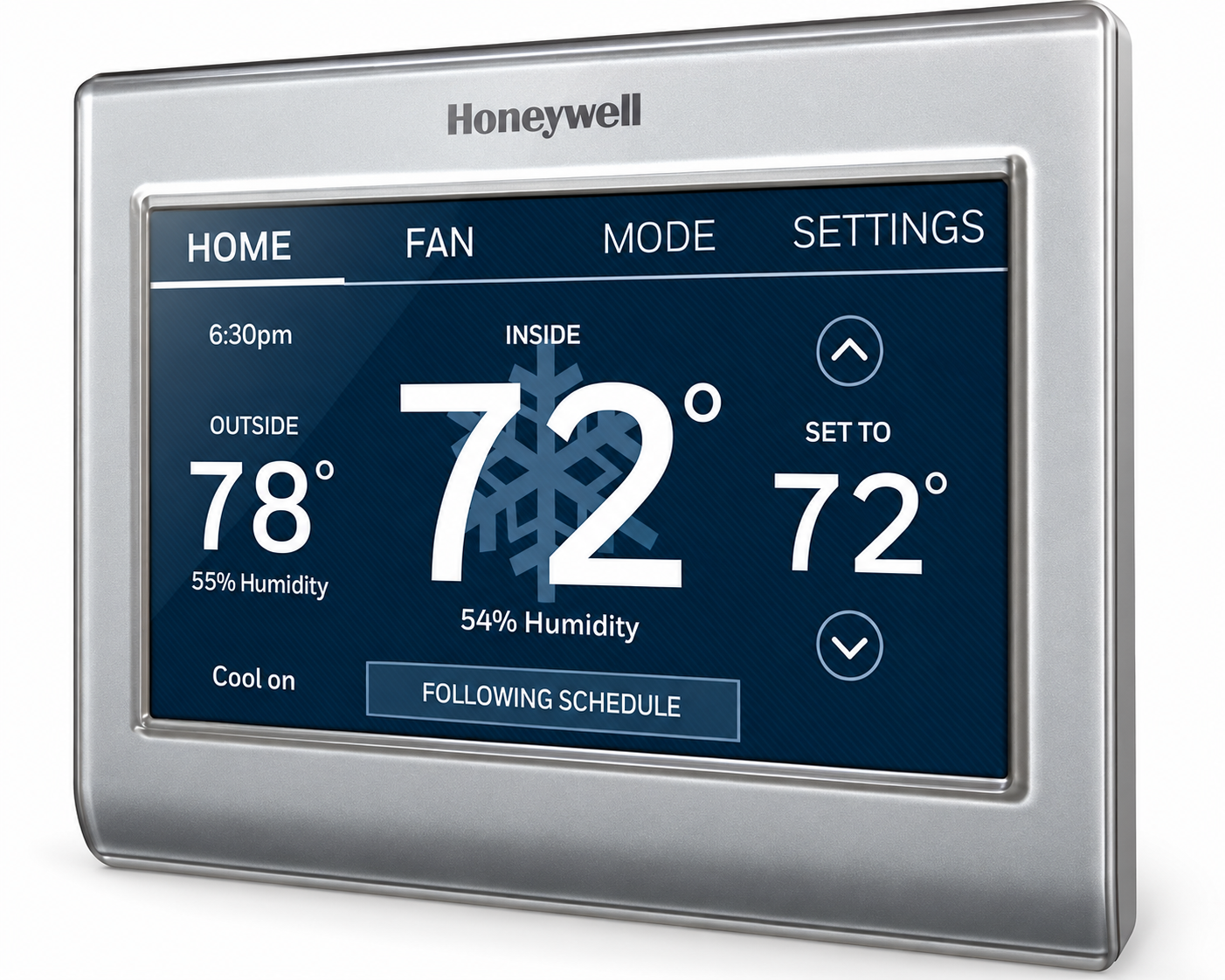
Introduction to Honeywell Home Color Touchscreen Programmable Thermostat RTH9585WF
The Honeywell Home Color Touchscreen Programmable Thermostat RTH9585WF is a premium Wi-Fi smart thermostat designed for modern homeowners seeking effortless climate control and energy efficiency. This ENERGY STAR certified device features a vibrant, fully customizable color touchscreen that matches your home decor while delivering precise temperature management through smart response technology. It learns your heating and cooling preferences, automatically adjusts schedules, and integrates seamlessly with smart home ecosystems like Amazon Alexa, Google Assistant, and SmartThings for voice control and IFTTT automations.
Key benefits include significant energy savings—up to 10-20% on heating and cooling bills—via 7-day programmable schedules, daily weather forecasts, and auto-alerts for filter changes or extreme temperatures. Ideal for busy families, pet owners, or remote workers, it ensures safe temps when away and offers app-based control through Honeywell Total Connect Comfort for real-time adjustments from anywhere. Unlike basic thermostats, the RTH9585WF provides humidity sensing, external temperature detection, and demand response features for utility programs.
Targeted at tech-savvy users upgrading to smart homes, it's perfect for single-family residences with central HVAC systems (compatible with 2-stage heat/cool, heat pumps excluding 120-240V electric baseboard). The estimated price range is $150-$200, widely available at retailers like Home Depot and Honeywell's site, with stock fluctuations noted. This Honeywell Home Color Touchscreen Programmable Thermostat RTH9585WF combines style, versatility, and performance for ultimate comfort.
Honeywell Home RTH9585WF Specifications and Key Features
The Honeywell Home Color Touchscreen Programmable Thermostat RTH9585WF boasts robust specs for reliable smart home integration. Here's a detailed breakdown:
- Display and Design: Full-color customizable touchscreen, 4.5 in W x 0.8 in D x 3.5 in H, silver plastic rectangle.
- Connectivity: Wi-Fi enabled, app control via Honeywell Total Connect Comfort, compatible with Amazon Alexa, Google Assistant, SmartThings, IFTTT.
- Programming: 7-day programmable (28 programs/week), smart response learning for auto-adaptation, temporary holds, vacation mode.
- Control Features: 2-stage heat/2-stage cool, humidity sensing, time-of-day usage, external temp detection, demand response (pre-cooling, cycling).
- Power and Efficiency: 24V softwired/battery backup, 0.93W standby power, ENERGY STAR certified since 2019.
- Additional Capabilities: On-screen weather forecast (daily/5-day via app), auto daylight savings, multi-language, filter/humidifier alerts, password protection.
- Includes: Wallplate, screws/anchors, quick start guide, wire labels, user guide.
Compared to Ecobee or Nest, the RTH9585WF excels in customizable displays and lower standby power, though it lacks built-in cameras or occupancy sensors found in premium rivals.
Setting up your thermostat
Setting up your programmable touchscreen thermostat is easy. It is preprogrammed and ready to go as soon as it is installed and registered.
- Install your thermostat.
- Connect it to your home wireless network.
- Register online for remote access.
Installing your thermostat
You might need the following tools to install this thermostat:
- No. 2 Phillips screwdriver
- Pen
- Pencil
- Level (optional)
- Drill and bits (3/16” for drywall, 7/32” for plaster) (optional)
- Hammer (optional)
- Electrical tape (optional)
Installation
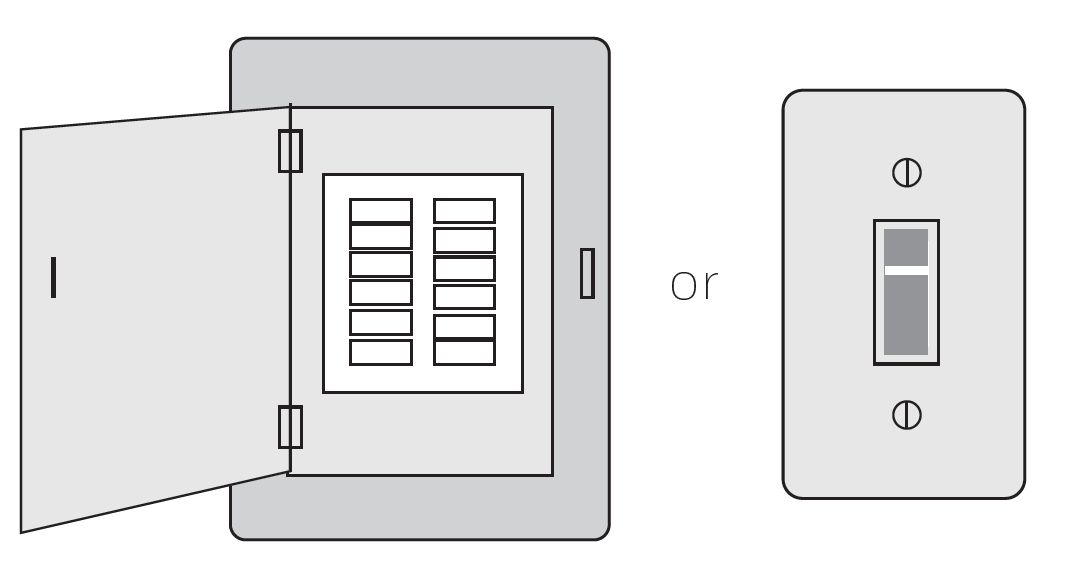
- Switch OFF power to your heating/cooling system.
- Remove the old thermostat faceplate and leave wires connected
- Take a picture of the wire connections for later reference.
- If no wire is connected to a terminal labeled C or no C terminal exists on the old thermostat, view the Alternate Wiring videos at honeywellhome.com/wifi-thermostat or reference the C-wire addendum in the box.
- Remove the old thermostat faceplate and leave wires connected
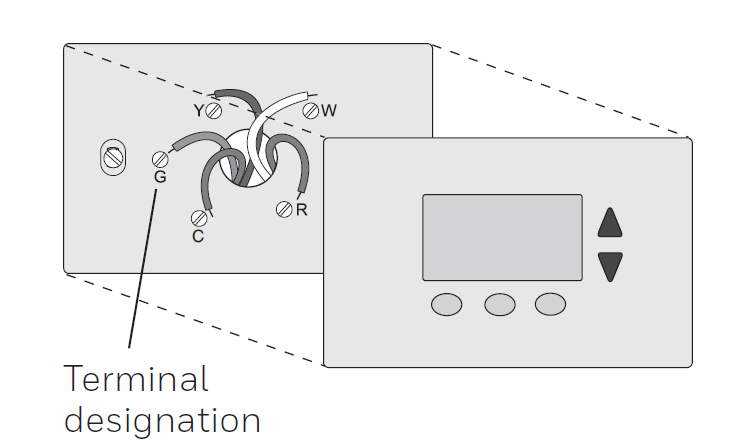
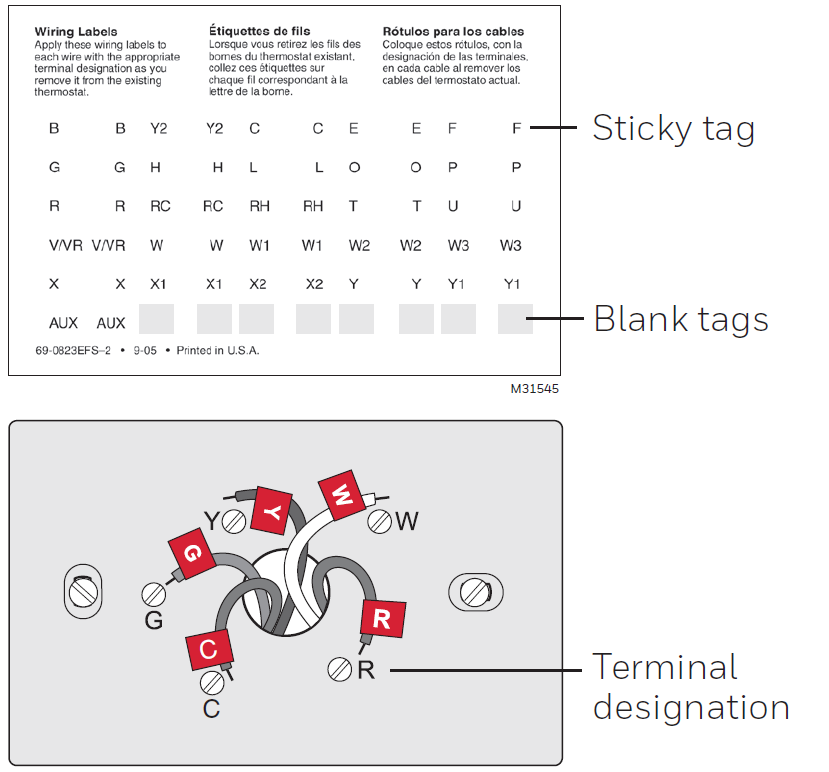
Label the wires
Use the supplied sticky tags to label each wire as you disconnect it. Label wires according to the old thermostat terminal designations, not by wire color.
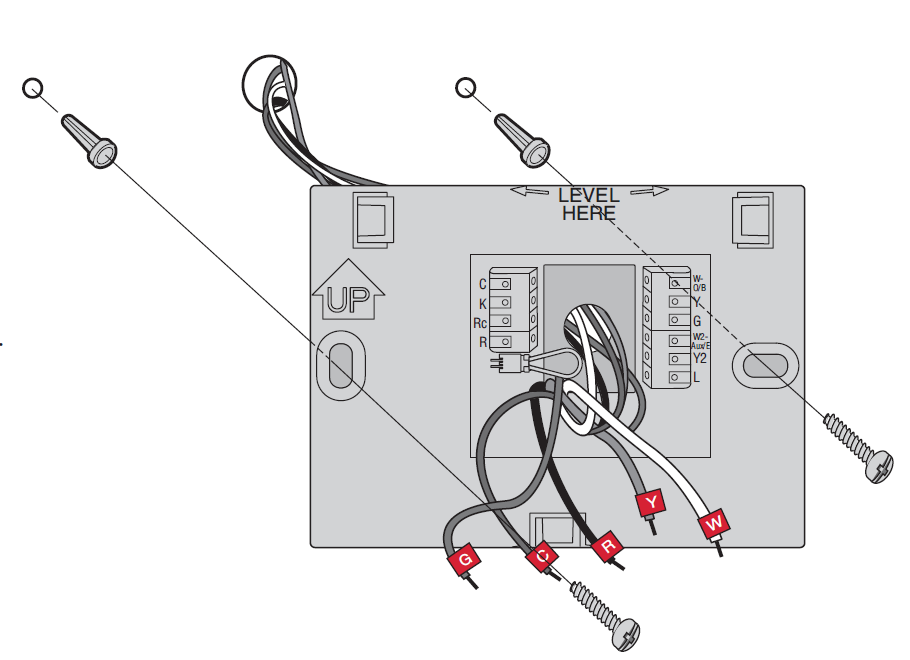
Remove the wallplate.
Remove the old wallplate from the wall after all wires have been labeled and disconnected.
Mount the wallplate for the thermostat
Mount your new wallplate using screws and anchors included with the thermostat. If necessary:
- Drill 3/16-in holes for drywall.
- Drill 7/32-in holes for plaster.
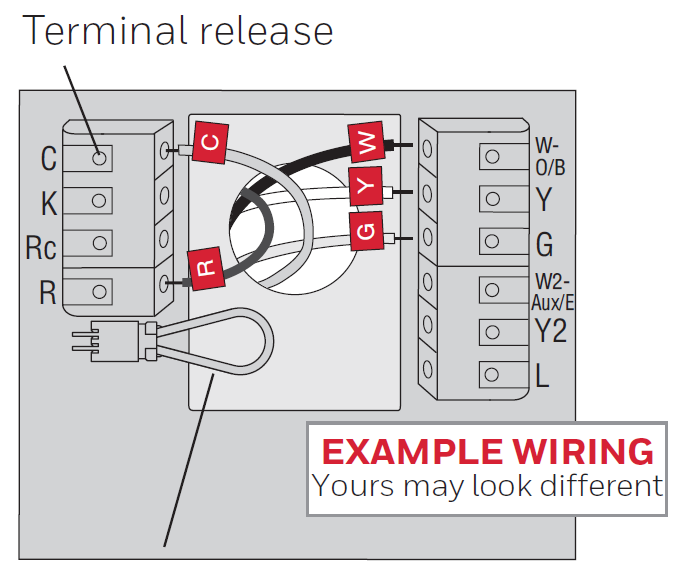
Wiring (Conventional System)
Wire the thermostat to your conventional system. Starting with the C Wire, match the sticky tag on the wire to the terminal labels.
You must have a C wire.
Straighten the wire and gently slide it into the terminal hole until it clicks into place. (If you need to remove a wire, use a pen tip to press the terminal release and then pull the wire out.)
- In the image on the right, check the box next to each connection. You will use this checklist in Step 9.
- Verify wire is firmly secured by gently pulling on wire.
- Repeat steps a–d for all other wires.
- Push any excess wire back into the wall opening after all wires are installed.
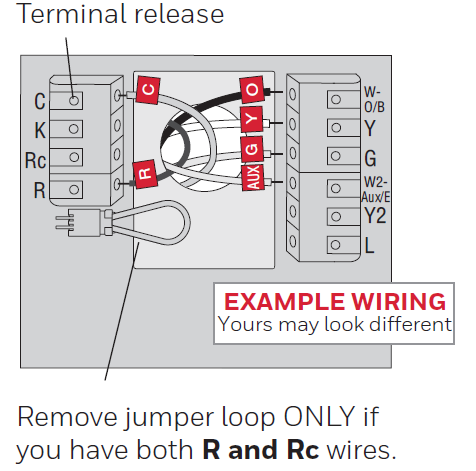
Wiring (Heat Pump System)
Wire thermostat to your heat pump:
- Starting with the C Wire, match the sticky tag on the wire to the terminal labels
- Slide wire gently into terminal hole until it clicks into place. (If you need to remove a wire, use a pen tip to press the terminal release and then pull the wire out.)
- In the image on the right, check the box next to each connection. You will use this checklist in Step 9.
- Verify wire is firmly secured by gently pulling on wire.
- Repeat steps a–d for all other wires.
- Push any excess wire back into the wall opening after all wires are installed.
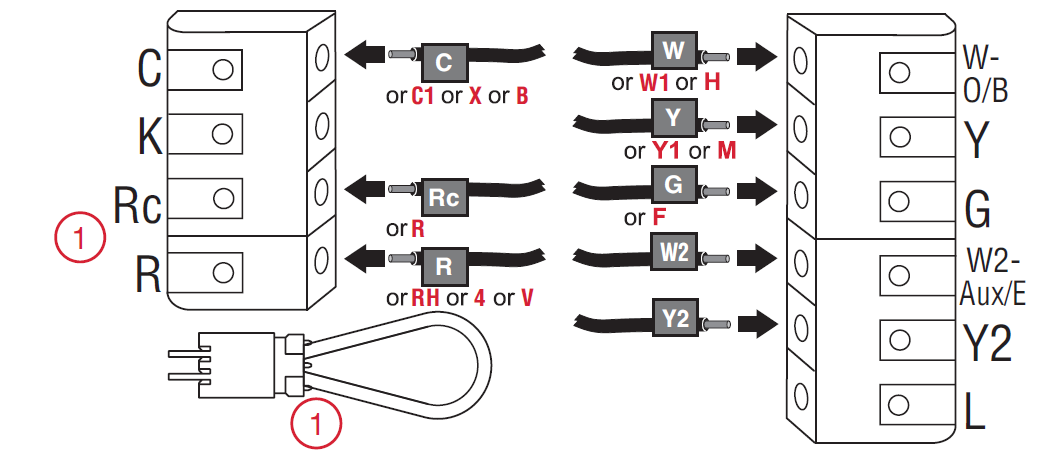
Alternate wiring (Conventional System)
Use this if your wire labels don’t match the terminal labels.
Alternate wiring (Heat Pump System)
Use this if your wire labels don’t match the terminal labels.
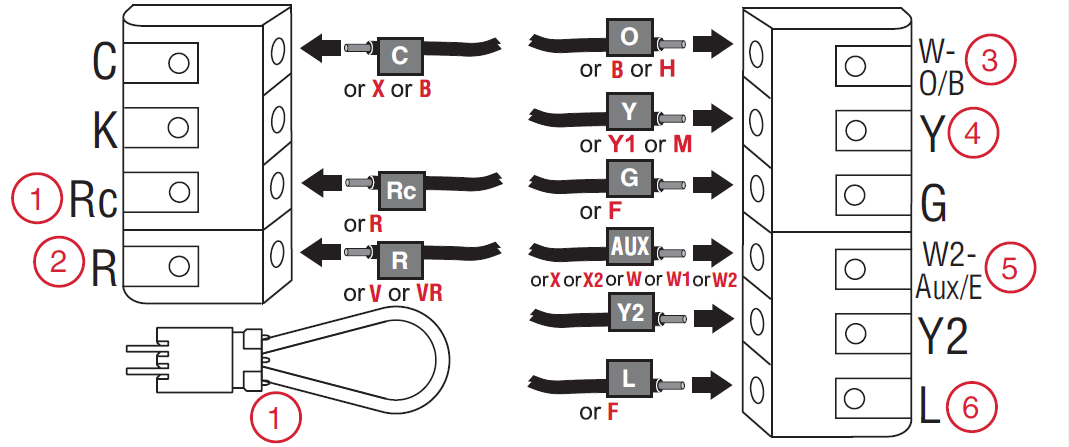
- R and Rc Wires: If you have both an R and Rc wire, unplug the jumper loop by pulling on the wire loop.
- R and RH Wires: If your old thermostat had both R and RH wires, connect the R wire to the Rc terminal, the RH wire to the R terminal, and unplug the jumper loop.
- O and B Wires: If your old thermostat had separate O and B wires and controls a single-zone heat pump system, connect the B wire to the C terminal. If multiple thermostats control the system, contact Resideo Zoning at 800-828-8367 for assistance.
- Aux and E Wires: If your old thermostat has separate wires connected to the Aux and E terminals, use a wire nut to connect both wires to a third wire. Insert the third wire into the W2-Aux/E terminal.
- System Monitor: The system monitor detects potential problems with the heating or cooling system. If an issue is detected, an orange alert button will appear on the thermostat's home screen.
Safety Note: Turn off power to the HVAC system before working with thermostat wiring. Confirm terminal compatibility with the manufacturer's wiring instructions before making connections.
Attach thermostat to wallplate
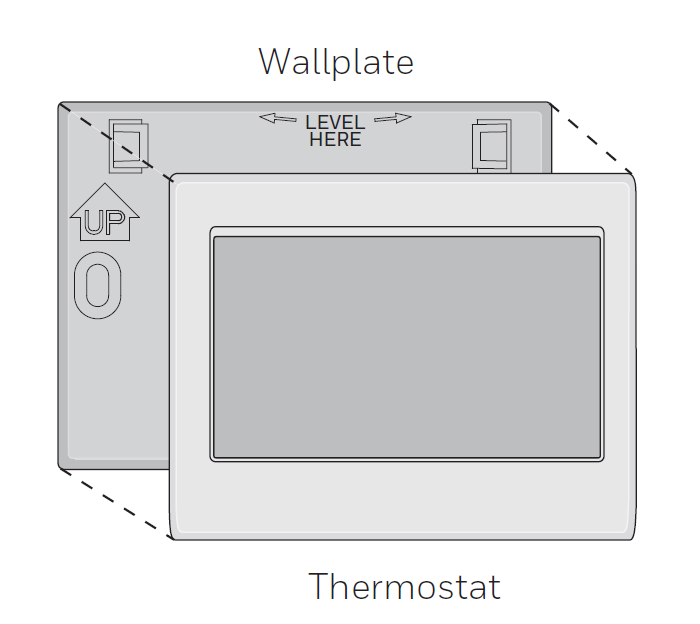
Align the thermostat with the wallplate and then snap into place.
Switch heating/cooling system ON
- Verify that the C wire is connected at the thermostat and at the heating/cooling system.
- Make sure the heating/cooling system door is firmly secured.
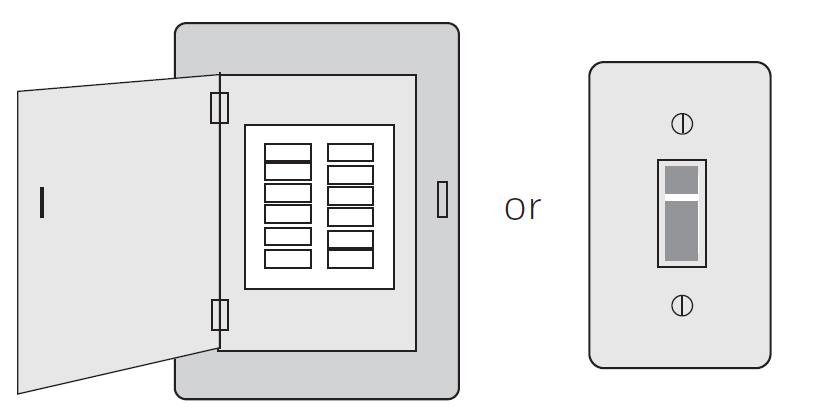
- Switch power back ON for your heating/cooling system at the breaker box or its power switch.
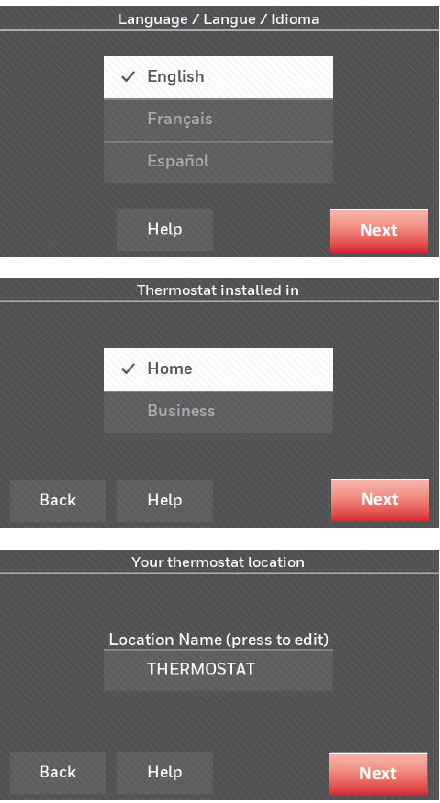
Before connecting to your Wi-Fi network, you need to set initial thermostat options to define your heating/cooling system:
• Language
• Home or business
You can customize other options later.
Follow prompts on the screen to select appropriate options.
- Touch the language you want the thermostat to display, then touch Next.
- Select Home or Business installation, then touch Next.
- Touch Next, or name the thermostat location—touch THERMOSTAT and follow the rest of the instructions.
- Select what type of heating and cooling equipment your thermostat will control and touch Next.
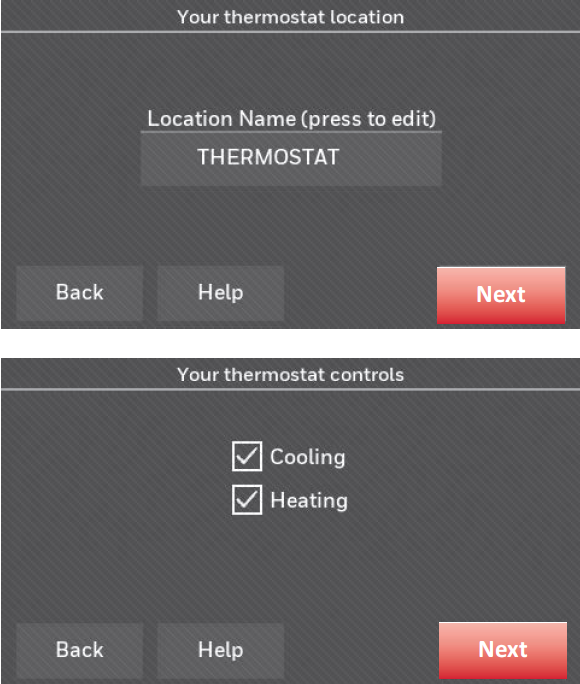
Connecting to your Wi-Fi network
After touching Done on the final screen of the initial set up, the thermostat displays an option to connect to your Wi-Fi network.
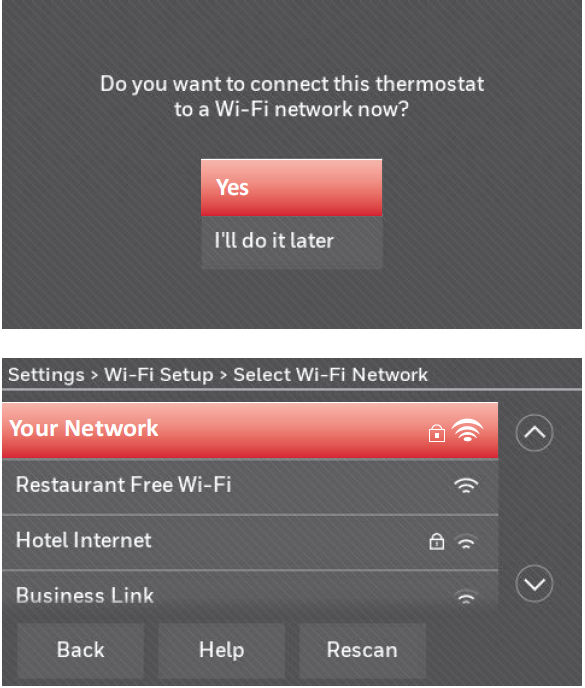
Touch Yes to connect the thermostat to your Wi-Fi network. The screen displays the message “Searching for wireless networks. Please wait...” after which it displays a list of all Wi-Fi networks it can find.
Disconnecting your Wi-Fi network
- Touch SETTINGS.
- Select Wi-Fi Setup.
- Touch Disconnect from Network. The thermostat will display a question to confirm your selection.
- Touch Yes to confirm that you want to disconnect from the network. The thermostat will display the Wi-Fi Setup screen.
- Touch OK to display the menu
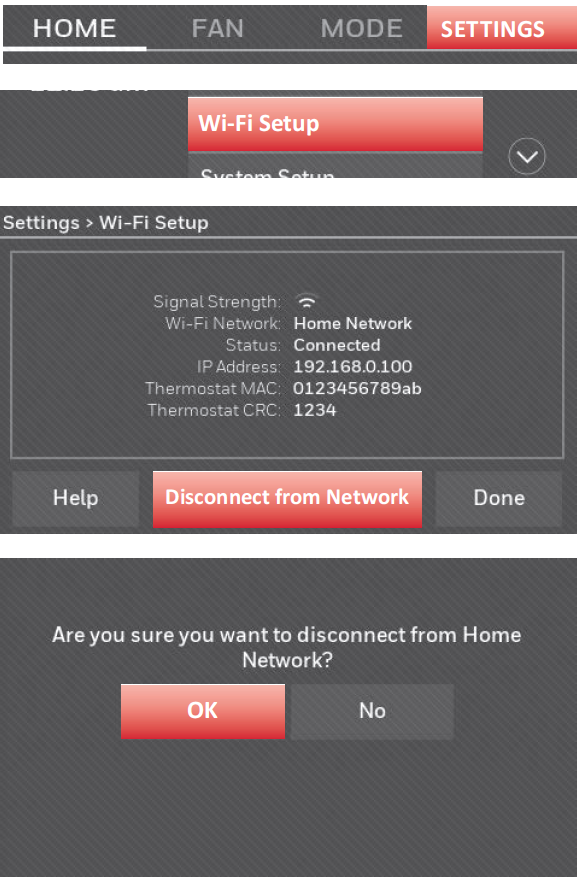
Setup
Setting the time/date
- Touch the current time. The screen displays Set Time/Set Date.
- Touch Set Time or Set Date.
- Touch p or q until the proper time/date is displayed.
- Touch Done to save or Cancel to ignore changes.
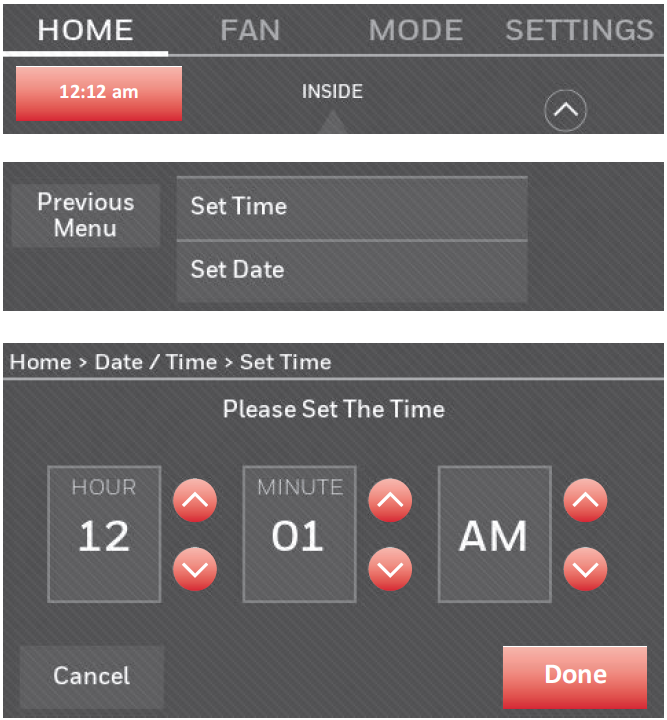
Setting the fan
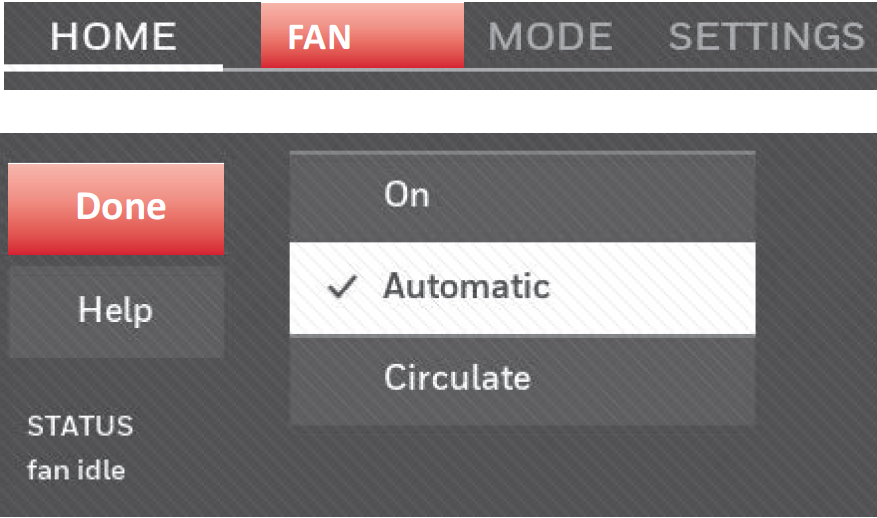
- Touch FAN to display fan settings.
- Touch On, Automatic, Circulate, or Follow Schedule.
- Touch Done to save and exit.
- On: Fan is always on.
- Automatic: Fan runs only when the heating or cooling system is on.
- Circulate: Fan runs randomly about 35% of the time (home use only).
- Follow Schedule: Follow Schedule is not an option if all programs are set to fan auto
Setting system mode
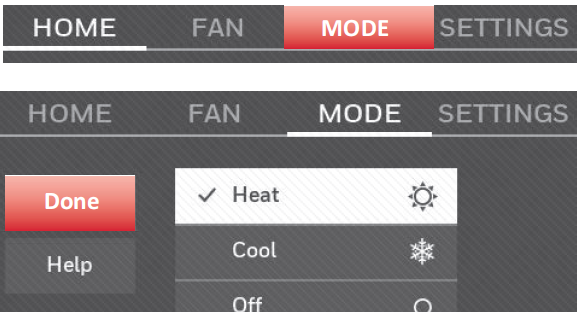
- Touch MODE to display system settings.
- Touch desired option:
- Heat: Thermostat controls only the heating system.
- Cool: Thermostat controls only the cooling system.
- Off: Heating/cooling systems are off.
- Automatic: Thermostat selects heating or cooling as needed depending on the indoor temperature.
- Emergency Heat (heat pumps with aux. heat): Controls auxiliary/emergency heat. Compressor is locked out.
- Touch Done to save and exit.
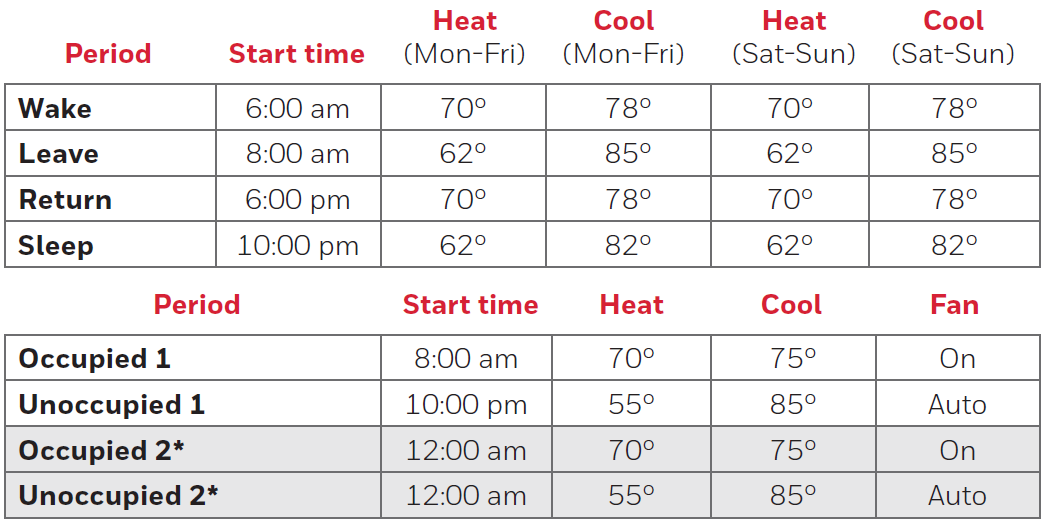
Preset energy-saving schedules
Adjusting program schedules
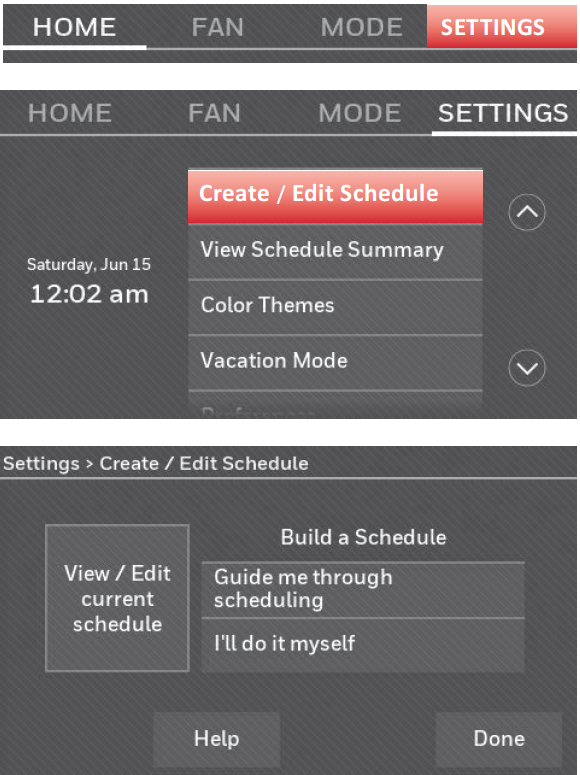
- Touch SETTINGS.
- Select Create/Edit Schedule.
- Touch View/Edit to view the full schedule and make a quick adjustment.
- Touch Guide Me to create a schedule by answering simple questions.
- Touch I’ll do it myself to manually create a program schedule
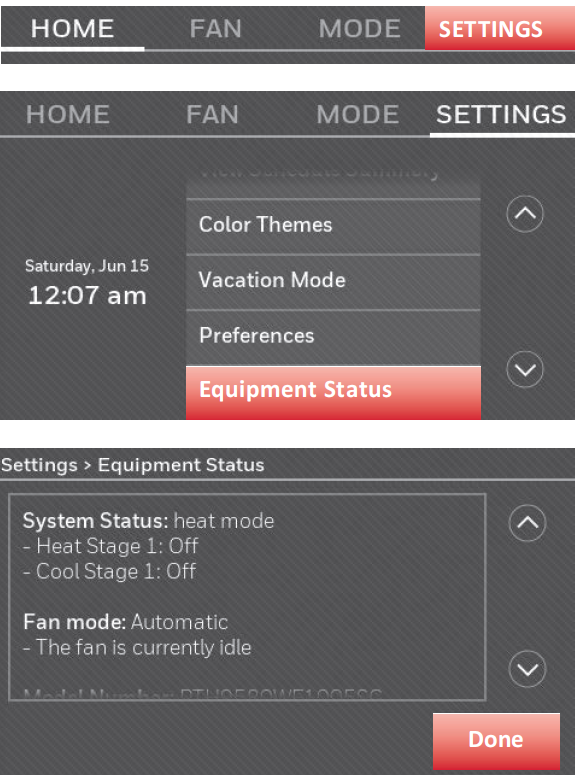
Viewing equipment status
- Touch SETTINGS.
- Select Equipment Status.
- Touch p or Q to view the status of all the equipment your thermostat is controlling. Depending on how your thermostat was installed, the Equipment Status screen can report data about the following systems:
- Heating and cooling
- Fan
- Thermostat information
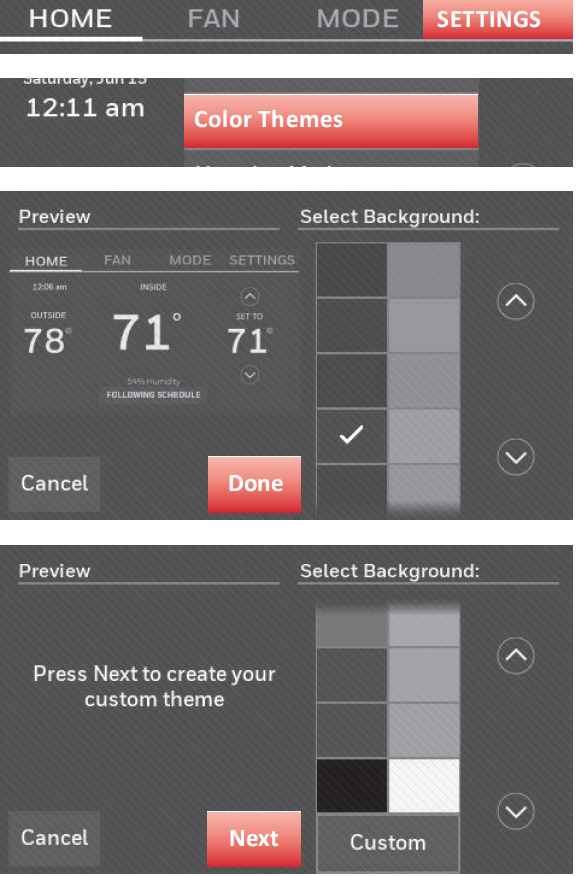
Customizing screen color
You can customize your thermostat display to match your décor.
- Touch SETTINGS.
- Touch Color Themes.
- Select the name of a color to use a predefined background, or select Custom to define you own background color and text.
Software updates
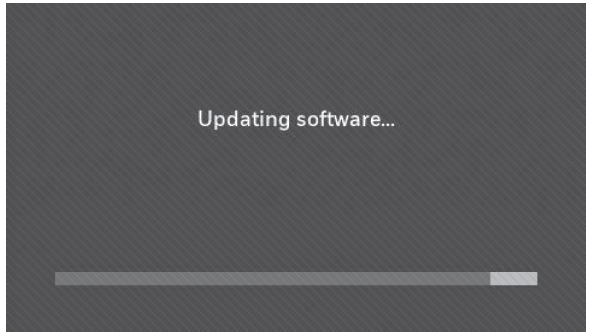
The Wi-Fi app periodically issues updates to the software for this thermostat. The updates occur automatically through your Wi-Fi connection. All your settings are saved, so you will not need to make any changes after the update occurs. Updates occur in the early morning. After your thermostat receives the software, it reboots. The screen then shows “Updating software…” with a green progress bar. When the update is complete, your home screen will appear as usual.
Changing system setup
Troubleshooting
If you have difficulty with your thermostat, please try the following suggestions. Most problems can be corrected quickly and easily.
Display Is Blank:
- Check the circuit breaker and reset it if necessary.
- Make sure the power switch at the heating and cooling system is on.
- Make sure the furnace door is securely closed.
- Make sure the C wire is connected (see page 5).
Cannot Change System Setting to Cool:
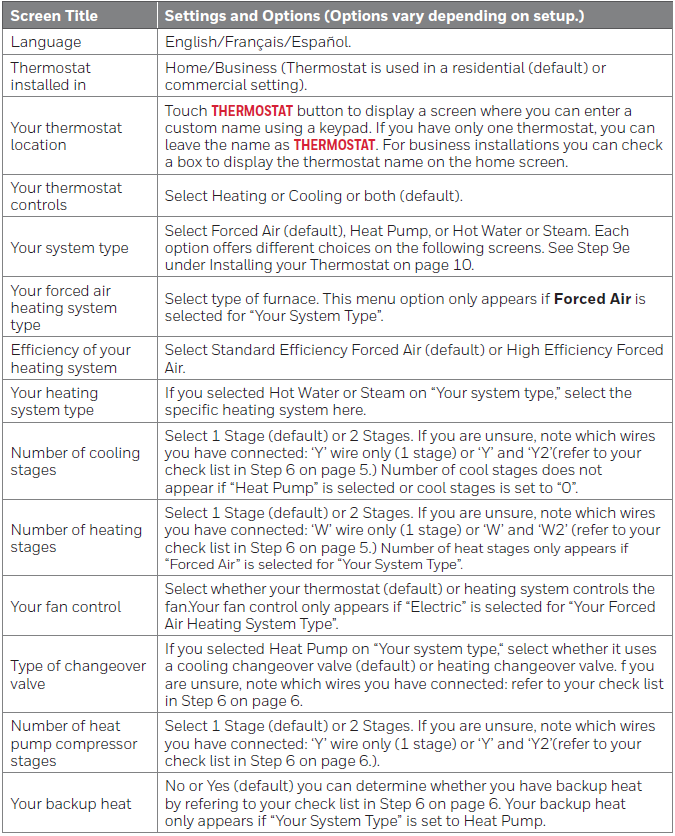
Check that the System Setup screen "Your Thermostat Controls" or "Your System Type" is set to match your heating and cooling equipment (see page 29).
Fan Does Not Turn On When Heat Is Required:
Check that the System Setup screen "Your Fan Control" is set to match your heating equipment (see page 28).
"Wait" Appears on the Screen:
- The compressor protection feature is engaged.
- Wait 5 minutes for the system to restart safely without damaging the compressor.
Heat Pump Issues Cool Air in Heat Mode or Warm Air in Cool Mode:
Check the System Setup screen "Type of Changeover Valve" to make sure it is properly configured for your system (see page 28).
Heating or Cooling System Does Not Respond:
- Touch MODE to set the system to Heat. Make sure the temperature is set higher than the inside temperature.
- Touch MODE to set the system to Cool. Make sure the temperature is set lower than the inside temperature.
- Check the circuit breaker and reset it if necessary.
- Make sure the power switch at the heating and cooling system is on.
- Make sure the furnace door is securely closed.
- If "Wait" is displayed, the compressor protection timer is on. Wait 5 minutes for the system to restart safely without damaging the compressor (see page 26).
7. Heating System Is Running in Cool Mode:
- Check that the System Setup screen "Your Thermostat Controls" or "Your System Type" is set to match your heating and cooling equipment.
- Refer to "System Setup Options (SETTINGS > System Setup)" on page 29 for additional information.
Pros and Cons of Honeywell Home Color Touchscreen Programmable Thermostat RTH9585WF
Pros
- Exceptional energy savings with smart learning and ENERGY STAR certification, reducing bills by optimizing cycles based on real-time weather.
- Customizable color touchscreen enhances home aesthetics; vivid display shows humidity, forecasts, and alerts intuitively.
- Seamless smart integration for voice control and app remote access, ideal for multi-device homes.
- Reliable performance with 2H/2C stages; auto-updates and on-demand help simplify use.
- Great value at $150-$200, offering premium features like demand response without subscription fees.
Cons
- Not compatible with heat pumps using 120-240V electric baseboard heat, limiting some installations.
- App occasionally lags during peak usage, per user reports, though firmware updates help.
- Setup requires Wi-Fi and wiring knowledge; professional install recommended for non-DIYers.
- Fewer advanced sensors (no geofencing) compared to Nest Learning Thermostat.
- Battery backup may need occasional checks in power-outage-prone areas.
Overall, it delivers strong value for money versus pricier alternatives, balancing cost with smart Honeywell Home RTH9585WF functionality.
Customer Reviews: Honeywell Home Wi-Fi Smart Color Thermostat RTH9585WF Feedback
The Honeywell Home Color Touchscreen Programmable Thermostat RTH9585WF earns high praise, averaging 4.4/5 stars across retailers. Users love the "gorgeous customizable screen" and energy savings: "Dropped my bill 15% with auto-learning!" says one Home Depot reviewer. Common praises include easy Alexa integration—"Voice control is a game-changer"—and reliable app alerts for filters.
Complaints focus on initial wiring: "Tricky for beginners, but guide helps," and rare Wi-Fi drops. Testimonials highlight pet safety: "Keeps house cool remotely during vacations." Recommended for most, especially at this price; addresses issues like extreme temp alerts effectively.
Faqs
How do I install the Honeywell Home Color Touchscreen Programmable Thermostat RTH9585WF step by step?
What should I do if the Honeywell Home Color Touchscreen Programmable Thermostat RTH9585WF displays no power or won't turn on?
How do I program a 7-day schedule on the Honeywell Home Color Touchscreen Programmable Thermostat RTH9585WF?
Is the Honeywell Home Color Touchscreen Programmable Thermostat RTH9585WF compatible with my HVAC system?
How do I connect the Honeywell Home Color Touchscreen Programmable Thermostat RTH9585WF to Wi-Fi?
Why is my Honeywell Home Color Touchscreen Programmable Thermostat RTH9585WF not responding to temperature changes?
How can I optimize energy savings with the Honeywell Home Color Touchscreen Programmable Thermostat RTH9585WF?
What maintenance is required for the Honeywell Home Color Touchscreen Programmable Thermostat RTH9585WF?
More honeywell home manuals
- Setup: Honeywell Home FocusPRO P200 Series Programmable Thermostats User Manual
- How to Use: Honeywell Home T9 Smart Thermostat with Smart Room Sensor User Manual
- Setup: Honeywell Home Programmable Thermostat RTH2300/RTH221 Series User Manual
- Setup: Honeywell Home T10 Pro Smart Programmable Thermostat with RedLINK THX321WFS2001W User Manual
- Setup: Honeywell Home RTH6500WF Smart Series Programmable Thermostat User Manual
- Setup: Honeywell Home X1N Non-Programmable Thermostat RTH11B/RTHC11B User Manual
Leave a Comment