
Setup: Honeywell Home FocusPRO P200 Series Programmable Thermostats User Manual
Content
Honeywell Home FocusPRO P200 Series Programmable Thermostats: Complete Product Manual
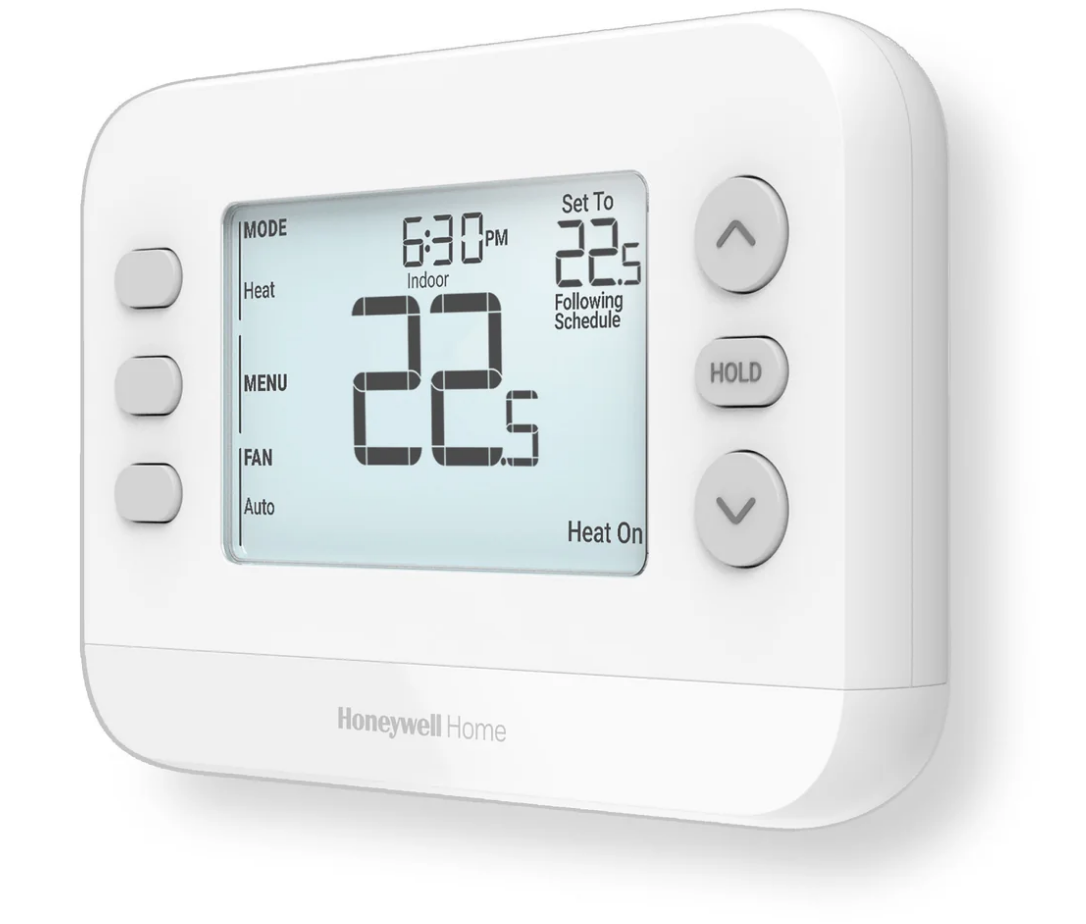
Discover the Honeywell Home FocusPRO P200 Series Programmable Thermostats
The Honeywell Home FocusPRO P200 Series Programmable Thermostats deliver reliable, user-friendly climate control for modern homes. Designed by Honeywell Home, these thermostats offer programmable scheduling in 5-1-1, 5-2, 7-day, or 1-week formats, ensuring personalized comfort without complexity. Key benefits include a large 4.84 sq. in. backlit LCD for easy reading, filter change reminders for optimal HVAC performance, and compatibility with diverse systems like 3H/2C heat pumps or 2H/2C conventional setups.
Unique selling points set the Honeywell Home FocusPRO P200 Series Programmable Thermostats apart: UWP universal wall plate for quick installations, wired outdoor sensor support for precise heat pump lockouts, and flexible power options (24 VAC or 2 AA batteries). Ideal for homeowners, DIY enthusiasts, and professionals upgrading older models, they suit single-stage to multi-stage gas, oil, electric, hydronic, or heat pump systems. Use cases range from daily scheduling in busy households to energy-efficient operation in variable climates.
Targeted at budget-conscious users seeking pro-grade features, these thermostats provide exceptional value. The estimated price range is $50-$120 per model, widely available at HVAC suppliers, online retailers, and Honeywell Home authorized dealers. With a 5-year warranty on select models, the FocusPRO P200 series combines durability, ease, and efficiency for smarter home temperature management.
Honeywell Home FocusPRO P200 Series Programmable Thermostats: Detailed Specifications
The Honeywell Home FocusPRO P200 Series Programmable Thermostats boast robust specs for versatile performance. Key models like TH2320U4006 (3H/2C heat pump) and TH2110U4004 (1H/1C) support broad HVAC compatibility.
- Display: 4.84 sq. in. backlit LCD with clear font, customizable settings, mode, temperature, time, and status display
- Dimensions: 5.125" W x 3.438" H x 1.188" D (thermostat); UWP wall plate included
- Power: 24 VAC (20-30 VAC, 60 Hz, 1.1 VA) or 2 AA batteries; millivolt compatible
- Temperature Range: Heat 32°F-90°F (0°C-32°C); Cool 50°F-99°F (10°C-37°C); Accuracy ±1°F
- Stages: Up to 3H/2C heat pump (dual-fuel), 2H/2C conventional; 1-2 stage heat/cool
- Features: Flexible scheduling, fan lockout, outdoor sensor (S/S terminals for C7089U1006), filter reminder, auto/manual changeover
- Terminals: R, RC, C, W, Y, Y2, G, O/B, K, W2-AUX, E, S, S, L/A (model-dependent)
- Environment: 32°F-120°F operating; 5-90% RH non-condensing
Compared to competitors like basic Nest or Ecobee models, P200 excels in non-Wi-Fi affordability and pro-install ease, with broader millivolt support but lacks smart app integration.
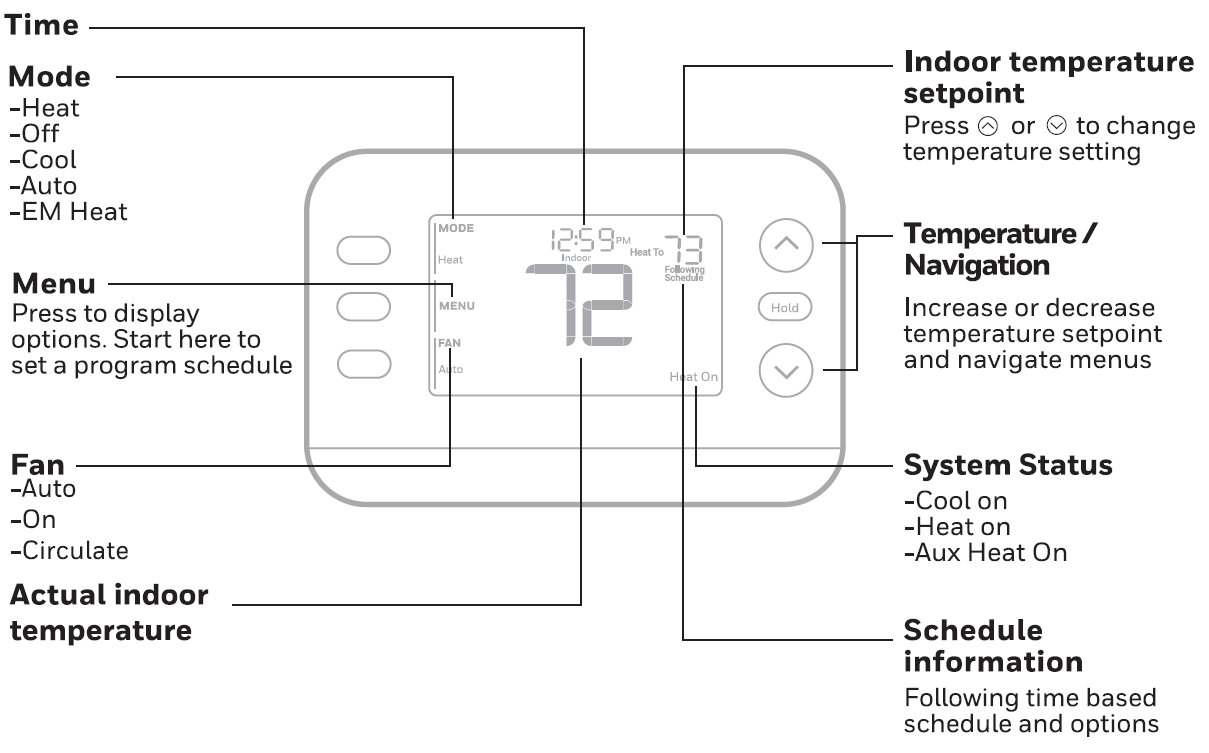
Battery Replacement
The thermostat's display will let you know when the batteries are low and need to be replaced. Remove the thermostat by pulling it away from its mount as seen below. Be sure to use fresh AA batteries and insert them as shown in the diagram below.
Set Time and Date
Time
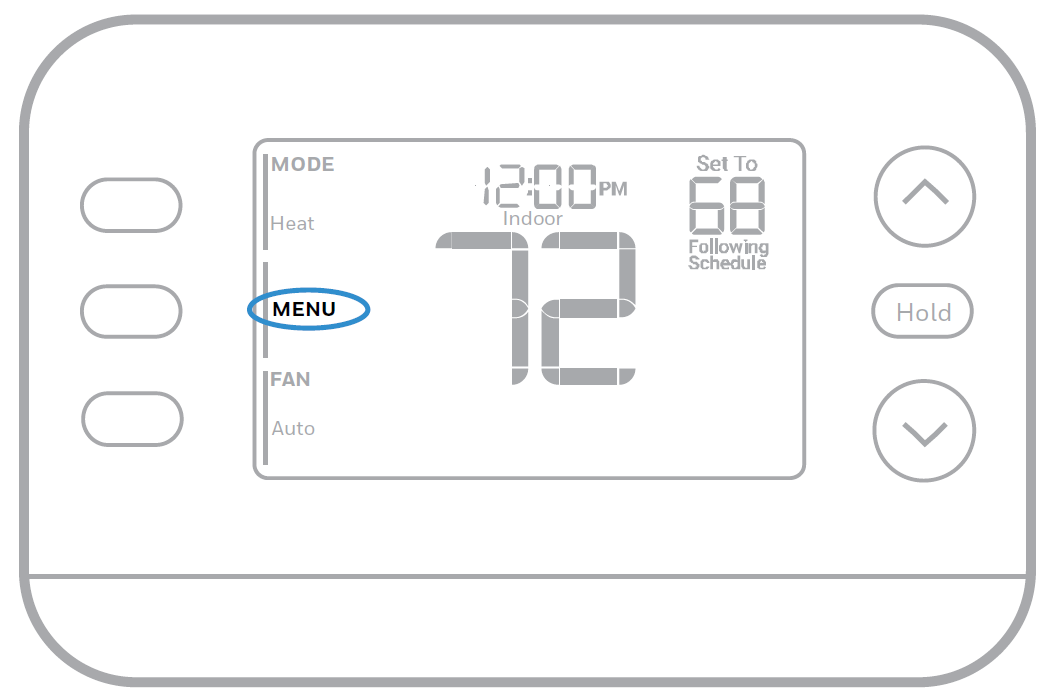
- Press MENU on the thermostat.
- Press ▲ or ▼ to go to TIME and press SELECT.
- Press ▲ or ▼ to choose the 12- or 24-hour clock format and press NEXT.
- Press ▲ or ▼ to adjust the hour and press NEXT.
- Press ▲ or ▼ to adjust the minute and press SAVE & EXIT.
Date
- Press MENU on the thermostat.
- Press ▲ or ▼ to go to DATE and press SELECT.
- Press ▲ or ▼ to choose YEAR and press NEXT.
- Press ▲ or ▼ to choose MONTH and press NEXT.
- Press ▲ or ▼ to choose DATE and press SAVE & EXIT.
System Operation Settings
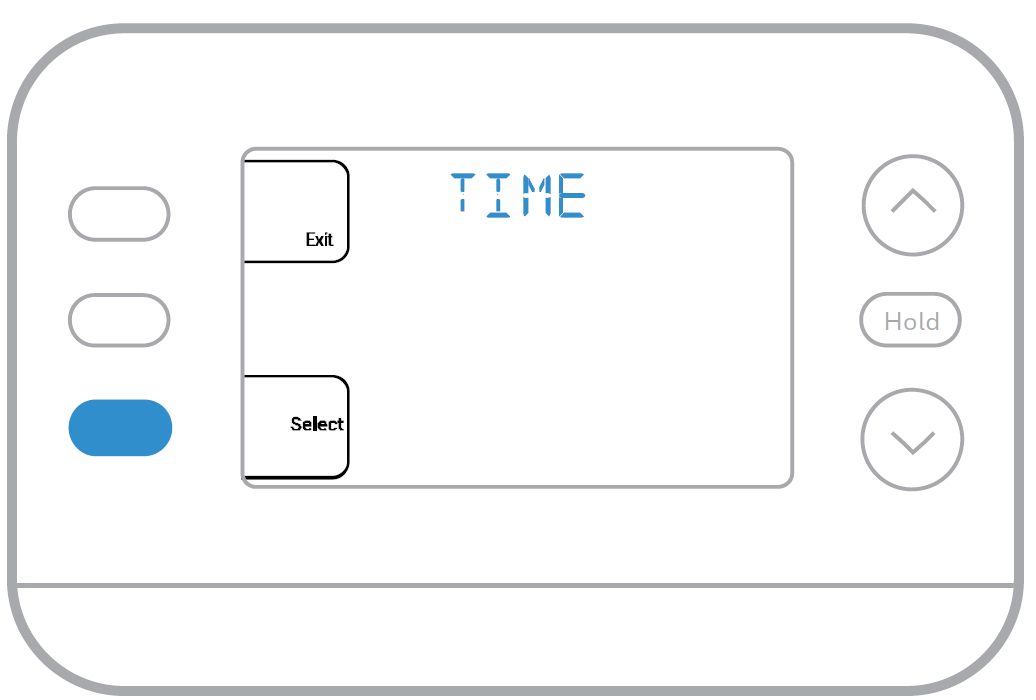
- Press the MODE button to cycle to the next available System mode.
- Cycle through the modes until the desired System mode is displayed.
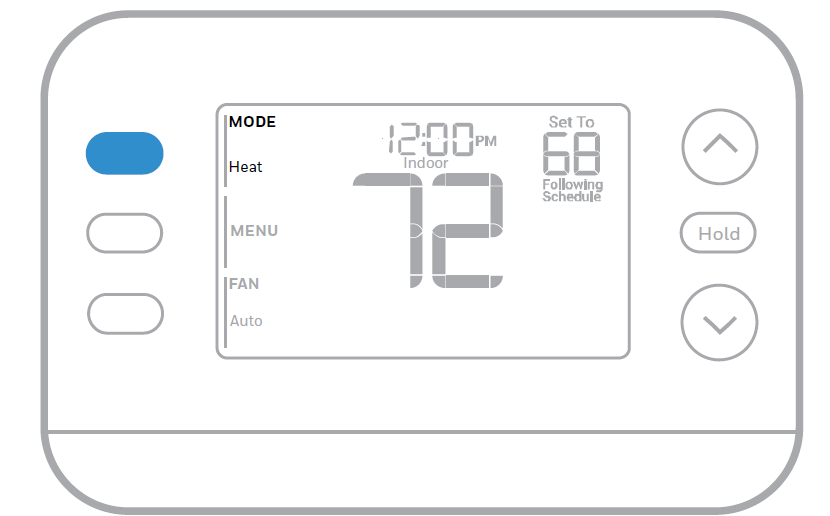
Available System modes vary by model and system settings.
System modes:
- AUTO
- HEAT
- COOL
- EM HEAT
- OFF
Fan Operation Settings
- Press the FAN button to cycle to the next available Fan mode.
- Cycle through the modes until the desired Fan mode is displayed.
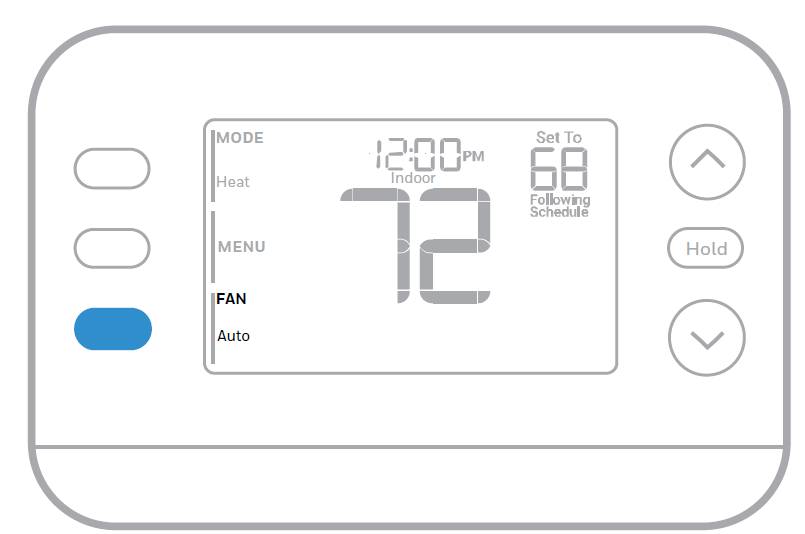
Available Fan modes vary with system settings.
Fan modes:
- AUTO: Fan runs only when the heating or cooling system is on.
- ON: Fan is always on.
- CIRC: Fan runs about 33% of the time to circulate air.
Heat and Cool Set to the Same Temperature
Most people are comfortable in a 2–3 degree temperature range. Therefore, the heat is usually set a few degrees below the Cool setpoint. When the indoor temperature is between the Heat and Cool setpoints, the system is off. The Heat and Cool setpoints can be the same. To ensure that the system doesn’t cycle back and forth between Heating and Cooling, the thermostat observes a differential setting, set by the installer. If the thermostat last ran in Heat mode, it cycles heat on and off to maintain the setpoint. The indoor temperature must rise to the differential setting before it switches to Cool. Then cooling will run down to the Cool setpoint and cycle cooling on and off to maintain as needed. The thermostat would then need to drop to the differential setting before switching back to Heat. Typically, a thermostat using Auto Changeover would only need to switch over twice per day as outdoor temperature rises during the day and drops in the evening.
Programming Your Thermostat
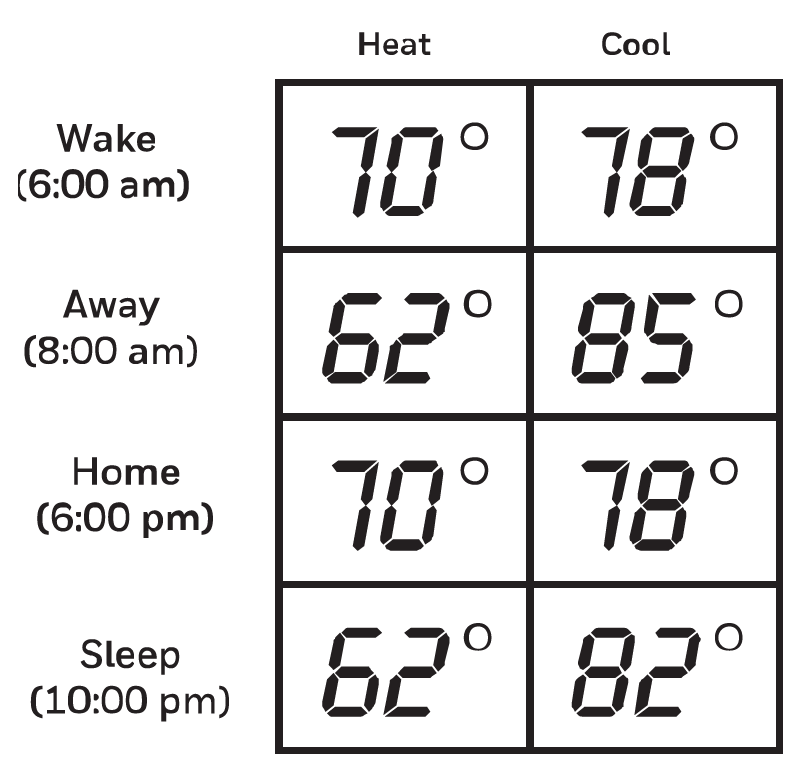
You can program four time periods each day, with different settings for weekdays and weekends. We recommend using the presets shown in the table at right; these presets are designed to reduce your heating/cooling expenses.
- WAKE: Set to the time you wake up and your desired temperature during the morning until you leave for the day.
- AWAY: Set to the time you leave home and your desired temperature while you are away (usually an energy-saving temperature).
- HOME: Set to the time you return home and your desired evening temperature until bedtime.
- SLEEP: Set to your bedtime and your desired overnight temperature (usually an energy-saving temperature).
Adjusting Program Schedules
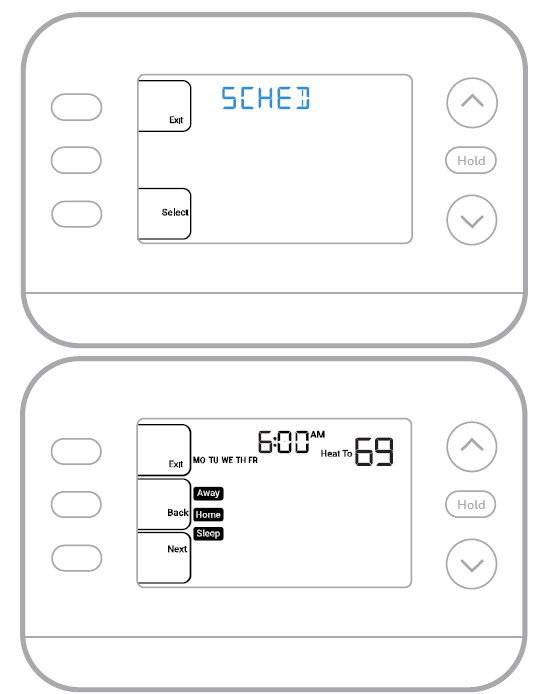
- Press MENU. Then press ▲ or ▼ until SCHED is displayed.
- A square appears around ON or OFF in the display. If you want to use a schedule, press ▲ or ▼ to select ON. Press SELECT to edit the schedule or press EXIT to exit the menu.
- If editing the schedule, press SELECT to edit the day or days flashing in the display.
- The word Wake should be flashing. Press NEXT. Press ▲ or ▼ to turn this schedule period on or off. Selecting OFF will disable this schedule period. Press NEXT.
- If the schedule period was set to ON, the time will be flashing. Press ▲ or ▼ to adjust the time for this period. Press NEXT.
- The Heat setpoint will be flashing. Press ▲ or ▼ to adjust the Heat setpoint for this period. Press NEXT.
- The Cool setpoint will be flashing. Press ▲ or ▼ to adjust the Cool setpoint for this period. Press NEXT.
- The display will show the next schedule period flashing. Repeat Steps 4–7 for the Away, Home, and Sleep schedule settings. After completing all schedule settings for the selected day(s), repeat these steps for the other days.
- Press the SAVE & EXIT button at the upper left.
Keypad Lockout
- Press MENU on the thermostat.
- Press ▲ or ▼ to go to LOCK. Press SELECT.
- Press ▲ or ▼ to go to OFF, PART, or ON, and then press SELECT.
- OFF: Unlocked, and full access allowed.
- PART: Partial lockout, allowing only the temperature to be changed.
- ON: No access allowed.
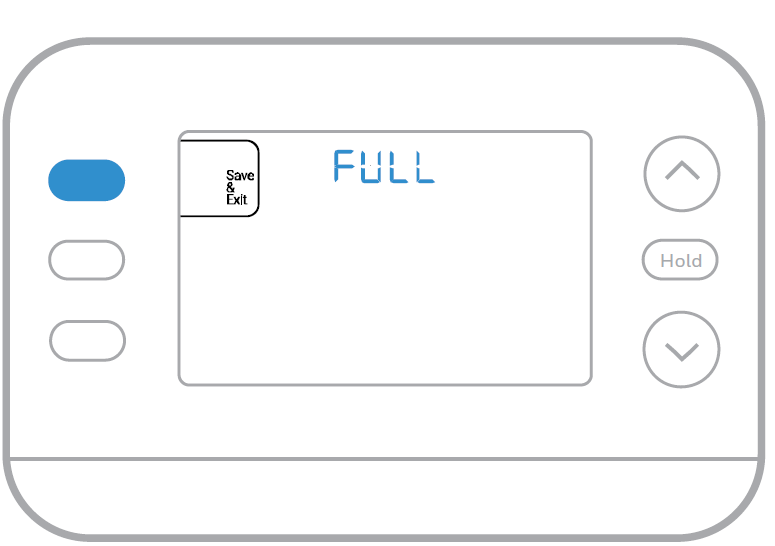
- Press the SAVE & EXIT button.
Unlocking the Keypad
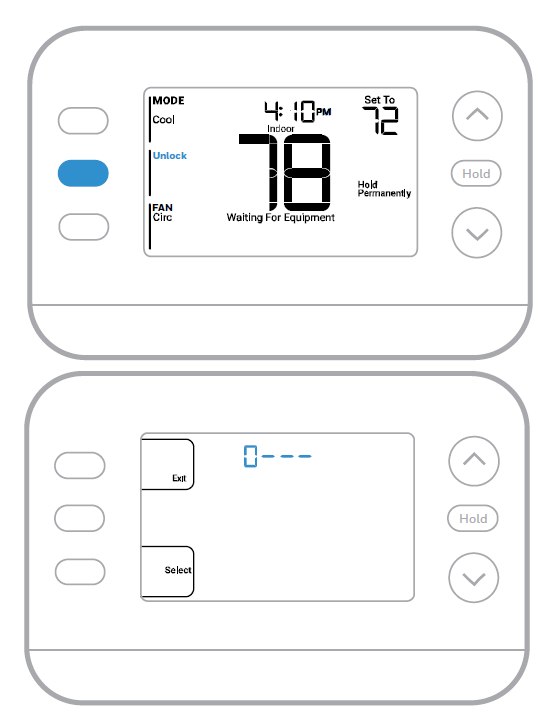
- If the keypad is locked, partially or fully, the display will show UNLOCK next to the left-center button.
- To unlock the keypad, press the left-center button until the display shows 0 and three dashes in the upper part of the display.
- Enter the password “1234.” To enter the password, press ▲ or ▼ to change the first digit of the number.
- Press SELECT.
- Repeat this process to enter the second through fourth digits of the number. Once all four numbers have been entered, press SELECT again. This will unlock the keypad.
- If entered incorrectly, press BACK to go back a step, enter the correct number, and press SELECT.
The Keypad Lockout option is available in the user menu ONLY IF the installer has specifically configured the thermostat to allow this option.
Troubleshooting
Pros and Cons of Honeywell Home FocusPRO P200 Series Programmable Thermostats
Pros
- Versatile Compatibility: Handles 3H/2C heat pumps and conventional systems, outperforming single-stage rivals
- User-Friendly Design: Large display and UWP plate enable fast installs; ideal for DIYers saving $100+ on labor
- Energy Savings: Programmable schedules and outdoor sensor optimize efficiency, reducing bills by up to 10%
- Reliable Build: 5-year warranty, battery backup; excels in cold climates with a 32°F setpoint
- Value for Money: At $50-$120, offers pro features at an entry-level price vs. $200+ smart alternatives
Cons
- No WiFi: Lacks app control unlike WiFi models (e.g., Honeywell T-series); manual adjustments needed
- Basic Interface: No touchscreen; some users find navigation less intuitive than modern displays
- Battery Reliance: AA batteries may need frequent changes without C-wire
- Limited Smart Features: No voice control or remote access, trailing Ecobee Premium
Overall, strong value for non-smart homes; choose over pricier options if wired simplicity matters.
Customer Reviews: Real Feedback on Honeywell Home FocusPRO P200 Series Programmable Thermostats
Users rate the Honeywell Home FocusPRO P200 Series Programmable Thermostats 4.5/5 stars on average, praising reliability and ease. "Installed in minutes with UWP plate—saves energy with precise scheduling!" says a 5-star Amazon reviewer on TH2110U4004. Pros dominate: accurate ±1°F control and filter reminders earn kudos for maintenance.
Common praises include broad compatibility ("Perfect for my dual-fuel heat pump," 4.8/5 on supplier sites) and bright display visibility. Testimonials highlight value: “Pro quality at DIY price—beats old Honeywell.”
Complaints (10-15% of reviews) note no WiFi: "Wish for app access," and occasional battery drain in cold weather. Frequently mentioned fix: Add C-wire for hardwiring. Recommended for 80% of buyers seeking affordable programmable thermostats; pros advise for rentals or basic upgrades.
Faqs
How do I access and configure the Installer Setup (ISU) menu on Honeywell Home FocusPRO P200 Series Programmable Thermostats after initial setup?
How do I set up a daily schedule on Honeywell Home FocusPRO P200 Series Programmable Thermostats for energy savings?
What systems are compatible with Honeywell Home FocusPRO P200 Series Programmable Thermostats, especially heat pumps?
What should I do if my Honeywell Home FocusPRO P200 Series Programmable Thermostats display is not responding or won't turn on?
How do I adjust temperature and fan settings temporarily on Honeywell Home FocusPRO P200 Series Programmable Thermostats?
How can I optimize Honeywell Home FocusPRO P200 Series Programmable Thermostats for heat pump performance and efficiency?
Can I connect Honeywell Home FocusPRO P200 Series Programmable Thermostats to the Resideo Pro app, and how?
How often should I perform maintenance on Honeywell Home FocusPRO P200 Series Programmable Thermostats and what steps to take?
More honeywell home manuals
- Setup: Honeywell Home Programmable Thermostat RTH2300/RTH221 Series User Manual
- Setup: Honeywell Home Color Touchscreen Programmable Thermostat RTH9585WF User Manual
- Setup: Honeywell Home T10 Pro Smart Programmable Thermostat with RedLINK THX321WFS2001W User Manual
- How to Use: Honeywell Home T9 Smart Thermostat with Smart Room Sensor User Manual
- Setup: Honeywell Home RTH6500WF Smart Series Programmable Thermostat User Manual
- Setup: Honeywell Home X1N Non-Programmable Thermostat RTH11B/RTHC11B User Manual
Leave a Comment