
Setup: Honeywell Home T10 Pro Smart Programmable Thermostat with RedLINK THX321WFS2001W User Manual
Content
Honeywell Home T10 Pro Smart Programmable Thermostat with RedLINK THX321WFS2001W: Complete Product Manual
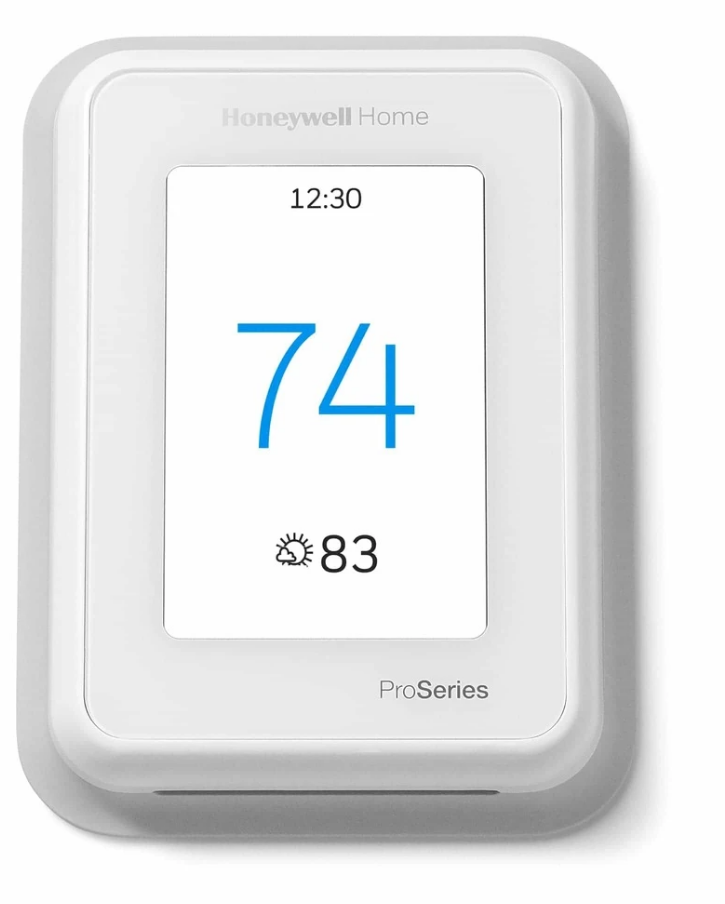
Introduction to Honeywell Home T10 Pro Smart Programmable Thermostat with RedLINK THX321WFS2001W
The Honeywell Home T10 Pro Smart Programmable Thermostat with RedLINK THX321WFS2001W is a cutting-edge Wi-Fi-enabled device designed for precise home temperature control. This smart thermostat features RedLINK 3.0 technology, including a wireless room sensor that detects temperature, humidity, and motion up to 200 feet away, allowing it to prioritize comfort in the rooms that matter most. With a color graphical LCD touchscreen display, configurable backlighting, and support for geofencing via the Honeywell Home App, it offers flexible 7-day programming, 5-2, 5-1-1 schedules, or manual control.
Key benefits include multi-room temperature management for heat pumps (up to 3H/2C) or conventional systems (2H/2C), plus humidification, dehumidification, and ventilation control. Ideal for homeowners seeking energy savings through location-based adjustments and occupancy detection, it's perfect for large homes, families with varying schedules, or anyone upgrading from basic thermostats. Energy Star certified with ±1.5°F accuracy, it integrates dual fuel systems and IAQ products seamlessly. Priced around $200-$250, it's widely available at retailers like Honeywell Home, Home Depot, and online HVAC suppliers, backed by a 5-year warranty.
This T10 Pro thermostat stands out with Smart Room Sensors for automatic priority scheduling, making it a top choice for smart home temperature control and Wi-Fi thermostat with room sensor setups.
UWP Mounting System Installation
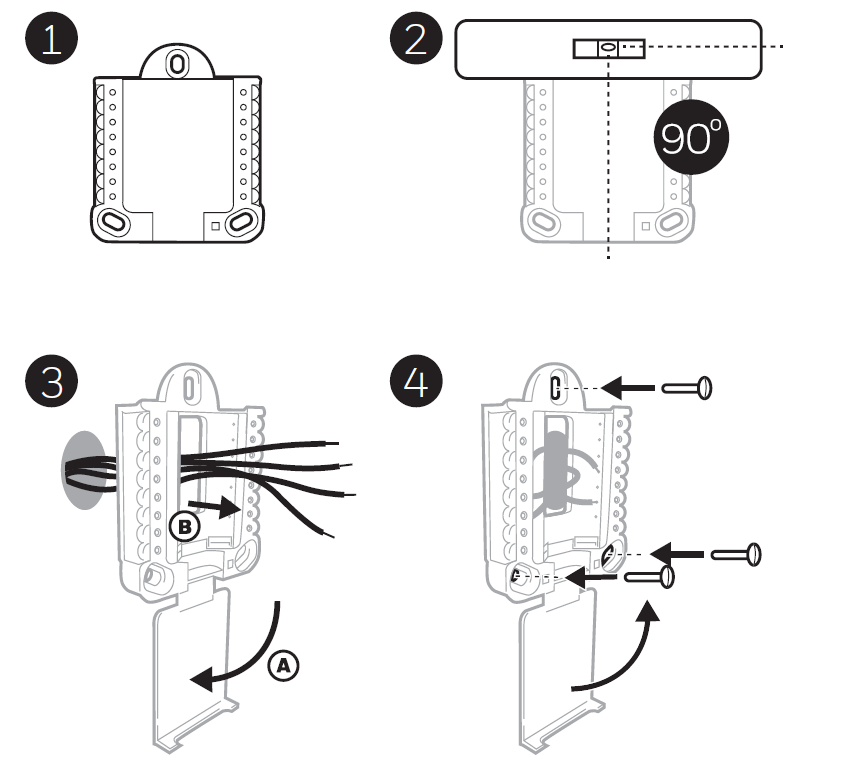
- Open the package to find the UWP. See Figure 1.
Position the UWP on the wall. Level it and mark the hole positions. See Figure 2.
Drill holes at the marked positions, and then lightly tap the supplied wall anchors into the wall using a hammer.
- If your box contains red anchors, drill 7/32" holes.
- If your box contains yellow anchors, drill 3/16" holes.
- Pull the door open and insert the wires through the wiring hole of the UWP. See Figure 3.
- Place the UWP over the wall anchors. Insert and tighten the mounting screws supplied with the UWP. Do not overtighten. Tighten until the UWP no longer moves. Close the door.
Optional Cover Plate Installation
Use the Optional Cover Plate when:
- Mounting the thermostat to an electrical junction box.
- Or when you need to cover the paint gap from the old thermostat.
- Separate the Junction Box Adapter from the Cover Plate.
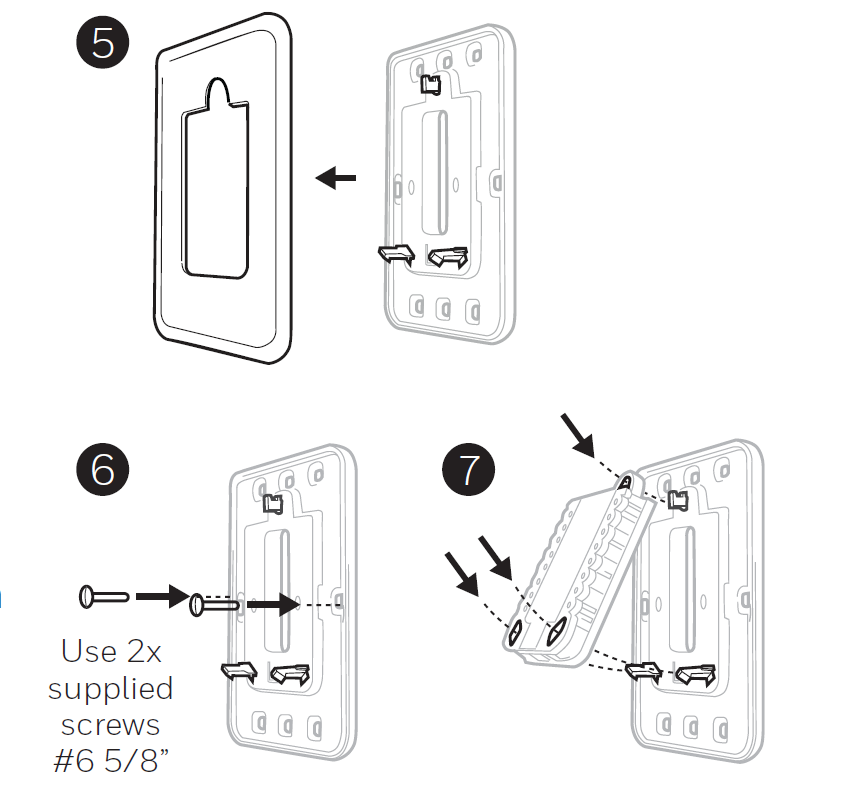
- Mount the Junction Box Adapter to the wall or an electrical box using any of the eight screw holes. Insert and tighten the mounting screws supplied with the Cover Plate Kit. Do not overtighten. Make sure the Adapter Plate is level. See Figure 6.
- Attach the UWP by hanging it on the top hook of the Junction Box Adapter and then snapping the bottom of the UWP into place. See Figure 7.
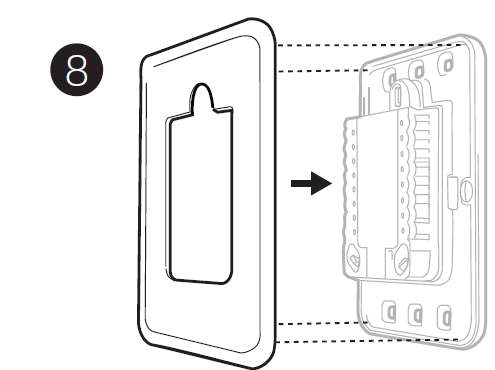
- Snap the Cover Plate onto the Junction Box Adapter.
Wiring UWP
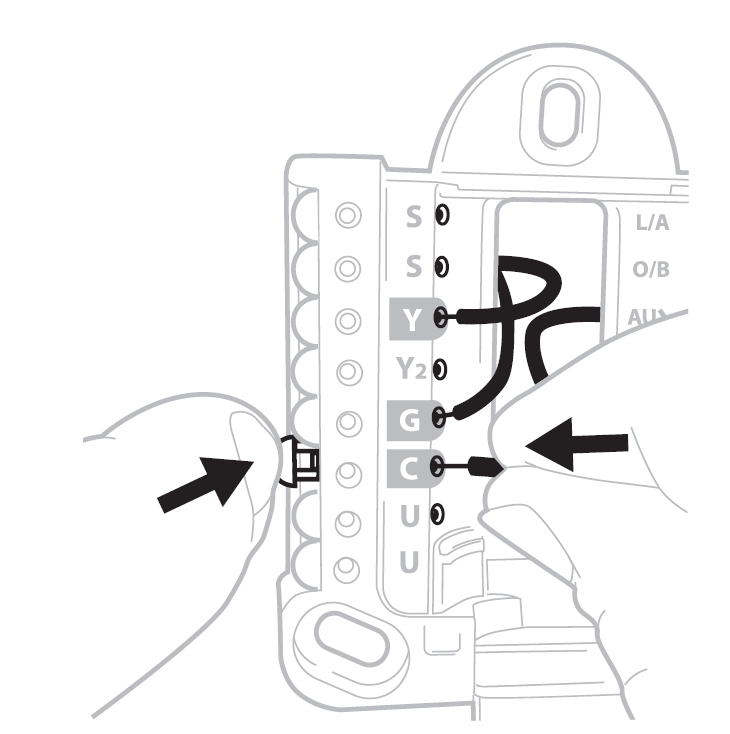
Push down on the tabs to put the wires into the inner holes of their corresponding terminals on the UWP, one wire per terminal, until they are firmly in place. Gently tug on the wires to verify they are secure. If you need to release the wires again, push down the terminal tabs on the sides of the UWP.
Setting Slider Tabs
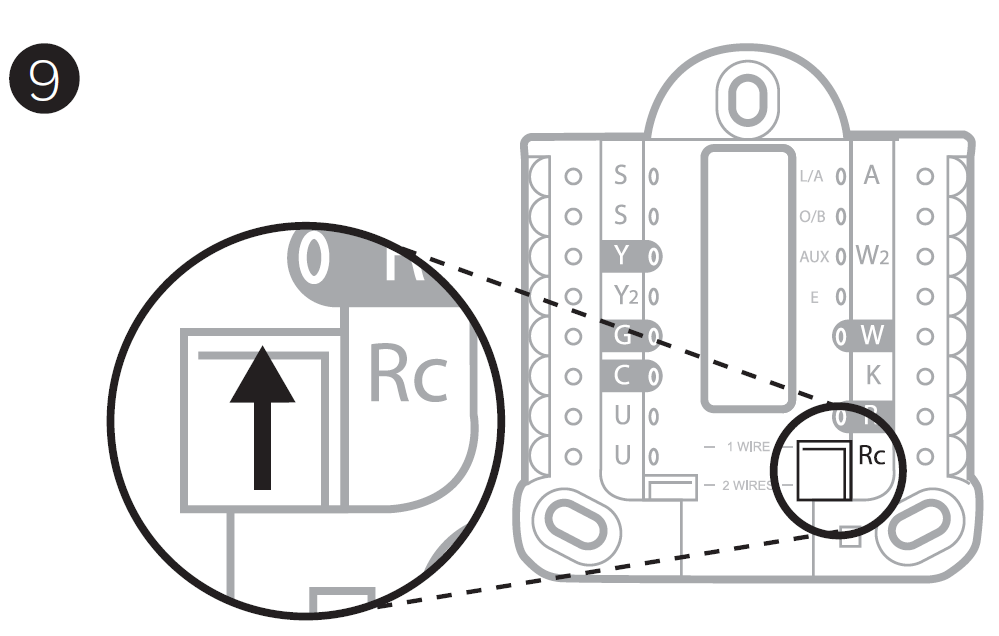
Set R Slider Tab
- Use the built-in jumper (R Slider Tab) to differentiate between one- or two-transformer systems.
- If there is only one R wire, and it is connected to the R, Rc, or RH terminal on the old thermostat, set the slider to the up position (1 wire).
- If there is one wire connected to the R terminal and one wire connected to the Rc terminal, set the slider to the down position (2 wires).
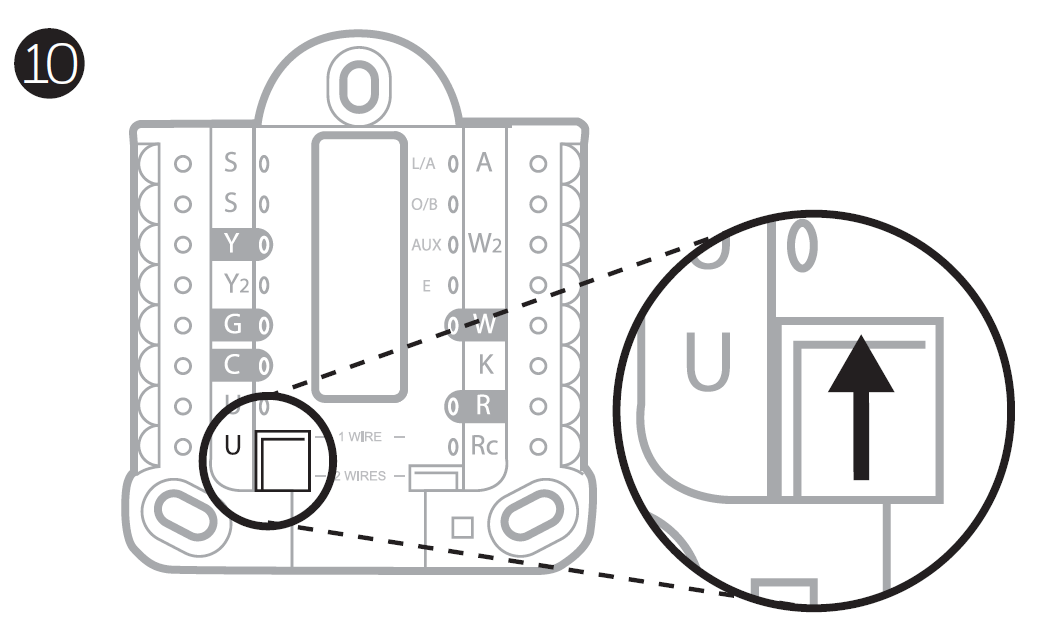
Set U Slider Tab, See Figure 10
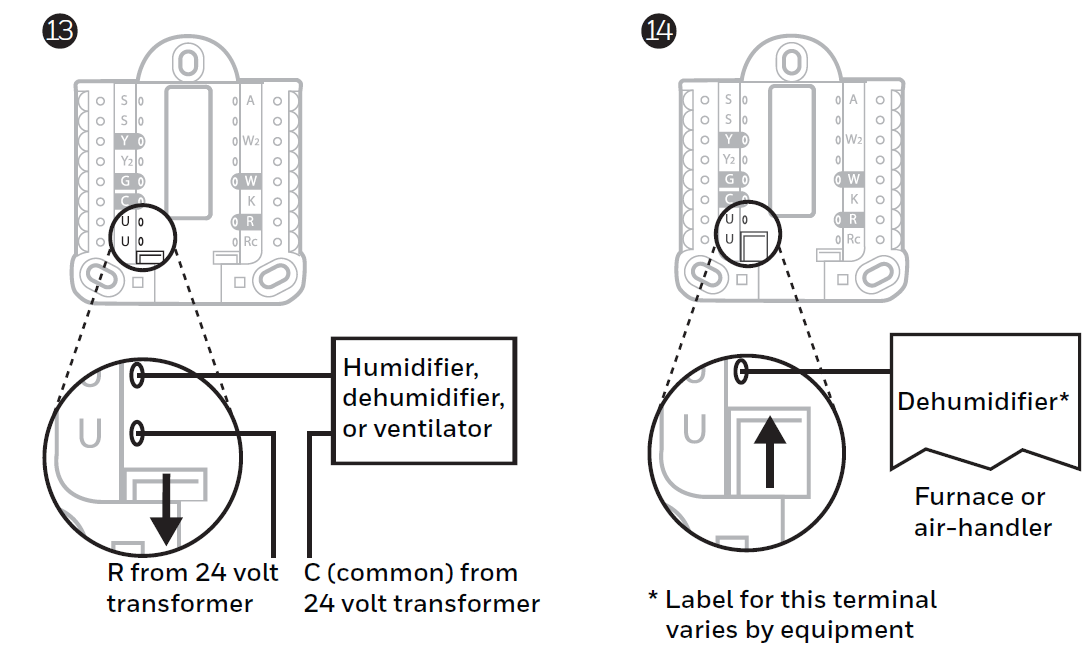
- Use the built-in jumper (U Slider Tab) for an IAQ device.
- When the U Slider Tab is in the down position (2 wires), the U contacts are a dry set of contacts.
- If your IAQ device is powered by the cooling transformer, move the U Slider Tab to the up position (1 wire). When this is done, the lower U terminal is internally jumped to the Rc terminal. In this application, you would hook up one wire from your IAQ device to the upper U terminal and the other to the common side of the cooling transformer. The 1-wire setting is most commonly used when using a fresh air damper for ventilation or using a low-speed fan for dehumidification.
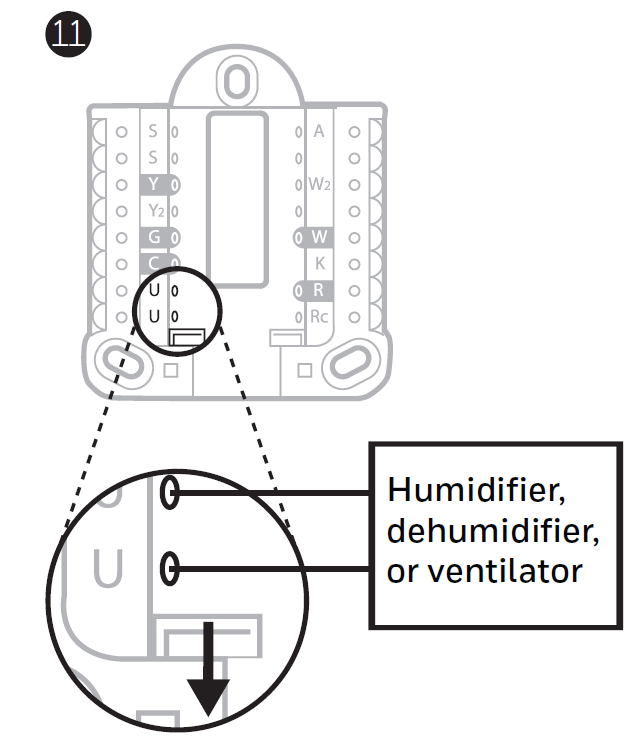
- Wired to humidifier, dehumidifier, or ventilator with built-in transformer.
- Wired to fresh air damper powered by furnace transformer.
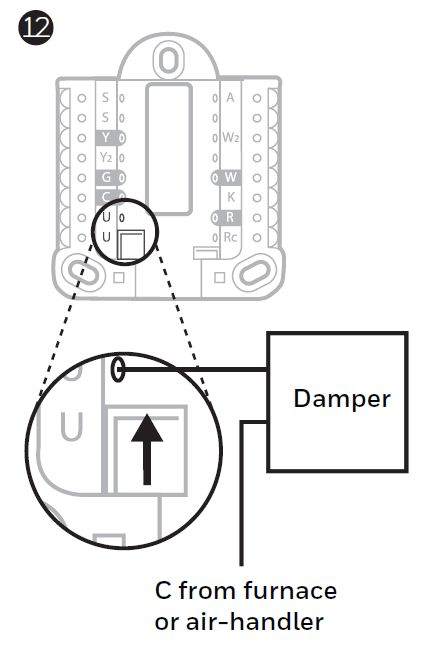
- Wired to humidifier, ventilator, or damper powered by external transformer.
- Wired to low-speed fan terminal on HVAC for dehumidification.
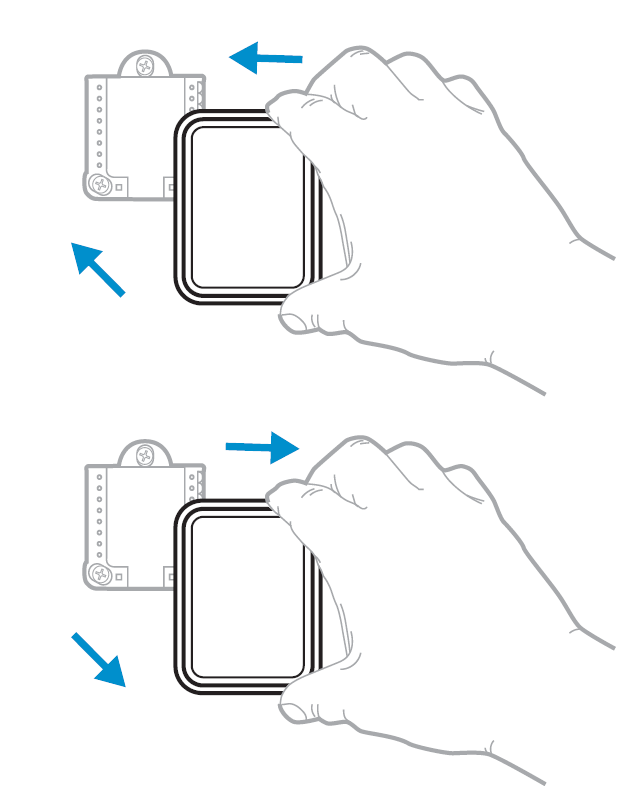
Mounting Thermostat
- Push excess wire back into the wall opening.
- Close the UWP door. It should remain closed without bulging.
- Align the UWP with the thermostat, and push gently until the thermostat snaps into place.
Sensor Installation
- Remove the white cover from the grey base and insert two (2) AAA alkaline batteries into the sensor.
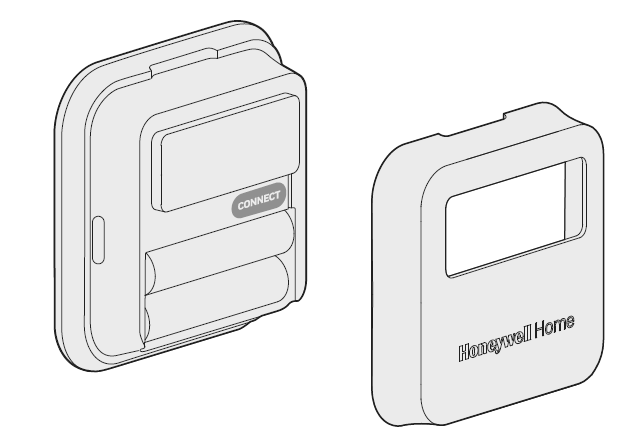
- Open the menu.
- Tap "Devices & Sensors."
- Tap "Add."
- Follow the on-screen instructions.
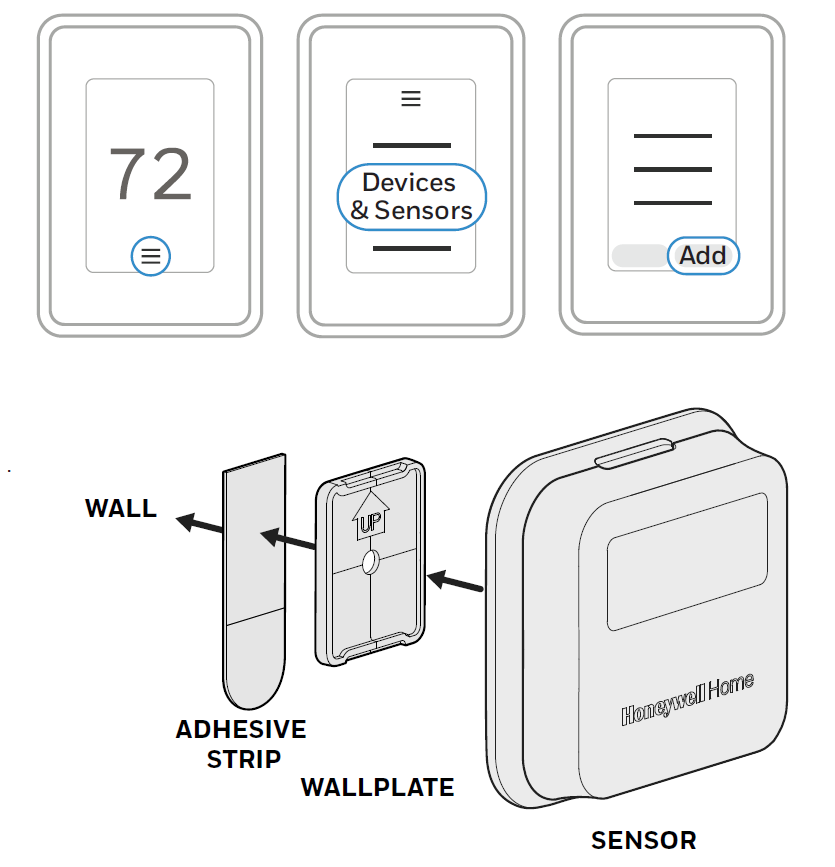
- Snap the sensor onto the wall plate.
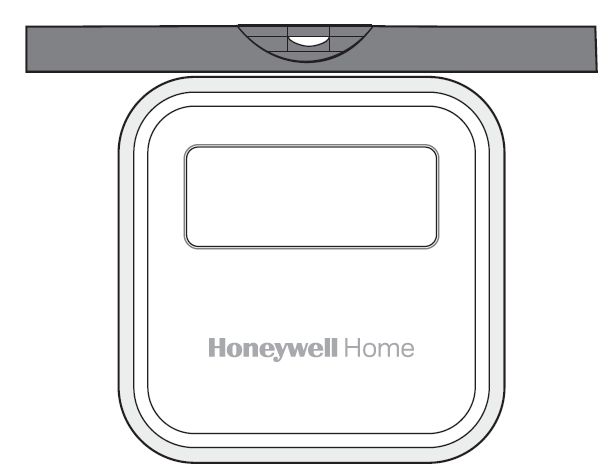
- Adhere the included command strip to the wall plate. Then adhere the sensor to the wall. Level the sensor for appearance.
How to Use Your Thermostat
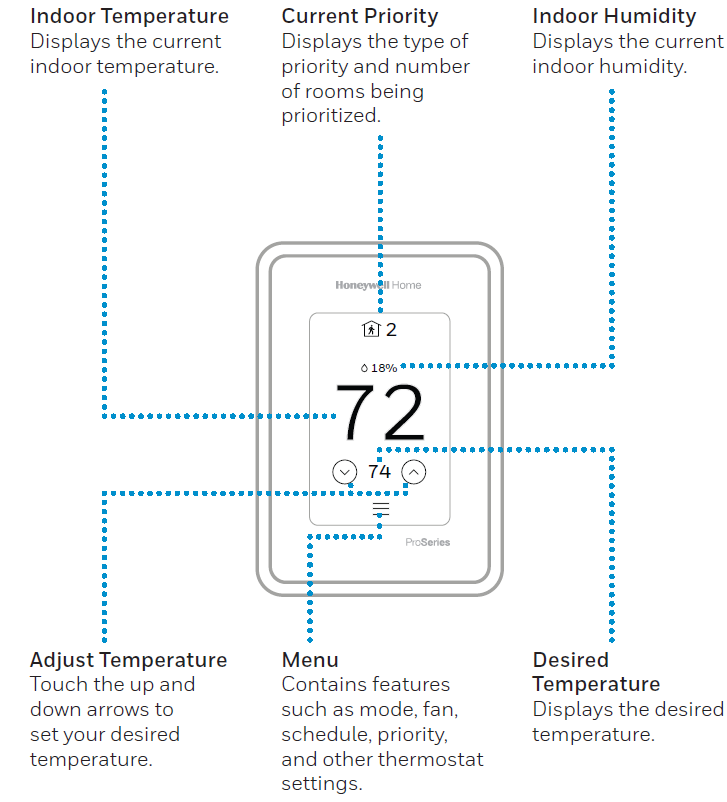
The screen will wake up by pressing the center area of the displayed temperature.
Pros and Cons of Honeywell Home T10 Pro Smart Programmable Thermostat with RedLINK THX321WFS2001W
Pros
- Advanced Multi-Room Control: RedLINK sensor enables temperature averaging, motion-based priority, and humidity monitoring across up to 20 rooms—ideal for unevenly heated homes.
- Flexible Smart Features: Geofencing, app control, and 7-day programming save energy; for example, it adjusts to 75°F in occupied kitchen areas automatically.
- Robust Compatibility: Supports 3H/2C heat pumps, conventional systems, dual fuel, and IAQ like humidifiers—more versatile than basic Nest or Ecobee models.
- User-Friendly Design: Touchscreen with English/French/Spanish support, Energy Star efficiency, and a 5-year warranty offer excellent value at $200-$250.
Cons
- Professional Installation Recommended: Low-voltage wiring (24V AC) may require HVAC pros for complex setups like heat pumps.
- App Dependency: Full geofencing needs reliable Wi-Fi (2.4/5GHz); some users report occasional connectivity hiccups without strong signals.
- Higher Initial Cost: More expensive than non-smart thermostats, though superior to alternatives like Emerson Sensi for multi-room features.
Overall, the Honeywell Home T10 Pro delivers strong value for tech-savvy users prioritizing comfort over simplicity, outperforming entry-level competitors in room-specific control.
Customer Reviews: Real User Feedback on Honeywell Home T10 Pro Smart Programmable Thermostat with RedLINK THX321WFS2001W
Users rave about the Honeywell Home T10 Pro Smart Programmable Thermostat with RedLINK THX321WFS2001W, averaging 4.6/5 stars across retailer sites. Praises highlight effortless multi-room comfort: "The sensor shifted cooling to my upstairs bedroom perfectly—saves on bills!" (5 stars, verified buyer). Many appreciate app integration: "Geofencing knows when I leave work; humidity control fixed our dry winters" (4.8 stars).
Common complaints include setup complexity: "Needed an electrician for wiring, but worth it" (3 stars), and rare Wi-Fi drops: "Motion detection lags without 5GHz" (4 stars). Frequently mentioned issues like initial pairing are resolved via app updates. 85% recommend for best smart thermostat for multi-room homes, especially over Google Nest for HVAC pros.
Faqs
How do I install the Honeywell Home T10 Pro Smart Programmable Thermostat with RedLINK THX321WFS2001W for the first time?
How do I connect room sensors to Honeywell Home T10 Pro Smart Programmable Thermostat with RedLINK THX321WFS2001W?
What should I do if the Honeywell Home T10 Pro Smart Programmable Thermostat with RedLINK THX321WFS2001W temperature settings do not change?
How do I set up a schedule on the Honeywell Home T10 Pro Smart Programmable Thermostat with RedLINK THX321WFS2001W?
Is the Honeywell Home T10 Pro Smart Programmable Thermostat with RedLINK THX321WFS2001W compatible with my HVAC system?
How do I connect the Honeywell Home T10 Pro Smart Programmable Thermostat with RedLINK THX321WFS2001W to Wi-Fi?
How do I adjust fan settings on Honeywell Home T10 Pro Smart Programmable Thermostat with RedLINK THX321WFS2001W?
How do I optimize performance of Honeywell Home T10 Pro Smart Programmable Thermostat with RedLINK THX321WFS2001W for energy savings?
More honeywell home manuals
- Setup: Honeywell Home RTH6500WF Smart Series Programmable Thermostat User Manual
- Setup: Honeywell Home Programmable Thermostat RTH2300/RTH221 Series User Manual
- Setup: Honeywell Home X1N Non-Programmable Thermostat RTH11B/RTHC11B User Manual
- Setup: Honeywell Home FocusPRO P200 Series Programmable Thermostats User Manual
- Setup: Honeywell Home RTH9580 Smart Colour Touchscreen Programmable Thermostat User Manual
- Setup: Honeywell Home Color Touchscreen Programmable Thermostat RTH9585WF User Manual
Leave a Comment