
Setup: Honeywell Home RTH9580 Smart Colour Touchscreen Programmable Thermostat User Manual
Content
Honeywell Home RTH9580 Smart Colour Touchscreen Programmable Thermostat: Complete Product Manual
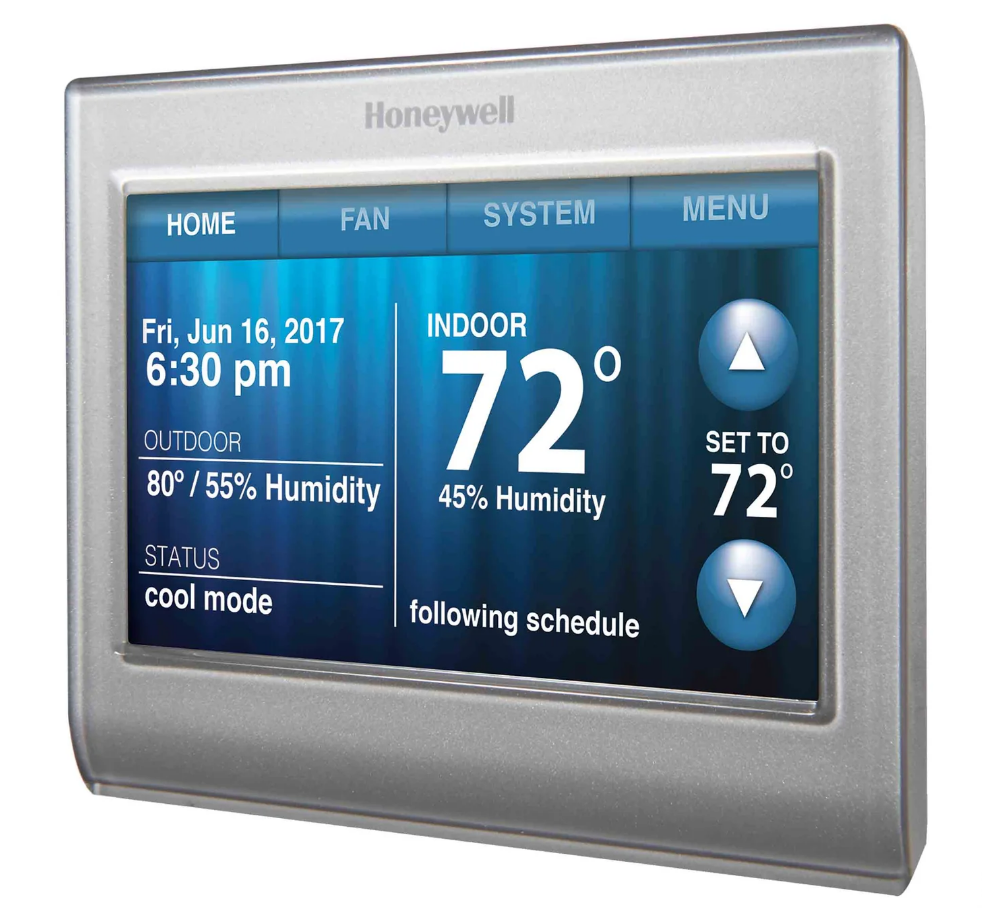
Introduction to the Honeywell Home RTH9580 Smart Thermostat
The Honeywell Home RTH9580 Smart Colour Touchscreen Programmable Thermostat represents a modern solution for homeowners seeking energy-efficient climate control with advanced connectivity features. This Wi-Fi-enabled smart thermostat combines intuitive touchscreen technology with comprehensive programmability, allowing users to manage their heating and cooling systems from anywhere via the Total Connect Comfort mobile app.
Designed for homes with conventional HVAC systems including forced air furnaces, heat pumps, and hydronic systems, the Honeywell Home RTH9580 offers seven-day programming capabilities that adapt to your daily lifestyle. The device features a large, customizable colour touchscreen display that not only provides essential climate information but also complements your home décor with multiple colour background options. This smart thermostat is ENERGY STAR certified, helping homeowners reduce energy consumption and lower utility bills through intelligent scheduling and automation features.
The Honeywell Home RTH9580 Smart Colour Touchscreen Programmable Thermostat targets homeowners who value convenience, energy savings, and modern technology integration. Whether you're managing a primary residence, vacation home, or property with complex heating and cooling needs, this thermostat delivers reliable performance with straightforward installation. The device was originally priced at approximately $70 (often discounted from higher retail prices) and represents excellent value in the smart thermostat category. Note that this model has been discontinued by Honeywell Home, with the RTH9585 serving as the current replacement model, though the RTH9580 remains widely available through retailers and continues to function reliably for existing users.
Technical Specifications of the Honeywell Home RTH9580
Understanding the technical specifications of the Honeywell Home RTH9580 Smart Colour Touchscreen Programmable Thermostat ensures proper installation and optimal performance. Below are the detailed technical characteristics:
Physical Dimensions and Design
- Height: 3.5 inches
- Width: 4.5 inches
- Depth: 0.75 inches
- Available Colour: White with customizable touchscreen backgrounds
- Display Type: Large colour touchscreen with intuitive interface
Power and Electrical Requirements
- Primary Power Supply: 24 VAC via C-wire (common wire required)
- C-wire Mandatory: Yes - essential for proper operation
- Compatible System Voltage: Common 24-volt HVAC systems
Connectivity and Smart Features
- Wi-Fi Standards: 802.11b, 802.11g, 802.11n
- Frequency: 2.4GHz range
- Mobile App: Total Connect Comfort app for iOS and Android
- Voice Command: Compatible with voice control systems
- Remote Access: Full temperature and schedule control from smartphone or computer
Sensing and Detection Capabilities
- Indoor Temperature Sensor: Real-time temperature monitoring
- Humidity Sensing: Integrated humidity detection
- Precision Accuracy: +/- 1 degree Fahrenheit
- External Temperature Detection: Available via smart home integration
Programming and Control Features
- Programming Schedule: 7-day customizable programming
- Heating Modes: Single-stage and multi-stage heating
- Cooling Modes: Single-stage and multi-stage cooling
- Heating-Only Mode: Available for heating-only systems
- Cooling-Only Mode: Available for cooling-only systems
- Auto Mode: Automatic switching between heating and cooling
- Hold Function: Permanent and temporary hold options
- Energy Saving Mode: Built-in energy conservation features
System Compatibility
- Forced Air Furnaces: Full compatibility
- Heat Pump Systems: Complete support including ground-source heat pumps
- Hydronic Systems: Compatible with water-based heating
- Oil Furnaces: Supported system type
- Multi-stage Systems: Supports up to multi-stage heating and cooling
Additional Features
- Real-Time Clock: Optional feature with time and date display
- Software Updates: Automatic updates for security and functionality
- Secure Network: Encrypted connection for data protection
- Warranty: One-year limited manufacturer warranty
- Installation: DIY installation supported with proper documentation
- Energy Certification: ENERGY STAR certified for efficiency
In the box, you will find
- Thermostat
- Wallplate
- Screws and anchors
- Quick Start Guide
- Thermostat ID Card
- Wire labels
- User Guide
Advantages and Disadvantages of the Honeywell Home RTH9580
Key Advantages
- User-Friendly Touchscreen: The large colour touchscreen display on the Honeywell Home RTH9580 Smart Colour Touchscreen Programmable Thermostat provides intuitive navigation and clear information display, making temperature adjustments simple for all users.
- Reliable Wi-Fi Connectivity: Users consistently report strong internet connectivity with the Total Connect Comfort app, enabling seamless remote control from anywhere with cellular or Wi-Fi access.
- Easy Installation: DIY installation typically takes less than 30 minutes with straightforward instructions, eliminating expensive professional installation costs for most homeowners.
- Energy Savings: ENERGY STAR certification and 7-day programming capabilities help reduce energy consumption and lower monthly utility bills through intelligent scheduling.
- Customization Options: Multiple colour background selections allow the thermostat to match your home décor preferences and personal style.
- Broad System Compatibility: Works with forced air, heat pumps, hydronic systems, and oil furnaces, making it suitable for diverse HVAC configurations.
- Dependable Performance: Users report excellent reliability over extended periods, with consistent operation across various climate control scenarios.
Notable Disadvantages
- Limited Heat Anticipation Control: The thermostat lacks adjustable heat anticipation settings, resulting in frequent on-off cycling of heating systems that some users find less efficient than competing models.
- No Cycle Differential Adjustment: Advanced users miss the ability to set cycle differential degrees, limiting fine-tuning for specific HVAC requirements.
- C-Wire Requirement: A C-wire (common wire) is mandatory for operation, which may require professional installation if not already present in older homes.
- Discontinued Model: Honeywell Home has discontinued the RTH9580 in favour of the newer RTH9585 model, potentially affecting future support and parts availability.
- Limited Home/Away Features: The home/away feature can only be accessed through the physical thermostat, not through the mobile app, reducing convenience for remote users.
- Vacation Schedule Limitation: Vacation scheduling is restricted to thermostat-only access, requiring you to be home to program extended away periods.
Installation and Setup Guide for the Honeywell Home RTH9580
Proper installation of the Honeywell Home RTH9580 Smart Colour Touchscreen Programmable Thermostat ensures optimal performance and reliability. Before beginning installation, verify that your HVAC system includes a C-wire (common wire), as this is mandatory for thermostat operation. Most modern systems include this wire, but older installations may require professional assessment.
Pre-Installation Requirements: Turn off power to your HVAC system at the breaker. Take a photograph of your existing thermostat's wiring configuration for reference. Ensure you have a C-wire available in your thermostat box. Gather the included mounting hardware and installation instructions.
Installation Steps: Remove your existing thermostat and carefully note the wire connections (typically labelled R, W, Y, G, and C). Mount the Honeywell Home RTH9580 base plate to your wall using the provided screws and level. Connect wires to the corresponding terminals on the new thermostat, ensuring the C-wire connects to the common terminal. Secure the thermostat body to the base plate. Restore power to your HVAC system and follow the on-screen setup prompts to configure your WiFi connection and initial preferences.
Mobile App Setup and Remote Control Features
The Total Connect Comfort app transforms your Honeywell Home RTH9580 Smart Colour Touchscreen Programmable Thermostat into a remote climate control system. Download the app from your device's app store and create a Honeywell account. Connect your thermostat to your home Wi-Fi network during initial setup. From the app, you can adjust temperature set-points, modify heating and cooling schedules, enable energy-saving modes, and monitor your system status in real-time from anywhere with internet access.
Energy Efficiency and Cost Savings
As an ENERGY STAR certified device, the Honeywell Home RTH9580 Smart Colour Touchscreen Programmable Thermostat helps reduce energy consumption through intelligent programming. The 7-day scheduling allows you to set different temperatures for weekdays and weekends, ensuring your HVAC system operates only when needed. Energy-saving mode optimizes heating and cooling cycles to minimize waste. Many users report noticeable reductions in monthly energy bills after implementing appropriate schedules aligned with their daily routines.
Comparison with Alternative Smart Thermostats
When evaluating the Honeywell Home RTH9580 Smart Colour Touchscreen Programmable Thermostat against competitors, consider factors including price, features, ease of use, and system compatibility. The RTH9580 excels in user-friendliness and reliability at its price point, making it ideal for homeowners prioritizing simplicity. However, if you require advanced features like learning capabilities, geofencing, or adjustable heat anticipation, you may want to explore newer models or competing brands. The discontinued status of the RTH9580 means limited future updates, so long-term support should factor into your decision.
Setting up your thermostat
Setting up your smart programmable touchscreen thermostat is easy. It is preprogrammed and ready to go as soon as it is installed and registered.
- Install your thermostat.
- Connect it to your home wireless network.
- Register online for remote access.
Installing your thermostat
You might need the following tools to install this thermostat:
- No. 2 Phillips screwdriver
- Pen
- Pencil
- Level (optional)
- Drill and bits (4.5 mm for drywall, 5.5 mm for plaster) (optional)
- Hammer (optional)
- Electrical tape (optional)
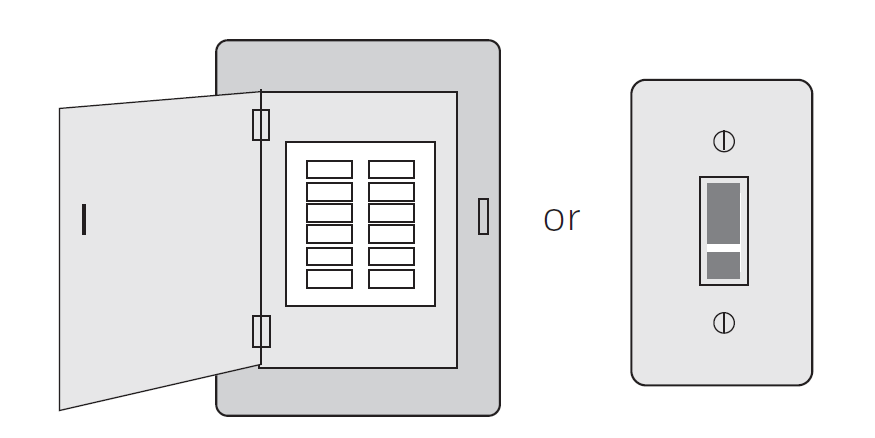
Switch OFF power to your heating/cooling system.
To protect your equipment, switch OFF the power to your heating/cooling system at the breaker box or the system switch.
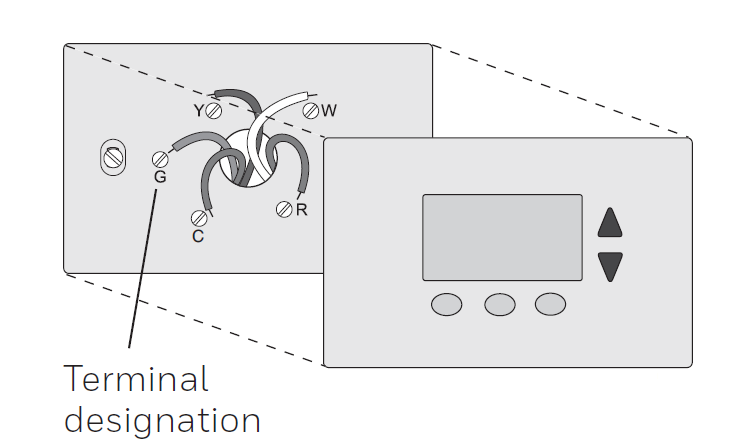
Remove the old thermostat faceplate and leave the wires connected.
Take a picture of the wire connections for later reference.
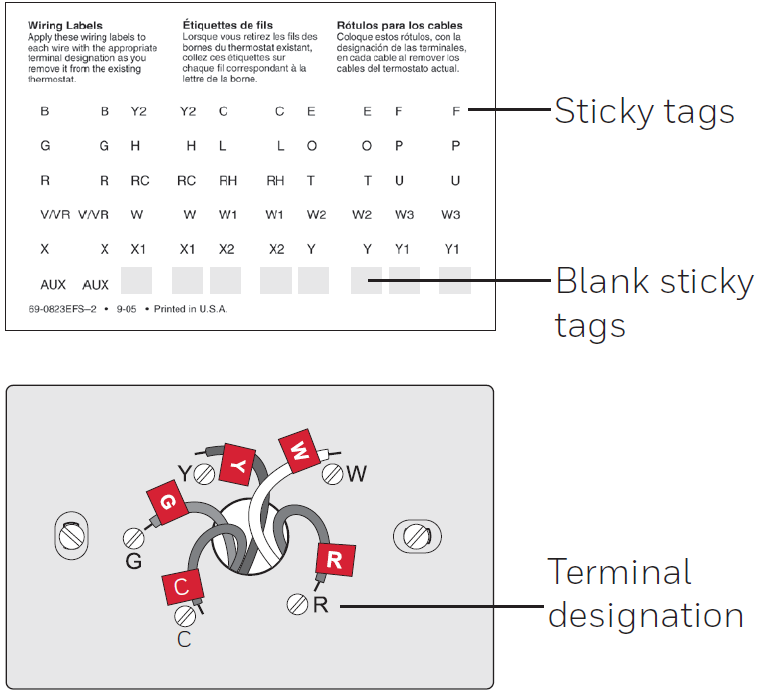
Label the wires.
Use the supplied sticky tags to label each wire as you disconnect it. Label wires according to the old thermostat terminal designations, not by wire colour.
Remove the wallplate.
Remove the old wallplate from the wall after all wires have been labelled and disconnected.
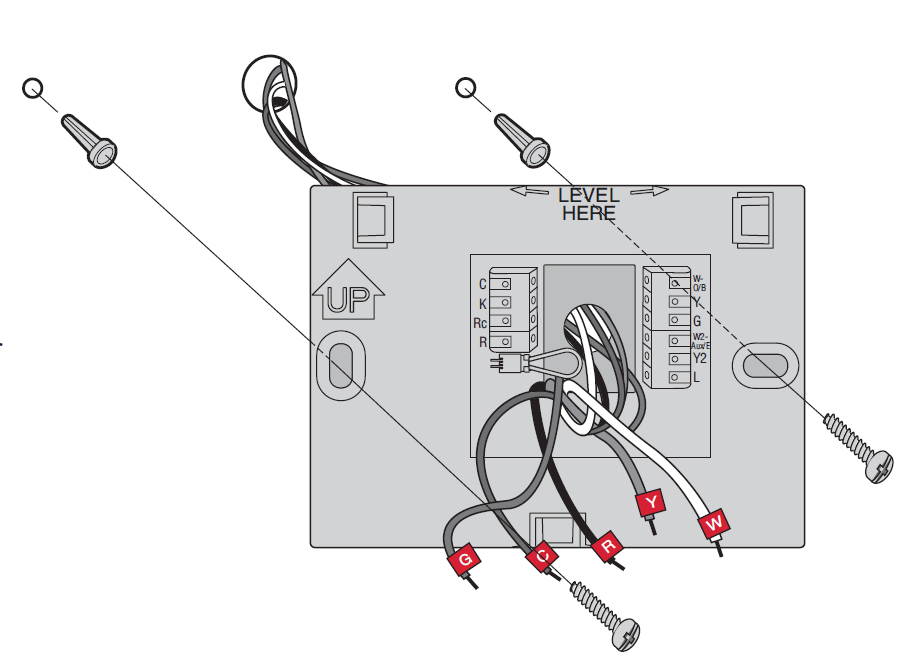
Mount the wallplate for the smart thermostat.
Mount your new wallplate using screws and anchors included with the thermostat.
If necessary:
- Drill 4.5 mm holes for drywall.
- Drill 5.5 mm holes for plaster.
Connecting to your Wi-Fi network
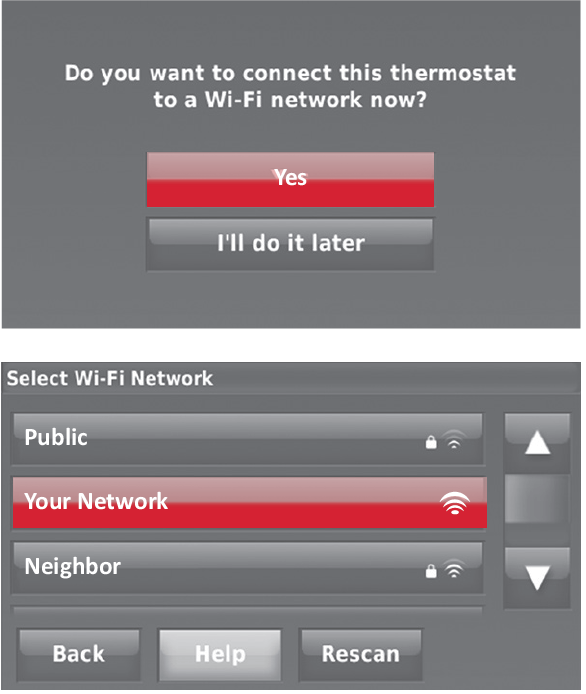
After touching Done on the final screen of the initial setup, the thermostat displays an option to connect to your Wi-Fi network.
Connect the Wi-Fi network.
Touch Yes to connect the thermostat to your Wi-Fi network. The screen displays the message “Searching for wireless networks. Please wait...” after which it displays a list of all Wi-Fi networks it can find.
Select the network.
2a. Touch the name of the network you want to use. The thermostat displays a password page.
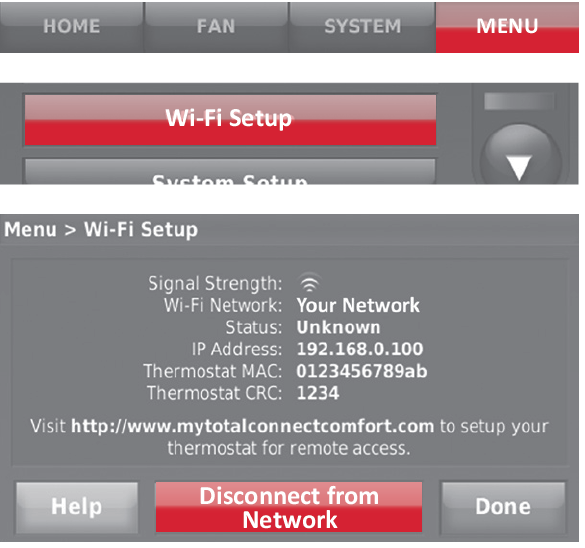
Disconnecting your Wi-Fi network
- Touch MENU.
- Select Wi-Fi Setup.
- Touch Disconnect from Network.
- Touch Yes to confirm that you want to disconnect from the network. The thermostat will display the Wi-Fi Setup screen.
- Touch OK to display the menu.
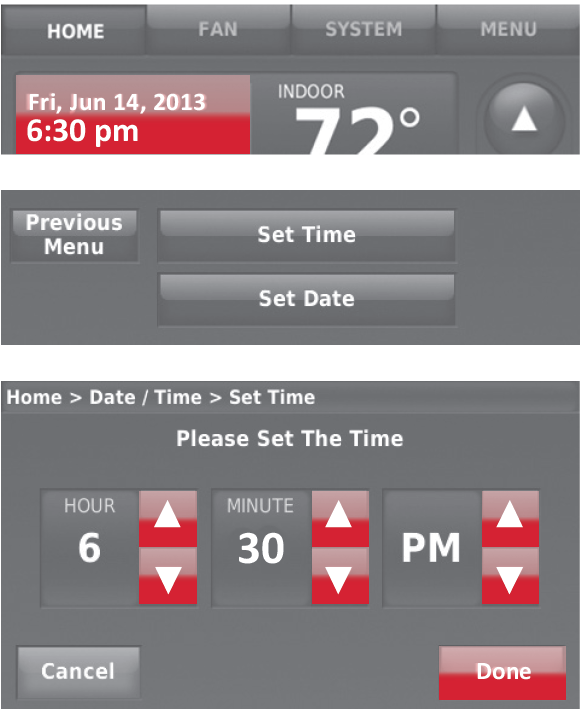
Setting the time/date
- Touch the current time. The screen displays Set Time/Set Date.
- Touch Set Time or Set Date.
- Touch p or q until the proper time/date is displayed.
- Touch Done to save or Cancel to ignore changes.
Setting the fan
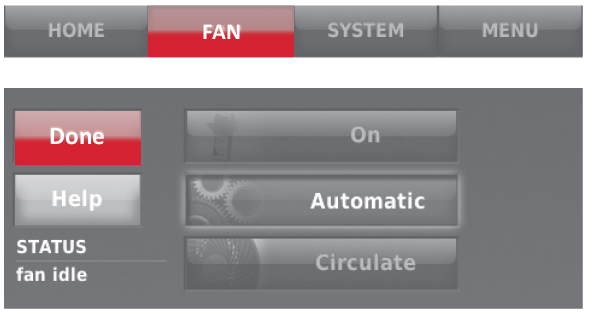
- Touch FAN to display fan settings.
- Touch On, Automatic, Circulate, or Follow Schedule.
- Touch Done to save and exit.
- On: Fan is always on.
- Automatic: Fan runs only when the heating or cooling system is on.
- Circulate: Fan runs randomly about 35% of the time (home use only).
- Follow Schedule: Fan controlled by program.
Setting system mode
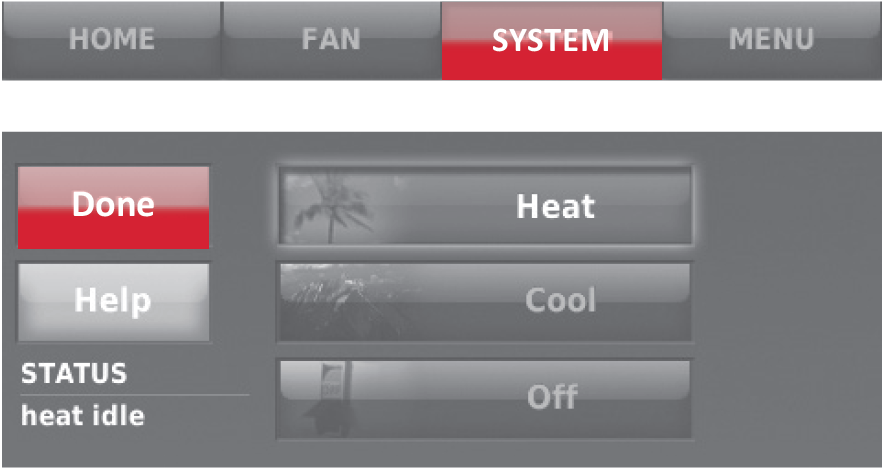
- Touch SYSTEM to display system settings.
Touch the desired option:
- Heat: Thermostat controls only the heating system.
- Cool: Thermostat controls only the cooling system.
- Off: Heating/cooling systems are off.
- Automatic: Thermostat selects heating or cooling as needed depending on the indoor temperature.
Emergency Heat (heat pumps with aux. heat): Controls auxiliary/emergency heat. Compressor is locked out.
- Touch Done to save and exit.
Pre-set energy-saving schedules
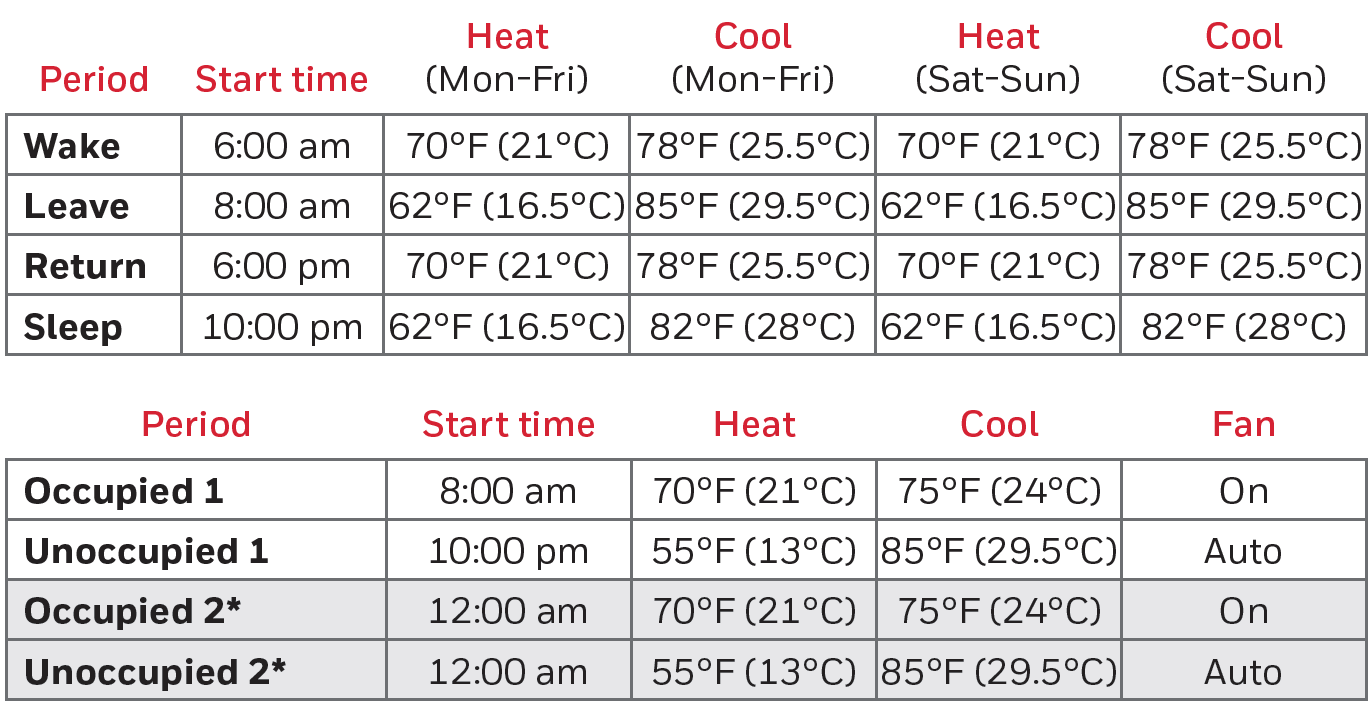
This thermostat uses default Energy Saver settings that can reduce your heating/cooling expenses. To customise settings, see next page.
Adjusting program schedules
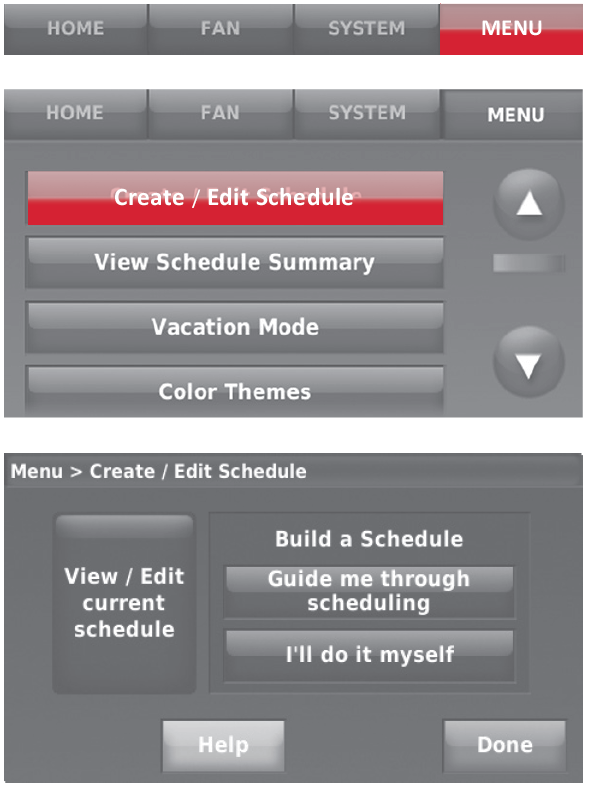
- Touch MENU.
- Select Create/Edit Schedule.
- Touch View/Edit to view the full schedule and make a quick adjustment.
- Touch Guide Me to create a schedule by answering simple questions.
- Touch I’ll do it myself to manually create a program schedule.
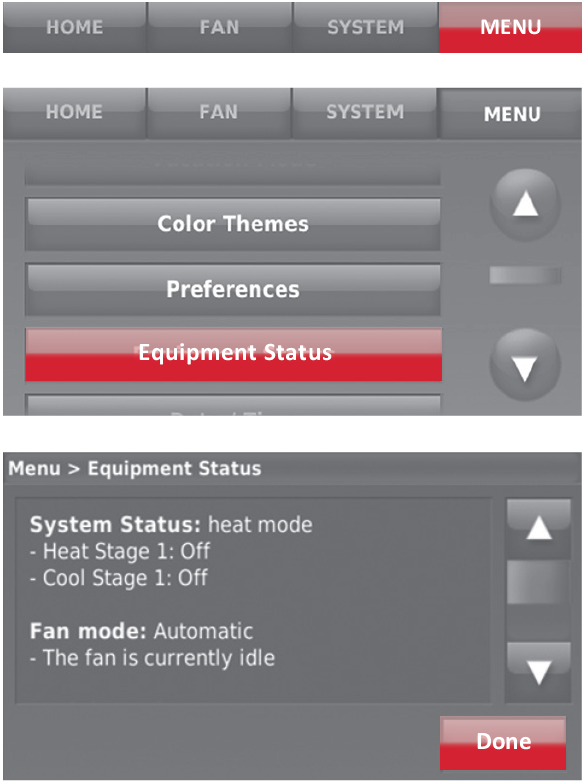
Viewing equipment status
- Touch MENU.
- Select Equipment Status.
- Touch p or q to view the status of all the equipment your thermostat is controlling. Depending on how your thermostat was installed, the Equipment Status screen can report data about the following systems:
- Heating and cooling
- Fan
- Thermostat information
Troubleshooting Common Issues
If your Honeywell Home RTH9580 Smart Colour Touchscreen Programmable Thermostat experiences connectivity issues, restart both the thermostat and your Wi-Fi router. Verify that your 2.4GHz Wi-Fi network is functioning properly, as the thermostat does not support 5GHz connections. If the system cycles heating too frequently, this is due to the lack of adjustable heat anticipation—consider consulting an HVAC professional about alternative models if this becomes problematic. For any persistent issues, consult the comprehensive user manual or contact Honeywell Home customer support.
Real Customer Reviews and User Feedback
Customer experiences with the Honeywell Home RTH9580 Smart Colour Touchscreen Programmable Thermostat reveal a product that delivers strong overall satisfaction with reliable performance. Multiple users report purchasing multiple units for different properties, indicating confidence in the product's durability and functionality.
- Positive Customer Feedback: Users consistently praise the thermostat's dependability, noting successful operation across various system types, including conventional AC units with LP gas heaters and complex ground-source heat pump installations. Customers highlight the straightforward setup process, strong mobile app functionality, and excellent internet connectivity as key strengths. Installation experiences are overwhelmingly positive, with users completing setup in under 30 minutes and reporting satisfaction with both appearance and functionality.
- Common User Concerns: The primary complaint centres on the lack of heat anticipation adjustment, which causes heating systems to cycle on and off more frequently than desired. Some advanced users also note the absence of cycle differential settings as a limitation for fine-tuning HVAC performance. A few users mention that while the thermostat performs excellently, they would prefer additional customization options for heating control.
- Value Assessment: For homeowners seeking a reliable, user-friendly smart thermostat with solid energy-saving features at an accessible price point, the Honeywell Home RTH9580 delivers excellent value. The combination of intuitive controls, dependable performance, and easy installation makes it particularly suitable for non-technical users and those new to smart home technology.
Conclusion and Recommendations
The Honeywell Home RTH9580 Smart Colour Touchscreen Programmable Thermostat represents a solid choice for homeowners seeking reliable, user-friendly smart climate control. Its combination of intuitive touchscreen interface, strong Wi-Fi connectivity, comprehensive programming options, and ENERGY STAR certification makes it particularly suitable for those new to smart home technology or seeking straightforward energy management. The easy DIY installation and dependable performance across various HVAC system types further enhance its appeal. While the lack of advanced features like heat anticipation adjustment and the discontinued product status are considerations, the overall value proposition remains strong for most residential applications. Purchase this thermostat if you prioritize ease of use, reliability, and energy savings over advanced customization options.
```
Faqs
How do I install the Honeywell Home RTH9580 Smart Colour Touchscreen Programmable Thermostat for the first time?
What should I do if the Honeywell Home RTH9580 Smart Colour Touchscreen Programmable Thermostat won't power on after installation?
How do I connect the Honeywell Home RTH9580 Smart Colour Touchscreen Programmable Thermostat to Wi-Fi?
Is the Honeywell Home RTH9580 Smart Colour Touchscreen Programmable Thermostat compatible with heat pump systems?
How do I program schedules on the Honeywell Home RTH9580 Smart Colour Touchscreen Programmable Thermostat?
Why is my Honeywell Home RTH9580 Smart Colour Touchscreen Programmable Thermostat not responding to temperature changes?
How can I optimize energy savings with the Honeywell Home RTH9580 Smart Colour Touchscreen Programmable Thermostat?
How do I clean and maintain the Honeywell Home RTH9580 Smart Colour Touchscreen Programmable Thermostat?
More honeywell home manuals
- Setup: Honeywell Home Prestige® Touch Screen Thermostat User Manual
- Setup: Honeywell Home X1N Non-Programmable Thermostat RTH11B/RTHC11B User Manual
- Setup: Honeywell Home Smart Thermostat 9000 Color Touchscreen TH9320WF User Manual
- Setup: Honeywell Home RTH6500WF Smart Series Programmable Thermostat User Manual
- Setup: Honeywell Home Round™ Smart Thermostat TH8732WFH5004 User Manual
- Setup: Honeywell Home T10 Pro Smart Programmable Thermostat with RedLINK THX321WFS2001W User Manual
Leave a Comment